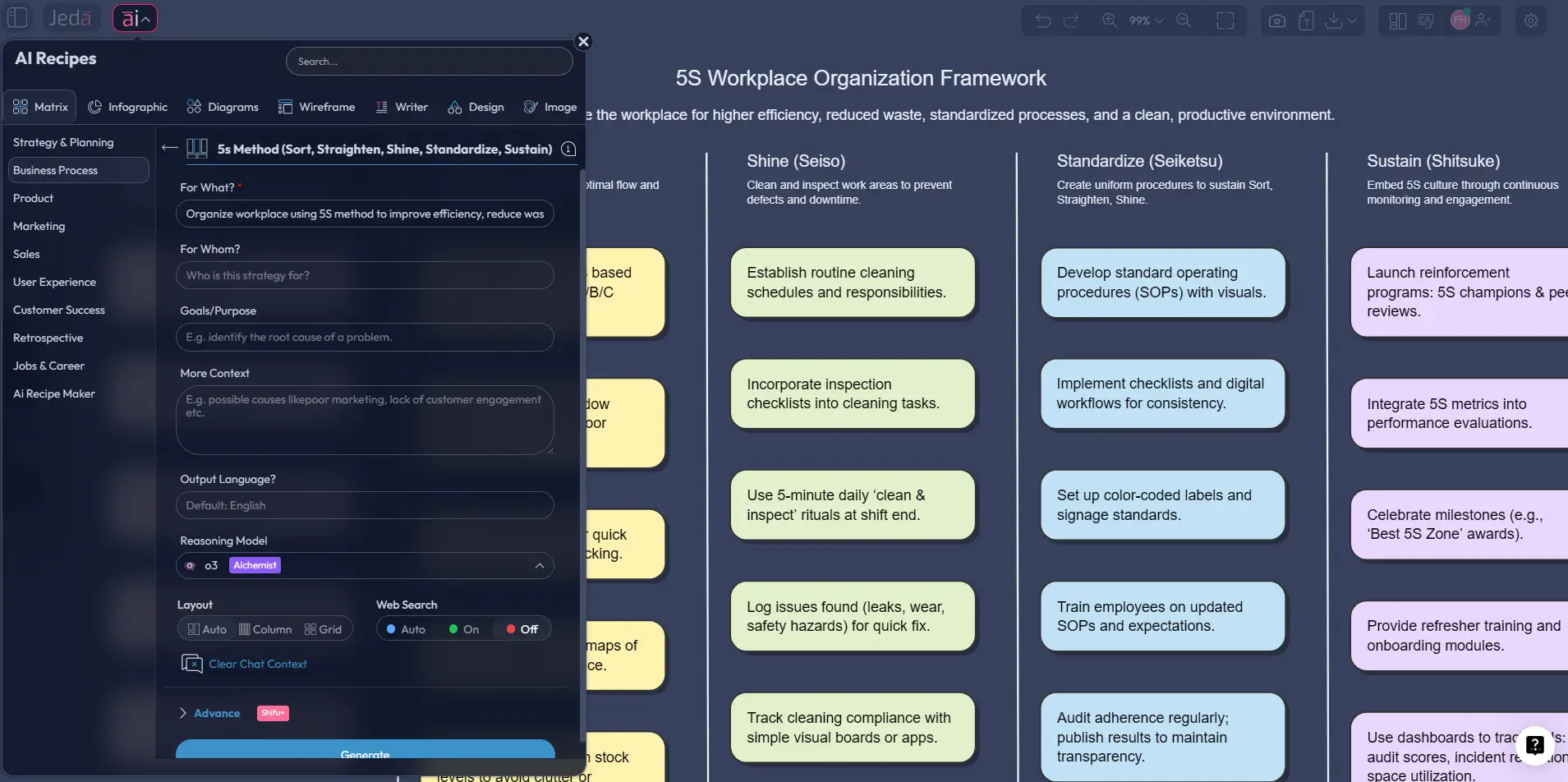
You don’t need another 5S poster. You need a working system.
The 5S Method has always been useful because it makes messy work visible. But here’s the catch: most teams still run it like a workshop exercise, not like an operating system. They brainstorm a few sticky notes, maybe print a checklist, then watch the whole thing drift back into clutter two weeks later. Jeda.ai changes that rhythm. In Jeda.ai, your AI Workspace and AI Whiteboard can turn 5S into an editable matrix with owners, standards, audits, and next actions in one place. That’s why 150,000+ users use Jeda.ai to move from nice ideas to visible execution.
What is the 5S Method?
The 5S Method is a lean workplace-organization system built around five practices: Sort, Straighten, Shine, Standardize, and Sustain. In classic lean literature, you’ll also see the second step rendered as “Set in Order,” but the underlying point is the same: remove what doesn’t belong, organize what does, keep the area clean, make the rules visible, and hold the gains over time.
That sounds simple because it is. And that’s why people underestimate it.
A solid 5S implementation reduces search time, exposes waste, improves safety, and creates a more stable environment for quality work. ASQ defines 5S as a method that creates a clean, uncluttered, safe, and well-organized workspace, while the U.S. EPA frames it as a cyclical lean method that supports continuous improvement. The deeper academic story matters too. Takashi Osada’s 1991 work helped formalize 5S in English-language management practice, and Hiroyuki Hirano’s visual-workplace framing pushed it beyond housekeeping into a disciplined operating model.
So no, 5S is not just “clean the room.” It is a visible management system.
Why use the 5S Method with AI?
Because a static checklist doesn’t think.
A good 5S board usually needs more than the five labels. You need current-state issues, red-tag decisions, relocation rules, cleaning routines, standard work, photo references, ownership, and audit frequency. That is where AI helps. Instead of starting from an empty page, Jeda.ai can generate the first structure in seconds, then let your team refine it inside an editable AI Whiteboard.
- Matrix-first structure
Jeda.ai turns 5S into a usable matrix instead of scattered notes, so each pillar connects to actions, owners, standards, and audits.
- Faster first draft
Use the recipe matrix or Prompt Bar to generate a practical 5S framework without building the board by hand.
- Real collaboration
Because the output stays editable, teams can review, challenge, and improve the 5S system together in one AI Workspace.
- Visible standards
Turn vague clean-up ideas into visual rules: labels, locations, inspection tasks, ownership, and sustain routines.
- AI+ extension
After the first board is generated, use the AI+ button to deepen the work into rollout plans, zone-specific actions, or audit ideas.
- 300+ strategic frameworks
Jeda.ai is more than a one-off 5S template. It sits inside a broader Visual AI workflow with 300+ strategic frameworks.
Here’s the part most competitors miss: the win is not just speed. The win is structure. Jeda.ai gives you a Visual AI starting point that still behaves like a working board, not a locked image and not a generic text answer.
And if your team is working across operations, facilities, healthcare, labs, retail, or even digital file systems, that flexibility matters a lot.
How to create a 5S Method in Jeda.ai
For this page, the right output is a Matrix. Not a floating brainstorm. Not a random diagram. A matrix.
Method 1: Recipe Matrix (Recommended)
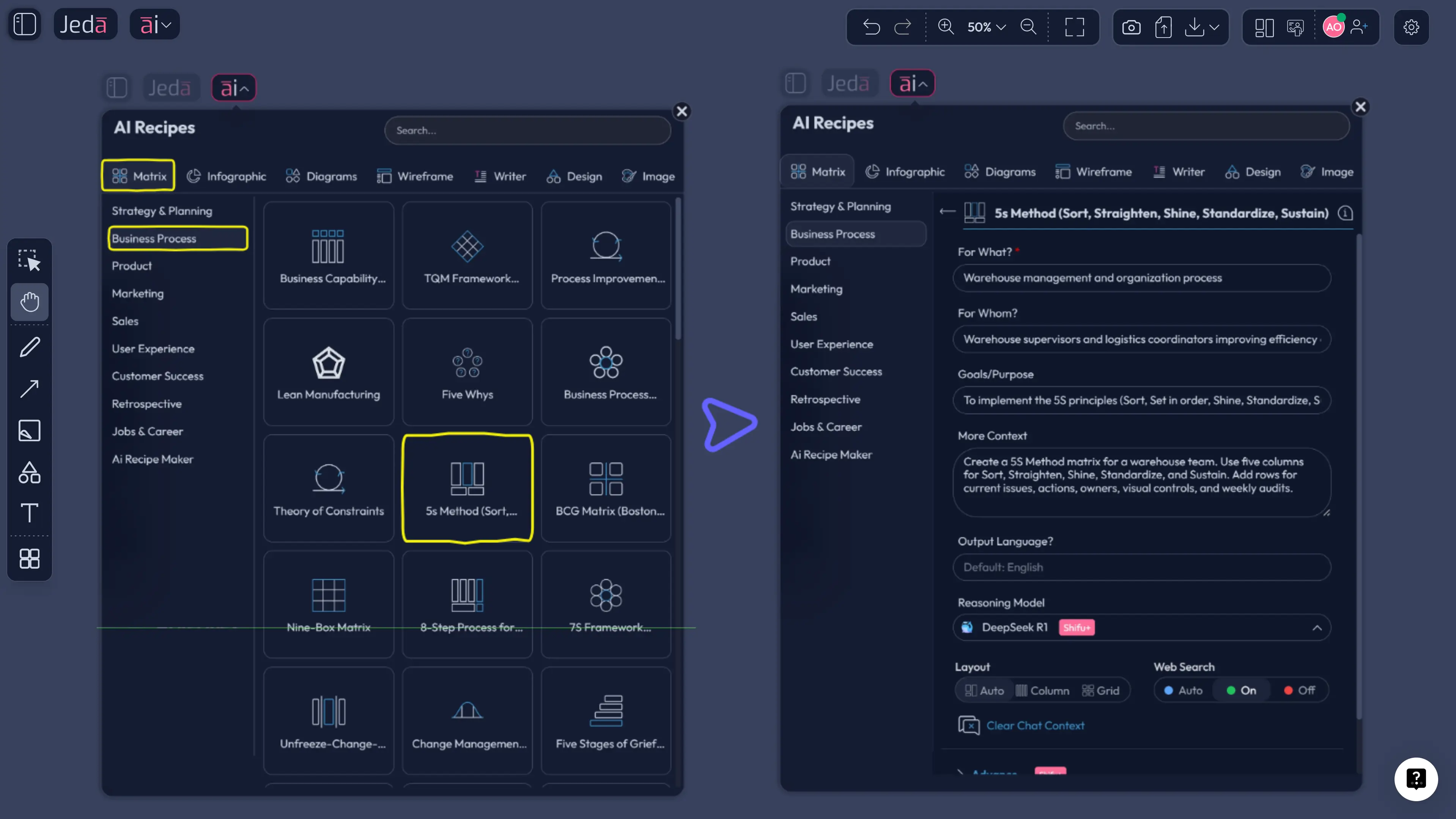
Jeda.ai already includes a 5s Method recipe in the AI Menu under Business Process, so this is the cleanest way to start.
- Open the AI Menu
In Jeda.ai, open the AI Menu from the canvas and go to the Business Process recipe category.
- Choose the 5s Method recipe
Select the built-in 5s Method recipe so you start with a matrix structure instead of a blank board.
- Add your context
Describe the workspace, team, or process you want to improve. Be specific about the area, current problems, and desired outcome.
- Generate the matrix
Let Jeda.ai create a 5S board with the five pillars: Sort, Straighten, Shine, Standardize, and Sustain.
- Review the rows
Check whether the output includes practical rows such as current issues, actions, owners, standards, and audit cadence.
- Refine with your team
Edit labels, add zone photos, attach files, and clarify ownership directly on the board inside the shared AI Workspace.
- Use AI+ to deepen the board
Select a section and tap the AI+ button to extend it into a deeper rollout plan, checklist, or implementation view.
Method 2: Prompt Bar
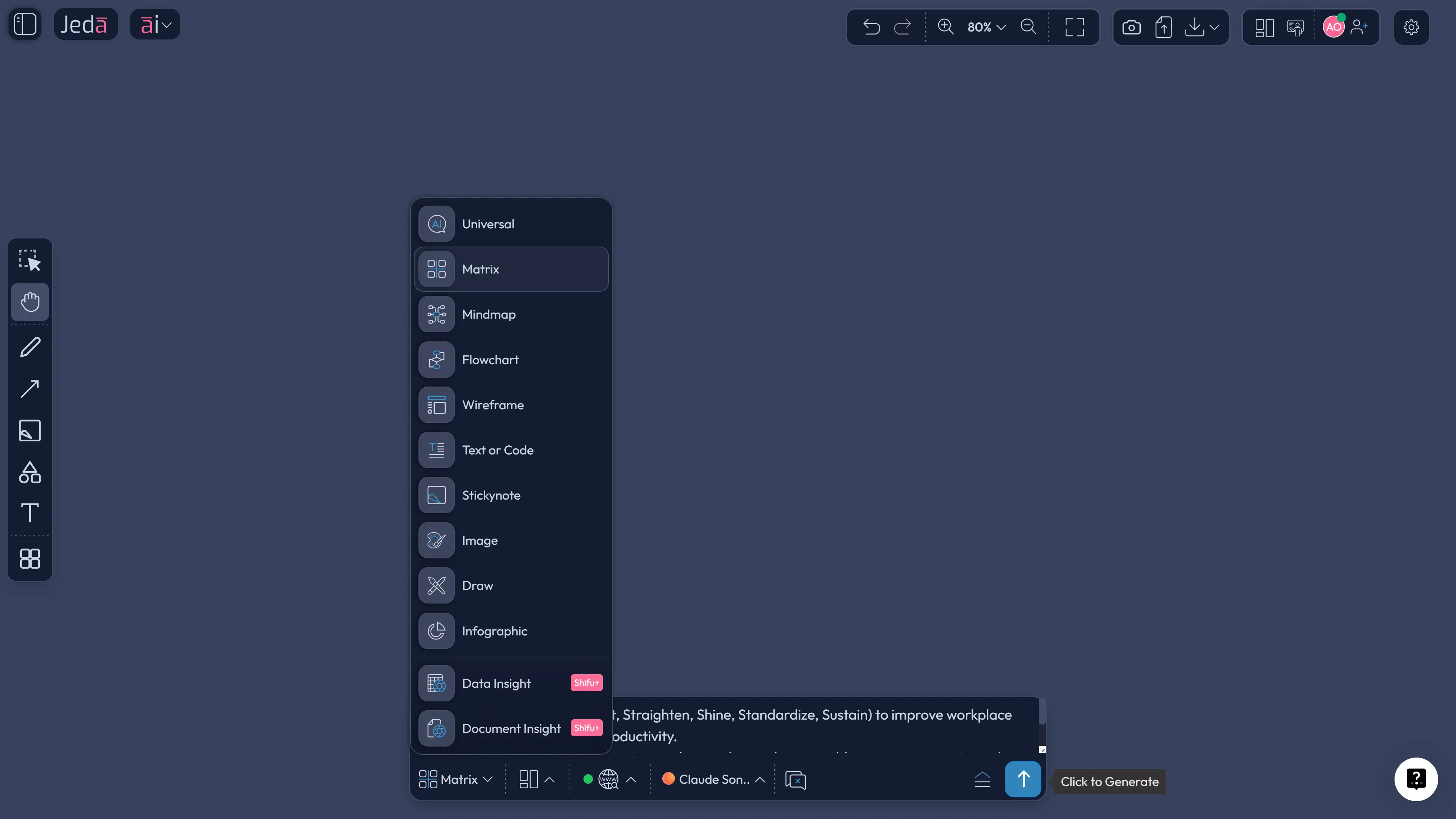
If you want more freedom, use the Prompt Bar at the bottom of the canvas.
Select the Matrix command, then describe the board you want. A strong prompt is something like:
Create a 5S Method matrix for a maintenance workshop. Use five columns for Sort, Straighten, Shine, Standardize, and Sustain. Add rows for current issues, corrective actions, ownership, visual controls, and weekly audit checks.
That gives you a structured draft fast. Then you can tighten the language, move sticky notes, attach evidence, and adapt the matrix to one zone or one department.
What to do after the first draft
This is where most teams stop too early.
After generation, use the board like a real implementation layer:
- add owners by area
- attach before/after images
- add audit dates
- assign red-tag actions
- convert part of the matrix into a flow if you want a rollout sequence
And yes, you can use Vision Transform if you want to convert the output into a different visual type later, such as a flowchart for your implementation plan.
If you’re on a Multi-LLM workflow, you can also compare responses from several models and keep the strongest structure. That’s especially useful when you want a version for the shop floor and another for leadership review.
5S Method template and examples
A useful 5S board usually has more than five columns. It also needs operational scaffolding.
Example 1: Physical workspace
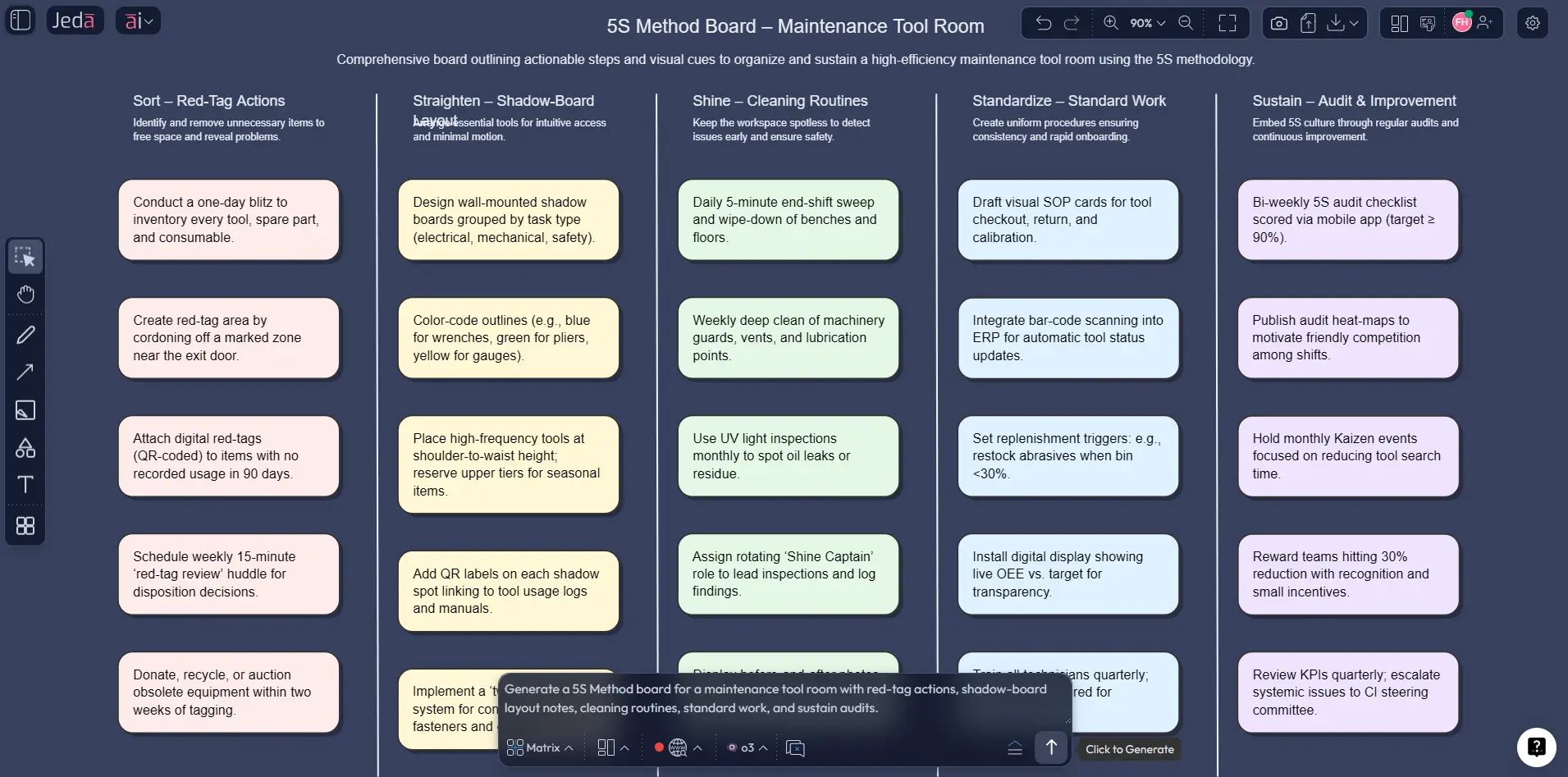
Imagine a maintenance tool room.
- Sort: remove obsolete spares, broken tools, duplicate items
- Straighten: assign fixed shadow-board locations and labels
- Shine: define daily wipe-down and weekly inspection tasks
- Standardize: publish restocking, labeling, and return rules
- Sustain: run a weekly 5S audit and review missing-tool exceptions
That is already better than a generic checklist because it ties the five S’s to visible actions. But inside Jeda.ai, you can go further by attaching photos, marking owners, and extending any weak section with AI+.
Example 2: Digital 5S
This is the sleeper use case. And honestly, it’s one of the best ones.
Most teams don’t suffer from dirty factory floors. They suffer from chaotic shared drives, duplicated decks, version confusion, unclear naming, and dead folders nobody wants to touch. The 5S Method works there too.
- Sort: archive outdated files and remove duplicate versions
- Straighten: define folder hierarchy and naming rules
- Shine: clean file metadata, descriptions, and broken links
- Standardize: publish file conventions and ownership rules
- Sustain: review the system monthly and audit exceptions
That’s where an AI Workspace really earns its keep. Physical and digital 5S can live side by side in the same board. If you want to keep digging after 5S, a related follow-up is a Fishbone Diagram workflow for root-cause analysis.
Best practices and tips
One more thing. Tie every improvement to a visible standard. “Keep it clean” is not a standard. “Return calibrated tools to labeled rack B3 before shift end” is a standard.
That difference is where Sustain lives.
Common mistakes to avoid
The first mistake is treating 5S like a one-day cleanup event. It isn’t. The first three S’s can look dramatic fast, but the last two decide whether the gains stick.
The second mistake is confusing activity with design. Teams sometimes generate a pretty board, fill it with notes, and call it done. But if the matrix doesn’t show ownership, audit cadence, and visual controls, it will not survive real work.
The third mistake is starting too abstractly. “Improve efficiency” sounds nice. It also gives nobody anything concrete to do. Start with a bounded area and a painful problem: missing tools, duplicated files, unsafe storage, slow retrieval, or inconsistent cleaning.
The fourth mistake is ignoring digital clutter. A team that runs a pristine floor and a disastrous file system is not really practicing 5S. It is just choosing where to be messy.
The fifth mistake is using the board once and then hiding it. A 5S board should stay visible, editable, and reviewable. That is why an AI Whiteboard format works so well: the board can keep living after the workshop.
Frequently asked questions
- What is the 5S method?
- The 5S method is a lean workplace-organization system built around Sort, Straighten, Shine, Standardize, and Sustain. It helps teams reduce waste, improve safety, and create a more consistent work environment by making organization and standards visible.
- What do the 5S’s stand for?
- In this page’s terminology, the 5S’s stand for Sort, Straighten, Shine, Standardize, and Sustain. Many lean sources use “Set in Order” instead of “Straighten,” but both point to organizing necessary items so they are easy to find and return.
- Is 5S only for manufacturing?
- No. 5S started in industrial and lean-production settings, but it now appears in healthcare, laboratories, public services, offices, and digital work environments. The method works anywhere teams need less clutter, clearer standards, and faster retrieval.
- How do you create a 5S template with AI?
- In Jeda.ai, you can use the built-in 5s Method recipe in the AI Menu or generate a board through the Prompt Bar with the Matrix command. The best result is a matrix that maps each pillar to issues, actions, owners, standards, and audits.
- What should a 5S matrix include?
- A strong 5S matrix should include the five pillars plus operational rows such as current-state issues, corrective actions, ownership, visual controls, standards, and audit cadence. Without those elements, the board may explain 5S but won’t help teams run it.
- Can you use 5S for digital files and workflows?
- Yes. Digital 5S is one of the most practical modern uses of the method. Teams can apply it to shared drives, folder structures, naming rules, dashboards, and document ownership to reduce confusion and speed up retrieval.
- How is 5S different from 6S?
- 6S usually adds Safety as an explicit extra pillar. In many organizations, safety is already embedded inside 5S, especially through cleaner spaces, better labeling, and fewer hazards. The difference is mostly about emphasis and training design.
- What usually makes 5S fail?
- 5S usually fails when teams stop after cleanup, skip standardization, ignore ownership, or never review the board again. The Sustain step is where most implementations break down, which is why audits, visual standards, and leadership follow-through matter so much.
- Can teams collaborate on a 5S board in real time?
- Yes. In Jeda.ai, the 5S board lives inside a shared AI Workspace, so teams can edit actions, assign owners, attach evidence, and review progress together. That makes the board useful after the initial workshop instead of turning into a static artifact.
- What should you do after the first 5S draft?
- After the first draft, tighten the matrix with owners, time frames, photo evidence, and audit routines. Then use the AI+ button to deepen weak sections or extend the board into rollout plans, training tasks, or zone-specific checklists.
Sources & further reading
- [1]
Osada, Takashi (1991) . “The 5S's: Five Keys to a Total Quality Environment” Asian Productivity Organization.
View Source ↗ - [2]
Hirano, Hiroyuki (1995) . “5 Pillars of the Visual Workplace” Productivity Press / Taylor & Francis.
View Source ↗ - [3]
Jaca, Carmen; Viles, Elisabeth; Paipa-Galeano, Luis; Santos, Javier; Mateo, Ricardo (2014) . “Learning 5S principles from Japanese best practitioners: case studies of five manufacturing companies” International Journal of Production Research.
View Source ↗ - [4]
Jiménez, Marta; Romero, Luis; Fernández, Javier; del Mar Espinosa, María; Domínguez, Manuel (2015) . “5S methodology implementation in the laboratories of an industrial engineering university school” Safety Science.
View Source ↗ - [5]
Kanamori, Shuaib; Sow, Sadou; Castro, Margarita C.; Matsuno, Rie; Tsuru, Aya; Jimba, Masamine (2015) . “Implementation of 5S management method for lean healthcare at a health center in Senegal” Global Health Action.
View Source ↗ - [6]
Kanabar, Bhakti; Khatri, Priyanka; et al. (2024) . “The Impact and Challenges of the Implementation of 5S Methodology in Healthcare Settings: A Systematic Review” Cureus / PMC.
View Source ↗
Start Your 5S Method in Jeda.ai
Join over 150,000 professionals who use Jeda.ai as an AI Workspace for clearer systems, smarter visual planning, and faster continuous improvement.
Try Free Template