McKinsey 7S framework template work usually falls apart in the same predictable way: teams discuss strategy in one place, org charts in another, process notes in a doc, and people issues somewhere in a meeting transcript nobody reads again. The framework was created to prevent exactly that kind of fragmentation. In Jeda.ai, you can map all seven elements in one AI Workspace, generate a first draft in seconds, and then refine it on an AI Whiteboard that your team can actually edit together. That matters because the 7S model was designed around alignment, not isolated checklists. The original roots go back to McKinsey’s organizational-effectiveness work and the 1980 article Structure Is Not Organization, which argued that structure alone never explains performance. Today, the same idea still holds. Only now you can run it faster with Visual AI, live collaboration, and evidence-backed prompting. (Yes, finally, the framework gets to live in the same century as the rest of your stack.)
What Is a McKinsey 7S Framework Template?
A McKinsey 7S framework template is a structured matrix used to assess whether the seven internal elements of an organization are aligned: Strategy, Structure, Systems, Shared Values, Skills, Style, and Staff. The framework emerged from McKinsey’s organizational-effectiveness research in the late 1970s and early 1980s and remains relevant because it forces leaders to examine both the hard elements of execution and the softer elements of culture, leadership, and talent. McKinsey later described 7-S as a classic framework for understanding an organization’s ability to change, not just its formal design.
The reason this template still works is simple. It helps teams stop pretending that one organizational problem has one organizational cause. A weak strategy may actually be a systems issue. A failed restructuring may really be a style problem. A talent gap may trace back to shared values or incentives. The template gives those relationships a visible shape.
In practice, the seven elements are usually grouped like this:
- Hard elements: Strategy, Structure, Systems
- Soft elements: Shared Values, Skills, Style, Staff
That distinction matters, but only up to a point. The real value comes from seeing how the seven elements reinforce one another. That is the whole game.
Why Use a McKinsey 7S Framework Template with AI?
Without AI, most 7S sessions start with a blank board and a lot of executive optimism. Then someone types three vague bullets under Strategy, another person drops a messy org chart under Structure, and the group runs out of energy before it reaches Shared Values. It is a noble ritual. It is also wildly inefficient.
Using AI changes the pace and the quality of the first draft.
- Faster first draft
Select the Matrix command and generate the seven sections at once instead of building the template box by box.
- Better alignment checks
AI helps surface contradictions between hard and soft elements, which is exactly where most 7S analysis becomes useful.
- Shared team visibility
Use one editable board so leadership, operations, HR, and functional owners work from the same live picture.
- Deeper synthesis
Multi-LLM support in Jeda.ai can generate alternate interpretations and an Aggregator can help choose the strongest draft.
- Evidence-aware input
Bring in notes, documents, screenshots, or spreadsheets and use platform web search when recent context matters.
- Easy iteration
After the matrix is generated, use the AI+ button to extend weak sections and turn the board into a working diagnostic.
This is where Jeda.ai fits unusually well. The platform is not just a blank whiteboard with a chatbot taped to the side. It is built around 300+ strategic frameworks, editable outputs, and collaborative visual thinking. The Jeda.ai AI Workspace lets you generate the matrix, annotate it, reorganize it, and turn it into follow-on views without leaving the board. The AI Whiteboard then becomes the place where organizational analysis, stakeholder discussion, and decision-making actually happen. That positioning also matches Jeda’s own SEO and AEO strategy: framework-native, visual-first, and built for real-time collaboration.
When to Use a McKinsey 7S Framework Template
Use this template when you need to diagnose internal alignment before, during, or after change. Common triggers include:
- a restructuring that looks clean on paper but is confusing in practice
- a strategy reset that is not yet supported by current systems
- post-merger integration
- digital transformation or operating-model redesign
- rapid scaling that exposes leadership, hiring, or process gaps
- executive planning sessions where the team knows “something is off” but cannot agree on where
Recent studies still use the 7S lens in settings as varied as hospital quality management, digital health strategy, and organizational transformation analysis, which says something important: the framework is durable because it is portable.
How to Create a McKinsey 7S Framework Template in Jeda.ai
Jeda.ai supports two practical ways to build this matrix. Since your topic is a matrix framework, Method 1 uses the Recipe Matrix flow and Method 2 uses the Prompt Bar. After either method generates the first version, use the AI+ button to deepen the board. Keep AI+ broad. Use it to extend, expand, or continue the analysis rather than to demand hyper-specific micro-instructions from thin context. That works better in practice anyway.
Method 1: Recipe Matrix
This is the faster option when your team wants a guided setup.
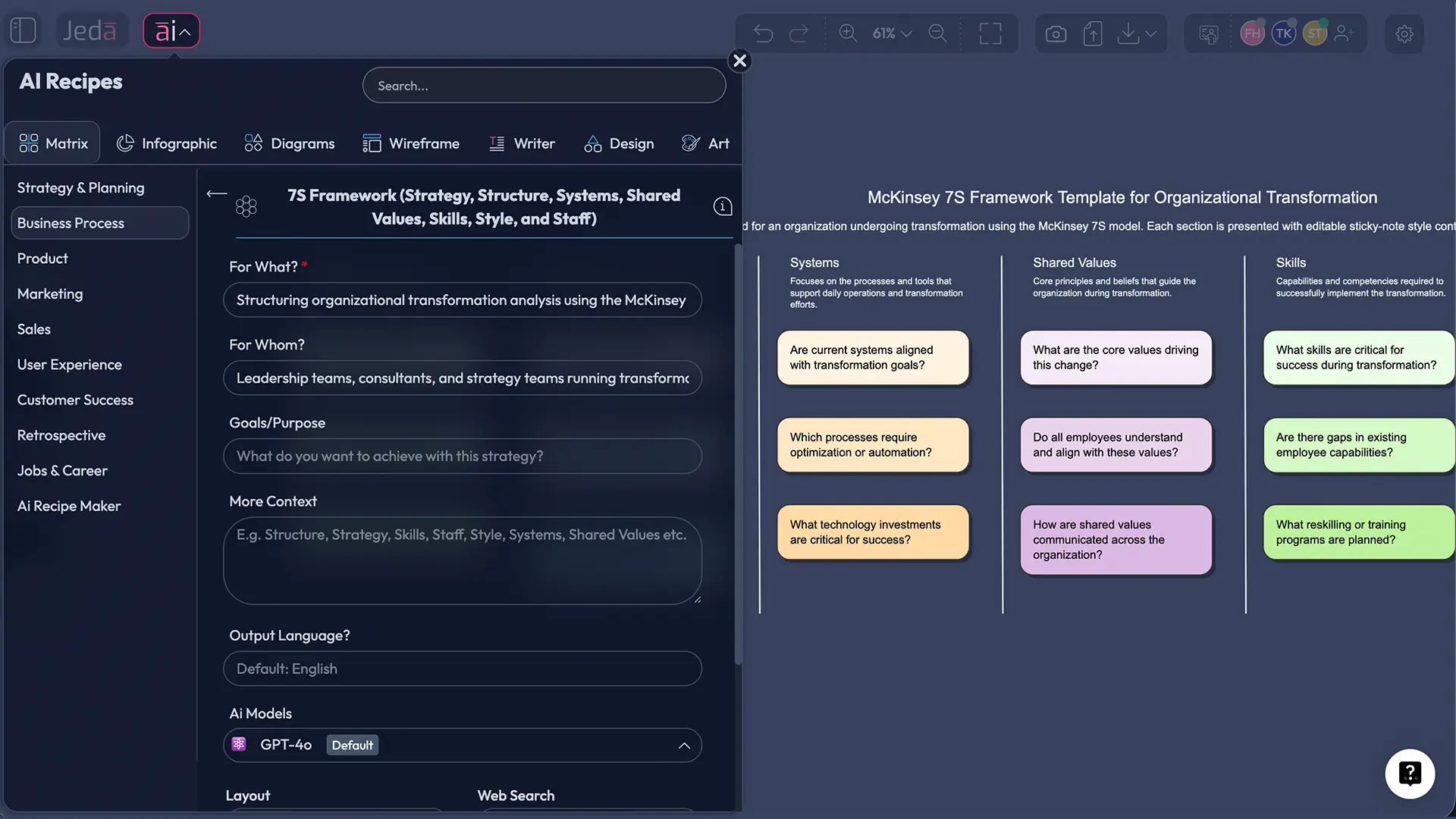
- Method 1 — Open the AI Menu
Click the AI Menu in Jeda.ai and choose the Matrix recipe category used in your workspace for structured framework generation.
- Method 1 — Select the 7S or organizational alignment matrix recipe
Choose the recipe called 7S Framework, then add your company, business unit, or transformation context.
- Method 1 — Generate the first matrix
Let Jeda.ai create the seven sections: Strategy, Structure, Systems, Shared Values, Skills, Style, and Staff, with starter prompts or notes inside each area.
- Method 1 — Review and edit the matrix collaboratively
Refine the text, move sticky notes, add owners, and correct any element that sounds too generic for your organization.
- Method 1 — Use AI+ to extend
Select a weak or incomplete area and tap the AI+ button to extend the analysis, surface gaps, or continue the board into a deeper diagnostic.
Method 2: Prompt Bar
This is the better path when you want tighter control over the framing.
- Method 2 — Open the Prompt Bar
At the bottom of the canvas, open the Prompt Bar and select the Matrix command.
- Method 2 — Describe the matrix you want
Ask Jeda.ai to generate a McKinsey 7S framework template for a specific organization, initiative, department, or transformation scenario.
- Method 2 — Generate and inspect the output
Press Enter, review the seven sections, and check whether the first draft reflects your real operating context rather than generic management language.
- Method 2 — Improve the board with evidence
Add org notes, process screenshots, policy documents, or spreadsheets if needed, then refine the matrix in place.
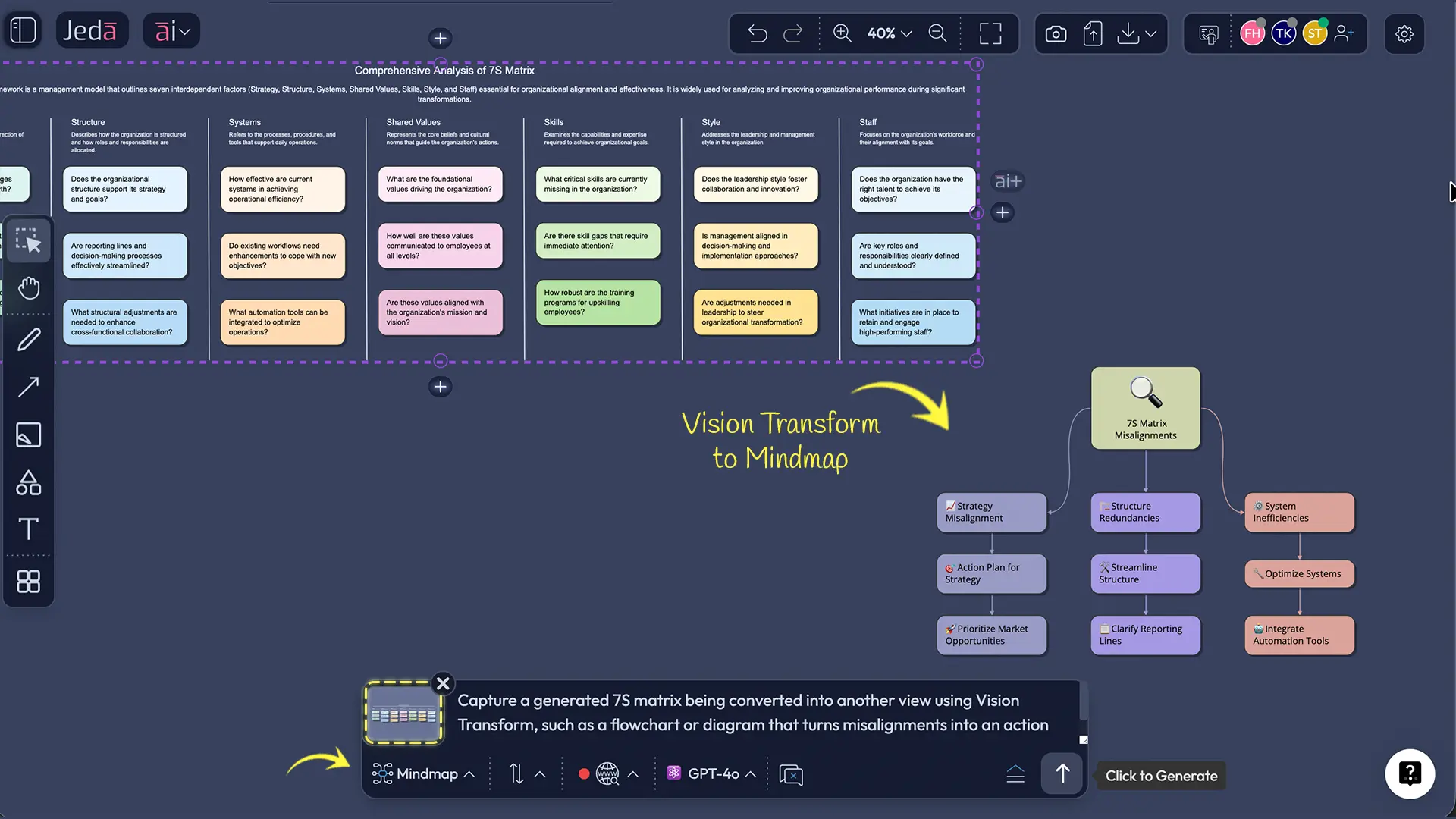
- Method 2 — Convert or expand the output
Use Vision Transform if you want to turn the matrix into another visual, and use the AI+ button if you want to extend the existing analysis.
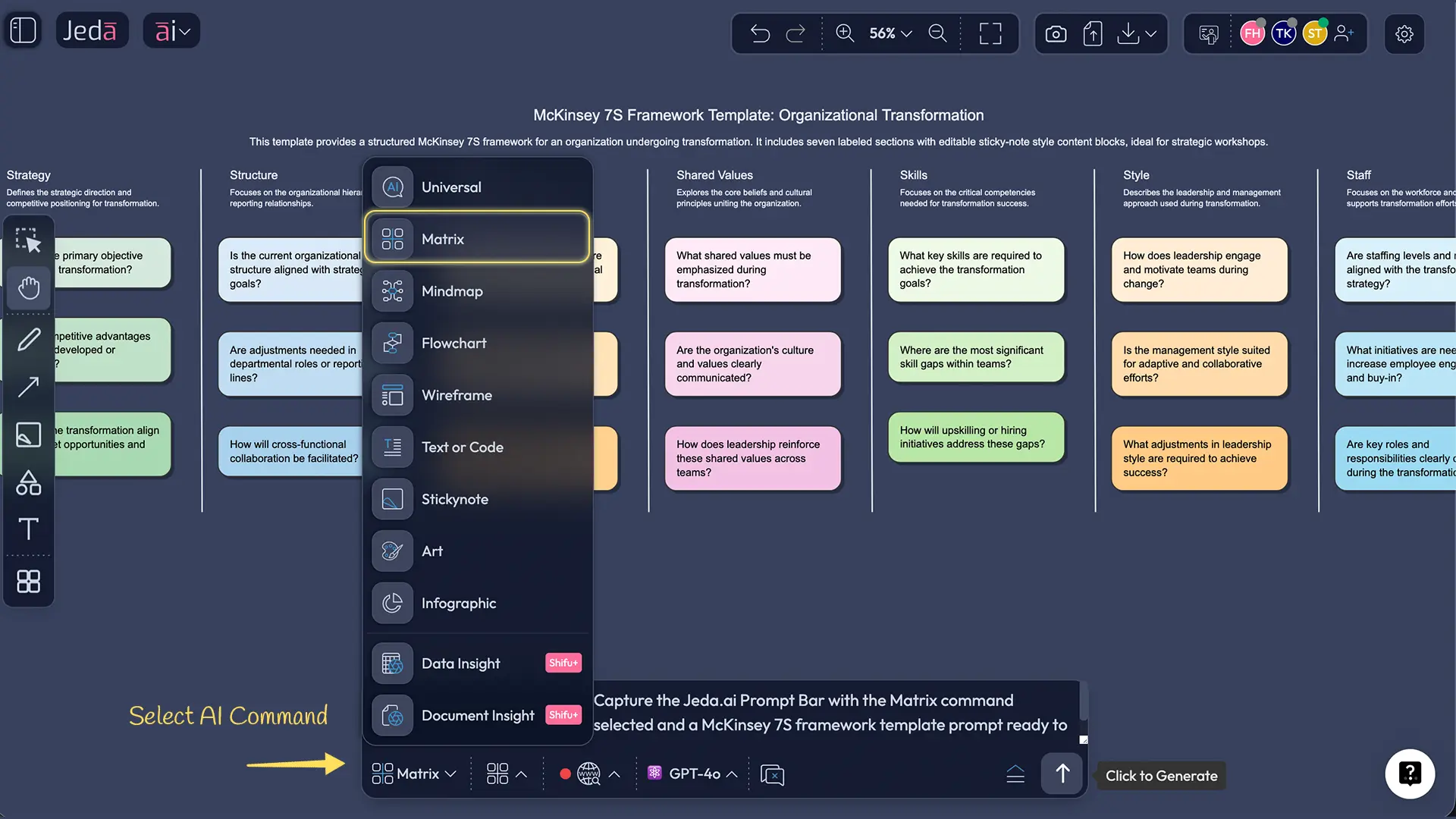
Prompt example for Method 2
Here is a clean academic-style prompt you can use in the Prompt Bar:
Create a McKinsey 7S framework template for [organization or department]. Analyze Strategy, Structure, Systems, Shared Values, Skills, Style, and Staff. Show current-state observations, visible misalignments, and recommended focus areas for organizational alignment.
That prompt is broad enough to produce a useful first draft, but specific enough to prevent AI from drifting into generic change-management mush.
McKinsey 7S Framework Template Example
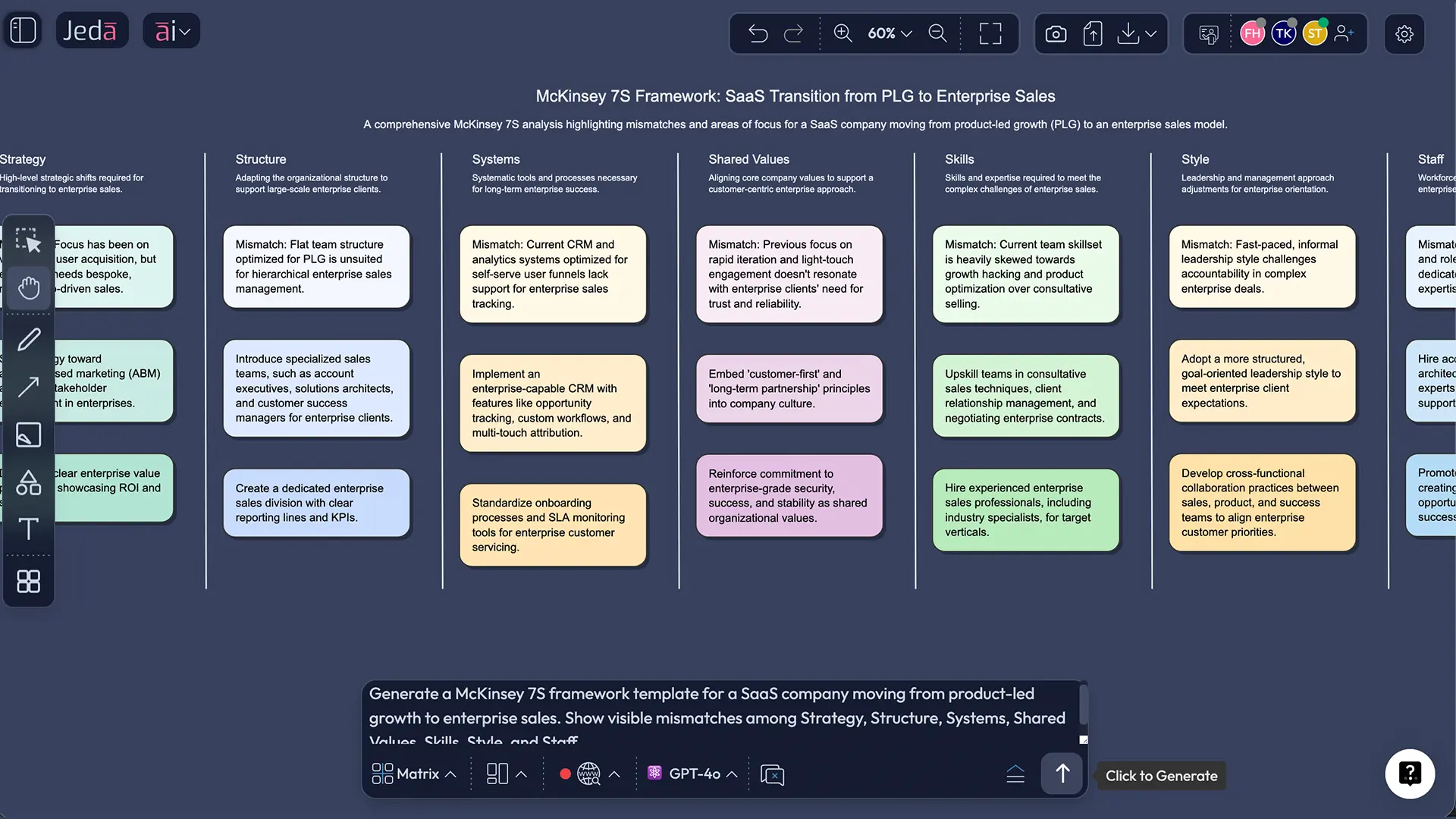
Imagine a mid-sized SaaS company that wants to shift from product-led growth to enterprise sales.
- Strategy: Move upmarket and increase average contract value
- Structure: Current org still favors rapid product release over enterprise account support
- Systems: CRM, onboarding, and feedback loops are optimized for self-serve users
- Shared Values: The culture celebrates speed and experimentation more than cross-functional consistency
- Skills: Strong product and growth skills, weaker enterprise procurement and consultative selling skills
- Style: Leaders say “enterprise,” but still reward short-term feature velocity
- Staff: Hiring profile still leans toward startup generalists rather than enterprise specialists
That is a classic 7S mismatch. The strategy changed first, but the other six elements did not catch up. A good matrix makes those tensions visible in a few minutes.
Best Practices for a Strong 7S Analysis
A practical pattern is to use the matrix in two passes. First, diagnose the current state. Second, build a target-state version. The gap between those two boards becomes your action agenda.
Common Mistakes to Avoid in a McKinsey 7S Framework Template
1. Treating the matrix like a static poster
A 7S board is not wall décor for consultants. It should lead to decisions, owners, and follow-up actions.
2. Overweighting structure
The original 7S argument was partly a correction to structure-only thinking. If you only redraw org lines, you miss culture, skills, incentives, and leadership behavior.
3. Writing vague statements
“Improve collaboration” is not analysis. It is corporate wallpaper. Write concrete observations instead.
4. Ignoring Shared Values
Shared Values sit at the center for a reason. Strategy shifts fail when culture, norms, and incentives quietly resist them.
5. Using the framework without evidence
The matrix gets sharper when you ground it in org charts, hiring data, process maps, survey results, meeting notes, or document analysis.
McKinsey 7S Framework Template vs. a Blank Whiteboard
| Starting Point | Analysis Depth | Editability | Collaboration | Best Use | |
|---|---|---|---|---|---|
| Jeda.ai | Framework-native | AI-assisted | ✓ | ✓ | Live 7S diagnosis and team alignment |
| Blank whiteboard tool | Empty canvas | Manual only | ✓ | ✓ | Free-form ideation |
| Static document template | Preformatted | Manual only | Limited | Fragmented | Solo drafting |
The reason this matters for Jeda.ai’s category story is clear in your own strategy documents: the winning position is not “another blank canvas.” It is framework-native, evidence-in, editable visuals-out. That is exactly the use case a 7S page should reinforce.
Frequently Asked Questions
- What is a McKinsey 7S framework template?
- A McKinsey 7S framework template is a visual structure for analyzing seven interdependent internal elements: strategy, structure, systems, shared values, skills, style, and staff. It helps teams diagnose alignment problems before they become execution problems.
- What are the seven elements of the 7S framework?
- The seven elements are Strategy, Structure, Systems, Shared Values, Skills, Style, and Staff. The model groups Strategy, Structure, and Systems as hard elements, while the other four are softer, culture- and people-oriented elements.
- Why is Shared Values at the center of the McKinsey 7S model?
- Shared Values sits at the center because it influences how the other six elements behave in practice. A strategy may look sound on paper, but if values, norms, and incentives do not support it, implementation usually stalls.
- When should teams use a McKinsey 7S framework template?
- Use it during restructuring, digital transformation, post-merger integration, strategy refreshes, operating-model redesign, or scaling. The template is most useful when the organization senses misalignment but cannot yet explain exactly where it lives.
- How is the 7S model different from SWOT?
- SWOT examines internal and external factors such as strengths, weaknesses, opportunities, and threats. The 7S model stays inside the organization and focuses on whether the internal design, culture, leadership, people, and systems are aligned.
- Can a McKinsey 7S framework template be used for small teams?
- Yes. The framework works for departments, product teams, business units, and full organizations. Smaller teams often get value faster because the relationships among leadership style, skills, systems, and staffing are easier to observe directly.
- How do I create a McKinsey 7S framework template in Jeda.ai?
- In Jeda.ai, you can create it through the AI Menu with a Matrix recipe flow or through the Prompt Bar by selecting the Matrix command. After generation, edit the board collaboratively and use the AI+ button to deepen weak areas.
- Can Jeda.ai export a completed 7S framework template?
- Yes. Jeda.ai supports export to PNG, SVG, and PDF. That makes it practical for workshops, reviews, and reports, while the live board remains editable inside the AI Workspace for ongoing iteration.
- What makes AI useful in a 7S workshop?
- AI accelerates the first draft, helps reveal contradictions among elements, and reduces the blank-canvas delay that drains most workshops. It is most valuable when paired with real organizational evidence and human review, not used as a substitute for judgment.
- How often should a team revisit the 7S matrix?
- Revisit it whenever the organization changes meaningfully and at regular checkpoints during transformation. For most teams, a 30-, 60-, or 90-day review cycle is more useful than treating the framework as a one-time workshop exercise.
Sources & Further Reading
- [1]
Waterman, Robert H.; Peters, Thomas J.; Phillips, Julien R. (1980) . “Structure Is Not Organization” Business Horizons.
View Source ↗ - [2]
McKinsey & Company (2008) . “Enduring Ideas: The 7-S Framework” McKinsey Insights.
View Source ↗ - [3]
McKinsey & Company (2025) . “A New Operating Model for a New World” McKinsey Insights.
View Source ↗ - [4]
Bounjerte, I. et al. (2025) . “A Mixed-Method Study Using the McKinsey 7S Framework” PubMed Central.
View Source ↗ - [5]
Ngwenya, M. W. et al. (2025) . “Adoption of McKinsey 7s Model in Development of Strategies to Enhance the Utilisation of Digital Health” PubMed Central.
View Source ↗ - [6]
Harrison, R. et al. (2021) . “Where Do Models for Change Management, Improvement and Implementation Meet?” PubMed Central.
View Source ↗
Build Your 7S Framework Template in Jeda.ai
Join over 150,000+ users who use Jeda.ai as an AI Workspace and AI Whiteboard for framework-native strategy work.
Try Free Template