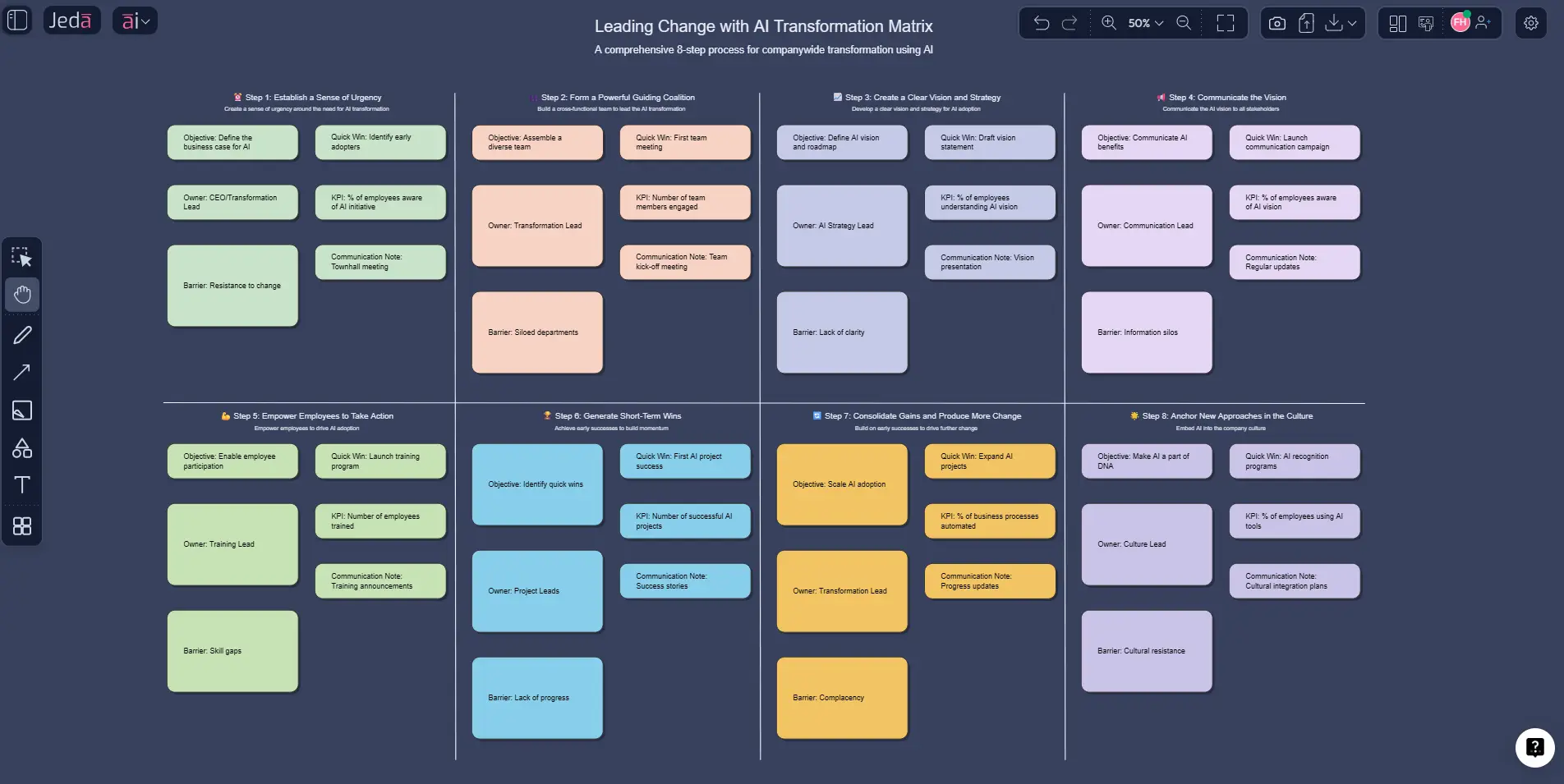
Change efforts rarely fail because teams lack ambition. They fail because the plan lives in six places, the story changes every week, and nobody can tell where resistance will show up until it bites. That is exactly why the 8-step process for leading change with AI works so well inside a visual AI Workspace. You are not just listing steps. You are turning a change model into a live matrix your team can read, edit, stress-test, and extend.
In practice, when people talk about an “8-step process for leading change,” they are usually referring to John Kotter’s model, first introduced in the mid-1990s and still widely used today. The official Kotter framework now phrases the stages as: create urgency, build a guiding coalition, form a strategic vision, enlist a volunteer army, remove barriers, generate short-term wins, sustain acceleration, and institute change. Older summaries often restate those ideas as communicating the vision, involving stakeholders, managing resistance, and anchoring change into culture. Same backbone. Slightly different jackets.
And that is where Jeda.ai gets interesting. Instead of keeping Kotter’s model as a static diagram in a slide deck, you can build it as a visual matrix in an AI Whiteboard, pressure-test the logic with multiple models, then use the AI+ button to expand what is already on the canvas. Much better than arguing over version 14 of a spreadsheet.
What is the 8-step process for leading change?
The 8-step process for leading change is a structured change management framework used to guide organizations through transformation in a deliberate, staged way. At its core, the model helps teams move from “we know something has to change” to “the new behavior is now how we work.” It is most closely associated with John P. Kotter’s work on organizational transformation and his book Leading Change.
What makes the framework durable is its balance. It is strategic enough for executives, practical enough for project owners, and human enough to account for resistance, communication gaps, and fragile momentum. That matters because change is rarely blocked by strategy alone. More often, it gets stuck in the middle: unclear ownership, weak buy-in, no visible wins, or poor follow-through.
For a modern team, the framework works best when it becomes a working system rather than a one-time workshop artifact. Build it as a matrix, and each step can hold its own objective, risks, stakeholders, owner, communication plan, quick wins, and progress signals. That turns the model from a lecture into an operating view.
Why use the 8-step process for leading change with AI?
Because the framework is solid, but the work around it gets messy fast.
One team writes the vision. Another tracks risks. Leadership wants a narrative. Ops wants owners and deadlines. HR wants stakeholder alignment. And somebody always asks for a cleaner version for tomorrow’s meeting. Inside Jeda.ai, you can collapse that chaos into one visual system inside an AI Workspace and keep refining it without rebuilding from scratch.
- See the full change path
Map all eight stages in one matrix so urgency, coalition, vision, resistance, wins, and institutionalization stay connected.
- Pressure-test the logic
Use Jeda.ai’s multi-model setup to surface blind spots, weak assumptions, and missing stakeholders before rollout day.
- Align people around one board
Keep leadership, PMO, HR, and frontline owners on the same editable canvas instead of splitting the plan across docs and slides.
- Extend with AI+
After the matrix exists, use the AI+ button to deepen a step, expand risks, add examples, or continue planning without starting over.
- Switch visual formats later
Use Vision Transform to turn the matrix into a flowchart, mind map, or diagram when a different audience needs a different view.
- Keep strategy practical
Move from theory to execution by adding owners, barriers, metrics, communication actions, and short-term wins right on the board.
There is another upside people underestimate: speed with structure. Jeda.ai combines Visual AI, an AI Whiteboard, and 300+ strategic frameworks in one place, so you are not stitching together a change model in one tool and then translating it elsewhere for leadership review. That framework-native setup is one of Jeda.ai’s core differentiators in its broader AI Workspace strategy.
How to create the 8-step process for leading change in Jeda.ai
Method 1: Recipe Matrix
This is the cleanest route when you want a structured output fast.
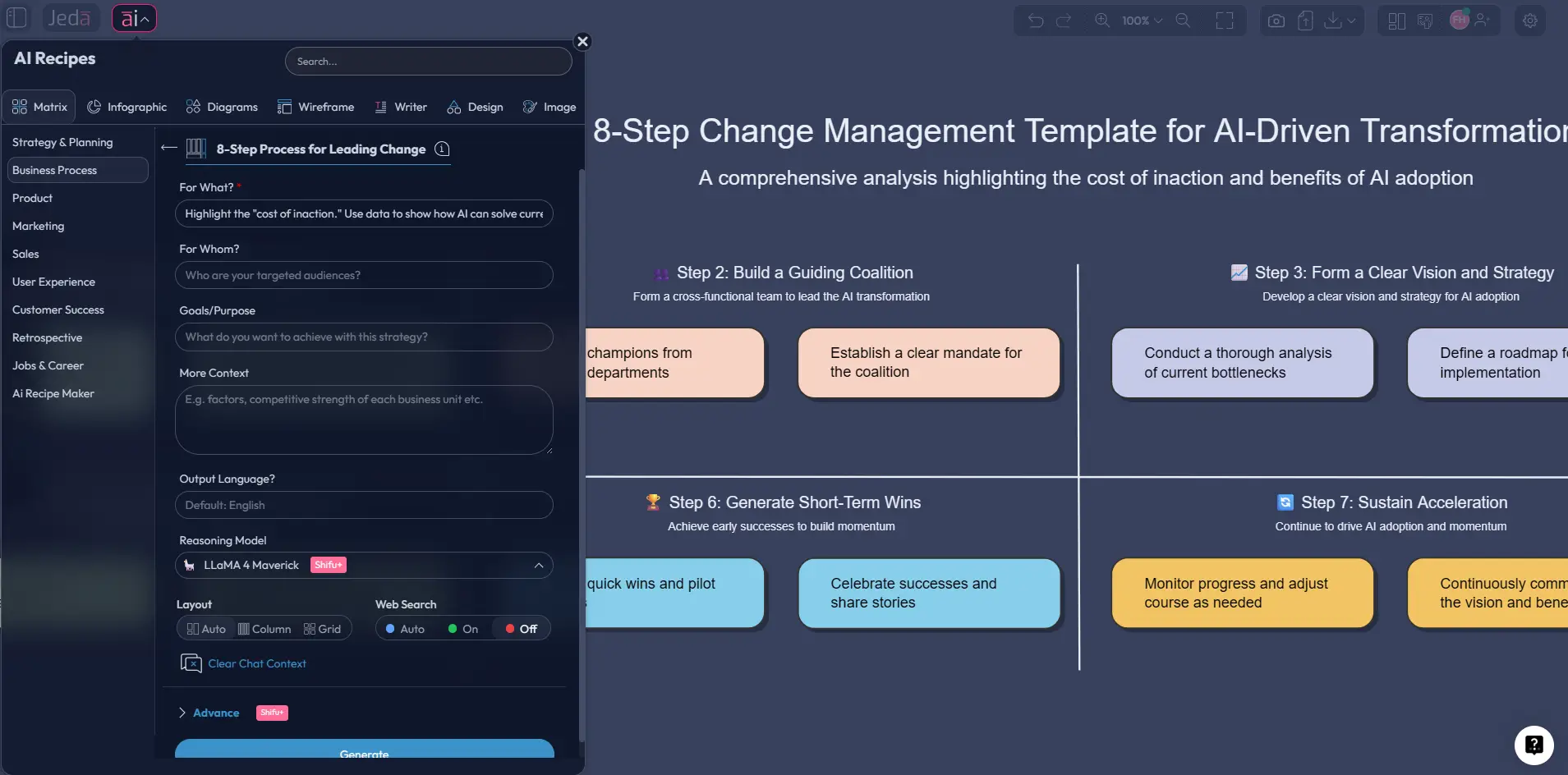
- Open the AI Menu
Start on the canvas, open the AI Menu, and go to the Matrix recipe area for framework-style outputs.
- Choose the relevant change matrix recipe
Select the matrix recipe that best fits an 8-step change planning workflow. Use the 8-step process for leading change as the framework backbone.
- Add your context
Describe the initiative, such as ERP rollout, merger integration, AI adoption, policy change, or operating-model redesign, plus your audience and constraints.
- Generate the matrix
Create a matrix that maps all eight steps with practical columns such as objective, key actions, owners, barriers, communication needs, quick wins, and KPIs.
- Refine on canvas
Edit language, move notes, add details, and prepare the board for collaborators or leadership review right inside the AI Workspace.
A solid prompt for the recipe version:
Build an 8-step process for leading change matrix for a 1,200-person manufacturing company rolling out a new ERP system. Use the eight steps as rows. Add columns for goal, key actions, owner, likely resistance, quick win, KPI, and communication note.
Method 2: Prompt Bar
Use this when you want tighter wording or a custom structure.
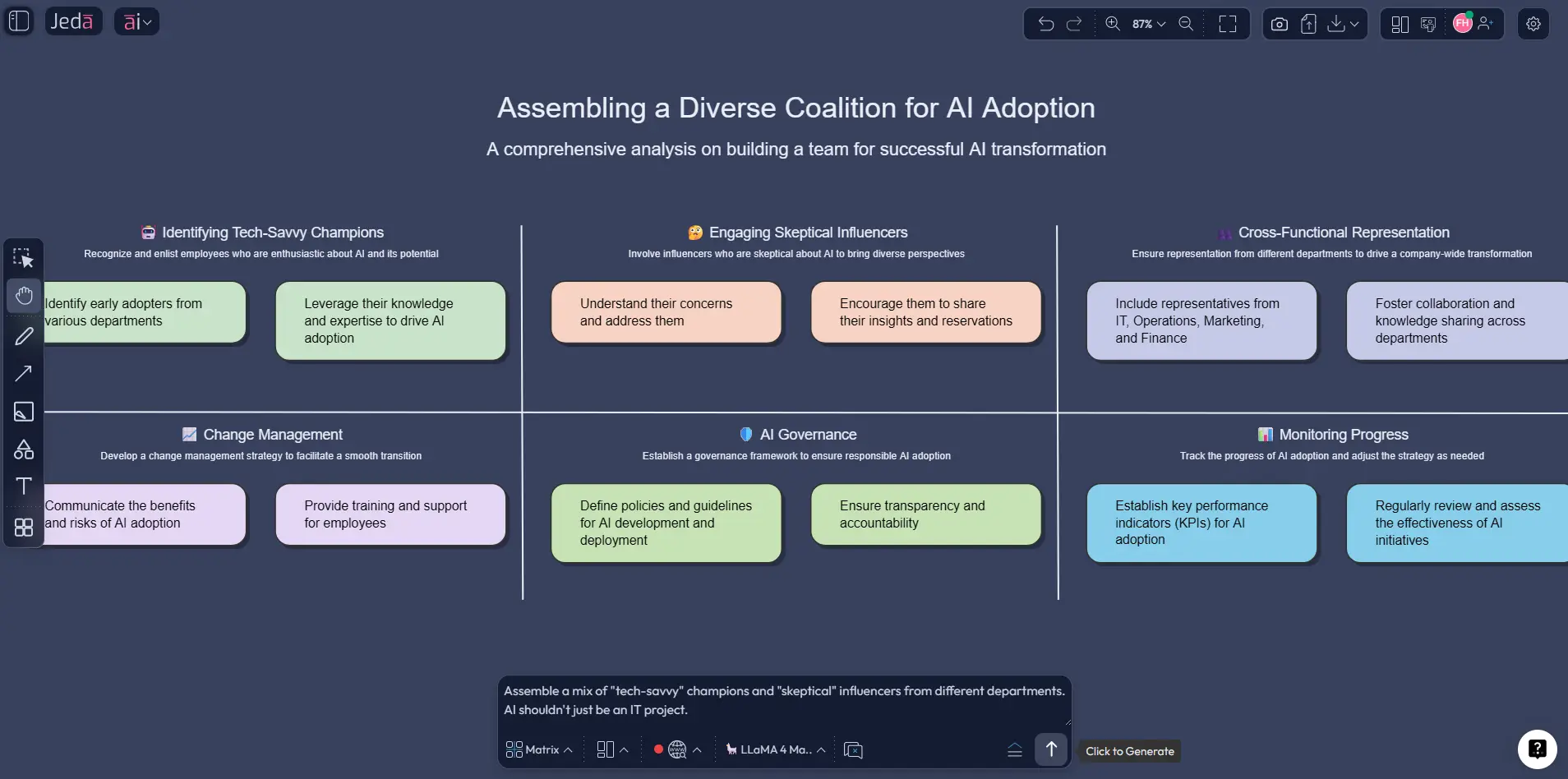
- Open the Prompt Bar at the bottom of the canvas.
- Select the Matrix command.
- Type a prompt that tells Jeda.ai what rows, columns, context, and execution fields you want.
- Press Enter to generate.
- Edit the matrix on canvas and add collaborators if needed.
A practical Prompt Bar example:
Create an 8-step process for leading change with AI as a matrix for a hospital introducing a new patient-scheduling platform. Use the eight Kotter steps as rows. Add columns for stakeholder goal, communication action, barrier, owner, timeline, short-term win, and success metric.
AI+ button generated deep dive
After the matrix exists, this is where the AI+ button earns its lunch.
Use AI+ to:
- expand a weak step
- deepen stakeholder risks
- add more detailed quick wins
- suggest communications for a specific step
- continue the board with supporting analysis
Use it for extension, not for a hyper-specific net-new build from nothing. In other words, AI+ is strongest when you already have a matrix on the canvas and want more depth, not when you need a fully constrained framework created from zero.
A good AI+ prompt:
Extend this matrix with a deeper resistance-management layer for steps 4 through 6. Add frontline concerns, manager concerns, mitigation actions, and signals of adoption.
And if leadership wants a different format later, use Vision Transform to convert the matrix into a flowchart or diagram without rethinking the entire structure.
8-step process for leading change template and example
Here is a simple way to structure the matrix so it is actually usable:
- Rows: the eight steps
- Columns: objective, key actions, owner, resistance/risk, quick win, KPI, communication note
- Optional columns: timeline, dependencies, affected teams, decision needed
What makes this approach better than a plain checklist is visibility. You can see which steps are overdeveloped and which are hand-wavy. Most teams love talking about vision and hate defining the barrier column. That is usually where the real work is hiding.
Best practices for a stronger change matrix
The model is not the magic. The quality of your inputs is.
Also, do not let the matrix become decorative. The best boards are ugly in a useful way: comments, edits, risk notes, changed owners, revised milestones. That means the team is using it.
Common mistakes to avoid
Treating the framework like a linear slideshow.
The steps have an order, yes. Real change work does not move in a neat little parade. Some steps overlap. Some need revisiting.
Confusing a leadership announcement with urgency.
Urgency is not “we sent an email.” It is shared belief that action matters now.
Building the coalition too narrowly.
If the board only lists executives, you are probably missing the people who shape day-to-day adoption.
Skipping the barrier layer.
Resistance does not vanish because the vision sounds inspiring. Name the blockers. Then deal with them.
Declaring victory after the pilot.
Short-term wins are fuel, not the finish line. Teams stall here all the time.
Using AI as decoration instead of a thinking partner.
The real value comes from asking Jeda.ai to challenge the logic, reveal missing stakeholders, sharpen communication, and extend the matrix where it is thin.
Frequently asked questions
- What is the 8-step process for leading change?
- It is a structured change management framework, most commonly associated with John Kotter, that guides organizations from urgency and alignment through execution, momentum, and cultural adoption.
- Is the 8-step process for leading change the same as Kotter’s model?
- Usually, yes. In most business contexts, the phrase refers to Kotter’s eight-step change model, even when teams restate the steps in slightly different language.
- Why use a matrix for this framework?
- A matrix makes the model operational. Instead of eight abstract stages, you can map each step to actions, owners, risks, communication tasks, quick wins, and KPIs on one visual board.
- Which Jeda.ai method should I use first?
- Start with Method 1, the Recipe Matrix, when you want a structured first draft quickly. Use Method 2, the Prompt Bar, when you want more control over wording, rows, and columns.
- Can I create this in Jeda.ai without rebuilding it later in slides?
- You can keep the planning work in Jeda.ai and export your finished board as PNG, SVG, or PDF. That works well for reviews, documentation, and stakeholder sharing.
- What does the AI+ button do here?
- The AI+ button extends an existing board. It is useful for expanding a step, adding risks, deepening stakeholder plans, or continuing analysis after the initial matrix already exists.
- Can AI+ create the whole framework from scratch?
- It is better to generate the first matrix through the Recipe Matrix or the Prompt Bar. AI+ works best as an extension layer after the initial structure is already on the canvas.
- What teams benefit most from this framework in Jeda.ai?
- Strategy consultants, business leaders, product managers, project managers, and business analysts all benefit because the framework turns abstract change planning into a shared execution view.
- How do I reduce resistance with this model?
- Do not wait until the end. Build resistance into the matrix from the start by naming affected groups, likely objections, enabling actions, communications, and visible wins for each stage.
- Can I turn the matrix into another visual later?
- Yes. With Vision Transform, you can convert the matrix into a different visual format such as a flowchart or diagram when you need a different storytelling style for another audience.
Sources and further reading
- [1]
Kotter, John P. (2026) . “The 8-Step Process for Leading Change” Kotter.
View Source ↗ - [2]
Kotter, John P. (1995) . “Leading Change: Why Transformation Efforts Fail” Harvard Business Review.
View Source ↗ - [3]
Kotter, John P. (1996) . “Leading Change” Harvard Business School Press.
View Source ↗ - [4]
Pollack, Julien; Pollack, Rachel (2015) . “Using Kotter’s Eight Stage Process to Manage an Organisational Change Program: Presentation and Practice” Systemic Practice and Action Research.
View Source ↗ - [5]
Miles, Mary C.; et al. (2023) . “Using Kotter's Change Management Framework to Redesign Departmental GME Recruitment” Journal of Graduate Medical Education.
View Source ↗ - [6]
Hu, F.; et al. (2025) . “Kotter’s 8-step change model to improve hand hygiene compliance in intensive care unit: A 41-month prospective longitudinal quality improvement study” Intensive and Critical Care Nursing.
View Source ↗ - [7]
Auguste, Jacqueline (2013) . “Applying Kotter’s 8-Step Process for Leading Change to the Digital Transformation of an Orthopedic Surgical Practice Group in Toronto, Canada” Journal of Health & Medical Informatics.
View Source ↗
Start your 8-step process for leading change with AI
Join over 150,000+ users using Jeda.ai to turn frameworks into editable, collaborative visuals inside one AI Workspace.
Try Free Template