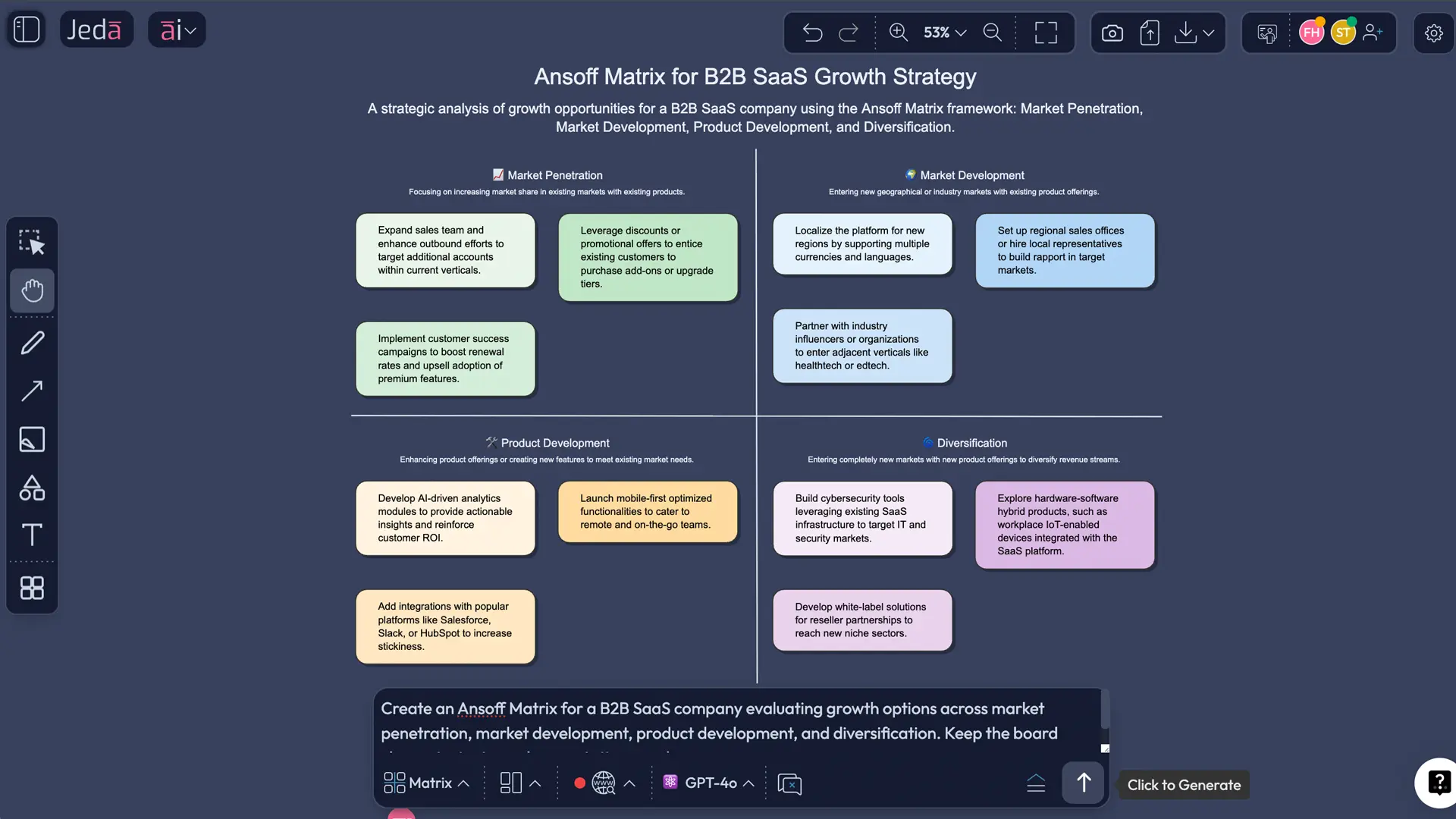
Ansoff Matrix with AI gives you a faster way to compare growth options without turning strategy into a pile of sticky notes, slides, and vague opinions. You still need judgment. But now you can map product and market choices, compare risk, and turn messy workshop input into a clean visual inside Jeda.ai’s AI Workspace and AI Whiteboard.
Teams rarely struggle because they lack ideas. They struggle because growth conversations get scattered. The Ansoff Matrix gives you the structure. Jeda.ai makes it usable at speed.
What is Ansoff Matrix with AI?
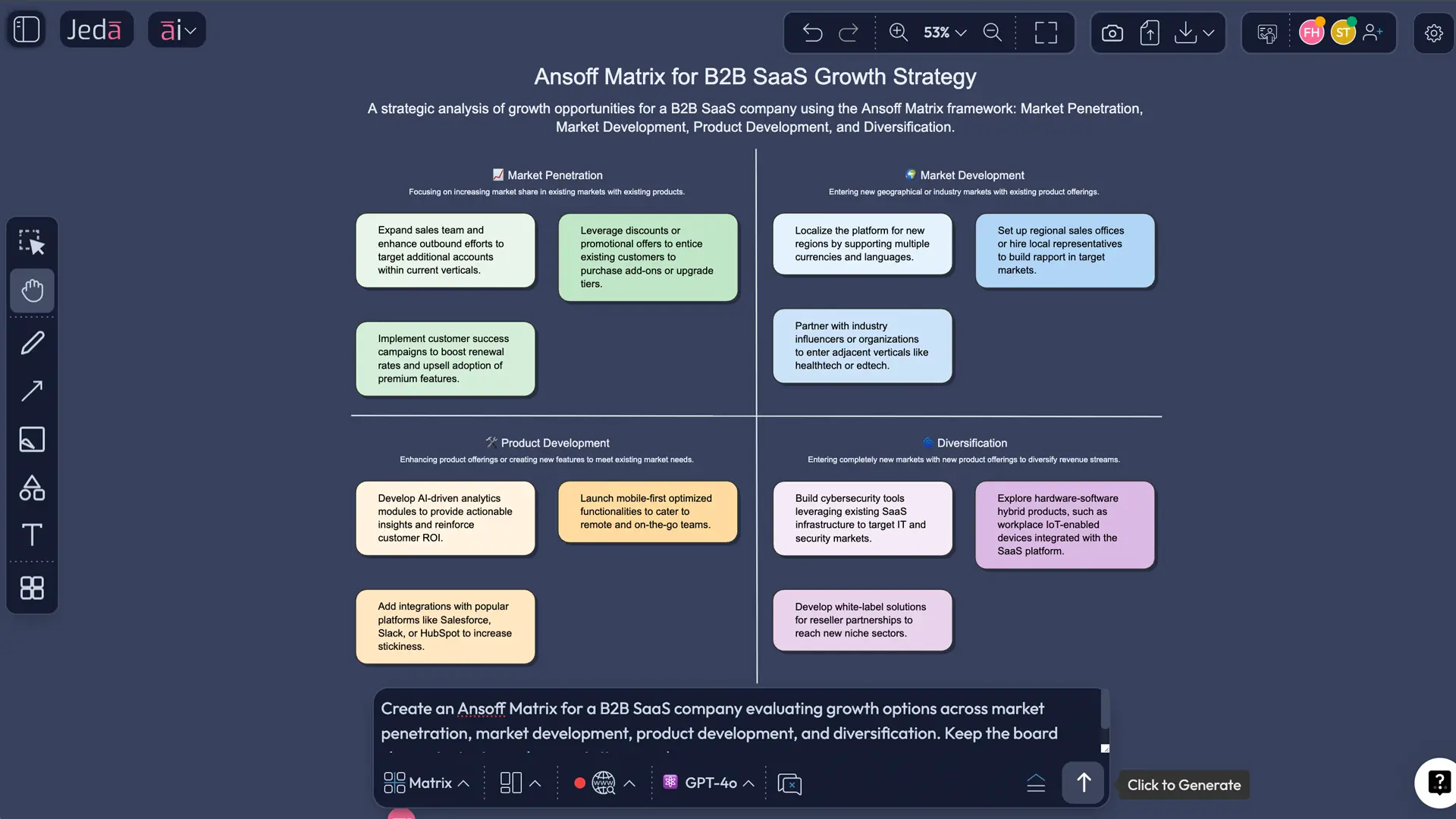
The Ansoff Matrix—also called the Product/Market Expansion Grid—is a classic growth framework introduced by H. Igor Ansoff in 1957. It helps teams evaluate four strategic paths based on whether products and markets are existing or new: market penetration, market development, product development, and diversification.
That structure still works. The problem is execution.
A manual matrix often ends up filled with generic phrases like “expand globally” or “launch something new.” Jeda.ai helps you go further by turning the framework into a live AI Workspace where you can organize options, pressure-test assumptions, and collaborate in one place.
Why use Ansoff Matrix with AI instead of doing it manually?
Manual matrices are fine for a classroom exercise. Real planning is messier. Teams need context, trade-offs, and room to edit together. Jeda.ai turns the framework from a static slide into an editable Visual AI workspace.
- Faster first draft
Generate a structured Ansoff Matrix in minutes instead of building the grid from scratch.
- Sharper risk framing
AI helps surface assumptions, constraints, and blind spots across all four growth directions.
- Team-ready collaboration
Use the Jeda.ai AI Whiteboard so strategy, product, and marketing can edit the same visual together.
- Evidence-backed thinking
Bring in notes, market inputs, or prior planning context to reduce hand-wavy quadrant filling.
- Better scenario coverage
Extend each quadrant and compare alternative growth paths before committing budget.
- Cleaner deliverables
What starts as a brainstorm becomes a polished strategic artifact inside the same AI Workspace.
A manual board usually captures what people already believe. An AI-supported board makes the team explain why a move is safer, faster, or more realistic. That’s the difference.
When should you use it—and when should you not?
Use the Ansoff Matrix when the conversation is about growth direction:
- Should we sell more of the current product in the current market?
- Should we take the same offer into a new segment or geography?
- Should we build something new for current customers?
- Are we underestimating the risk of diversification?
It is useful for strategy consultants, founders, product managers, marketing teams, business analysts, and business leaders. Those roles already live in uncertainty. A shared AI Whiteboard helps them make the discussion visible.
Don’t force the framework into the wrong job. If you’re prioritizing features, use a prioritization model. If you’re diagnosing industry pressure, use Porter’s Five Forces with AI. If you’re scanning macro shifts, use PESTEL Analysis with AI. And if you want a broader place to plan, start in Jeda.ai’s AI Whiteboard.
How to create an Ansoff Matrix in Jeda.ai
Because this is a matrix framework and the recipe is available, the fastest route is the AI Menu first. Then the Prompt Bar. Both work.
Method 1: Recipe Matrix
Use the built-in matrix recipe when you want structure without extra setup.
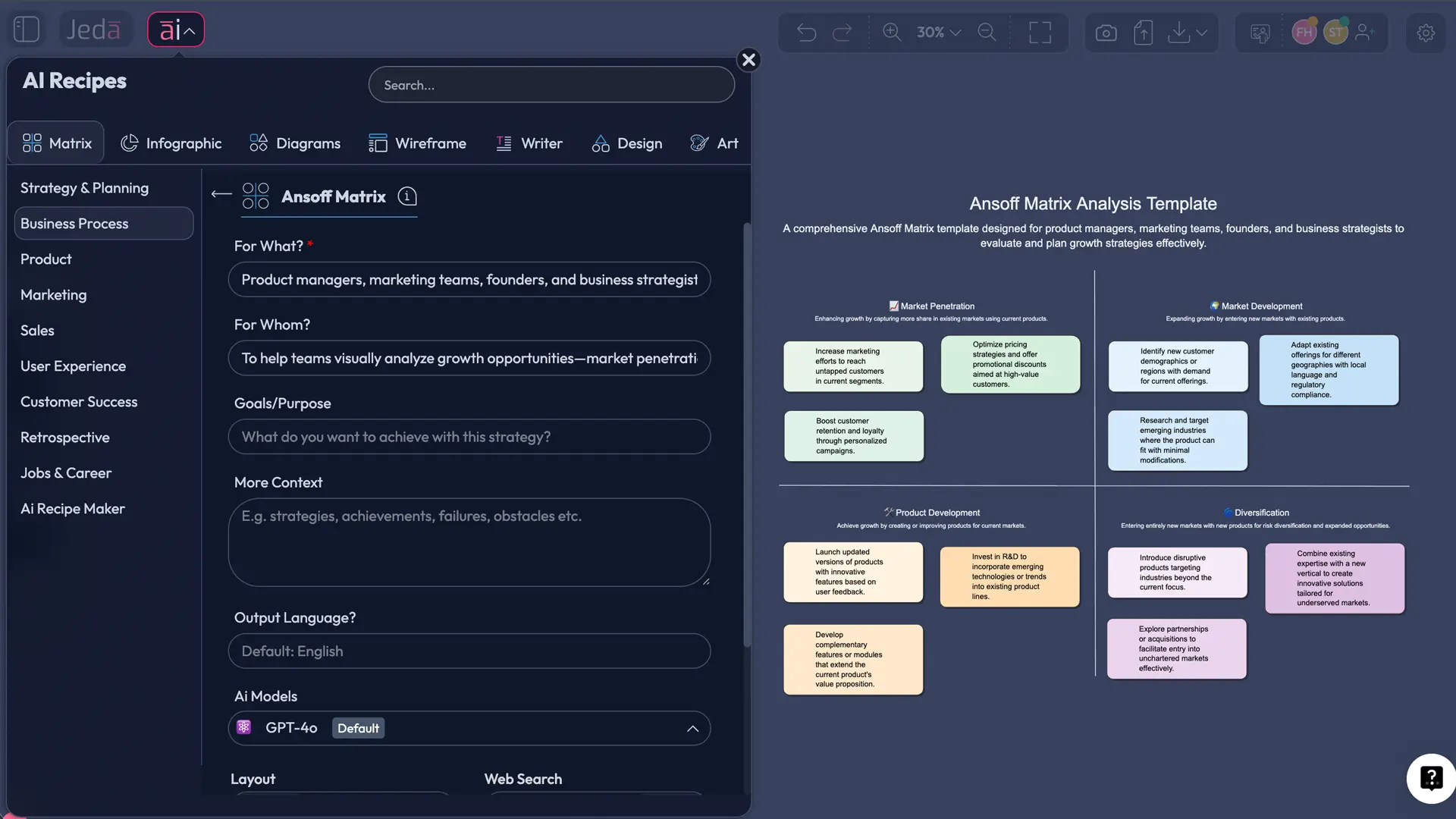
- Open AI Menu
Click AI Menu from the top-left corner of the canvas to access Jeda.ai’s recipe library.
- Choose Matrix Recipes
Select the Matrix recipe category because the Ansoff Matrix is a structured growth framework.
- Select the Ansoff Matrix recipe
Pick the Ansoff Matrix template so the product-market grid is generated in the correct format.
- Enter your business context
Add the company, product line, target market, growth challenge, and any known constraints.
- Generate the matrix
Click Generate and let Jeda.ai build the board with the four quadrants.
- Review and refine
Edit sticky notes, remove weak options, and shape the board into a realistic growth discussion.
Method 2: Prompt Bar
Use the Prompt Bar when you want more control over framing, detail, and scenario language.
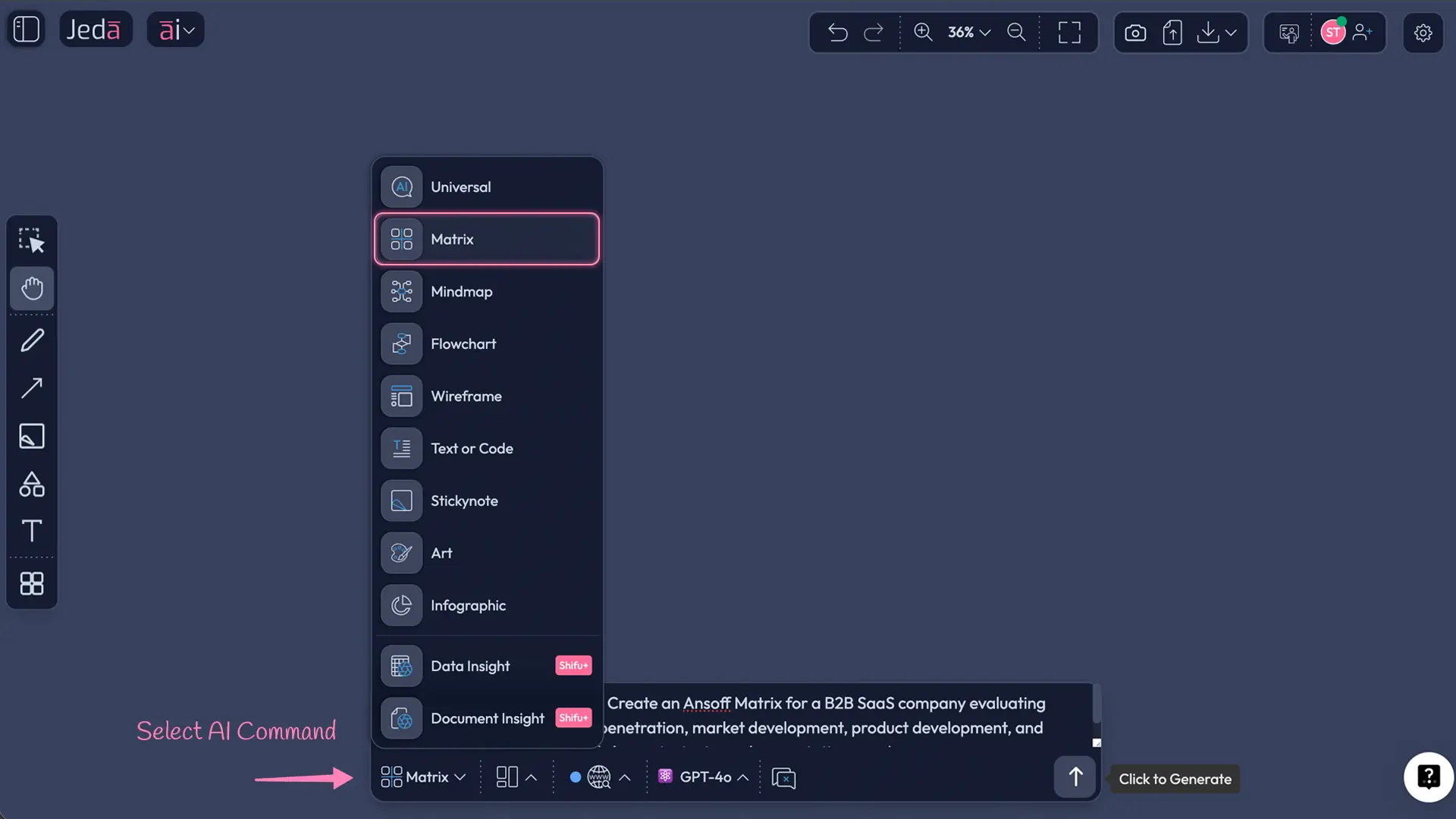
- Open the Prompt Bar
At the bottom of the canvas, open the Prompt Bar inside Jeda.ai.
- Select the Matrix command
Choose Matrix so the output is generated as a structured quadrant board.
- Describe the business problem
Write a prompt with the company type, current products, current markets, growth horizon, and key constraints.
- Generate the board
Press Enter to create the first version of the Ansoff Matrix inside the AI Workspace.
- Edit and align
Review each quadrant with stakeholders and tighten the board into testable growth options.
A prompt like this works well:
Create an Ansoff Matrix for a DTC skincare brand with strong domestic sales, limited retail distribution, and interest in GCC expansion. Compare growth options, risks, and likely resource demands across all four quadrants.
After generation, tap the AI+ button to extend the board. Use AI+ to deepen the matrix and continue the analysis inside the same board. Then use Vision Transform if you want to convert the matrix into a roadmap, diagram, or mind map.
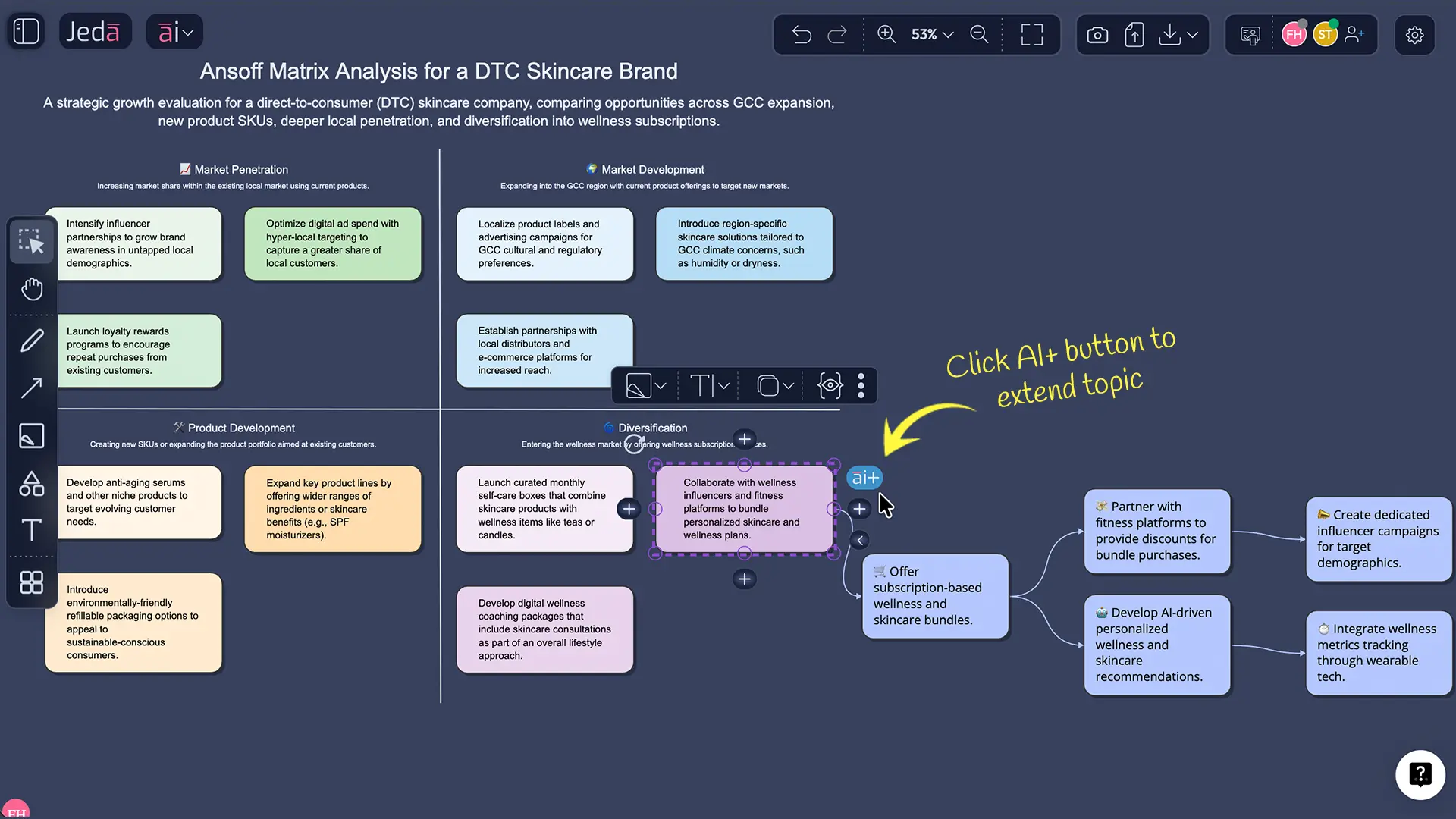
Ansoff Matrix with AI example: a realistic growth discussion
Suppose a B2B SaaS company sells workflow automation software to mid-sized HR teams and wants its next growth move for the next 12 months.
A weak session says:
- market penetration = sell more
- market development = go abroad
- product development = add AI features
- diversification = build something new
That isn’t strategy. That’s label-making.
A better Jeda.ai board forces each quadrant to answer three things: what the move is, why it could work, and what would likely break first.
The matrix does not tell you which box is “right.” It helps you compare the distance from today’s capabilities. A team that is strong in product delivery but weak in channel expansion may prefer product development over market development. Another team might see the opposite.
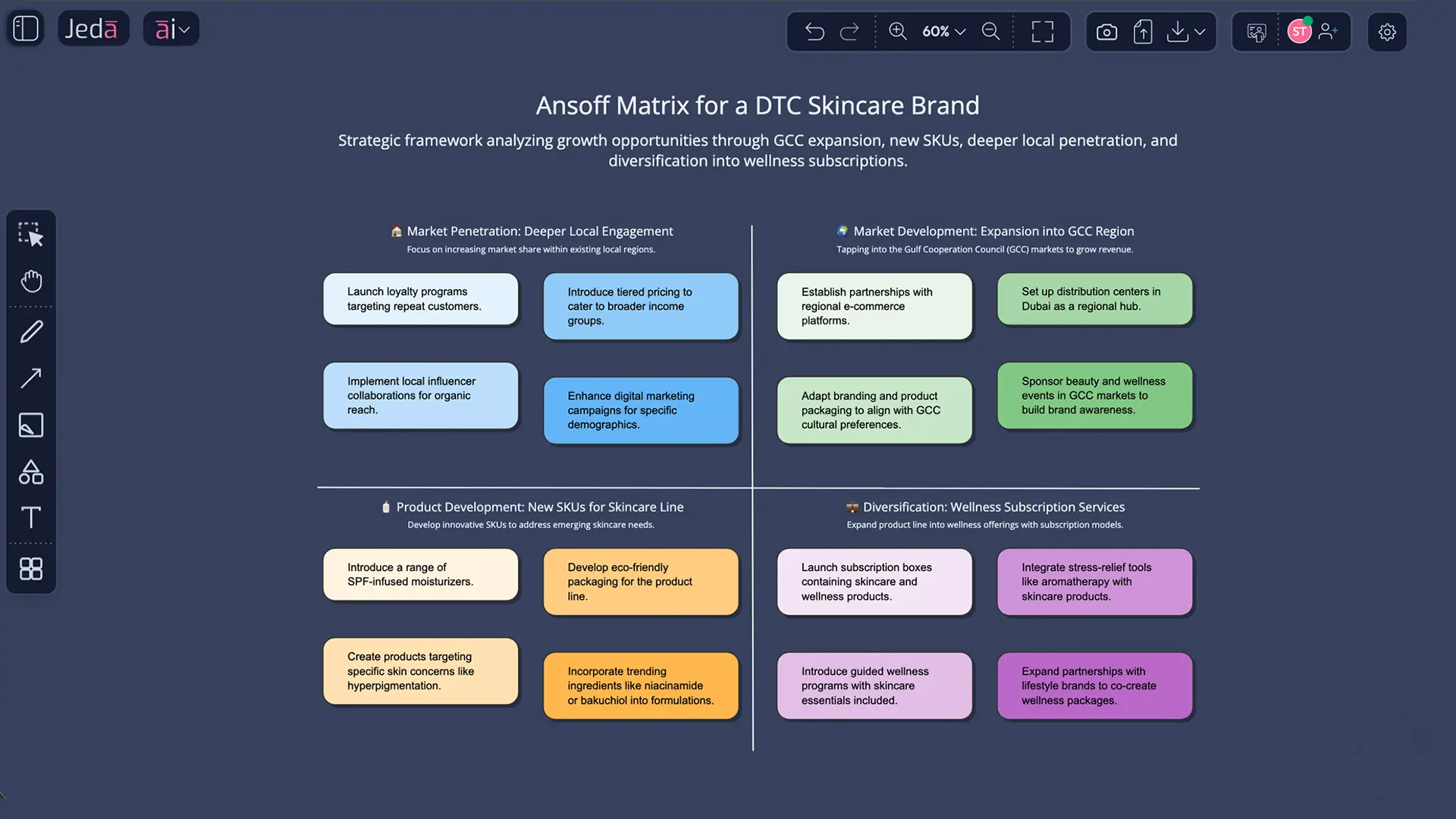
Best practices for a stronger Ansoff Matrix
Common mistakes to avoid
Treating all quadrants as equally attractive. They are not. Diversification usually carries the highest uncertainty.
Using the matrix without a time horizon. A move that makes sense in 24 months may fail in the next 90 days.
Confusing new features with new products. Incremental feature work is not always product development in the strategic sense.
Ignoring channel and capability constraints. New market entry looks elegant until compliance, localization, and support costs show up.
Stopping at the matrix. The board should lead to a decision, experiment, or follow-up framework.
Jeda.ai compared with the usual planning mess
Many teams still compare growth options in spreadsheets, docs, and generic whiteboards. That works until the assumptions disappear and nobody remembers why Quadrant B looked smarter last Tuesday.
| Speed to first draft | Strategic depth | Collaborative editing | Best for | |
|---|---|---|---|---|
| Jeda.ai | Minutes | High | ✓ | Growth analysis in an AI Workspace |
| Spreadsheet | Medium | Low | Limited | Simple comparison logs |
| Blank whiteboard | Slow | Depends on facilitator | ✓ | Freeform workshops |
| AI chat only | Fast | Medium | ✗ | Idea generation without a shared visual |
Jeda.ai gives you the speed of AI, the structure of a real matrix, and the editability of a live AI Whiteboard inside the same AI Workspace. No tool hopping.
Frequently asked questions
- What is Ansoff Matrix with AI used for?
- Ansoff Matrix with AI is used to compare business growth options across four paths: market penetration, market development, product development, and diversification. AI speeds up structure, surfaces risks, and helps teams move from vague ideas to a clearer strategic discussion.
- Who should use an Ansoff Matrix in Jeda.ai?
- Strategy consultants, founders, product managers, marketing teams, business analysts, and business leaders can all use it. It works best for teams deciding how to grow, enter new segments, expand geography, or evaluate whether new product bets are worth the risk.
- Is the Ansoff Matrix still relevant today?
- Yes. The framework is old, but the problem is not. Teams still need a simple way to compare growth routes. What changes today is speed and depth: AI helps populate, challenge, and extend the matrix faster than manual workshops usually can.
- What makes Jeda.ai useful for this framework?
- Jeda.ai combines a structured Matrix command, recipe-based generation, real-time editing, AI+ extension, and Vision Transform in one AI Workspace. You can generate the board, refine it collaboratively, and convert it into another visual format without rebuilding it.
- Should beginners use the recipe or the Prompt Bar?
- Beginners should usually start with the recipe because it gives them the correct matrix structure immediately. The Prompt Bar is better when you already know the business context and want more control over the wording, scope, and scenario framing.
- Can I extend my Ansoff Matrix after it is generated?
- Yes. After the initial board is created, you can tap the AI+ button to extend the matrix with more detail. The point is continuation and depth inside the same board, not starting over with another disconnected prompt.
- Can I turn the matrix into another visual?
- Yes. With Vision Transform, you can convert the matrix into another visual format such as a roadmap, diagram, or mind map. That helps when the team has finished analysis and now needs to communicate actions or dependencies more clearly.
- How detailed should each quadrant be?
- Each quadrant should include at least one concrete move, a short rationale, and the main risk or constraint. If the board only contains labels like ‘go global’ or ‘launch AI,’ it is too shallow to support a serious strategy decision.
- What should I do after finishing the Ansoff Matrix?
- Use it as a bridge, not a destination. Pick the strongest one or two growth options, then move into prioritization, market analysis, roadmap planning, or a deeper framework such as PESTEL, Porter’s Five Forces, or a business model review inside Jeda.ai.
- Can I export my Ansoff Matrix from Jeda.ai?
- Yes. Jeda.ai supports export to PNG, SVG, and PDF. That makes it easy to share the finished board with clients or internal stakeholders while keeping the editable master version inside your AI Whiteboard and AI Workspace.
Sources & Further Reading
- [1]
Ansoff, H. Igor (1957) . “Strategies for Diversification” Harvard Business Review.
View Source ↗ - [2]
Ansoff, H. Igor (1965) . “Corporate Strategy” McGraw-Hill.
View Source ↗ - [3]
Meldrum, Michael and McDonald, Malcolm (1995) . “The Ansoff Matrix” Key Marketing Concepts, Palgrave Macmillan.
View Source ↗ - [4]
Guerras-Martín, Luis Ángel; Madhok, Anoop; Montoro-Sánchez, Ángeles (2014) . “The evolution of strategic management research: Recent trends and current directions” Business Research Quarterly.
View Source ↗ - [5]
Heracleous, Loizos (2010) . “The strategic management field” Strategy and Organization, Cambridge University Press.
View Source ↗
Start Your Ansoff Matrix with AI Today
Join over 150,000+ users who use Jeda.ai to turn fuzzy strategy discussions into decision-ready visuals inside one AI Workspace.
Try Free Template