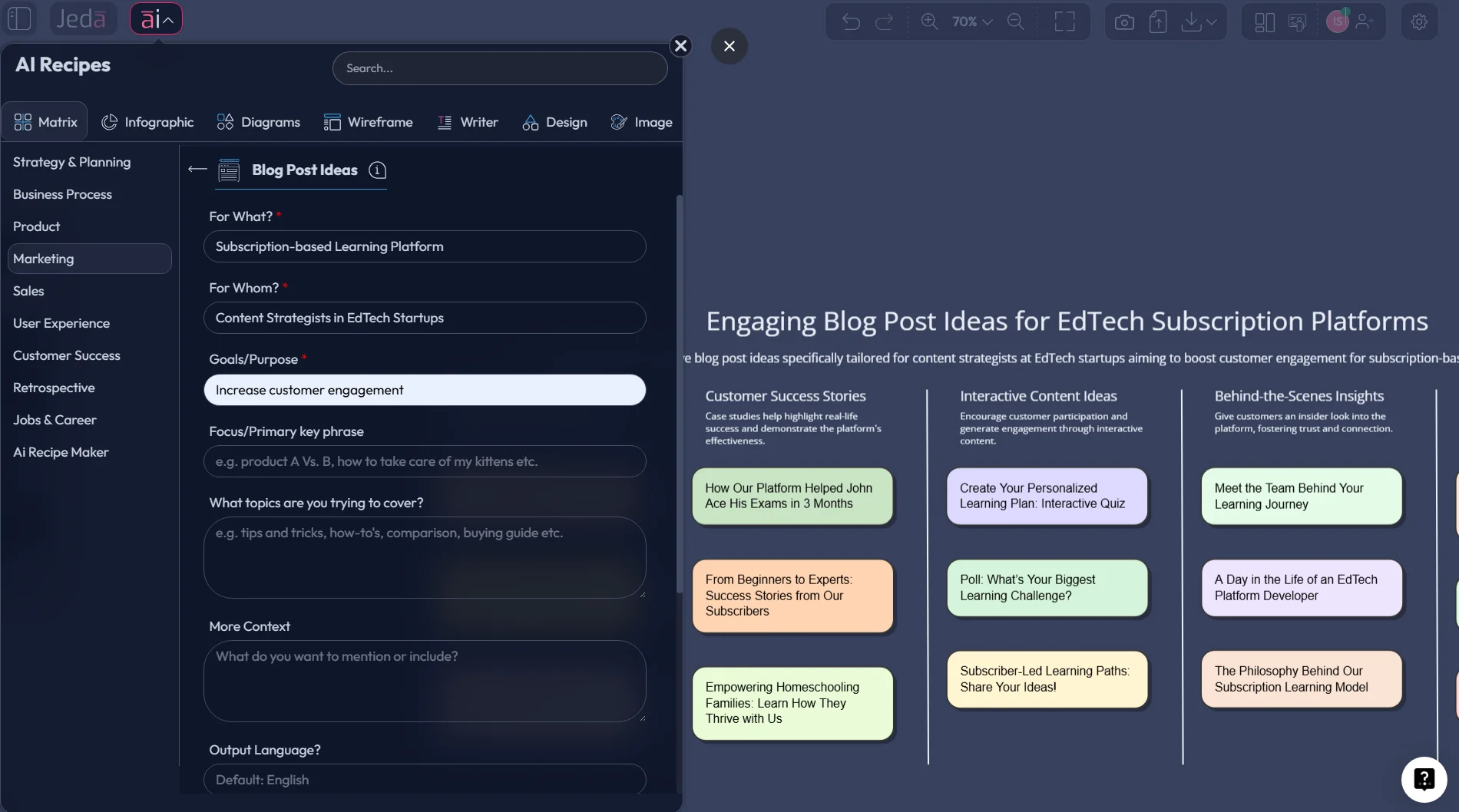
Blog post ideas with AI can save you from the blank-page stare, but only if the output is structured. That’s the real issue. Most tools spit out a pile of titles, you skim them, save two, forget the rest, and call it “brainstorming.” Jeda.ai takes a better route inside an AI Workspace and AI Whiteboard: it turns ideation into a matrix you can expand, edit, organize, and reuse with your team.
And that matters now. Google has been clear that AI-assisted content is allowed, but content created mainly to game rankings is not; what wins is original, people-first content with clear expertise and useful depth (Google Search Central, 2022; Google Search Central, 2023). Orbit Media’s 2025 blogging survey also found that the average blog post still takes just under three and a half hours to create, and stronger results often correlate with deeper articles and measured use of AI rather than full autopilot writing (Orbit Media, 2025). So yes, use AI. Just don’t let it drive the bus into a ditch.
What are blog post ideas with AI?
Blog post ideas with AI are topic suggestions generated from prompts, audience inputs, keywords, business goals, and content patterns. Simple enough. But the good version is not a random headline machine. The good version maps ideas to intent, audience pain, funnel stage, and format so you know what to publish first.
That’s where Jeda.ai stands out. Instead of dumping ideas into a dead-end text box, Jeda.ai gives you an AI Workspace where those ideas become editable visual structures. You can generate them as a matrix, shift them around on an AI Whiteboard, extend the strongest clusters, and convert them into other visual formats when planning gets more serious.
Plenty of content tools already frame ideation around keywords, audience prompts, and question discovery. HubSpot positions its generator around search trends, audience interests, and follow-on drafting. Hootsuite emphasizes keyword-led inputs and summaries. Semrush pushes topic research, question mining, and competitor gap analysis. Ahrefs leans hard into traffic potential instead of pure inspiration. That’s the pattern across the SERP, and honestly, it makes sense (HubSpot, 2026; Hootsuite, 2026; Semrush, 2026; Ahrefs, 2024).
The weak spot? Most of them still lead you back to a list. A matrix is better.
Why blog post ideas with AI work better in a matrix
A flat list gives you options. A matrix gives you strategy.
When you create blog post ideas with AI in a matrix, you can see patterns fast: which audience pain points are over-covered, which intent buckets are empty, which themes deserve a cluster, and which ideas belong near revenue instead of vanity traffic. That’s a much better fit for marketing teams, startup founders, business analysts, product managers, and strategy consultants who need content to do a job.
Jeda.ai is especially strong here because the output stays editable inside a Visual AI canvas. You’re not stuck with one burst of generated text. You can revise headings, regroup ideas, add sticky notes, collaborate live, and build the rest of your content workflow without jumping tools.
- See gaps fast
A matrix reveals weak topic coverage, missing intent buckets, and thin content clusters in one glance.
- Prompt with SEO context
Use keywords, audience pains, and competitor themes so the ideas are search-aware, not random.
- Expand winning ideas
Use the AI+ button to deepen the best cells into subtopics, FAQs, title angles, and supporting content.
- Convert planning formats
Use Vision Transform to turn the matrix into a mind map, diagram, or stickynote board for planning.
- Collaborate in context
Your editor, marketer, founder, or strategist can review and reshape ideas directly on the board.
- Work from recipes
Jeda.ai combines visual generation with 300+ strategic frameworks so your ideation starts structured.
Here’s the blunt version: if your AI gives you 40 titles and you can’t tell which 6 deserve the next month of effort, the tool didn’t solve the problem. It just made a prettier mess.
How to create blog post ideas with AI in Jeda.ai
This page treats blog ideation as a matrix because that’s the cleanest way to plan content that can actually turn into clusters, briefs, and editorial decisions.
Method 1: Recipe Matrix
This is the recommended route when you want structure from the first click.
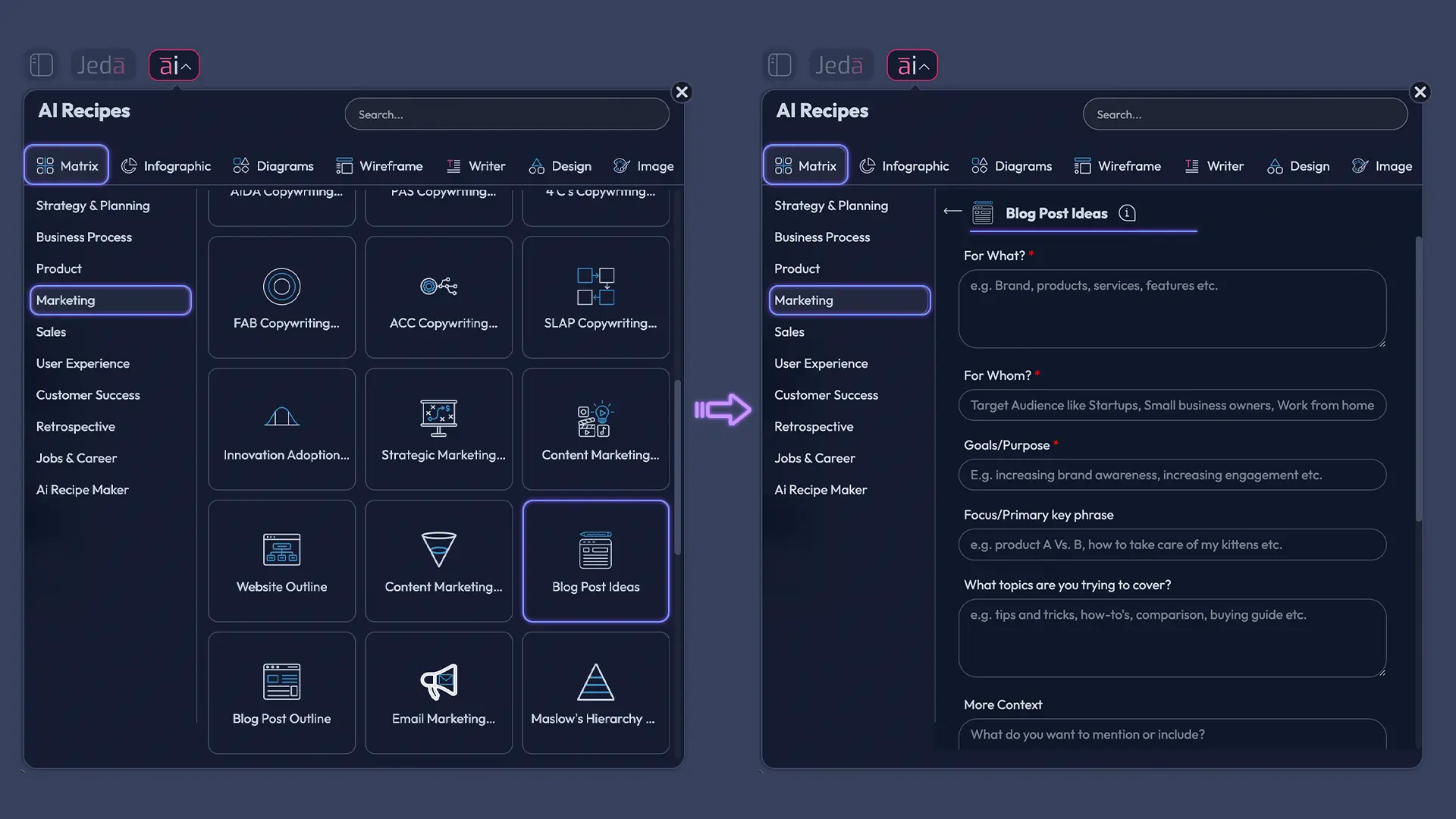
- Open the AI Menu and choose the Blog Post Ideas matrix recipe
Start in your Jeda.ai workspace, open the AI Menu, go to the recipe library, and select the Blog Post Ideas matrix recipe.
- Add your working context
Enter your niche, audience, business goal, primary topic, and any search phrases or subthemes you want the matrix to consider.
- Generate the first matrix
Let Jeda.ai create grouped blog ideas instead of one long list, so your ideas appear by angle, intent, or audience problem.
- Review the strongest cells
Look for cells with clear relevance, strong specificity, and enough depth to become a full article or cluster.
- Use AI+ to deepen the winners
Tap the AI+ button on the generated matrix to expand the most promising boxes into title variants, subtopics, FAQs, and deeper supporting angles.
A good input looks like this:
Method 2: Prompt Bar
You can also create blog post ideas with AI from the Prompt Bar at the bottom of the canvas.
Open the Prompt Bar, choose the Matrix command, and describe the kind of board you want. The best prompts include four things: who the audience is, what the topic area is, what business outcome matters, and how the ideas should be organized. Then press Enter to generate.
A practical prompt would be: “Generate a matrix of 24 blog post ideas for a cybersecurity startup. Use rows for audience pain points and columns for post types such as how-to, comparison, checklist, case study, myth-busting, and trend analysis. Keep the ideas specific enough to brief writers immediately.”
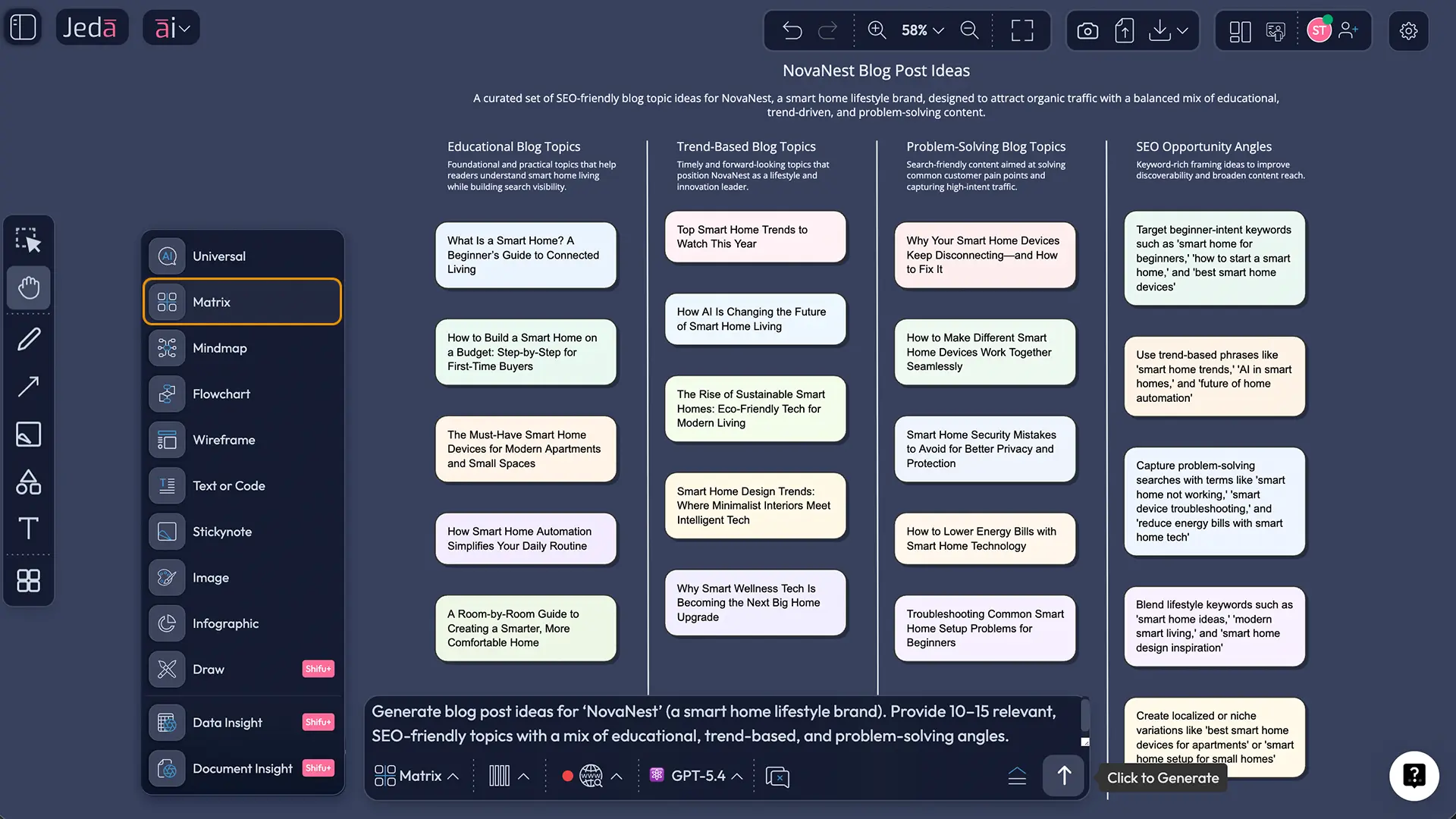
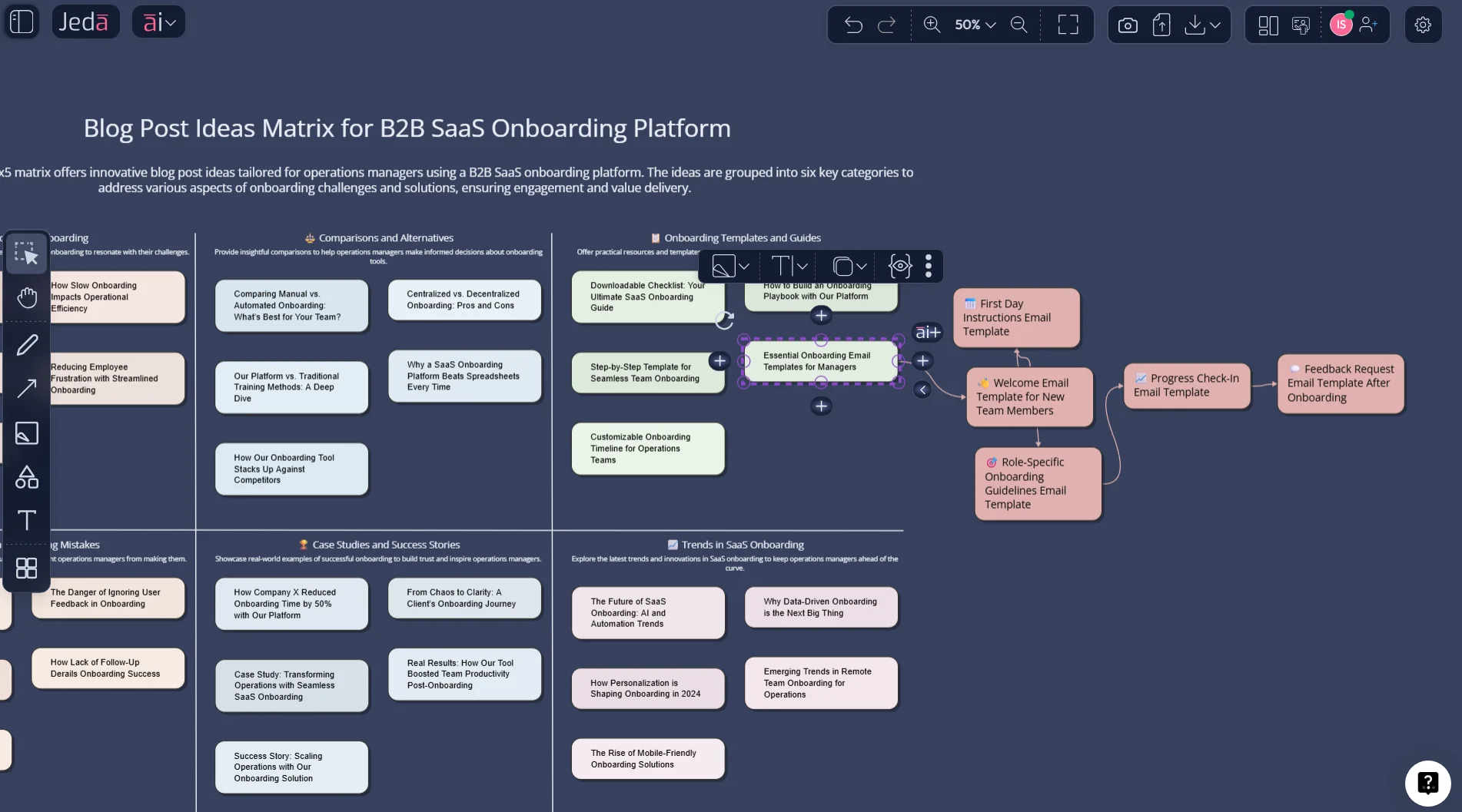
After either method, use the AI+ button to deepen what’s already on the board. That distinction matters. AI+ works best as an expansion move. It’s ideal for turning a promising idea cell into related headlines, content questions, angle variations, and follow-up topics. It is not the place to give a brand-new, highly specific instruction from scratch.
Then, when planning shifts from ideation to structure, use Vision Transform. Convert the matrix into a Mindmap to see topic clusters, or switch it into Stickynotes if your team wants a looser editorial sorting session on the AI Whiteboard.
The matrix structure that keeps your ideas useful
Most teams don’t need more ideas. They need better sorting logic.
A strong matrix for blog post ideas with AI usually has one axis for audience need and another for content angle. That gives you a practical grid such as this:
- Rows: awareness pain points, operational blockers, evaluation questions, implementation issues, ROI concerns, trend monitoring
- Columns: how-to, comparison, checklist, mistake, case study, opinion/trend
That single setup gives you 36 possible article angles before you’ve even touched AI+. Not bad.
This works because it forces diversity. You stop publishing six versions of the same “tips” article and start seeing the actual editorial mix: tutorials, bottom-funnel comparisons, mid-funnel case studies, objection-handling posts, and thought leadership.
And if you want to go one step further, add color labels for funnel stage on the board. You’ll instantly see whether your content plan is all awareness fluff, all late-stage sales content, or something balanced.
30 blog post ideas you can generate from one Jeda.ai matrix
Let’s make this real. Say you run content for a B2B SaaS company, agency, or consulting brand. One matrix in Jeda.ai can easily produce a month or two of usable ideas.
Pain-point articles
- How to reduce '[process bottleneck]' without adding new headcount
- Why '[audience role]' struggles with '[task]' and how to fix it
- The hidden cost of managing '[workflow]' manually
- How teams can stop wasting time on '[repetitive task]'
- What slows down '[business outcome]' more than most teams realize
Comparison posts
- '[Approach A]' vs. '[Approach B]': which works better for '[audience]'?
- '[Tool 1]' vs. '[Tool 2]' for fast-moving teams
- In-house vs. outsourced '[function]': what makes sense now?
- Manual planning vs. AI-assisted planning: what actually changes?
- Traditional whiteboarding vs. AI Whiteboard workflows for content teams
Checklist and template posts
- The '[topic]' checklist every '[audience]' should use
- A reusable template for planning '[campaign or workflow]'
- Your pre-launch checklist for '[initiative]'
- A one-page brief template for '[content type]'
- The audit template we use before publishing '[asset]'
Mistake-focused posts
- Seven mistakes teams make when planning '[topic]'
- Why most '[initiative]' content fails before it ships
- The biggest myths about '[topic]' that waste your budget
- What not to do when targeting '[persona]'
- The headline mistakes that quietly kill CTR
Case study and proof posts
- How one '[company type]' improved '[metric]' with a better workflow
- A before-and-after breakdown of fixing '[problem]'
- What we learned from testing '[strategy]' for 30 days
- Inside our process for planning '[content program]'
- How a small team built a repeatable '[marketing or ops]' system
Trend and opinion posts
- What changes in '[industry]' mean for '[audience]' this year
- Why '[popular belief]' is losing relevance
- The next big shift in '[topic]' and how to prepare
- What AI is getting right and wrong about '[niche topic]'
- The opinion no one wants to say about '[industry habit]'
That’s just one pass. Use AI+ on any single cell and Jeda.ai can turn one idea into title variants, article sections, related FAQs, supporting examples, and adjacent follow-up pieces. Now you’re not just generating blog post ideas with AI. You’re building a publishable topic cluster.
How to tell which AI-generated ideas are worth keeping
Not every idea deserves a draft. Some are too broad. Some are too cute. Some sound smart and do absolutely nothing.
Use this quick filter inside Jeda.ai before you move an idea into production:
If the answer is “not really” to most of those, throw it out. Brutal? A little. Useful? Very.
And once you have the board, connect it to related planning flows such as Content Marketing Strategies with AI, Target Audience Analysis with AI, or Social Media Campaign Strategy with AI. That is where a one-off brainstorm starts behaving like a real content system.
Best practices for blog post ideas with AI
The strongest boards usually follow three rules.
First, feed the system constraints. Vague prompts create vague ideas. Mention your audience, market, product or service, goals, tone, and preferred article types. Hootsuite, HubSpot, and Semrush all push versions of this same principle: better inputs create better topic suggestions (Hootsuite, 2026; HubSpot, 2026; Semrush, 2026).
Second, use AI for ideation and expansion, not blind publication. Google’s guidance is pretty direct here: appropriate use of AI is allowed, but the goal still needs to be original, high-quality, people-first content with E-E-A-T signals and a clear “who, how, and why” behind production (Google Search Central, 2023).
Third, aim for clusters instead of isolated posts. Ahrefs makes this point from a traffic angle: the best ideas are tied to search demand and content opportunity, not random inspiration (Ahrefs, 2024). In practice, that means one board in Jeda.ai should give you pillar ideas, supporting questions, comparison posts, objection posts, and template-led content—not five disconnected titles.
Common mistakes to avoid
Here’s where people fumble it.
They ask for ideas that are too broad. They skip the audience. They judge the board by how clever the titles sound instead of how usable they are. And then they wonder why the content calendar looks busy but the pipeline looks sleepy.
Another common mistake is using AI to summarize what already ranks without adding anything new. Google has warned against creating search-engine-first content that simply rehashes existing pages without extra value (Google Search Central, 2022). Orbit Media’s data points in the same direction: human judgment, stronger editing, richer detail, analytics, and original inputs still correlate with better results than total AI autopilot (Orbit Media, 2025).
So use the machine for range. Keep the editorial brain for selection.
Frequently asked questions about blog post ideas with AI
- Can AI really help me find better blog post ideas?
- Yes, if you use it for structure rather than random inspiration. AI is best at clustering topics, spotting variations, and expanding promising angles. It becomes much more useful when you feed it audience context, keyword direction, and business goals instead of asking for generic ideas.
- What should I include in my prompt for better results?
- Include your niche, target audience, business goal, primary topic, and preferred article types. Add an organizational rule too, such as funnel stage, audience pain point, or post format. That extra structure gives the AI enough context to produce ideas you can actually brief and publish.
- Should I use a list or a matrix for content ideation?
- Use a list when you want fast inspiration. Use a matrix when you want planning logic. A matrix helps you see gaps, balance formats, and build topic clusters. For teams, it’s usually the more practical format because it supports editorial decisions instead of just dumping options.
- What does the AI+ button do after the matrix is generated?
- AI+ deepens what is already on the board. It can expand strong idea cells into subtopics, title variations, FAQs, and supporting angles. It works best as an extension step after generation, not as a place for highly detailed new instructions that should have gone into the original prompt.
- Can I turn the matrix into another format in Jeda.ai?
- Yes. After generating blog post ideas with AI, you can use Vision Transform to convert the board into a Mindmap, Diagram, Flowchart, or Stickynotes format. That makes it easier to switch from brainstorming to content cluster planning or editorial workflow discussions on the same canvas.
- Is AI-generated ideation safe for SEO?
- It can be, if you use AI as an assistant rather than a spam machine. Google says AI use is not against its guidelines by itself. What matters is whether the final content is original, useful, people-first, and clearly designed to help readers rather than manipulate rankings.
- How many ideas should I generate in one session?
- Usually 20 to 40 is enough for a first pass. That gives you enough range to see patterns without drowning in options. Once the first matrix is on the board, use AI+ to deepen the top cells instead of generating another giant batch from scratch.
- Who benefits most from blog post ideas with AI?
- Content marketers, founders, agencies, consultants, product marketers, and small editorial teams usually get the fastest payoff. They often need more ideas than time. AI shortens the research and brainstorming stage, while visual structure helps them move from ideation to planning without losing context.
- Why use Jeda.ai instead of a basic blog topic generator?
- Because Jeda.ai doesn’t trap you in a one-shot generator. It gives you an editable AI Workspace and AI Whiteboard where ideas can be sorted, extended, regrouped, discussed, and converted into other visual planning formats. That makes it more useful for real content operations, not just quick inspiration.
- Can I build a full content cluster from one generated board?
- Absolutely. That is one of the best reasons to use a matrix. Start with a core topic, generate grouped ideas, select the strongest cells, and then use AI+ to build supporting questions, subtopics, comparisons, and FAQ content. One board can easily become a pillar-and-cluster plan.
Sources and further reading
You don’t need to guess your way through this. The core play is pretty well supported: generate ideas from keyword and audience inputs, organize them around questions and gaps, and keep the final content useful for real humans.
- [1]
Google Search Central (2022) . “What creators should know about Google's August 2022 helpful content update” Google for Developers.
View Source ↗ - [2]
Google Search Central (2023) . “Google Search's guidance about AI-generated content” Google for Developers.
View Source ↗ - [3]
Andy Crestodina (2025) . “2025 Blogging Statistics: Blogger Data Shows Trends and Insights Into Blogging” Orbit Media.
View Source ↗ - [4]
HubSpot (2026) . “Blog Ideas Generator - Free AI Topics and Content” HubSpot.
View Source ↗ - [5]
Hootsuite (2026) . “Blog Ideas Generator [Free AI Tool]” Hootsuite.
View Source ↗ - [6]
Semrush (2026) . “75 Blog Ideas for Every Industry + How to Find More” Semrush Blog.
View Source ↗ - [7]
Si Quan Ong (2024) . “100 Blog Post Ideas to Get Traffic” Ahrefs Blog.
View Source ↗
Start Generating Blog Post Ideas with AI
Join over 150,000+ users who use Jeda.ai to turn rough topics into structured, editable content plans inside one AI Workspace.
Try Free Template