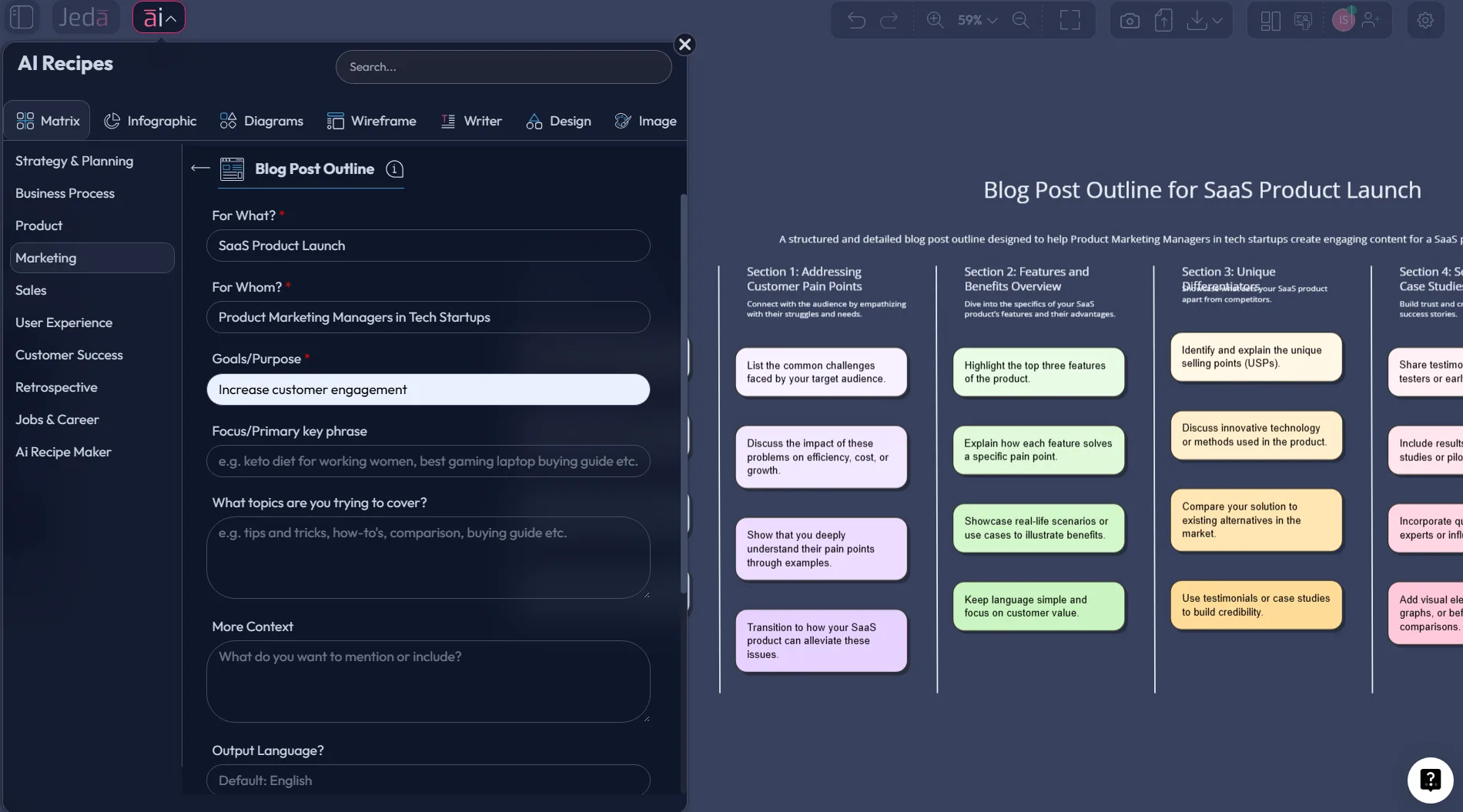
AI can write fast. That part is easy. The harder part is getting the structure right before the drafting starts. Blog Post Outline with AI is where smart content teams win or lose: not in the first paragraph, but in the plan behind it. A sharp outline keeps the argument tight, the SEO intent clear, and the final article far less likely to wander off into fluffy nonsense. Inside Jeda.ai, you can turn that planning phase into an editable visual workflow inside an AI Workspace and AI Whiteboard, then extend weak sections with AI instead of rewriting the whole piece from scratch.
And yes, that matters now more than ever. Recent guidance from Google continues to reward helpful, people-first content and clean article structure, while top-ranking outline guides increasingly stress search intent, direct-answer formatting, and stronger heading architecture. Jeda.ai brings that planning work into one visual system instead of leaving it scattered across docs, tabs, and random notes.
What is a blog post outline?
A blog post outline is a planning framework that maps the core argument, section order, heading hierarchy, supporting proof, and search intent of an article before drafting begins. University writing centers describe outlining as a way to organize ideas, clarify structure, and make the logic of a piece visible before the full draft is written. That logic still applies to marketing content. The only difference is that a modern blog outline also needs to account for keyword intent, snippet-ready headings, internal links, examples, and conversion paths.
So the outline is not busywork. It is the skeleton.
For content marketers, strategists, startup founders, and product teams, a strong outline usually answers six things early:
Why use Blog Post Outline with AI instead of outlining manually?
Because manual outlining tends to break in the same three places. First, the writer starts too early and structures too late. Second, keyword intent gets bolted on after the fact. Third, the team loses track of what belongs in the article versus what merely sounded clever in the moment.
AI helps, but only when the workflow is controlled.
The strongest pages ranking for blog outline queries now emphasize keyword research, search intent, SERP analysis, and section planning before drafting. That is the right order. Jeda.ai simply gives you a better surface for doing it. Instead of generating a one-shot wall of text and praying it is useful, you create a structured outline that stays editable.
- Visual structure first
Map H1, H2s, H3s, proof points, and CTA paths inside an editable matrix before a full draft exists.
- AI refinement on demand
Use the AI+ button to deepen weak sections, add examples, or expand subpoints without regenerating the whole outline.
- Intent-aware planning
Combine Web Search, prompt context, and article goals to shape an outline around what readers actually want.
- Easy angle testing
Spin multiple versions of the same article angle for beginners, executives, or product teams in the same board.
- Transform, don’t restart
Use Vision Transform to turn a matrix into a mind map, flowchart, or diagram when the article needs a different logic.
- Collaborative content planning
Review article structure with your team in a shared AI Whiteboard instead of emailing a stale Google Doc around.
The hidden advantage is editorial discipline. A visual outline makes it easier to spot duplicated sections, weak transitions, missing proof, and bloated ideas before the drafting phase gets expensive.
Why this topic matters in search right now
The current SERP for blog post outline queries is crowded, but predictable. It is led by practical guides from HubSpot, Ahrefs, Semrush, Siege Media, and AI-writing platforms. Most of them teach the mechanics well enough: choose a topic, research keywords, study the SERP, define an angle, and build the heading structure. Fair. But many stop at the document stage. They help you plan the post, yet they do not turn planning into an editable visual system for team review, iteration, or reuse.
That gap is where Jeda.ai has room to punch above its weight.
So no, this is not just another “how to outline” article. It is about building blog architecture that is easier to review, easier to improve, and much harder to derail.
How to create a Blog Post Outline with AI in Jeda.ai
Your note defines this as a Matrix recipe under the Marketing category, so this walkthrough follows that exact build path.
Method 1: Recipe Matrix
This is the cleanest route when you want the article structure to appear as a guided, editable board.
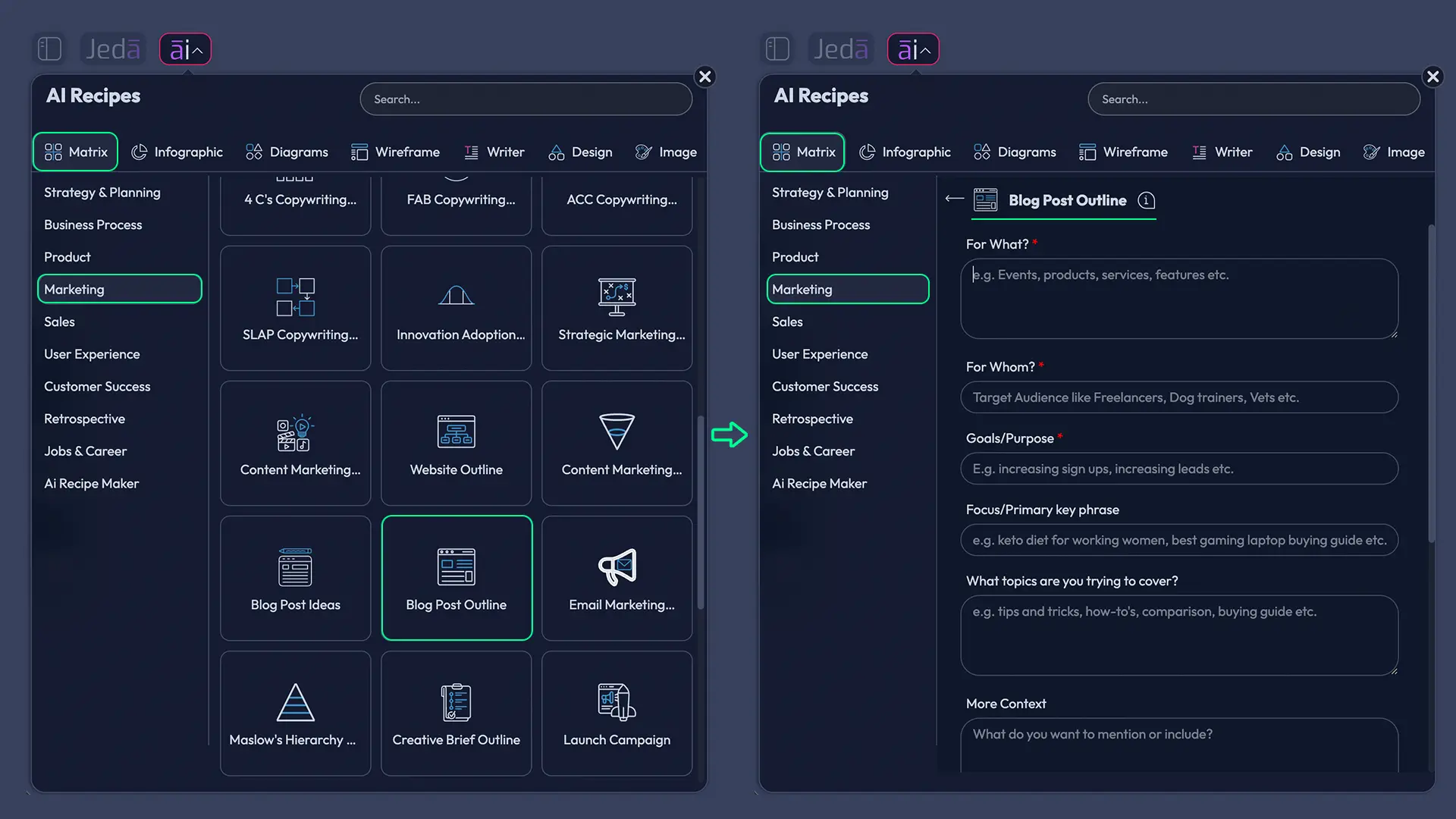
- Open the AI Menu
Click the AI Menu in the top-left corner of Jeda.ai and go to the Matrix Recipes area under the Marketing category.
- Choose the Blog Post Outline recipe
Select the Blog Post Outline recipe and fill in the guided fields such as topic, audience, article goal, tone, and any supporting context you already have.
- Generate the first outline board
Click Generate to create a structured matrix that maps the headline, section flow, talking points, supporting examples, and likely article direction.
- Audit the structure visually
Review the board for missing sections, duplicated ideas, weak logic, or areas that need stronger proof or clearer reader intent.
- Use AI+ to deepen sections
Select a section or smart shape and use the AI+ button to expand subpoints, add examples, strengthen arguments, or deepen the angle.
- Transform the output if needed
Use Vision Transform to convert the matrix into a mind map, diagram, or flowchart when you want to review narrative flow from another perspective.
Method 2: Prompt Bar
The Prompt Bar works better when you already know what article you want and just need Jeda.ai to structure it fast.
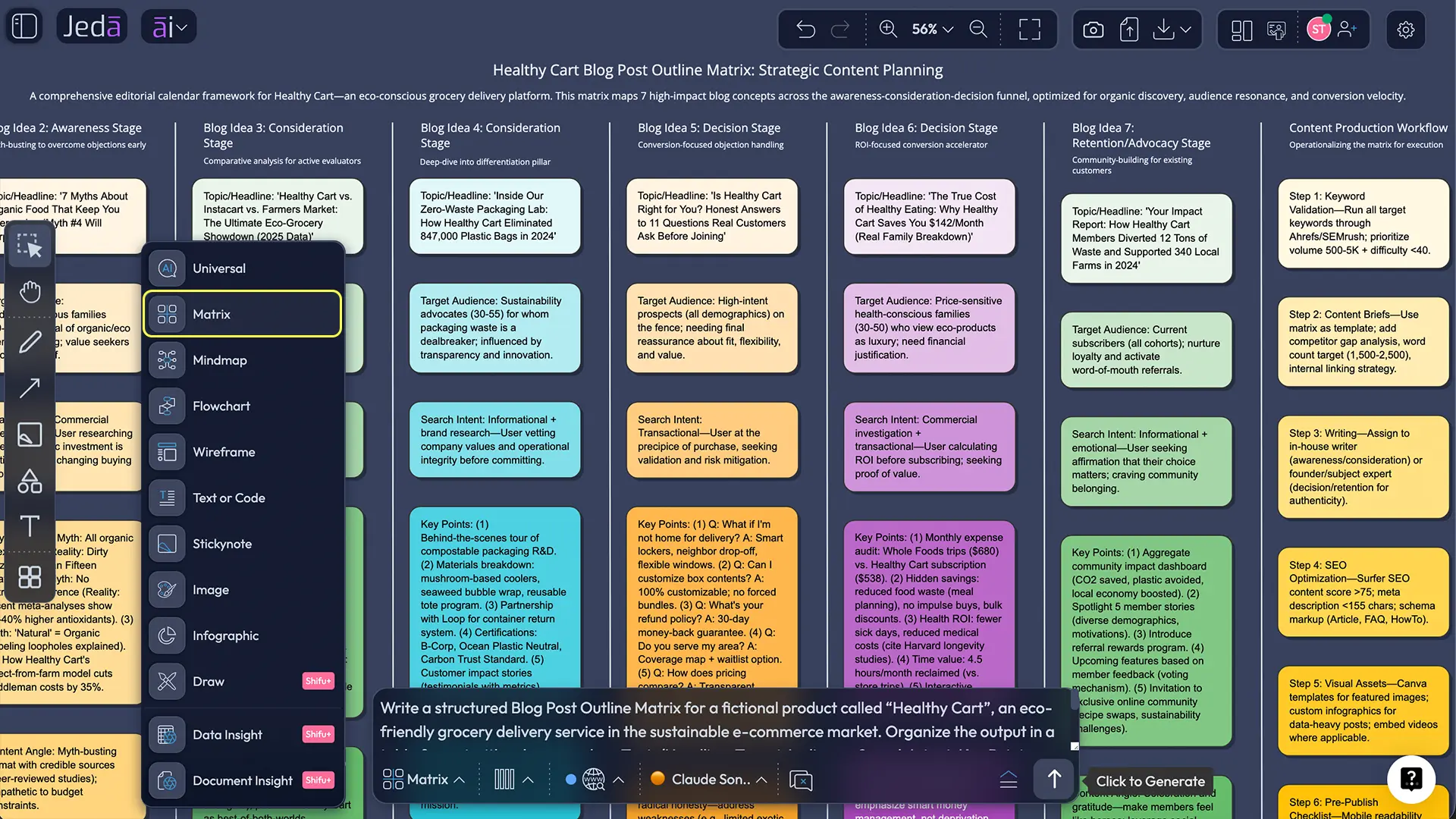
- Open the Prompt Bar at the bottom of the canvas.
- Select the Matrix command.
- Enter a prompt that includes the article topic, target reader, search intent, tone, and desired outcome.
- Generate the outline.
- Review the matrix sections and use AI+ to expand any thin area.
- Use Vision Transform if you want to convert the outline into a mind map for easier narrative review.
A solid Prompt Bar instruction looks like this in natural language:
What a strong AI-generated blog outline should include
A lot of outlines fail because they are too vague to guide writing and too polished to invite editing. Strange combo. They look finished while still being thin.
A useful outline inside Jeda.ai should contain these layers:
1. The article promise
What is the reader going to get, exactly? Not “learn about content strategy.” That says nothing. Better: “Build a publish-ready blog structure that aligns keyword intent, headings, proof, and CTA.”
2. Search intent and reader context
Top-ranking outline guides now start with keyword research and SERP review for a reason. Search intent shapes the outline before tone does.
3. Heading hierarchy
The outline should show the full article spine: H1, H2s, and selective H3s. If those sections do not logically stack, the draft will wobble later.
4. Evidence plan
What stats, examples, expert opinions, screenshots, or citations will you need? A blog outline is stronger when proof is planned before writing.
5. CTA logic
What should happen after the reader finishes the article? Visit a product page? Start a template? Compare tools? Good content teams decide that before the draft gets pretty.
6. Expansion zones
Mark which sections deserve AI+ expansion. These are usually examples, FAQs, comparison sections, objections, and practical steps.
A worked example: using Blog Post Outline with AI for a SaaS content team
Let’s make this less abstract.
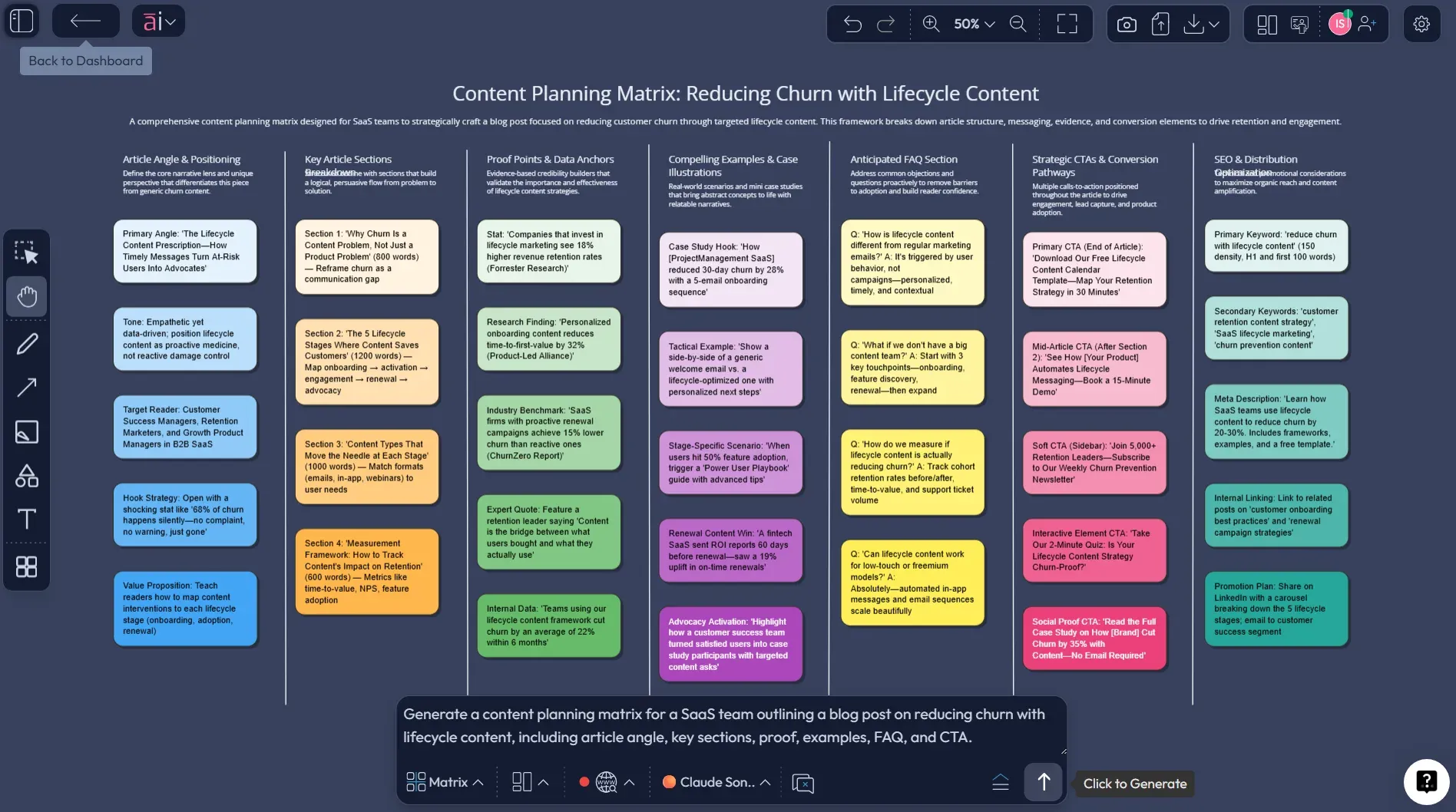
Imagine a SaaS marketing team wants an article called “How to Reduce Customer Churn with Lifecycle Content.” They open Jeda.ai, use the Blog Post Outline recipe, and generate a matrix with sections for churn drivers, lifecycle stages, campaign examples, metrics, common mistakes, and next steps.
The first version looks fine but a little safe.
So the team selects the section on retention metrics and uses AI+ to expand it into leading indicators, lagging indicators, and benchmark questions. Then they extend the “common mistakes” area to add examples from under-segmented onboarding, weak reactivation flows, and generic email copy. Finally, they use Vision Transform to view the same structure as a mind map and check whether the story flows from problem to solution to execution.
That is the difference. The outline becomes a thinking tool, not just a prewriting checklist.
Best practices for better outlines inside Jeda.ai
You do not need a perfect prompt. You do need good constraints.
And one blunt point: if the outline does not give the writer a real advantage, it is not done yet.
Common mistakes to avoid
Treating the outline like a draft
An outline is a planning asset. It should be detailed enough to guide writing, but still easy to reorganize.
Ignoring search intent
If the reader wants a how-to and your outline becomes a manifesto, the post will miss the mark.
Using AI for volume instead of clarity
Bigger outlines are not better outlines. More H2s can mean more drift.
Forgetting the CTA path
A post without a next step is just a polite dead end.
Skipping visual review
This is where Jeda.ai earns its keep. When the outline is visible as a structure inside the AI Workspace, problems show up faster.
Frequently asked questions
- What is the main benefit of using Blog Post Outline with AI?
- The main benefit is speed with structure. AI helps you build the first draft of the article plan quickly, while the outline format keeps headings, logic, and proof points organized before writing starts.
- Is a blog post outline still necessary if AI can draft the article?
- Yes. An outline gives the draft direction. Without it, AI often produces repetitive sections, weak transitions, and generic copy. A clear outline keeps the final post aligned with reader intent and editorial goals.
- Which Jeda.ai workflow is better for this use case: Recipe Matrix or Prompt Bar?
- Use the Recipe Matrix when you want guided structure and a repeatable workflow. Use the Prompt Bar when you already know the topic, audience, and angle and just want a fast, flexible outline.
- Can I expand only one section of an outline in Jeda.ai?
- Yes. Select the relevant smart shape and use the AI+ button to extend only that part of the outline. This is one of the easiest ways to improve weak sections without regenerating the whole board.
- Can Jeda.ai turn a blog outline into another visual format?
- Yes. After generating the outline, you can use Vision Transform to convert the structure into another visual type such as a mind map, flowchart, or diagram for easier review.
- Who benefits most from Blog Post Outline with AI?
- Marketing teams, strategy consultants, startup founders, product marketers, and content leads benefit most because they often need to plan, review, and refine articles quickly while keeping structure visible to collaborators.
- Does Jeda.ai support collaborative content planning?
- Yes. Jeda.ai is built for shared visual work, so multiple contributors can review, edit, and refine a content outline together inside the same AI Whiteboard or AI Workspace.
- What should I include in an AI prompt for a blog post outline?
- Include the topic, target audience, article goal, tone, search intent, desired heading depth, and any proof requirements. The stronger the context, the more useful and less generic the outline becomes.
- Can Jeda.ai help with SEO-aware blog structures?
- Yes. Jeda.ai can help you plan keyword-aligned sections, snippet-friendly headings, FAQs, proof points, and CTA placement. It works best when you feed it the intended query and reader intent up front.
- Why use a visual AI Workspace for content planning instead of a text doc?
- A visual workspace makes gaps easier to spot. You can see hierarchy, overlap, missing proof, weak transitions, and expansion opportunities more quickly than in a long linear document.
Sources & further reading
- [1]
Google Search Central (2025) . “Creating helpful, reliable, people-first content” Google.
View Source ↗ - [2]
Google Search Central (2025) . “Article structured data” Google.
View Source ↗ - [3]
HubSpot (2025) . “How to Write a Blog Post Outline: A Step-by-Step Formula” HubSpot Blog.
View Source ↗ - [4]
Ahrefs (2023) . “How to Write a Blog Post Outline (7 Simple Steps)” Ahrefs Blog.
View Source ↗ - [5]
George Mason University Writing Center (2026) . “Outlining” The Writing Center.
View Source ↗ - [6]
University of Wisconsin (2026) . “Writing a Detailed Outline” Academic Writing I.
View Source ↗ - [7]
Hunter College Writing Center (2015) . “Guidelines for Outlining” City University of New York.
View Source ↗
Start Your Blog Post Outline with AI Today
Join over 150,000+ users who use Jeda.ai to turn rough ideas into structured, editable content plans inside one AI Workspace.
Try Jeda.ai Free