Most teams don’t have a process problem. They have a visibility problem.
A business process management framework sounds neat in theory, but in practice it often dies in scattered docs, half-finished swimlanes, and workshop notes nobody wants to revisit. That’s exactly why business process management with AI matters now. Not because AI magically fixes operations. It doesn’t. But it can help teams discover, structure, question, and improve workflows faster inside one AI Workspace instead of bouncing between whiteboards, spreadsheets, and slide decks.
And that shift is bigger than it looks.
Business Process Management, or BPM, has always been about managing end-to-end processes rather than isolated tasks. IBM’s current definition still centers BPM on discovering, modeling, analyzing, measuring, improving, and optimizing business processes, not just automating one step and calling it progress. Academic work says much the same thing: BPM is a management discipline supported by methods, tools, governance, and improvement cycles — not a one-off automation sprint. That distinction matters because a team that only automates broken work just gets broken work faster.
If you want a BPM page that actually helps you build something usable, this is it. We’ll cover the framework itself, where AI changes the game, and how to build it in Jeda.ai using Method 1: Recipe Matrix, Method 2: Prompt Bar, and an AI+ button deep dive.
What is a Business Process Management Framework?
A business process management framework is a structured way to discover how work happens, model the current state, redesign the future state, execute changes, monitor outcomes, and keep improving over time. In plain English: it gives teams a repeatable way to stop guessing and start managing operations deliberately.
That sounds simple. It isn’t.
BPM pulls from management science, industrial engineering, workflow systems, quality thinking, and process redesign research. The modern view goes well beyond drawing flowcharts. Dumas, La Rosa, Mendling, and Reijers describe BPM as a full lifecycle that includes identification, discovery, analysis, redesign, implementation, and monitoring. Rosemann and vom Brocke widen the lens further with six core elements: strategic alignment, governance, methods, information technology, people, and culture. And van der Aalst’s work keeps making the same point many companies still miss: the goal is better processes, not prettier process models.
So what should a solid BPM framework include?
- The process goal and business outcome
- The current state or “as-is” flow
- Friction points, delays, risks, and handoff failures
- Owners, systems, approvals, and dependencies
- KPIs such as cycle time, error rate, rework, throughput, or compliance
- The future state or “to-be” design
- A governance loop for review, rollout, and optimization
That’s why BPM is different from task management. A task list tells you what someone should do next. BPM tells you whether the whole system makes sense.
Inside Jeda.ai, that difference becomes practical. You can draft the framework as a matrix, expand it visually on an AI Whiteboard, convert it into an execution flow, and keep the analysis editable instead of locking it into a dead PDF the minute the meeting ends.
If you want a related companion once your matrix is clear, pair this framework with AI Flowcharts, the AI Whiteboard, or Jeda.ai’s guide on how to generate flowcharts with AI.
Why Use a Business Process Management Framework with AI?
Here’s the uncomfortable truth: BPM work usually fails long before technology enters the room.
Teams start too wide. Leaders argue from memory. Process maps get drafted from opinion instead of evidence. Nobody agrees on bottlenecks. Then someone buys automation software and hopes the mess sorts itself out. It won’t.
AI changes BPM when you use it in the right order.
First, it helps structure chaos. Instead of beginning with an empty board, you can prompt AI to propose a first-pass matrix for lifecycle stages, roles, pain points, metrics, and redesign opportunities. That alone saves hours. But the real gain is not speed. It’s sharper thinking.
Second, AI helps compare multiple interpretations of the same process. Jeda.ai supports multi-model generation and aggregation across several LLMs, so one model can emphasize process clarity while another spots edge cases or ambiguous ownership. On an operational workflow, that’s not a cute feature. That’s risk reduction.
Third, AI helps teams move between abstraction levels. A matrix is great for executive discussion. A flowchart is better for operational execution. A note cluster may be better during discovery. In a good AI Workspace, you should be able to move across those views without rebuilding the whole artifact from scratch.
That’s where Jeda.ai has a real angle. Jeda.ai’s current product pages position the platform as a Visual AI workspace and AI Whiteboard built for turning prompts, documents, data, and rough inputs into editable visuals. Public pages also show 300+ strategic framework recipes, a dedicated Business Process Management recipe in the AI Menu, flowchart conversion paths, and an AI+ workflow that expands the next layer of detail from an existing visual.
- Faster discovery
Use AI to draft the first BPM structure, surface missing steps, and reveal handoff gaps before your workshop drifts into vague opinions.
- Smarter prioritization
Map bottlenecks, controls, owners, and KPIs in one view so your team improves the part of the process that actually moves the business.
- Continuous iteration
Generate the matrix, deepen one section with AI+, convert it into a flowchart, then edit live as your process maturity grows.
The big idea? AI doesn’t replace BPM discipline. It removes the dumb friction that usually keeps teams from doing BPM well in the first place.
How to Create a Business Process Management Framework in Jeda.ai
Jeda.ai gives you two workable routes here. Use the structured recipe when you want speed and guardrails. Use the Prompt Bar when you already know the shape of the framework you want. Then use the AI+ button to deepen any section after the first draft lands.
Method 1: Recipe Matrix
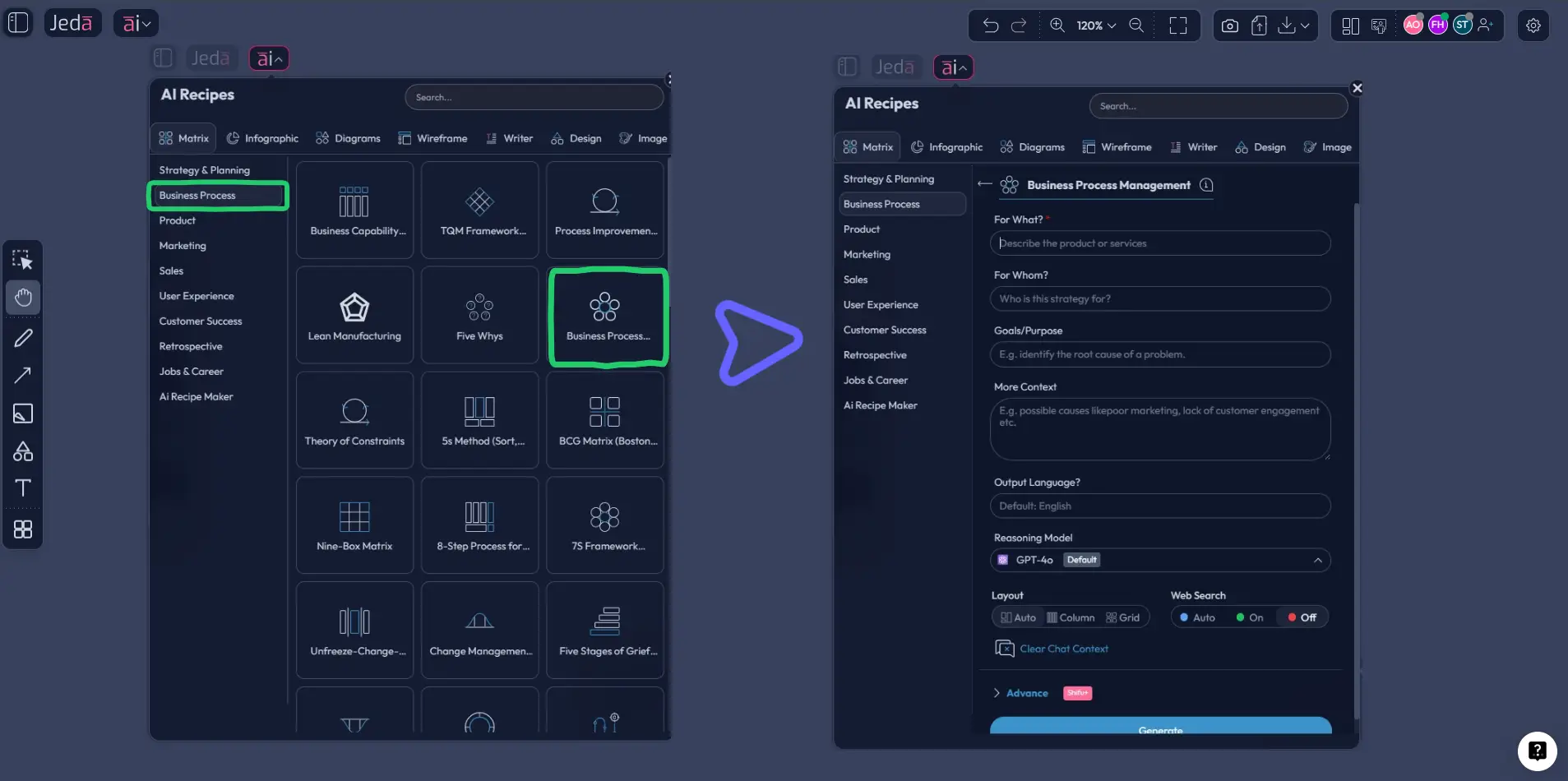
Start by opening Jeda.ai and entering your workspace. Go to the AI Menu, choose Business Process, then select Business Process Management. Jeda.ai will ask for a few context-building inputs. Keep them strategic, not bloated. Name the process, define the business outcome, specify the users or teams involved, and call out the operational pain you want to fix.
Then choose your layout and model. Generate the first version as a matrix. Review it for three things right away: where ownership is fuzzy, where handoffs are overloaded, and where the process lacks measurable control points. Don’t over-edit yet. First drafts are supposed to be a little wrong. That’s the point.
Method 2: Prompt Bar
This is the better route when the recipe is too broad or your process needs a custom lens.
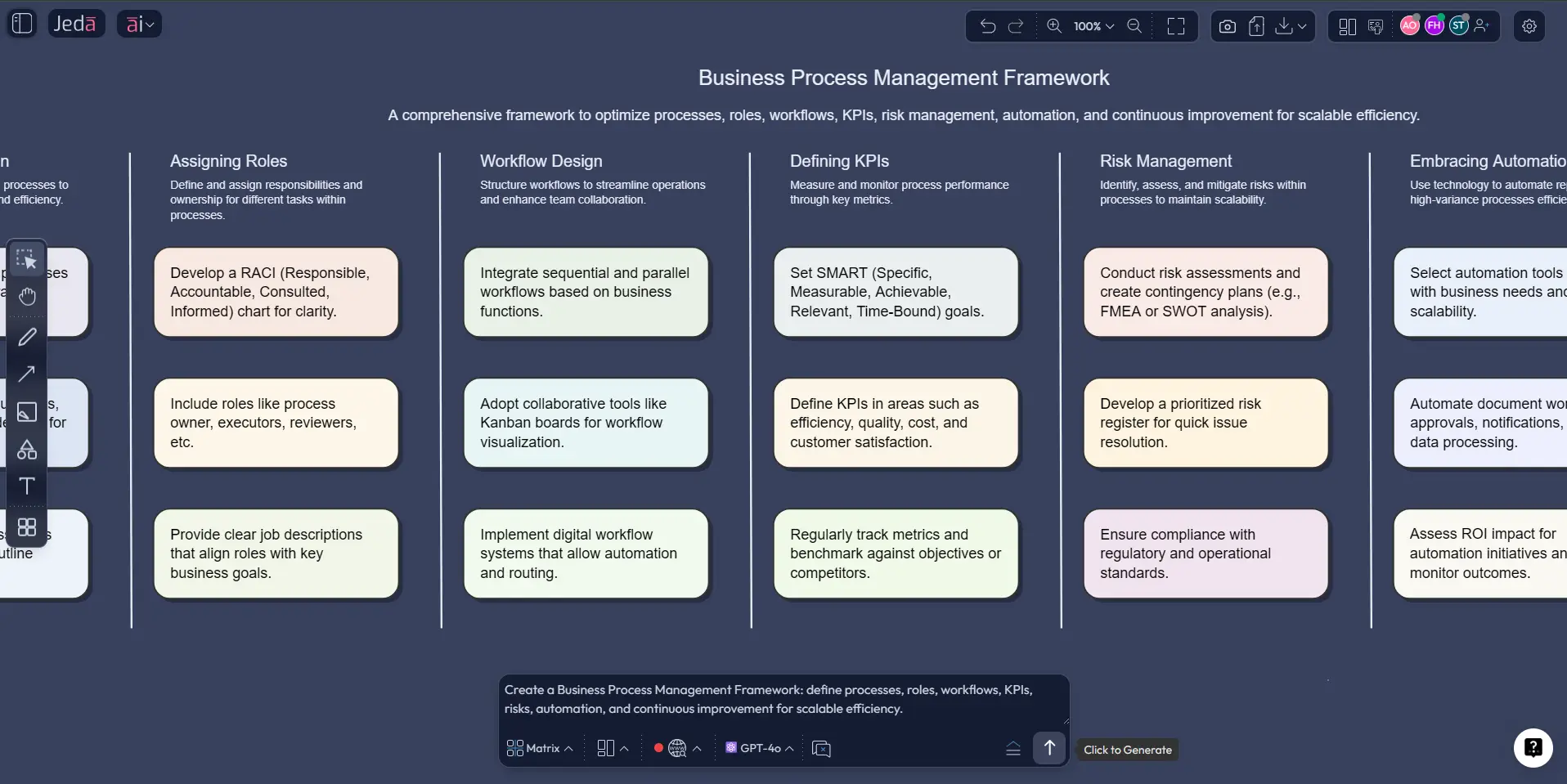
Open the Prompt Bar at the bottom of the canvas and select the Matrix command. Then enter a prompt that names the process, desired structure, and level of detail. For example:
“Create a business process management framework matrix for employee onboarding. Columns: lifecycle stage, key actions, owner, systems used, bottlenecks, KPI, and AI opportunity. Make it practical for a 300-person company.”
That prompt usually gets you closer to a usable artifact than something vague like “make a BPM framework.” Specificity wins. Every time.
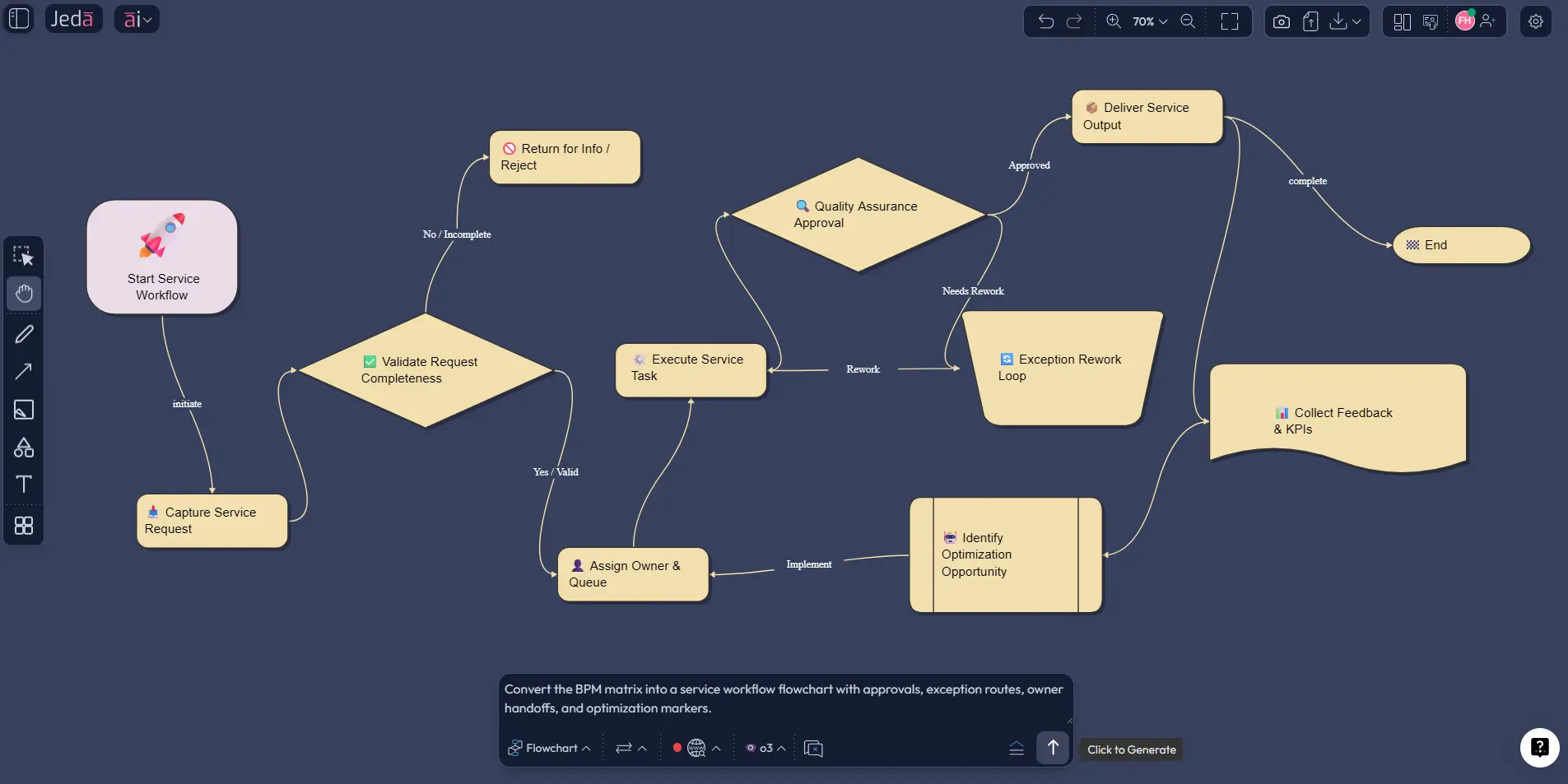
Once the matrix looks right, you can use Vision Transform or the Flowchart command to convert the framework into a process flow that operational teams can execute against. That move is where BPM becomes real. Strategy up top, execution below.
AI+ button generated deep dive
Now for the part people underestimate.
After your initial matrix is generated, select one stage or one cluster — discovery, approvals, exception handling, compliance checks, service recovery, whatever is weak — and tap the AI+ button. Ask Jeda.ai to extend it. Not with fluff. With useful depth.
Good AI+ expansions for BPM include:
- exception paths
- missing stakeholders
- hidden bottlenecks
- KPI suggestions
- approval delays
- automation candidates
- controls and compliance checks
- dependencies between teams
That’s where AI becomes valuable. It helps you move from a presentation artifact to an operational thinking tool.
- Open the Recipe Matrix
Enter Jeda.ai, open the AI Menu, go to Business Process, and choose Business Process Management to start from a structured BPM recipe.
- Answer the context questions
Define the process, the business objective, the teams involved, and the pain you want to reduce so the matrix has clear operational intent.
- Generate the first BPM matrix
Choose your preferred layout and model, then review the matrix for lifecycle stages, owners, bottlenecks, KPIs, and redesign opportunities.
- Build a custom version in Prompt Bar
Use the Matrix command in the Prompt Bar when you need a more specific BPM structure, such as owners, systems, controls, and AI opportunities.
- Deepen one area with AI+
Select a weak stage or cluster and use the AI+ button to extend it with exceptions, controls, missing stakeholders, or optimization ideas.
- Convert the framework into execution visuals
Use Vision Transform or the Flowchart command to turn the matrix into a clearer execution path for day-to-day teams.
- Refine, collaborate, and export
Edit the output live on the AI Whiteboard, collaborate with teammates, and export the final version as PNG, SVG, or PDF.
Business Process Management Framework Template & Example
Let’s make this concrete.
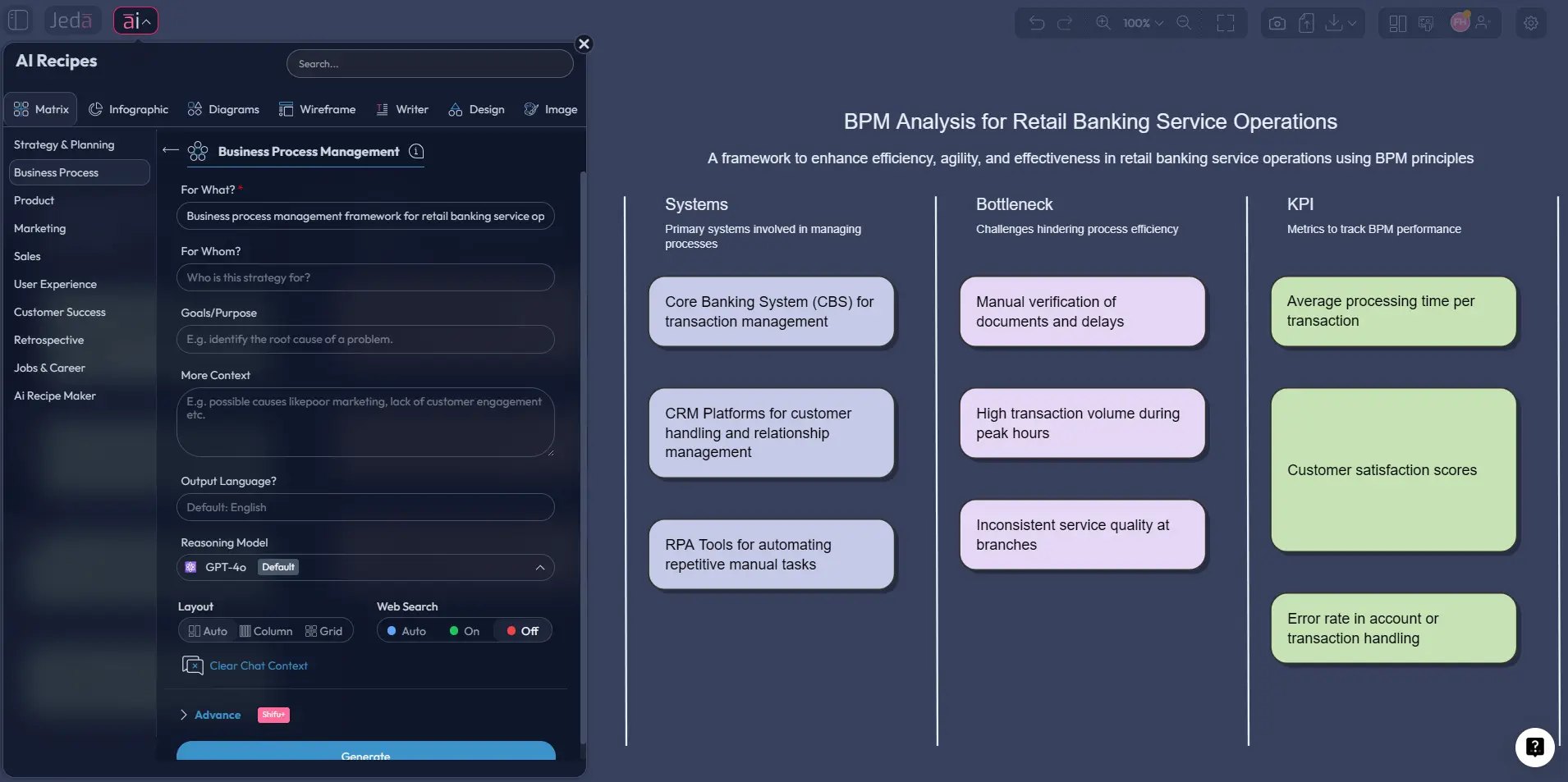
Say you’re working on a retail banking service workflow — a fitting example because Jeda.ai’s public BPM recipe gallery already demonstrates Business Process Management in a retail banking context. The common pain isn’t just slow service. It’s fragmented ownership. Requests move across customer service, compliance, operations, and escalation teams. Everyone touches the process. Nobody owns the whole thing.
A useful BPM matrix for that case might include these columns:
- lifecycle stage
- objective
- primary owner
- systems involved
- friction point
- KPI
- improvement move
- AI opportunity
A real matrix row might look like this: Request intake → customer service lead → CRM + ticketing → incomplete data at submission → first-response accuracy → guided intake prompts + auto-triage suggestion.
That’s already better than the vague “optimize service” nonsense many teams start with.
From there, convert the matrix into a Flowchart view. The matrix helps leaders decide what matters. The flowchart helps teams see what happens next. That one-two move is one of the strongest ways to use Jeda.ai for BPM work because it keeps strategic clarity and operational detail inside the same AI Workspace.
If you want to expand root-cause work before redesigning the future state, pair the BPM matrix with Jeda.ai’s Fishbone Diagram resource or the broader AI Diagrams page.
Best Practices & Tips
Good BPM work is rarely about being exhaustive. It’s about being disciplined.
A few rules are worth keeping:
One more thing. Don’t ignore governance.
Rosemann and vom Brocke’s six core elements are still useful because they force teams to ask the annoying questions early: Is this process aligned to strategy? Who governs it? What methods are we using? What systems touch it? Do the people involved have the right capability? Does the culture reward process discipline or reward firefighting? If you skip those questions, the process may look polished and still fail.
Common Mistakes to Avoid
Mistake 1: Confusing BPM with automation.
Automation is one possible outcome of BPM. It is not BPM itself. If you skip discovery and redesign, you risk automating a bad workflow faster.
Mistake 2: Mapping activities without measuring outcomes.
A nice process map with no KPIs is decorative. You need a baseline and a way to tell whether the redesign actually improved anything.
Mistake 3: Starting too broad.
“Fix operations” is not a BPM scope. “Reduce employee onboarding cycle time from 10 days to 6” is.
Mistake 4: Treating owners like afterthoughts.
A process breaks at the handoff. Always. If the owner, approver, or system dependency is fuzzy, the process will drift no matter how good the framework looks.
Mistake 5: Building a future-state model nobody can run.
This happens when executive logic and frontline reality never meet. Use the matrix for decision quality, then use the flowchart for execution reality.
Mistake 6: Using AI as decoration.
If AI only produces prettier diagrams, you’re wasting it. Use it to expose weak assumptions, missing steps, controls, exceptions, and redesign options.
Frequently Asked Questions
- What is a business process management framework?
- A business process management framework is a structured method for discovering, modeling, improving, executing, and optimizing repeatable business processes. It helps teams manage the whole system of work, not just isolated tasks or one-time projects.
- Is BPM the same as workflow automation?
- No. Workflow automation can be part of BPM, but BPM is broader. It includes discovery, governance, analysis, redesign, monitoring, and continuous improvement. Automation without BPM discipline often just speeds up a flawed process.
- What is the BPM lifecycle?
- The BPM lifecycle is the repeating improvement cycle used to manage processes over time. Common lifecycle models include five phases such as discovery, analysis, design, implementation, and optimization, though some versions use slightly different labels.
- How does AI help business process management?
- AI helps BPM by drafting first-pass process structures, surfacing bottlenecks, suggesting KPIs, spotting hidden dependencies, and expanding weak areas faster. It improves discovery and redesign, but human judgment is still required for governance, risk, and final decisions.
- Which Jeda.ai command should I use first for BPM?
- Start with the Matrix command when you want a structured BPM framework with lifecycle stages, owners, bottlenecks, and KPIs. Use Flowchart next if you need a clearer execution view for day-to-day teams.
- Does Jeda.ai have a BPM recipe in the AI Menu?
- Yes. Jeda.ai’s public gallery shows a Business Process Management recipe available from the AI Menu under Business Process. That makes the recipe route the fastest option when you want a matrix-first BPM starting point.
- What should I include in a BPM framework template?
- Include the process goal, current-state stages, owners, systems, bottlenecks, KPIs, future-state improvements, and governance checkpoints. Without those elements, the framework usually ends up too abstract to drive operational change.
- Can I turn a BPM matrix into a flowchart in Jeda.ai?
- Yes. After generating the BPM matrix, you can use Vision Transform or the Flowchart command to convert the framework into a process flow. That is useful when you want to move from executive-level review to operational execution.
- What is a good first BPM use case for a team new to this?
- Choose one repeatable process that already hurts, such as onboarding, approvals, service triage, or invoice handling. Narrow scopes produce faster wins, clearer ownership, and more reliable KPI tracking than broad transformation projects.
Sources & Further Reading
- [1]
IBM (2026) . “What is business process management (BPM)?” IBM Think.
View Source ↗ - [2]
Marlon Dumas, Marcello La Rosa, Jan Mendling, Hajo A. Reijers (2018) . “Fundamentals of Business Process Management” Springer.
View Source ↗ - [3]
Wil M.P. van der Aalst (2013) . “Business Process Management: A Comprehensive Survey” ISRN Software Engineering.
View Source ↗ - [4]
Wil M.P. van der Aalst, Marcello La Rosa, Flávia M. Santoro (2016) . “Business Process Management” Springer.
View Source ↗ - [5]
Michael Rosemann, Jan vom Brocke (2015) . “The Six Core Elements of Business Process Management” Handbook on Business Process Management 1, Springer.
View Source ↗ - [6]
Hajo A. Reijers (2021) . “Business Process Management: The evolution of a discipline” Computers in Industry.
View Source ↗ - [7]
Peter Fettke et al. (2025) . “Business Process Management and Artificial Intelligence” KI - Künstliche Intelligenz.
View Source ↗
Build Your Business Process Management Framework Today
Join 140,000+ users using Jeda.ai to turn messy workflows into editable, decision-ready visuals.
Try Free Template