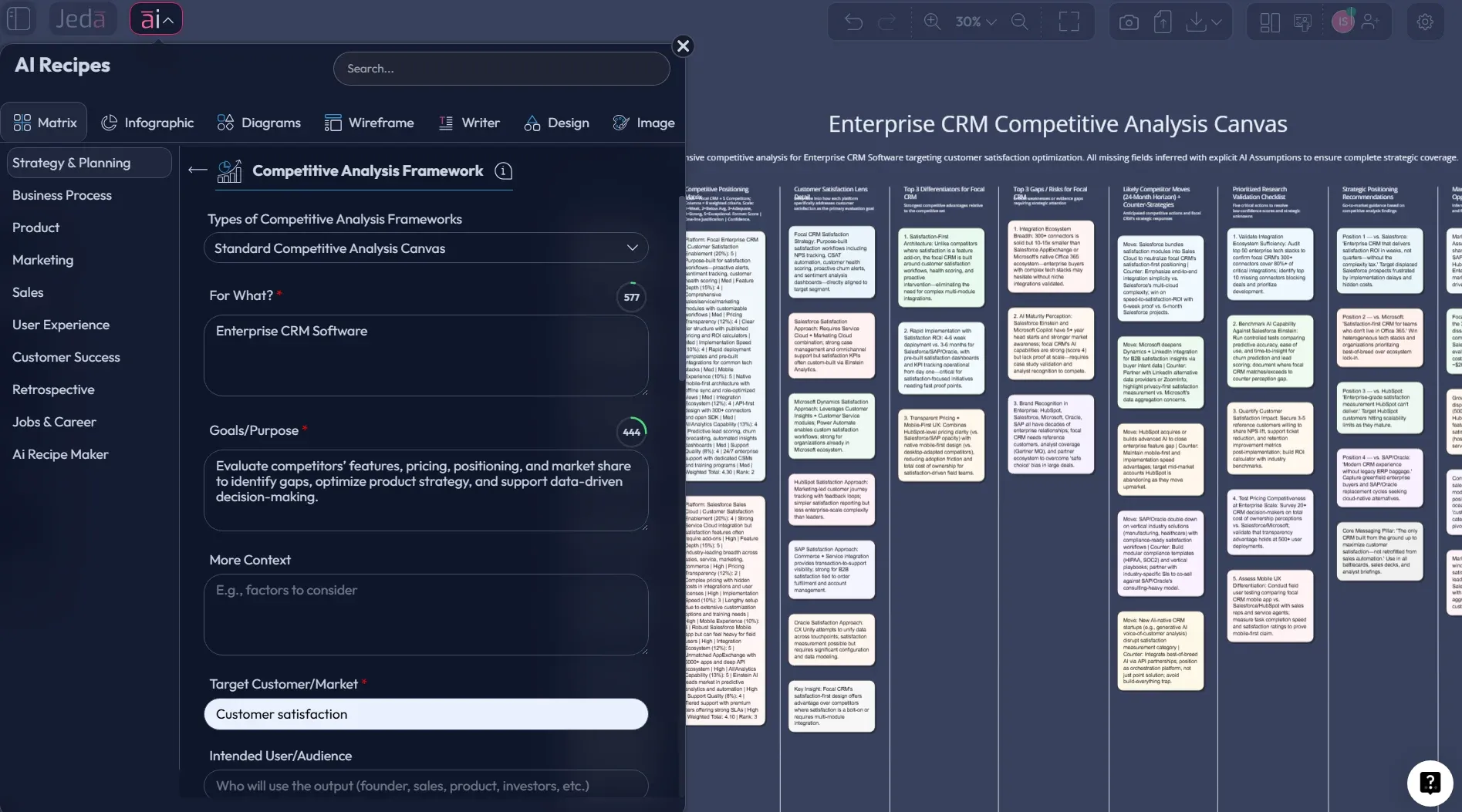
A competitive analysis template is only useful if your team can update it without groaning. Most “templates” die in a folder after week one. This page is about building a Standard Competitive Analysis Canvas — a one‑page matrix you can refresh in minutes, not hours — inside a Visual AI workflow on Jeda.ai.
If you’re leading strategy, product, or marketing, here’s the promise: you’ll walk away with a canvas that answers “Who are we really up against, what do they win on, and what should we do next?” — without turning your calendar into a spreadsheet hostage situation.
What is a Standard Competitive Analysis Canvas?
A Standard Competitive Analysis Canvas is a competitive analysis template formatted as a matrix. It compresses competitor research into a single page so you can compare players side‑by‑side and decide where to compete.
Think of it as a practical cousin of classic strategy tools:
- Michael Porter’s view: strategy is about coping with competition, not ignoring it (Porter, 1979).
- Competitive analysis as discipline: identify competitors, compare strengths/weaknesses, and find your advantage (SBA, 2025; BDC).
- Blue Ocean’s “strategy canvas” shows how offerings stack up on factors buyers care about (Kim & Mauborgne).
The difference: this canvas is designed for day‑to‑day decisions — product tradeoffs, positioning updates, sales enablement, and “why are we losing deals?” reviews.
What it includes (the “standard” part)
A good canvas balances facts, patterns, and actions. Here’s the structure we recommend for a reusable matrix:
- Competitive set — direct, adjacent, and substitute solutions
- Customer + job — who buys, why, and what “done” looks like
- Offer snapshot — product promise, core features, packaging/pricing logic
- Positioning + messaging — category story, differentiators, proof points
- Go‑to‑market — channels, motions, partnerships, sales cycles
- Moats + constraints — why they win, where they can’t go
- Risks + counter‑moves — what they’re likely to do next
- Your plays — what you’ll change, test, or stop
Not eight chapters. Eight boxes. That’s the whole point.
Why build this competitive analysis template with AI?
Because competitor landscapes move. Fast. And the pain isn’t “thinking” — it’s the boring work around thinking:
- collecting scattered notes
- keeping comparisons consistent
- refreshing the same sections every quarter
- turning a messy analysis into something your team can act on
An AI Workspace helps you do the repetitive parts once, then update the analysis without rebuilding from scratch. And an AI Whiteboard makes the output visible to humans, not just to your spreadsheet.
Where AI helps (and where it doesn’t)
AI is great at structuring, summarizing, and suggesting hypotheses. It’s not a license to invent competitor facts. Competitive analysis works when you pair AI with your evidence: pricing pages, product docs, win/loss notes, demos, and customer interviews.
So, use AI to speed up the format and framing. You still own the truth.
- One-page clarity
Matrix format forces tradeoffs. You stop writing essays and start making choices.
- Faster synthesis
Jeda.ai’s platform Web Search can pull supporting context when you need it, then you refine with your own sources.
- Living document
Use AI+ to extend sections when new competitors show up, new packaging launches, or messaging shifts.
The Standard Competitive Analysis Canvas template (Matrix layout)
Below is a clean, “standard” matrix layout that works across B2B, B2C, SaaS, services, and marketplaces.
Suggested grid (copy this structure)
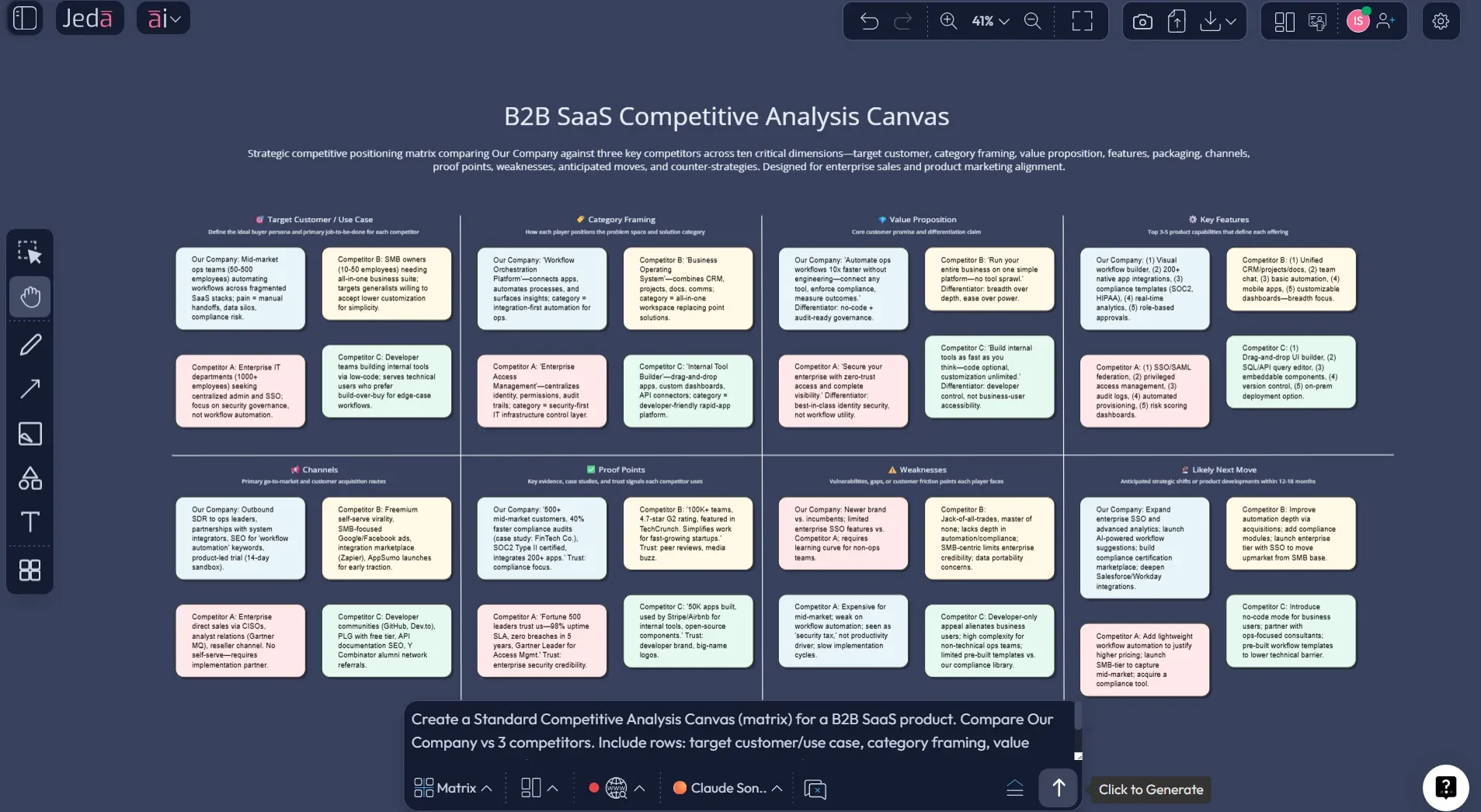
Columns (top):
- Your company (baseline)
- Competitor A
- Competitor B
- Competitor C
Rows (left):
- Target customer + primary use case
- Category framing (what they claim to be)
- Core value proposition (one sentence)
- Key features (3–6 bullets)
- Pricing/packaging logic (not exact numbers unless verified)
- Acquisition channels + motion
- Proof (logos, case studies, awards, benchmarks)
- Weaknesses + constraints
- Likely next move (3–12 months)
- Your response (what you’ll do)
This is intentionally boring. Boring templates get used.
How to create a Standard Competitive Analysis Canvas in Jeda.ai
This is the part where people overthink it. Don’t.
You’re building a matrix on an AI Workspace. Jeda.ai is an AI Whiteboard, so you can keep the canvas visual, editable, and collaborative — without duct-taping ten tools together.
Method A — Matrix Recipe Template (AI Menu → Matrix Recipes)
Use this if your workspace has a dedicated template (recommended).
Open a fresh board (one canvas per market/segment, so updates don’t become archaeology).
Click AI Menu (top-left) → go to Matrix Recipes.
Search and select “Standard Competitive Analysis Canvas” (or closest competitive analysis canvas recipe).
Enter your context:
- Market + segment
- Your company (baseline)
- Competitors A/B/C
Click Generate.
Use AI+ to extend cells like “Likely next move” or “Weaknesses,” then replace assumptions with proof.
Use Vision Transform to convert the matrix into a battlecard diagram or decision tree without rebuilding.
Export as PNG/SVG/PDF (no magical PowerPoint unicorns).
Method B — Prompt Bar (Matrix command)
Use this when you don’t see the exact recipe template, or you want full control.
- Open the Prompt Bar (bottom) → select the Matrix command.
- Paste your context (market + your offer + competitor list + any known facts).
- Press Enter to generate a sticky-note matrix you can edit.
- Stress-test: run 1–3 models if you want alternative framings; use your aggregator to pick the cleanest structure.
- Use AI+ to expand and then tighten (expand is easy; good is hard).
- Convert with Vision Transform if stakeholders need a battlecard/flow.
- Export as PNG/SVG/PDF.
Prompt Bar prompt (copy/paste)
Create a Standard Competitive Analysis Canvas (matrix).
Columns: Our company (baseline), Competitor A, Competitor B, Competitor C. Rows must include:
- Target customer + primary use case
- Category framing
- Core value proposition (one sentence)
- Key features (3–6 bullets)
- Pricing/packaging logic (no exact numbers unless verified)
- Acquisition channels + motion
- Proof (logos, case studies, benchmarks)
- Weaknesses + constraints
- Likely next move (3–12 months)
- Our response (what we’ll do)
Rules: keep each cell under 35 words, use neutral language, and flag assumptions with “(verify)”.
- Choose your build method (Recipe or Prompt Bar)
If your workspace has a Standard Competitive Analysis Canvas template, use AI Menu → Matrix Recipes. Otherwise, open the Prompt Bar and select the Matrix command.
- Set the competitive set (keep it small)
Use 3 competitors max for the standard canvas. Include direct and relevant substitutes only if they show up in deals or buying comparisons.
- Lock the standard grid
Columns = Our company + Competitor A/B/C. Rows = customer/use case, category framing, value prop, features, packaging logic, channels, proof, weaknesses, next move, our response.
- Paste evidence, not opinions
Attach 1 proof point per strong claim (pricing page, screenshot, review snippet, win/loss note). Mark uncertain items with “(verify)”.
- Generate the matrix
Click Generate (Recipe) or press Enter (Prompt Bar). You’ll get a grid of editable sticky notes.
- Stress-test with Multi-LLM
Run 1–3 models for alternative framings. Keep the best structure, then standardize wording across columns so comparisons stay fair.
- Extend and refine with AI+
Tap AI+ on cells like “Likely next move” or “Weaknesses,” then replace any AI assumptions with verified proof.
- Convert and share
Use Vision Transform to convert the matrix into a battlecard or decision tree when needed, then export as PNG, SVG, or PDF.
A prompt you can use immediately (copy/paste)
Use this in the Prompt Bar (Matrix selected). Swap the bracketed parts.
Create a Standard Competitive Analysis Canvas (matrix).
Market: [industry + segment].
Our company: [name + 1-line offer].
Compare competitors: [A], [B], [C].
Rows must include: Target customer/use case, category framing, value proposition, key features, packaging/pricing logic, channels, proof, weaknesses/constraints, likely next move, our response.
Keep each cell under 35 words. Use neutral language and flag assumptions with “(verify)”.
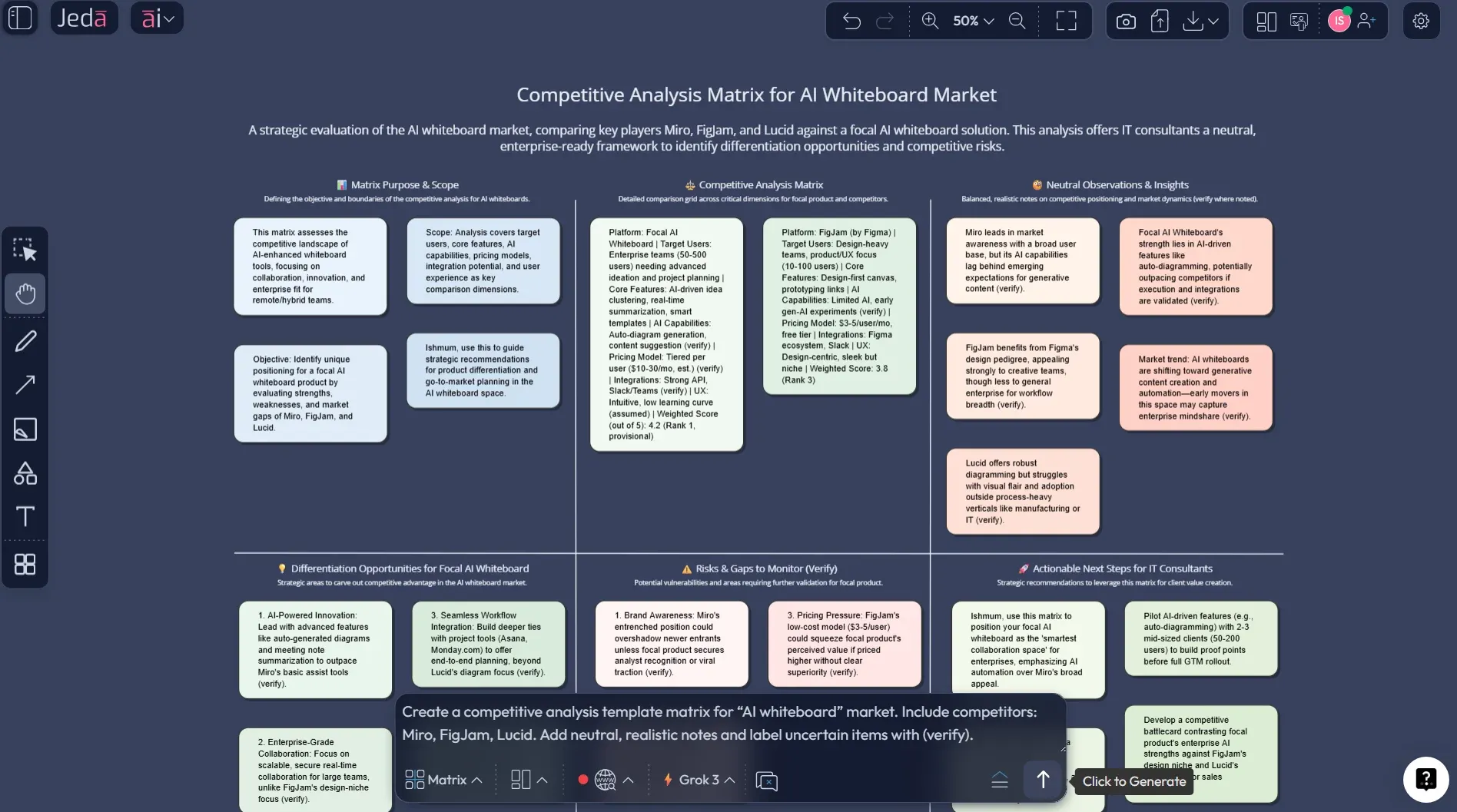
Worked example: “AI whiteboard” market (tiny but real)
Let’s do a lightweight example so you can see what “standard” looks like without writing a novel.
Scenario: you’re selling an AI whiteboard for strategy and visual work.
What you’d capture (sample notes)
- Category framing: “visual collaboration”, “AI whiteboard”, “diagramming”, “workspace”
- Packaging logic: free tier limits vs paid collaboration vs advanced AI bundles
- Moats: template library, integrations, enterprise trust, collaboration performance
- Likely move: deeper AI features, pricing changes, team plan pushes
You’d keep the cells short and actionable. If you need a paragraph, it belongs in a separate research board.
Best practices that make the canvas worth updating
Competitive analysis gets messy when it turns into trivia night. Use these rules to keep it sharp.
The “evidence spine” approach
A simple trick: for every strong claim, attach one supporting artifact.
- Pricing claim → pricing page screenshot or doc link
- Messaging claim → headline + hero section screenshot
- Channel claim → ad library / SEO pages / partner directory (where applicable)
- Proof claim → case study URL or customer list screenshot
This aligns with how competitive analysis is described in practical guides: collect and compare consistently, then extract advantage (SBA, 2025).
Common mistakes to avoid (because we’ve all done them)
Over-indexing on direct competitors only
The substitute that feels “not our category” is often the real threat. (Porter literally calls out substitutes as a force.)Treating the canvas like a research dump
The canvas is your summary. Your raw research belongs elsewhere.Copying competitor language word-for-word
It contaminates your positioning. Paraphrase, then interpret.Comparing features without comparing outcomes
Customers buy outcomes. Features are only evidence.Never recording “what we’ll do next”
If there’s no “our response” row, it’s not analysis. It’s sightseeing.
Frequently Asked Questions
- What is a competitive analysis template?
- A competitive analysis template is a structured format that helps you compare competitors consistently across the same criteria, such as customers, positioning, features, pricing logic, and go-to-market. The template reduces bias and makes trends easier to spot across multiple competitors.
- What is a competitive analysis canvas?
- A competitive analysis canvas is a one-page version of a competitor analysis that focuses on decision-relevant insights. It prioritizes comparison and action (what you'll do next) instead of long notes. Many teams use a canvas to keep competitive work updated, not archived.
- How is a competitive analysis canvas different from Porter's Five Forces?
- Porter's Five Forces analyzes industry structure and the pressures that shape profitability, while a competitive analysis canvas compares specific competitors side-by-side. In practice, teams often use Five Forces to frame the market and a canvas to plan moves against rivals.
- How many competitors should I include in a standard canvas?
- Three to five competitors is usually enough for clarity. More than that and the matrix turns into a spreadsheet. If you need broader coverage, keep a separate research board and summarize only the top threats and best benchmarks in the canvas.
- Can AI do competitor research automatically?
- AI can help structure and summarize what you provide, and some platforms can search the web for context. But competitive analysis still requires verification. Treat AI output as hypotheses and placeholders until you confirm details from primary sources like pricing pages, docs, and customer interviews.
- How do I create a competitive analysis template in Jeda.ai?
- Open Jeda.ai, choose the Matrix command in the Prompt Bar, paste your market context and competitor list, and generate the canvas. Then use the AI+ button to extend sections and Vision Transform to convert the matrix into a battlecard diagram or decision flow when needed.
- What should I include in the pricing section if I'm not sure?
- Use pricing or packaging logic instead of exact numbers. For example: 'seat-based tiers', 'usage-based add-ons', or 'freemium with collaboration limits'. Mark uncertain claims with '(verify)' so the team knows what needs confirmation.
- How often should a competitive analysis canvas be updated?
- Update it on a cadence that matches your market. Many small business guides recommend making competitive analysis a regular discipline rather than a one-time exercise; quarterly is common, and monthly fits fast-moving categories.
- Is a strategy canvas the same thing as this competitive analysis canvas?
- Not exactly. A strategy canvas (Kim & Mauborgne) focuses on how offerings compare across buyer-valued factors. A standard competitive analysis canvas is broader: it includes positioning, channels, proof, constraints, and likely moves. They complement each other.
- What's the best output format to share a canvas from Jeda.ai?
- Use PNG for quick sharing, SVG for editable vector use in design tools, or PDF for stakeholder review packs. Jeda.ai supports PNG, SVG, and PDF exports.
Sources & further reading
- [1]
Porter, Michael E. (1979) . “How Competitive Forces Shape Strategy” Harvard Business Review.
View Source ↗ - [2]
Porter, Michael E. (1980) . “Competitive Strategy: Techniques for Analyzing Industries and Competitors” Free Press (HBS listing).
View Source ↗ - [3]
U.S. Small Business Administration (2025) . “Market research and competitive analysis” SBA.gov.
View Source ↗ - [4]
Business Development Bank of Canada (2020) . “How to conduct a competitive analysis” BDC.ca.
View Source ↗ - [5]
Kim, W. Chan & Mauborgne, Renée (n.d.) . “Strategy Canvas” Blue Ocean Strategy.
View Source ↗ - [6]
Asana (2026) . “Conduct a Competitive Analysis (With Examples)” Asana Resources.
View Source ↗ - [7]
HubSpot (n.d.) . “Competitive Analysis Template” HubSpot Resources.
View Source ↗
Build your Standard Competitive Analysis Canvas in one AI Workspace
Join over 150,000+ users who use Jeda.ai as an AI Whiteboard to turn messy competitive notes into clear, shareable strategy.
Try the Matrix template free