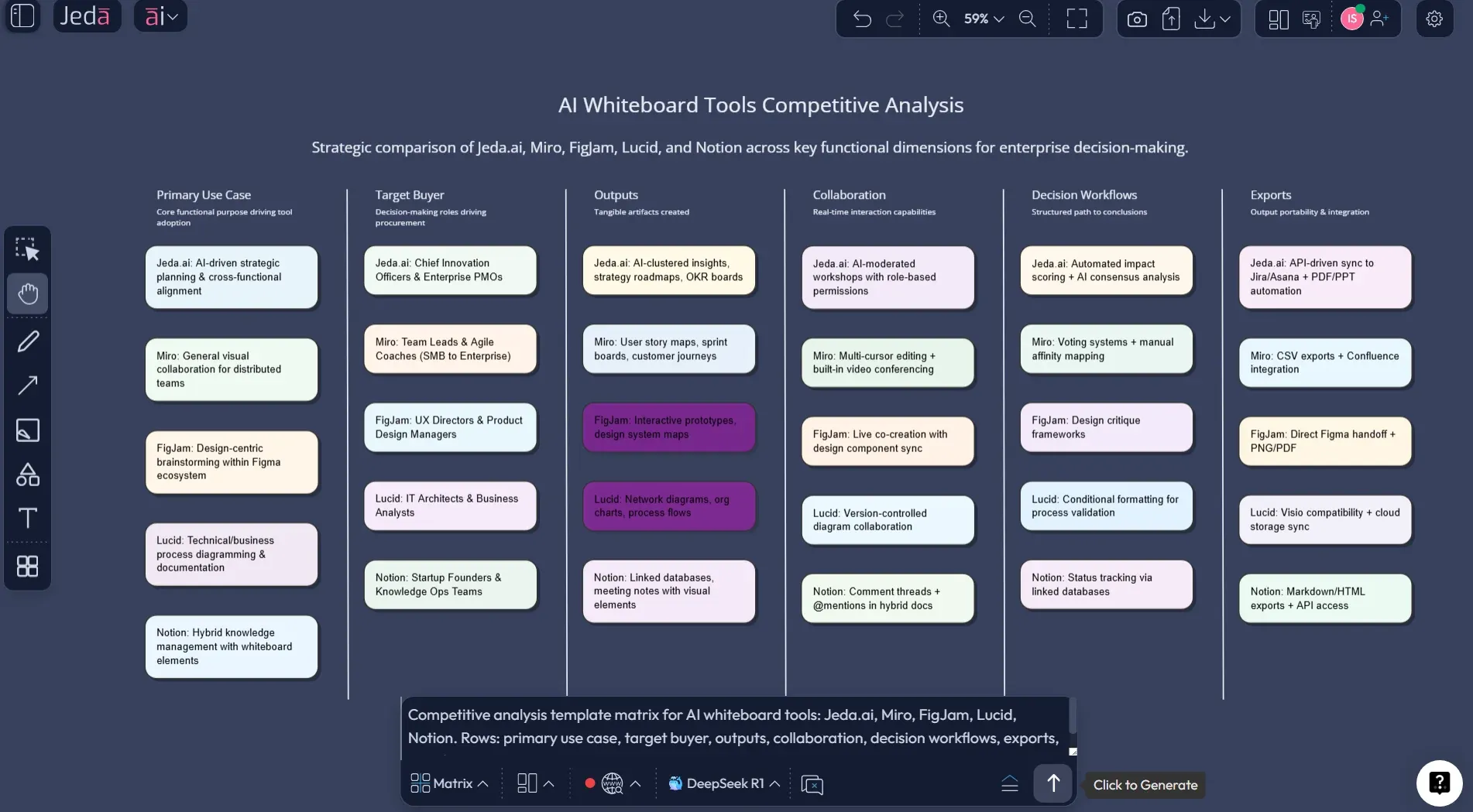
A competitive analysis template is how you stop guessing and start deciding. You capture competitors, compare them against the same criteria, and then make one uncomfortable but useful call: what will we do differently?
Jeda.ai is built for that kind of work. It’s an AI Workspace and an AI Whiteboard where the Competitive Analysis Framework lives as an editable Matrix, not a dead spreadsheet.
What is a competitive analysis framework?
A competitive analysis framework is a repeatable way to study competitors so you can improve your strategy, not just your trivia knowledge. It forces structure: who you’re competing with, what buyers compare, what you’re better at, and where you’re exposed.
Modern strategy work draws heavily from competitive strategy and industry analysis work popularized by Michael Porter (1979–1980), which pushed leaders to look beyond “the rival across the street” and consider forces, positioning, and profit structure.
Here’s the punchline: competitive analysis is only useful if it changes decisions. Otherwise it’s a hobby.
What is a competitive analysis matrix?
A competitive analysis matrix is the visual center of the framework: competitors as columns, evaluation criteria as rows, and notes/scores in the cells.
Most popular templates ask you to compare things like features, pricing, messaging, channels, and “proof” (case studies, security posture, integrations, reputation). That template style shows up everywhere from startup guides to big marketing playbooks, because it works.
In practice, a good matrix does three jobs:
- It makes the comparison fair. Same criteria, same scale.
- It shows trade-offs. One competitor wins on enterprise controls, another wins on simplicity.
- It gives you a “so what.” You should be able to point to 2–4 cells and say, “That’s our positioning angle.”
Why use AI for competitive analysis?
Because the annoying part of competitor analysis isn’t thinking. It’s collecting, organizing, and rewriting the same points across five documents.
AI helps most in three places:
- Drafting structure: choosing sensible comparison criteria for your market.
- Summarizing evidence: turning notes and links into clean, comparable statements.
- Keeping it current: updating the matrix every month without starting over.
This is where a Visual AI workflow matters. You don’t want a wall of text that dies in a chat window. You want editable visuals that your team can point at, argue about, and refine.
And yes—Jeda.ai’s platform web search is a product feature, so you can fill gaps faster when your model knowledge isn’t enough.
How to create a competitive analysis framework in Jeda.ai
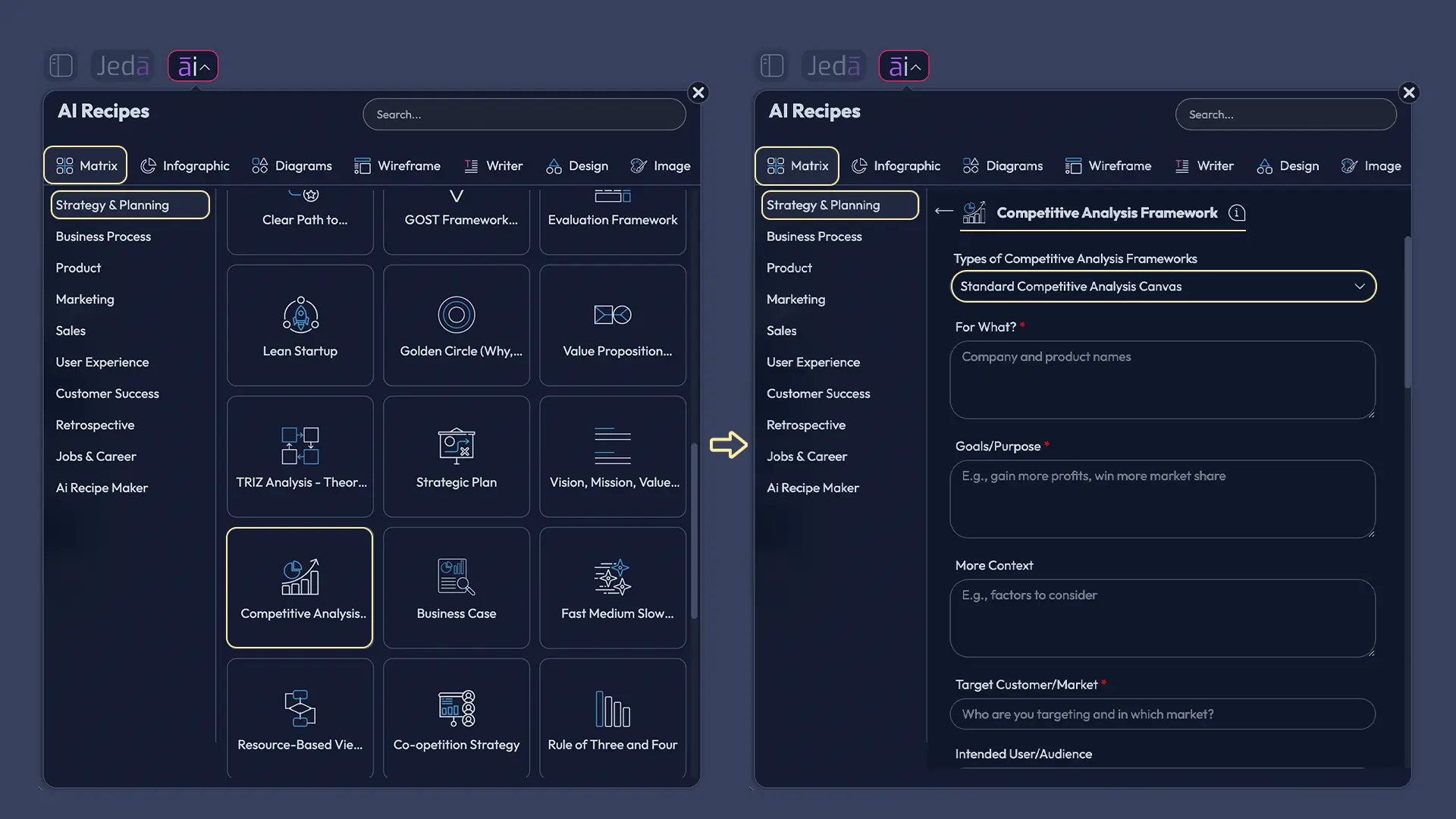
Jeda.ai supports two clean ways to build this as a matrix recipe: AI Menu (recommended) and Prompt Bar.
Method 1 — AI Menu recipe (recommended)
- Open your board in Jeda.ai.
- Click AI Menu (top-left).
- Choose Matrix Recipes.
- Select the Competitive Analysis Framework recipe.
- Add your market, competitor list, and what you’re comparing.
- Click Generate.
This gets you a clean starting matrix fast, and you can edit everything after.
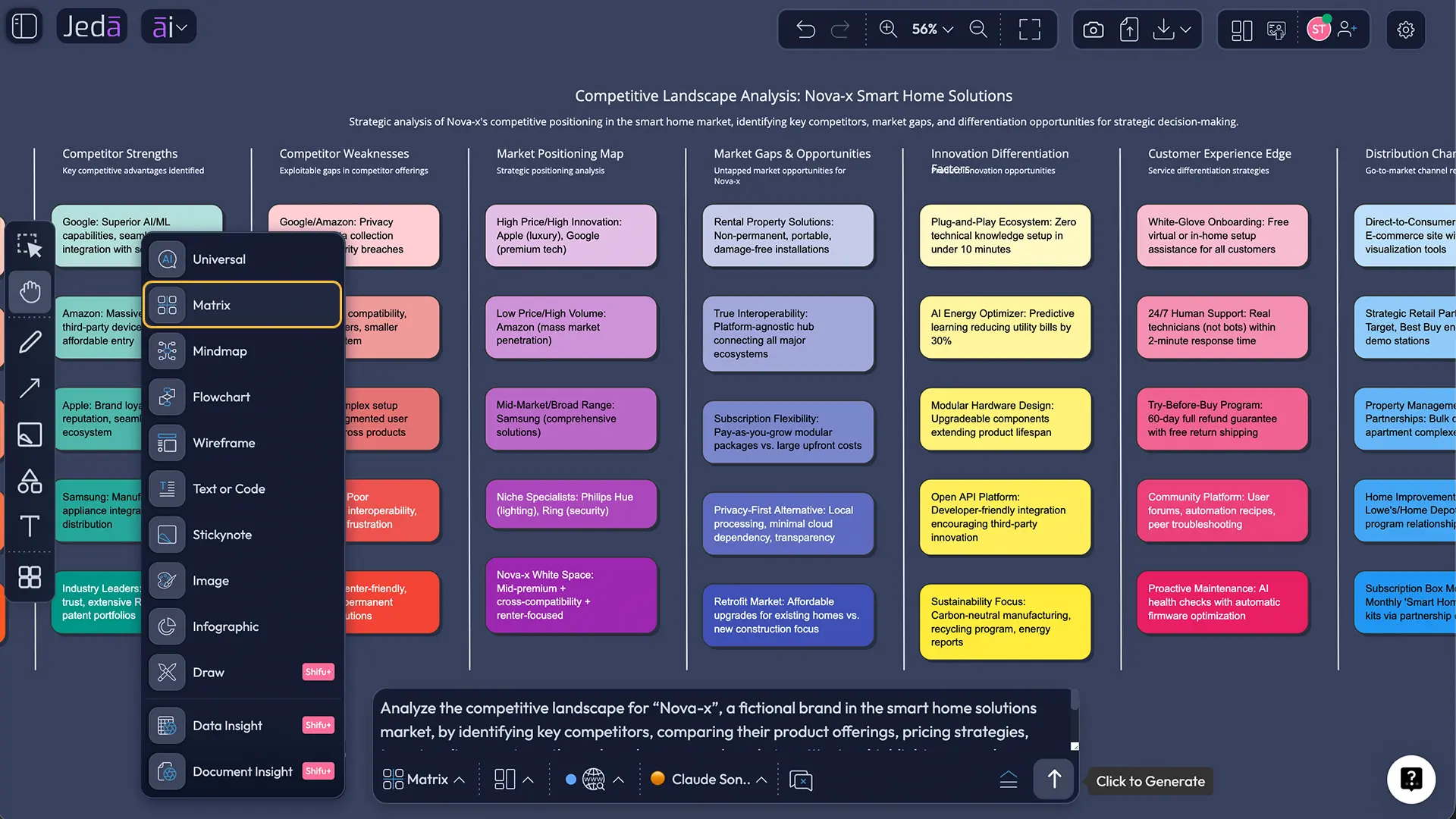
Method 2 — Prompt Bar + Matrix command
- Open the Prompt Bar at the bottom of the canvas.
- Select Matrix. (No slash commands—just pick it from the UI.)
- Paste a prompt like this:
- Press Enter to generate.
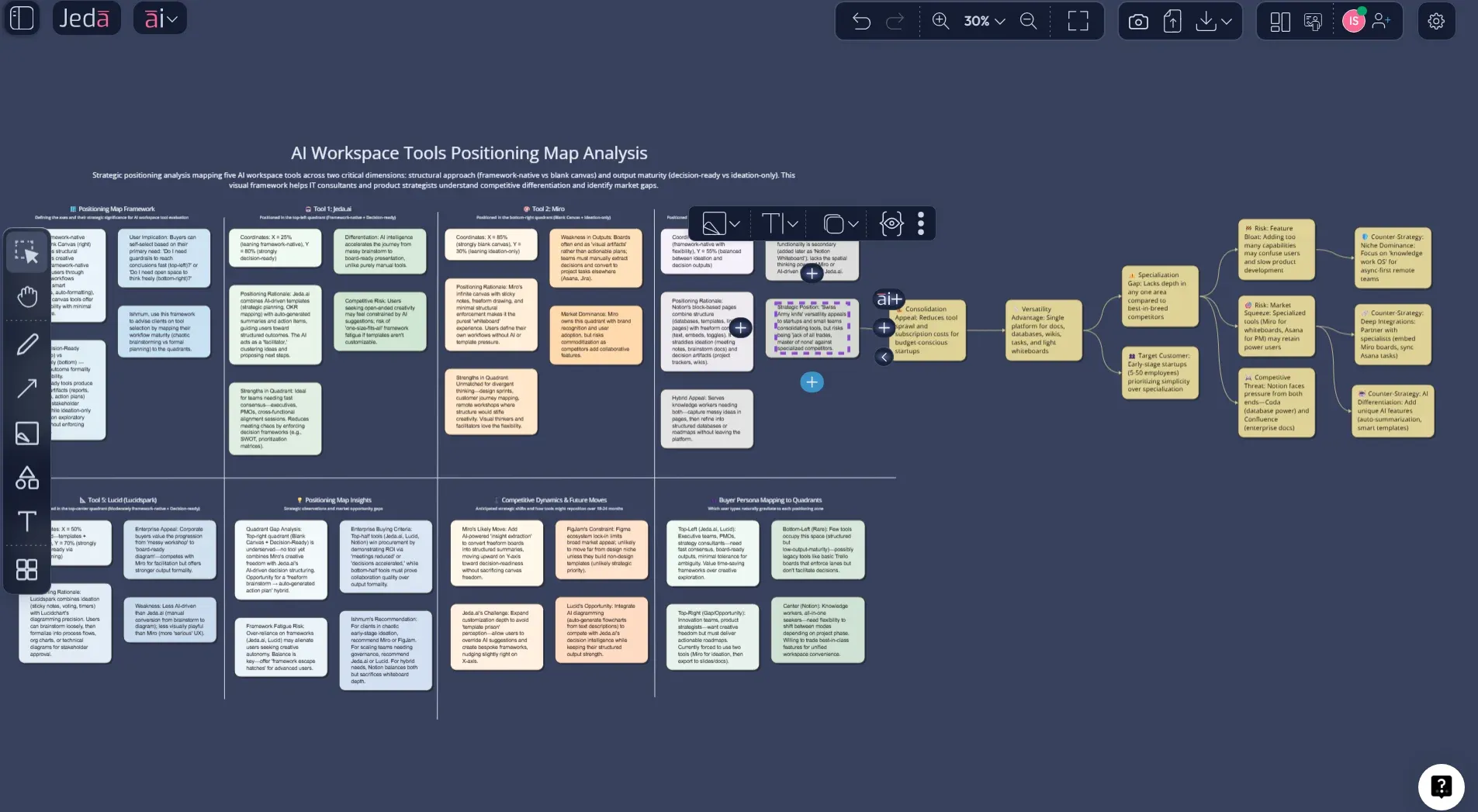
Extend and convert with AI+ and Vision Transform
Once the matrix exists, treat it like an evolving board:
- Tap the AI+ button on a section to expand it with more detail.
- Use Vision Transform to convert your matrix into a Diagram (for a positioning map) or a Flowchart (for a competitor response plan).
And when it’s ready to share, export as PNG, SVG, or PDF.
Competitive analysis template structure (matrix) you can reuse
If you want a matrix that doesn’t turn into a junk drawer, use this structure. It’s boring in the best way.
Columns
- You (baseline)
- 3–6 direct competitors
- 1–2 “sneaky” substitutes (the tool buyers use instead of buying any of you)
Rows (criteria)
Use rows that map to buyer decisions, not internal pride:
This works across strategy teams, marketing, and product. It also fits how people actually compare tools in a buying cycle.
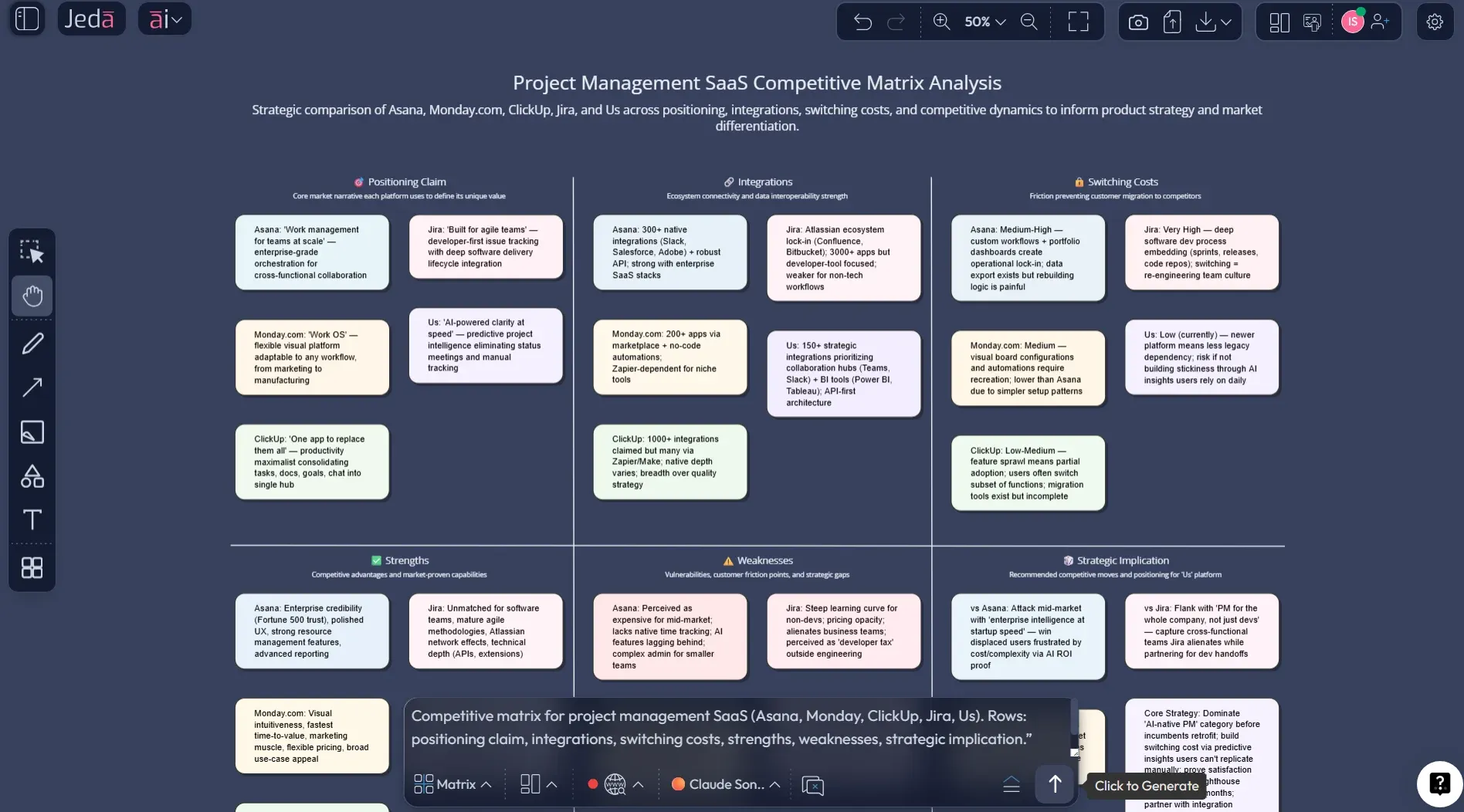
Example: a worked competitive matrix (project management SaaS)
Let’s say you’re building a B2B project management tool and you keep hearing, “We already use Asana/Monday/ClickUp/Jira.”
You can build a competitor matrix that answers:
- Who wins on flexibility?
- Who wins on enterprise controls?
- Who wins on simplicity?
- Where is the opening?
After the matrix is generated, do the part that actually matters:
- Circle 2–3 cells where buyers consistently choose a competitor over you.
- Write one sentence: “They win because ___.”
- Write a counter: “We win when ___.”
- Turn those into a positioning statement and 2 roadmap bets.
If you want to make that positioning visible, convert the matrix into a Diagram and plot a simple positioning map (two axes, clear labels, no art project).
Best practices and tips
A few practical rules that keep the work clean:
- Separate facts from interpretations. Put sources in notes.
- Pick a segment first. “Enterprise” and “startup” buyer behavior are different planets.
- Don’t score everything. Score only the criteria you actually make decisions with.
- Add an action row. If your matrix doesn’t end in actions, it’s unfinished.
Coursera’s step-by-step framing is a useful baseline: identify competitors, study their structure and value proposition, then compare. Your matrix is the part that makes that comparison usable in a meeting.
Common mistakes to avoid
- Comparing the wrong competitors. Indirect competitors and substitutes steal deals quietly.
- Including 50 rows. That’s not analysis. That’s self-harm with extra steps.
- Treating the matrix like a report. A matrix is meant to change decisions, not impress stakeholders with volume.
- Never updating it. Stale competitor analysis is worse than none, because it gives false confidence.
Frequently Asked Questions
- What is a competitive analysis template?
- Competitive analysis template is a structured format that helps you compare competitors using the same criteria, so you can make clearer strategy decisions. A good template includes competitors (columns), buyer-relevant criteria (rows), and a final action row that captures what you will do differently.
- What is a competitive analysis matrix?
- Competitive analysis matrix is a grid that compares your company and competitors across selected criteria such as positioning, features, pricing approach, channels, and proof signals. The matrix works best when it is short, updated regularly, and tied to a decision like positioning or roadmap bets.
- How do I choose competitors for analysis?
- Choosing competitors for analysis is easiest when you separate direct competitors (same buyer, same job) from indirect competitors (same buyer, different job) and substitutes (what the buyer uses instead of buying anyone). Start with 3–6 direct competitors and add 1–2 substitutes.
- How often should I update a competitor analysis?
- Updating a competitor analysis monthly is enough for many markets. Fast-moving markets may need updates every two weeks. The key is to update the same matrix instead of recreating a new document, so changes are visible and comparable over time.
- What is the difference between competitor analysis and competitive intelligence?
- Competitor analysis is a focused comparison of specific rivals and their offerings. Competitive intelligence is broader and includes market forces, buyer shifts, partners, and signals that affect competitiveness. Many teams start with competitor analysis and expand into competitive intelligence as they mature.
- Can AI do competitive analysis for me?
- AI can do competitive analysis for you at the drafting and summarizing level, such as proposing comparison criteria, organizing notes, and generating a first-pass matrix. Humans still need to verify facts, choose what matters for the buyer, and decide on actions.
- How do I do a competitive analysis in Jeda.ai?
- Competitive analysis in Jeda.ai is done by selecting the Matrix command and prompting the AI to generate a competitor matrix with your competitors and criteria. After it generates, you edit the board, extend sections with the AI+ button, and export the final as PNG, SVG, or PDF for sharing.
- Does Jeda.ai have a free plan for competitive analysis templates?
- Jeda.ai free plan is the Whitebelt tier, which includes all 11 commands with limited daily usage. If you need expanded usage and collaboration, Blackbelt is $10/month, and Shifu is $39/month with multi-model and aggregator capabilities.
- What if my inputs are messy notes or a PDF?
- Messy notes or a PDF can still become a competitive matrix if you first extract the relevant points and then ask for a matrix draft. In Jeda.ai you can also use Document Insight to generate a matrix from a document, then refine it on the canvas.
- What is the fastest way to present competitive analysis to stakeholders?
- Fastest way to present competitive analysis is to keep a one-page matrix as the main artifact and add a short summary: key differentiators, key risks, and 2–4 recommended moves. A visual matrix is easier to scan than a long report, especially in executive meetings.
Sources & further reading
- [1]
Porter, Michael E. (1979) . “How Competitive Forces Shape Strategy” Harvard Business Review.
View Source ↗ - [2]
Porter, Michael E. (1980) . “Competitive Strategy: Techniques for Analyzing Industries and Competitors” Harvard Business School / Free Press.
View Source ↗ - [3]
Day, George S.; Wensley, Robin (1988) . “Assessing Advantage: A Framework for Diagnosing Competitive Superiority” Journal of Marketing.
View Source ↗ - [4]
Werle, M. et al. (2022) . “Competitor identification: A review of use cases, data, and methods” International Journal of Information Management.
View Source ↗ - [5]
Coursera Staff (2026) . “How to Perform Competitor Analysis: A Step-by-Step Guide” Coursera.
View Source ↗
Start Your Competitive Analysis Matrix Today
Join over 150,000+ users who trust Jeda.ai as an AI Workspace for decision-ready strategy.
Try Free Template