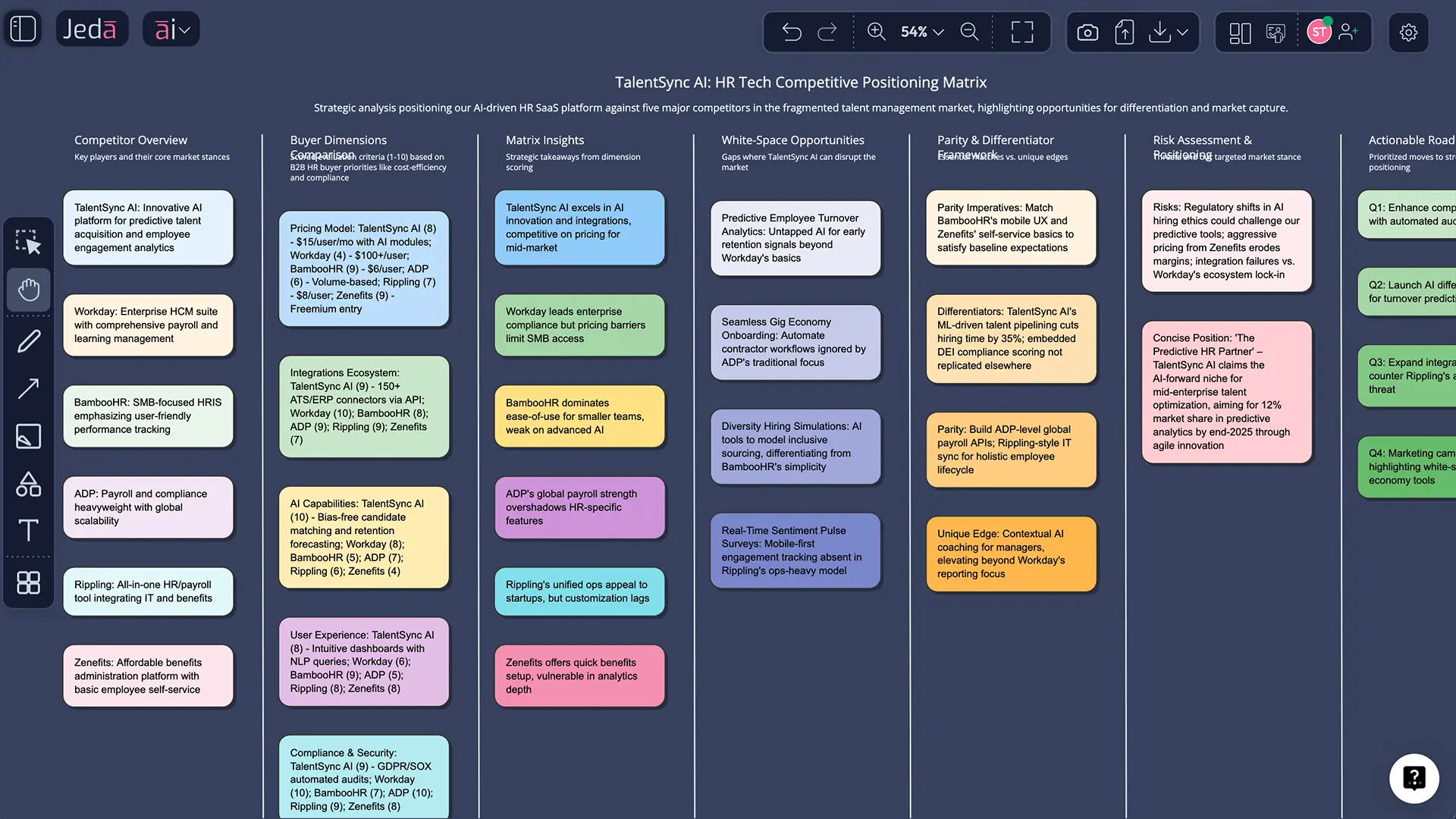
Competitive Positioning with AI is not about drawing a pretty two-axis chart and calling it strategy. It is about deciding where you can win, why buyers should care, and which competitors you actually need to beat. That sounds obvious. It rarely happens cleanly.
Most teams still do this work in fragments. One spreadsheet for feature comparisons. One deck for messaging. One doc for market notes. Three opinions in Slack. Then somebody makes a positioning map that looks polished but says almost nothing. That is exactly where an AI Workspace changes the job.
On Jeda.ai, you can build competitive positioning as a living visual analysis, not a static artifact. Start in the Prompt Bar with the Matrix command, feed it documents or data when needed, turn on web search for current context, compare angles with Multi-LLM reasoning, and then use the AI+ button to deepen the part of the matrix that deserves more pressure. You stay on the same AI Whiteboard the whole time, which matters more than people admit.
And yes, that difference shows up in the market. A quick look at current top-ranking pages shows a familiar pattern: Miro leans on templates for competitive analysis and strategic group mapping, Visily offers a customizable competitive positioning map template, and HubSpot still pushes downloadable spreadsheet-style competitor analysis sheets. Useful starting points. But they still leave the synthesis burden on you. Jeda.ai takes you from evidence to editable visuals to team alignment in one place.
What is competitive positioning?
Competitive positioning is the act of choosing the place you want to occupy in a buyer’s mind relative to alternatives, then backing that position with proof, parity where needed, and a real delivery model. Al Ries and Jack Trout popularized positioning as a way to create a distinct place in the prospect’s mind. Kevin Lane Keller and Brian Sternthal later sharpened the practical side: strong positioning is not only about points of difference, but also about points of parity and a clear frame of reference. Michael Porter adds the tougher strategic lens. Your position is only credible if it makes sense inside the competitive structure of the market, not just inside your own brand story.
That is why competitive positioning is broader than competitor analysis. Competitor analysis tells you what rivals do. Competitive positioning tells you where you should stand, what claim you can defend, and what trade-offs you accept.
Why Competitive Positioning with AI works better than the old manual process
The old manual process has one big flaw: it separates evidence from interpretation. Your market notes live in one place. Your map lives in another. Your messaging draft lives somewhere else. So the final position often reflects the loudest opinion in the room, not the sharpest insight.
Using Competitive Positioning with AI inside an AI Workspace fixes that in a much more practical way than the hype crowd likes to admit.
- One visual source of truth
Your matrix, notes, competitor claims, buyer pains, and response options stay on the same canvas instead of getting split across slides, docs, and spreadsheets.
- Current context, not stale assumptions
Jeda.ai web search is a platform feature, so you can ground your analysis with up-to-date market signals when your prompt needs live context.
- Evidence-in from docs and data
Upload reports, battlecards, customer interviews, or CSVs and convert them into a positioning-ready matrix instead of retyping everything by hand.
- Multi-angle reasoning
Run 1-3 reasoning models together and compare how each frames differentiation, parity, risk, and white space before you lock the final story.
- AI+ deep dives where it matters
Expand one part of the visual with the AI+ button when you need more detail on a competitor cluster, a buyer segment, or an underused wedge.
- Easy format shifts
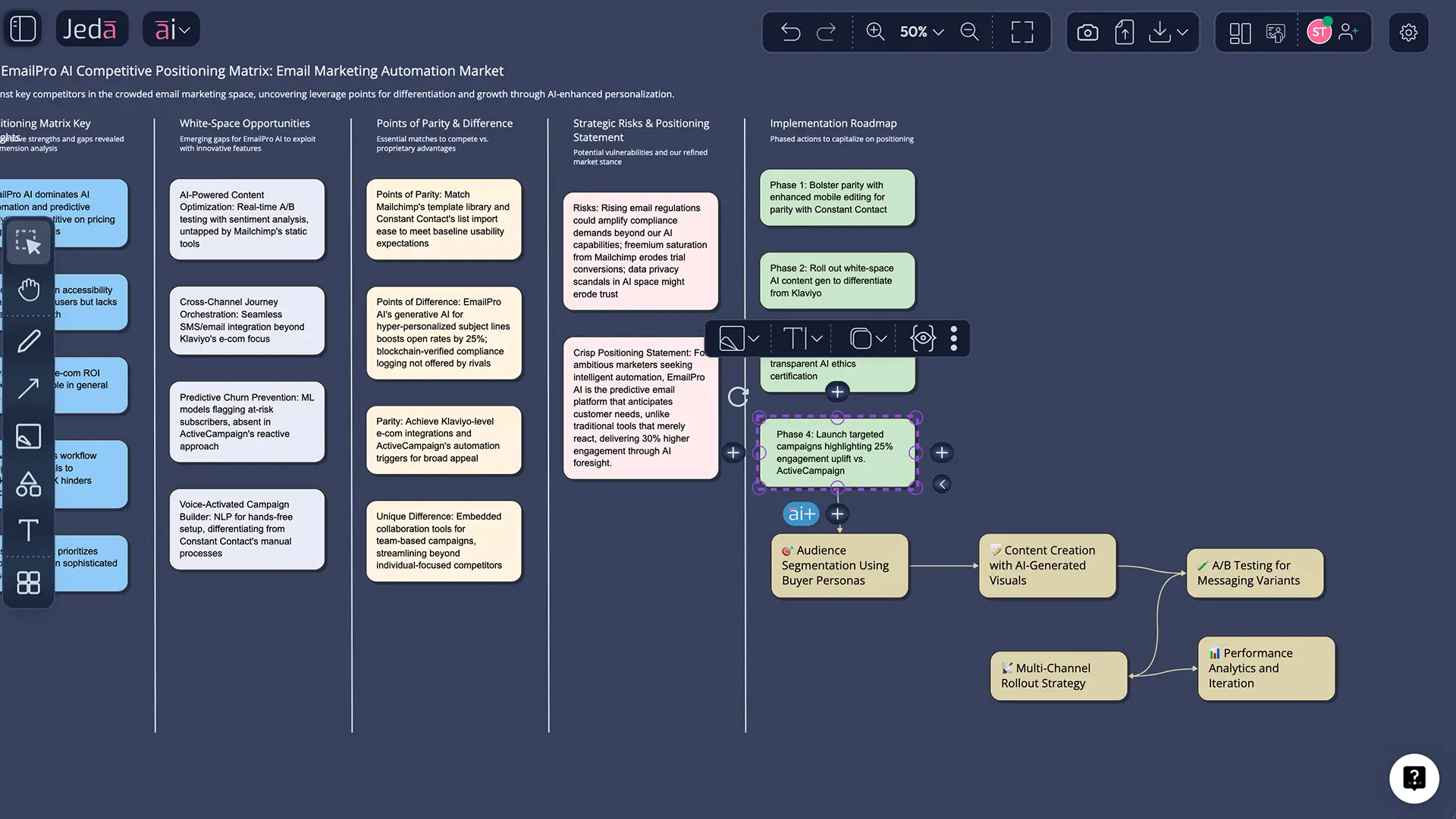
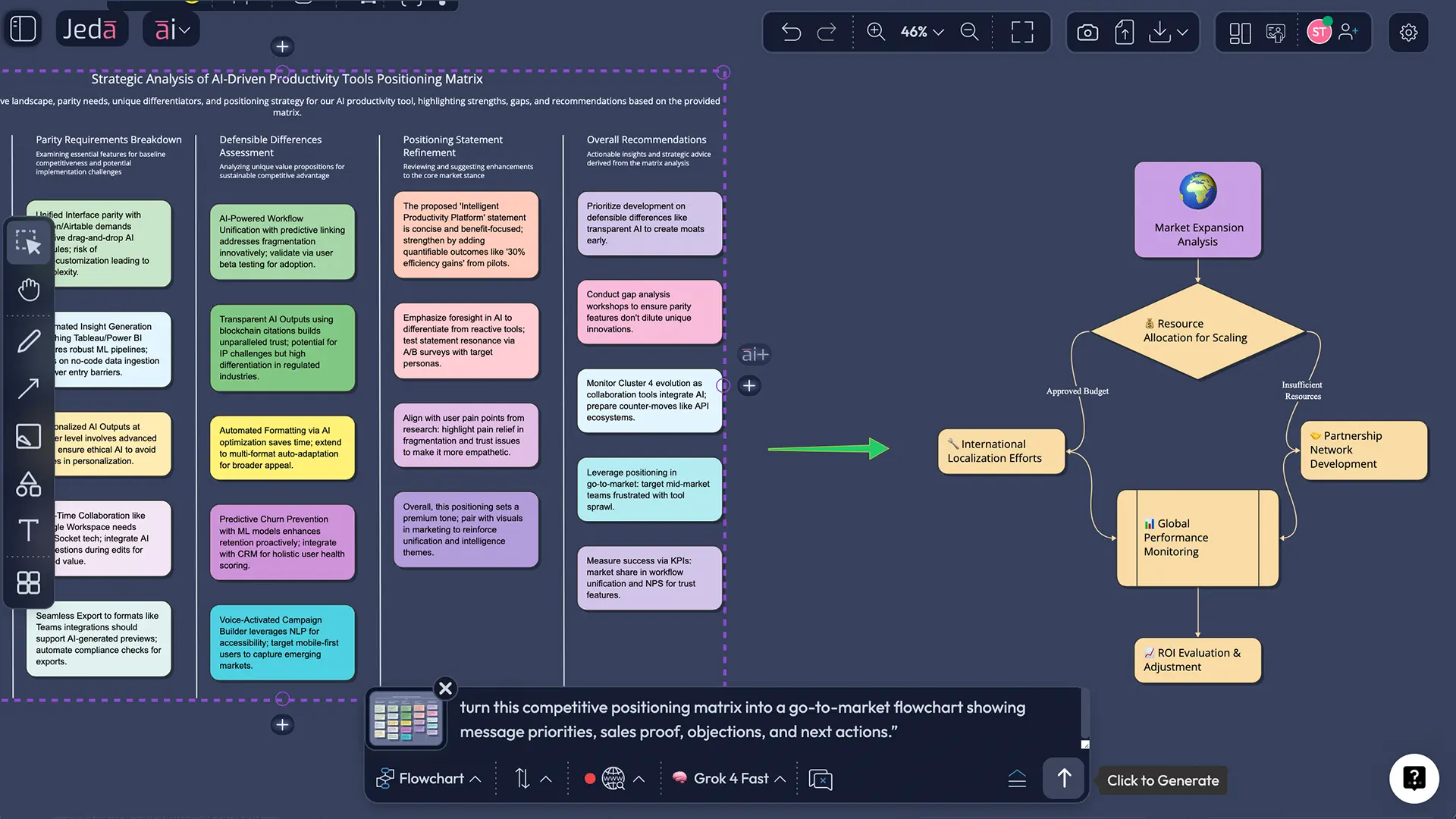
Use Vision Transform to turn the matrix into a flowchart, mind map, or diagram when the team needs an action plan instead of just a market snapshot.
Here is the bigger point. Competitive positioning is not a one-output exercise. It is a sequence: research, framing, choice, pressure-testing, messaging, and response design. Jeda.ai is strong because it handles that sequence on the same AI Whiteboard.
Where most teams mess this up
They choose lazy axes. They compare themselves to everybody. They confuse product claims with buyer value. They forget that being different is useless if the buyer does not care. And they often build a map that looks objective while hiding a mountain of assumptions underneath it.
That is why good positioning work usually needs a few passes.
How to create Competitive Positioning with AI in Jeda.ai
There is no dedicated AI Menu recipe for this topic right now. For this page, the right move is the Prompt Bar. Start with the Matrix command, build the first competitive view fast, then use the rest of Jeda.ai’s stack to sharpen it.
- Open the Prompt Bar and choose Matrix
Start on the bottom Prompt Bar, select the Matrix command, and decide whether your first pass should be a simple competitive map or a fuller positioning matrix with parity, difference, proof, and risk.
- Define the market and competitive set
Name the category, target segment, your brand, and the most relevant competitors. Keep it tight. A smaller, real competitive set beats a giant vanity comparison every time.
- Tell Jeda.ai what buyers actually value
Specify the dimensions that matter in decision-making, such as time-to-value, depth, flexibility, trust, price, support, or enterprise readiness. Ask for white space and vulnerable zones, not just a plot.
- Generate the first matrix and edit it on canvas
Press Enter, review the output, then adjust labels, text, colors, or shape formatting directly on the canvas. Jeda.ai visuals stay editable, so the board can become a working strategy asset.
- Pressure-test with current context
If you need fresher signals, turn on web search. If you have battlecards, analyst notes, transcripts, or spreadsheets, use Document Insight or Data Insight to pull evidence into the same competitive positioning workflow.
- Use AI+ to deepen the strongest or weakest zone
Select the area worth unpacking, then tap the AI+ button to extend it. After that, use Vision Transform if the team needs a follow-up flowchart, mind map, or diagram for action planning.
A solid starter prompt looks like this:
Prompt example
Choose the Matrix command in the Prompt Bar and enter:
“Build a competitive positioning matrix for [your company] in the [market/category]. Compare us with [competitor 1], [competitor 2], [competitor 3], and [competitor 4]. Use buyer-relevant dimensions, identify white-space opportunities, show points of parity, points of difference, risks, likely objections, and draft a crisp positioning statement we could defend in sales and marketing.”
If your source material already exists, bring it in first. That is where Jeda.ai gets unfair.
- Use Document Insight when your evidence is in reports, interview notes, strategy memos, or PDFs.
- Use Data Insight when the story lives in pricing tables, survey exports, or usage data.
- Use Dynamic Prompt when the first prompt is still too fuzzy and you need guided questions to tighten the brief.
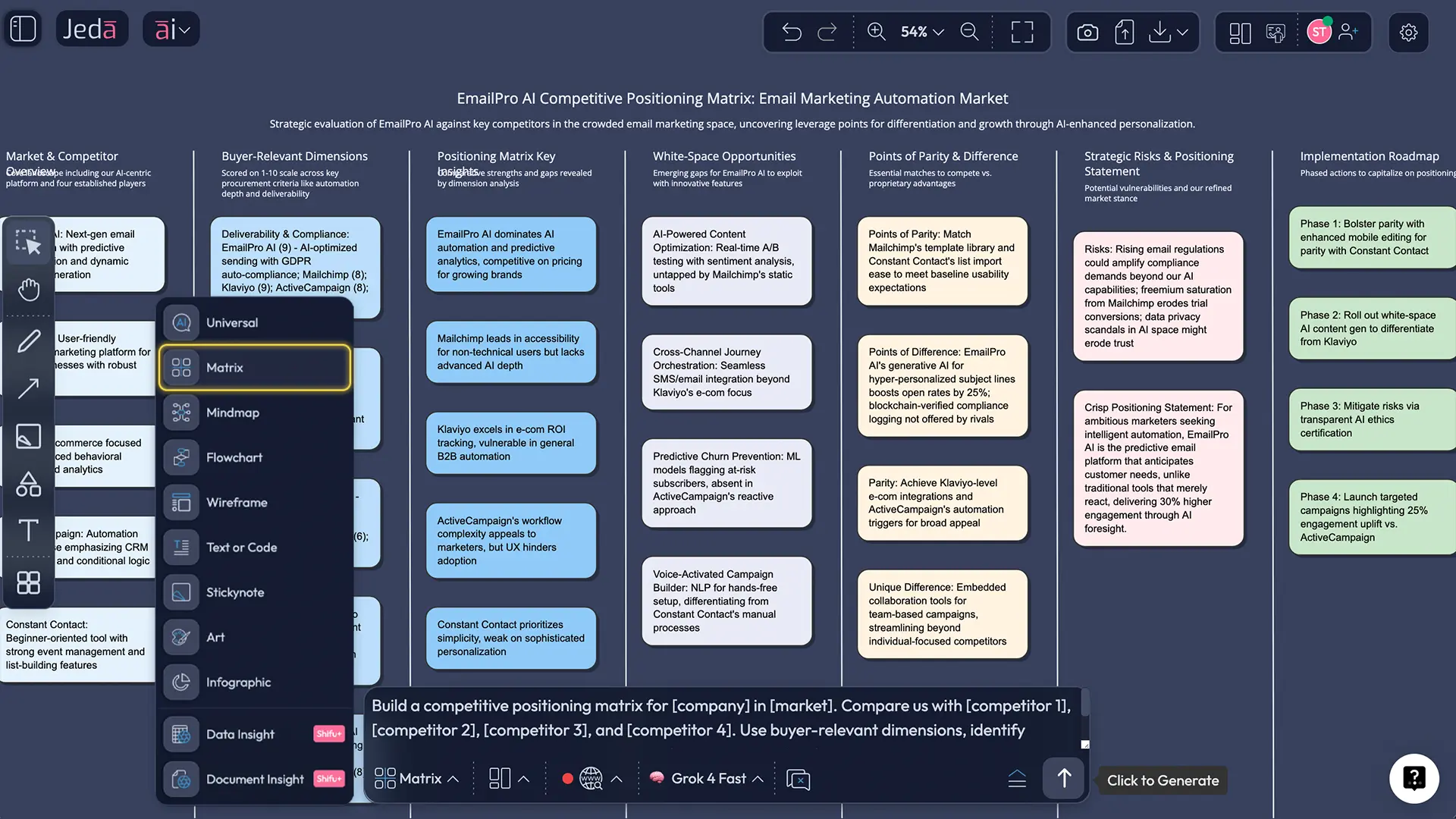
AI+ button generated deep dive: where the real strategy work happens
The first matrix gives you structure. The AI+ button is where you turn structure into depth.
Say your initial visual reveals a tempting gap: competitors are high on feature breadth but weak on speed-to-value for mid-market buyers. Do not start a new document. Stay on the same board. Select that cluster or node, tap AI+, and extend it. Jeda.ai can expand the area into supporting rationale, buyer implications, objections, proof angles, and next-step actions connected to the original visual.
That matters because good competitive positioning is cumulative. The map is not the end. It is the pressure point.
A worked example: mid-market project management software
Let’s make this real.
Imagine a SaaS team selling project management software to mid-market operations leaders. They think their position is “all-in-one project visibility.” Sounds fine. It also sounds like fifteen other tools.
A better Competitive Positioning with AI workflow would ask:
- Which buyers are we actually trying to win?
- Which alternatives do they shortlist first?
- Which parity features must we meet just to be taken seriously?
- What wedge do we own that is both valuable and believable?
Suppose the first matrix uses these two dimensions:
- Ease of rollout for cross-functional teams
- Depth of decision visibility for managers
Now the map gets interesting. The low-price tools cluster in “easy but shallow.” Enterprise incumbents sit in “deep but slow to roll out.” Your product lands in a viable wedge: “fast rollout with enough management depth to replace fragmented reporting.”
That is not just a map. That is a usable position.
From there, use the same board to add:
- proof points from onboarding time or customer feedback,
- objections from competitors with stronger brand recognition,
- message variants for sales, web copy, and product marketing,
- and a follow-up action flow using Vision Transform.
Use the full Jeda.ai stack, not just the first matrix
This is where the platform gets fun.
You can keep the original matrix as the strategic anchor, then extend the work in a few directions:
- Use Multi-LLM Agent when the position feels too convenient and you want competing interpretations before you commit.
- Use Document Insight to turn win-loss interviews into evidence-backed parity and difference notes.
- Use Data Insight to bring in pricing, NPS, feature usage, or survey results.
- Use Vision Transform to convert the matrix into a flowchart for go-to-market response, or a mind map for message architecture.
- Use Follow Me and live collaboration when the team needs to debate trade-offs on the same AI Whiteboard in real time.
- Export the finished output as PNG, SVG, or PDF when the board is ready to travel.
That is the real difference between an AI Workspace and a one-off template page. The board keeps working after the first answer.
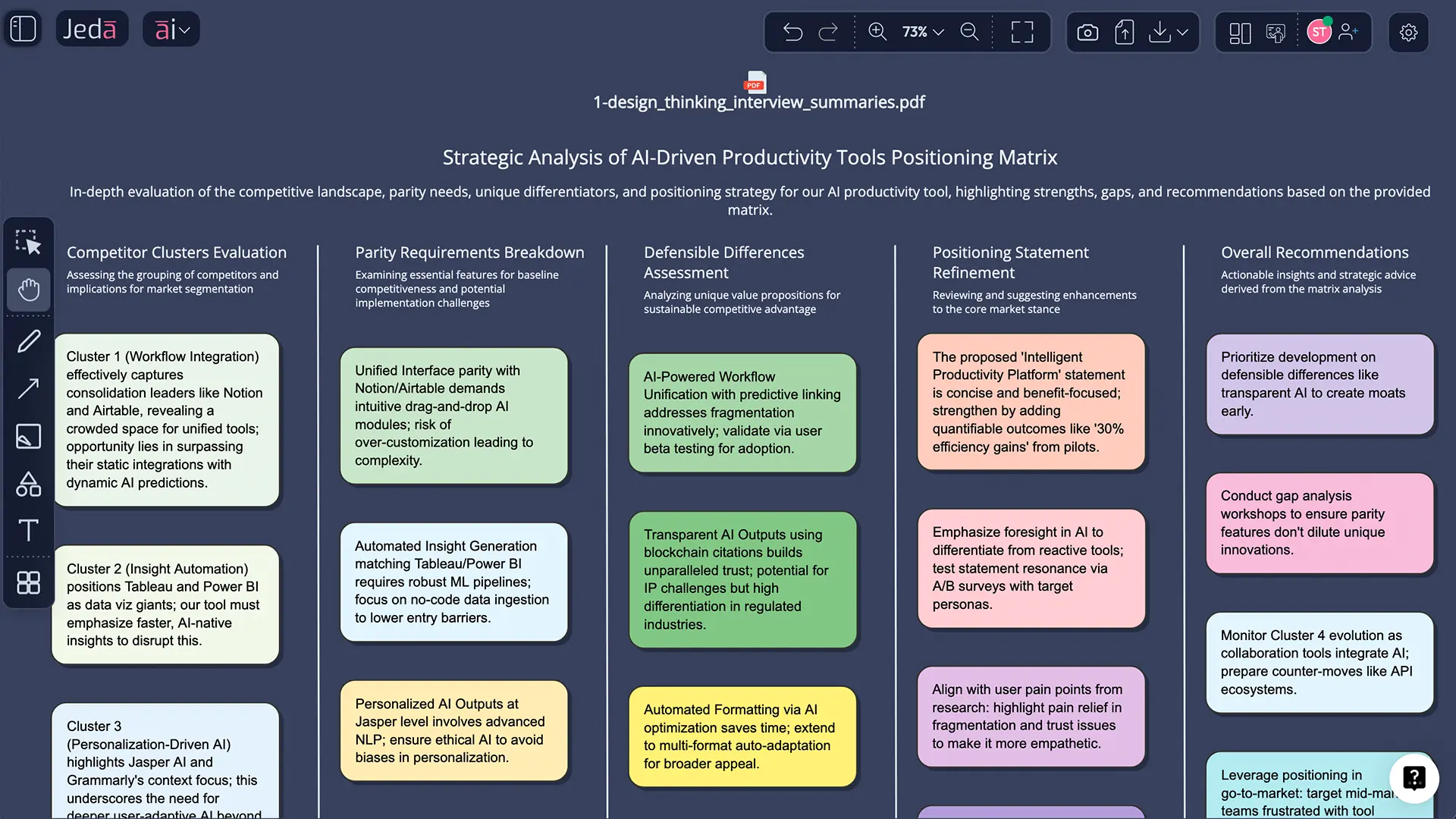
Best practices that make the output worth trusting
Common mistakes to avoid
The first mistake is choosing flattering axes. Teams love to pick dimensions that guarantee they land in the upper-right corner. Cute. Buyers are not fooled.
The second mistake is treating the category leader as the only reference point. In real buying journeys, the competitor is often a spreadsheet, a legacy process, or “do nothing for another quarter.”
Third, do not confuse a slogan with a position. “Easy, powerful, intelligent” is not positioning. It is wallpaper.
And finally, do not stop at the map. A matrix without follow-through is just a more sophisticated way to procrastinate.
If you want related strategic views after this one, build on the same AI Workspace with Porter’s Five Forces, PESTEL analysis, or Gap analysis. That sequence is often stronger than trying to squeeze every market truth into one board.
Frequently Asked Questions
- What is the difference between competitive positioning and competitor analysis?
- Competitor analysis gathers information about rivals. Competitive positioning uses that information to decide where your offer should stand in the market, what claim you can defend, and which buyer-relevant differences matter enough to build a strategy around.
- What should I put on the axes of a competitive positioning map?
- Use dimensions buyers actually care about in selection, not internal vanity metrics. Good axes often include price, ease of rollout, depth, support quality, innovation speed, trust, or time-to-value. Weak axes usually make the map look neat but useless.
- Is a positioning map the same as a perceptual map?
- Not exactly. A perceptual map reflects how customers perceive brands. A positioning map can show your intended or actual strategic placement. In practice, strong teams compare both because the gap between intended position and perceived position is often the real problem.
- Can I create Competitive Positioning with AI even if Jeda.ai has no dedicated recipe for it?
- Yes. Use the Prompt Bar, choose the Matrix command, and describe your market, target segment, competitors, and decision criteria. For this topic, Prompt Bar is the right method because it gives you more freedom than forcing the work into a rigid template.
- When should I use AI+ on a competitive positioning board?
- Use AI+ after the first matrix reveals tension worth exploring. Good targets include a white-space opportunity, a weak parity area, a risky competitor cluster, or a message wedge that needs more proof, buyer language, and strategic implications.
- Can Jeda.ai use my reports or spreadsheets to build the positioning view?
- Yes. Document Insight can pull structure from reports, PDFs, and notes, while Data Insight can use CSV or Excel data. That makes the positioning board more defensible because the map is tied to evidence instead of memory or opinion.
- What Jeda.ai features are most useful for this workflow?
- Start with the Matrix command in the Prompt Bar. Then add web search for live context, Dynamic Prompt for a sharper brief, Multi-LLM Agent for competing interpretations, AI+ for depth, and Vision Transform when the team needs an action-oriented follow-up visual.
- Is Competitive Positioning with AI useful only for marketing teams?
- No. Marketing teams use it for messaging, but strategy consultants, product managers, founders, and business leaders use the same structure to clarify trade-offs, find white space, prepare launches, and align cross-functional decisions on one AI Whiteboard.
- How often should a team revisit its positioning?
- At minimum, revisit it quarterly or whenever market conditions shift. A new competitor, pricing change, category reframing, or product launch can make an old position feel vague or outdated faster than most teams expect.
- How do I share the final output from Jeda.ai?
- Keep the live board for collaboration, then export the finished work as PNG, SVG, or PDF when you need to present or circulate it. Because the visual stays editable on canvas, the export is a snapshot of a strategy asset, not the end of the asset itself.
Sources & Further Reading
- [1]
Michael E. Porter (1979) . “How Competitive Forces Shape Strategy” Harvard Business Review.
View Source ↗ - [2]
Michael E. Porter (2008) . “The Five Competitive Forces That Shape Strategy” Harvard Business Review.
View Source ↗ - [3]
Kevin Lane Keller and Brian Sternthal (2002) . “Three Questions You Need to Ask About Your Brand” Harvard Business Review.
View Source ↗ - [4]
Jonathan Byrnes (2007) . “Mapping Your Competitive Position” Harvard Business Review.
View Source ↗ - [5]
Al Ries and Jack Trout (1981) . “Positioning: The Battle for Your Mind” McGraw-Hill.
View Source ↗ - [6]
Moderandi Inc. (2013) . “The Strategic Marketing Process” Marketing MO.
View Source ↗ - [7]
Chiranjeev S. Kohli and Lance Leuthesser (1993) . “Product Positioning: A Comparison of Perceptual Mapping Techniques” Journal of Product & Brand Management.
View Source ↗ - [8]
Miro Team (2025) . “AI for Competitive Analysis: A 5-step framework + Templates” Miro.
View Source ↗ - [9]
Visily (2026) . “Competitive Positioning Map” Visily.
View Source ↗ - [10]
HubSpot (2026) . “Competitive Analysis Template” HubSpot.
View Source ↗
Start Your Competitive Positioning with AI Board
Join 150,000+ users who use Jeda.ai as an AI Workspace for sharper strategy, clearer differentiation, and faster team alignment.
Try Free Template