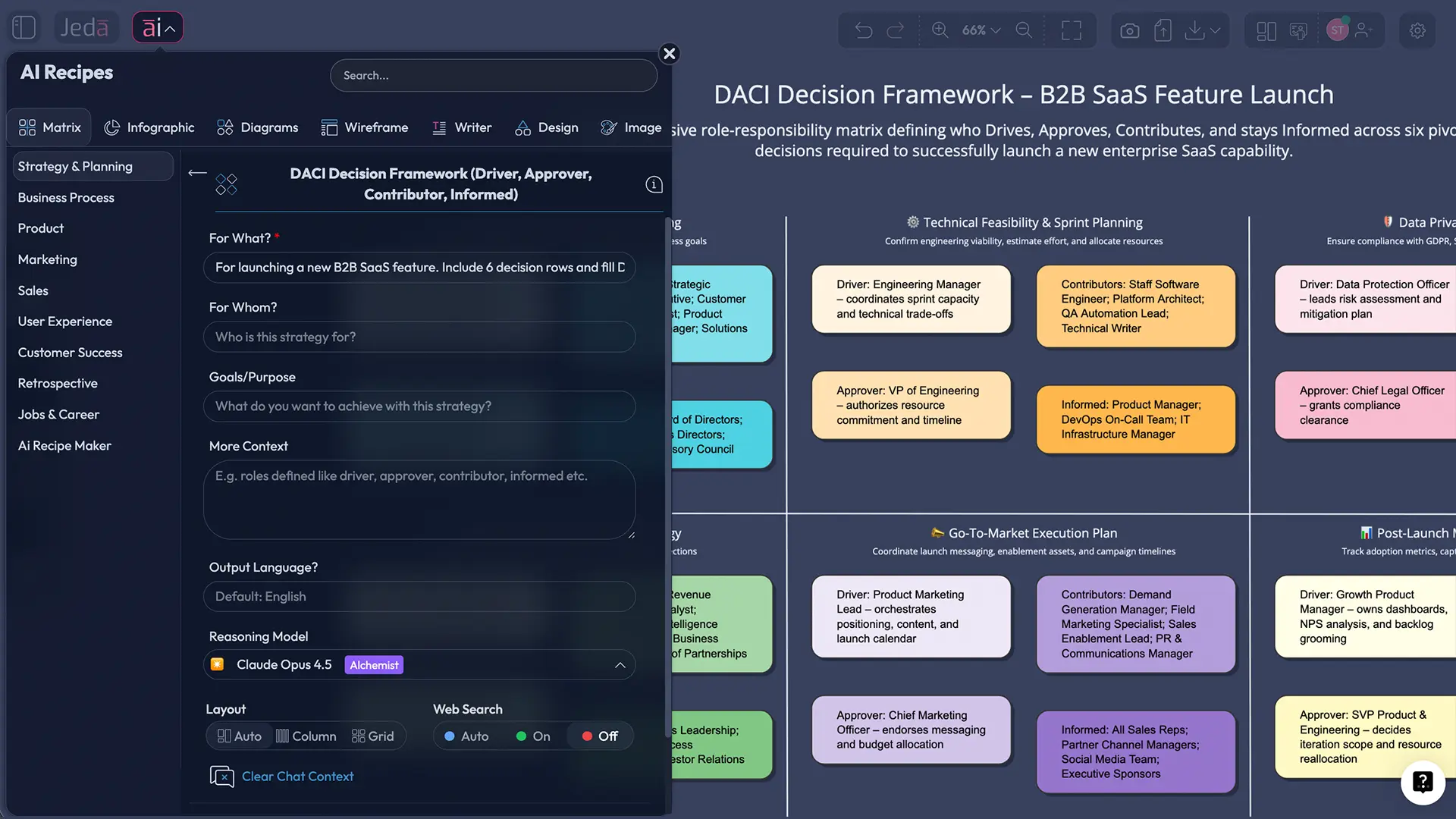
DACI Decision Framework with AI (Driver, Approver, Contributor, Informed)
Ever watched a “quick decision” turn into a three-week email thread? Same. The DACI decision-making framework exists for one reason: stop the endless looping and get a clear call made.
DACI is a simple role matrix — Driver, Approver, Contributor, Informed — that makes decision ownership visible, so teams can move. It’s widely described as originating at Intuit in the 1980s (the “internet legend” version), and it shows up today in modern team playbooks and product orgs.
And yes, you can build a clean DACI matrix in an AI Workspace or AI Whiteboard (and keep it editable) instead of writing it in a doc nobody updates. Jeda.ai is built for that: a Visual AI workspace where frameworks become living boards you can iterate on with your team.
What is the DACI decision-making framework?
The DACI decision-making framework is a decision-role model that assigns four roles to each meaningful decision (or decision chunk):
- Driver (D): Runs the process. Frames the decision, gathers input, keeps the timeline honest.
- Approver (A): Makes the final call (ideally one person).
- Contributors (C): Provide expertise, options, evidence, and trade-offs.
- Informed (I): Needs the outcome and context, but doesn’t shape the decision.
Most teams already do this… badly. They just don’t label it. DACI forces the labels.
Many summaries credit Intuit with developing DACI, and it’s now documented in practical playbooks like Atlassian’s DACI play.
DACI vs RACI: what’s the actual difference?
RACI is great for execution accountability (who is Responsible vs Accountable). DACI is built for decision clarity (who drives the decision and who approves it). That’s why DACI tends to work well when work is cross‑functional and decisions are frequent — product, strategy, engineering, design.
Here’s the blunt test:
- If the problem is “we don’t know who does the work,” use RACI.
- If the problem is “we don’t know who decides,” use DACI.
Why use the DACI decision-making framework with AI?
AI doesn’t replace decision-making. It replaces the junk work around it: summarizing inputs, organizing options, and turning messy discussion into something a team can actually approve.
In a Visual AI AI Workspace, the DACI model becomes more than a table. It becomes a decision board you can update as facts change, attach evidence to, and reuse across projects. And since Jeda.ai is built as an AI Whiteboard, the DACI matrix stays editable and collaborative.
Where AI actually helps (without making you look like you outsourced thinking)
1) Faster framing Turn a messy goal like “Should we launch in Q2?” into a structured decision: constraints, criteria, options, and the DACI roles attached.
2) Better options AI can generate 3–6 plausible options, plus trade-offs, so contributors aren’t starting from a blank page.
3) Cleaner approvals Approvers don’t want a novel. They want the call, the rationale, and what changes if the call flips. AI can help you keep it that clean.
4) Better decision memory A DACI board is a record. Add a few “why we chose this” notes and future-you stops cursing past-you.
- Clear decision ownership
DACI makes one person drive and one person approve, so decisions don’t stall in committee.
- Shorter decision cycles
AI drafts options, criteria, and summaries so contributors spend time on judgment, not formatting.
- Reusable decision boards
Save the matrix as a template, attach evidence, and reuse it across teams inside one AI Workspace.
How to create a DACI decision-making framework in Jeda.ai
Jeda.ai supports two main input paths: the AI Menu (recipes/templates) and the Prompt Bar (freeform prompting). If your workspace already has a DACI recipe under AI Menu → Matrix Recipes, use it. If not, build it with the Matrix command in the Prompt Bar — same output, same logic, still editable.
Method 1: Recipe Matrix (AI Menu → Matrix Recipes)
This method is best when you want a clean DACI matrix layout fast. The AI Menu is designed for structured outputs with predefined framework templates.
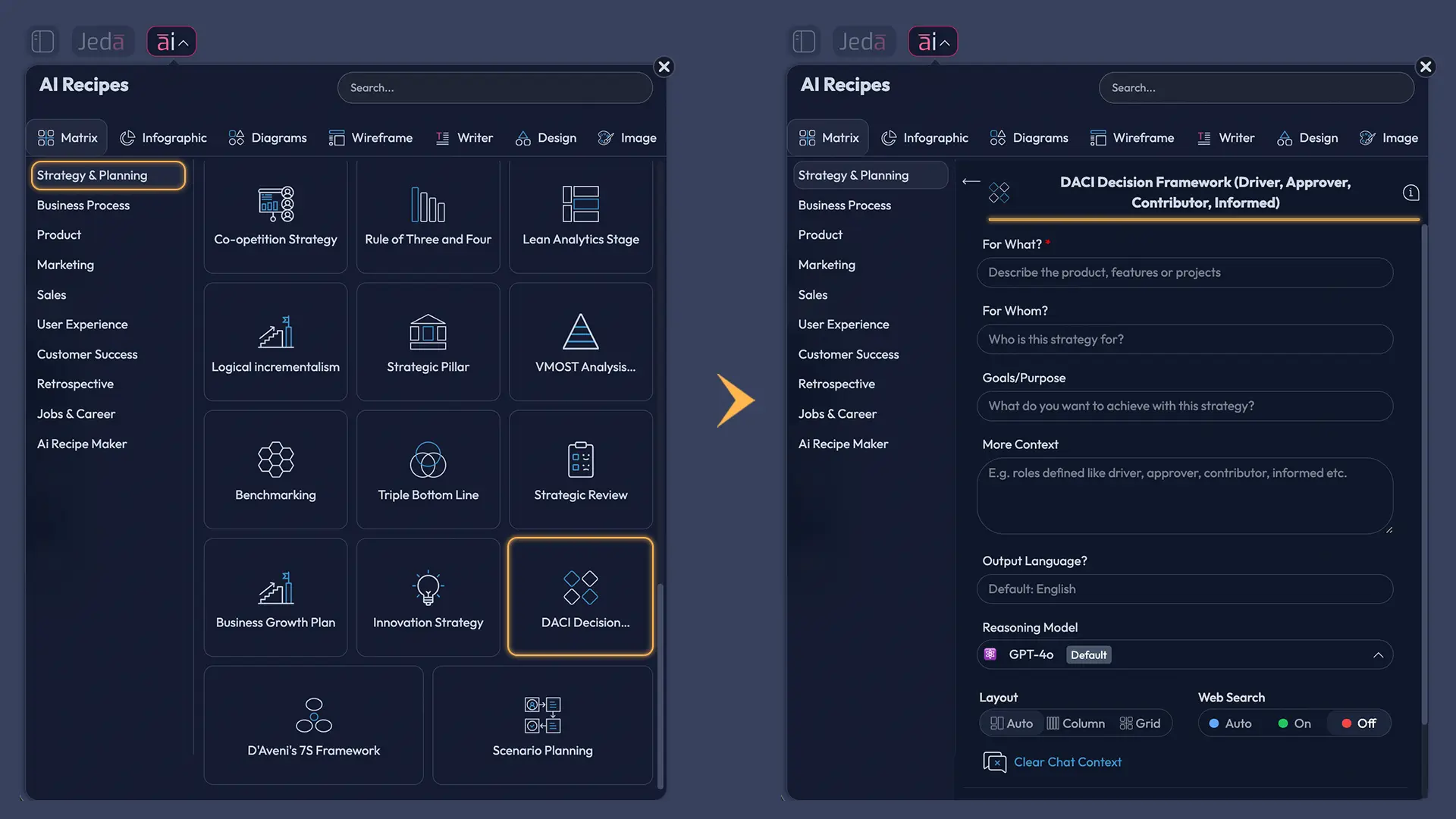
- Open the AI Menu and choose Matrix Recipes
In your AI Workspace, click AI Menu (top-left). Choose Matrix Recipes so you generate a structured decision matrix rather than a freeform note dump.
- Select DACI (or a Decision Roles template)
Pick a DACI Decision Framework template if it appears. If you don’t see it, choose any decision-roles matrix template and rename columns to Driver, Approver, Contributor, Informed.
- Lock the decision context
Write the decision, the team, and the time horizon (for example: “Launch Feature X to paid users in Q2”). Tight context beats generic content every time.
- List the decisions (rows) and assign roles (columns)
Create 3–8 concrete decisions. For each row, assign one Driver and one Approver. Add 2–5 Contributors, then list who needs to be Informed.
- Generate, then refine together
Click Generate. Edit the matrix live with your team on the AI Whiteboard. When something feels vague, rewrite it as a clear decision statement and attach evidence.
Method 2: Prompt Bar (Matrix command)
The Prompt Bar is the fastest way to generate a DACI matrix when you want full control. The Prompt Bar sits at the bottom of the canvas; you select the Matrix command, type your prompt, and press Enter.
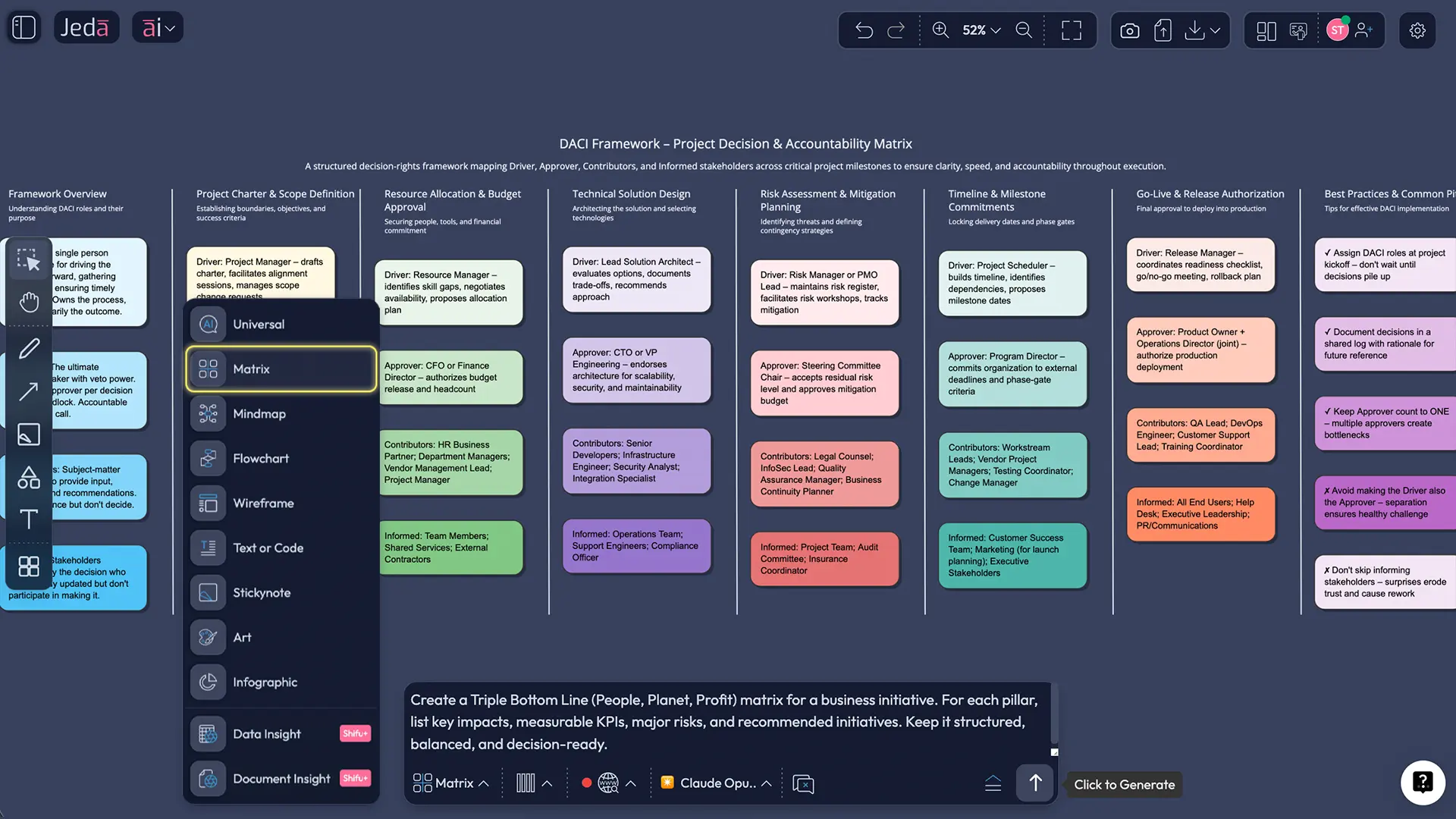
Prompt you can paste (edit the bracketed parts):
Create a DACI decision-making framework matrix for [project]. List 6 key decisions we must make in the next [time window]. For each decision, assign: Driver (name/role), Approver (name/role), 2–4 Contributors (roles), and Informed stakeholders. Add a short “Decision criteria” note per row.
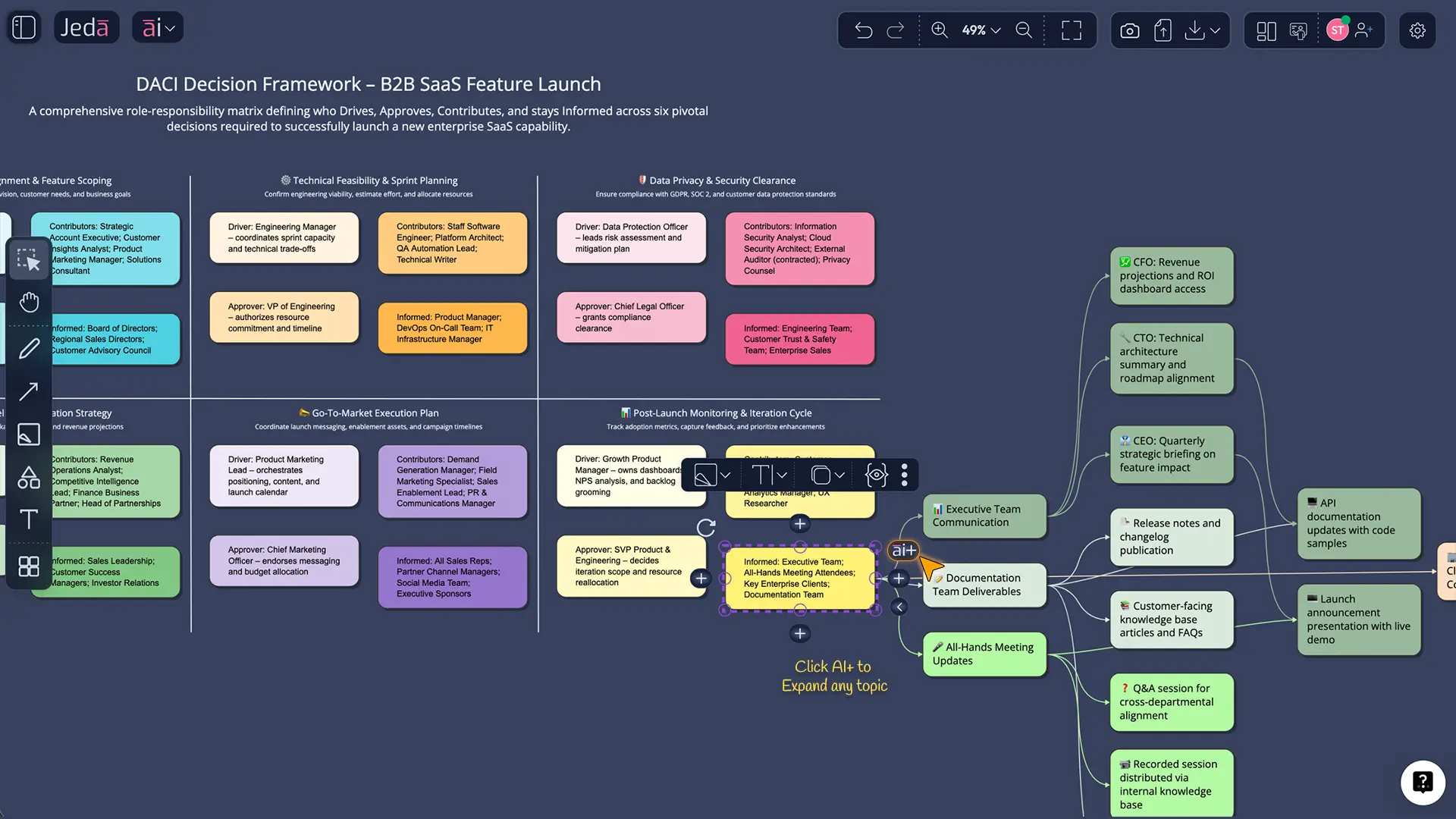
Use AI+ to deepen the board (without overthinking it)
Once your matrix exists, you’ll see the AI+ button for extending content on the canvas. Select a row (or the whole matrix) and use AI+ to expand: add criteria, risks, or the “what changes if we delay?” notes.
Convert DACI into a decision flow when needed (Vision Transform)
Sometimes the matrix isn’t enough — you need the logic. That’s where Vision Transform helps: you can convert a matrix into a flowchart or diagram layout for review meetings.
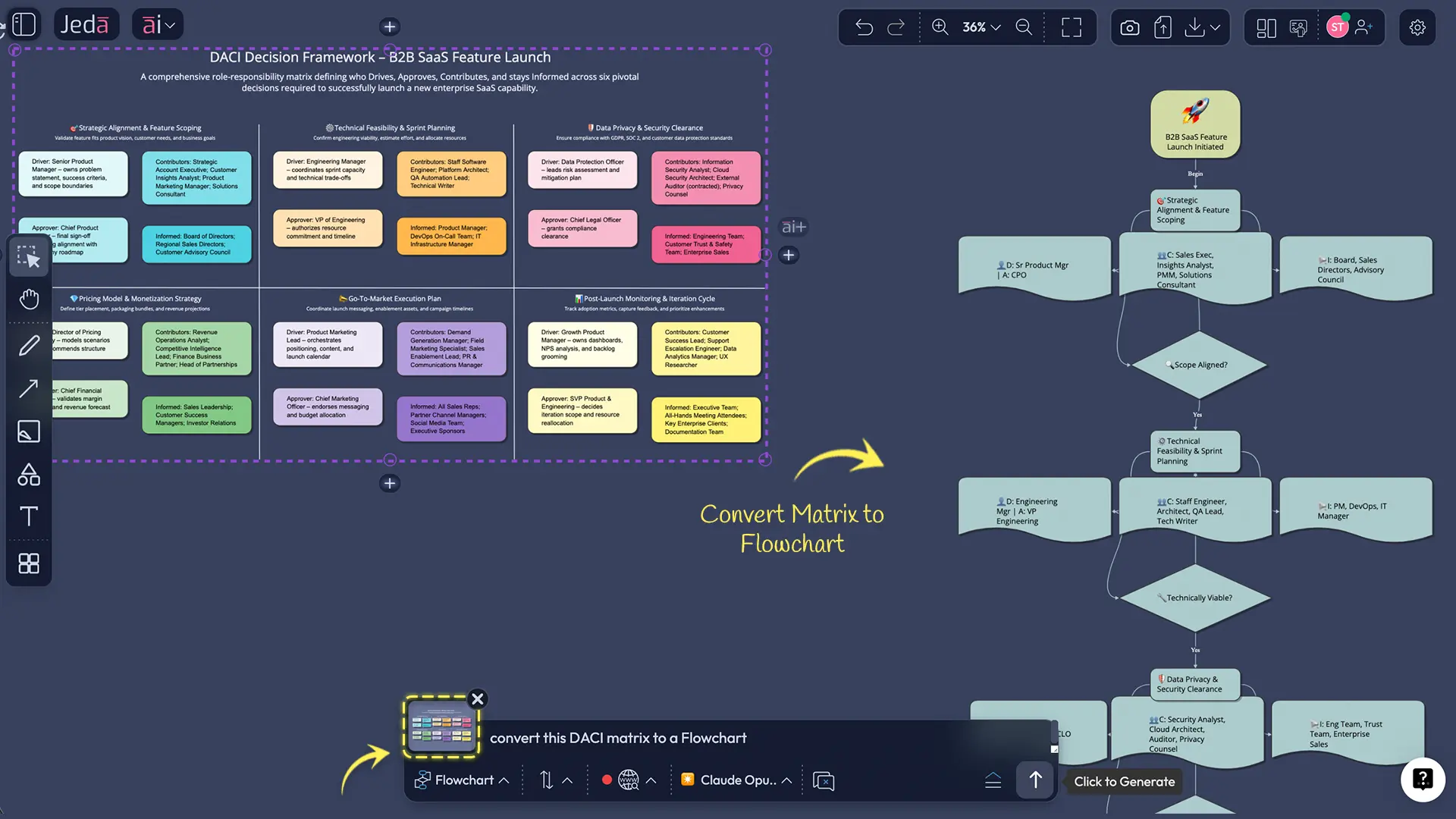
DACI matrix template (copy this structure)
A practical DACI board usually looks like this:
- Rows: decisions (not tasks)
- Columns: Driver, Approver, Contributors, Informed
- Optional column: decision criteria (one line)
Here’s a mini template you can mirror:
| Decision | Driver | Approver | Contributors | Informed | Criteria |
|---|---|---|---|---|---|
| Ship Feature X to paid users in Q2? | PM | VP Product | Eng Lead, Data Analyst, Support | Sales, Marketing | Retention lift ≥ 2% |
| Pricing change for Feature X? | PM | CFO | Finance, Growth, Legal | CS, Sales | Margin ≥ target |
| Rollout plan (beta → GA)? | Eng Lead | VP Product | PM, QA, Support | Marketing | Error rate ≤ threshold |
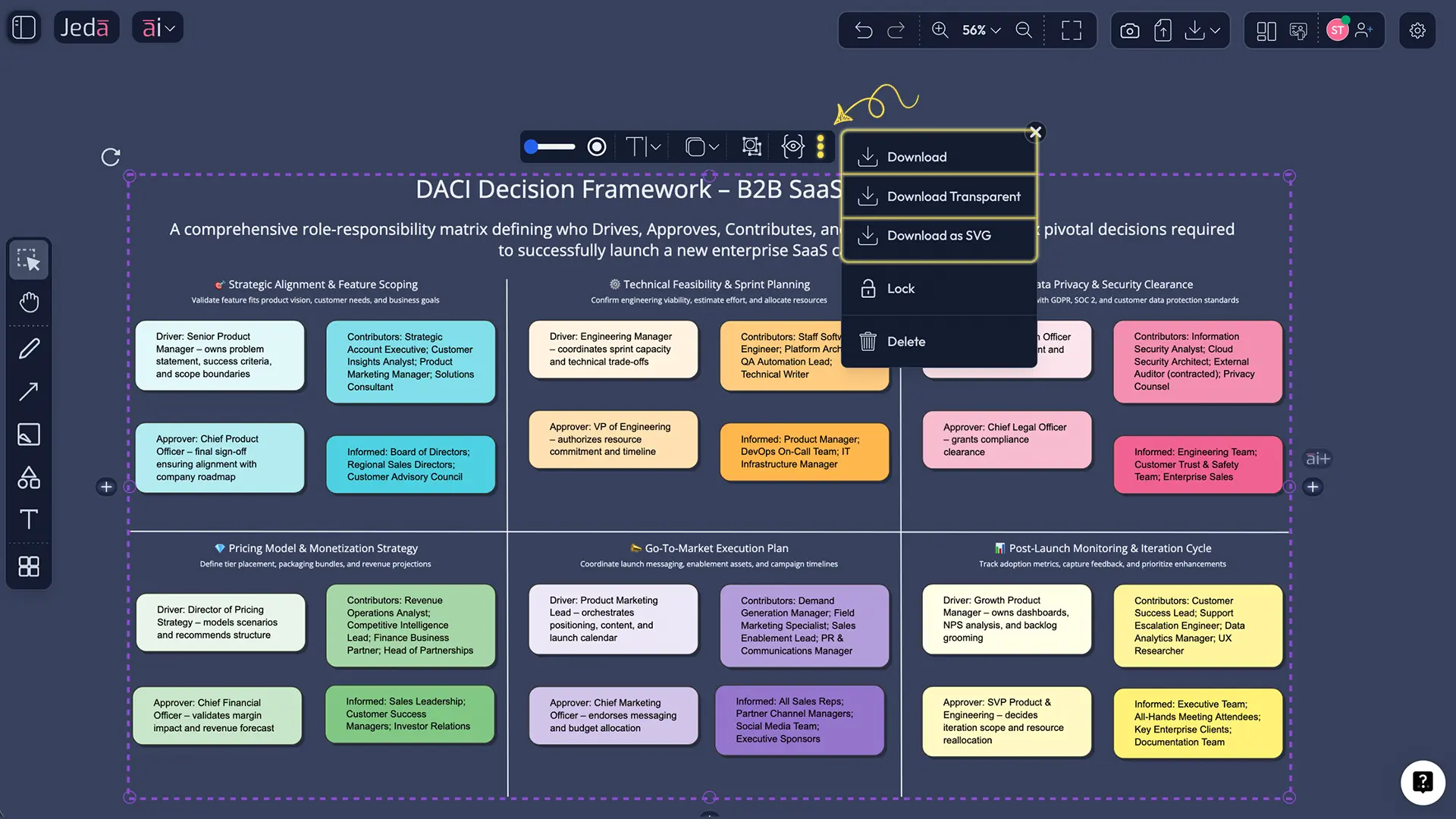
Your team can keep this inside one AI Whiteboard, attach links, screenshots, PDFs, and meeting notes, then export the final board to PNG, SVG, or PDF when you need to share it.
Worked example: DACI for a SaaS launch (what it looks like in real life)
Let’s say you’re launching a new “Teams” plan. You have product, engineering, finance, marketing, and sales all in the mix. Classic chaos territory.
Here’s a sane DACI setup:
Decisions (rows):
- Target segment for first release
- Feature scope for GA
- Pricing + packaging
- Rollout gating criteria (beta exit)
- Support readiness plan
Driver: Product Manager (owns the process) Approver: VP Product (final call) Contributors: Eng lead, data analyst, finance, support lead, marketing lead Informed: Sales reps, CS, exec staff, partnerships
Now the trick: keep each decision row small and specific. “Pricing + packaging” is a row. “Launch strategy” is too big unless you split it into 3–4 decisions.
Best practices (so DACI doesn’t become another “process poster”)
1) Keep one Approver per decision
Multiple approvers turns into “approval roulette.” The fastest way to kill DACI is to make the “A” a committee.
2) Don’t confuse Driver with “does all the work”
The Driver coordinates. Contributors still do the real work (analysis, estimates, research). The Driver just makes sure it lands.
3) Limit Contributors to the people with real input
If everyone is a Contributor, nobody is. Two to five contributors per decision is a good ceiling for most decisions.
4) Make “Informed” a broadcast list, not a debate club
Informed stakeholders should hear the outcome and the why. They shouldn’t reopen the decision unless new facts show up.
Common mistakes to avoid
You assign DACI once and never update it Decisions change. People change. DACI needs maintenance or it becomes fiction.
Your rows are tasks, not decisions “Design UI screens” is a task. The decision is “which design direction do we pick?”
The Driver is also the Approver for everything That can work for small teams. In bigger orgs it usually means approvals happen without enough input, and you get surprise backlash later.
You keep adding Contributors as politics If someone is only there to feel included, they’re probably Informed.
Frequently Asked Questions
- What is the DACI decision-making framework?
- The DACI decision-making framework is a role model that assigns a Driver, Approver, Contributors, and Informed stakeholders to each decision so teams know who drives the process and who makes the final call.
- What does DACI stand for?
- DACI stands for Driver, Approver, Contributor, and Informed. The Driver runs the decision process, the Approver makes the final call, Contributors provide input, and Informed stakeholders receive the outcome and context.
- Is DACI better than RACI?
- DACI is better than RACI when your main problem is unclear decision ownership. RACI focuses on who does work and who is accountable for tasks, while DACI focuses on who drives and approves decisions.
- How many Approvers should a DACI have?
- One Approver per decision is the usual best practice. Multiple approvers slow decisions and often create conflicting feedback loops that undo the point of using a decision framework.
- Who should be the Driver in DACI?
- The Driver is typically the person responsible for moving the decision forward, often a product manager, project manager, or functional lead. They frame the decision, gather input, and ensure the approver has what they need to decide.
- How do you use DACI in product teams?
- Use DACI in product teams by listing key product decisions as rows (scope, sequencing, pricing, rollout), then assigning a Driver and Approver for each. Contributors add research and estimates, and Informed stakeholders get the final decision plus rationale.
- Can DACI work for small teams?
- Yes. In small teams, DACI can be lightweight: one Driver, one Approver, a short contributor list, and a simple Informed list. The value is speed and clarity, even when roles overlap.
- How do you create a DACI matrix in Jeda.ai?
- To create a DACI matrix in Jeda.ai, generate a decision matrix using AI Menu → Matrix Recipes (if available) or use the Prompt Bar with the Matrix command. Then refine roles on the AI Whiteboard, extend details with the AI+ button, and export to PNG, SVG, or PDF.
- What should go in the rows of a DACI matrix?
- Rows should be decisions, not tasks. Good rows are specific choices such as “approve pricing model,” “choose launch segment,” or “set beta exit criteria,” each with a single approver and a clear driver.
- How do you stop DACI from becoming bureaucracy?
- Keep it small and timeboxed: 3–8 decisions, one approver per row, and only contributors with real input. Use the board as a working artifact in your AI Workspace, not a document you update once and forget.
Sources & further reading
- [1]
Atlassian Team Playbook (2026) . “DACI: A Decision-Making Framework” Atlassian.
View Source ↗ - [2]
Chris Butler (2023) . “What is the DACI decision-making framework? Examples & template” LogRocket Blog.
View Source ↗ - [3]
Erik Larson (2019) . “Here's What To Do When DACI Decision-Making Falls Short” Forbes.
View Source ↗ - [4]
ProductPlan (2026) . “What is the DACI Decision-Making Framework?” ProductPlan Glossary.
View Source ↗ - [5]
Project-Management.com (2023) . “DACI vs. RACI Model Guide: Differences and How to Choose” Project-Management.com.
View Source ↗
Build your DACI decision board in minutes
Join over 150,000+ users who use Jeda.ai as an AI Workspace and AI Whiteboard for decision-ready visuals.
Try Free Template