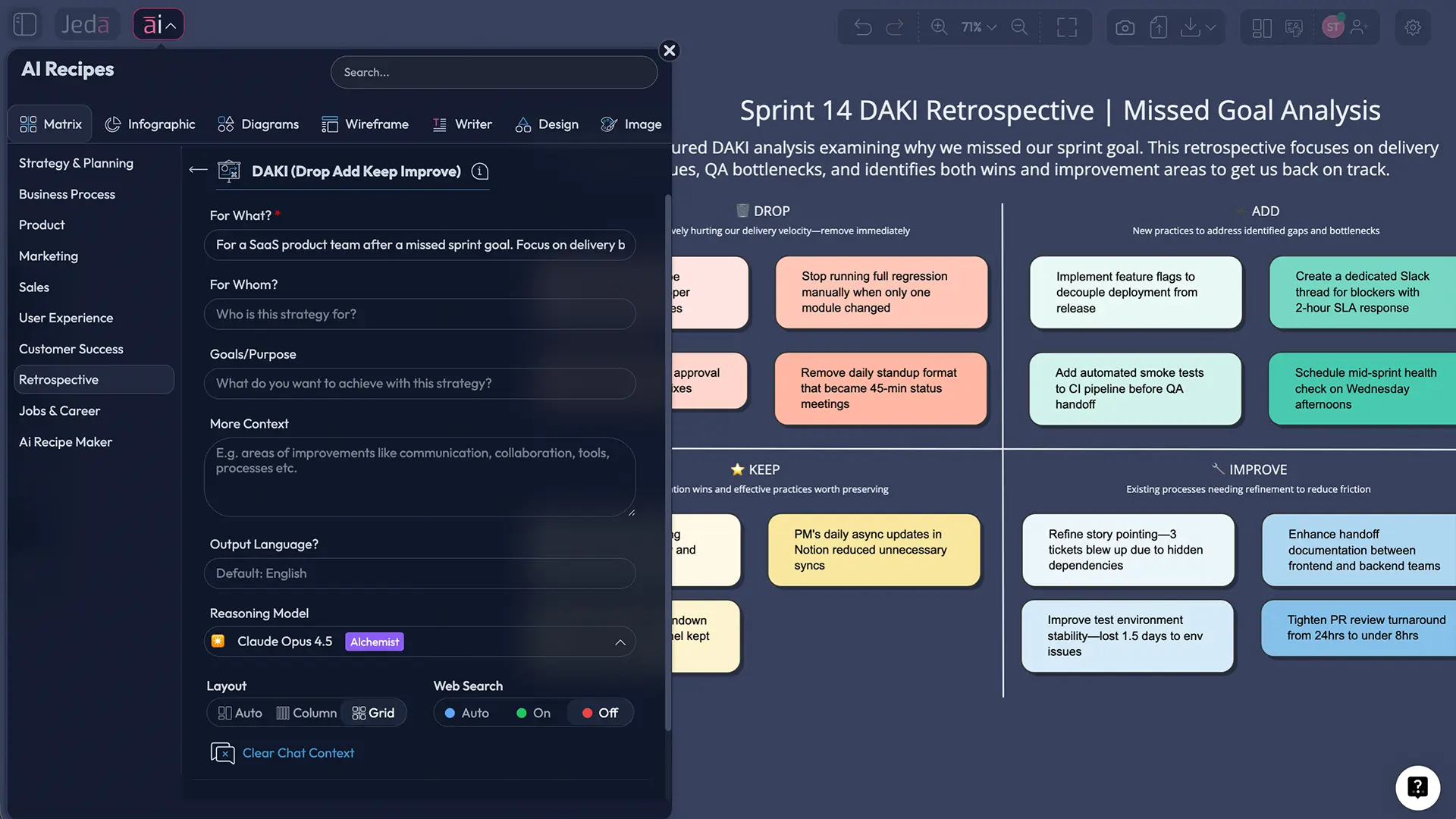
A DAKI retrospective template gives your team a simple four-part way to review work: Drop, Add, Keep, Improve. That sounds almost suspiciously simple. Good. Simplicity is the point. In a fast-moving AI Workspace, the hard part is rarely “how do we make four columns?” It’s how to turn scattered opinions into a clear board, a clean action list, and a better next sprint.
That’s where Jeda.ai earns its keep. Instead of starting from a blank AI Whiteboard, your team can generate a structured DAKI board, cluster messy input, extend ideas with the AI+ button, and turn reflection into something you can actually use. Not someday. In the next sprint. More than 150,000+ users already use Jeda.ai to turn fuzzy thinking into visual action inside an editable AI Workspace built for collaboration and speed. And because Jeda.ai includes 300+ strategic frameworks, DAKI doesn’t have to live alone—it can sit beside fishbone analysis, flowcharts, and other follow-up boards in the same Visual AI environment.
What is a DAKI retrospective template?
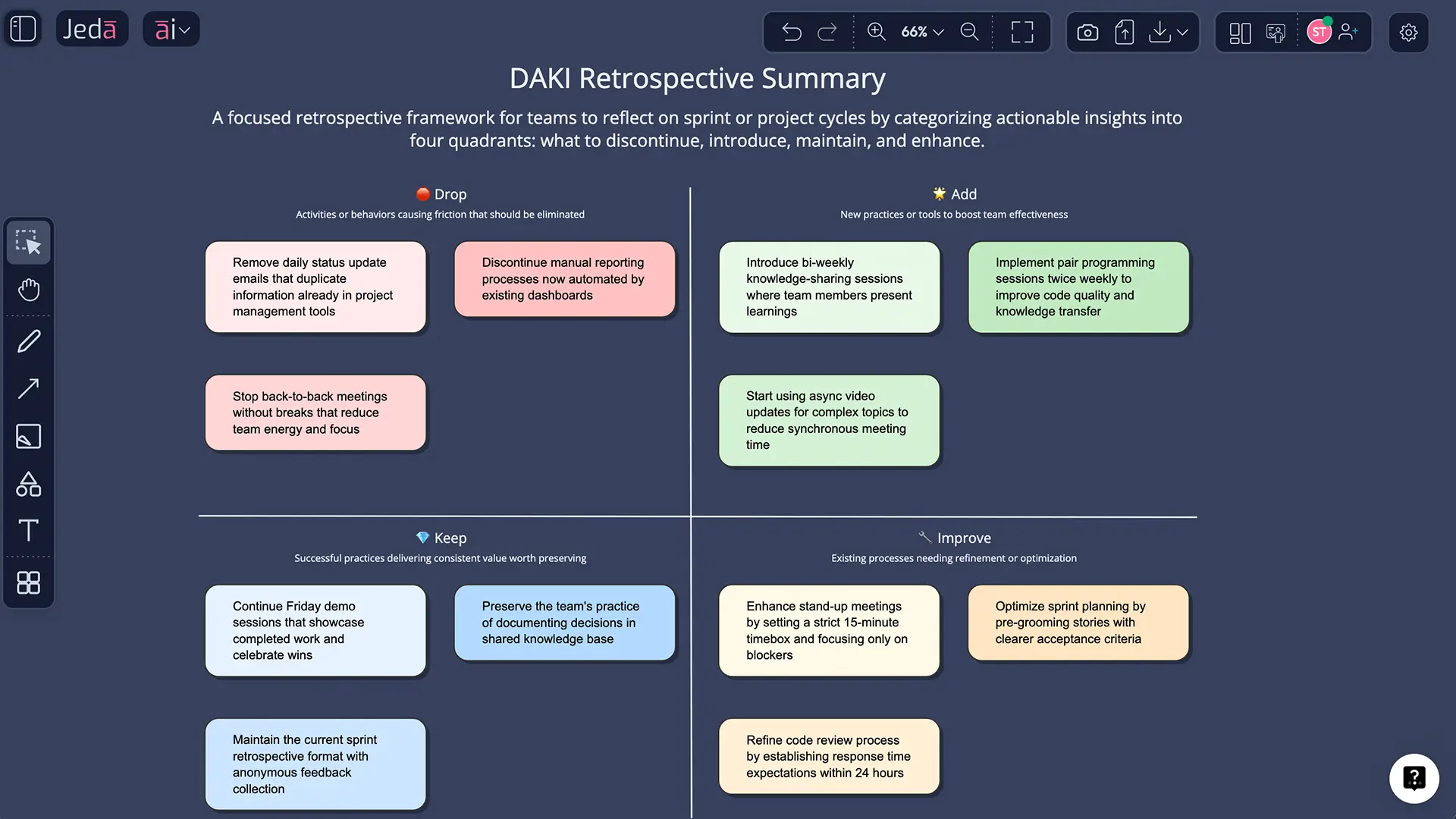
A DAKI retrospective template is a four-quadrant board used in retrospectives to sort team feedback into Drop, Add, Keep, and Improve. It is not a separate Scrum event by itself. It is one way to run the Sprint Retrospective, the Scrum event used to inspect how the last sprint went and plan improvements to increase quality and effectiveness.
The format works because it gives feedback edges. “Drop” forces the team to name habits, meetings, or steps that no longer deserve oxygen. “Add” asks what is missing. “Keep” protects what is already working. “Improve” catches the gray zone—things that are useful, but sloppy, overloaded, or under-supported.
That last column matters more than most teams realize. Start/Stop/Continue is great when you need blunt clarity. DAKI is better when the team is mature enough to say, “Don’t kill it. Tune it.” Several top-ranking DAKI template pages also position it for teams that have worked together for a while, need a reset, or want more nuance than lighter retro formats.
Why use a DAKI retrospective template with AI?
Running DAKI manually is fine. Running it with AI is better when the team is distributed, short on time, or drowning in notes.
First, AI gives structure faster. A blank board is democratic, sure, but it also eats time. Jeda.ai can generate the initial DAKI matrix in seconds inside an editable AI Whiteboard, so the team starts discussing instead of formatting.
Second, AI helps you see patterns across messy input. Teams rarely hand you elegant, single-theme feedback. They hand you duplicates, contradictions, vague complaints, side quests, and one sticky note that reads like it was written mid-caffeine earthquake. AI can cluster overlap, surface themes, and help reframe vague notes into usable action items.
Third, AI makes follow-through easier. A retrospective that ends with twenty sticky notes and no owner is basically performance art. The good kind, maybe, but still not helpful. Jeda.ai helps teams turn a DAKI board into an action list, a next-step flowchart, or a mind map using the same AI Workspace.
And there’s another reason. Retrospectives only work when people feel safe telling the truth. Research on agile retrospectives and team learning keeps landing on the same point: psychological safety and visible follow-through matter. Teams speak up more when the environment feels safe, and retros work better when they end with clear actions instead of good intentions wearing a fake mustache.
- Faster structure
Generate the four-quadrant DAKI board instantly instead of drawing and formatting from scratch.
- Smarter synthesis
Use AI to group similar notes, tighten wording, and expose patterns across Drop, Add, Keep, and Improve.
- Better collaboration
Run the session live on a shared AI Whiteboard so everyone sees the same evolving source of truth.
- Action after discussion
Turn the retro into owners, experiments, and follow-up boards rather than leaving ideas stranded as sticky-note confetti.
When should you use DAKI instead of other retrospective formats?
Use DAKI when your team already has some history and needs sharper process thinking, not just emotional temperature checks. That is why many current DAKI template guides recommend it after several sprints, during a team reset, or when the group needs to examine habits that are helping, hurting, or merely limping along.
Use something lighter when the team is new, fragile, or exhausted. Use something more exploratory when you need emotional depth. DAKI is at its best when the team can name trade-offs without turning the meeting into courtroom drama.
How to create a DAKI retrospective in Jeda.ai
The cleanest way to build this in Jeda.ai is to use a matrix-style recipe first, then refine it in the Prompt Bar if you want more context. Both work. The difference is speed versus flexibility.
Method 1: Recipe Matrix
This is the better starting point when you want a board fast, especially for recurring sprint retrospectives.
- Open the AI Menu
Enter your Jeda.ai workspace and click the AI Menu in the top-left area of the canvas.
- Choose Matrix Recipes
Select the Matrix recipe path and choose the DAKI-style retrospective matrix for Drop, Add, Keep, and Improve.
- Add your context
Describe the sprint, project phase, team size, delivery issues, wins, and any specific focus such as quality, communication, or release readiness.
- Generate the board
Pick your layout and generate the DAKI retrospective template as an editable matrix on the canvas.
- Refine live with the team
Edit wording, move notes, add icons or sticky notes, and cluster repeated ideas while the team reviews the board together.
Method 2: Prompt Bar
This method is better when you need a tailored DAKI board for a very specific situation.
- Open the Prompt Bar
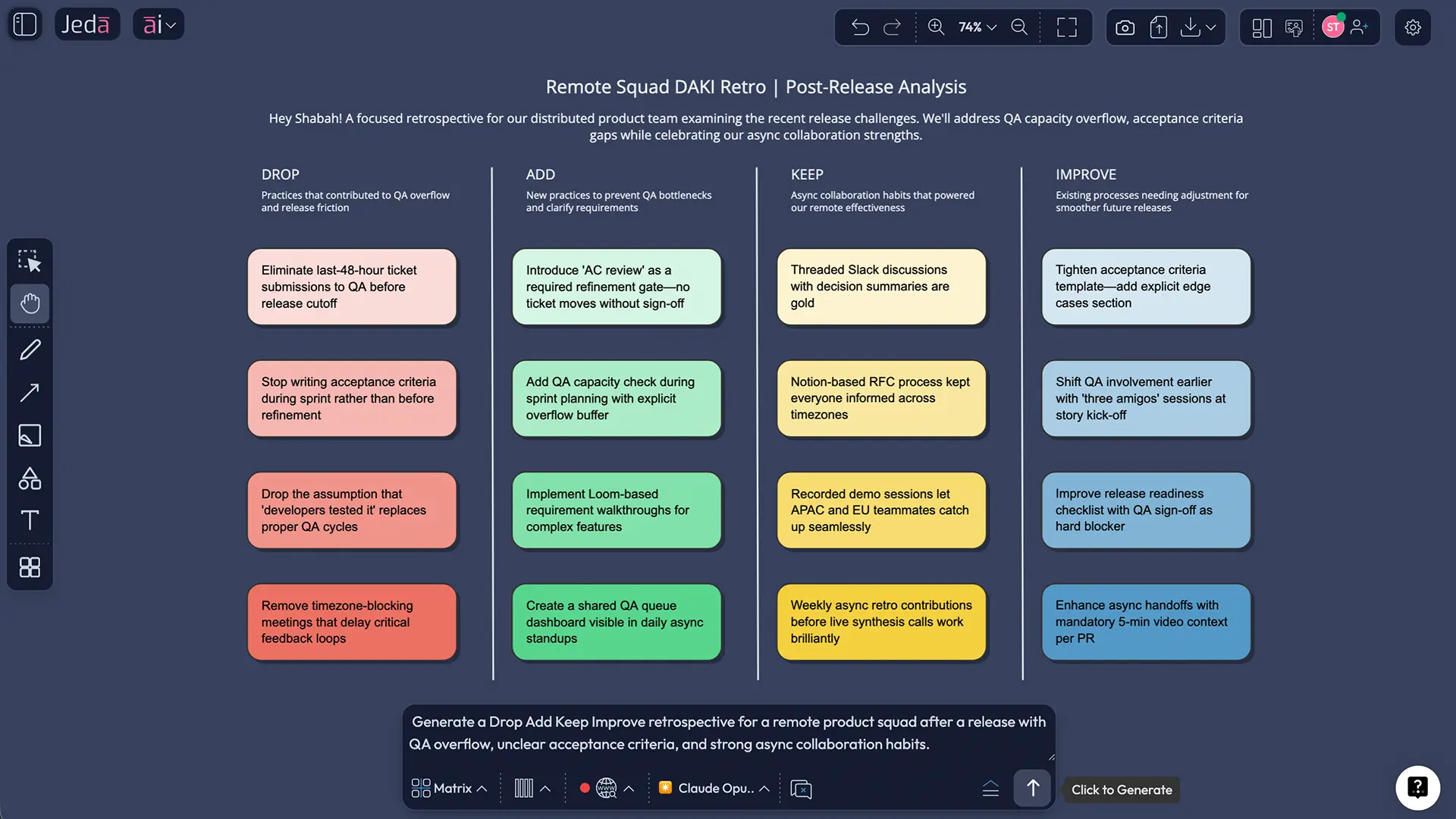
Go to the Prompt Bar at the bottom of the workspace and select the Matrix command.
- Write a focused prompt
Describe the team, timeframe, and the exact kind of retrospective you want, such as a post-release DAKI for a remote product squad.
- Generate and review
Press Enter to generate the DAKI matrix, then adjust labels, edit note phrasing, and remove anything too generic.
- Extend with AI+
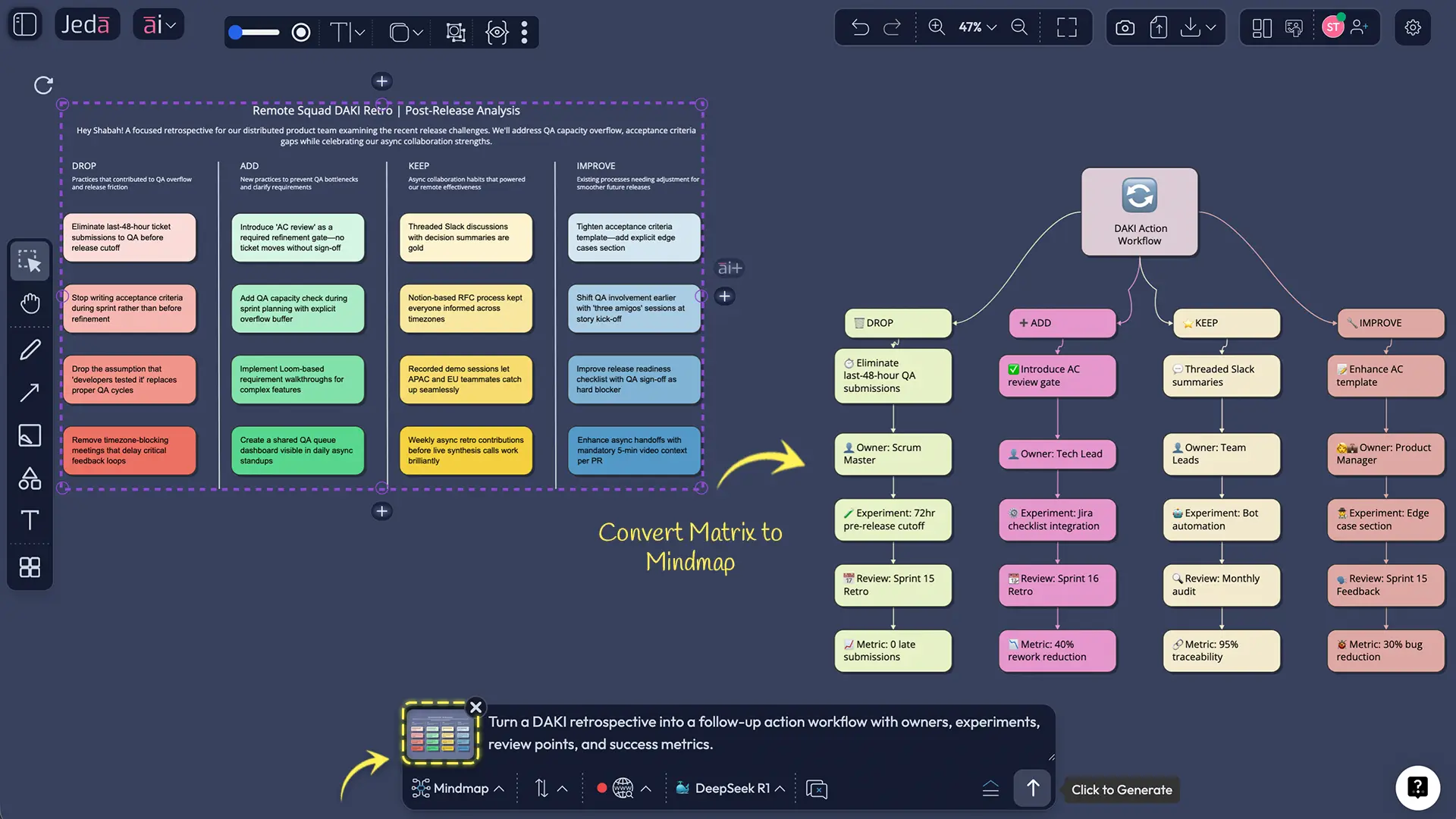
Select the generated board or one quadrant and use the AI+ button to deepen themes, suggest owners, or draft next-sprint experiments.
Here is a strong starter prompt:
Create a DAKI retrospective template for a remote product team after a missed sprint goal. Focus on delivery bottlenecks, handoff issues, testing gaps, and communication wins. Keep the notes practical and ready for prioritization.
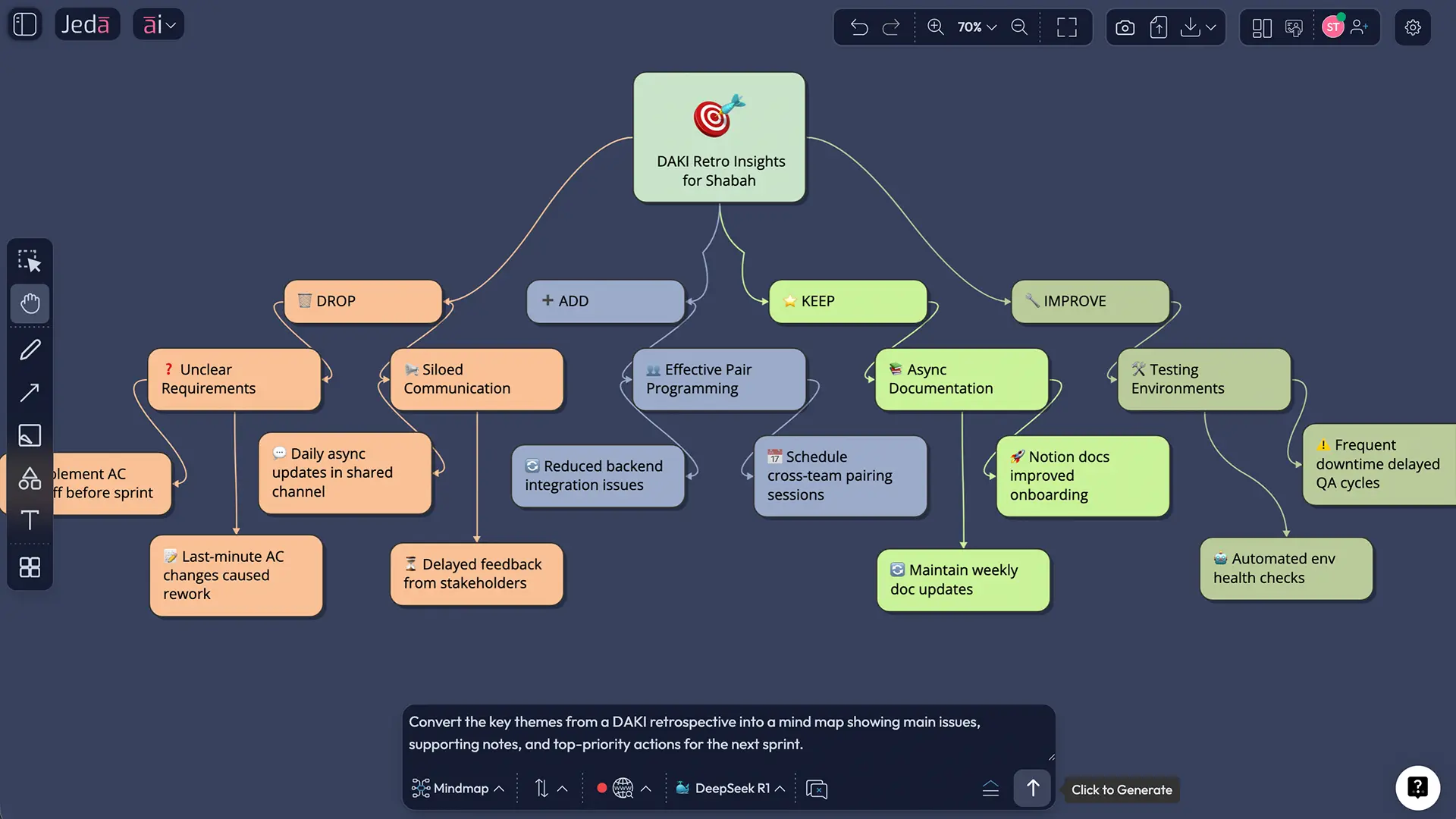
After the board is generated, use AI+ to extend the discussion. For example, you can deepen the “Improve” quadrant into experiments, owners, risks, and success metrics. Then use Vision Transform to convert the matrix into a mind map or flowchart when you need a cleaner playback for stakeholders. That’s one reason Jeda.ai works well as both an AI Workspace and an AI Whiteboard—you don’t have to drag your team through five tabs and three separate tools just to finish one retrospective.
DAKI retrospective example: a product team after a missed sprint goal
Let’s make this concrete.
A product team misses a sprint goal because QA overflowed, design clarifications arrived late, and too many stories were pulled into the sprint. Nothing exploded. But velocity slipped, frustration rose, and everyone left the sprint review with that familiar “we should probably talk about this” face.
A useful DAKI board might look like this:
That structure is powerful because it prevents the meeting from collapsing into one giant complaint bucket. Some practices should die. Some deserve protection. Some are not broken, just under-designed. DAKI lets the team say all three without muddling them together.
Now layer in AI. Jeda.ai can help rewrite vague notes like “testing sucked” into something operational, such as “regression testing started too late because stories closed without final acceptance criteria.” That difference is everything. One is steam. The other is a fixable problem.
Best practices for better DAKI sessions
The first rule: keep it specific. “Improve communication” is not a DAKI insight. It’s a poster. Good retrospective notes describe a behavior, tool, handoff, meeting, or decision.
The second rule: create safety before honesty. If people expect blame, they will offer theater instead of truth. Research on psychological safety shows that teams learn better when people feel safe taking interpersonal risks, including raising problems, asking questions, and admitting mistakes.
The third rule: leave with fewer actions than you want. Brutal, yes. Necessary, also yes. Most retrospectives die from ambition. Pick one or two high-impact changes, assign owners, and define how you will tell whether the experiment worked.
Common mistakes to avoid
One mistake is treating Add and Improve as the same thing. They’re not. “Add” introduces something new. “Improve” refines something already in place.
Another mistake is overfilling the board. If every sticky note becomes sacred, your team leaves with a visually impressive wall and zero momentum. Lovely board. Terrible outcome.
A third mistake is using DAKI when the team actually needs a different conversation. If morale is damaged, start with safety and emotion. If the problem is strategic ambiguity, a DAKI board may be too tactical on its own. Pair it with a follow-up board in Jeda.ai, like a fishbone diagram or flowchart, inside the same AI Workspace.
And one more: forgetting the loop. Scrum treats retrospectives as a mechanism for improving quality and effectiveness, not as a recurring vent session. If the next sprint doesn’t visibly change, the team will stop taking the ritual seriously.
Frequently asked questions
- What does DAKI stand for in a retrospective?
- DAKI stands for Drop, Add, Keep, Improve. It is a four-part retrospective format used to help teams decide what should stop, what should start, what should continue, and what should be refined in the next cycle of work.
- Is DAKI part of Scrum?
- Not exactly. Scrum requires a Sprint Retrospective, but it does not require a specific format. DAKI is one facilitation structure teams can use inside that event when they want more nuance than simpler retrospective formats provide.
- When should a team use a DAKI retrospective template?
- Use a DAKI retrospective template when the team has enough shared context to evaluate habits, process choices, and collaboration patterns. It works especially well after several sprints, after a missed goal, or when a team needs a reset.
- What is the difference between DAKI and Start Stop Continue?
- DAKI and Start Stop Continue are similar, but DAKI splits the middle ground more clearly. “Keep” protects what already works, while “Improve” identifies practices worth refining. That extra nuance makes DAKI useful for more mature teams and more complex retro discussions.
- How long should a DAKI retrospective take?
- A typical DAKI session takes 45 to 60 minutes for one team. Larger groups or post-project retrospectives may need longer, especially if you want time for discussion, prioritization, and assigning owners instead of just collecting notes.
- Can non-software teams use DAKI?
- Yes. Although DAKI is common in agile and Scrum settings, the format works for marketing teams, operations groups, leadership teams, and project-based work outside software. If the group needs to review how it works, DAKI is usually a strong option.
- Why use AI for a DAKI retrospective?
- AI helps teams generate the board faster, clean up vague notes, group similar feedback, and draft clearer action items. It also reduces setup friction, which matters when the team already feels time pressure and doesn’t need another meeting that burns fifteen minutes on formatting.
- What should go in the Improve column?
- The Improve column should contain practices that already have value but need refinement. Good examples include code review quality, handoff timing, acceptance criteria, meeting structure, or release communication that works in theory but underperforms in practice.
- How do we make sure the DAKI retro leads to action?
- Prioritize no more than one or two changes, assign owners immediately, and define how success will be measured in the next sprint or review cycle. Then revisit those actions at the start of the next retrospective so the team sees a real improvement loop.
- What can I do after generating a DAKI board in Jeda.ai?
- After generating the board in Jeda.ai, you can edit the matrix, use AI+ to deepen one quadrant, add sticky notes or comments, and convert the output with Vision Transform. You can also export the result as PNG, SVG, or PDF when you need to share it.
Sources & Further Reading
If you want to keep building out your improvement stack in Jeda.ai, pair this board with the AI Workspace, the AI Whiteboard, Fishbone Diagram Templates, and Generate Flowcharts with AI.
- [1]
Schwaber, Ken and Sutherland, Jeff (2020) . “The Scrum Guide” Scrum Guides.
View Source ↗ - [2]
Atlassian (2025) . “What are agile retrospectives?” Atlassian.
View Source ↗ - [3]
Edmondson, Amy C. (1999) . “Psychological Safety and Learning Behavior in Work Teams” Administrative Science Quarterly.
View Source ↗ - [4]
Khanna, Diksha et al. (2022) . “Are Your Online Agile Retrospectives Psychologically Safe? the Usage of Online Tools” HCII / Springer.
View Source ↗ - [5]
Spichkova, Maria et al. (2025) . “Agile Retrospectives: What went well? What didn't go well? What should we do” arXiv.
View Source ↗ - [6]
TeamRetro / Parabol / Neatro (2025) . “DAKI retrospective guides and templates” TeamRetro, Parabol, Neatro.
View Source ↗
Start Your DAKI Retrospective Today
Join over 150,000+ professionals who use Jeda.ai as an AI Workspace to turn reflection into clearer decisions, cleaner boards, and better next steps.
Try Free Template