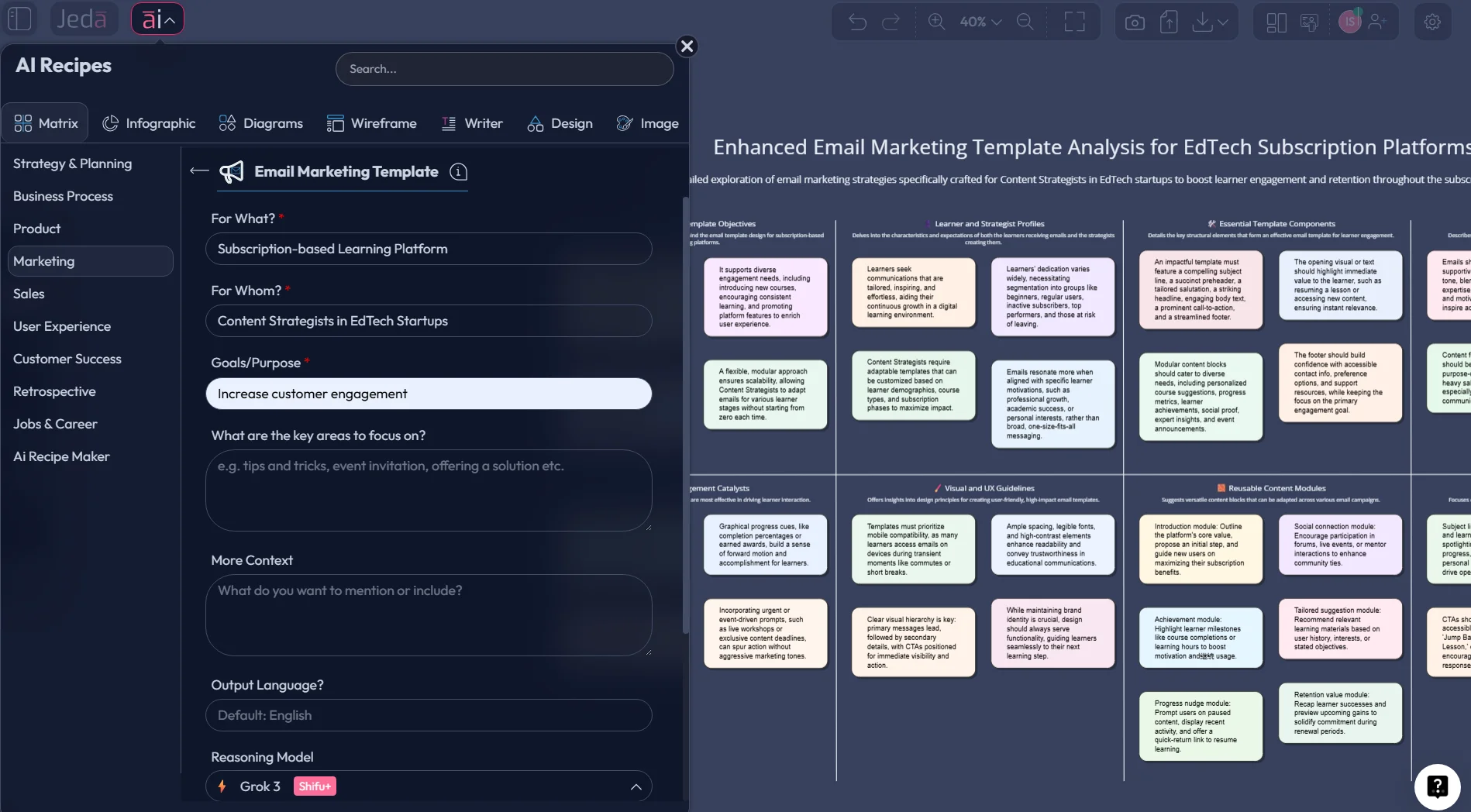
Email marketing templates still matter. But the teams pulling ahead are not treating templates like frozen chunks of copy. They are treating them like repeatable decision systems. That shift is the whole game.
Jeda.ai already serves 150,000+ users, and one reason the platform fits this work well is that it was built for structured thinking across 300+ strategic frameworks, not just loose drafting.
Email still delivers serious commercial weight. Litmus says email drives an average ROI of $36 for every $1 spent, and its 2025 research says 35% of companies see email ROI of 36:1 or more. Mailchimp’s benchmark page lists all-users averages around 35.63% open rate and 2.62% click rate. That tells you something obvious and easy to forget: the channel is mature, crowded, and still worth fighting for.
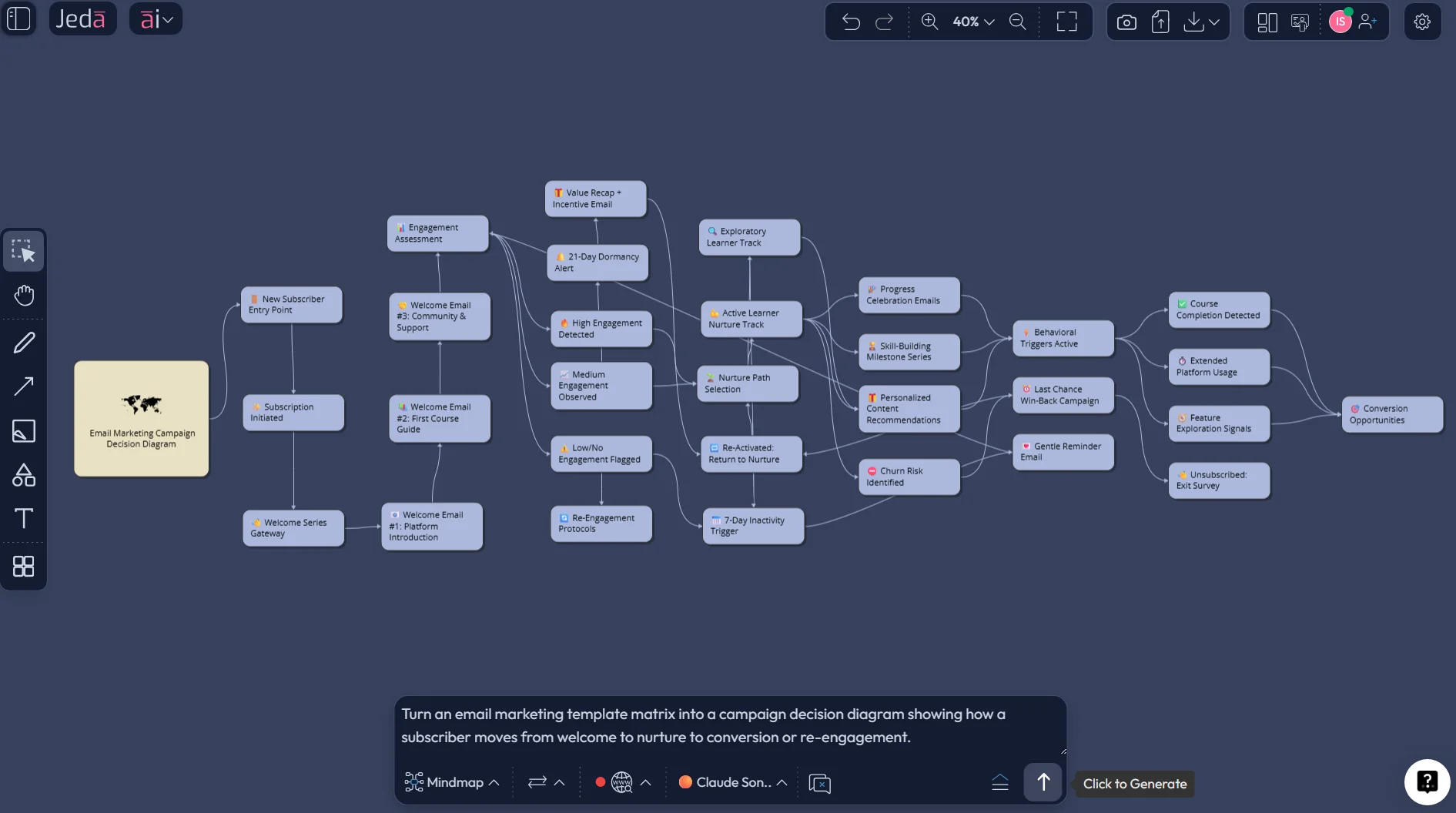
So the question is not whether you need email marketing templates. You do. The question is whether your templates are just static layouts living in a folder, or whether they’re part of an editable system inside an AI Workspace. That is where Jeda.ai changes the conversation. Instead of drafting one email at a time, you can map your campaign logic visually, generate a matrix of reusable templates, extend sections with AI using the AI+ button, and turn the same thinking into a flow, mind map, or briefing board inside an AI Whiteboard.
What email marketing templates actually do
An email marketing template is not just a pretty frame with a subject line and a button. It is a reusable structure for a recurring business moment. Welcome emails, product launches, newsletters, event reminders, re-engagement campaigns, and post-purchase sequences all carry different jobs. Strong templates reduce decision fatigue, speed up production, and keep your voice consistent when the calendar gets messy.
The problem is that most template libraries stop too early. They give you a design shell, maybe a hero section, maybe a footer, and then toss the hard part back to the team: What should this campaign say? Which segment should receive it? What is the CTA? Which variation belongs to first-time buyers versus dormant subscribers?
That gap is why static template galleries are useful, but incomplete. Campaign Monitor groups templates into categories like announcements, newsletters, deals and offers, feedback, events, re-engagement, welcome, and transactional. Mailchimp offers 130+ templates and highlights more than 40 premium options across use cases. Helpful? Yes. Enough? Not anymore.
What modern teams need is a matrix that connects campaign type, audience segment, message goal, proof, CTA, and follow-up logic. That is exactly the sort of work an AI Workspace should handle.
Why email marketing templates work better with AI
Here’s the blunt version: AI is not replacing email marketers. It is replacing slow, repetitive drafting and weak first-pass structure.
That is already happening across the market. HubSpot’s AI email creation can generate subject lines, preview text, body copy, and CTAs from an existing email or template. Wix’s AI email builder can generate a campaign after the user describes campaign intent and design theme. Mailchimp’s Write with AI works inside the editor to draft, rewrite, shorten, lengthen, and refine email content. The platforms are telling you where the category is going. Fast.
But the better strategic move is not “let AI write the whole email.” It is “let AI help you build a reusable system that a human team can control.”
- Faster production
Generate first-pass campaign structures in minutes instead of rebuilding from scratch every send.
- Brand consistency
Keep voice, layout logic, proof blocks, and CTA patterns aligned across recurring campaigns.
- Segment clarity
Map one campaign type across new leads, warm leads, customers, and dormant users without losing the plot.
- Variant planning
Build subject-line and CTA branches before production so testing becomes deliberate, not random.
- AI-assisted depth
Use AI+ to extend a selected section into a deeper breakdown when your first output feels too shallow.
- Editable visuals
Unlike static documents, the output stays editable inside Jeda.ai’s AI Whiteboard.
| What you get | How it behaves | Best use | |
|---|---|---|---|
| Static template library | Layouts and categories | Reusable but mostly fixed | Fast design starting point |
| Basic AI writer | Copy drafts | Fast, but easy to lose structure | Subject lines, body copy, rewrites |
| Jeda.ai | Template matrix, campaign logic, editable visuals | Visual, collaborative, extendable with AI+ | Building a repeatable email operating system |
The email marketing templates matrix your team should actually build
Most teams organize email templates by campaign name. That is a weak system. A better system organizes them by customer moment and message job.
Try this matrix:
- Rows = lifecycle stage: subscriber, lead, first-time buyer, repeat customer, inactive user
- Columns = message job: welcome, educate, persuade, convert, remind, recover
- Inside each cell = template skeleton, proof block, CTA style, offer rule, and follow-up note
Now the template stops being “the welcome email.” It becomes “the welcome email for a new subscriber whose next best action is a product quiz,” or “the re-engagement email for an inactive customer who needs a low-friction return path.”
That is why a matrix is so useful in Jeda.ai. You can see the holes. You can spot redundancies. You can show the whole system to marketing, lifecycle, product, and leadership teams on one board. And if you need a different lens, you can use Vision Transform to turn the matrix into a flowchart or mind map without rebuilding the thinking from zero.
How to create email marketing templates in Jeda.ai
If you want the quickest route, treat this page as a matrix workflow.
Method 1: Recipe Matrix
Use the AI Menu when you want structure first and copy second.
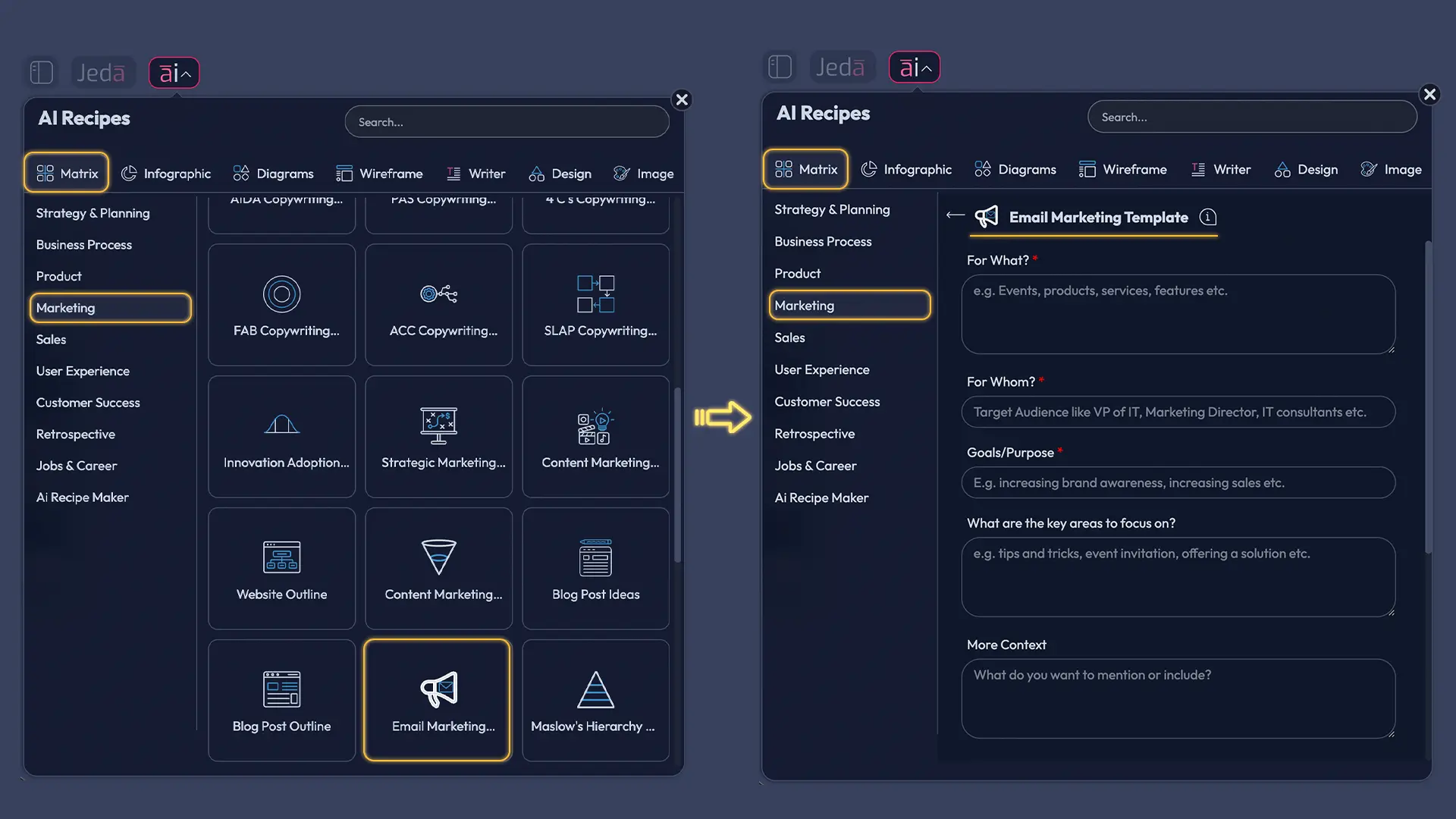
- Open AI Menu and choose Matrix Recipes
From the top-left AI Menu, open Matrix Recipes and pick the Email Marketing Templates.
- Define the matrix logic
Enter your business type, audience segments, lifecycle stages, and the recurring email jobs you want to standardize.
- Generate the first matrix
Let Jeda.ai create a structured matrix that maps email marketing templates across stages, goals, and CTA patterns.
- Edit the board visually
Refine labels, rewrite weak cells, merge duplicates, and adjust the layout so your team can scan it quickly.
- Extend promising sections with AI+
Select a strong area of the matrix and use the AI+ button to deepen it into a more detailed breakdown.
- Turn the system into other visuals
Use Vision Transform if you want to convert the matrix into a flowchart, diagram, or mind map for another team.
- Keep it as a living operating board
Reuse the board every quarter as offers, segments, and product priorities change.
Method 2: Prompt Bar
Use the Prompt Bar when you already know the structure you want.
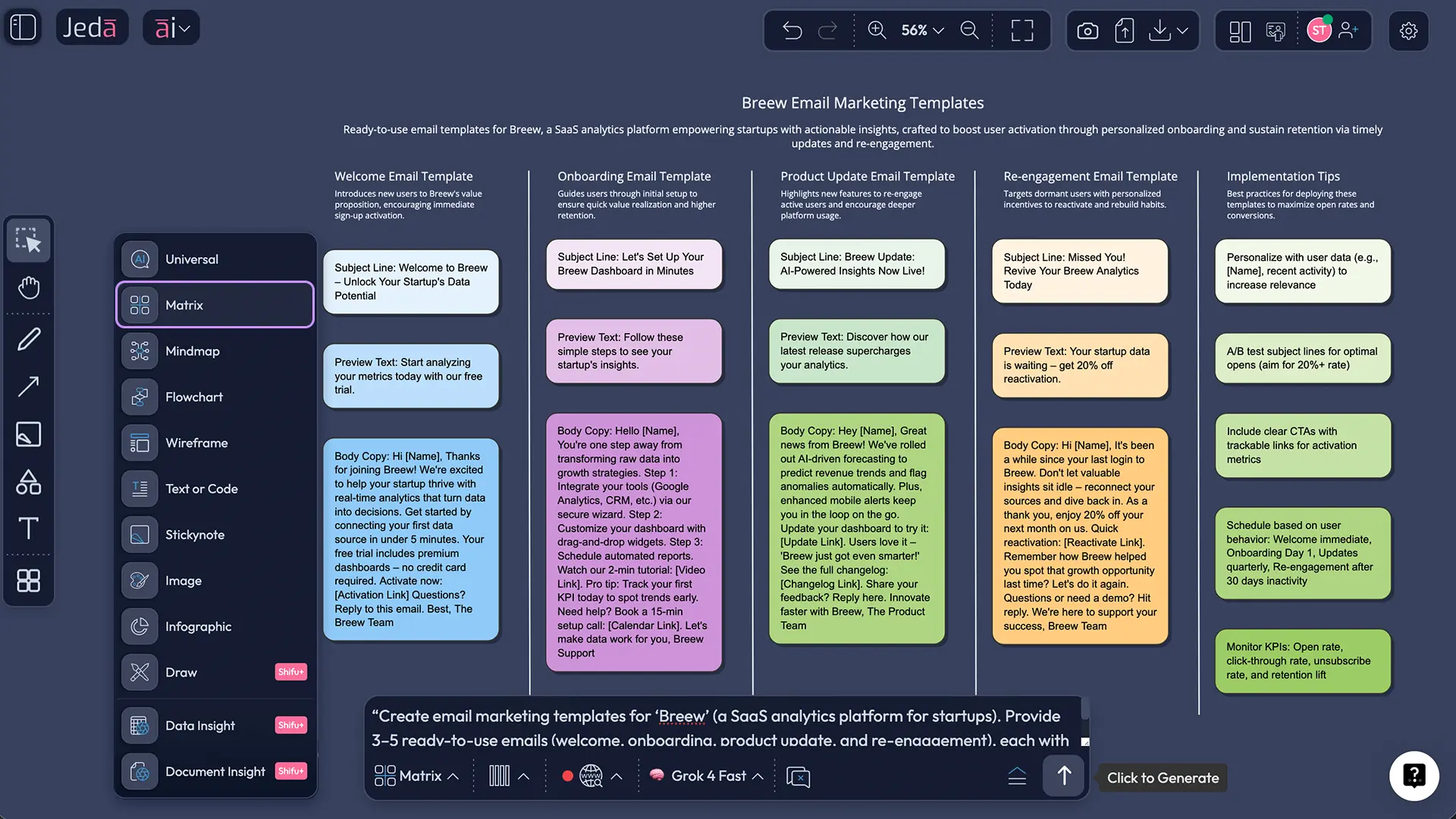
- Open the Prompt Bar at the bottom of the canvas.
- Select the Matrix command.
- Describe the matrix you want in plain language. Example direction: build an email marketing template system by lifecycle stage and campaign goal.
- Press Enter to generate.
- Edit weak sections on the board, then use the AI+ button to extend areas that deserve deeper treatment.
- If the team needs a different format, use Vision Transform to convert the output into a Diagram, Flowchart, or Mindmap.
Email marketing templates examples worth keeping in your system
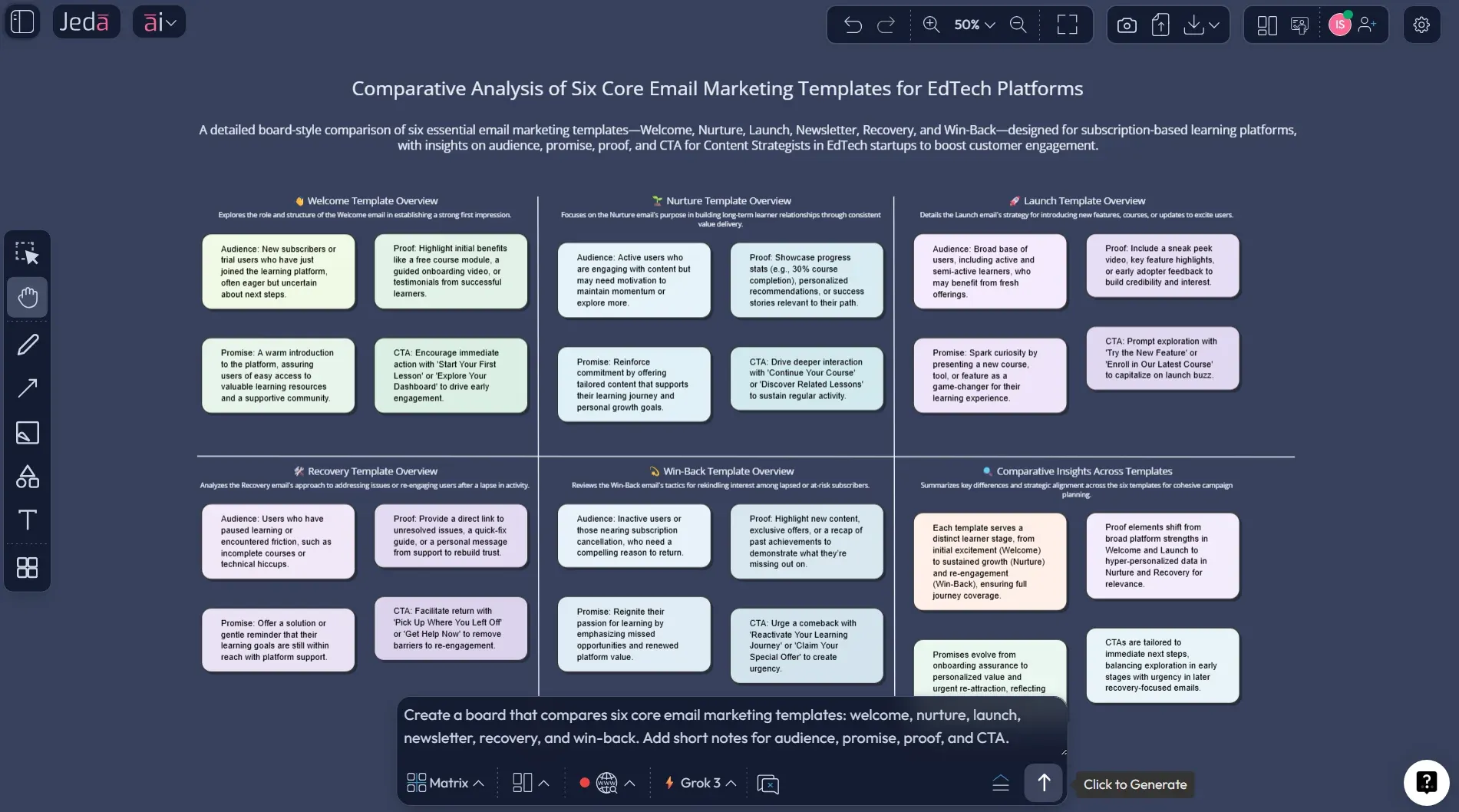
You do not need fifty templates on day one. You need the right six.
1) Welcome template
This one establishes tone, promise, and next action. It should not try to sell everything. Its job is to orient the subscriber and earn the second open.
2) Lead nurture template
Use this for education, proof, and trust-building. Think one sharp problem, one useful insight, one next step. Not a kitchen sink.
3) Product or offer launch template
This is where teams usually over-write. Keep the structure clean: what changed, why it matters, proof, CTA, deadline if relevant.
4) Newsletter template
Newsletters are habit builders. They need rhythm more than cleverness. A stable structure beats a “creative” reinvention every week.
5) Cart, browse, or checkout recovery template
This one should remove friction. Reduce noise. Remind the user what they were doing, why it matters, and what the easy next click is.
6) Re-engagement or win-back template
This is not a louder newsletter. It is a reset email. The best versions acknowledge inactivity, offer a reason to return, and sometimes invite preference updates instead of another hard sell.
Best practices for email marketing templates with AI
Litmus and Mailchimp both point to the same underlying reality: email performance depends on structure, relevance, and iteration. AI helps most when it strengthens those three things.
The research backs a more disciplined approach. Nobile and Cantoni found positive effects from personalized email messages, but also pointed out the risk of customer reactance when personalization feels clumsy or intrusive. Another 2024 study on topic-based segmentation found that open rates could increase nearly two times on average when segmentation was built around topic preferences and interaction history. And a 2022 study using 140,000 subject lines showed that structure, content, and sender-related characteristics all matter when predicting open potential.
In plain English: personalization helps, but lazy personalization is not a strategy. A matrix that links audience context to message type beats dropping a first name into the subject line and hoping for the best.
Common mistakes to avoid
Mistake one: building one “master template” for everyone.
That usually means the template is too vague for everyone.
Mistake two: letting AI decide the offer.
AI can shape language and structure. It should not invent pricing, discounts, or product claims.
Mistake three: optimizing for opens and ignoring the click path.
A flashy subject line with a weak landing path is just a pretty miss.
Mistake four: separating copy from layout too early.
Email performance is partly verbal and partly visual. Think in modules, not just paragraphs.
Mistake five: treating templates as done forever.
Good templates evolve. Offers change. Segments change. Audience fatigue is real.
Frequently Asked Questions
- What are email marketing templates?
- Email marketing templates are reusable structures for recurring campaign types such as welcome emails, newsletters, promotions, reminders, and re-engagement sends. They save production time, improve consistency, and make testing easier because your team is not rebuilding every message from scratch.
- Why use AI for email marketing templates instead of a normal template gallery?
- A normal gallery gives you design starting points. AI helps you build the logic behind the design: audience fit, message angle, CTA variants, and campaign sequencing. That makes your templates more useful because they become part of a working system, not just a visual shell.
- Which email marketing templates should every brand create first?
- Start with six: welcome, nurture, launch, newsletter, recovery, and win-back. Those cover the most common lifecycle moments and give your team a stable base. After that, build role-specific or offer-specific variants only where they support a clear business objective.
- Can AI write the whole email for me?
- It can draft a lot of it, but you still need human review. AI is strong at structure, rewrites, and idea generation. Your team still owns brand voice, factual accuracy, legal safety, and the final judgment on what should actually be sent.
- How do I improve open rates without sounding like clickbait?
- Write subject lines that are specific, useful, and easy to scan. Mailchimp recommends keeping subject lines short, limiting punctuation, and using personalization carefully. AI can help generate strong options, but the best results still come from testing against a real audience.
- Are email marketing templates better as a matrix or a flowchart?
- Use a matrix when you want to compare campaign types, segments, and goals at once. Use a flowchart when you need to map sequence logic over time. In Jeda.ai, you can start with the matrix and use Vision Transform to convert it into a flowchart later.
- Can I try this workflow in Jeda.ai for free?
- Yes. Jeda.ai’s Whitebelt plan is free and includes all 11 commands with limited daily usage. Blackbelt expands usage and collaboration, while Shifu adds Multi-LLM intelligence and the Aggregator model for more advanced workflows.
- How does the AI+ button help with email marketing templates?
- AI+ is useful once the first matrix is on the canvas. Instead of regenerating the whole board, you can select a promising section and deepen it with AI. That keeps good structure intact while letting the stronger parts grow into more detailed working assets.
- Do small teams need this, or is it only for big lifecycle programs?
- Small teams may benefit even more because they have less time and fewer dedicated specialists. A clear matrix helps a lean team standardize repeatable campaigns, reduce last-minute drafting, and keep messaging aligned without building a giant operations layer.
Sources & Further Reading
- [1]
Litmus (2025) . “Email Marketing ROI” Litmus Resource Center.
View Source ↗ - [2]
Litmus (2025) . “State of Email Reports” Litmus.
View Source ↗ - [3]
Mailchimp (2025) . “Email Marketing Benchmarks and Metrics Businesses Should Track” Mailchimp.
View Source ↗ - [4]
HubSpot (2026) . “Generate Marketing Emails with AI Email Creation” HubSpot Knowledge Base.
View Source ↗ - [5]
Wix (2026) . “Email Marketing: Using AI to Create an Email Campaign” Wix Help Center.
View Source ↗ - [6]
Mailchimp (2026) . “Use Write with AI to Create Content” Mailchimp Help Center.
View Source ↗ - [7]
Nobile, Tekila Harley; Cantoni, Lorenzo (2023) . “Personalisation (In)effectiveness in email marketing” International Journal of Information Management Data Insights.
View Source ↗ - [8]
Paulo, M. et al. (2022) . “Leveraging email marketing: Using the subject line to anticipate the open rate” Expert Systems with Applications.
View Source ↗ - [9]
Surjandari, I. et al. (2024) . “Topic-Based Segmentation in Email Marketing” Evergreen.
View Source ↗ - [10]
Salesforce (2025) . “Email Design Best Practices: Tips for Marketers” Salesforce.
View Source ↗ - [11]
Campaign Monitor (2026) . “Free Responsive Email Templates” Campaign Monitor.
View Source ↗
Related Jeda.ai pages
- AI Workspace
- AI Whiteboard
- Generate Flowcharts with AI
- AI Infographic Generator
- Generate PESTEL Analysis with AI
Build Your Email Marketing Templates in Jeda.ai
Join 150,000+ users using Jeda.ai’s AI Workspace and AI Whiteboard to turn repeatable campaign work into editable systems.
Try Free Template