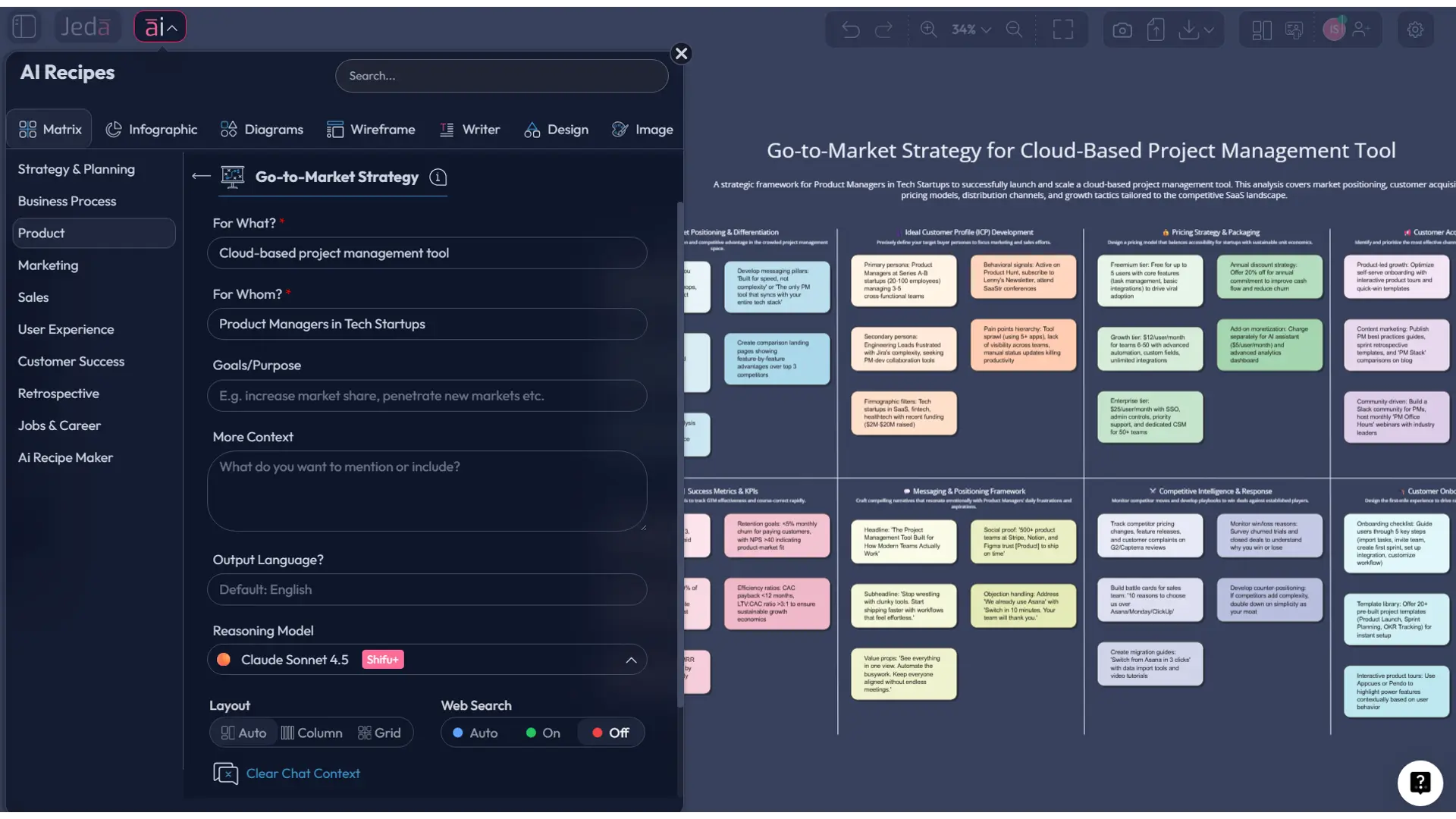
A go-to-market strategy template is only useful if it forces real decisions: who you’re selling to, why they should care, and how you’ll reach them without burning six months and your team’s sanity. The good news? In an AI Workspace like Jeda.ai, you can turn scattered notes, decks, and “someone should write this down” moments into one GTM plan that’s visual, editable, and actually runnable—on an AI Whiteboard, with your whole team looking at the same truth. And yes, you can do it fast (without worshipping a spreadsheet).
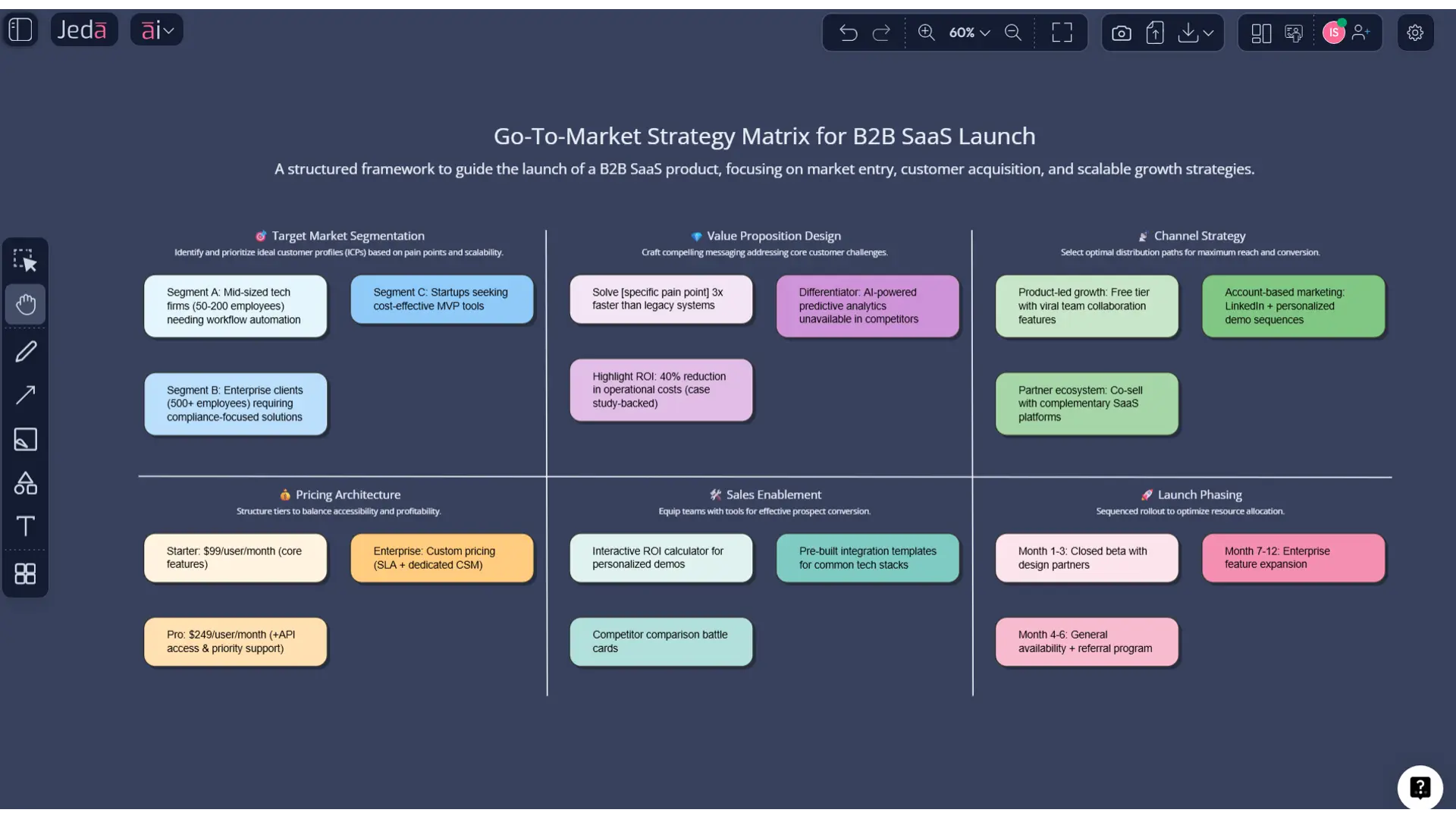
What is a go-to-market (GTM) strategy?
A go-to-market (GTM) strategy is a cross-functional plan for how you’ll launch a product (or enter a new segment) and win customers—covering target customers, positioning, channels, pricing/packaging, and the sales motion. Stripe frames GTM as a comprehensive plan to connect with customers and gain advantage (not just marketing), and HubSpot similarly positions it as a step-by-step plan that aligns stakeholders across sales and marketing.
A GTM strategy isn’t the same as a marketing plan. A marketing plan zooms in on promotion and campaigns; the GTM plan includes the whole “how does this reach the buyer and turn into revenue?” machine.
When you need a GTM strategy (the “don’t wing it” moments)
You should treat GTM as mandatory when:
- You’re launching a new product (or a major feature) into an existing market.
- You’re entering a new segment or geography with different buying behavior.
- You’re changing packaging/pricing enough to disrupt how people buy.
- You’re switching motions (e.g., self-serve → sales-assisted) and pretending it’s “just a sales tweak.”
And yes, startups need it too—HBR calls out that “go-to-market” is about choices, discipline, and coordination, not hype.
Why use a go-to-market strategy with AI?
A GTM plan is basically a reasoning task… disguised as a document. AI helps when your inputs are messy (they always are) and your team needs alignment more than another slide deck.
Here’s what AI changes:
- Faster synthesis from evidence. Feed in notes, customer calls, competitor pages, pricing docs, and win/loss nuggets; AI summarizes and maps patterns, so you’re not guessing from vibes.
- Better cross-functional alignment. Your plan lives as a visual, editable board—product, marketing, sales, and CS can argue on the same canvas (healthier than arguing in 14 Slack threads).
- Scenario-friendly. Create GTM options side-by-side: “partner-led vs direct”, “SMB vs mid-market”, “free trial vs demo-first”.
- Less rework. When assumptions change, you update one board. Not 19 docs.
In Jeda.ai, you can do this inside a single AI Workspace and AI Whiteboard that supports real-time collaboration, multi-model reasoning, and platform web search (web search is a platform feature, not “a model”).
- Decision clarity
Turn fuzzy strategy into explicit choices: segment, message, channel, and motion—visible to everyone.
- Evidence-in
Bring PDFs, docs, screenshots, and spreadsheets into one AI Workspace so the GTM is grounded in what customers actually say.
- Editable visuals-out
Get a GTM matrix you can edit, annotate, and export as PNG/SVG/PDF (no fancy claims, just what ships).
The GTM Strategy Matrix (the version your team will actually use)
Most GTM templates fail because they’re “complete” but not decision-grade. So we’ll use a matrix that forces the six choices a launch can’t dodge.
The 6-column GTM Strategy Matrix
Use columns as the “what must be decided” buckets:
- Market & Segment — which slice of the world you’re going after first
- Buyer & Job-to-be-Done — who buys, who uses, what triggers purchase
- Positioning & Message — why you, why now, why not a competitor
- Offer & Pricing/Packaging — what’s included, how it’s priced, what’s the “starter” path
- Channels & Motion — how buyers discover, evaluate, and buy (self-serve / sales / partner)
- Metrics & Feedback Loops — how you’ll know it’s working, and how fast you’ll learn
Now add rows that keep you honest:
- Assumptions (what you believe)
- Evidence (what supports it)
- Decisions (what you’ll do)
- Experiments (how you’ll validate fast)
Why a matrix?
Because GTM is a coordination problem. A matrix shows dependencies:
- Positioning changes your channel mix.
- Pricing changes your sales motion.
- Segment choice changes your whole ICP and onboarding.
A linear doc hides those links. A matrix makes them annoyingly obvious (which is exactly what you want).
How to create a go-to-market strategy in Jeda.ai
Method 1: Recipe Matrix and Method 2: Prompt Bar—so here they are, step-by-step, mapped to the GTM matrix. (And yes, both live inside the same AI Workspace.)
Quick note: Jeda.ai’s AI Menu includes 300+ strategic frameworks. If you see a GTM-specific recipe in the Matrix Recipes list, use it. If you don’t, start with a strategy/planning matrix recipe and rename the sections to match the GTM matrix above.
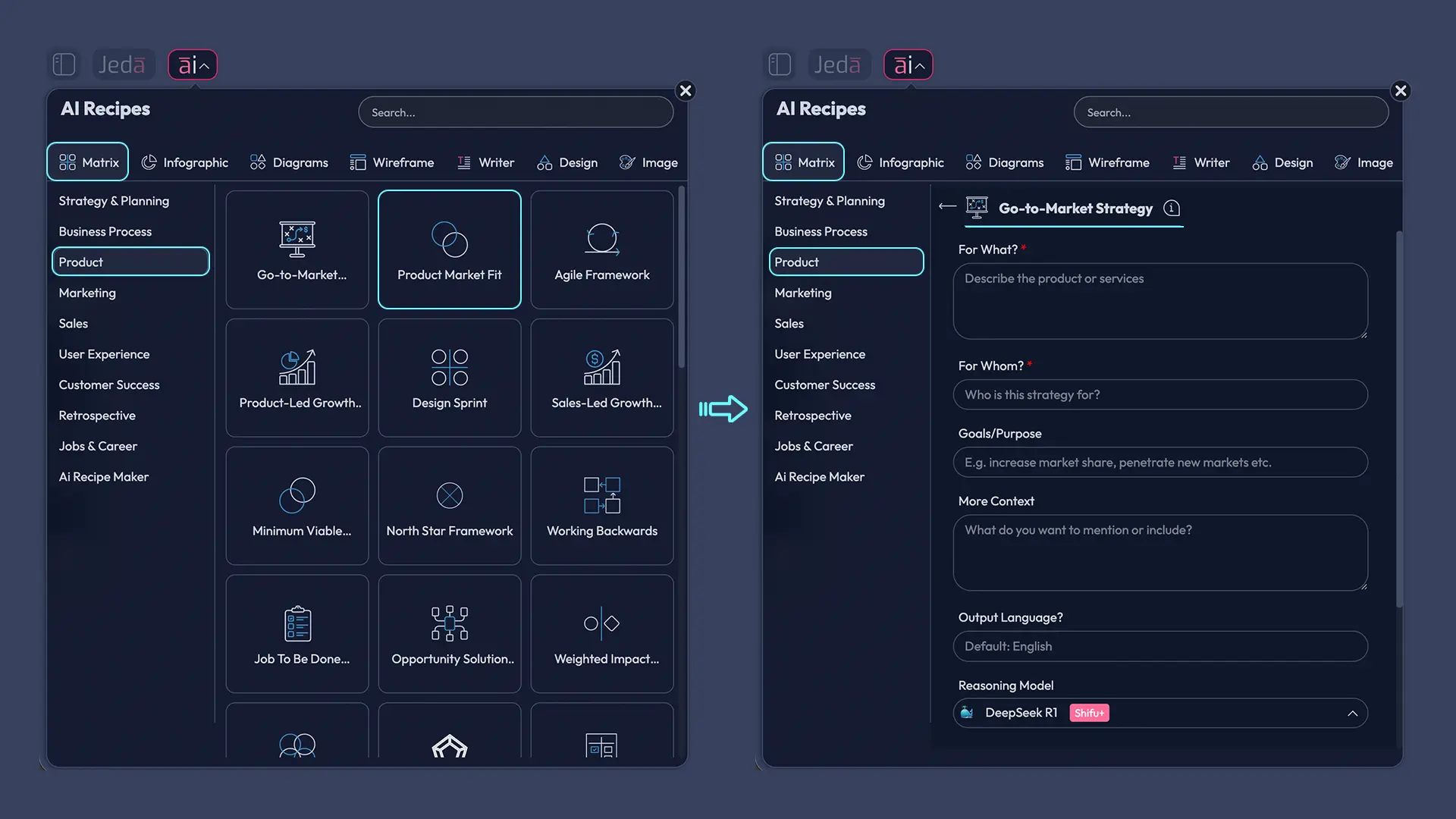
Method 1: Recipe Matrix (AI Menu)
- Open AI Menu (top-left).
- Choose Matrix Recipes.
- Pick Go-To-Market Strategy.
- Enter your launch context (product, target segment, differentiator, constraints).
- Click Generate.
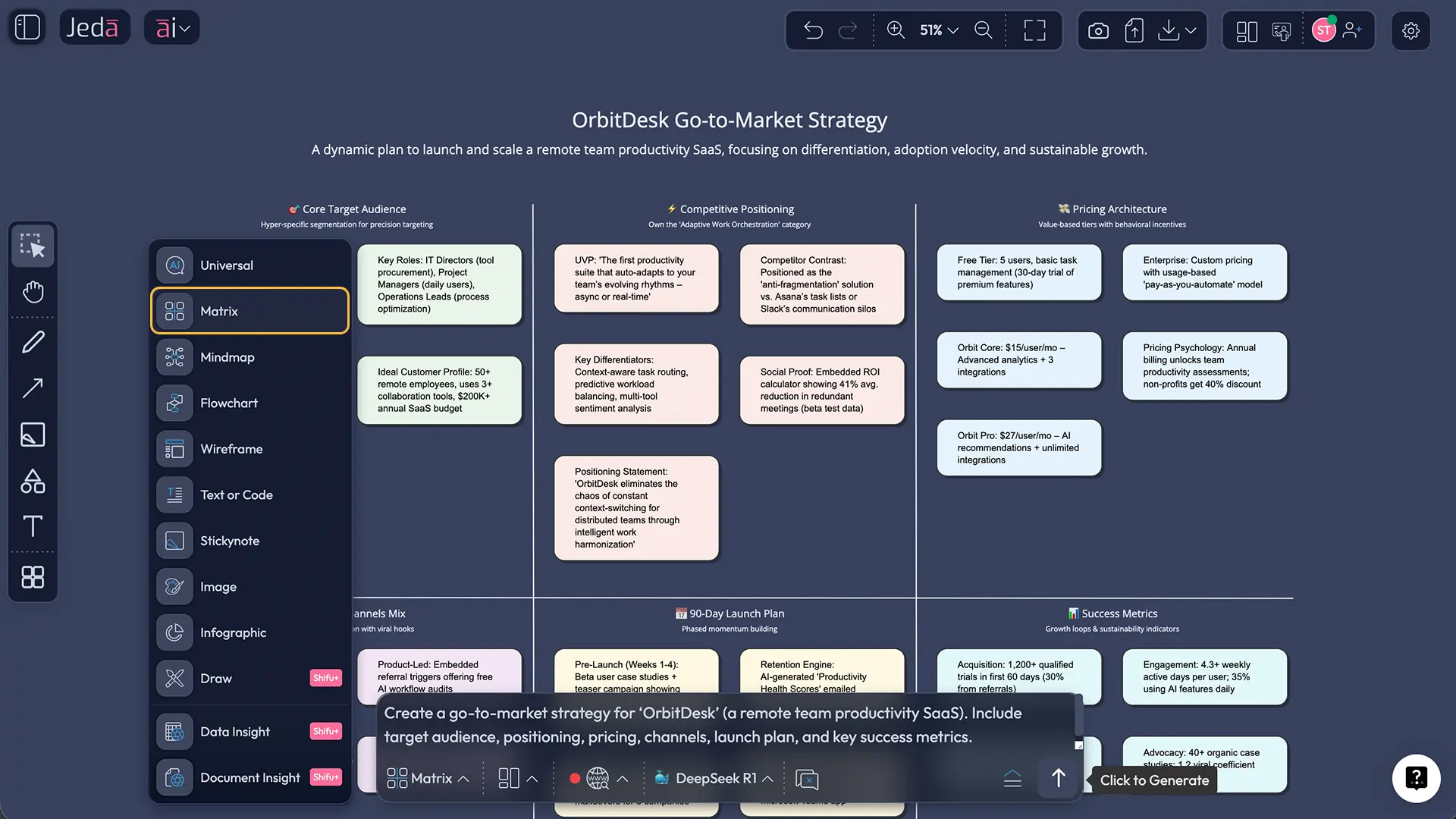
Method 2: Prompt Bar (Matrix command)
- Open the Prompt Bar (bottom).
- Select the Matrix command.
- Paste a prompt like the one below.
- Press Enter to generate.
Prompt you can reuse (copy/paste):
Create a Go-To-Market Strategy Matrix for a [PRODUCT/FEATURE] launch.
Context: [1–2 sentences on what it does + why now].
Target market: [industry/segment/geography].
Constraints: [budget, time, team size, launch date].
Output: A 6-column matrix with columns: Market & Segment, Buyer & JTBD, Positioning & Message, Offer & Pricing/Packaging, Channels & Motion, Metrics & Feedback Loops.
Rows: Assumptions, Evidence, Decisions, Experiments.
Add 4–7 bullets per cell, written as crisp, testable statements. Include a “Week 1–4” experiment plan inside the Experiments row.
After generation: deepen and adapt (AI+ and Vision Transform)
- AI+ button deep dive: Select any quadrant of the matrix and tap AI+ to extend it with more detail. Keep it simple: you’re extending what’s already on the board, not trying to micromanage the output.
- Vision Transform: If you want the matrix turned into a workflow, convert it into a Flowchart or Diagram via Vision Transform. (Matrix → Flowchart is great for turning “Decisions” into execution steps.)
- Collect your inputs in one canvas
Drop customer notes, pricing ideas, competitor links, and launch constraints onto the AI Whiteboard so everything is in view.
- Generate the GTM Strategy Matrix
Use either AI Menu (Go-To-Market Strategy Matrix Recipes) or the Prompt Bar with the Matrix command to generate the 6×4 GTM matrix.
- Make the 6 hard decisions
Edit the matrix so every cell has a real choice, not a slogan. If it can’t be tested, it’s not a decision.
- Extend weak areas with AI+
Select a thin section (like Channels or Pricing) and tap AI+ to expand it based on your existing board context.
- Convert to an execution plan
Use Vision Transform to turn the Decisions row into a Flowchart for launch steps, owners, and milestones.
- Ship and export
Export the board as PNG/SVG/PDF for stakeholders, then keep the board as the living GTM source of truth.
A worked example (so this isn’t just theory)
Let’s say you’re launching a B2B feature: “AI meeting recap + action items” for mid-market operations teams.
Here’s what “decision-grade” looks like.
Want to go deeper? Duplicate the board and run “Segment A vs Segment B” side-by-side. A matrix makes that painless.
Best practices (the stuff teams learn the hard way)
Common mistakes to avoid
- “Everyone” is your ICP. That’s not a strategy, it’s a wish.
- You confuse features with positioning. Buyers don’t buy feature lists; they buy outcomes.
- Channels are picked by habit. “We always do LinkedIn ads” is not a channel strategy.
- Sales motion isn’t defined. Self-serve vs sales-assisted is a design choice, not an afterthought.
- No success metric until after launch. That’s how you end up celebrating vanity metrics.
Frequently Asked Questions
- What’s the difference between a go-to-market strategy and a marketing plan?
- A go-to-market strategy is broader: it covers who you target, how you sell, how you distribute, how you price, and how marketing supports the full launch. A marketing plan focuses on promotion and campaigns within that bigger GTM system.
- When should I create a GTM strategy?
- Create a GTM strategy anytime you’re launching something new, entering a new segment, changing pricing/packaging, or shifting sales motion. If buyers will experience you differently, you need a plan that aligns product, marketing, sales, and customer success.
- How long should a GTM strategy take to build?
- For a straightforward launch, many teams can draft a solid first version in a few days, then refine it over 2–4 weeks as evidence comes in. The key is to ship a usable plan quickly and iterate, instead of “perfecting” a doc for months.
- Can AI really help with GTM, or is it just fancy text generation?
- AI helps most with synthesis and structure: turning scattered inputs into a consistent matrix, generating alternatives, and exposing gaps. The team still owns the decisions, but AI shortens the time between evidence and a coherent plan—especially in a shared AI Workspace.
- What inputs should I gather before generating my GTM matrix?
- Bring customer interviews, product notes, competitor positioning, early pricing thoughts, and channel constraints. If you have PDFs, docs, or spreadsheets, add them to the board first so the GTM output reflects real context rather than generic guesses.
- How do I choose channels in my GTM strategy?
- Pick channels based on where your ICP already learns and buys, and match them to your sales motion. If it’s self-serve, prioritize product-led channels and onboarding. If it’s sales-assisted, prioritize channels that generate qualified conversations and proof.
- How do I know if my GTM messaging is strong?
- Strong messaging is specific, testable, and tied to a buyer problem you can name in one sentence. If your message sounds like it could fit any competitor, it’s weak. The fastest check is to test it against real buyer objections and competitor alternatives.
- How does Jeda.ai fit into a GTM workflow if my team already uses docs and slides?
- Use Jeda.ai as the decision canvas: generate the GTM matrix, convert it to an execution flow, and keep it as the living source of truth. Then export visuals as PNG/SVG/PDF for decks and stakeholders, while the team continues to collaborate on the AI Whiteboard.
- What’s the simplest way to turn a GTM strategy into an execution plan?
- Convert the Decisions row into a Flowchart with owners, milestones, and feedback loops. In Jeda.ai you can use Vision Transform to shift from a matrix view into a workflow view without rebuilding everything from scratch.
Sources & further reading
- [1]
Stripe (2025) . “What is a go-to-market strategy? A quick GTM guide” Stripe Resources.
View Source ↗ - [2]
HubSpot (2025) . “What is a Go-to-Market Strategy? GTM Plan Template + Examples” HubSpot Blog.
View Source ↗ - [3]
Natalia Zhukova (2025) . “How to Build a Go-to-Market Strategy [Template Included]” Semrush Blog.
View Source ↗ - [4]
Ron Ashkenas & Patrick Finn (2016) . “The Go-to-Market Approach Startups Need to Adopt” Harvard Business Review.
View Source ↗ - [5]
Cristina Piñel-Neparidze et al. (2024) . “The importance of a go-to-market strategy in the commercialisation of cellular immunotherapies” Drug Discovery Today.
View Source ↗
Build Your GTM Strategy on a Visual AI Canvas
Join over 150,000+ users who use Jeda.ai’s AI Workspace to turn strategy into editable, shareable visuals.
Try it Free