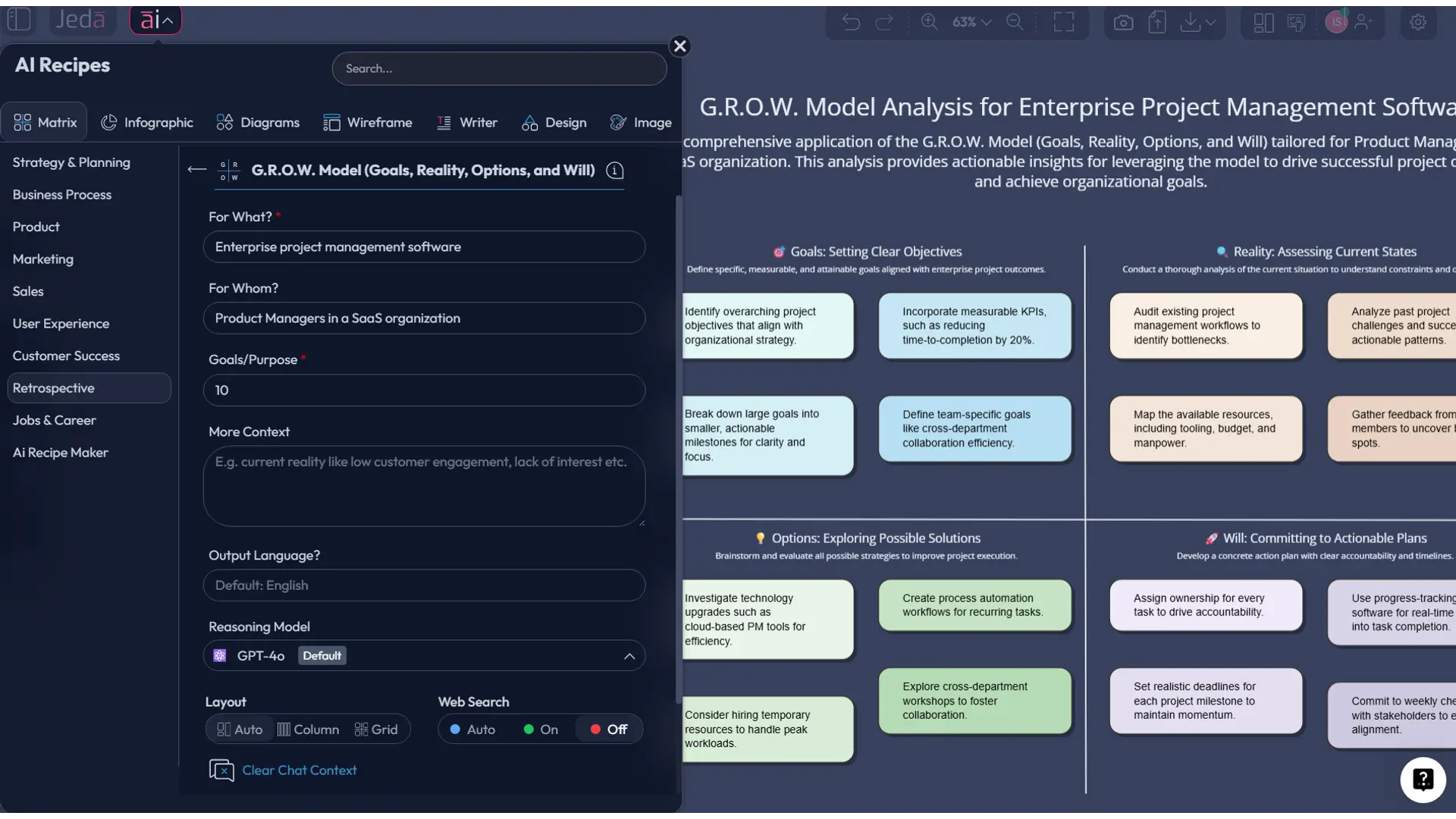
GROW Retrospective with AI: Turn Team Reflection into Action Faster
If your retrospectives keep producing the same polite nods, the same fuzzy takeaways, and the same action items nobody touches again, you do not have a reflection problem. You have a structure problem. GROW Retrospective with AI gives teams a cleaner way to review what happened, face what is actually true, explore better paths, and commit to what happens next.
Inside Jeda.ai, that matters because the work does not end as a wall of sticky notes. It becomes an editable matrix inside an AI Workspace, ready for follow-up, extension, and collaboration. For product teams, engineering managers, scrum masters, project leads, and strategy consultants, that is the difference between a “good conversation” and a usable operating artifact. Jeda.ai’s Visual AI approach turns retrospective thinking into something your team can revisit, refine, and share. And yes, over 150,000+ users already use Jeda.ai to turn messy thinking into structured visuals.
What is a GROW retrospective?
A GROW retrospective applies the GROW model to team reflection. The framework breaks the conversation into four parts: Goals, Reality, Options, and Will. Rather than stopping at “what went well” and “what went badly,” it pushes the team toward decisions with a bit more backbone.
The GROW model is widely associated with Sir John Whitmore and colleagues, who developed it in the 1980s as part of performance coaching. Over time, teams adapted it beyond one-to-one coaching and into planning, facilitation, and retrospective work. In a retro setting, the logic is simple: clarify the result you wanted, confront the current situation, explore possible responses, then decide what the team will actually do next. That final step is where many retros die, quietly and without flowers.
For teams running sprints, projects, launch cycles, or cross-functional reviews, the format works because it balances reflection with forward motion. It is structured enough for distributed teams, but flexible enough to handle product delivery, operations, customer success, and leadership reviews.
Why teams use GROW instead of a generic retrospective
Some retrospectives are great for emotional check-ins. Some are great for surfacing blockers. GROW is better when the team needs to leave the room with sharper direction.
Here is why it works well:
- Clearer end state
The Goals section forces the team to define what success should have looked like before everyone rewrites history in real time.
- Harder look at reality
Reality grounds the retro in evidence, not vibes. Teams can anchor discussion to delivery data, incidents, feedback, and actual constraints.
- Better option generation
Options creates room for alternatives, experiments, and trade-offs instead of jumping too fast to one obvious fix.
- Action with ownership
Will turns the session into commitments. That matters because an unowned action item is just motivational wallpaper.
- Works visually
The framework maps naturally into a matrix, which makes it easy to scan, edit, and discuss in an AI Whiteboard environment.
- Better for collaboration
Because the output is editable and shared, teams can keep refining the retro after the meeting instead of losing it in meeting notes.
In Jeda.ai, those advantages compound. You can generate the structure in seconds, refine sections with the AI+ button, use the platform’s Web Search feature when current context matters, and convert the result into another visual with Vision Transform. So the retro can start as a matrix and end as a flowchart, action plan, or decision map in the same AI Workspace. That is a lot more useful than pasting bullet points into a forgotten doc.
Why use GROW Retrospective with AI in Jeda.ai?
Because speed helps, but speed alone is cheap. The real gain is structured thinking.
Jeda.ai gives teams a way to run a GROW retrospective as a living visual system. The matrix format is easy to generate, easy to edit, and easy to review across functions. You can start with the AI Menu recipe for guided setup, or use the Prompt Bar when you want more control. Then you can extend weak areas with AI, add supporting material from documents or datasets, and share the board with collaborators in real time. The output stays editable because Matrix results in Jeda.ai are smart visual objects, not static images. That matters a lot once the team starts debating language, priority, or ownership.
Jeda.ai also fits the actual way retros happen in the wild. Sometimes the team has incident notes. Sometimes it has sprint metrics. Sometimes it has screenshots, release notes, customer complaints, or a PDF summary from another system. You can bring those in, then use Document Insight or Data Insight to extract signals before you build the final retro board. That makes the conversation less selective. And, conveniently, less fictional.
How to create a GROW Retrospective in Jeda.ai
The workflow file supports two creation paths for framework pages: Method 1: Recipe Matrix and Method 2: Prompt Bar, then an AI+ button deep dive for extensions. That matches this page.
Method 1: Recipe Matrix
This is the recommended route when you want a guided setup.
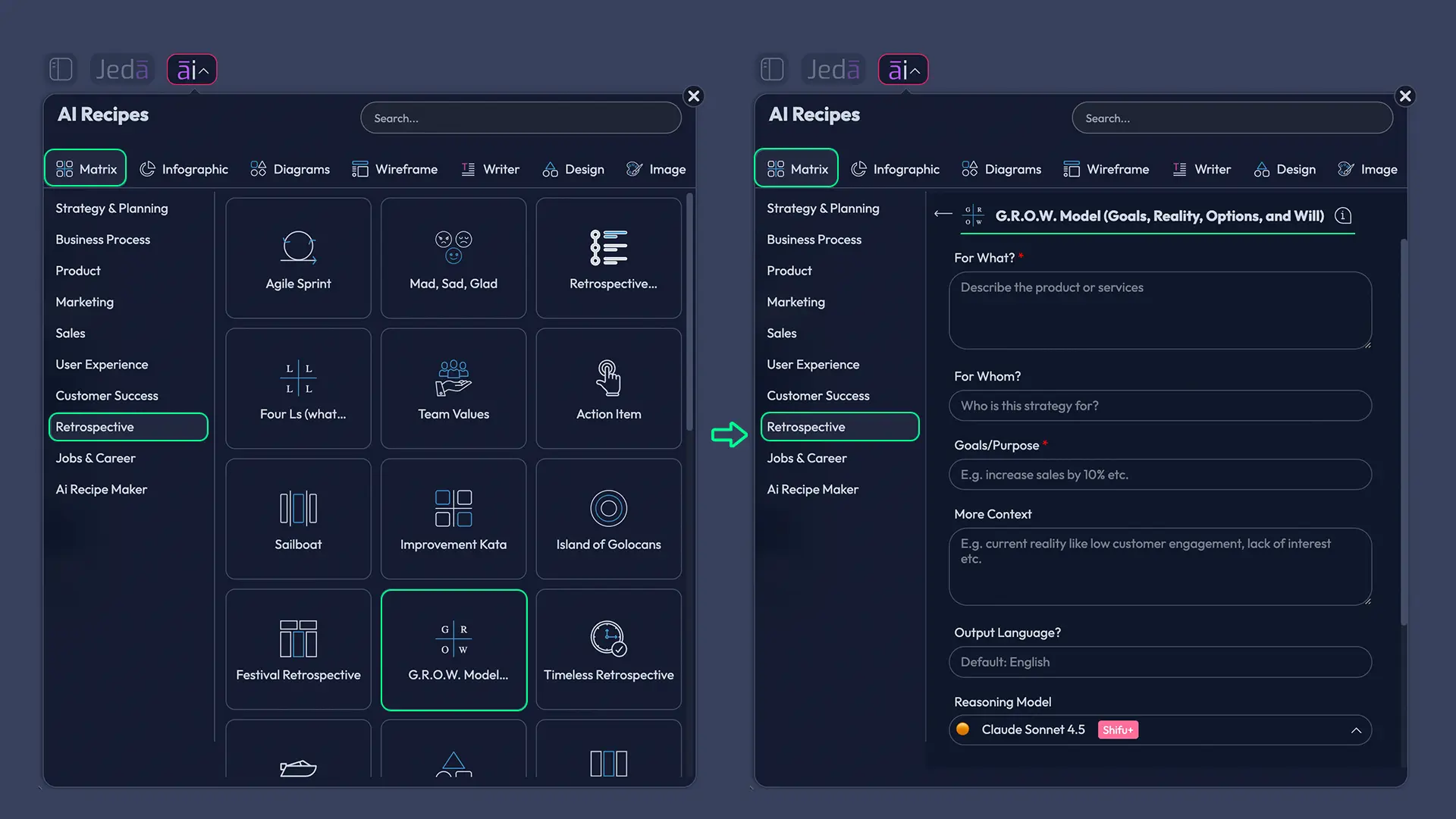
Use the AI Menu in the top-left of Jeda.ai, open Matrix Recipes, go to the Retrospective category, and choose GROW Retrospective. Fill in the context for your sprint, release, project cycle, or team review. Then generate the matrix.
The benefit here is consistency. Guided recipes help teams who want the framework without having to handcraft the prompt from scratch. That is useful for recurring retros, leadership reviews, and mixed-experience teams.
- Open a workspace in Jeda.ai
Create or open a board in Jeda.ai. This becomes the shared AI Workspace for your team retrospective.
- Method 1: Use the Recipe Matrix
Open the AI Menu at the top-left, choose Matrix Recipes, go to the Retrospective category, select GROW Retrospective, add your sprint or project context, and generate the board.
- Method 2: Use the Prompt Bar
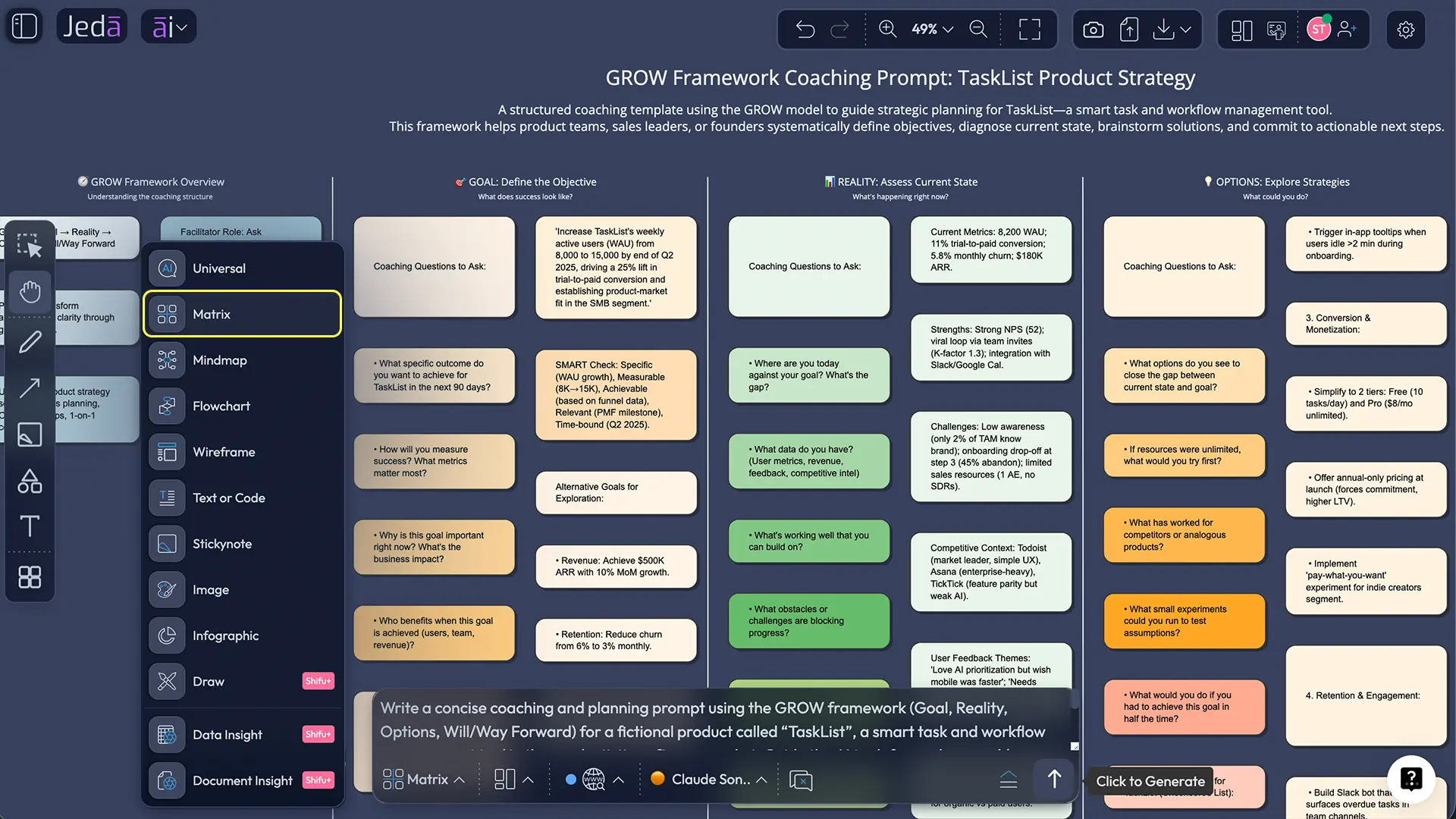
Open the Prompt Bar at the bottom, select the Matrix command, write a prompt for a GROW retrospective, and generate the matrix directly on the canvas.
- Review each GROW section with the team
Edit Goals, Reality, Options, and Will directly on the board. Add specifics, remove vague language, and assign ownership where needed.
- Use AI+ to deepen weak areas
Select any cell or smart shape and use the AI+ button to extend a shallow idea, challenge an assumption, or generate better next-step options.
- Convert, share, and export
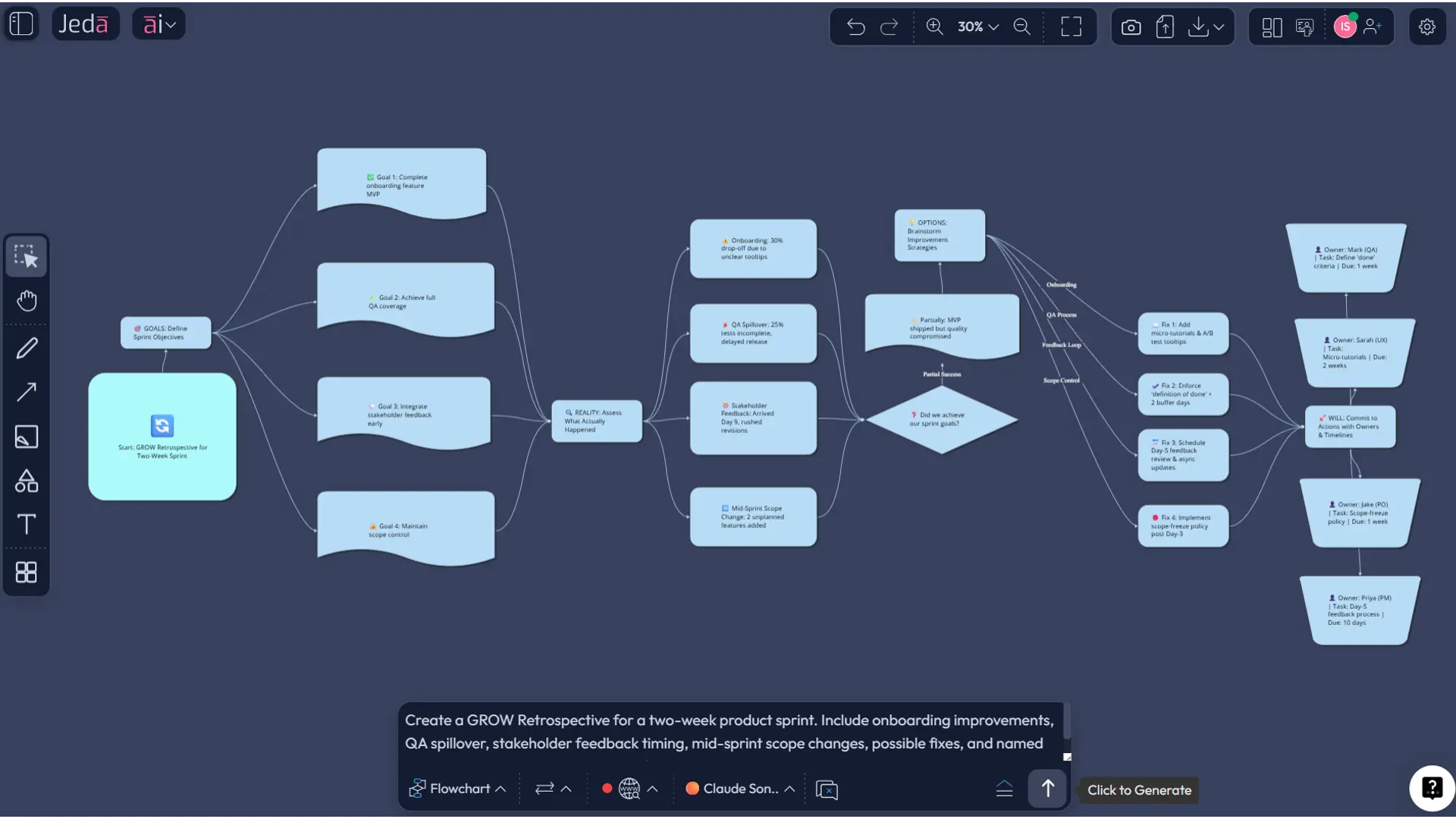
Use Vision Transform to convert the retro into a flowchart or follow-up map, collaborate with the team in real time, then export as PNG, SVG, or PDF.
AI+ button deep dive
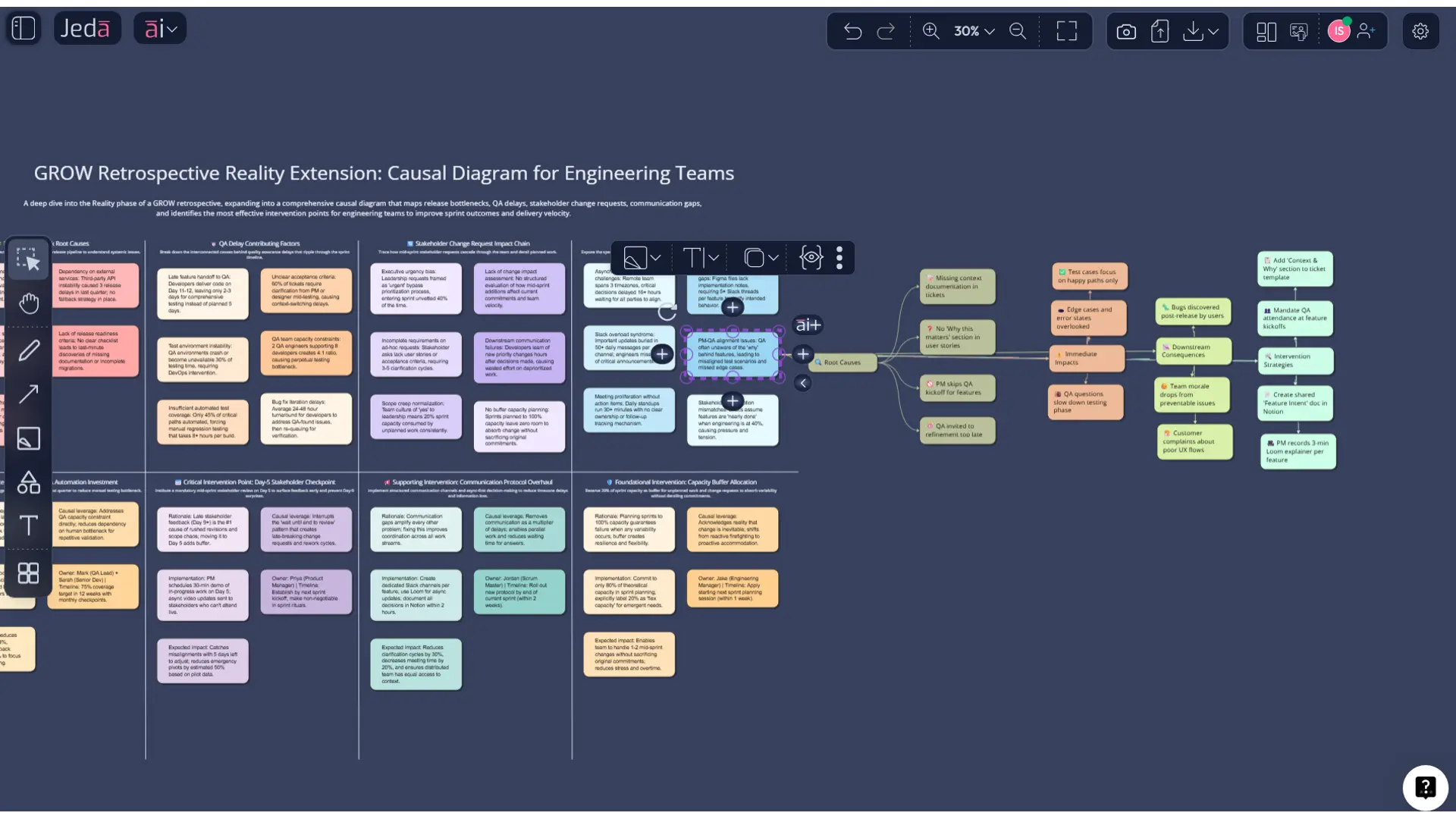
Once the first version is on the canvas, click any weak, vague, or disputed section and use the AI+ button to extend it. You can ask Jeda.ai to elaborate on a reality statement, produce sharper options, or turn a generic “we should communicate better” note into something an adult could actually execute.
Then use Vision Transform if you want to convert the GROW matrix into a flowchart, mind map, or diagram for follow-through planning. Jeda.ai supports that cross-visual workflow inside the same board.
Method 2: Prompt Bar
This route is better when you want more control over the language, audience, or output style.
Open the Prompt Bar at the bottom of the workspace, select the Matrix command, and enter a structured prompt describing the team, time period, context, and what the matrix should include. Generate the board, then edit the cells directly on canvas.
Copy-paste prompt for the Prompt Bar
Prompt:
Create a GROW Retrospective for [team / sprint / project].
Use four columns: Goals, Reality, Options, and Will.
Context: [brief summary of the sprint, release, or project period].
Include concrete observations, blockers, wins, decision points, and follow-up actions.
Keep the content concise, specific, and useful for a cross-functional team.
End with 3 high-priority commitments in the Will section, each with an owner and timeframe.
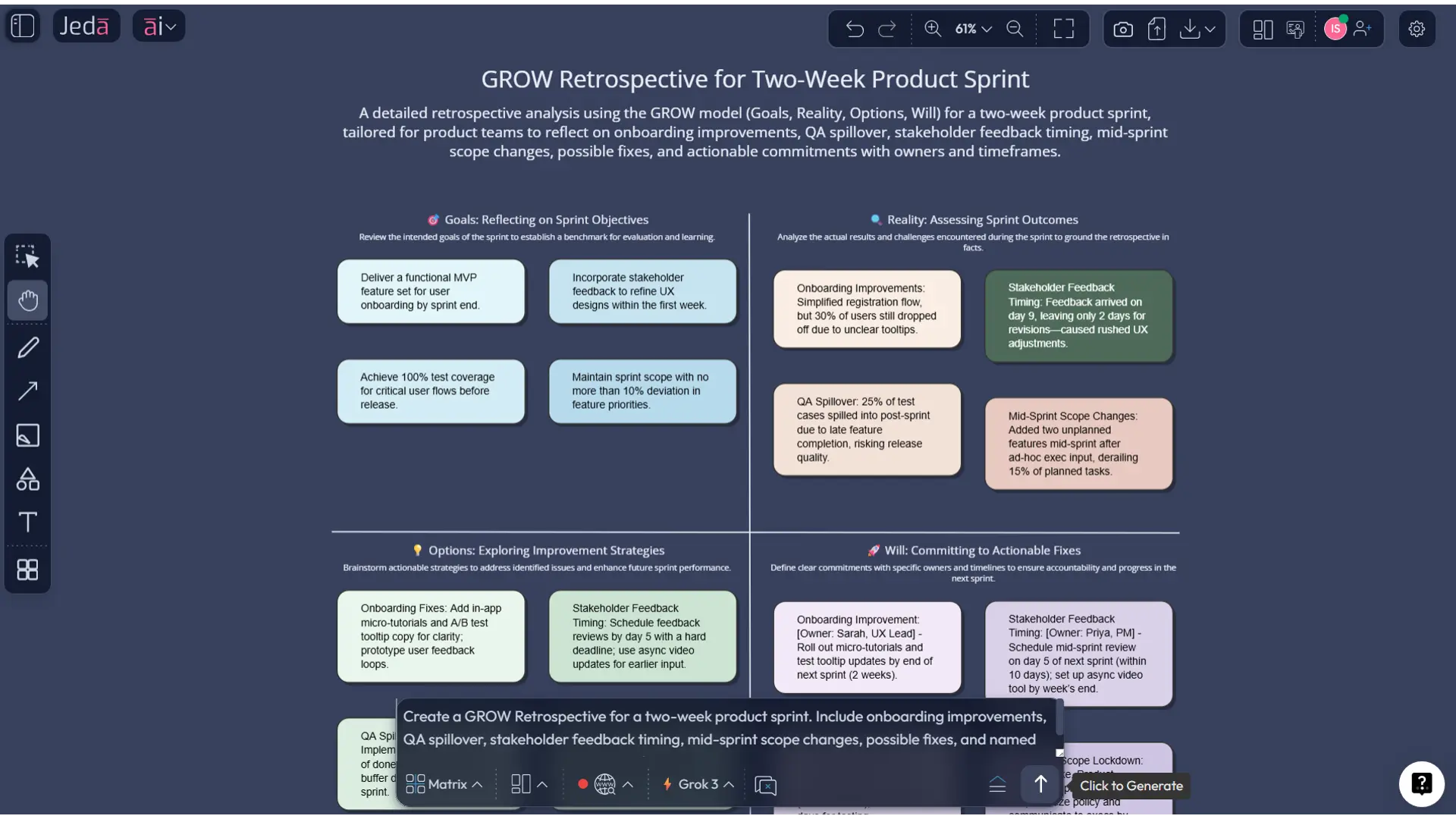
A practical example: product team sprint retrospective
Imagine a product squad finishing a two-week sprint after a rocky release.
In the Goals column, the team records what success should have looked like: ship onboarding improvements, reduce QA spillover, and improve handoff clarity between design and engineering.
In Reality, it captures what actually happened: two stories rolled over, QA found avoidable issues late, product decisions changed mid-sprint, and stakeholder feedback arrived too close to release.
In Options, the board explores actual responses: freeze design decisions 48 hours earlier, set a single escalation path for scope changes, split QA review checkpoints across the sprint, and pre-review analytics assumptions before build starts.
In Will, the team commits: product manager owns earlier decision lock, engineering lead owns QA checkpoint redesign, and designer owns a mid-sprint prototype review ritual. Now the retro has turned into a working agreement. Not magic. Just structure done right.
Best practices for a stronger GROW retrospective
1. Make Goals specific enough to be testable
“Improve teamwork” is not a goal. It is decorative language. Try goals tied to delivery speed, defect rate, meeting quality, customer impact, release confidence, or decision cycle time.
2. Keep Reality evidence-based
Use actual sprint outcomes, delivery stats, incident notes, customer feedback, or meeting records. If your Reality column is all opinion, the rest of the retro gets wobbly fast.
3. Push for multiple Options before choosing one
Do not let the first plausible fix win by default. Teams learn more when they compare alternatives, constraints, and trade-offs.
4. Write Will as commitments, not hopes
Every action should have an owner, timeframe, and visible follow-up. Otherwise it belongs in the museum of retro promises.
5. Use AI as a challenger, not a substitute for accountability
Jeda.ai can expand weak thinking, summarize input, and suggest alternatives. It cannot care more than the team does. Annoying, but true.
Common mistakes to avoid
Treating Goals as hindsight
Teams often rewrite the goal after the fact so the sprint sounds more successful. That defeats the point.
Confusing Reality with blame
A good retrospective names facts, constraints, and process failures. It does not turn into a courtroom drama.
Listing Options that are too generic
“Communicate better” should be banned on sight unless followed by a concrete behavior change.
Writing Will without owners
If nobody owns the action, nobody owns the outcome.
Stopping at the matrix
The board is not the end. Use AI+ to deepen it, then convert it into a plan the team can actually execute.
Who should use a GROW retrospective?
This format works especially well for:
- Scrum masters and agile coaches
- Product managers and product design engineers
- Software engineering teams
- Project managers
- Business analysts
- Strategy consultants running post-project reviews
- Innovation teams reviewing experiments or pilot work
That range matters because GROW Retrospective with AI is not only for classic agile ceremonies. It also works for launch reviews, cross-functional programs, design sprints, operations reviews, and executive team reflection when decisions need to become visible and actionable.
Frequently asked questions
- What is a GROW retrospective?
- A GROW retrospective is a reflection format built around Goals, Reality, Options, and Will. It helps teams move from review into action by structuring what they wanted, what happened, what they could do next, and what they will commit to now.
- Why use AI for a GROW retrospective?
- AI helps teams generate the initial structure faster, sharpen vague statements, surface alternatives, and summarize supporting inputs from notes, documents, or data. In Jeda.ai, that output stays editable on an AI Whiteboard instead of becoming static text.
- Can I create a GROW retrospective in Jeda.ai without a prebuilt recipe?
- Yes. You can use the Prompt Bar with the Matrix command and write your own structured prompt. That gives you more control over wording, context, and the level of detail in each GROW section.
- What is the best Jeda.ai method for this page?
- Use the Recipe Matrix method when you want a guided setup and the Prompt Bar method when you want custom control. After generation, use the AI+ button to deepen sections and Vision Transform to convert the board into another visual format.
- Is GROW only for coaching?
- No. Although the GROW model came from coaching practice, teams now use it for retrospectives, workshop facilitation, planning, and decision-making. It is especially useful when a team wants reflection to end with concrete commitments.
- What should go in the Reality section?
- The Reality section should capture what actually happened using specific observations, metrics, blockers, incidents, feedback, and constraints. It works best when grounded in evidence rather than memory alone.
- Can Jeda.ai use documents and data in a retrospective workflow?
- Yes. Jeda.ai supports Document Insight and Data Insight, so teams can upload PDFs, notes, spreadsheets, or other inputs and turn them into structured visuals before or during the retro workflow.
- Can we collaborate live on the same retrospective board?
- Yes. Jeda.ai supports real-time collaboration in the same shared board. Teams can edit the matrix together, discuss cells live, and keep the output as a shared source of truth inside the AI Workspace.
- Can we export the final GROW retrospective?
- Yes. Export the completed board from Jeda.ai as PNG, SVG, or PDF. Those formats make it easy to share the retrospective with stakeholders or archive it for later review.
- Does Jeda.ai support web search in this workflow?
- Yes. Web Search is a platform feature in Jeda.ai, not a model-only feature. It can help when the retrospective needs current outside context, benchmarks, or recent background information.
Sources and further reading
- [1]
Sir John Whitmore / Performance Consultants (2024) . “Sir John Whitmore” Performance Consultants.
View Source ↗ - [2]
Performance Consultants (2026) . “A Complete Guide to the GROW Coaching Model” Performance Consultants.
View Source ↗ - [3]
Atlassian (2025) . “What are agile retrospectives?” Atlassian.
View Source ↗ - [4]
Atlassian (2026) . “Sprint Retrospective: How to Hold an Effective Meeting” Atlassian Team Playbook.
View Source ↗ - [5]
Parabol (2026) . “22 Retrospective Ideas for Ambitious Agile Teams” Parabol.
View Source ↗ - [6]
EasyRetro (2026) . “Futurespective Grow Model Template” EasyRetro.
View Source ↗
Start Your GROW Retrospective with AI Today
Join over 150,000+ users using Jeda.ai’s AI Workspace and AI Whiteboard to turn team reflection into decision-ready action.
Try Free Template