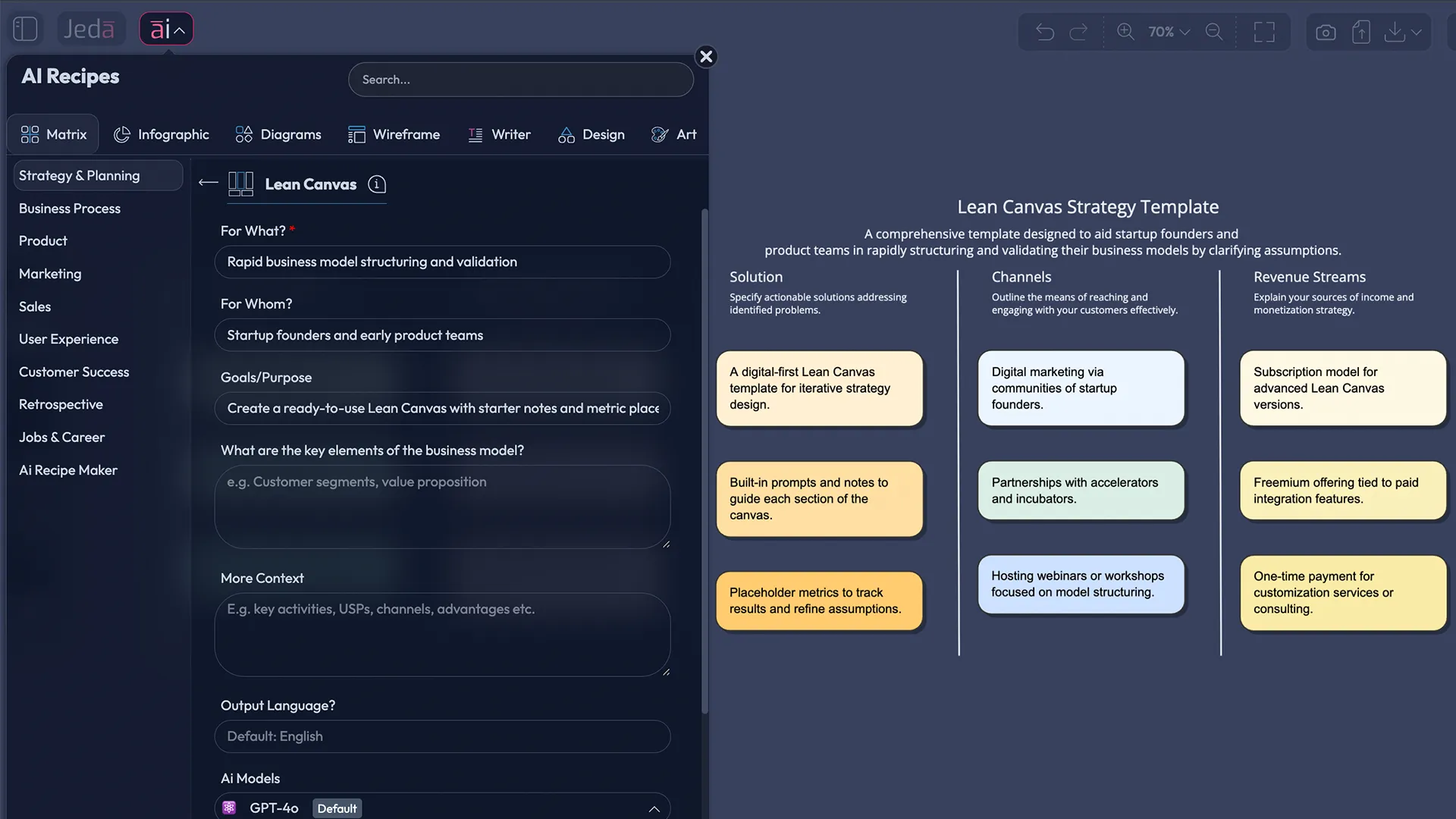
A lean canvas template is useful because it forces clarity fast. In a few minutes, you can state the problem, propose a solution, and name the assumptions that must be true for your business to work. Doing this inside an AI Workspace changes the tempo: you can generate variants, attach evidence, and keep the canvas editable for the whole team. Jeda.ai is an AI Whiteboard used by 150,000+ users, and it’s built for this kind of iterative thinking (without turning your planning into a 30-slide hostage situation).
What is a Lean Canvas?
A Lean Canvas is a one-page business modeling artifact designed to make a startup’s riskiest assumptions explicit. It uses nine blocks to describe (1) who experiences a problem, (2) what solution you propose, (3) why your value proposition is distinct, and (4) what evidence you will accept as “true enough” to proceed. The framework is commonly attributed to Ash Maurya and is often presented as a startup-oriented adaptation of the Business Model Canvas tradition.
In practice, Lean Canvas is less a “plan” and more a structured hypothesis sheet. You should expect to revise it repeatedly as customer discovery and experiments change what you believe.
Lean Canvas vs Business Model Canvas
Lean Canvas and the Business Model Canvas answer different questions.
- Lean Canvas is optimized for searching for product–market fit. It foregrounds the problem, early adopters, and the hardest-to-fake advantage.
- Business Model Canvas is optimized for describing and scaling a business model once you have more operational certainty.
Many explainers summarize this difference as “startup validation vs operational completeness,” which matches how the two are taught and used in common practice.
A practical rule:
If you are still guessing what customers will pay for and why they will switch, use Lean Canvas.
If you are optimizing partnerships, activities, and operational structure, use Business Model Canvas.
Why use a Lean Canvas with AI?
Using a lean canvas template with AI can improve speed and quality for a simple reason: the tool can produce alternatives quickly, and alternatives reduce fixation.
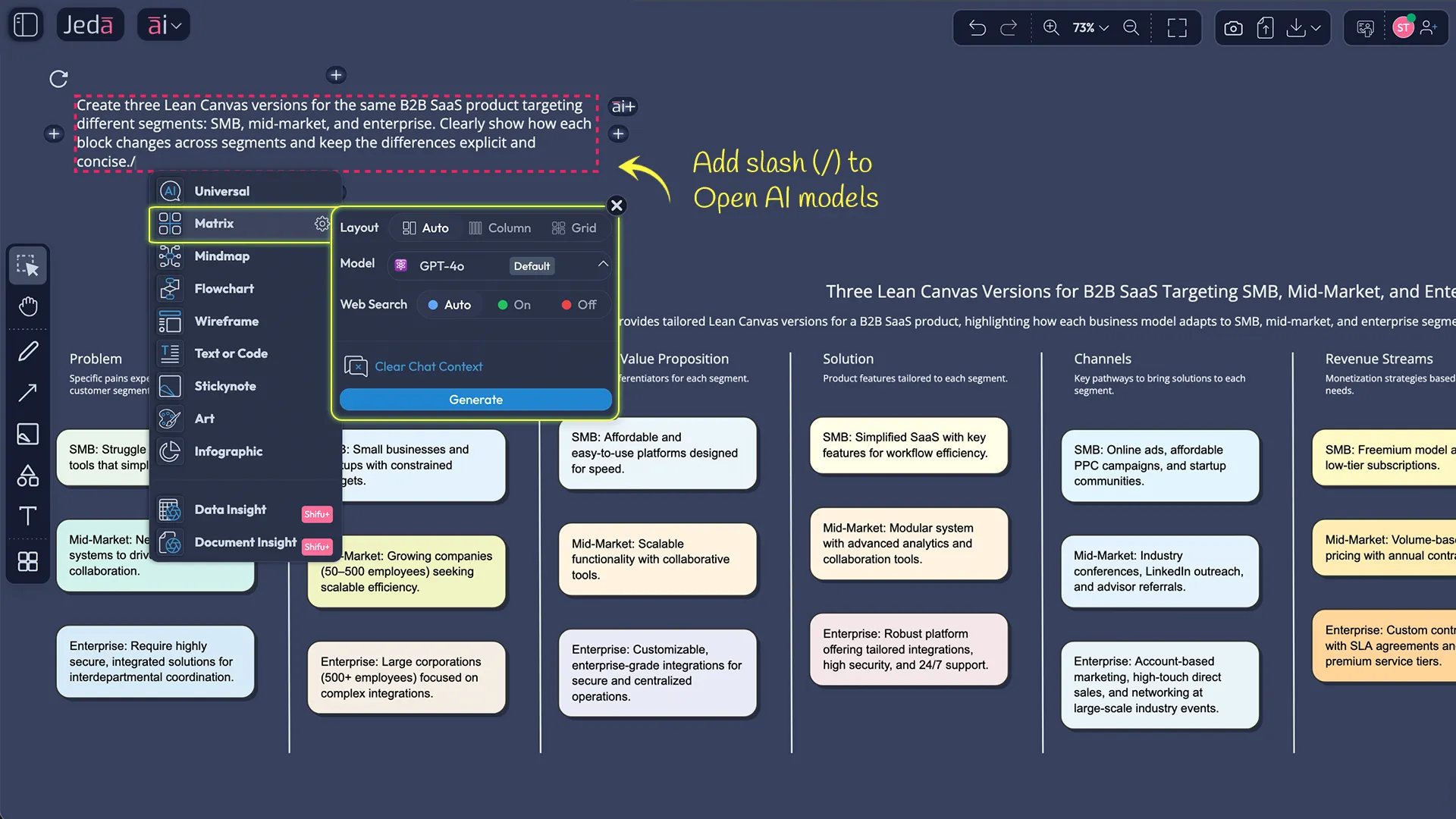
In an AI Workspace like Jeda.ai, AI is helpful in four specific ways:
- Variant generation: create 3–5 competing canvases for the same idea (different segments, channels, pricing, UVPs).
- Evidence organization: attach interview notes, competitor snapshots, or a PDF brief and extract structured claims.
- Metric design: propose measurable signals for “Key Metrics” (not vanity numbers).
- Consistency checks: detect mismatches (e.g., high-touch channels paired with low-price revenue).
- Hypothesis clarity
AI can restate ambiguous blocks as falsifiable claims, which improves test design and reduces wordy, non-committal canvases.
- Alternative canvases
Generate multiple lean canvas variants to avoid anchoring on a single segment, channel, or pricing assumption.
- Evidence-in workflow
Bring notes, PDFs, or spreadsheets into the AI Whiteboard and extract candidate problems, segments, and metrics for review.
How to create a Lean Canvas in Jeda.ai
You can build a Lean Canvas inside Jeda.ai using the Matrix command in the Prompt Bar. If your AI Menu already includes a Lean Canvas recipe under Matrix Recipes, you can use that too. Either way, the output stays editable on the canvas.
- Open a new board in Jeda.ai
Create a fresh workspace so your lean canvas template becomes the visible source of truth for the team in the AI Workspace.
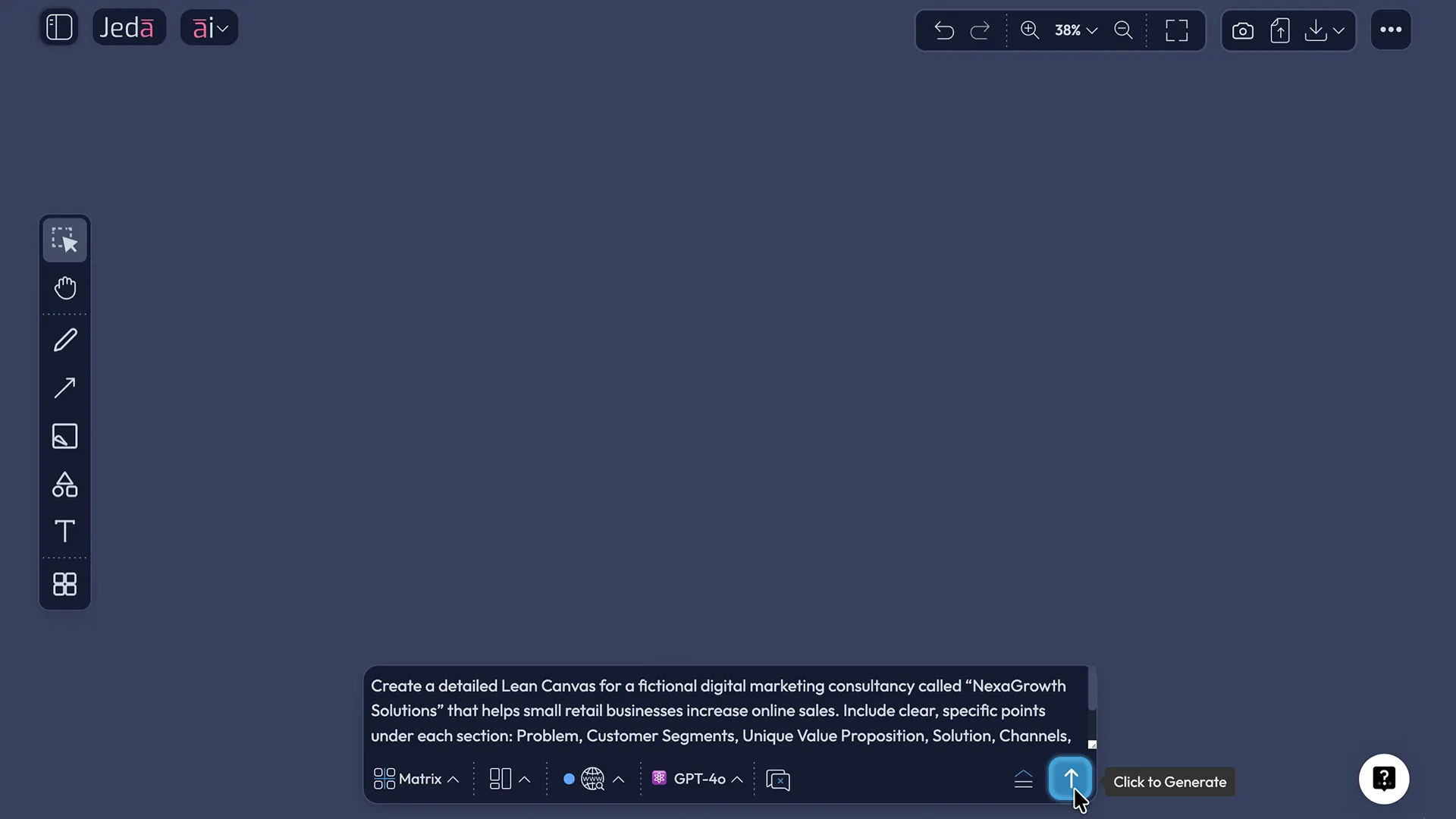
- Generate the Lean Canvas with the Matrix command
Open the Prompt Bar, select the Matrix command, and request a 9-block lean canvas template with sticky notes.
- Add evidence (optional but recommended)
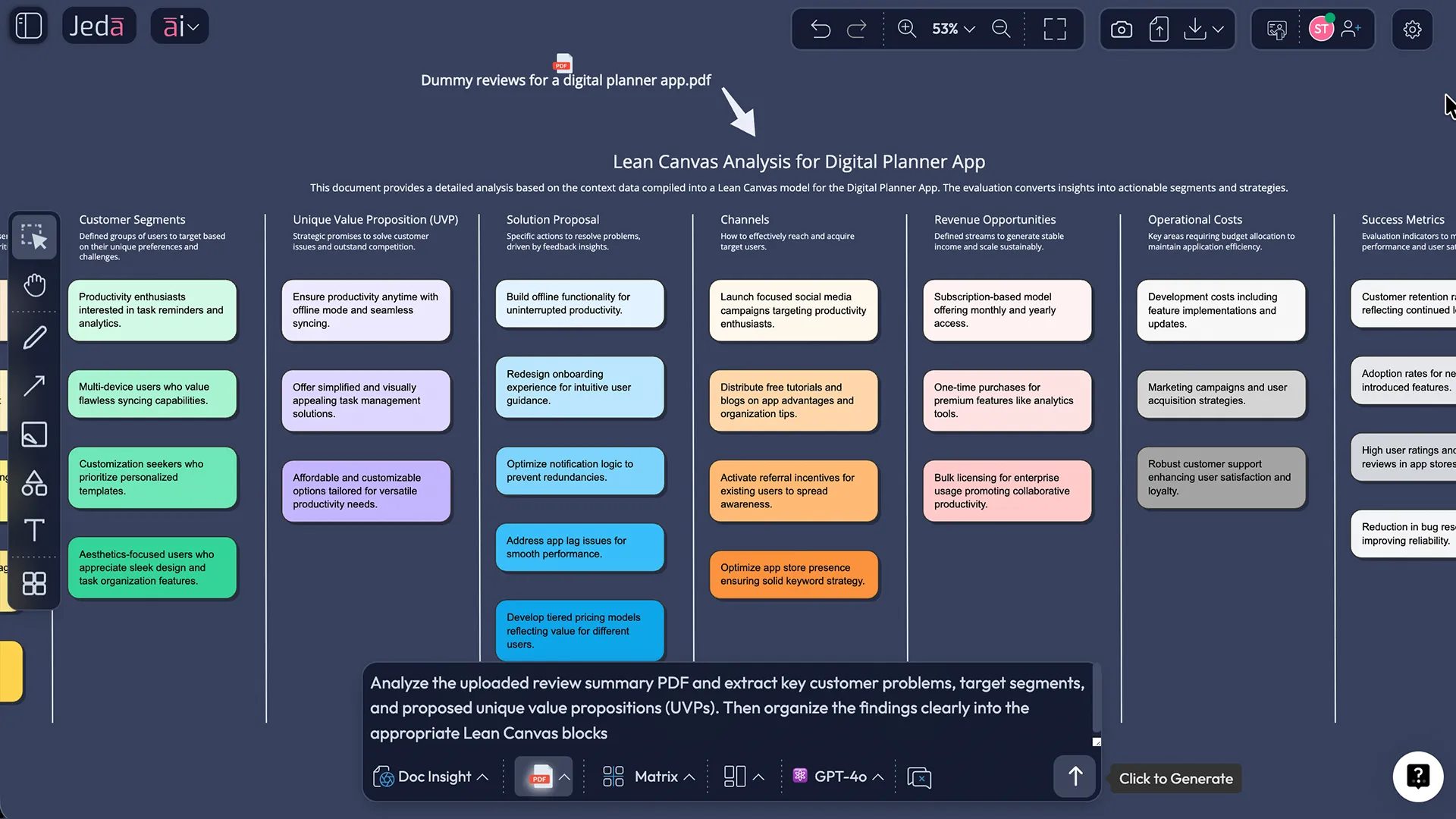
Upload interview notes or a PDF brief and use Document Insight to extract problems, segments, and candidate UVPs into the canvas.
- Define tests and success thresholds
For each risky block, write the smallest experiment you can run and the numeric threshold that counts as a pass.
- Extend and convert as you learn
Use the AI+ button to expand weak blocks (e.g., channels or key metrics). Use Vision Transform to convert your canvas into a flowchart of experiments or a roadmap.
Lean Canvas template and a worked example
Example venture (for illustration): “Compliance Compass”, a B2B SaaS that helps startups prepare SOC 2 evidence faster.
What makes this example “usable” is not the phrasing. It is the testability. For instance:
- “Founder communities” as a channel is vague until you specify which communities, what message, and what conversion rate you will accept.
- “Time-to-auditor-ready packet” is a metric only if you define the baseline and the target improvement.
So the canvas is the start. The science is in the experiment design.
Best practices & tips (evidence-first)
Two additional practices matter in teams:
(1) Version the canvas. A Lean Canvas is not a monument. It is a lab notebook.
(2) Attach evidence. Notes, screenshots, and small datasets prevent “opinions” from re-entering as facts.
Common mistakes to avoid
- Writing slogans instead of claims. “Best-in-class” is not testable.
- Confusing channels with tactics. “Social media” is not a channel; it’s a category.
- Using vanity metrics in Key Metrics. Total signups without activation is usually noise.
- Leaving “Unfair Advantage” blank forever. If you truly have none, state that and design a plan to build one.
- Never revisiting the canvas. A stale Lean Canvas is worse than no Lean Canvas because it gives false confidence.
Frequently Asked Questions
- What is a lean canvas template?
- A lean canvas template is a one-page, nine-block framework used to map a startup’s key assumptions—problem, customer segments, solution, metrics, and economics—so you can test and revise them quickly rather than writing a long business plan.
- What are the 9 blocks of the Lean Canvas?
- The Lean Canvas blocks are Customer Segments, Problem, Unique Value Proposition, Solution, Channels, Revenue Streams, Cost Structure, Key Metrics, and Unfair Advantage. Together they describe assumptions you must validate to reach product–market fit.
- What is the difference between Lean Canvas and Business Model Canvas?
- Lean Canvas emphasizes early validation: problems, solutions, key metrics, and unfair advantage. Business Model Canvas emphasizes operational structure: partners, key activities, resources, and customer relationships. Lean Canvas fits discovery; BMC fits scaling and optimization.
- What is the best order to fill in a Lean Canvas?
- A practical order is Problem → Customer Segments → Unique Value Proposition → Solution → Channels → Revenue/Costs → Key Metrics → Unfair Advantage. This keeps attention on customer reality first, then economics and defensibility.
- How often should I update my Lean Canvas?
- Update weekly during customer discovery or when running active experiments. After you reach stable acquisition and retention signals, monthly updates are usually enough. The canvas should change whenever evidence changes what you believe.
- What does 'Unfair Advantage' mean in Lean Canvas?
- Unfair Advantage is a defensible edge that competitors cannot easily copy—proprietary data, network effects, unique distribution access, trusted brand, or deep domain capability. If you do not have one yet, state that and plan how to build it.
- Can AI generate a Lean Canvas?
- Yes. AI can draft a Lean Canvas quickly, propose alternative segments and value propositions, and suggest candidate metrics. You still need human judgment and real customer evidence to validate the blocks and decide which assumptions to test first.
- How do I validate a Lean Canvas?
- Translate each risky block into a falsifiable hypothesis, run the smallest test you can (interviews, landing pages, prototypes), and define numeric pass/fail thresholds. Replace assumptions with evidence and keep iterating until the model is stable.
- Is Lean Canvas only for startups?
- It is most commonly used for startups and new products, but established teams can use it for new initiatives, internal tools, or market-entry bets. The key requirement is uncertainty: you are testing a model, not documenting a known one.
- What can I export from Jeda.ai after building a Lean Canvas?
- Jeda.ai exports boards as PNG, SVG, or PDF. This is useful for sharing with stakeholders, adding to documentation, or attaching to decision memos while keeping the editable AI Whiteboard as the working source of truth.
Sources & Further Reading
- [1]
Maurya, Ash (2012) . “Running Lean: Iterate from Plan A to a Plan That Works” O'Reilly Media (catalog entry).
View Source ↗ - [2]
Ries, Eric (2011) . “The Lean Startup” Crown Business.
View Source ↗ - [3]
Blank, Steve (2000s) . “Customer Development and early startup learning foundations (referenced in Lean Startup discourse)” Startup methodology literature.
View Source ↗ - [4]
Cassens, N. (2021) . “The Lean Startup – A Systematic Literature Review” FH Wedel (PDF).
View Source ↗ - [5]
Osterwalder, Alexander; Pigneur, Yves (2010) . “Business Model Generation” Wiley listing.
View Source ↗ - [6]
Miro (2025) . “Lean Canvas vs. Business Model Canvas: A Quick Guide” Miro.
View Source ↗ - [7]
Canva (2024) . “What is a Lean Canvas? (Examples and Tips)” Canva.
View Source ↗