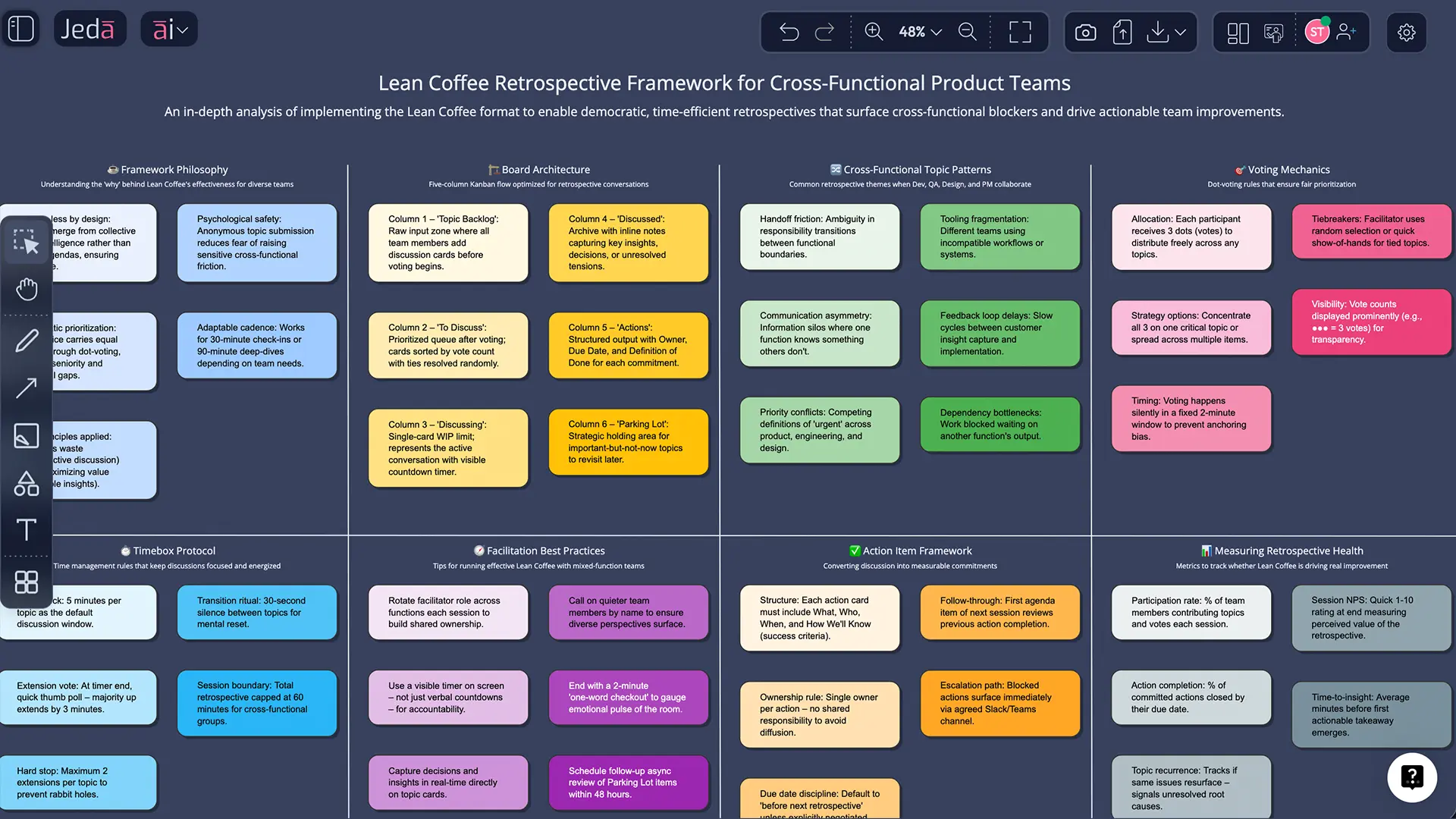
A Lean Coffee retrospective template is what you use when your team has a lot to talk about… and exactly zero patience for a bloated agenda. In a Visual AI AI Workspace like Jeda.ai, you can collect topics, vote, timebox discussions, and turn the best conversations into real action items—without losing the thread halfway through. And yes: 150,000+ users are already doing this in Jeda.ai’s AI Whiteboard workflows.
Quick definition (snippet-ready): A Lean Coffee retrospective is a structured, agenda-less retro where participants propose topics, dot-vote to prioritize them, then discuss items in short timeboxes—moving cards across columns like a mini Kanban board. Lean Coffee started in Seattle in 2009, created by Jim Benson and Jeremy Lightsmith.
What is a Lean Coffee retrospective template?
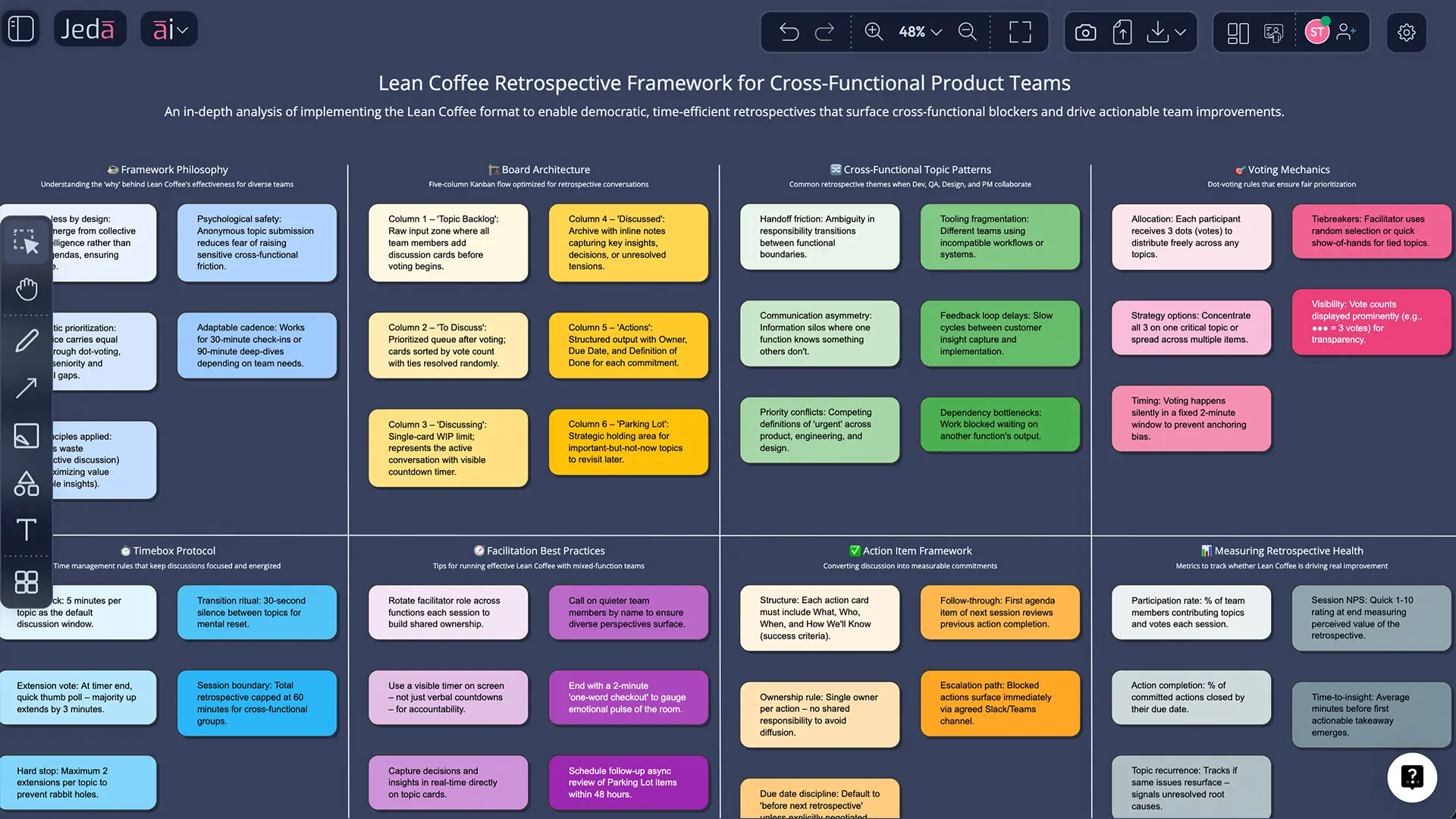
A Lean Coffee retrospective template is a simple board that turns “we should talk about stuff” into a fair, focused discussion. It’s agenda-less at the start (no pre-selected topics), but structured once the meeting begins: people add topics, vote, then discuss the highest-voted items first.
The classic board uses three columns:
- To Discuss (topic backlog)
- Discussing / In Progress
- Discussed / Done
From there, teams often add an Actions lane so the retro doesn’t end as “great chat, see you next sprint.” Some teams also add Parking Lot for topics that matter but don’t fit today.
Lean Coffee works especially well when:
- the team wants to surface unexpected issues,
- there are too many topics to pre-plan,
- you need lightweight facilitation without a 40-slide retro script.
Why run a Lean Coffee retrospective template with AI?
Lean Coffee already solves the “agenda politics” problem. Adding AI makes it solve the “we talked about it but nothing changed” problem.
In Jeda.ai, you’re running this inside an AI Workspace that can generate the board, help cluster similar topics, and help you draft clearer action items—while keeping everything editable on an AI Whiteboard. (No, you don’t have to become a facilitator monk to get value.)
- Start with structure
Generate a Lean Coffee board as a Matrix so the team begins aligned: topics, votes, timeboxes, outcomes. The board stays editable for live facilitation.
- Make priorities visible
Dot-voting and ranked queues keep the discussion honest. AI helps you group duplicates so votes reflect real priorities, not repeated wording.
- Turn talk into actions
AI can help draft action items and owners after the discussion. Then your team leaves with decisions you can actually follow up on.
Also: if your retro is remote, a shared canvas helps everyone see the same board state. No “wait, which topic are we on?” loop.
The Lean Coffee board layout (matrix)
Here’s a clean, practical layout you can use in most retros:
| Column | What goes here | Rule of thumb |
|---|---|---|
| To Discuss | Topic cards (one idea per card) | Write as a question or problem statement |
| Discussing | The single topic being discussed now | One card at a time |
| Discussed | Completed topics | Add a quick takeaway note if needed |
| Actions (optional) | Action items, owners, due dates | If it’s not owned, it’s not real |
| Parking Lot (optional) | Important but out-of-scope topics | Decide later: schedule, assign, or drop |
Timeboxing is the second pillar. Many teams start with a short timebox (often ~5 minutes), then vote whether to continue or move on.
How to run a Lean Coffee retrospective template with AI in Jeda.ai
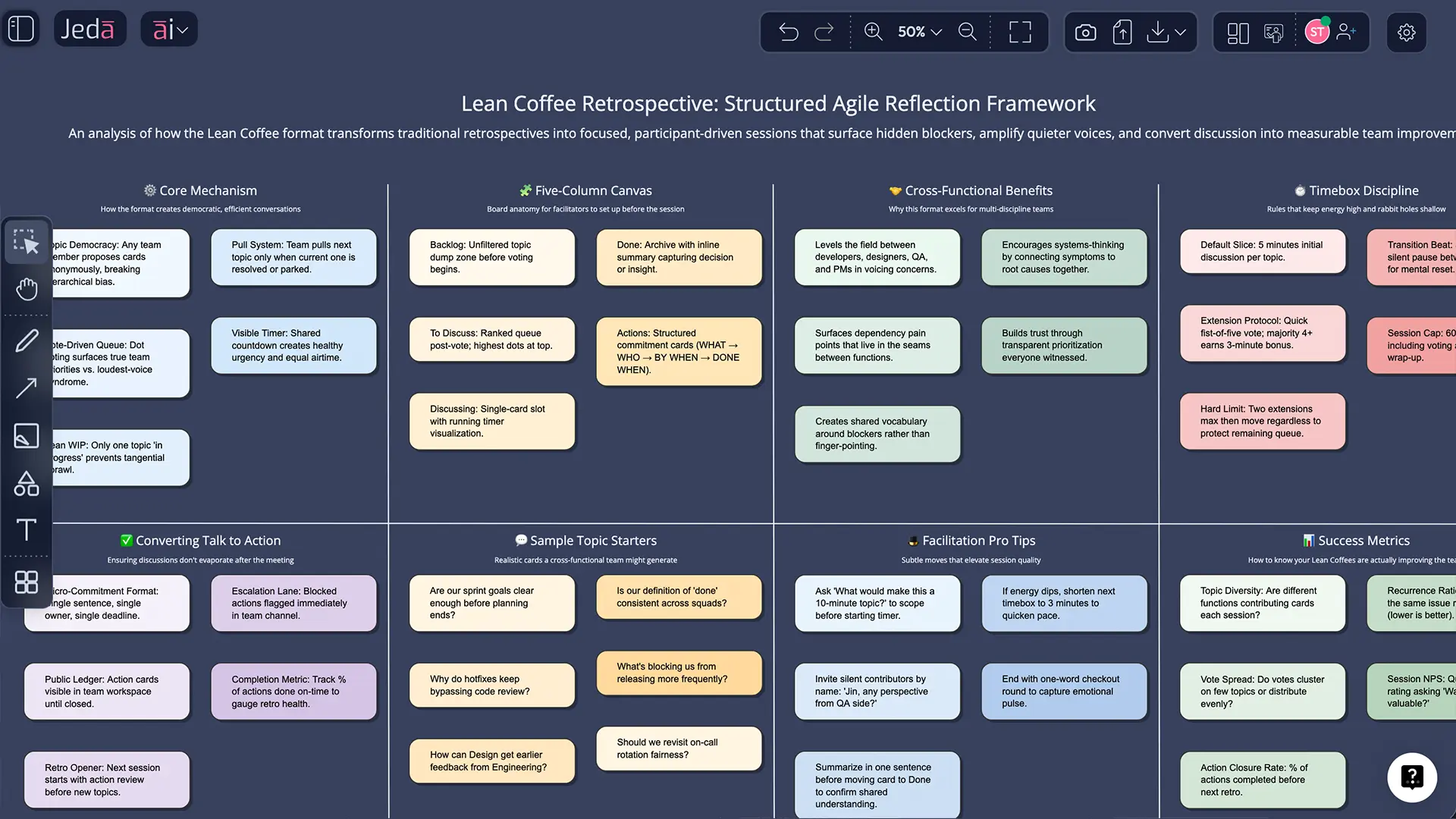
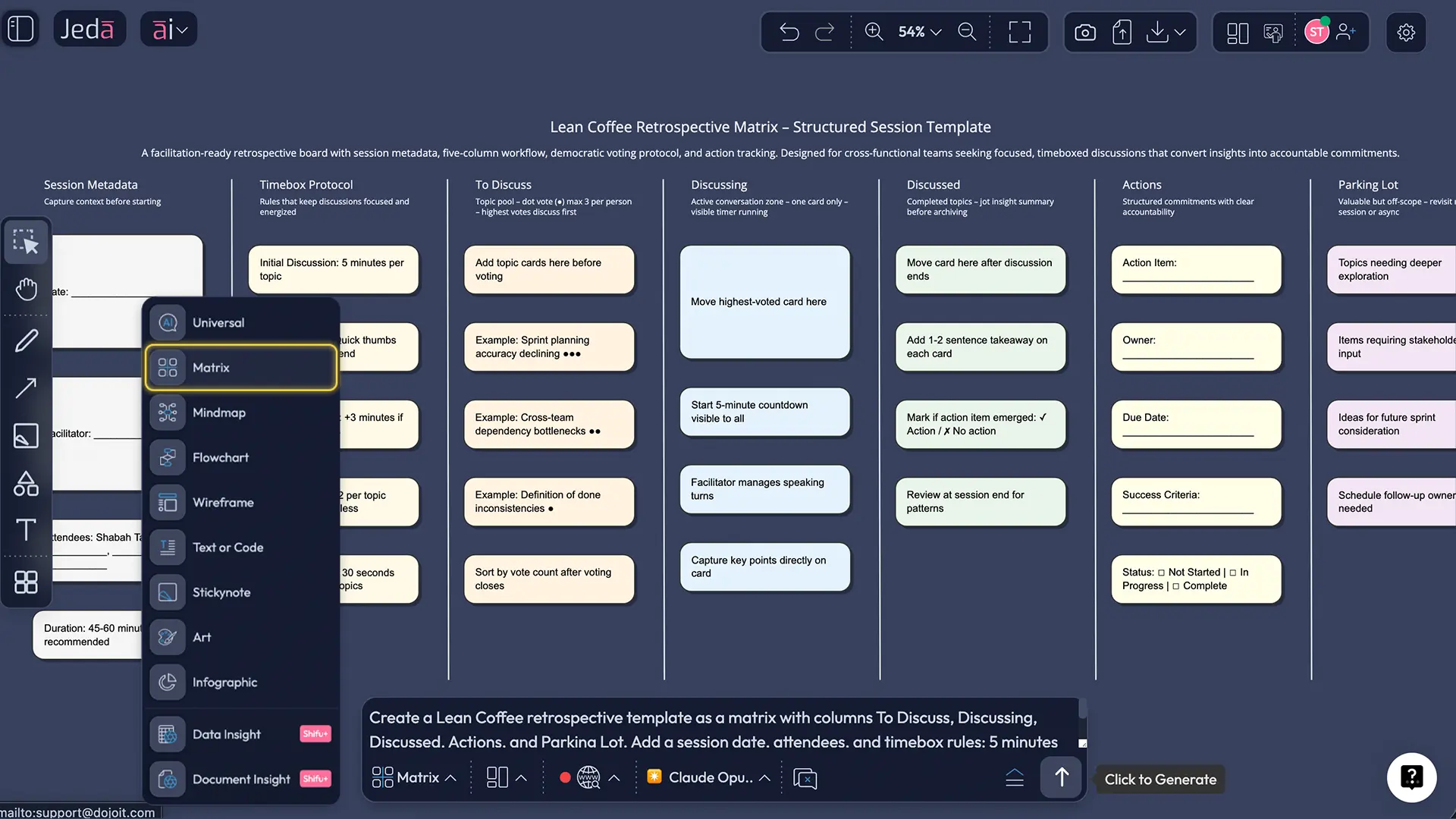
Jeda.ai supports two main input paths: AI Menu (recipes/templates) and the Prompt Bar (direct prompting). You’ll use the Matrix command as your core move (this is a matrix format), then optionally use Stickynotes for free-form topic capture.
Method 1: Recipe Matrix - Reference you want a fast starting template.
- Open the AI Menu (top-left of the canvas).
- Go to **Matrix Recipes “retrospective.” (If you don’t see an exact Lean Coffee recipe, pick the closest retrospective-style matrix and rename the columns.)
- Enter a short prompt about what you want to improve.
- Click Generate to place the matrix on the AI Whiteboard canvas.
- During the session, add topics as sticky notes/cards and rank them by votes.
Method 2: Prompt Bar (direct prompt)
Use this when you want full control over columns, rules, and facilitation start at bottom of the workspace. 2. Select the Matrix command. 3. Paste a prompt like this (edit it for your team):
Prompt (copy/paste):
“Create a Lean Coffee retrospective template as a, Discussing, Discussed, Actions, Par sion date, attendees, and timebox rules: 5 minutes per topic, then vote to continue or move on. Add an action item format: Owner, Due date, Success criteria.”
- Press Enter to generate the board.
AI+ deep dive (after you have a first pass)
When you’ve got your topics clustered and a few discussions done, select a section and use the AI+ button to extend it with AI—for example, to expand notes into clearer takeaways or to help draft next steps. Keep it open-ended and review what it produces.
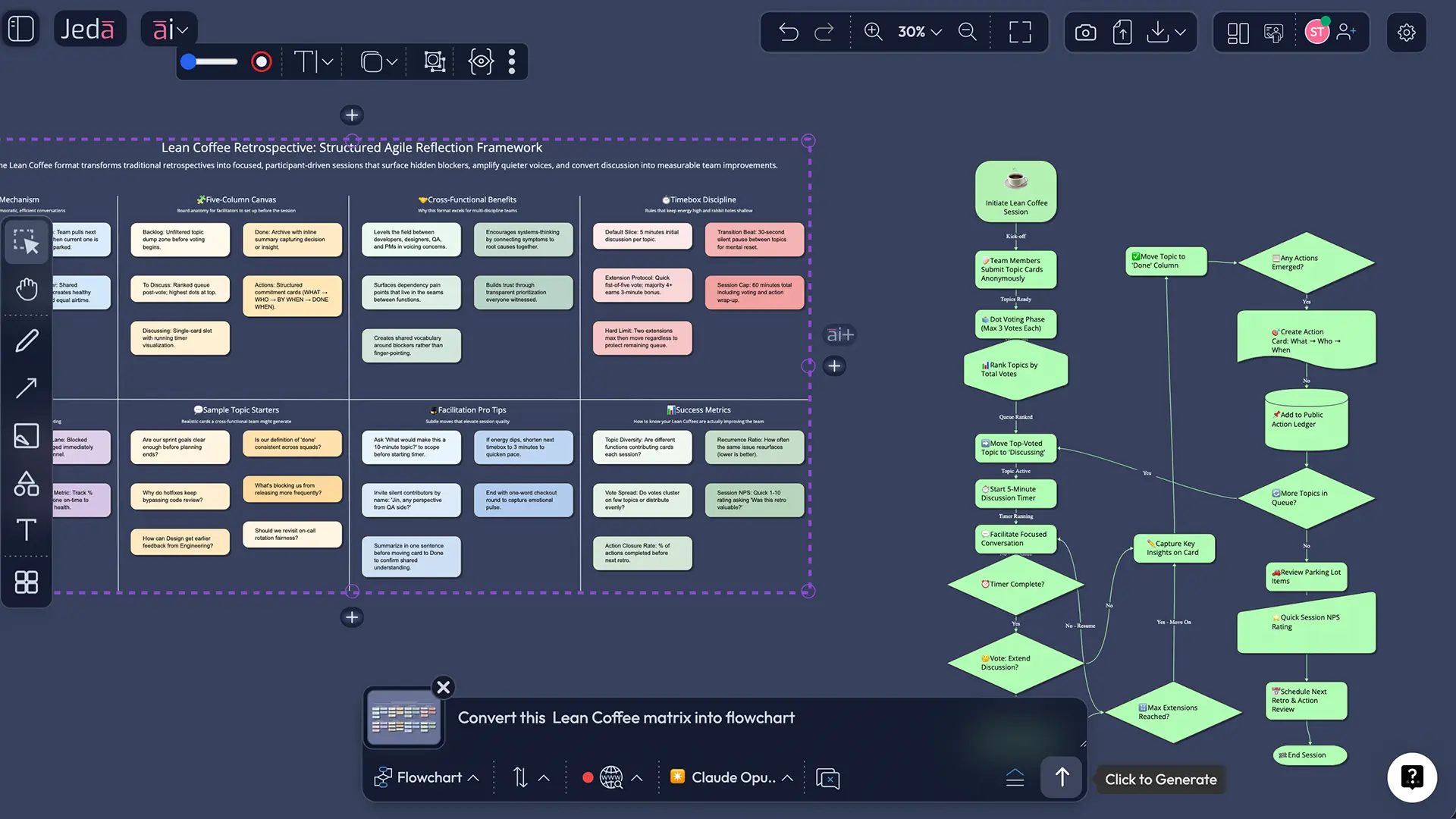
Vision Transform (optional)
If you want to turn your retro outcomes into a different visual (like an execution flow), select the board area and use Vision Transform to convert it—e.g., matrix → flowchart.
- Generate the Lean Coffee matrix
Use Method 1 (AI Menu Matrix Recipes) or Method 2 (Prompt Bar + Matrix) to create columns: To Discuss, Discussing, Discussed, plus Actions and Parking Lot.
- Collect topics (silent first)
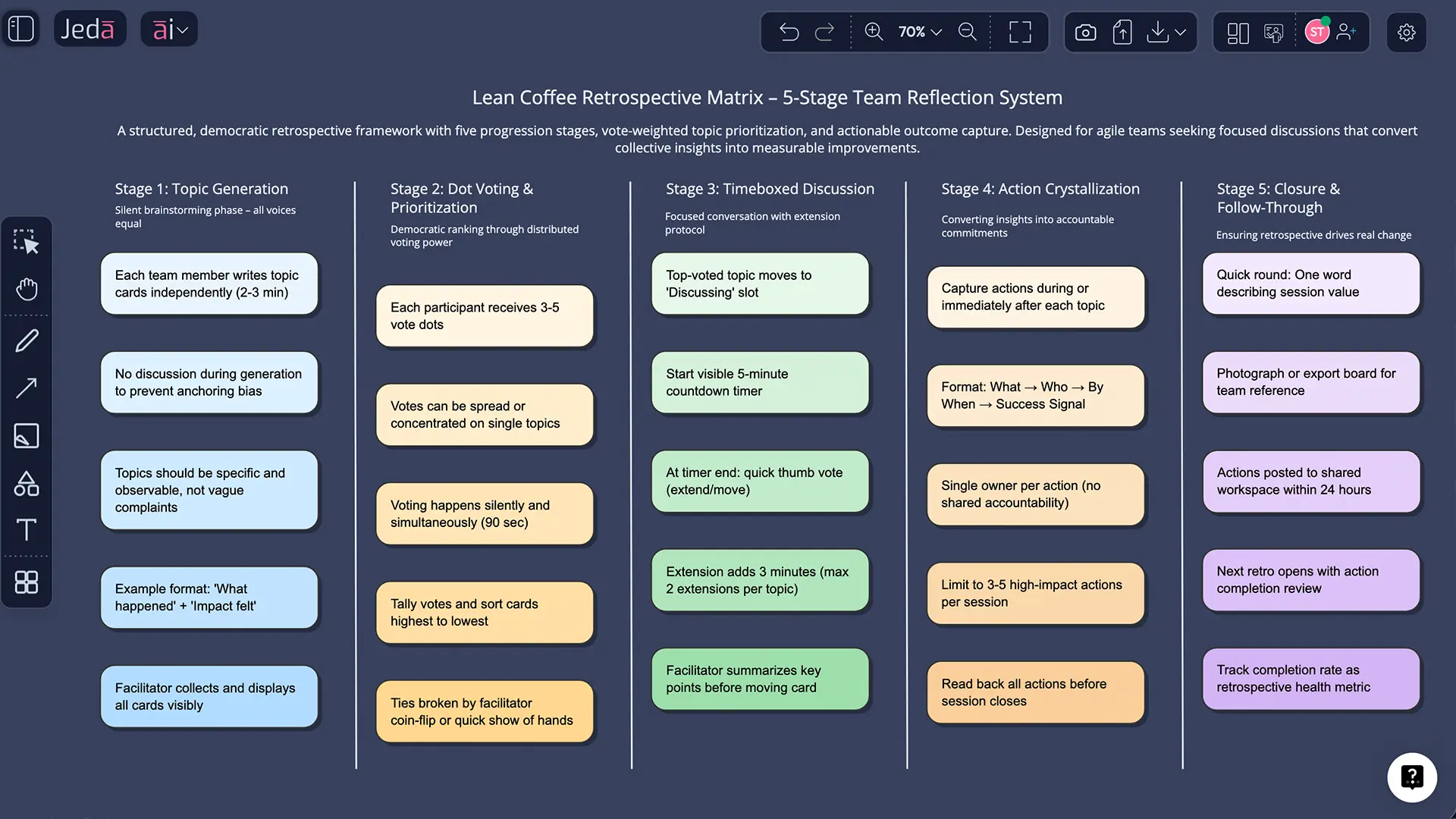
Give everyone 3–5 minutes to add topic cards. Encourage one topic per card, phrased as a question or problem statement.
- Cluster duplicates
Group similar topics so votes represent priorities, not repeated wording. Rename clusters if needed.
- Dot-vote to prioritize
Give each participant a fixed number of votes (commonly 3) and rank topics by votes.
- Discuss with timeboxes
Move the top topic to Discussing and start a short timebox (often ~5 minutes). When time is up, vote to continue or move on.
- Capture actions and export
For each discussed topic, capture decisions and action items (owner + due date). Export the board as PNG, SVG, or PDF for sharing.
fee retro (realistic, not magical)
Let’s say a product team just shipped a sprint with two production incidents and a late QA cycle.
0–5 min — Topics: People add cards like:
- “Why did QA start so late?”
- “Incident handoff during on-call”
- “Too many WIP items”
- “Requirements churn mid-sprint”
5–8 min — Cluster: Merge duplicates (“late QA” + “handoff gaps” often overlap).
8–10 min — Vote: Each person gets 3 votes. Popular topics rise to the top.
10–40 min — Discuss: Start with a 5-minute timebox, then vote: continue or move on. Capture outcomes as you go:
- Decision: “QA joins sprint kickoff, not just mid-sprint.”
- Action: “Add a pre-merge checklist for incident-prone modules.”
- Owner + due date: assigned on the Actions column.
40–45 min — Close: Pick 1–2 actions max that you can actually complete. (If you leave with 12 actions, you’ll complete zero. Human nature wins.)
Best practices that make Lean Coffee actually work
Common mistakes to avoid
- Letting one person narrate every topic. Lean Coffee is democratic by design.
- Skipping clustering. If the same issue appears three times, it steals votes from everything else.
- Turning every topic into a debate club. Timebox, decide, move.
- Leaving without actions. A retro without next steps is a group therapy session. (Sometimes needed. Still.)
- Over-producing actions. Two strong actions beat ten weak ones.
Lean Coffee vs classic retros (when should you pick it?)
Lean Coffee fits best when you want the team to create the agenda. Classic retrospective formats can be better when you need a guided flow.
If you want deeper retrospective facilitation structure, Derby & Larsen’s “Agile Retrospectives” is still the reference many facilitators return to.
For broader “team reviews” (beyond agile), Norman Kerth’s work is also widely cited.
Frequently Asked Questions
- What is a Lean Coffee retrospective template?
- A Lean Coffee retrospective template is a simple board that supports an agenda-less retro: participants add topics, vote to prioritize them, then discuss items in short timeboxes while moving cards across columns like To Discuss, Discussing, and Discussed.
- How long should a Lean Coffee retrospective take?
- A Lean Coffee retrospective often takes 30–60 minutes. The time stays under control because each topic is discussed in short timeboxes, and the group votes to continue or move on when the timer ends.
- How many votes should each person get in Lean Coffee?
- A common starting point is three votes per person, but teams adjust based on topic volume and group size. The key is consistency: set the rule, vote quickly, then rank topics so discussion follows priority.
- What columns should a Lean Coffee retrospective template include?
- The classic Lean Coffee board uses three columns: To Discuss, Discussing (or In Progress), and Discussed. Many teams add Actions for accountability and a Parking Lot for important items that don’t fit today.
- How do you timebox Lean Coffee discussions?
- Start each topic with a short timebox (often around five minutes). When time ends, the group votes whether to continue or move to the next topic. This keeps momentum without shutting down important discussions.
- How to create a Lean Coffee retrospective template using AI?
- To create a Lean Coffee retrospective template using AI, generate a matrix with the Lean Coffee columns and rules, then edit it live during the retro. In Jeda.ai, you can generate the matrix from the AI Menu or the Prompt Bar, then extend sections using the AI+ button.
- Is Lean Coffee good for remote teams?
- Yes—Lean Coffee works well remotely because the board makes the agenda and current topic visible to everyone. A shared canvas reduces cross-talk, and dot-voting gives quieter participants a fair way to influence priorities.
- What should we do with leftover topics?
- Move unfinished items to a Parking Lot and decide explicitly: schedule a follow-up, assign an owner to investigate, or bring it back next retro. The key is to avoid silently dropping topics people cared enough to vote for.
- Can we export a Lean Coffee board from Jeda.ai?
- Yes. You can export your Jeda.ai Lean Coffee board as PNG, SVG, or PDF for sharing and record-keeping. (No native PowerPoint or Word export.)
Sources & Further Reading
- [1]
Jim Benson & Jeremy Lightsmith (2009) . “Lean Coffee (Origins)” LeanCoffee.org.
View Source ↗ - [2]
Esther Derby & Diana Larsen (2006) . “Agile Retrospectives: Making Good Teams Great” Pragmatic Bookshelf (ACM record).
View Source ↗ - [3]
Agile Alliance (2015) . “Heartbeat Retrospective” Agile Alliance.
View Source ↗
Run your next Lean Coffee retro in minutes
Join over 150,000+ users who use Jeda.ai as an AI Workspace and AI Whiteboard to capture decisions, actions, and real improvement.
Try Jeda.ai Free