Ever stared at an employee engagement survey and thought, "Great, now what do I do with 4,000 rows of data?" You're not alone. People analysis — sometimes called people analytics or workforce analytics — is supposed to give HR and leadership teams the insights they need to make smarter decisions about hiring, retention, and team performance. But for most organizations, it's still a mess of disconnected spreadsheets and gut feelings dressed up as strategy.
That's changing fast. When you bring AI into the picture — especially a Visual AI Workspace like Jeda.ai — people analysis goes from a quarterly slog to something your team can actually run in minutes. We're talking about real-time workforce diagnostics, visual models you can share in a meeting, and insights that don't require a data science degree to interpret.
Let's walk through what people analysis actually is, why AI makes it dramatically better, and how to get started today.
What Is People Analysis?
People analysis is the practice of using data to understand and improve how organizations manage their workforce. Think of it as the human side of business intelligence. Instead of analyzing product sales or supply chain performance, you're looking at the patterns behind employee behavior, team dynamics, skills gaps, and organizational health.
The field has roots in industrial-organizational psychology going back decades, but the modern version — often credited to Google's pioneering People Operations team around 2006 — uses data analytics, statistical modeling, and increasingly AI to transform raw HR data into strategic insight. Josh Bersin, a leading industry analyst, has called people analytics "one of the last mature areas of HR," noting that only about 10% of companies do it with the rigor they apply to financial or supply chain analysis.
What does people analysis actually cover? Quite a lot:
Talent acquisition analytics — understanding which sourcing channels produce the best hires, how long your hiring pipeline takes, and where candidates drop off. Employee engagement tracking — going beyond annual surveys to real-time sentiment analysis. Performance patterns — identifying what differentiates your top performers from everyone else. Retention risk modeling — predicting who might leave before they hand in their notice. Skills gap analysis — mapping current capabilities against future needs. Workforce planning — forecasting headcount, budget, and talent needs 1, 3, or 5 years out.
The catch? Most HR teams still do this manually. According to SHRM's 2025 State of the Workplace report, only 56% of HR professionals rated their organization's recruiting efforts as effective. That's a diagnostic problem. And it's exactly what AI solves.
Why Use People Analysis with AI?
So here's the thing. Traditional people analysis requires someone to pull data from your HRIS, clean it up (which takes forever), build a model in Excel or a BI tool, and then try to explain the findings to leaders who just want to know if they should be worried about attrition.
AI flips that entire workflow. Instead of spending 80% of your time on data preparation and 20% on actual analysis, you can spend almost all of your time on the insights that matter.
On Jeda.ai, you can upload your workforce data — engagement survey exports, performance review summaries, even PDF reports from your HRIS — and the AI Workspace turns it into visual, shareable analysis in seconds. Not hours. Not days. Seconds.
- Data Insight Command
Upload CSV or Excel workforce data directly. Jeda.ai's AI analyzes patterns, generates charts, and produces strategic insights — all from your actual data.
- Document Insight
Drop in PDF engagement reports or Word documents from your HR team. AI extracts the key findings and converts them into visual frameworks you can act on.
- Collaborative Analysis
HR, ops, and leadership can all work on the same people analysis canvas in real time. Live cursors, Follow Me mode, and real-time editing.
- 300+ Strategic Frameworks
Access pre-built people analysis templates through the AI Menu — from skills matrices to retention risk models to org health diagnostics.
- Multi-LLM Intelligence
Run your analysis through GPT, Claude, Grok, and more simultaneously. Jeda.ai's Aggregator selects the most useful output so you're not stuck with one model's blind spots.
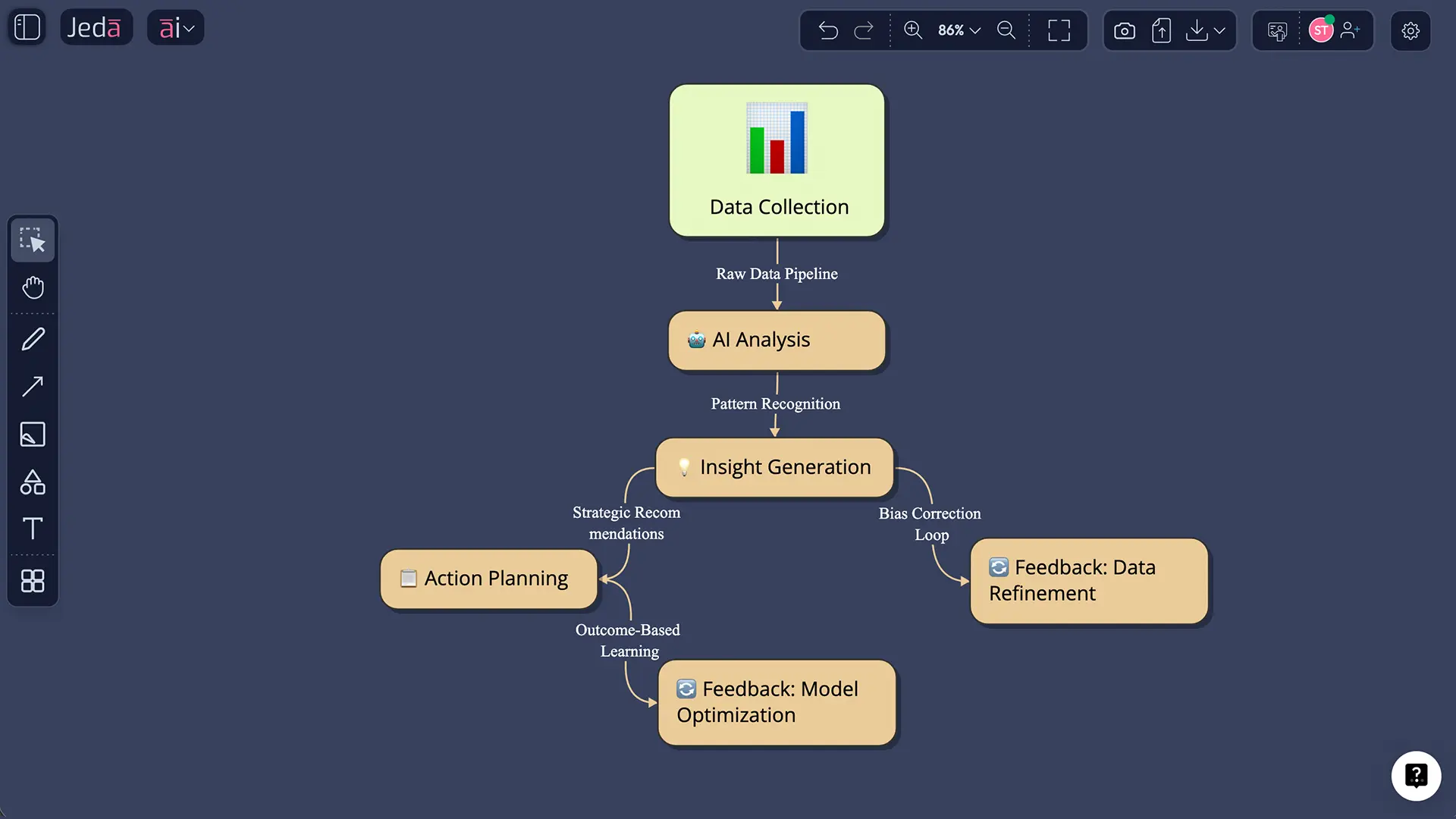
Here's what really gets HR leaders excited: Jeda.ai doesn't just show you what happened. It helps you figure out what to do about it. Generate a retention risk matrix, then use Vision Transform to convert it into an intervention flowchart. Build a skills gap analysis, then transform it into a development roadmap with one click.
You're not switching between six different tools anymore. You're doing everything in one AI Whiteboard.
How to Create People Analysis Visuals in Jeda.ai
Ready to try it? Here's how to get your first people analysis running on Jeda.ai — whether you're starting from scratch or working with existing HR data.
Method 1 — AI Menu (Recommended):
- Click the AI Menu button in the top-left corner of your canvas
- Browse the Matrix Recipes
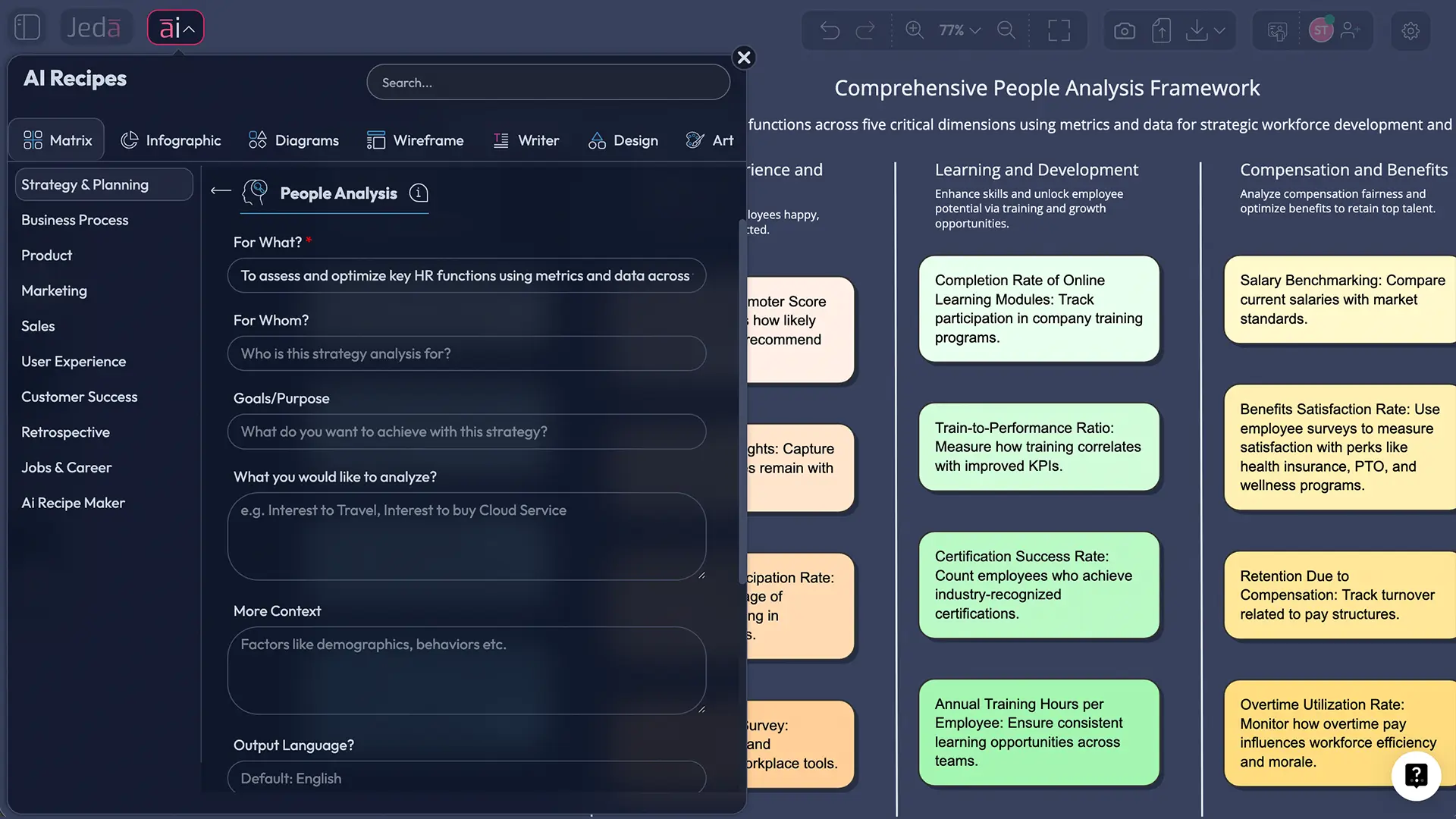
- Pick a template that fits your analysis — PEOPLE ANALYSIS
- Enter your details (team size, industry, specific questions you want answered)
- Click Generate and watch the AI build your analysis
Method 2 — Prompt Bar:
- Open the Prompt Bar at the bottom of the canvas
- Select your command — Matrix for frameworks and grids, Diagram for visual mappings, or Data Insight if you're uploading a CSV
- Type your prompt. Be specific! Something like: "Create a people analysis matrix for a 200-person tech company showing retention risk factors by department, with engagement scores, tenure, and performance ratings"
- Press Enter
Method 3 — Upload Your Data:
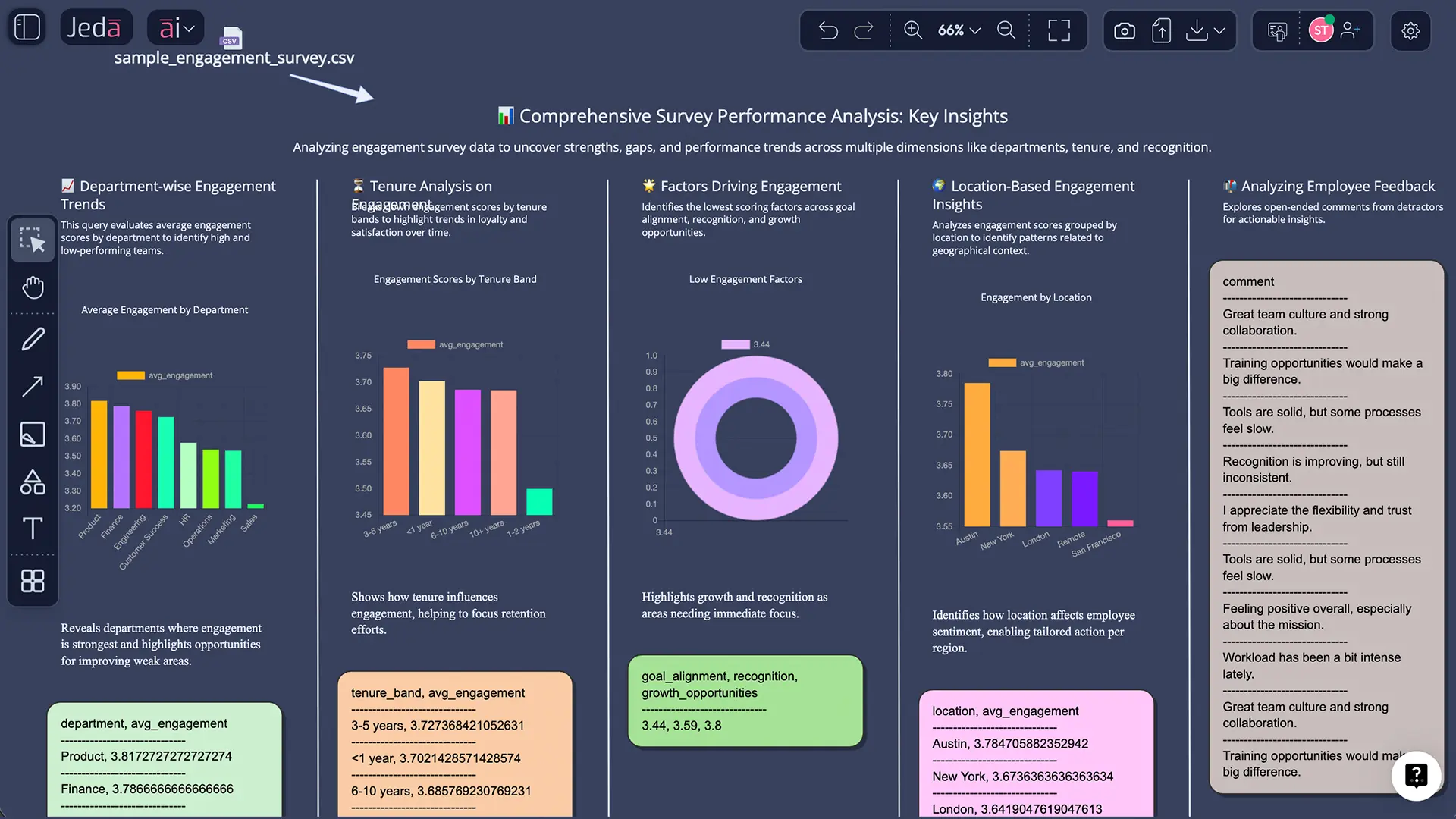
- Select the Data Insight command from the Prompt Bar
- Upload your CSV or Excel file (engagement survey results, turnover data, performance scores)
- Choose your preferred output: e.g. data summarization
- The AI analyzes your data and produces a visual you can share immediately
After your initial analysis, select any section and tap AI+ to go deeper. Use Vision Transform to convert any output — turn a matrix into a flowchart, a diagram into a mindmap, whatever makes the insight clearest for your audience.
- Define Your People Analysis Question
What are you trying to understand? Retention risk? Skills gaps? Engagement drivers? A focused question produces a more useful analysis.
- Gather Your Data Sources
Pull engagement surveys, HRIS exports, performance data, or even qualitative notes. Jeda.ai accepts CSV, Excel, PDF, and Word files.
- Generate the Analysis
Use the AI Menu, Prompt Bar, or Data Insight command to create your visual people analysis. Include specific context about your organization.
- Explore Patterns
Use AI+ to extend areas that need deeper investigation.
- Convert and Share
Use Vision Transform to create the best visual format for your audience. Export as PNG, SVG, or PDF for presentations.
- Take Action
Every good people analysis leads to a decision. Use your visual to align leadership on priorities and track intervention outcomes.
People Analysis Templates & Examples
Let's get practical. Here's a worked-through example of how a real people analysis might look on Jeda.ai.
Scenario: A mid-size SaaS company (350 employees) notices that voluntary turnover in their engineering department jumped from 12% to 22% over two quarters. The CHRO wants to understand why and what to do about it.
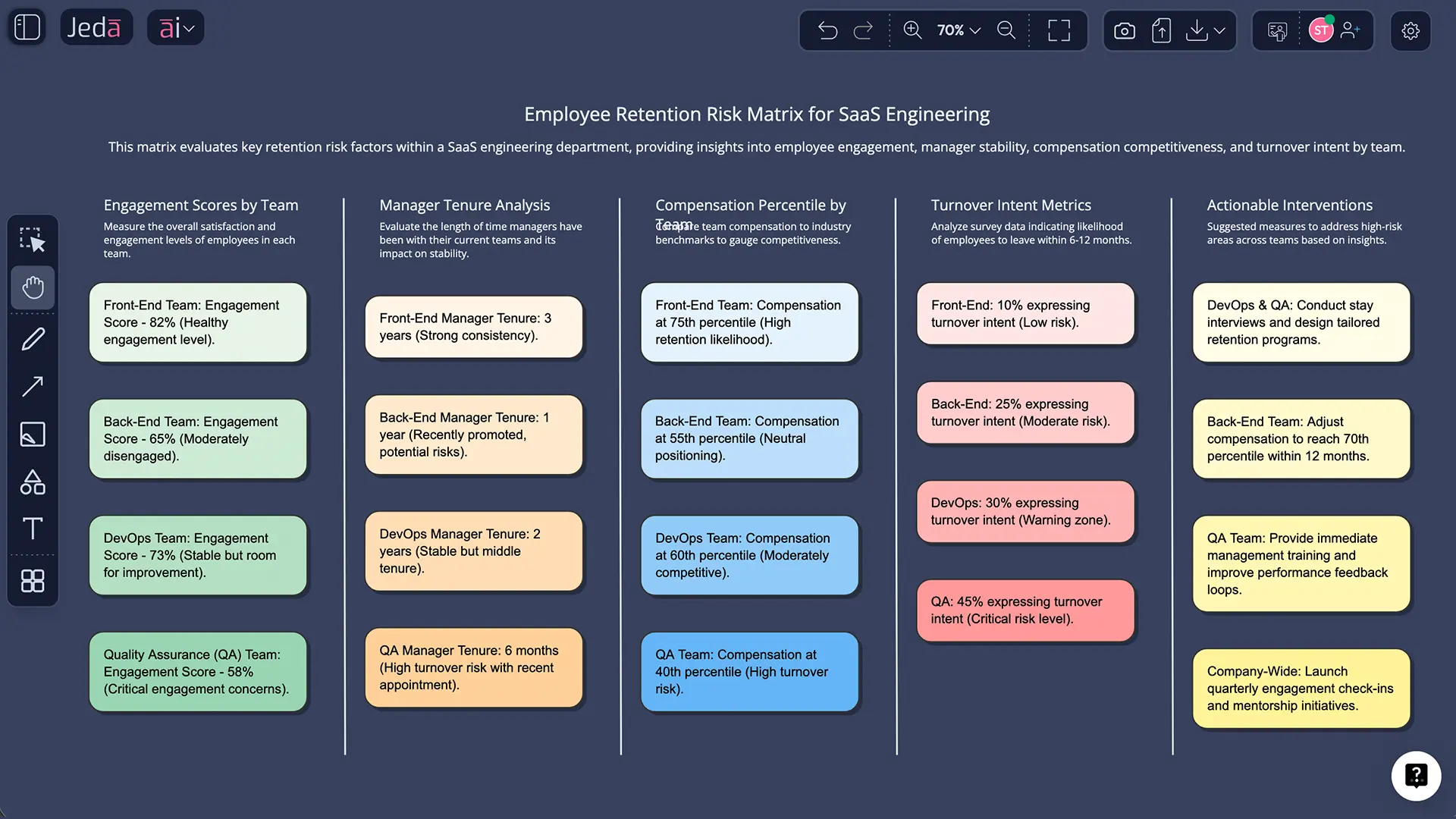
That's the power of people analysis done right. You're not guessing. You're not relying on a single metric. You're seeing the full picture — and you're building it in minutes on an AI Workspace that over 150,000 professionals already trust.
Best Practices & Tips
A few things we've learned from watching how the best HR teams use Jeda.ai's AI Whiteboard for people analytics:
Combine qualitative and quantitative data. Numbers tell you what happened. Exit interview themes and open-ended survey responses tell you why. Use Document Insight to upload qualitative data alongside your CSVs. Microsoft's People Analytics team, led by Dawn Klinghoffer, pioneered this approach by combining survey data with quantitative metrics to understand workforce dynamics holistically.
Visualize for your audience. Your CHRO doesn't want to see a regression model. They want to see a clear visual showing where the problem is and what to do about it. Jeda.ai's 300+ strategic frameworks give you audience-appropriate formats — from executive dashboards to detailed analytical matrices.
Make it recurring, not one-off. People analysis is most powerful when it's a continuous practice. Keep your analysis canvas on Jeda.ai and update it monthly or quarterly. Trends over time reveal patterns that single snapshots miss completely.
Protect employee privacy. Always aggregate data when sharing broadly. Individual-level insights should be restricted to authorized decision-makers. Jeda.ai's certified cloud infrastructure supports this, but good data governance starts with your team's practices.
Common Mistakes to Avoid
Collecting data you never act on. This is the number one problem in people analytics. You run the survey, you build the dashboard, you present the findings... and nothing changes. Every analysis on Jeda.ai should end with a concrete next step. If it doesn't lead to a decision, ask whether you're analyzing the right question.
Relying on lagging indicators only. Turnover rate is a lagging indicator — by the time you see it spike, people have already left. Combine it with leading indicators like engagement trends, internal mobility rates, and manager effectiveness scores. AI helps by identifying early-warning patterns humans often miss.
Ignoring data quality. Garbage in, garbage out applies triple to people analytics. Before uploading to Jeda.ai's Data Insight, make sure your data is clean, consistent, and reasonably current. A beautiful AI-generated matrix built on outdated survey data will mislead more than it helps.
Treating correlation as causation. AI is excellent at spotting correlations in workforce data. But just because high performers tend to use the gym benefit doesn't mean the gym causes high performance. Always apply critical thinking to AI-generated insights. Use the analysis as a starting point for investigation, not a final conclusion.
Keeping analysis siloed in HR. The best people analytics practices share insights with the business leaders who can actually act on them. Jeda.ai's real-time collaboration features make it easy to bring managers, department heads, and executives into the analysis — not just present findings to them after the fact.
Frequently Asked Questions
- What is people analysis in HR?
- People analysis is the practice of using data to understand workforce patterns and make better HR decisions. It covers talent acquisition, engagement, retention, performance, skills gaps, and workforce planning. AI-powered tools like Jeda.ai transform raw HR data into visual, actionable insights without requiring data science expertise.
- How do I create a people analysis with AI?
- In Jeda.ai, use the Prompt Bar to select the Matrix or Data Insight command and describe your analysis. For data-driven analysis, upload a CSV or Excel file using Data Insight and the AI generates visual frameworks automatically. Use AI+ to extend any section for deeper investigation.
- What data do I need for people analytics?
- Common data sources include employee engagement surveys, performance review scores, turnover and retention records, compensation data, hiring pipeline metrics, and training completion rates. Jeda.ai's Data Insight accepts CSV and Excel files, while Document Insight processes PDF and Word reports from your HRIS.
- Can AI predict employee turnover?
- Yes. AI models can analyze factors like engagement scores, tenure, compensation, manager effectiveness, and career progression to flag employees at higher risk of leaving. Deloitte and other major firms use predictive workforce analytics to identify at-risk employees and take proactive retention action.
- What is the difference between people analytics and HR analytics?
- They're largely the same concept used interchangeably. People analytics tends to emphasize the strategic, forward-looking use of data for workforce planning and organizational design. HR analytics sometimes carries a narrower connotation focused on operational HR metrics. Both aim to make data-driven workforce decisions.
- How do I visualize engagement survey results with AI?
- Upload your engagement survey export as a CSV file using Jeda.ai's Data Insight command. Select Matrix or Diagram as your output format. The AI analyzes patterns across departments, teams, and questions — then generates a visual you can share with leadership immediately.
- What people analysis frameworks can I create on Jeda.ai?
- Jeda.ai's AI Menu includes 300+ strategic frameworks covering skills matrices, retention risk models, workforce planning grids, stakeholder maps, competency frameworks, org health assessments, and more. You can also build custom frameworks by describing them in the Prompt Bar.
- Can non-technical HR professionals use AI people analytics?
- Absolutely. Jeda.ai is designed for business professionals, not data scientists. Type a natural language prompt, upload your data, and the AI handles the analysis. No coding, no SQL queries, no statistical modeling required. The Whitebelt plan is free with no credit card needed.
- How often should I run people analysis?
- At minimum, conduct a thorough people analysis quarterly. For high-priority metrics like retention risk and engagement, monthly monitoring is ideal. Jeda.ai's AI Workspace lets you maintain living analysis canvases that your team updates collaboratively as new data arrives.
Sources & Further Reading
- [1]
Bersin, Josh (2024) . “People Analytics, A Complex Domain, Is About To Be Transformed by AI” Josh Bersin Blog.
View Source ↗ - [2]
Klinghoffer, Dawn et al. (2025) . “Enabling Advanced HR Analytics and AI with Microsoft Azure Data Lake” Microsoft Inside Track.
View Source ↗ - [3]
AIHR (2026) . “How To Use AI in HR Analytics: Your 2026 Go-To Guide” Academy to Innovate HR.
View Source ↗
Start Your People Analysis Today
Join over 150,000 professionals using Jeda.ai to turn workforce data into visual, actionable insights — in minutes, not months.
Try Free People Analysis