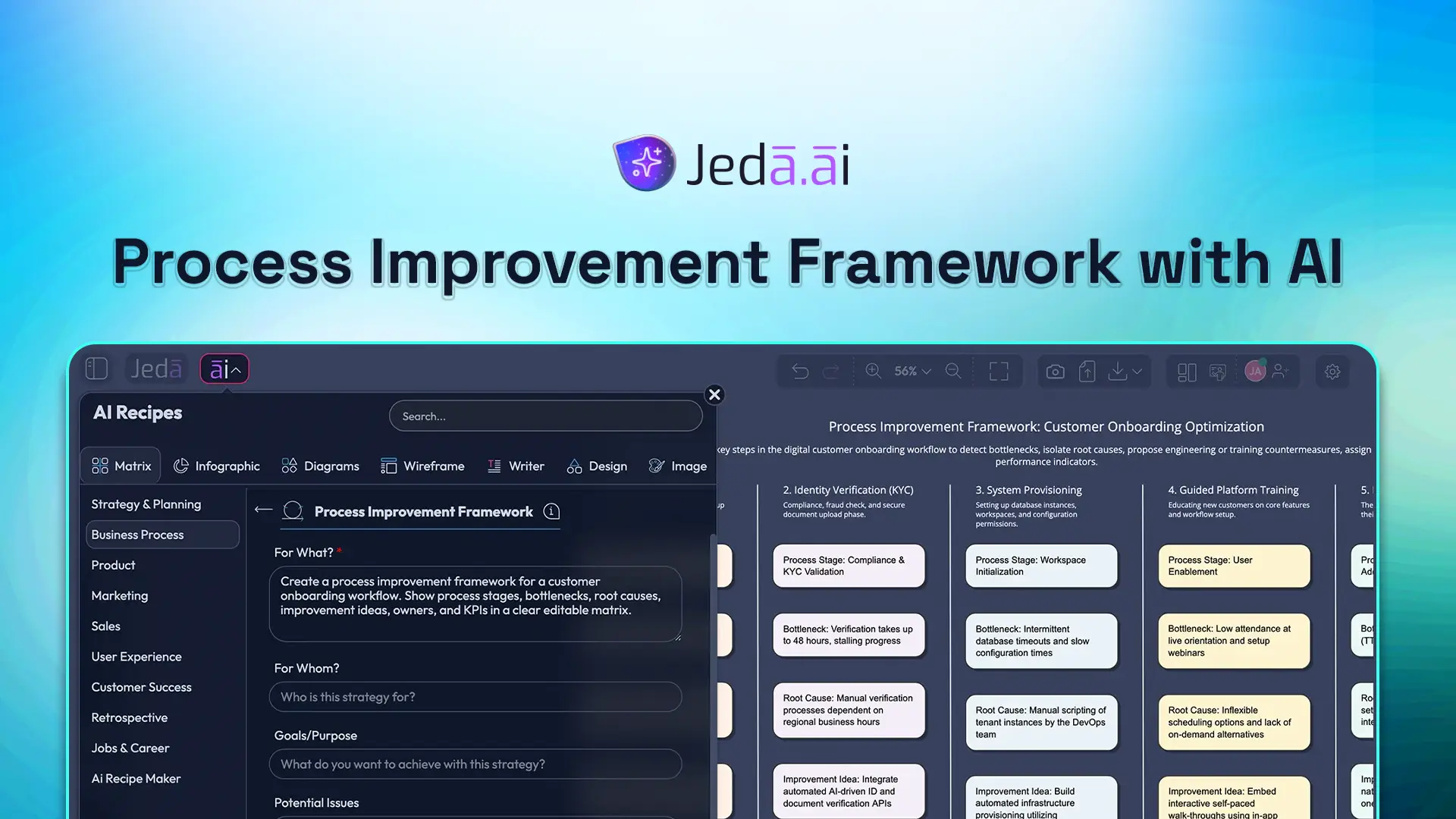
A process improvement framework gives teams a repeatable way to spot bottlenecks, find root causes, test fixes, and track whether the change actually worked. The problem is familiar: most teams still do this in fragments. One person maps the workflow in slides, someone else lists issues in a doc, and the KPI discussion gets buried in a spreadsheet. Slow. Messy. Easy to lose the thread.
That’s where Jeda.ai makes this click. Instead of treating process improvement like a filing exercise, you can turn it into a visual working session inside an AI Workspace built for structured thinking, iteration, and team alignment. On one board, your team can map the current state, cluster waste, rank improvement opportunities, and turn findings into an editable future-state plan. This is why more teams are using an AI Whiteboard instead of another blank canvas and another meeting.
And because Jeda.ai combines editable visuals, a Visual AI workflow, and 300+ strategic frameworks in one place, your first draft doesn’t stay a draft for long. You generate the structure, refine it with context, and keep moving. No app-hopping. No “final-final-v7” drama.
What is a Process Improvement Framework?
A process improvement framework is a structured method for improving how work gets done. It is not one single doctrine with one single founder. In practice, teams borrow from several schools of improvement: PDCA for test-and-learn cycles, Lean for waste reduction, Six Sigma/DMAIC for defect and variation control, kaizen for continuous small-step change, and reengineering when the process is too broken for cosmetic fixes.
That matters because most operational problems are not identical. Some are caused by handoff delays. Others come from unclear ownership, repeated rework, poor input quality, or a workflow that outgrew the company. A smart process improvement framework does three things well: it makes the current state visible, it separates symptoms from causes, and it helps you prioritize fixes based on impact rather than gut feel.
In plain English, the framework should answer five questions:
- What is happening now?
- Where is the waste, friction, or failure?
- Why is it happening?
- What change should we test first?
- How will we know the process actually improved?
Why use a Process Improvement Framework with AI?
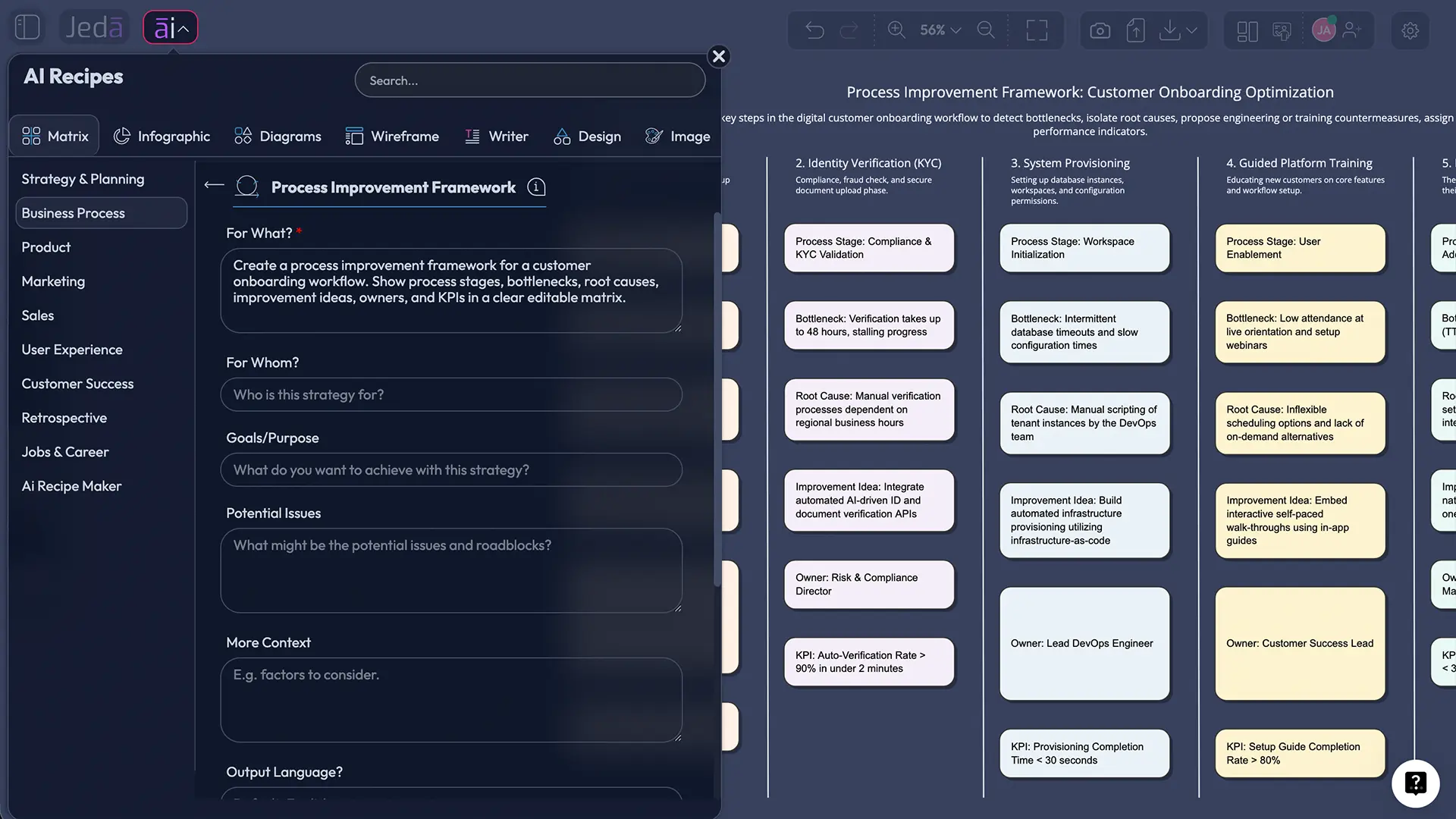
The old way burns time. People spend hours formatting boxes and arrows before the real discussion even starts. An AI-assisted process improvement framework flips that sequence. You get the structure first, then use your time on judgment, trade-offs, and execution.
Jeda.ai is useful here because it is not just a static generator. It gives you an AI Workspace where the output stays editable. Your team can add data, rewrite assumptions, regroup issues, and convert the board into a different visual if the conversation changes shape. That is a better fit for process work, because process work almost always changes shape.
- Faster diagnosis
Generate the first matrix or flow in minutes, then spend your time on root causes and decisions instead of formatting.
- Evidence-in analysis
Use notes, documents, screenshots, CSVs, or process narratives to ground the board in actual operational context.
- Clear prioritization
Separate high-impact fixes from nice-to-have ideas by mapping effort, risk, owners, and measurable outcomes.
- Shared visual alignment
Turn the process review into an editable team board inside Jeda.ai’s AI Whiteboard, not a static file handed around after the meeting.
A good rule of thumb: use AI to speed up the framing, not to skip the thinking. Your operators, analysts, PMs, consultants, or ops leaders still need to challenge the output. But now they start from a useful board, not from an empty screen.
How to Create a Process Improvement Framework in Jeda.ai
The cleanest route for this topic is a Matrix workflow first. That matches the way most teams compare stages, pain points, causes, fixes, and KPIs side by side. After that, you can turn the result into a Flowchart or Diagram with Vision Transform.
Method 1: Recipe Matrix
Use this when you want a structured starting point with less prompting and faster consistency.
- Open the AI Menu
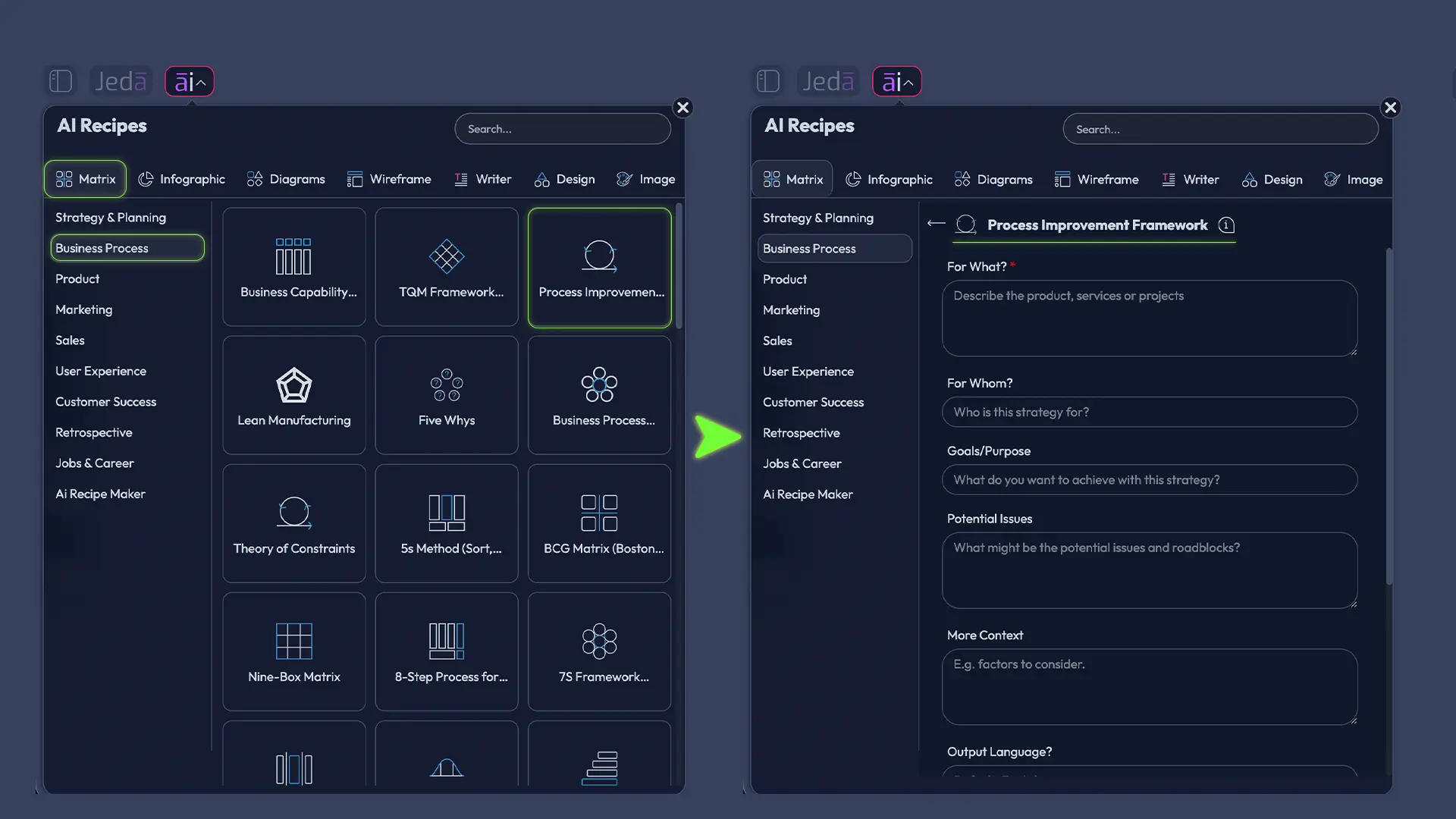
Enter your Jeda.ai workspace, click AI Menu at the top left, and choose the Matrix recipe category.
- Pick the process improvement recipe
Select the Process Improvement Framework.
- Add the business context
Describe the process you want to improve, the team involved, the current pain points, and the result you want.
- Generate the first matrix
Let Jeda.ai create the first visual structure with stages, bottlenecks, causes, countermeasures, and expected outcomes.
- Edit the matrix with your team
Refine the labels, merge duplicate issues, add owners and metrics, and remove anything that sounds neat but changes nothing.
- Extend and convert
Use the AI+ button to deepen a branch or expand a section, then use Vision Transform if you want a flowchart or diagram view.
Method 2: Prompt Bar
Use this when you know the process, the pain, and the output shape you want.
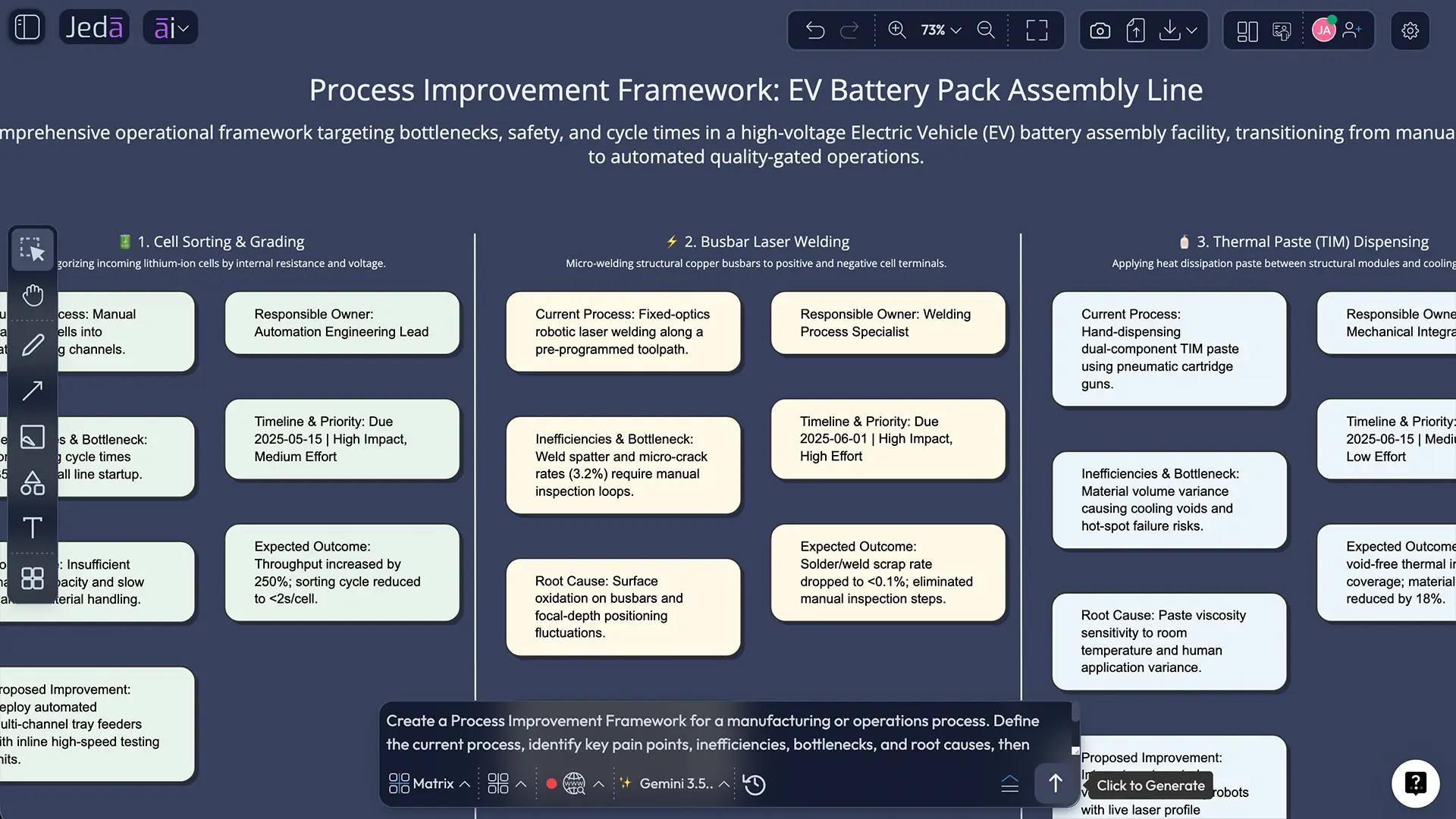
- Open the Prompt Bar at the bottom of the workspace.
- Select the Matrix command.
- Write a prompt that names the process, the failure pattern, and the output structure.
- Generate the matrix.
- Edit the board, then convert to Flowchart or Diagram if you want a current-state and future-state process view.
A solid prompt looks like this:
Create a process improvement framework for our customer onboarding workflow. Show the current stages, recurring bottlenecks, likely root causes, suggested countermeasures, owner by role, and success KPIs. Keep the output concise and workshop-ready.
Once the matrix is on the board, you can follow up with prompts like:
- Expand the bottleneck analysis for approval delays.
- Add likely causes behind duplicate data entry.
- Reframe this as a 30-day improvement plan.
- Convert the matrix into a future-state flowchart.
AI+ button: generated deep dive
This is where a lot of teams get extra value.
Use AI+ after you have already selected part of the visual. AI+ works best when you want to extend what exists. Ask it to deepen a bottleneck lane, expand a root-cause branch, add a second layer of countermeasures, or continue the KPI logic for one section. That is the sweet spot.
Examples of good AI+ requests:
- Extend the “handoff delay” section with second-order causes.
- Deep dive into the approval bottleneck and suggest three experiments.
- Expand the “future state” lane with roles, risks, and milestones.
- Continue the analysis for defect prevention metrics.
What not to do? Don’t use AI+ as a substitute for a brand-new specific build request that belongs in the Prompt Bar. AI+ is an extension tool, not the place for an unrelated custom instruction dump. Think “go deeper here,” not “build me a totally different framework from scratch.”
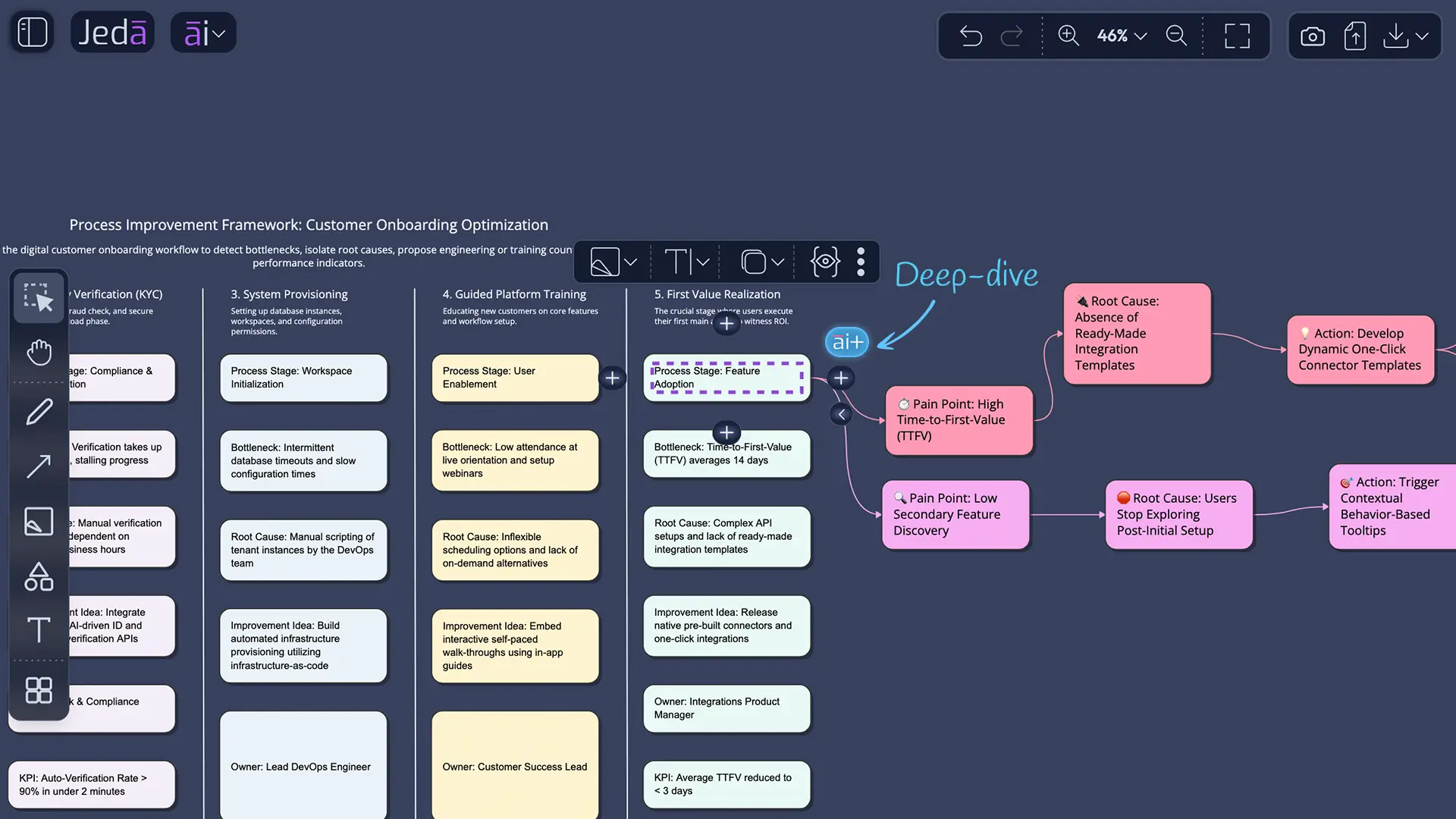
Process Improvement Framework Template and Example
Here’s a simple pattern that works well for most teams:
- Process objective — what outcome should the workflow produce?
- Current-state steps — what happens today, in sequence?
- Pain points — where are delays, defects, rework, confusion, or wasted effort?
- Root causes — why do those issues keep happening?
- Countermeasures — what change should the team test first?
- KPIs — what will prove the process improved?
That sounds straightforward. It is. But the hard part is usually prioritization.
A useful process improvement framework should not become a museum of every complaint anyone has ever had. It should help the team choose the next move. So in Jeda.ai, one strong board structure is a matrix with these columns:
- Process stage
- Observed problem
- Likely cause
- Improvement idea
- Expected impact
- Owner
- KPI
In that example, the first draft might show ten problems. After team review, only two deserve immediate action:
- automate the internal handoff packet after close-won
- standardize kickoff inputs so customer data is captured once
That is what a useful process improvement framework does. It makes the next decision obvious.
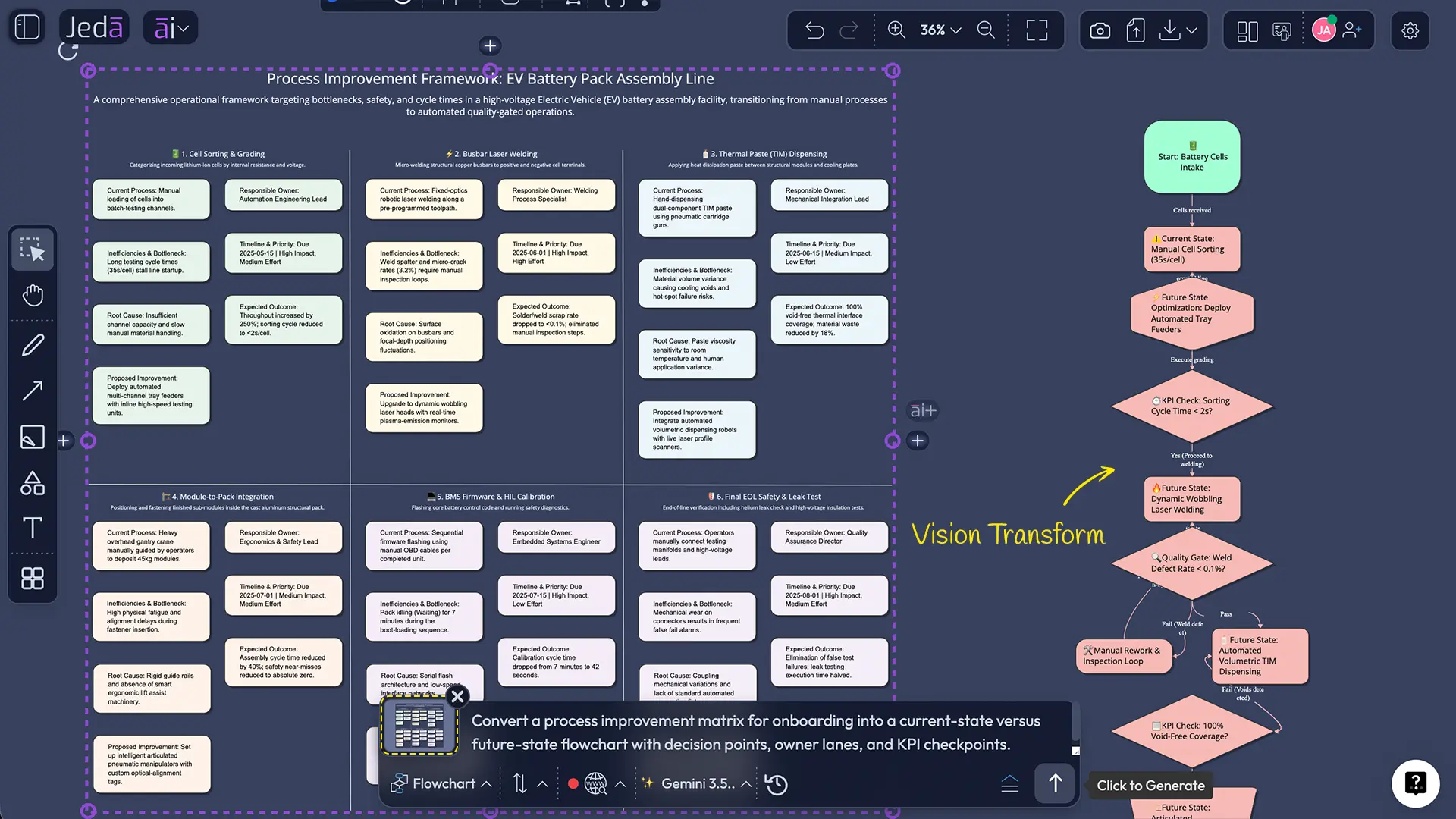
Best Practices for a Better Improvement Session
A lot of process reviews fail for boring reasons. They are too vague, too political, or too broad. A tighter session fixes that fast.
One more thing. Keep the first version ugly if needed. A rough but honest board beats a polished fiction every time.
Common Mistakes to Avoid
1) Treating every annoyance as a root cause
“Too many delays” is not a cause. It is a symptom. The board should force the team to ask what is driving the delay: approval logic, poor intake quality, missing capacity, broken tooling, or unclear ownership.
2) Mapping the process without measuring it
If nobody knows baseline cycle time, defect rate, rework count, or wait time, the team will argue in circles. You do not need perfect data. You do need enough signal to compare before and after.
3) Jumping straight to automation
Automation can speed up a broken process. It can also lock the brokenness in place. Fix the workflow logic first. Then automate what deserves to live.
4) Making the board too abstract
If the framework cannot tell you who owns the next step, what changes first, and what number should move, it is still a discussion board, not an improvement board.
5) Stopping after the workshop
This one hurts. Teams finish a strong session, export the board, feel productive, and then never revisit the experiment. Use the board as a living workspace. That is the whole point of an editable AI Workspace.
Frequently Asked Questions
- What is a process improvement framework?
- A process improvement framework is a structured method for analyzing a workflow, finding waste or defects, choosing fixes, and measuring whether the change worked. It usually combines mapping, root-cause analysis, prioritization, and KPI tracking rather than relying on brainstorming alone.
- Is there one standard process improvement framework?
- No. Most teams combine methods such as PDCA, Lean, Six Sigma, kaizen, BPM, or reengineering. The right choice depends on the problem: waste reduction, defect control, redesign, or continuous incremental improvement.
- When should I use a matrix instead of a flowchart?
- Use a matrix when you need side-by-side comparison across process stages, issues, causes, owners, and KPIs. Use a flowchart when sequence, handoffs, and decision points matter most. In Jeda.ai, many teams start with Matrix and then convert the result into Flowchart.
- How does AI help with process improvement?
- AI speeds up the first draft, surfaces likely bottlenecks, clusters related issues, and helps teams extend analysis faster. It does not replace operational judgment. It gives your team a stronger starting point inside an editable visual workspace.
- What should I include in a process improvement framework?
- Include the process objective, current-state steps, pain points, root causes, improvement ideas, owners, and KPIs. That gives the team a full chain from observed problem to accountable action.
- Can I combine Lean, PDCA, and Six Sigma ideas on one board?
- Yes. Many teams run hybrid improvement systems. A practical board might use Lean to identify waste, 5 Whys to probe causes, PDCA to run experiments, and DMAIC logic when the problem needs stronger measurement discipline.
- How should I use the AI+ button for this workflow?
- Use AI+ after selecting an existing part of the board. Ask it to extend, deepen, or continue that section. It works best for deeper analysis of what is already on the canvas, not for a totally separate, highly specific new request.
- Can Jeda.ai help me improve a process from documents or spreadsheets?
- Yes. Jeda.ai supports document and data-based workflows through Document Insight and Data Insight, which can turn uploaded files into editable visual outputs such as Matrix, Flowchart, Diagram, or Mindmap.
- Who should use this kind of board?
- Business analysts, operations leaders, consultants, project managers, product managers, and process owners all benefit from it. The board becomes especially useful when the process crosses functions and no single team sees the full picture.
- What happens after the board is built?
- The board should become the working source of truth for the experiment. Assign owners, define review dates, track the chosen KPIs, and update the visual as the team learns what worked and what did not.
Sources & Further Reading
- [1]
ASQ (2026) . “PDCA Cycle” ASQ Quality Resources.
View Source ↗ - [2]
ASQ (2026) . “DMAIC Process: Define, Measure, Analyze, Improve, Control” ASQ Quality Resources.
View Source ↗ - [3]
ISO (2023) . “Quality management principles: The foundation for success” ISO.
View Source ↗ - [4]
Lean Enterprise Institute (2026) . “Kaizen — A Resource Guide” Lean.org.
View Source ↗ - [5]
Hammer, Michael (1990) . “Reengineering Work: Don't Automate, Obliterate” Harvard Business Review.
View Source ↗ - [6]
Sallos, Mark P.; Yoruk, Esin; García-Pérez, Alexeis (2017) . “A Business Process Improvement Framework for Knowledge-Intensive Entrepreneurial Ventures” Journal of Technology Transfer.
View Source ↗ - [7]
NIST MEP (2020) . “Lean and Process Improvement” National Institute of Standards and Technology.
View Source ↗ - [8]
McKinsey & Company (2025) . “Want to Break the Productivity Ceiling? Rethink the Way Work Gets Done” McKinsey.
View Source ↗
Build Your Process Improvement Framework in Jeda.ai
Join 150,000+ users who use Jeda.ai’s AI Workspace and AI Whiteboard to turn messy workflows into clear, editable improvement plans.
Try Free Template