A product demo script is one of those things teams pretend they don’t need right up until a demo goes sideways. Someone rambles. Someone feature-dumps. Someone forgets to tie the product back to the buyer’s actual problem. Then everybody acts surprised.
Jeda.ai fixes that mess by giving you an AI Workspace where you can structure the story before you deliver it. Instead of improvising your way through a product presentation, you can generate a clean script, pressure-test the flow, and turn rough positioning into a buyer-ready narrative on an AI Whiteboard. That matters because the best demos are not lectures. They’re guided conversations built around pain, proof, and progress. Recent sales-demo guidance keeps hammering the same point: strong scripts should stay buyer-focused, flexible, and modular rather than rigid or feature-first.
And yes, this is where Jeda.ai earns its keep. You get an AI Workspace, a real AI Whiteboard, 300+ strategic frameworks, and a practical way to build the first draft fast, then sharpen it with AI instead of staring at a blinking cursor.
What is a product demo script?
A product demo script is a structured outline for how you introduce the problem, frame the product, walk through the most relevant features, and end with a next step. Supademo defines it as a written outline that guides a demo from start to finish so the presenter explains how the product works and why it solves a real problem. The useful bit is not the definition. The useful bit is the discipline.
Because without a script, most demos drift into one of two traps. Either they become a product tour with no buyer context, or they become a vague pitch with no product proof. Neither one closes confidence.
A good script does four things well:
- Starts with buyer pain
It frames the demo around the outcome the audience cares about, not the feature your team loves most.
- Controls the flow
It gives the presenter a sequence: opener, context, walkthrough, proof, objections, and close.
- Supports different audiences
It can shift for executives, technical buyers, operators, or current customers without losing the core story.
- Leaves room for conversation
The best scripts are modular. They guide you, but they do not turn you into a robot with Wi-Fi.
Walnut’s 2025 demo-script breakdown says the best examples are buyer-focused, interactive, short, flexible, and backed by visuals. HowdyGo makes a similar point in newer 2026 guidance: the script should be a conversation framework, not a theatrical monologue. That’s exactly the kind of content AI can help you generate well when you give it the right context.
Why use AI to write a product demo script?
Because blank-page writing is slow, and most demo teams already know the raw ingredients. They know the product. They know the audience. They know the features. What they usually don’t have is a fast way to turn all of that into a clear sequence that sounds human.
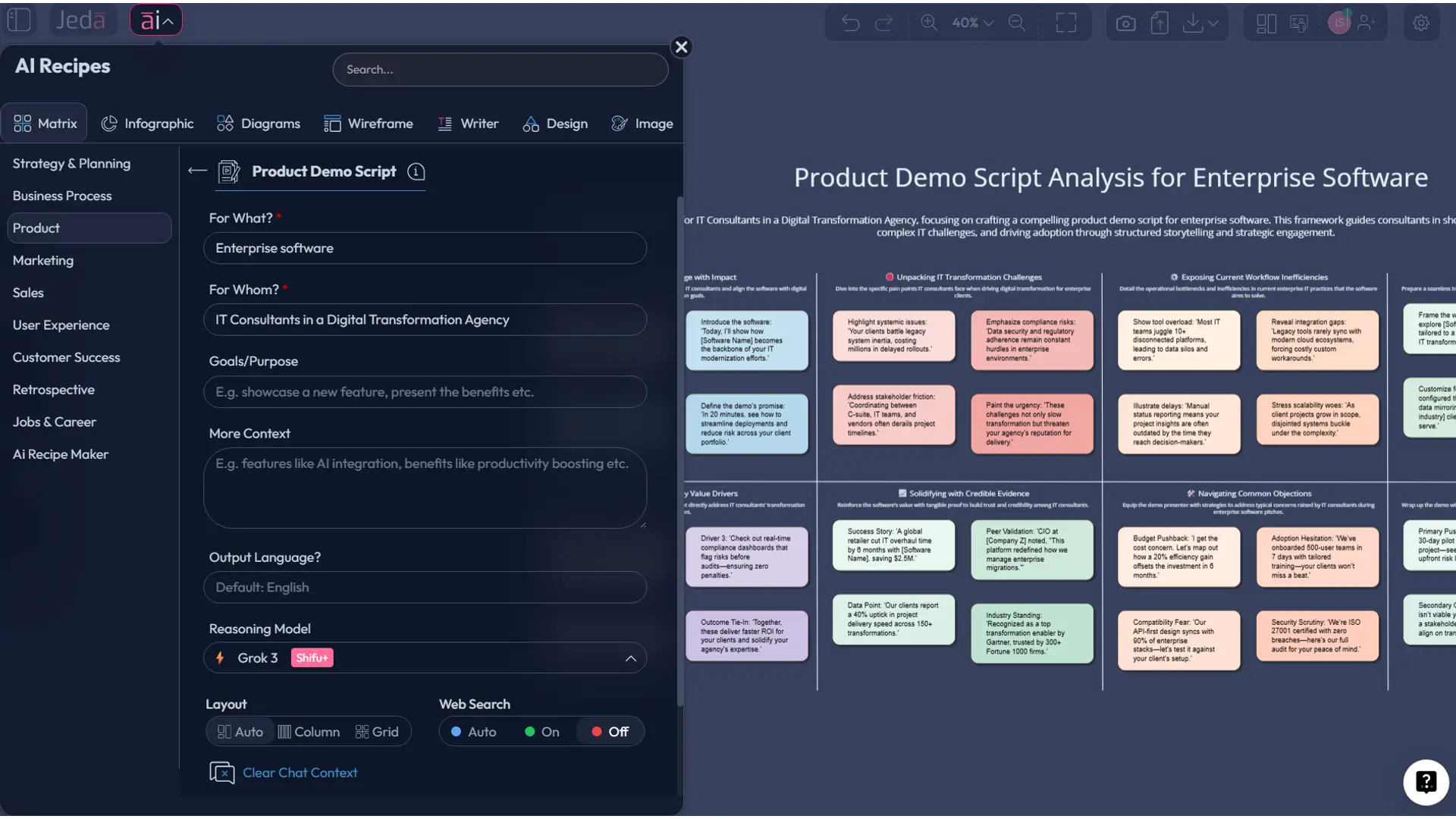
That’s where Jeda.ai’s Visual AI workflow becomes useful. You can start with the Product Demo Script recipe, give the AI the product, audience, goals, and context, and get a structured first pass that’s much closer to usable than a generic prompt from scratch. Then you edit. Then you tighten. Then you test the narrative in the same workspace.
Here’s why that matters in practice:
- It reduces rambling by forcing the script to follow a usable structure.
- It helps non-sales teams create demos too. Product marketers, founders, PMs, and consultants all benefit.
- It speeds up tailoring for different personas, which is one of the biggest demo quality gaps.
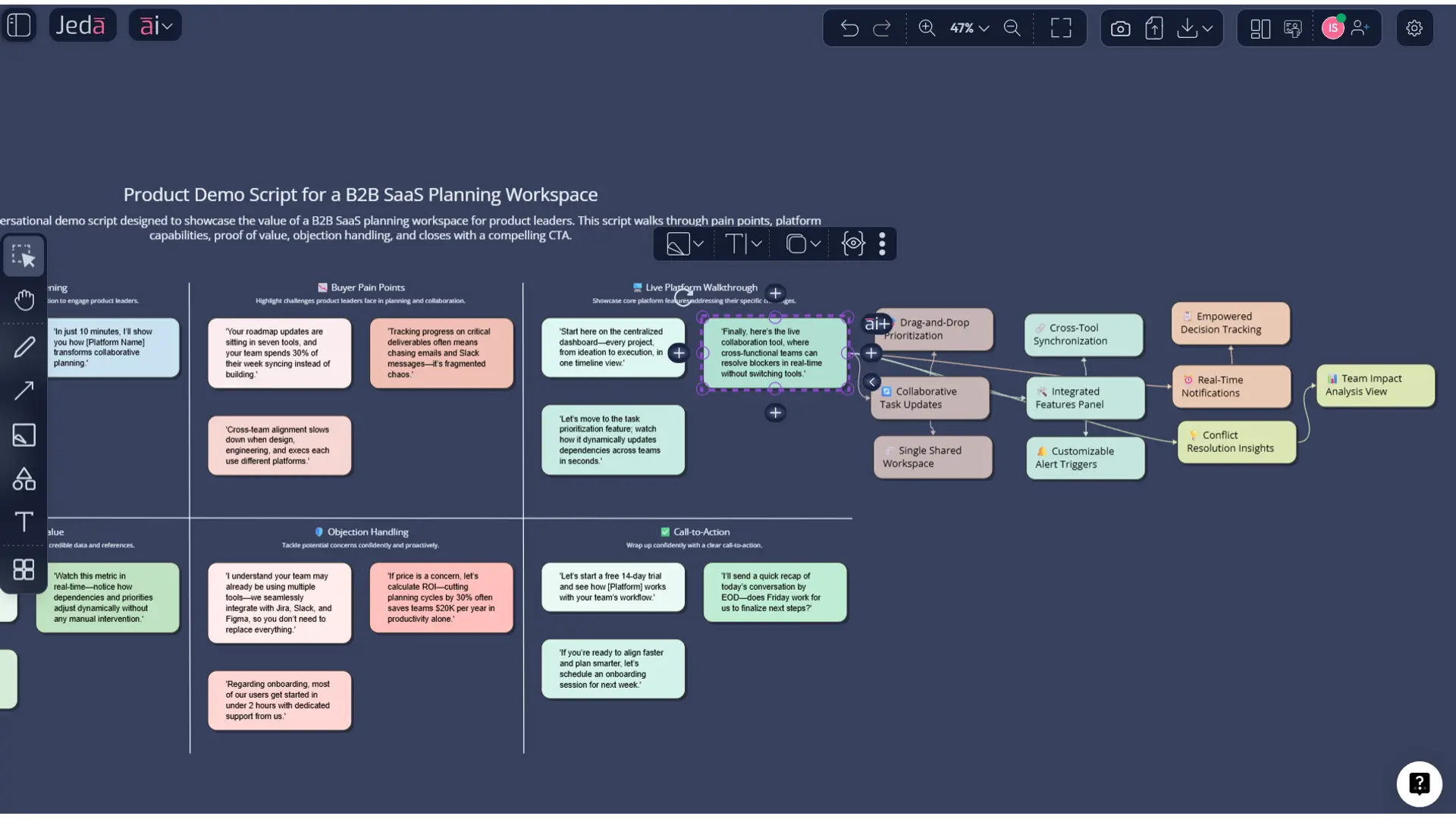
- It lets you extend weak sections with the AI+ button instead of rewriting the whole thing.
- It keeps the draft inside an AI Whiteboard where you can collaborate, edit, and export.
And there’s a broader market reason to care. Wyzowl’s 2026 video-marketing research reports that 91% of businesses use video as a marketing tool, while product-video guidance keeps pointing to the same trend: buyers increasingly expect to see products in action before they commit. If your demo is mediocre, the market won’t grade on a curve.
How to create a product demo script in Jeda.ai
The uploaded recipe data shows that the Product Demo Script recipe asks for these inputs: For What?, For Whom?, Goals/Purpose, More Context, and Output Language. In Jeda.ai, the general workflow for recipes runs through the AI Menu, while the Prompt Bar supports direct generation with the command you choose. Jeda.ai also supports AI+ for expansion and Vision Transform for format conversion.
Method 1: Recipe Matrix in the AI Menu
This is the cleaner route when you want structure first.
- Open your AI Workspace
Create or open a board in Jeda.ai so the whole demo-planning flow lives in one shared workspace.
- Open the AI Menu
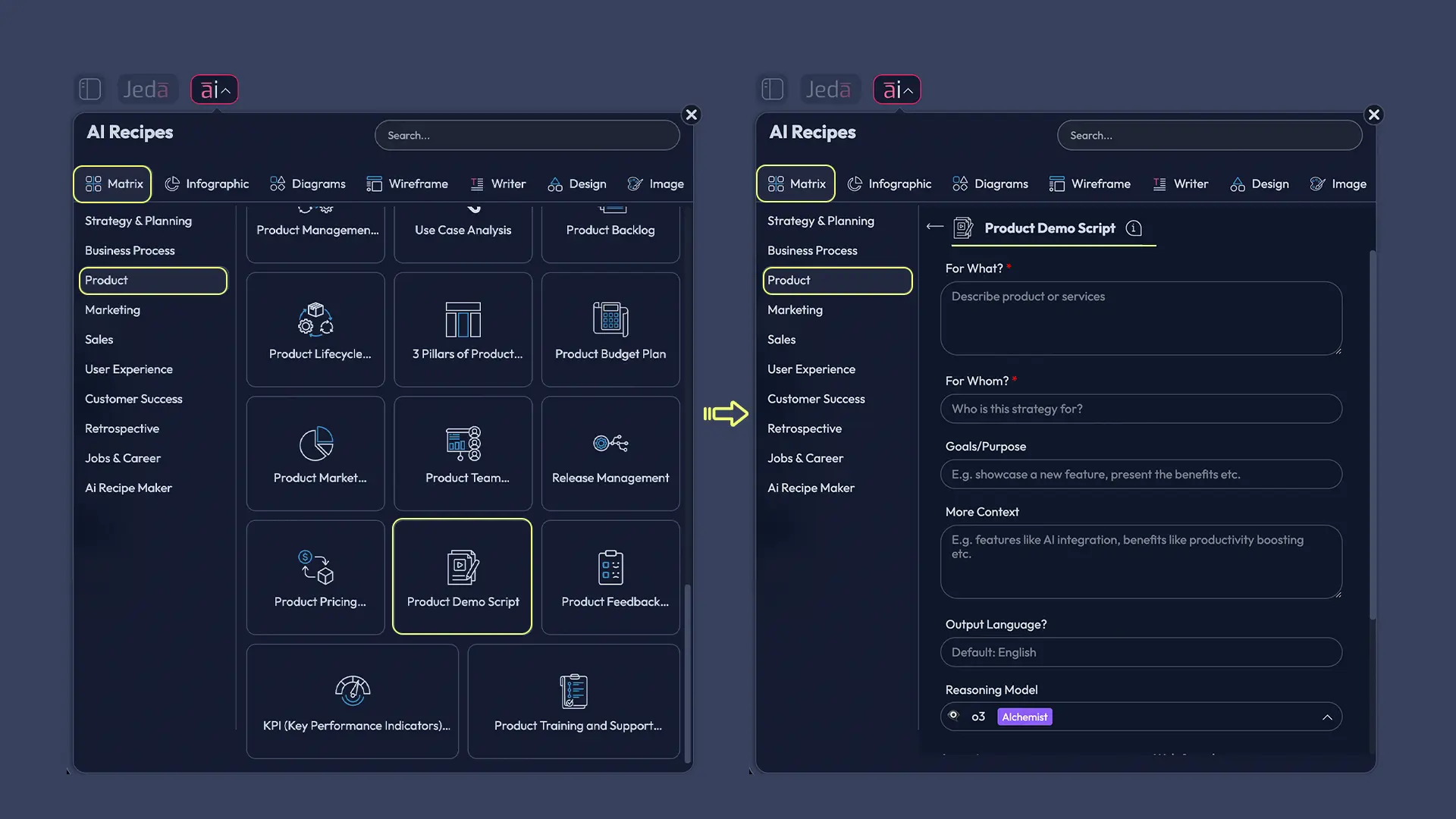
Click the AI Menu in the top-left corner and go to the Matrix recipe area for Product workflows.
- Choose Product Demo Script
Select the Product Demo Script recipe and fill in the recipe fields: For What, For Whom, Goals/Purpose, More Context, and Output Language.
- Generate the first draft
Run the recipe and review the draft script structure. Check whether the opening, walkthrough, proof, objections, and CTA line up with the audience.
- Use AI+ to deepen the weak parts
Select a section that feels thin and use the AI+ button to expand it with more depth, sharper framing, or a stronger transition.
- Convert or export
Use Vision Transform if you want to turn the script into a flowchart, mind map, or supporting structure, then export the final output as PNG, SVG, or PDF if needed.
Method 2: Prompt Bar
Use this when you want more control or a more custom angle.
Open the Prompt Bar at the bottom of the workspace, select the Text command, and paste a prompt like this:
Prompt:
Write a product demo script for [product name].
Audience: [target buyer or role].
Main goal: [what the demo must achieve].
Include these sections: opening hook, buyer problem, current friction, live walkthrough, top 3 value moments, proof or example, objection handling, and next-step CTA.
Tone: clear, confident, conversational, and buyer-focused.
Avoid jargon and feature dumping. Tie each feature to a business outcome.
Keep the script modular so it can be shortened for a 5-minute demo or expanded for a 20-minute demo.
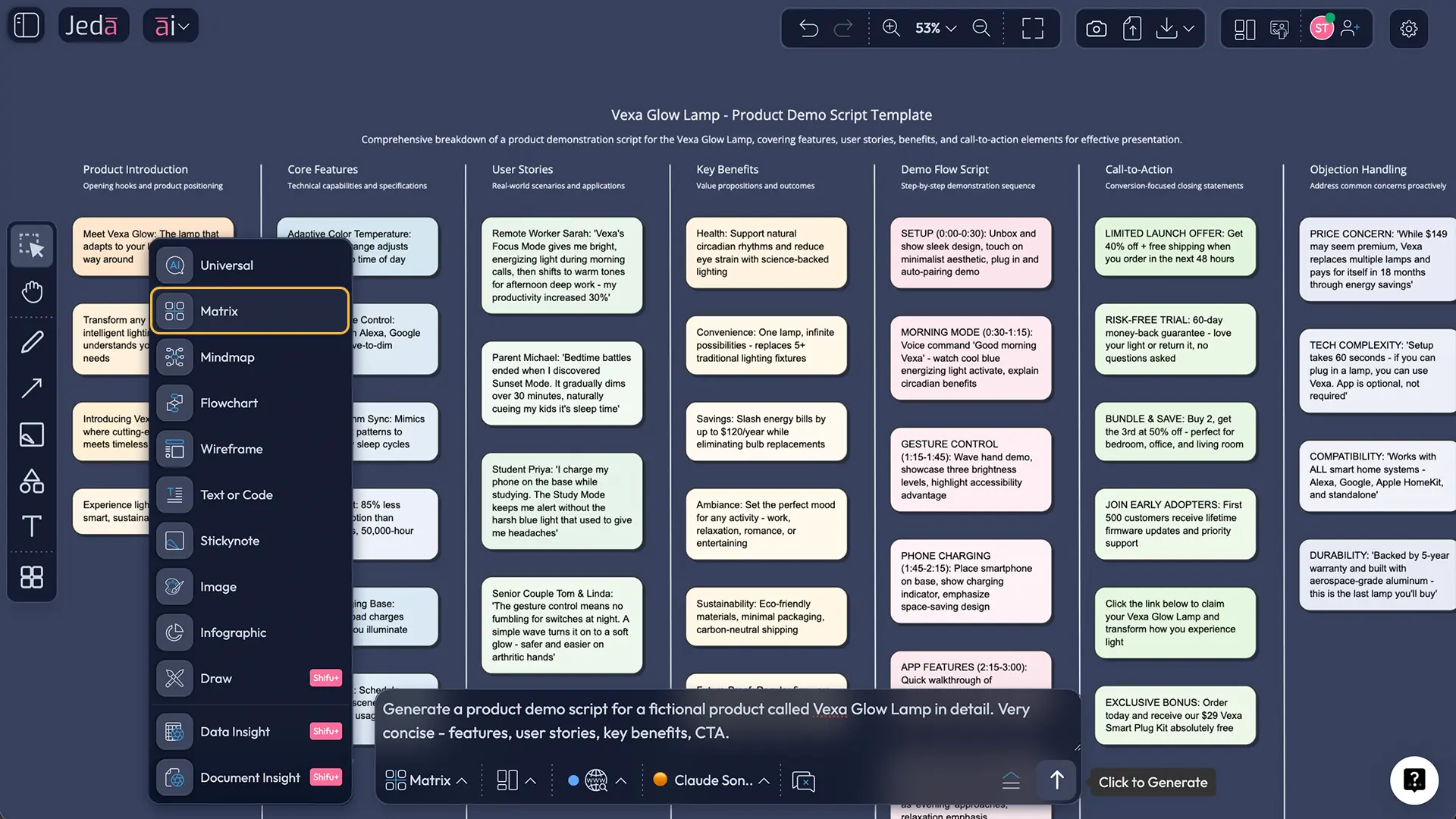
After the draft appears, don’t stop there. Use the AI+ button to extend a selected part of the draft. Then use Vision Transform if you want to convert the script into a supporting flowchart for presenters, a mind map for messaging branches, or a simple planning board for rehearsal.
A strong product demo script structure that actually works
Most bad demos fail for one boring reason: the team starts with the product instead of the buyer. Supademo warns against leading with features instead of problems, and Walnut says the best scripts feel like product-led conversations, not lectures. Same song, different guitarist.
A stronger structure looks like this:
1. Open with the buyer’s situation
Start by naming the context. Why are they in the room? What pressure are they under? What’s broken right now?
Example: “From what you shared, your team is losing time switching between tools and manually stitching reports together. I’ll show you how this workflow becomes faster, cleaner, and easier to manage in one place.”
2. Frame the outcome before the feature
Don’t say, “Here’s our dashboard.” Say what the dashboard changes.
Example: “Instead of waiting until Friday to see what slipped, you can spot the issue midweek and fix it before it hits delivery.”
3. Walk through only the moments that matter
You do not need to show everything. You need to show the parts that connect directly to pain, priority, and proof.
4. Add proof
That proof might be a customer example, a quantified improvement, or even a short before/after contrast. Buyers trust specifics more than enthusiasm. Shocking, I know.
5. Land the next step
End with a clear next action: deeper technical session, pilot, pricing review, stakeholder follow-up, or tailored use-case demo.
Product demo script template and example
Let’s make this concrete. Say you’re demoing a B2B SaaS workspace for product and strategy teams.
Product: Jeda.ai
Audience: Product leaders and cross-functional stakeholders
Goal: Show how teams can move from scattered thinking to structured, collaborative decision-making faster
Sample opening:
“Thanks for joining. From the notes ahead of this call, it sounds like your team is planning across docs, whiteboards, chat, and spreadsheets, and that creates handoff friction. Today I’ll show you how Jeda.ai helps you bring those moving parts into one AI Workspace so your team can map decisions visually, collaborate in real time, and turn rough thinking into structured outputs faster.”
Sample walkthrough transition:
“Rather than start with every menu in the product, let’s focus on the workflow you said matters most: turning a messy planning discussion into something your team can actually use.”
Sample value moment:
“Here’s where the AI Whiteboard becomes useful. Instead of writing a loose list of ideas, you can generate a structured view, edit it live, and refine weak sections with AI without leaving the board.”
Sample close:
“If this matches what your team needs, the next useful step would be a tailored session around your real planning workflow so we can map it in your environment, not a generic sandbox.”
That’s simple on purpose. A good script sounds like a smart human guiding a relevant conversation. Not a caffeinated brochure.
Best practices before you hit present
HubSpot’s sales-demo guidance stresses research and preparation, while newer demo operators keep repeating that scripts should make you a better listener, not a more polished rambler. That distinction matters. The script is there to free your brain, not handcuff it.
Common mistakes to avoid
Leading with features
This is still the biggest one. Supademo calls it out directly because it kills relevance fast.
Showing too much product
A demo is not a product scavenger hunt.
Ignoring audience depth
Executives care about impact, risk, and speed. Technical teams care about workflow, integrations, and edge cases. If your script sounds identical for both, it is undercooked.
Writing one rigid script
HowdyGo’s 2026 advice is especially useful here: good scripts are modular, not linear. If the buyer interrupts with a relevant question, your script should bend, not snap.
Ending without a next step
You’d be amazed how many demos conclude with “So… yeah.” Stirring stuff. Don’t do that.
Frequently asked questions
- What is a product demo script?
- A product demo script is a structured outline for how you present a product, connect it to a buyer problem, show the most relevant workflow, handle objections, and close with a next step. It keeps the demo focused and easier to adapt live.
- Why is a product demo script important?
- It reduces rambling, keeps the presenter aligned with buyer priorities, and makes the demo easier to repeat across teams. A strong script improves clarity, cuts wasted time, and helps the audience understand why the product matters.
- Should a demo script be written word for word?
- Usually, no. The better approach is a modular structure with key transitions, questions, proof points, and branches. That gives you consistency without making the demo sound stiff or over-rehearsed.
- How do I tailor a product demo script for different audiences?
- Change the language, proof points, and depth based on role. Executives need business impact. Technical buyers need workflow and implementation detail. End users want clarity around day-to-day value and ease of use.
- Can AI help write a better product demo script?
- Yes. AI is especially useful for generating a strong first draft, organizing the flow, tightening transitions, and adapting the script for different personas. You still need human judgment, but the drafting speed improves a lot.
- How does Jeda.ai help create a product demo script?
- Jeda.ai lets you create a script using the Product Demo Script recipe in the AI Menu or by prompting directly in the Prompt Bar. You can refine sections with AI+, collaborate on an AI Whiteboard, and convert the draft into supporting visuals with Vision Transform.
- Can I export the final demo planning output from Jeda.ai?
- Yes. Jeda.ai supports export as PNG, SVG, and PDF. That works well when you want to share the script structure, a visual demo flow, or a rehearsal board with internal stakeholders.
- Is Jeda.ai just for sales teams?
- No. Product marketers, founders, consultants, PMs, solution engineers, and business analysts can all use Jeda.ai to plan stronger demos. The workflow is useful anywhere a product story needs to be clear and repeatable.
- What should I include in a product demo script?
- At minimum, include the audience context, buyer problem, key workflow, top value moments, proof, likely objections, and a closing CTA. If the draft doesn’t clearly move from problem to value to next step, it needs more work.
- How long should a product demo script be?
- That depends on the format, but shorter and sharper usually wins. Build a core version for 5 to 7 minutes, then create branches you can expand for deeper sessions without rebuilding the whole script from scratch.
Sources & further reading
- [1]
HubSpot (2025) . “How to Run Sales Demos That Close Prospects [+ Expert Tips]” HubSpot Sales Blog.
View Source ↗ - [2]
HubSpot (2024) . “How to Write a Video Script [Template + Video]” HubSpot Marketing Blog.
View Source ↗ - [3]
Supademo (2025) . “How to Craft an Effective Demo Script (with Templates)” Supademo Blog.
View Source ↗ - [4]
Walnut (2025) . “Demo Script Examples: 7 Formats That Actually Convert” Walnut Blog.
View Source ↗ - [5]
HowdyGo (2026) . “Run the Perfect SaaS Product Demo Call in 2026” HowdyGo Blog.
View Source ↗ - [6]
Wyzowl (2026) . “Video Marketing Statistics 2026” Wyzowl.
View Source ↗
Write Your Next Product Demo Script Faster
Join over 150,000+ users using Jeda.ai’s AI Workspace and AI Whiteboard to turn rough product messaging into clearer, decision-ready stories.
Try Free Template