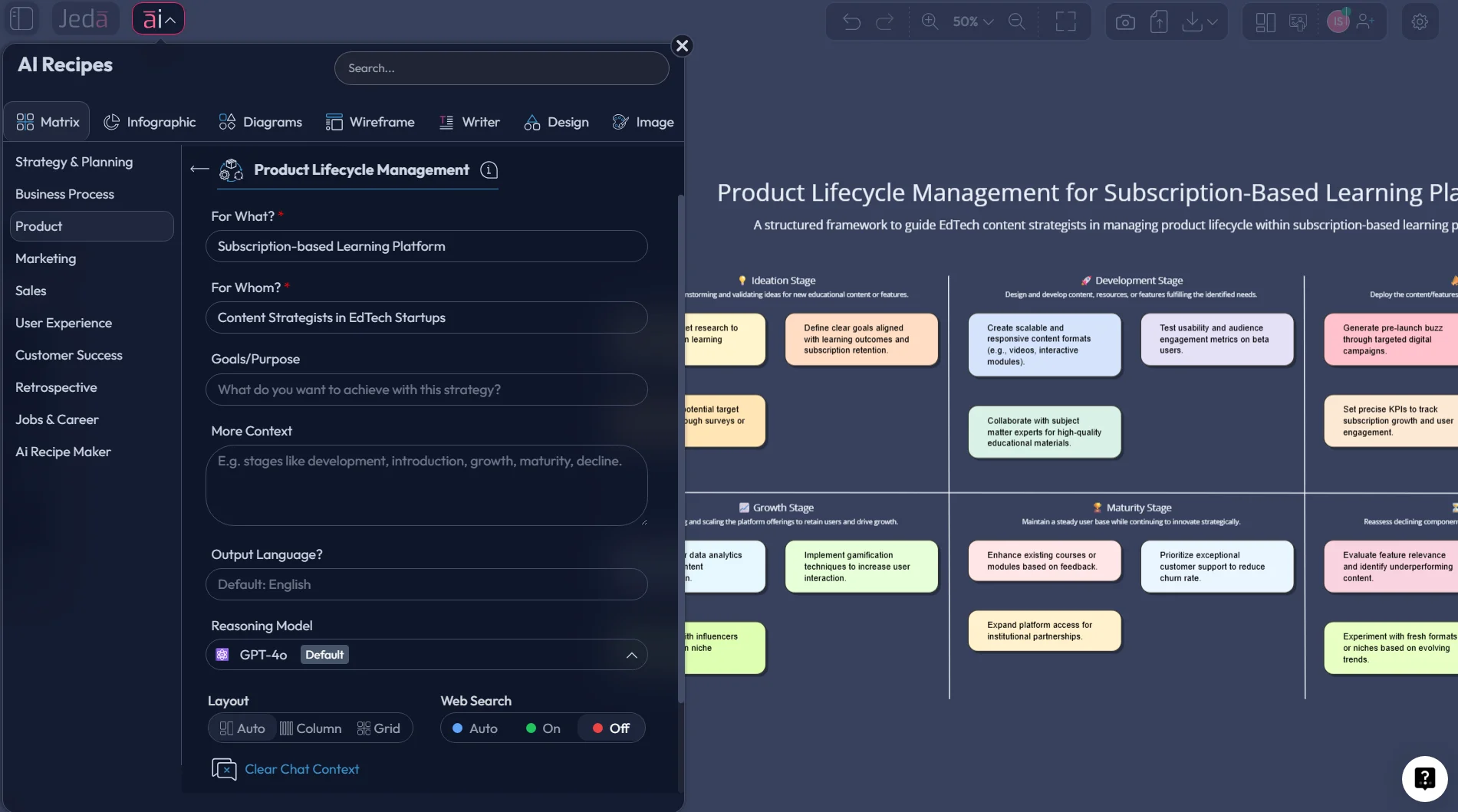
Product Lifecycle Management with AI: Plan Smarter Products from Concept to End-of-Life
Product Lifecycle Management with AI gives product teams a faster way to map the full arc of a product, from concept and design through launch, service, iteration, and retirement. Traditional PLM already connects people, processes, and product data across the lifecycle; AI changes the speed and depth of that work by helping teams structure decisions, surface patterns, summarize documentation, and turn messy inputs into editable visuals. Siemens, IBM, and SAP all describe PLM as an end-to-end discipline spanning concept, design, production, service, and disposal, while recent academic reviews show AI is increasingly applied across those same stages for design support, manufacturing intelligence, and service optimization.
Jeda.ai fits that reality well because it is built as a Visual AI workspace for structured thinking, not just a chat box. In Jeda.ai, teams can generate lifecycle maps, decision matrices, mind maps, flowcharts, and document-driven visuals inside the same editable canvas, then extend them with the AI+ button or transform them into another visual format with Vision Transform. The platform supports Prompt Bar generation, AI Menu recipes, Matrix, Flowchart, Mindmap, Document Insight, Data Insight, and real-time collaboration on the same workspace.
What is Product Lifecycle Management with AI?
Product lifecycle management is the practice of managing the entire lifecycle of a product, including ideation, design, engineering, production, launch, service, and end-of-life. IBM defines PLM as a strategic approach that manages product lifecycles end to end and integrates people, data, processes, and business systems. Siemens frames it similarly as a business strategy that brings together people, processes, and information across a product’s lifespan. SAP also describes PLM as the processes and technologies used to manage the entire lifecycle of a product from conception to disposal.
When you add AI, the job changes in one useful way: teams stop treating lifecycle work as static documentation and start treating it as a living decision system. AI can help summarize research, cluster risks, draft stage-gate criteria, convert notes into a structured matrix, extract action items from documents, and suggest next-stage considerations across the lifecycle. A 2021 review in The International Journal of Advanced Manufacturing Technology notes that AI methods are being applied across product design, manufacturing, and service stages of PLM, while later reviews on Industry 4.0 and PLM show digital twins, IoT, cloud systems, and machine learning widening the data foundation that PLM can use.
Why product teams use Product Lifecycle Management with AI
The plain-English answer: PLM creates the operating map, and AI helps you fill it faster.
Without that structure, product teams usually end up with lifecycle knowledge scattered across slides, Jira tickets, docs, spreadsheets, support notes, and stakeholder memory. That is exactly where PLM starts to wobble. Modern PLM vendors now pitch AI as a way to guide idea selection, automate routine work, and improve predictive decision support. Oracle, for example, positions AI in PLM around intelligent guidance, predictive insight, and AI-driven collaboration. Siemens’ 2026 survey framing also points to AI becoming a practical layer inside everyday PLM workflows rather than a lab experiment.
Jeda.ai gives teams a more visual route into that work. Instead of forcing lifecycle planning into static spreadsheets, you can build a decision-ready board on an AI Whiteboard, keep every stage visible, and let contributors extend, edit, and refine the model together. For product-heavy and process-heavy work, that matters. The workflow file specifically maps strategic planning topics to Matrix, Diagram, and Mindmap, and the user guide confirms that Matrix, Flowchart, Mindmap, Diagram, Document Insight, and Data Insight can all be used inside the same workspace.
- Map every lifecycle stage
Turn concept, design, launch, service, and retirement into one visible system instead of scattered files.
- Use AI for structure, not noise
Generate stage-by-stage risks, metrics, dependencies, and actions from prompts, documents, and team input.
- Keep planning editable
Refine Smart Shapes, reorganize stages, and use AI+ to extend weak areas without rebuilding from scratch.
- Pull insight from documents
Use Document Insight to extract lifecycle inputs from PDFs, requirement docs, or product briefs into visual form.
- Ground decisions in data
Use Data Insight to turn CSV or Excel data into structured lifecycle inputs and supporting analysis.
- Align teams in one AI Workspace
Product managers, engineers, analysts, and business leaders can collaborate on the same board in real time.
How to create Product Lifecycle Management with AI in Jeda.ai
There are two solid ways to build this in Jeda.ai.
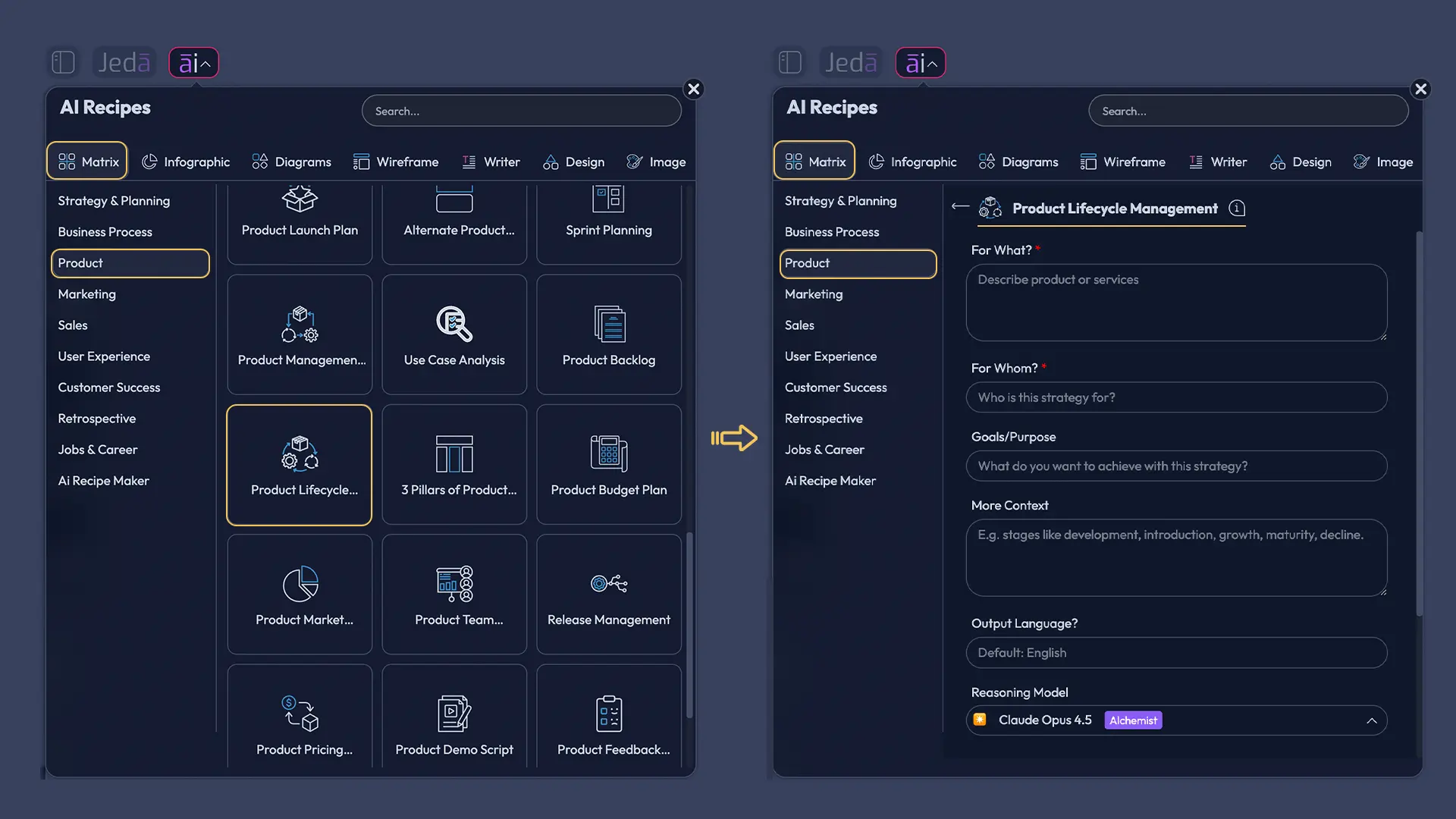
Method 1 is the better starting point when you want more structure. The AI Menu gives access to AI Recipes, including Matrix recipes organized by category, and the user guide shows Product as one of the recipe side-bar categories. Since this topic is a matrix recipe under the Product category, that route gives you the cleanest entry point. Method 2 is the faster option when you already know what you want. Open the Prompt Bar, choose Matrix, and describe the lifecycle stages, stakeholders, and outputs you need. After generation, use AI+ to deepen any stage, then use Vision Transform if you want to convert the lifecycle model into a flowchart or diagram for a different audience. The workflow and user guide explicitly support Prompt Bar generation, AI Menu usage, Vision Transform, and AI+ extension in that sequence.
Method 1: Recipe Matrix
- Open the AI Menu
Click the AI Menu in the top-left of the Jeda.ai workspace to open AI Recipes.
- Choose Matrix recipes
Select the Matrix category, then browse to the Product section to find the Product Lifecycle Management recipe.
- Enter lifecycle context
Add your product type, target market, lifecycle stages, key teams, risks, and goals so the matrix has real operating context.
- Generate the lifecycle board
Let Jeda.ai create the initial Product Lifecycle Management with AI matrix on the canvas.
- Review stage logic
Check whether the lifecycle stages, owners, metrics, and dependencies match how your team actually works.
- Use AI+ to deepen weak stages
Select a stage and tap the AI+ button to extend it with more risks, actions, milestones, or questions.
- Transform or present the output
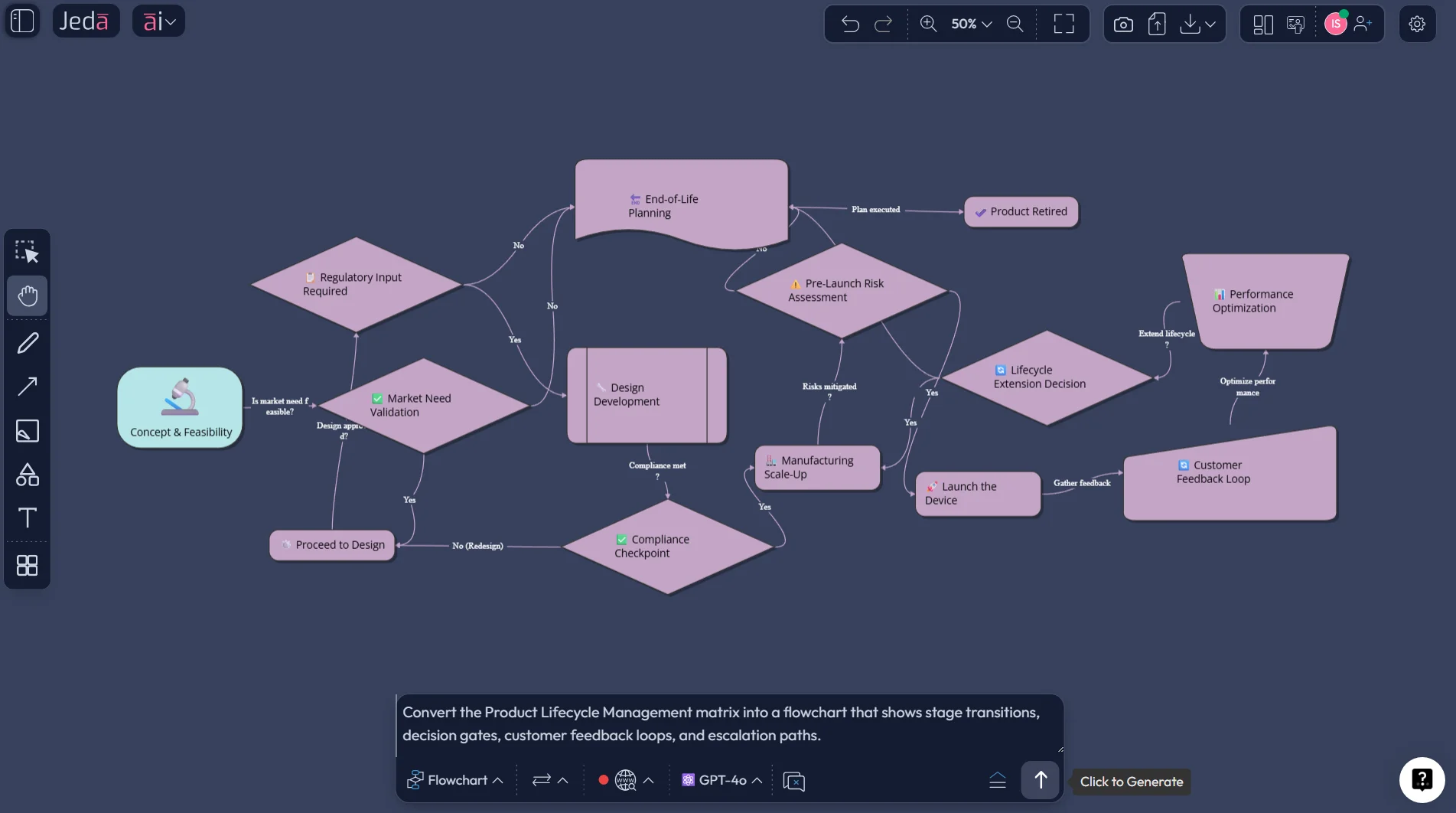
Use Vision Transform to convert the matrix into a flowchart or diagram when you need a process view for reviews or presentations.
Method 2: Prompt Bar
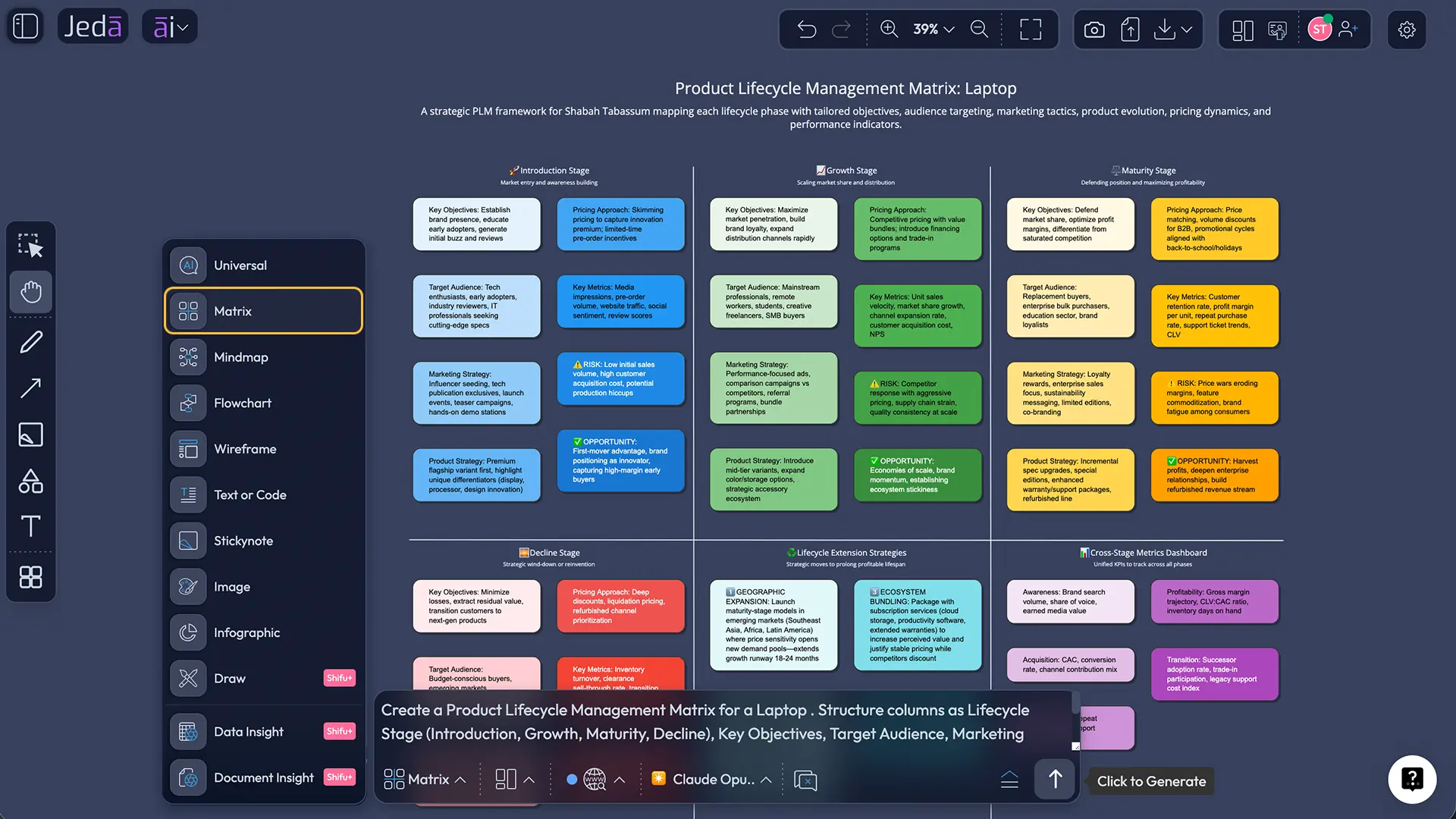
Use the Prompt Bar when you want a more custom lifecycle model.
A practical prompt looks like this:
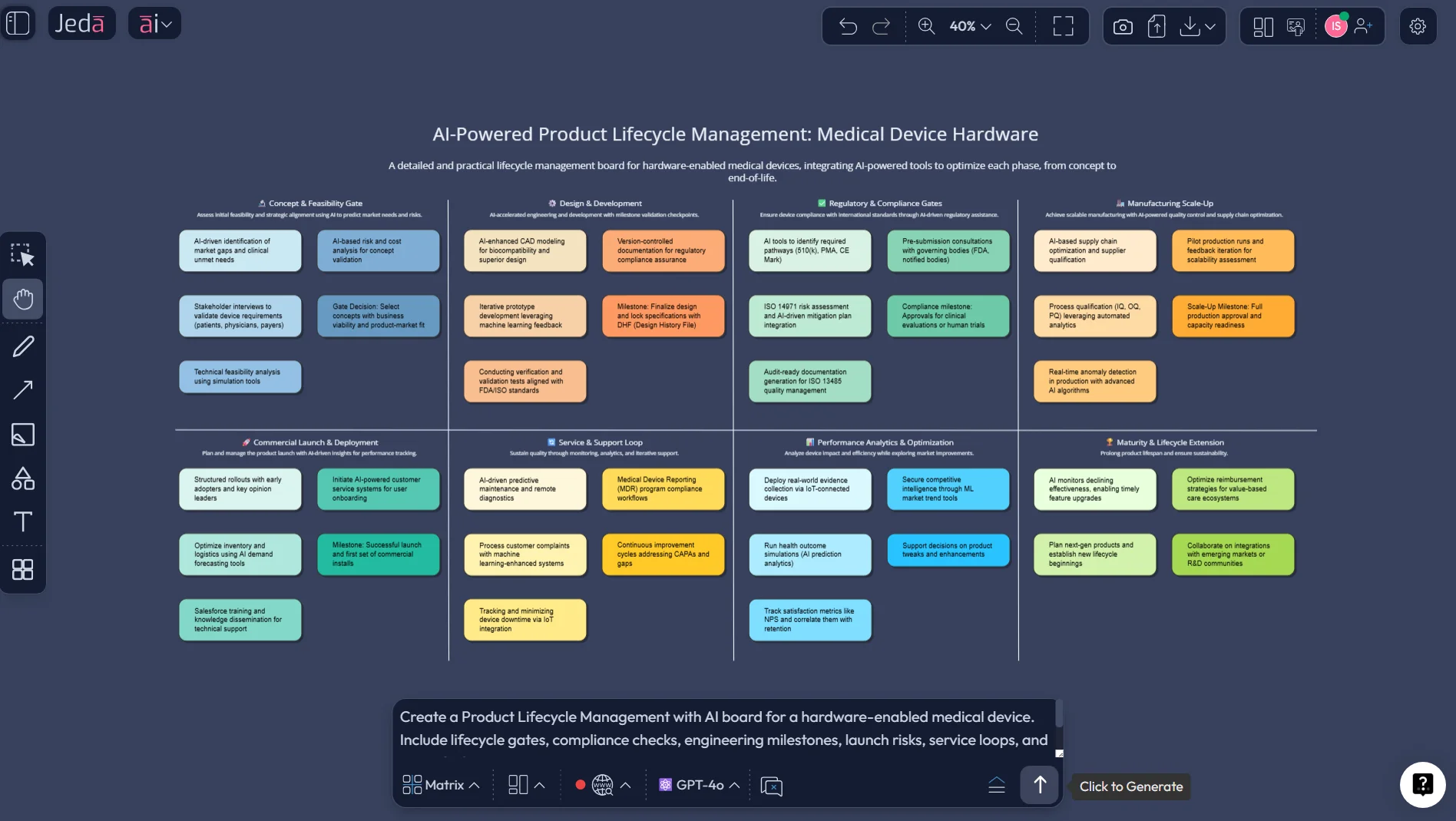
Then refine it. Ask Jeda.ai to add compliance checkpoints, customer feedback loops, launch dependencies, manufacturing constraints, or end-of-life criteria based on your context. For larger workflows, select the generated board and use Vision Transform to convert it into a flowchart or mind map. That is especially handy when product managers want a planning view and engineering or operations teams want a process view.
AI+ deep dive: how to extend Product Lifecycle Management without rebuilding it
This is the sneaky-good part.
Most lifecycle plans break not because the first version is bad, but because the second version is painful to update. Jeda.ai’s AI+ button helps solve that. Select a node or smart shape in your lifecycle board, click AI+, and extend that section with more detail. The user guide confirms that AI+ appears beside selected smart shapes and can add new related content branching from the selected element.
That makes AI+ especially useful for:
Product Lifecycle Management with AI example
Imagine a product manager working on an industrial IoT monitoring platform.
The team has customer interviews in docs, launch milestones in spreadsheets, engineering notes in tickets, and support insights in scattered messages. Instead of manually reconciling all that into a slide deck, they use Jeda.ai to create a Product Lifecycle Management with AI matrix that covers concept validation, pilot rollout, enterprise launch, support scaling, optimization, and retirement planning. Then they use Document Insight to extract requirements from a PRD and Data Insight to bring in adoption metrics from a CSV. From there, they extend the launch and service stages with AI+ and transform the board into a flowchart for a review with operations. Jeda.ai’s platform documentation supports all of those actions: Prompt Bar generation, Matrix outputs, Document Insight, Data Insight, Vision Transform, and AI+ on Smart Shapes.
The business case is straightforward. Academic and industry sources consistently frame AI in PLM around better prediction, stronger cross-functional visibility, and improved decision support. Oracle emphasizes predictive insight and guided collaboration; recent PLM literature emphasizes design, manufacturing, service, and smart-manufacturing integration; and the broader PLM literature still treats the core objective as lifecycle-wide coordination. So the gain is not magic. It is compression. Less hunting. Faster framing. Better visibility.
Best practices for Product Lifecycle Management with AI
A few rules make this work better.
First, define the stages before you ask for detail. AI does better when the lifecycle frame is clear. Second, keep each stage anchored to a small set of fields: goal, owner, risk, metric, next action. Third, use documents and data wherever possible so the board reflects reality instead of optimistic fan fiction. Fourth, separate lifecycle planning from lifecycle reporting. One board can support both, but the planning view and the executive summary should not be identical. Finally, use Jeda.ai’s editable canvas to review with stakeholders live rather than exporting too early.
Common mistakes to avoid
The biggest mistake is treating PLM as a single launch timeline. It is wider than that.
Another miss is using AI to generate stage names without giving business context. That produces lifecycle boards that look polished and say very little. Teams also stumble when they skip end-of-life planning, ignore service-stage inputs, or treat document analysis and data analysis as optional extras. In practice, the strongest PLM systems work because they link design, manufacturing, service, and disposal, not because they stop at release day. The academic and vendor literature is pretty aligned on that point.
Frequently Asked Questions
- What is Product Lifecycle Management with AI?
- Product Lifecycle Management with AI is the use of AI to support product lifecycle planning, coordination, and decision-making from concept to retirement. It helps teams structure lifecycle stages, summarize inputs, identify risks, and turn product information into usable visual workflows and decision boards.
- Why use AI for product lifecycle management?
- AI helps teams reduce manual structuring work, spot patterns across documents and data, and build lifecycle views faster. That matters when product knowledge is spread across research notes, roadmaps, engineering documents, support feedback, and operational systems.
- Can Jeda.ai generate a Product Lifecycle Management board visually?
- Yes. Jeda.ai supports Matrix, Flowchart, Mindmap, Diagram, Document Insight, and Data Insight workflows inside one editable AI Workspace, so teams can generate and refine lifecycle visuals collaboratively. It also supports AI+ extension and Vision Transform for deeper iteration.
- What is the best Jeda.ai method for Product Lifecycle Management with AI?
- The Recipe Matrix method is usually best when you want more structure fast. The Prompt Bar method is better when you need a custom lifecycle model tailored to a specific product, market, or operating process.
- Can I extend a lifecycle board after it is generated?
- Yes. Select a smart shape in the generated board and use the AI+ button to extend that specific area with more detail. This is useful for deepening launch, support, optimization, or retirement stages without rebuilding the full board.
- Can Product Lifecycle Management with AI use documents and spreadsheets?
- Yes. In Jeda.ai, Document Insight can extract structure from PDFs or Word files, and Data Insight can analyze CSV or Excel inputs. That makes it easier to ground lifecycle planning in real product requirements, usage data, and operational metrics.
- What teams benefit most from Product Lifecycle Management with AI?
- Product managers, product design engineers, industrial design engineers, business analysts, project managers, and business leaders benefit most because they all need a shared, structured view of product stages, decisions, and risks across the lifecycle.
- Is Product Lifecycle Management with AI only for manufacturers?
- No. PLM is heavily used in manufacturing and engineering, but the same lifecycle logic applies to SaaS, hardware-enabled services, digital products, and complex product ecosystems where multiple teams need to coordinate product decisions over time.
Sources & Further Reading
- [1]
IBM (2025) . “What is product lifecycle management?” IBM Think.
View Source ↗ - [2]
Siemens (2025) . “What is product lifecycle management (PLM)?” Siemens Teamcenter Blog.
View Source ↗ - [3]
SAP (2026) . “What is product lifecycle management (PLM)?” SAP.
View Source ↗ - [4]
Wang, L. et al. (2021) . “Artificial intelligence in product lifecycle management” The International Journal of Advanced Manufacturing Technology.
View Source ↗ - [5]
Ji, X. et al. (2023) . “Challenges and Opportunities in Product Life Cycle Management towards Industry 4.0” Procedia CIRP.
View Source ↗ - [6]
Oracle (2026) . “Product Lifecycle Management (PLM) Software” Oracle.
View Source ↗
Build Product Lifecycle Management with AI on a visual board
Join 150,000+ users who use Jeda.ai to turn product documents, data, and lifecycle decisions into editable visuals on one AI Workspace.
Try Jeda.ai Free