The era of the 47-page project plan is over. And honestly? Good riddance.
For decades, project managers have been locked into a painful loop: spend weeks crafting a detailed plan, watch it become obsolete within days of kickoff, then scramble to update timelines that no one reads. The Association for Project Management found in 2024 that 70% of project professionals now use AI in their organizations — up from just 36% two years earlier. That shift didn't happen because AI is trendy. It happened because the old way of planning projects was fundamentally broken.
Jeda.ai's AI Workspace gives teams something entirely new: the ability to generate, visualize, and iterate on project plans in real time using an AI Whiteboard that thinks alongside you. Not after you. Not instead of you. With you.
What Is AI-Powered Project Planning?
AI-powered project planning applies artificial intelligence — machine learning, natural language processing, and predictive analytics — to the core activities of scoping, scheduling, resource allocation, and risk management. Rather than relying on static Gantt charts and gut-feel estimates, teams use AI to analyze historical project data, surface hidden dependencies, and simulate outcomes before committing resources.
The concept isn't new. Algorithmic scheduling existed in the 1960s with PERT and CPM methods developed by the U.S. Navy and DuPont. But what's changed dramatically is accessibility. Tools like Jeda.ai put these capabilities directly into the hands of product managers, consultants, and startup founders — not just enterprise PMOs with six-figure software budgets.
Why Traditional Project Planning Fails (And Everyone Knows It)
Here's the thing most project management content won't say: traditional planning fails not because people are bad at planning. It fails because the world moves faster than any static document can track.
Gartner predicted that by 2030, 80% of routine project management tasks will be handled by AI. That number isn't aspirational — it reflects how rapidly the gap between planning speed and execution speed has widened. When Capterra surveyed project managers in 2025, 55% said AI was the top trigger for their most recent software purchase. Not integrations. Not pricing. AI.
The problem with conventional planning boils down to three structural weaknesses:
Plans are snapshots, not living systems. A Gantt chart captures one moment in time. The instant a team member gets sick, a vendor delays, or a client changes scope, that snapshot lies to you. AI doesn't capture moments — it models probabilities.
Estimation is guesswork wearing a suit. Most project timelines are built on "experienced estimates" — which is corporate language for educated guessing. Machine learning models trained on thousands of comparable projects deliver estimates that are measurably more accurate. McKinsey reported in 2025 that companies using AI tools for financial modeling achieved 35% better forecast reliability.
Collaboration bottlenecks kill momentum. When the plan lives in one person's head (or one person's Microsoft Project file), information asymmetry creeps in. Visual AI tools like Jeda.ai — trusted by 150,000+ users — make plans visible, shareable, and editable in real time.
- Predictive Scheduling
AI analyzes past project performance to forecast realistic timelines and flag schedule risks before they materialize.
- Dynamic Dependencies
Automatically maps task relationships and recalculates critical paths when scope or resources shift.
- Resource Optimization
Balances team workloads using real capacity data instead of hopeful spreadsheet assumptions.
- Risk Simulation
Runs Monte Carlo-style scenarios to quantify risk exposure across your project portfolio.
- Instant Visual Frameworks
Generate WBS, RACI matrices, and milestone maps from a single text prompt on Jeda.ai's AI Workspace.
- Real-Time Collaboration
Teams co-create project visuals with live cursors and Follow Me mode — no version control nightmares.
The Companies Leading the Way Are Doing Something Different
The forward-thinking organizations aren't just using AI for project planning. They're rethinking what planning means altogether.
Consider how IBM described the shift in late 2025: AI enables "continuous risk scoring" that adapts in real time, rather than periodic status reviews. That's not an incremental improvement. That's a fundamentally different relationship between a team and its plan.
Amazon's approach to cascading GOST frameworks — from corporate goals down to team-level tactics — works precisely because AI can maintain alignment across layers that humans struggle to keep in sync. When a strategy shifts at the top, the ripple effects through objectives and tactics can be modeled instantly.
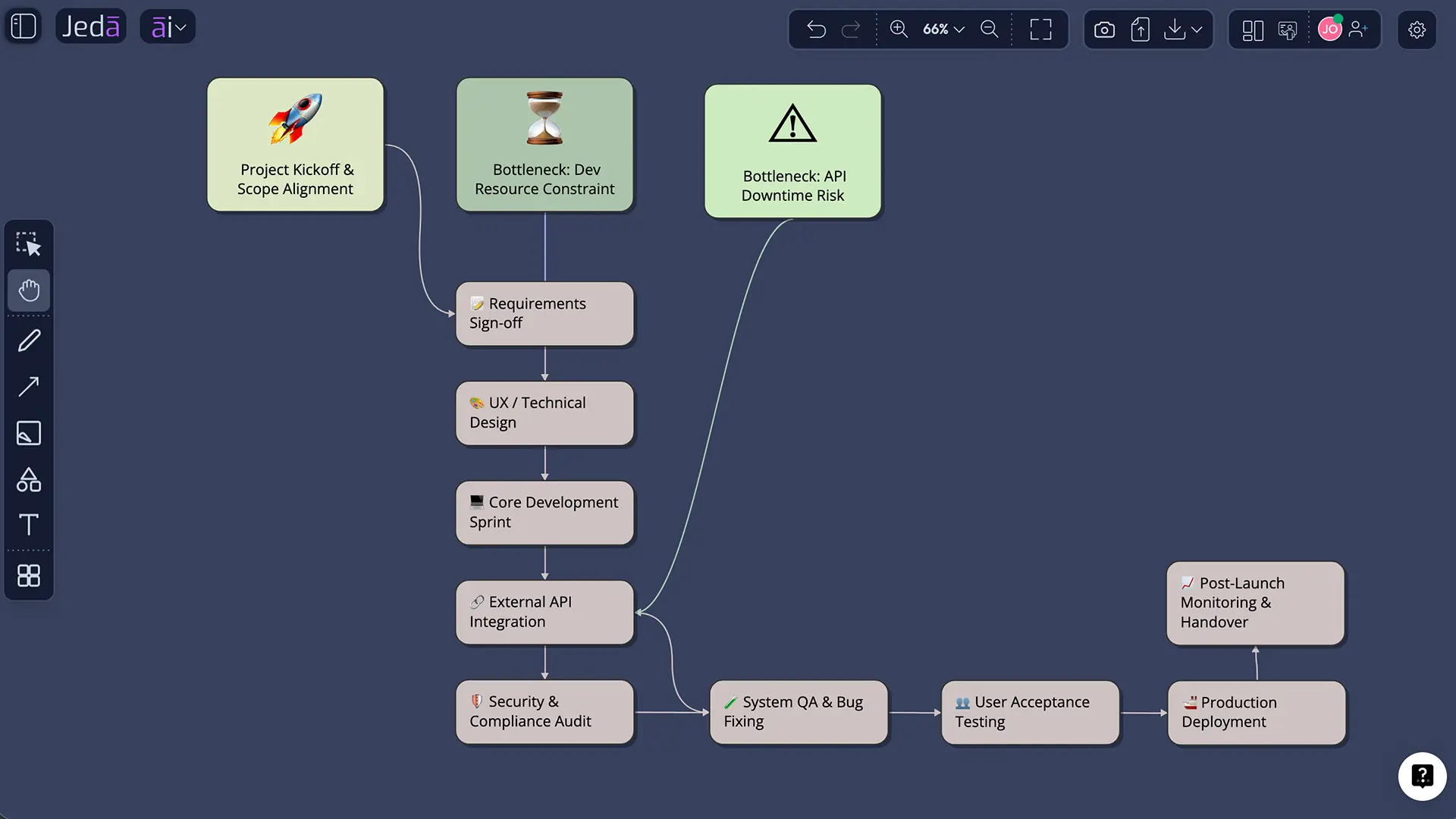
And this is where Visual AI tools create asymmetric advantage. A project plan that exists only as a list of tasks in a tool like Asana or Monday.com is invisible to the people who need strategic context. But a project plan visualized as an interconnected matrix on Jeda.ai's AI Whiteboard — showing dependencies, risks, resource constraints, and milestone gates simultaneously — becomes a thinking tool, not just a tracking tool.
How to Create a Project Plan in Jeda.ai
Getting started takes under 60 seconds. Seriously.
- Open the AI Menu
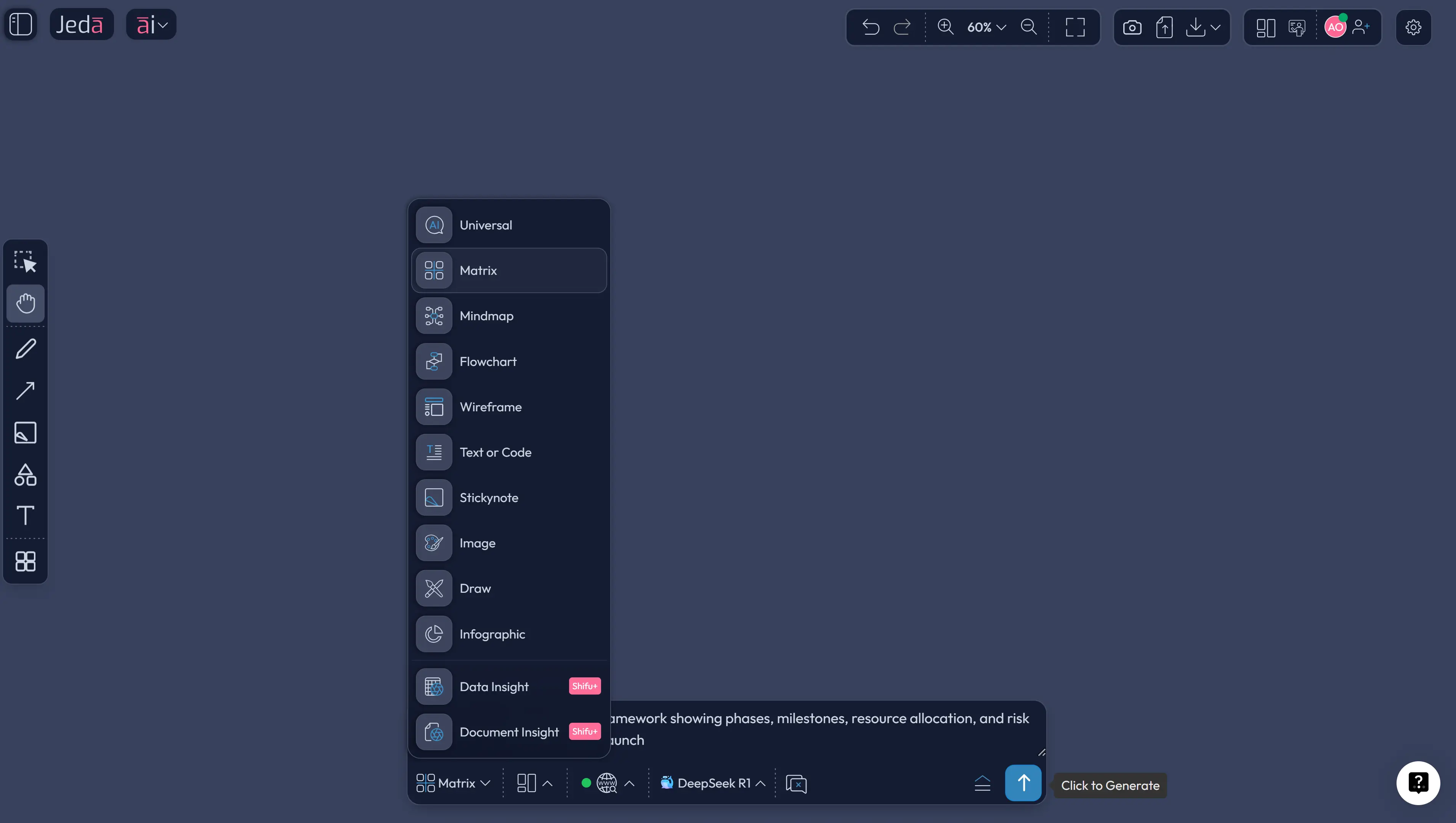
Click the AI Menu button at the top-left of your Jeda.ai canvas. Browse the Matrix Recipes for the project planning template.
- Select the Project Planning Recipe
Choose from templates. Each recipe is pre-configured for common planning needs.
- Describe Your Project Context
Enter your project details: scope, team size, timeline constraints, key deliverables. The more context you provide, the more tailored the output.
- Generate and Review
Click Generate. Jeda.ai creates an editable visual framework you can immediately share with stakeholders.
- Extend with AI+
Select any section and tap the AI+ button to drill deeper.
- Convert with Vision Transform
Need your matrix as a flowchart? Select the visual, choose Vision Transform, and convert between formats without losing content.
Alternative method — Prompt Bar:
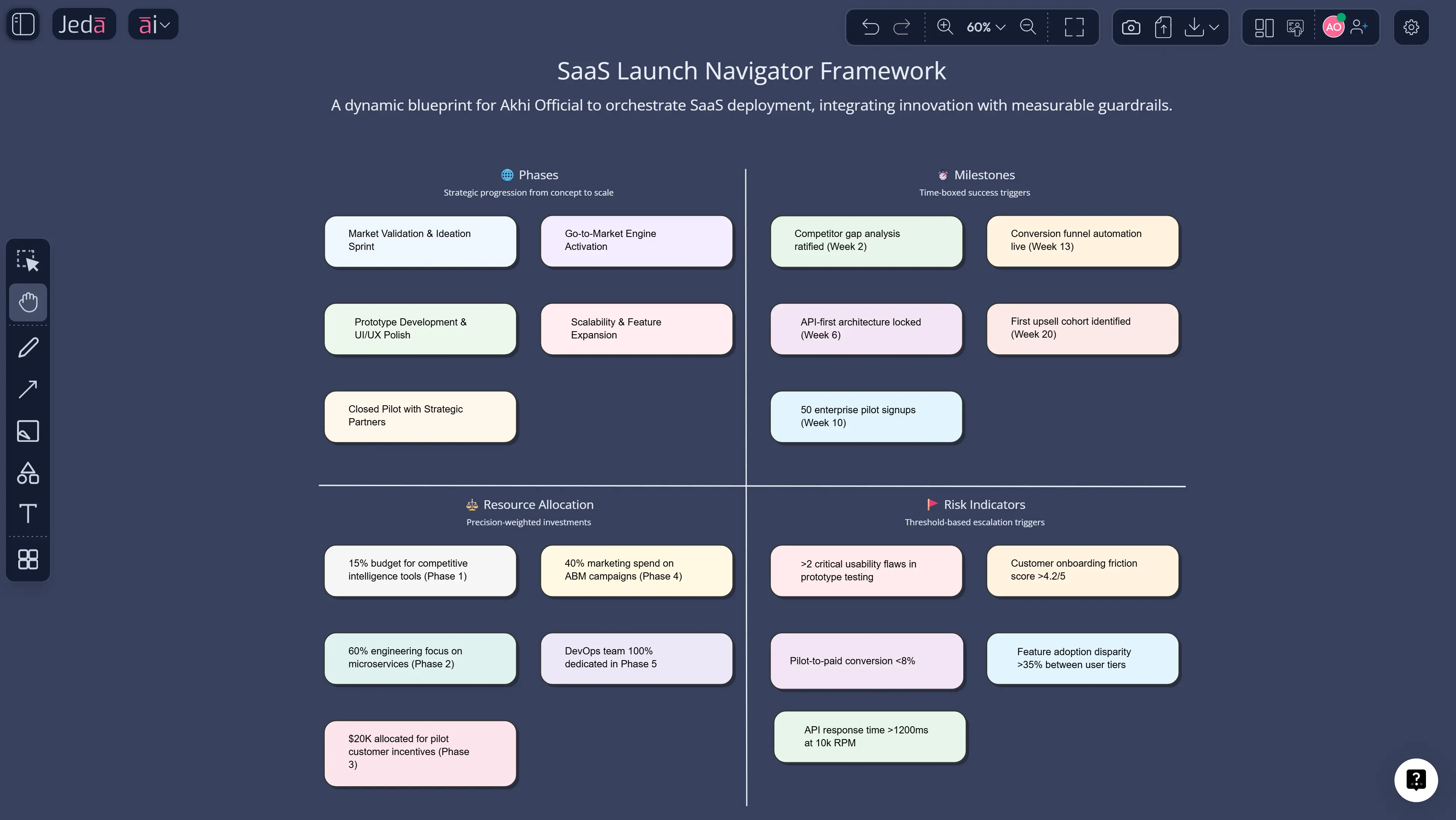
Open the Prompt Bar at the bottom of your canvas. Select the Matrix command. Type something like: "Create a project plan for a 6-month SaaS product launch with 4 team members, including milestones, dependencies, and risk indicators." Press Enter. Edit the result directly on your AI Whiteboard.
Project Planning Templates & Real-World Examples
Abstract frameworks are nice. But let's walk through how this actually works.
Case study: Series A startup launching a mobile app
A four-person product team needed to plan a 16-week development sprint covering design, engineering, QA, and go-to-market. Traditional approach? A PM spends 2-3 days building a project plan in Smartsheet, circulates it for feedback, revises it twice, and ends up with a document that's already partially outdated.
Using Jeda.ai's AI Workspace, the PM generated a Work Breakdown Structure in under a minute. Then used AI+ to expand the "Go-to-Market" node into a detailed sub-plan covering app store optimization, PR outreach, and beta user recruitment. The entire planning session — from blank canvas to stakeholder-ready visual — took 40 minutes. Not 3 days. 40 minutes.
The resulting visual showed the team something a Gantt chart never could: that their QA phase and marketing prep had a critical overlap that would bottleneck their only designer. They caught it in planning, not in week 12.
Best Practices for AI-Powered Project Planning
Start with outcomes, not tasks. The most common mistake in project planning is jumping straight to task lists. Instead, describe the business outcome you need, and let AI decompose it backward into workstreams. Jeda.ai's Matrix command handles this naturally — prompt it with an objective, and it generates the structural breakdown.
Visualize before you operationalize. A plan nobody can see is a plan nobody follows. The teams getting the most from AI planning tools are those using Visual AI to make strategy visible. Pin it on your workspace. Share it live. Let it be the artifact your standup revolves around.
Iterate in real time, not in review cycles. The old model of "plan, review, approve, execute" creates lag. With Jeda.ai's real-time collaboration features — live cursors, Follow Me mode — your plan evolves as your understanding evolves. No waiting for the PM to "update the deck."
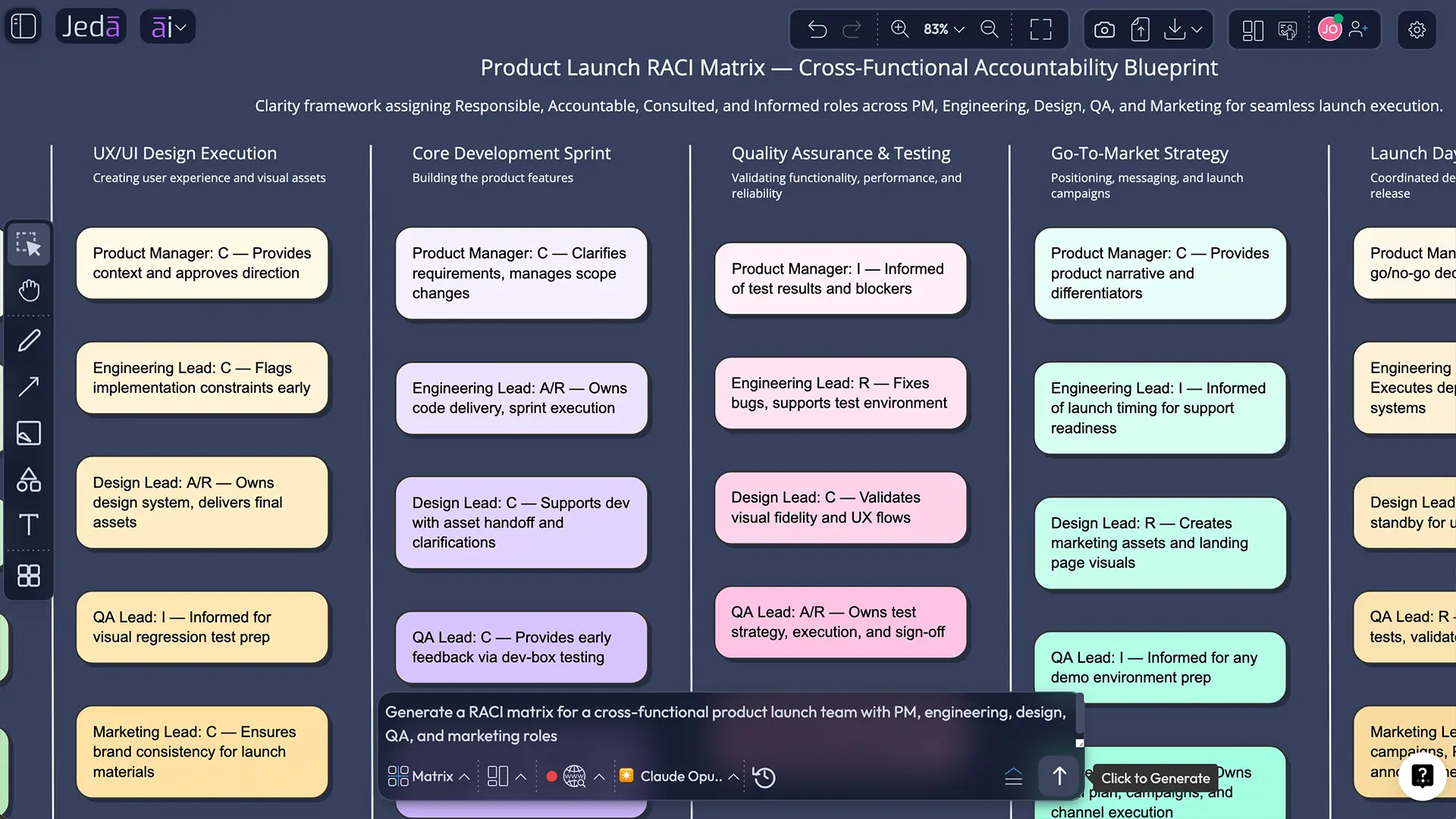
Layer your frameworks. A WBS alone doesn't capture risk. A RACI alone doesn't capture timeline. Use multiple visual frameworks together — WBS + Risk Matrix + Timeline — on the same canvas. Jeda.ai supports over 300+ strategic frameworks that can coexist and cross-reference.
Common Mistakes to Avoid
Treating AI output as final. AI generates excellent starting points. It doesn't know your team's quirks, your CEO's pet peeves, or the vendor that always delivers late. Layer your judgment on top.
Over-specifying your prompt. Counterintuitively, the best AI-generated plans come from prompts that describe outcomes rather than prescribing structure. Say "plan a product launch that hits market by Q3" not "create a Gantt chart with 47 tasks grouped into 6 phases."
Ignoring the visual. If you generate a matrix and then export it as a bullet-point list for your status email, you've lost the entire advantage. The visual is the plan. Share the visual.
Planning in isolation. AI makes it faster to plan alone. That's actually a risk. The value of collaborative planning isn't efficiency — it's alignment. Use Jeda.ai's collaboration features to plan together, not just plan faster.
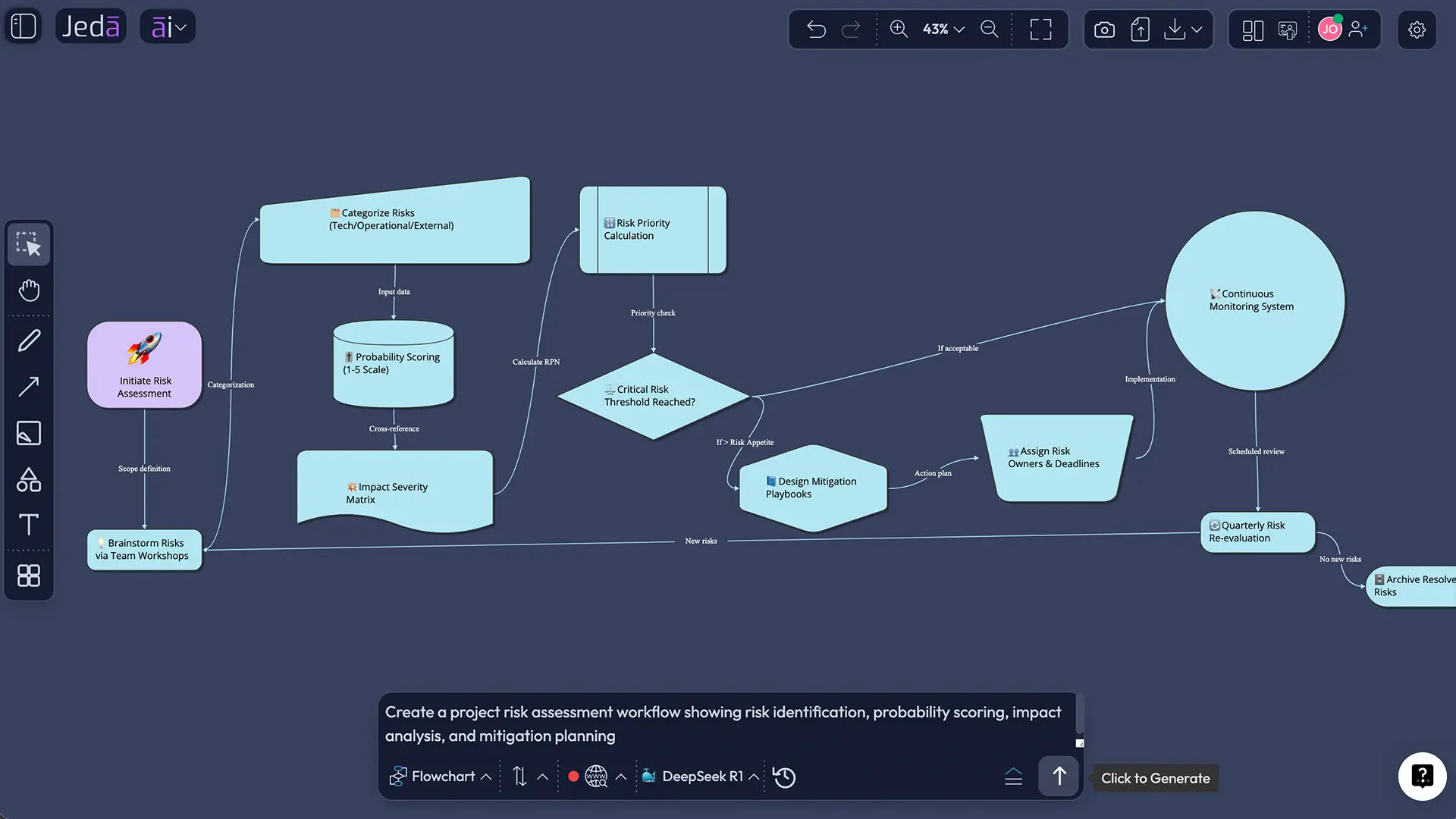
Skipping the risk simulation. Generating a happy-path plan is easy. The teams that consistently deliver on time are the ones who use AI to model the unhappy paths too. Ask Jeda.ai to generate a risk matrix alongside your project plan. Every single time.
Frequently Asked Questions
- What is AI project planning?
- AI project planning uses machine learning and predictive analytics to automate scheduling, resource allocation, risk assessment, and dependency mapping. Instead of manual Gantt charts, teams describe objectives and AI generates visual, editable project frameworks in Jeda.ai's AI Workspace.
- How does AI improve project planning accuracy?
- AI analyzes historical project data and current variables to produce estimates backed by pattern recognition rather than gut feel. McKinsey found that companies using AI achieved 35% better forecast reliability compared to traditional methods.
- Can AI replace project managers?
- No. AI handles routine planning tasks — scheduling, dependency mapping, risk flagging — so project managers focus on stakeholder alignment, team leadership, and strategic decisions. Think of AI as an amplifier, not a replacement.
- How to create a project plan using AI?
- In Jeda.ai, open the AI Menu, select a Matrix Recipe for project planning, enter your project context, and click Generate. The AI Workspace produces an editable visual framework in seconds that you can customize and share with your team.
- What project planning frameworks can AI generate?
- Jeda.ai's AI Workspace supports 300+ frameworks including Work Breakdown Structures, RACI matrices, Gantt-style timelines, risk matrices, stakeholder maps, and milestone charts. Select the Matrix or Diagram command from the Prompt Bar.
- Is AI project planning suitable for small teams?
- Absolutely. Small teams benefit most because they often lack dedicated PMO resources. Jeda.ai's Whitebelt plan is free and includes all 11 AI commands, giving small teams enterprise-grade planning without the enterprise price tag.
- How does Jeda.ai differ from tools like Monday.com or Asana for project planning?
- Monday.com and Asana are task management tools. Jeda.ai is a Visual AI Workspace that generates strategic frameworks, project plans, and decision visuals from text prompts. It's a thinking tool for planning, not just a tracking tool for tasks.
- Can I collaborate on AI project plans in real time?
- Yes. Jeda.ai supports real-time collaboration with live cursors, Follow Me mode for synchronized viewing, and shared canvases. Teams plan together on the AI Whiteboard, eliminating version control issues.
- What export options are available for AI-generated project plans?
- Jeda.ai exports project visuals as PNG, SVG, or PDF. This covers everything from board presentations to client deliverables. All generated frameworks are fully editable before export.
- How does AI handle project risk management?
- AI identifies risks by analyzing patterns from historical project data and current variables. In Jeda.ai, you can generate risk matrices alongside project plans and use AI+ to expand risk categories with mitigation strategies and probability assessments.
Sources & Further Reading
- [1]
Association for Project Management (2025) . “AI use in Project Management nearly doubles in just two years, APM survey finds” APM.
View Source ↗ - [2]
Gartner (2019) . “Gartner Says 80 Percent of Today’s Project Management Tasks Will Be Eliminated by 2030 as Artificial Intelligence Takes Over” Gartner Newsroom.
View Source ↗ - [3]
Olivia Montgomery (2025) . “AI & Security Are Top Concerns in Capterra’s 2025 Project Management Software Trends Survey” Capterra.
View Source ↗ - [4]
Amanda McGrath; Amanda Downie (2025) . “What is AI in project management?” IBM Think.
View Source ↗ - [5]
McKinsey & Company (2025) . “How AI is transforming strategy development” McKinsey.
View Source ↗
Build Your Next Project Plan in Under 60 Seconds
Join over 150,000 professionals who use Jeda.ai's AI Workspace to plan, visualize, and execute projects faster.
Try Free Template