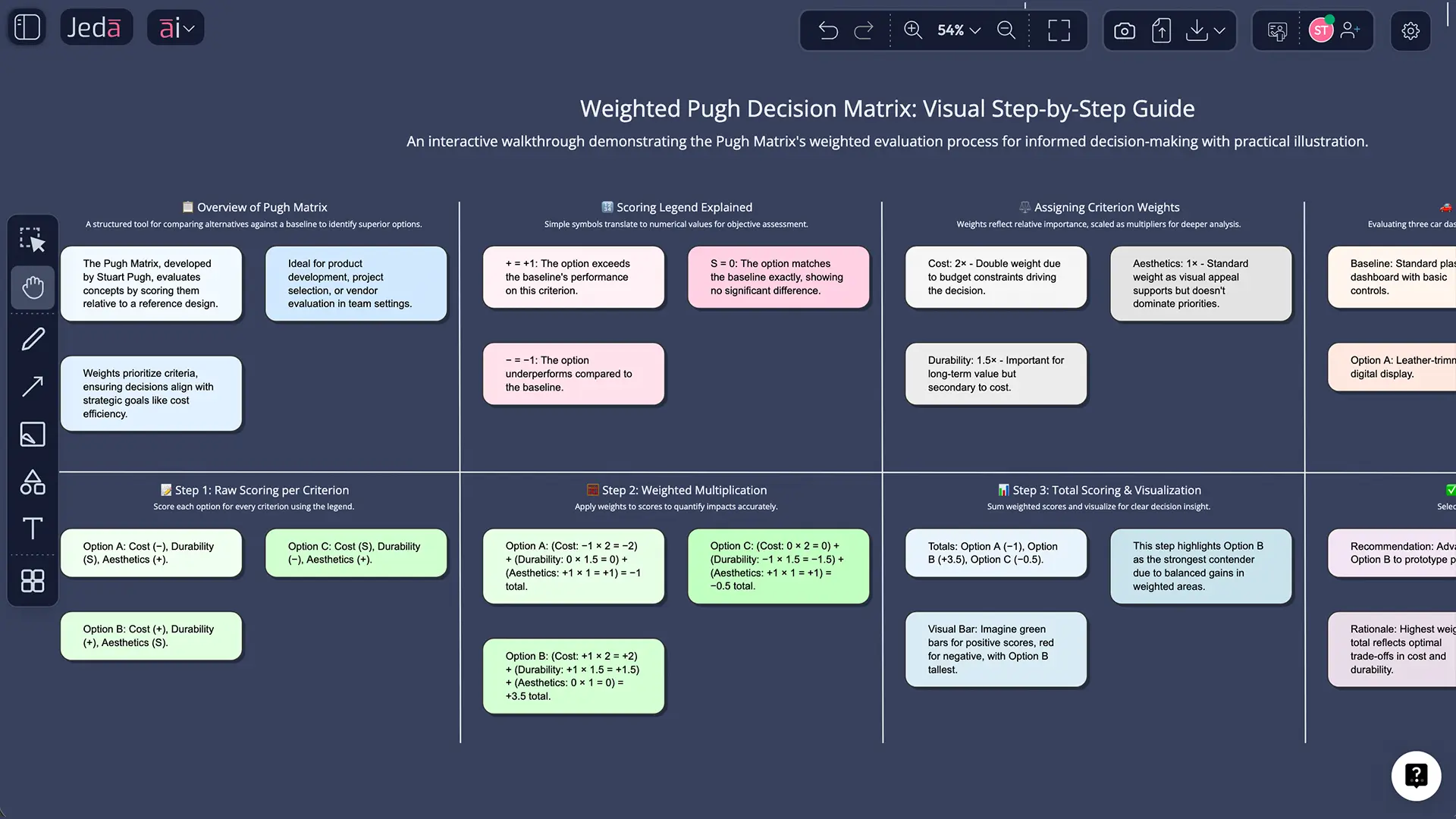
A Pugh Decision Matrix is a structured technique for comparing and selecting the best concept from multiple alternatives. Named after Professor Stuart Pugh, who formalized it at Strathclyde University in the 1980s and documented it in his seminal work Total Design (1991), the method is elegantly simple: you rate each concept as better (+), worse (−), or the same (S) as a chosen baseline.
The baseline is your reference point. It might be your current product, a competitor's offering, or an ideal solution you've defined. By comparing all alternatives to this single standard, you eliminate subjective bias. The Pugh matrix then reveals which concepts offer the most compelling trade-offs. It's used across industries—Six Sigma quality programs, automotive engineering, pharmaceutical product development, software architecture decisions—because it works.
What makes the Pugh method special is the baseline comparison. Other decision matrices might rank each option on an absolute scale. Pugh says: relative to this known quantity, how do you compare? That relativity is powerful. It forces conversations about what actually matters. And when you scale up to weighted criteria (assigning, say, twice as much importance to cost as to aesthetics), the matrix becomes a nuanced negotiation tool. You're not just scoring. You're prioritizing. The AI Whiteboard in Jeda.ai transforms this conversation into a collaborative, visual artifact your entire team can see, edit, and align around.
How the Pugh Matrix Works: Criteria, Scoring, and Selection
Here's the machinery. You define your criteria—the factors that matter to your decision. Cost. Durability. Aesthetics. Time-to-market. Battery life. You choose a baseline (your reference point). Then, for each alternative concept, you score it against that baseline.
The scoring system is binary + neutral:
- + = better than baseline
- − = worse than baseline
- S = same as baseline
Add them up. The concept with the most "+" marks is typically your winner. But here's the nuance: not all criteria weigh equally. If you're designing a luxury smartphone, aesthetics might matter more than cost. In a budget phone, it's reversed.
This is where weighted Pugh matrices enter the picture. Assign each criterion a weight—say, cost × 2, durability × 1.5, aesthetics × 1. Multiply each score (+1, −1, or 0 for S) by its weight, then sum. The math is simple, but the insight is profound. Weighting forces clarity. It surfaces disagreements. It makes hidden priorities visible.
Let's say you're evaluating three smartphone materials against the iPhone 15 Pro (your baseline): Metal Unibody, Plastic Budget, and Hybrid Composite. For durability, Metal wins (+). For cost, Plastic wins (+). For manufacturing ease, Hybrid wins (+). But if you weight cost at 2× and durability at 1.5×, Metal Unibody might win overall because durability compounds. That's the conversation the Pugh matrix facilitates. Data-driven, yes. But also deeply human.
Why Use AI for Pugh Decision Matrix Analysis?
Manual Pugh matrices took hours. You'd gather the team, argue about baselines, debate criteria, fill in spreadsheet cells. The process was thorough but slow. Now? AI changes the game.
Speed is the obvious win. Jeda.ai generates a populated Pugh matrix in seconds. No manual setup. No spreadsheet wrestling. But speed isn't the real story. Here's what matters:
Consistency. When you define criteria in natural language ("compare these five designs on cost, durability, and time-to-market, weight cost 2×"), an AI model applies those definitions uniformly. No fatigue-driven scoring drifts in hour three of a workshop. No "I didn't mean durability like that" arguments. Consistency beats consensus-theater.
Multi-perspective analysis. Jeda.ai's multi-LLM Aggregator Model lets you run your decision against GPT-5, Claude, Grok, and others simultaneously. Why? Because different models have different strengths. GPT-5 excels at manufacturing constraints. Claude shines at systematic reasoning. Grok brings unconventional angles. When you see where these models agree and diverge, you've surfaced hidden uncertainties. That's more valuable than any single perspective.
Reduction of politics. A spreadsheet in a meeting is a conversation waiting to happen (usually an argument). A Pugh matrix generated by AI is neutral. It's not your opinion versus theirs. It's a decision framework, transparent and reproducible. Teams align faster because they're not defending egos. They're discussing trade-offs.
150,000+ Jeda.ai users have already found that AI-powered decision matrices accelerate time-to-decision by 70–80% while improving stakeholder buy-in. The reason? Visual + data + collaboration. All three together.
- Generate in Seconds
From prompt to visual matrix in under 60 seconds. No templates to hunt for.
- Multi-Model Insights
Compare GPT, Claude, Grok perspectives on the same decision simultaneously.
- Visual & Collaborative
Shared AI Whiteboard means your entire team sees the decision and edits together.
- Weighted & Flexible
Easily adjust criteria weights, add constraints, and regenerate without restarting.
How to Create a Pugh Decision Matrix in Jeda.ai
Two paths. Both fast.
Method 1: AI Menu (Recommended for Templates)
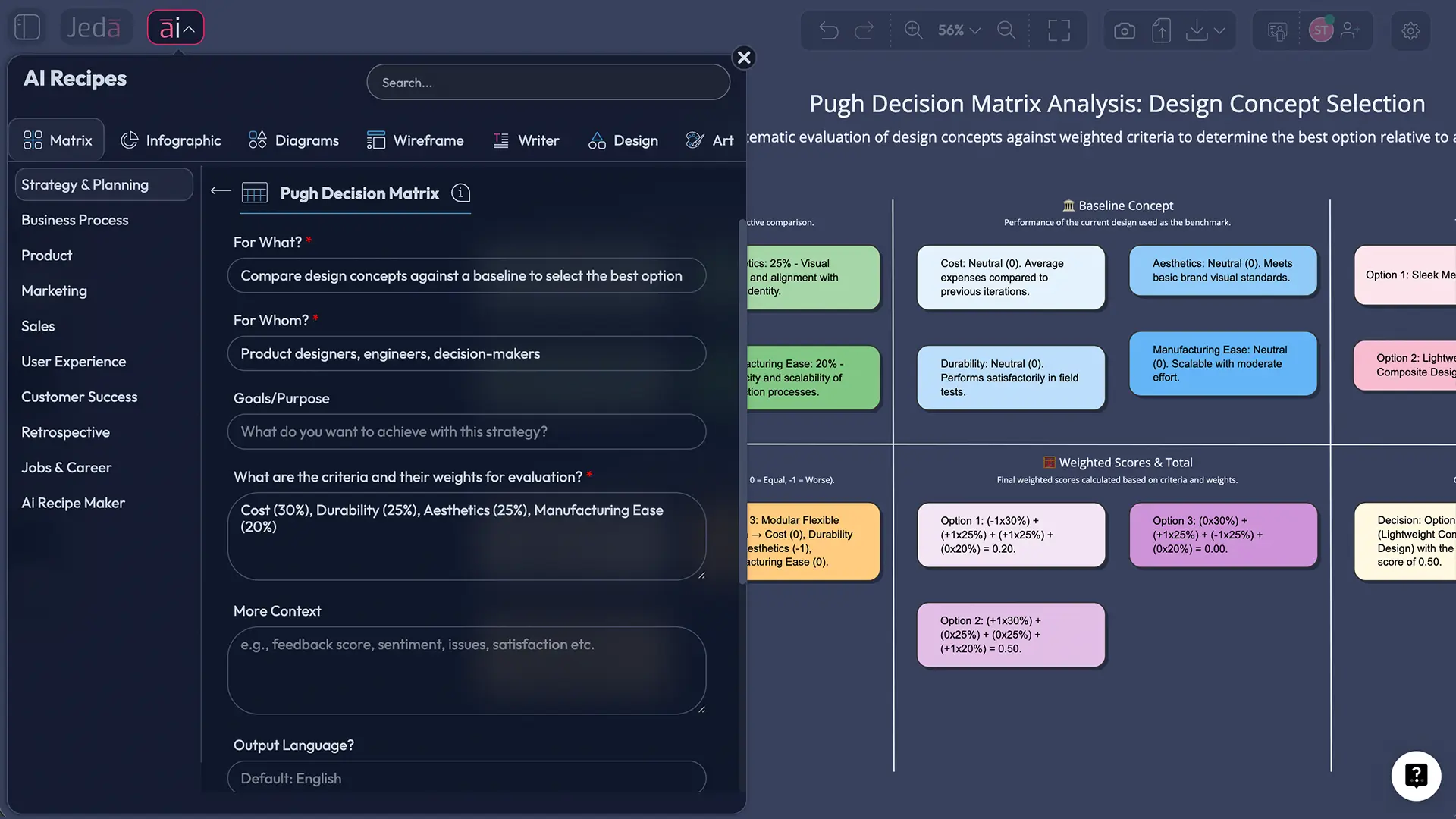
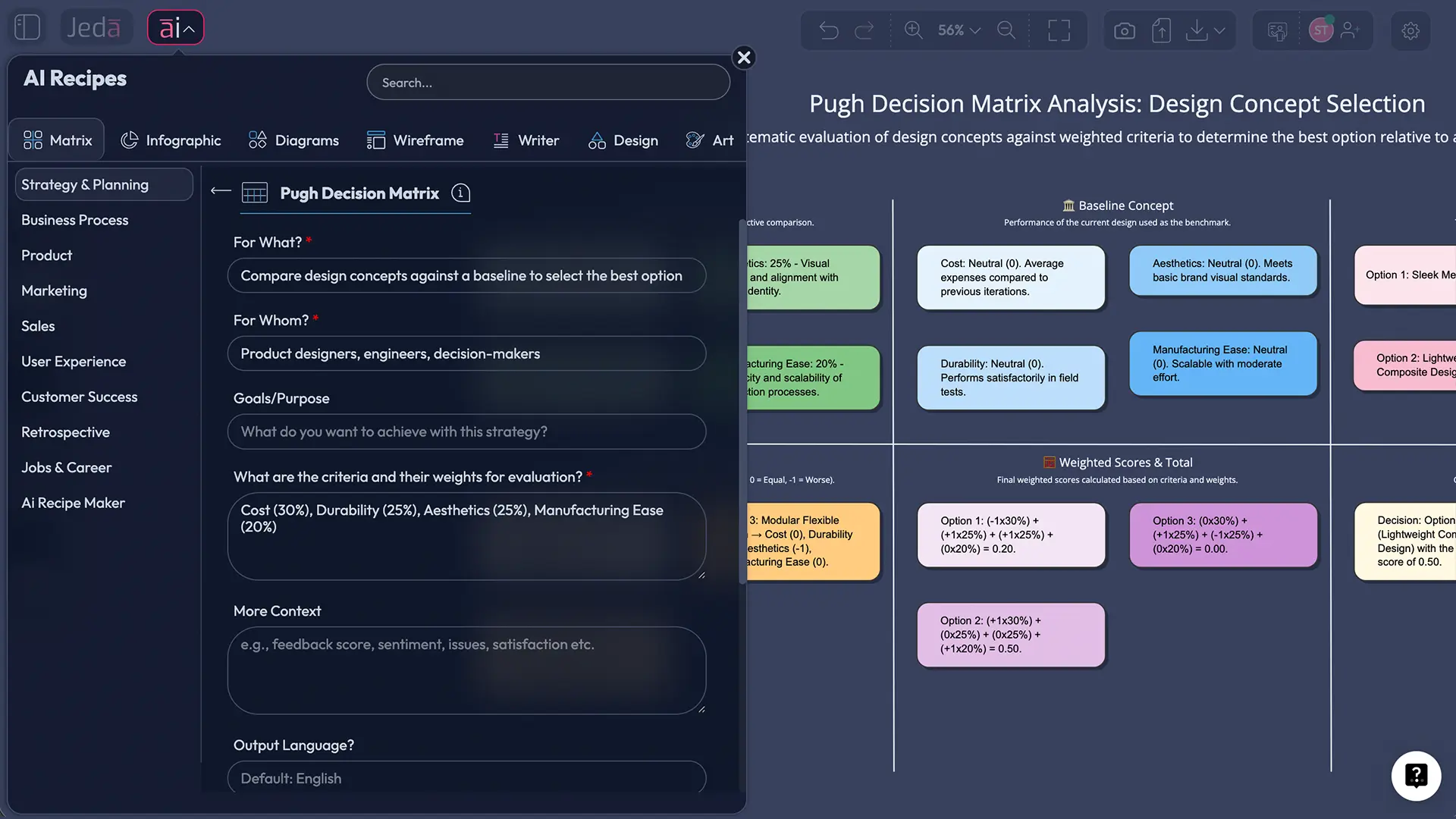
Open Jeda.ai and create a new whiteboard. In the top-left, click the AI Menu. You'll see 300+ AI Recipes—pre-built patterns for everything from SWOT analyses to competitive maps. Search for "Pugh" or "Decision Matrix." Select the Pugh recipe. A dialog appears asking for your context. Optional: weights for each criterion.
Fill those in, hit "Generate," and watch your AI Whiteboard populate. Your matrix appears, fully formatted, with scoring complete. Click the AI+ button to extend the analysis, or drill deeper into criteria definitions.
Method 2: Prompt Bar (Recommended for Custom Designs)
Prefer natural language? Use the Prompt Bar at the bottom of your canvas. Type something like this:
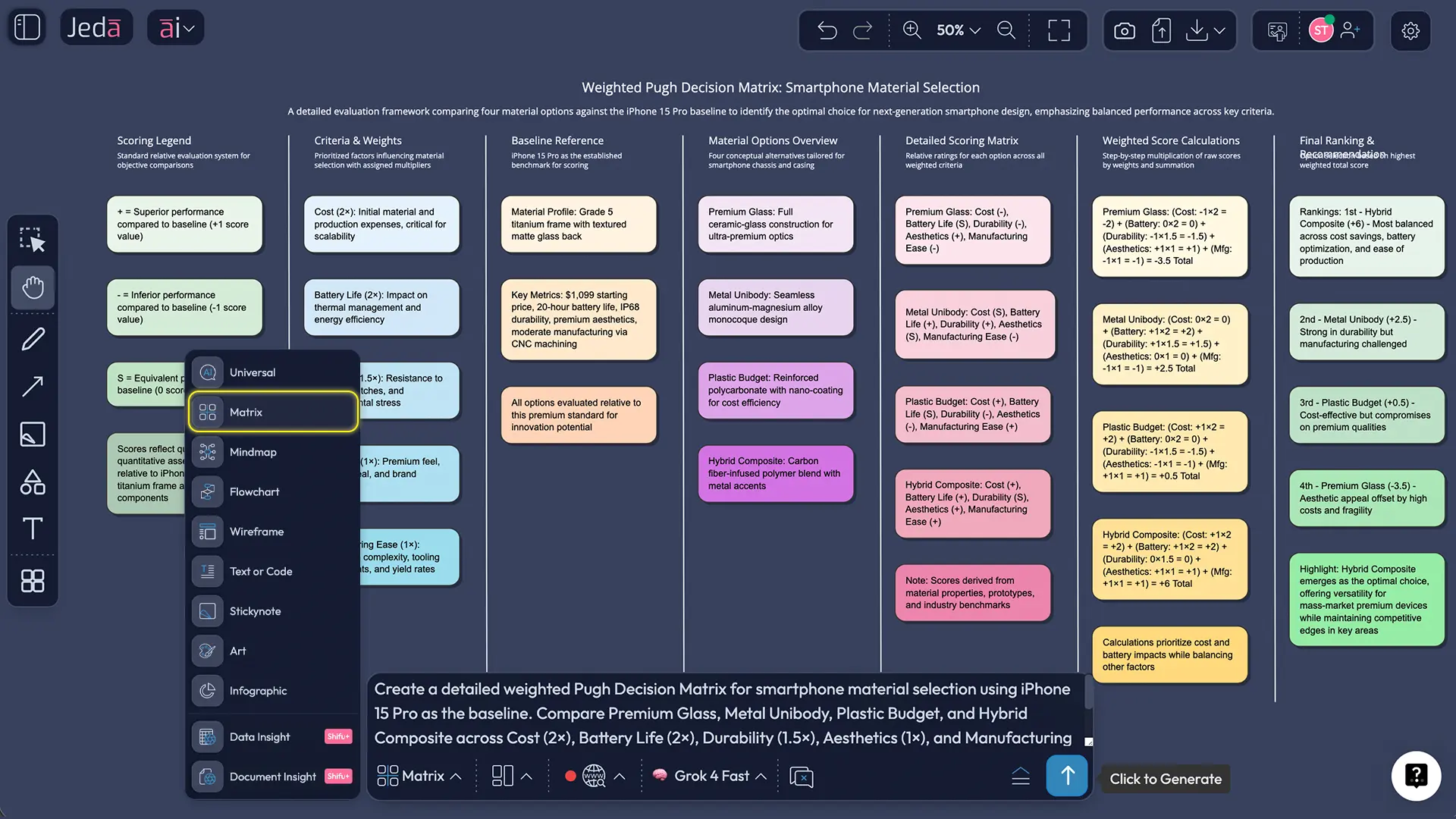
"Create a Pugh matrix comparing 4 smartphone designs (aluminum frame, glass unibody, plastic composite, titanium) against iPhone 15 Pro. Rate them on: cost (weight 2), durability (weight 1.5), aesthetics (weight 1), manufacturing ease (weight 1). Use +, −, S scoring. Show weighted totals."
Hit Enter. Jeda's multi-LLM Aggregator processes your request across multiple models simultaneously. Within seconds, your matrix appears on the canvas—visually polished, data-populated, ready to refine.
From there, you have options:
- AI+ button: Extend the analysis.
- Vision Transform: Convert your matrix into a Diagram (showing decision logic flow), a Flowchart (showing concept selection process), or stay visual as a matrix. Want to export this decision to a Mindmap for team discussion? Done.
- Export: Download as PNG, SVG, or PDF. Use in presentations, design reviews, stakeholder reports, or email.
And because it's a shared AI Workspace, your team sees edits in real-time. No version control nightmares. No "did you get the latest file?" questions.
- Define Your Decision Context
Identify the problem (which design? which vendor? which strategy?) and gather stakeholders. Clarify the baseline.
- Open Jeda.ai Whiteboard
Create a new canvas. You are about to generate a decision matrix that took teams hours to build manually.
- Access Pugh Recipe via AI Menu
Click AI Menu (top-left). Search "Pugh" in the 300+ AI Recipes. Select the template.
- Input Your Prompt
Use natural language for your data and optional weights. Example: "Compare 3 designs on cost (weight 2x) and durability (weight 1.5x)."
- AI Generates Your Matrix
Watch Jeda's multi-LLM Aggregator work. Your visual, data-populated Pugh matrix appears in your AI Whiteboard in seconds.
- Refine and Collaborate
Use AI+ to extend analysis. Share the canvas with teammates. Edit criteria, adjust weights, and regenerate.
- Vision Transform (Optional)
Convert to Diagram (decision logic), Flowchart (selection process), or keep as matrix. It is your choice.
- Export and Present
Download PNG, SVG, or PDF. Use in presentations, design docs, or stakeholder communication.
Pugh Matrix Templates & Real-World Examples
Let's walk through a real scenario. You're a materials engineer at a smartphone maker. You need to select packaging material for your next flagship phone. You have four candidates: Premium Glass, Metal Unibody, Plastic Budget, Hybrid Composite. Your baseline is the iPhone 15 Pro (proven, market-tested).
Your criteria:
- Cost (material + processing; weight 2×)
- Battery Life Impact (thermal management; weight 2×)
- Durability (scratch, drop, dent resistance; weight 1.5×)
- Aesthetics (premium feel, color options; weight 1×)
- Manufacturing Ease (yield rate, time-to-production; weight 1×)
You generate your Pugh matrix in Jeda.ai. The AI evaluates each material against iPhone 15 Pro:
| Criterion | Weight | iPhone 15 Pro (Baseline) | Premium Glass | Metal Unibody | Plastic Budget | Hybrid Composite |
|---|---|---|---|---|---|---|
| Cost | 2× | S | − | + | + | S |
| Battery Life | 2× | S | − | S | + | + |
| Durability | 1.5× | S | − | + | − | S |
| Aesthetics | 1× | S | + | S | − | S |
| Manufacturing | 1× | S | S | − | + | + |
| Weighted Score | — | 0 | (−1×2)+(−1×2)+(−1×1.5)+(1×1)+(0×1) = −6.5 | (1×2)+(0×2)+(1×1.5)+(0×1)+(−1×1) = +2.5 | (1×2)+(1×2)+(−1×1.5)+(−1×1)+(1×1) = +2.5 | (0×2)+(1×2)+(0×1.5)+(0×1)+(1×1) = +3 |
Winner: Hybrid Composite (+3). But look closer. Metal Unibody and Plastic Budget tie at +2.5. The conversation isn't "Hybrid wins, ship it." It's "Hybrid wins on balance, but let's stress-test the manufacturing claim. Can we really hit yield targets?" That's the matrix at work—surfacing what to debate.
Best Practices for AI-Powered Pugh Analysis
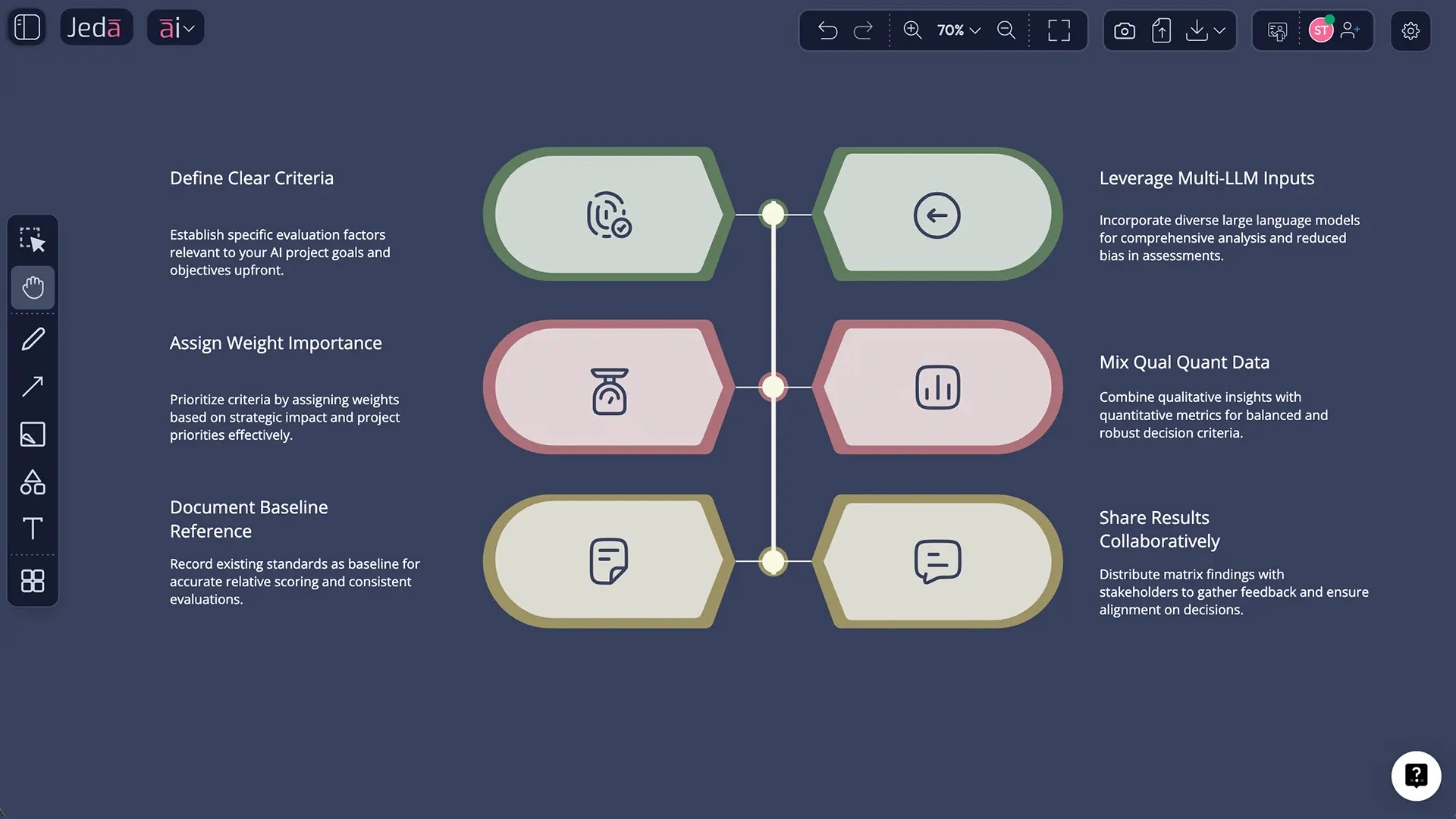
Six rules. Follow them, and you'll dodge 80% of decision-matrix traps.
Common Mistakes to Avoid
Mistake 1: Choosing a Weak Baseline. Your baseline should be real, proven, and representative. Don't pick "an ideal product that doesn't exist" as your baseline. Pick your current offering or a market competitor. Relativity requires something grounded.
Mistake 2: Too Many Criteria. More criteria = more noise. Aim for 5–8. Beyond that, decision fatigue kicks in. Combine related criteria ("durability + repairability" becomes one criterion with sub-factors).
Mistake 3: Vague Criterion Definitions. "Durability" is vague. "Withstands 1000 drop tests from 2 meters onto concrete" is not. Tell Jeda's AI what you mean, and the scoring becomes consistent and reproducible.
Mistake 4: Ignoring Weighting When Criteria Matter Unequally. If cost matters twice as much as aesthetics to your business, weight it. Unweighted matrices hide priorities. They feel objective but obscure the real decision-making logic.
Mistake 5: Treating the Matrix as Final. It's not. It's a tool for thinking. Run it once, share it, discuss gaps, adjust weights, regenerate. Iterate. The best decisions emerge from this loop—not from a single run.
Frequently Asked Questions
- What is a Pugh matrix used for?
- A Pugh matrix compares multiple design concepts or alternatives on defined criteria, using a reference baseline for comparison. It is used to select the best concept in product design, engineering, quality improvement, and strategic planning. Unlike absolute rating scales, Pugh relative comparison method reduces bias and surfaces trade-offs clearly.
- How do you score a Pugh matrix?
- Each concept is scored against a baseline using three symbols: + (better than baseline), - (worse than baseline), S (same as baseline). For weighted matrices, multiply each score by its criterion weight, then sum. The concept with the highest total score typically wins. This simplicity is powerful because it forces relative judgment rather than absolute guessing.
- Who invented the Pugh matrix?
- Professor Stuart Pugh created the Pugh Decision Matrix, also called the Pugh Controlled Convergence Method, at the University of Strathclyde in the early 1980s. He published his methodology in 1981 and detailed it in his influential book Total Design (1991). The method remains widely used in engineering, product development, and Six Sigma programs.
- How many concepts should a Pugh matrix evaluate?
- Ideally, 3 to 7 concepts. Too few, such as 2, and you are just comparing alternatives. Too many, such as 10 or more, and you create decision fatigue. For initial screening, you might evaluate 15 or more concepts using simpler criteria, then narrow to 5 to 7 for detailed Pugh analysis with weighted criteria. Jeda.ai handles any number, but practical decision-making favors smaller sets.
- Can you weight criteria in a Pugh matrix?
- Yes. Assign each criterion a weight, typically 1 to 3 times, reflecting its importance to your business goals. Multiply each score (+1, -1, or 0) by its weight, then sum across criteria. This transforms Pugh from an equal-weighting tool into a prioritization tool. Weighted matrices surface which trade-offs actually matter for your decision.
- What is the difference between a Pugh matrix and a decision matrix?
- A Pugh matrix is a specific type of decision matrix. The key difference is that Pugh uses relative comparison against a fixed baseline using +, -, and S scoring, while generic decision matrices often use absolute scales such as 1 to 5 ratings. Pugh is more structured, forces clearer thinking about trade-offs, and reduces bias. Both are valuable, but Pugh excels for concept selection.
- How do you select a baseline in a Pugh matrix?
- Your baseline should be proven and representative. Common choices include your current product, a market-leading competitor, or an idealized specification you have defined. Avoid baselines that do not exist or are not comparable. The baseline anchors all relative judgments, so choose wisely, document why, and stay consistent across scoring.
- Is the Pugh matrix used in Six Sigma?
- Yes. The Pugh Controlled Convergence Method is a standard concept selection tool in Six Sigma DMADV phase, which stands for Define, Measure, Analyze, Design, and Verify. It is used when you have multiple design concepts and need to select the one best suited to customer needs and business constraints. Pugh structured approach aligns well with Six Sigma data-driven methodology.
- Can AI generate a Pugh matrix automatically?
- Absolutely. Jeda.ai generates complete Pugh matrices from natural language prompts or template recipes. You define your decision context, including concepts, criteria, baseline, and weights, and Jeda multi-LLM Aggregator handles the analysis. It evaluates each concept against your baseline and produces a fully populated, visually formatted matrix. Humans review, and AI accelerates.
- How long does it take to create a Pugh matrix with AI?
- With Jeda.ai, it takes 60 to 120 seconds from prompt to a finished visual matrix. Manually, it takes 3 to 6 hours for workshopping criteria, debating baselines, filling spreadsheets, and formatting. This is a massive time reduction. The real benefit is iteration, as you can run it, discuss, adjust weights, and regenerate within a single meeting.
Sources & Further Reading
- [1]
Pugh, Stuart (1991) . “Total Design: Integrated Methods for Successful Product Engineering” Addison-Wesley.
View Source ↗ - [2]
Pugh, Stuart (1981) . “Concept Selection: A Method That Works” Review of Design Methodology: Proceedings of the International Conference on Engineering Design (ICED), Heurista, Zürich.
View Source ↗ - [3]
Frey, Daniel D.; Herder, Paulien M.; Wijnia, Ype; Subrahmanian, Eswaran; Katsikopoulos, Konstantinos; de Neufville, Richard; Clausing, Don P. (2009) . “The Pugh Controlled Convergence method: model-based evaluation and implications for design theory” Research in Engineering Design, 20(1), 41–58.
View Source ↗ - [4]
Ullman, David G. (2010) . “The Mechanical Design Process” McGraw-Hill Higher Education, 4th ed..
View Source ↗ - [5]
Singla, Alex; Sukharevsky, Alexander; Yee, Lareina; Chui, Michael (2024) . “The state of AI in early 2024: Gen AI adoption spikes and starts to generate value” McKinsey & Company.
View Source ↗
Start Your Decision Matrix Today
Join over 150,000 professionals making smarter, faster decisions with Jeda.ai's AI Workspace.
Try Free Template