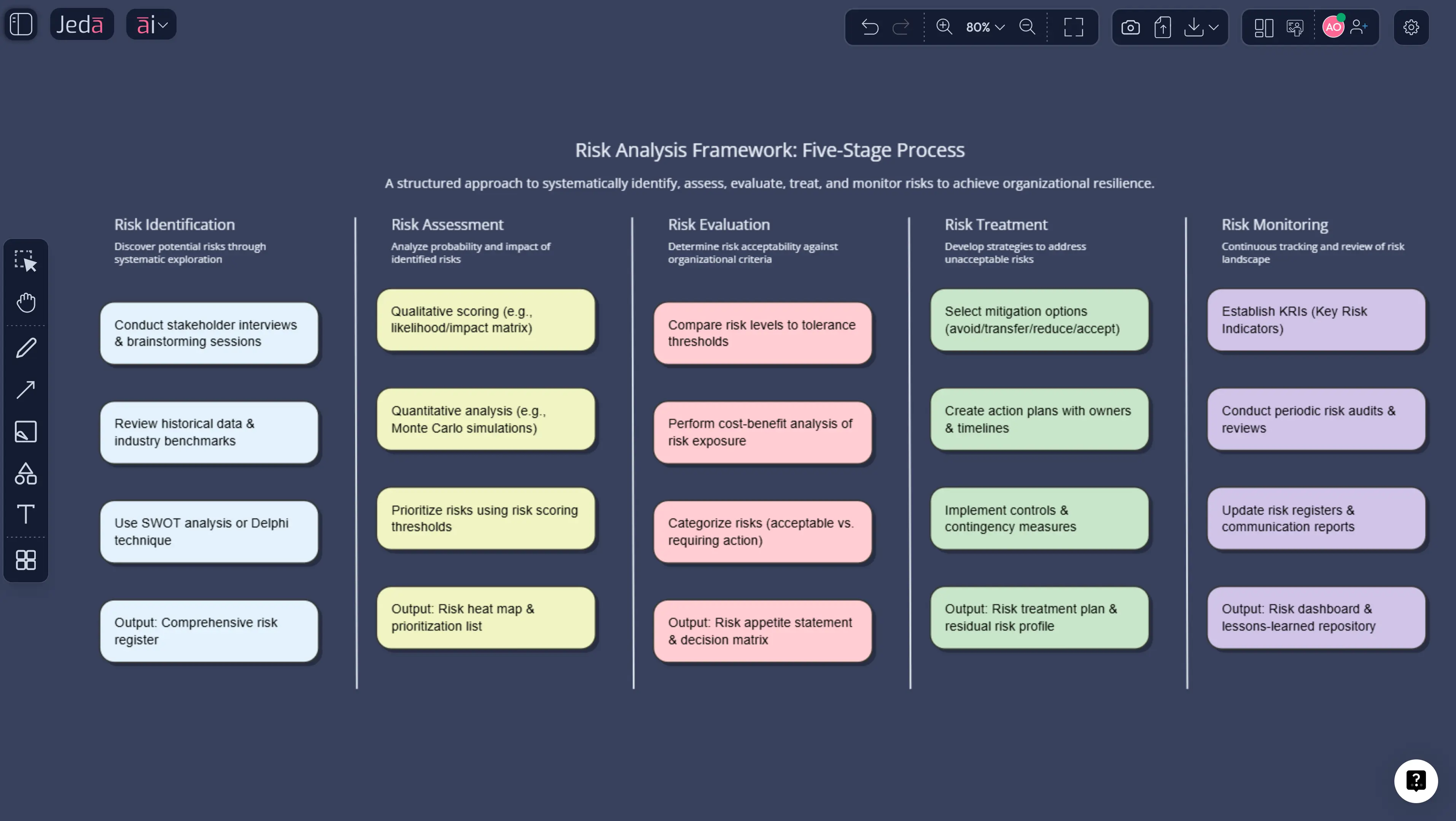
Every strategic decision carries risk. The question is whether you identify and assess those risks before they materialize — or after. Risk analysis provides the structured methodology for evaluating potential threats, estimating their probability and impact, and developing mitigation strategies that protect your organization's objectives. It's fundamental to project management, strategic planning, financial modeling, and operational continuity.
The challenge has always been speed and consistency. Traditional risk analysis methods — probability-impact matrices, Monte Carlo simulations, failure mode analysis — require significant time, subject-matter expertise, and manual effort. That's where AI changes the equation. Jeda.ai's Visual AI Workspace enables teams to generate comprehensive risk analysis frameworks, risk matrices, and mitigation plans in under 60 seconds. Over 150,000 professionals already use the platform to accelerate strategic analysis across 300+ frameworks.
This guide covers the fundamentals of risk analysis, how AI transforms the process, and step-by-step instructions for building your own risk assessment using Jeda.ai's AI Whiteboard.
What Is Risk Analysis?
Risk analysis is the systematic process of identifying potential events that could negatively affect an organization, assessing the likelihood and consequences of those events, and determining appropriate response strategies. The discipline has deep roots in engineering and financial management, with formal risk assessment methodologies emerging in the 1960s and 1970s through the nuclear and aerospace industries.
The ISO 31000 standard, first published by the International Organization for Standardization in 2009 and updated in 2018, provides the most widely adopted framework for risk management across industries. It defines risk as the "effect of uncertainty on objectives" and establishes principles for risk identification, analysis, evaluation, and treatment. The NIST Risk Management Framework and COSO Enterprise Risk Management (ERM) framework complement ISO 31000 with sector-specific guidance for technology, cybersecurity, and corporate governance respectively.
Risk analysis broadly falls into two categories. Qualitative risk analysis rates risks based on subjective assessments of probability and impact, typically using rating scales (low, medium, high) or numerical scores (1-5). It's faster and requires less data but is more susceptible to bias. Quantitative risk analysis applies mathematical models — expected monetary value calculations, decision tree analysis, Monte Carlo simulation — to produce numerical risk estimates. It's more rigorous but demands reliable historical data and statistical expertise.
In practice, most organizations use both approaches. A qualitative risk matrix identifies and prioritizes the risk landscape, while quantitative analysis provides deeper evaluation of the highest-priority risks. This two-stage approach aligns with guidance from both the Project Management Institute's PMBOK Guide and ISO 31000.
Why Use Risk Analysis with AI?
Traditional risk analysis suffers from three persistent problems. First, it's time-intensive. Building a thorough risk register and probability-impact matrix for a mid-size project typically requires 8-15 hours of facilitated workshops and documentation. Second, it's inconsistent. Different team members assess the same risk differently based on their experience, risk tolerance, and cognitive biases. Third, it's often a point-in-time exercise that quickly becomes outdated as conditions change.
AI addresses all three limitations. Jeda.ai's AI Workspace generates structured risk analysis outputs from natural language prompts, ensuring consistent formatting and comprehensive coverage. The multi-LLM intelligence — running DeepSeek, Claude, Grok, and other models simultaneously with an Aggregator selecting the best output — means your risk analysis benefits from multiple analytical perspectives rather than a single assessor's viewpoint.
- Instant Risk Matrix Generation
Generate probability-impact matrices, risk registers, and heat maps from a single prompt. Describe your project or business context, and the AI produces a structured risk assessment.
- Multi-Model Risk Assessment
Run risk analysis through multiple AI models simultaneously. The Aggregator selects the most thorough and balanced assessment, reducing individual model blind spots.
- Data-Driven Analysis
Upload project data, historical incident reports, or financial models via Data Insight. The AI identifies risk patterns from your actual operational data.
- Visual Format Flexibility
Use Vision Transform to convert risk matrices into flowcharts, risk registers into mind maps, or mitigation plans into process diagrams. One click changes the format.
- Collaborative Risk Workshops
Replace post-it-note risk workshops with real-time collaborative analysis. Teams assess, score, and prioritize risks together on the AI Whiteboard.
The practical impact is significant. What previously required a facilitated workshop, a risk consultant, and days of documentation can now be initiated with a well-crafted prompt and refined collaboratively in a single session. This doesn't eliminate the need for human judgment — it accelerates the structured work so teams can focus their expertise on evaluating and responding to the risks that matter most.
How to Create a Risk Analysis in Jeda.ai
Jeda.ai's AI Workspace offers multiple pathways for building risk analyses, from template-based approaches using the AI Menu to fully custom analyses via the Prompt Bar.
Method 1 — AI Menu (Recommended):
- Click the AI Menu button in the top-left corner of the canvas
- Navigate to Matrix Recipes
- Select a risk analysis template — RISK ANALSYIS
- Enter your project or business context, industry, and key risk categories
- Click Generate to produce a structured risk analysis
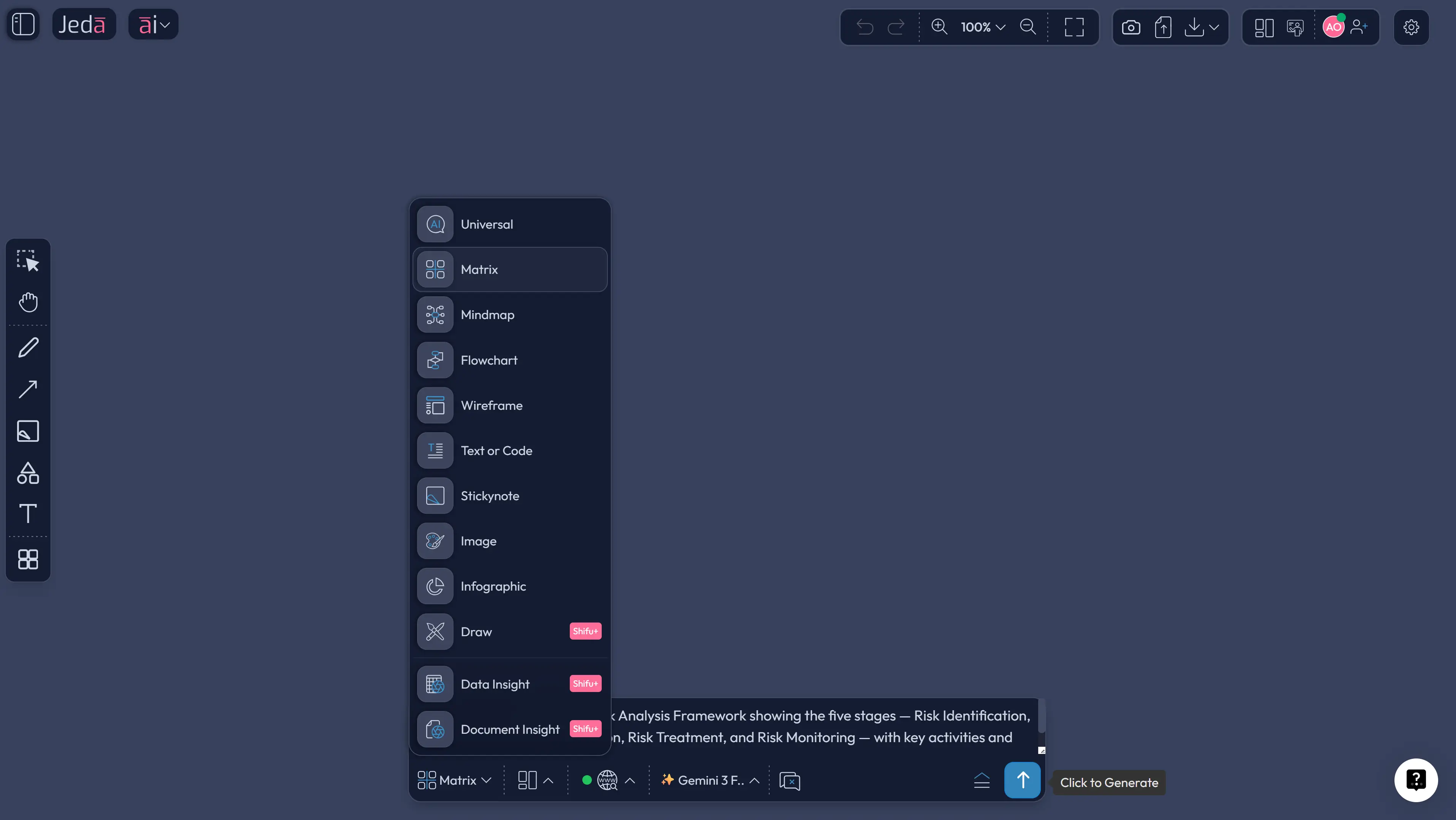
Method 2 — Prompt Bar:
- Open the Prompt Bar at the bottom of the canvas
- Select the Matrix command for risk matrices and registers, or Diagram for risk process flows
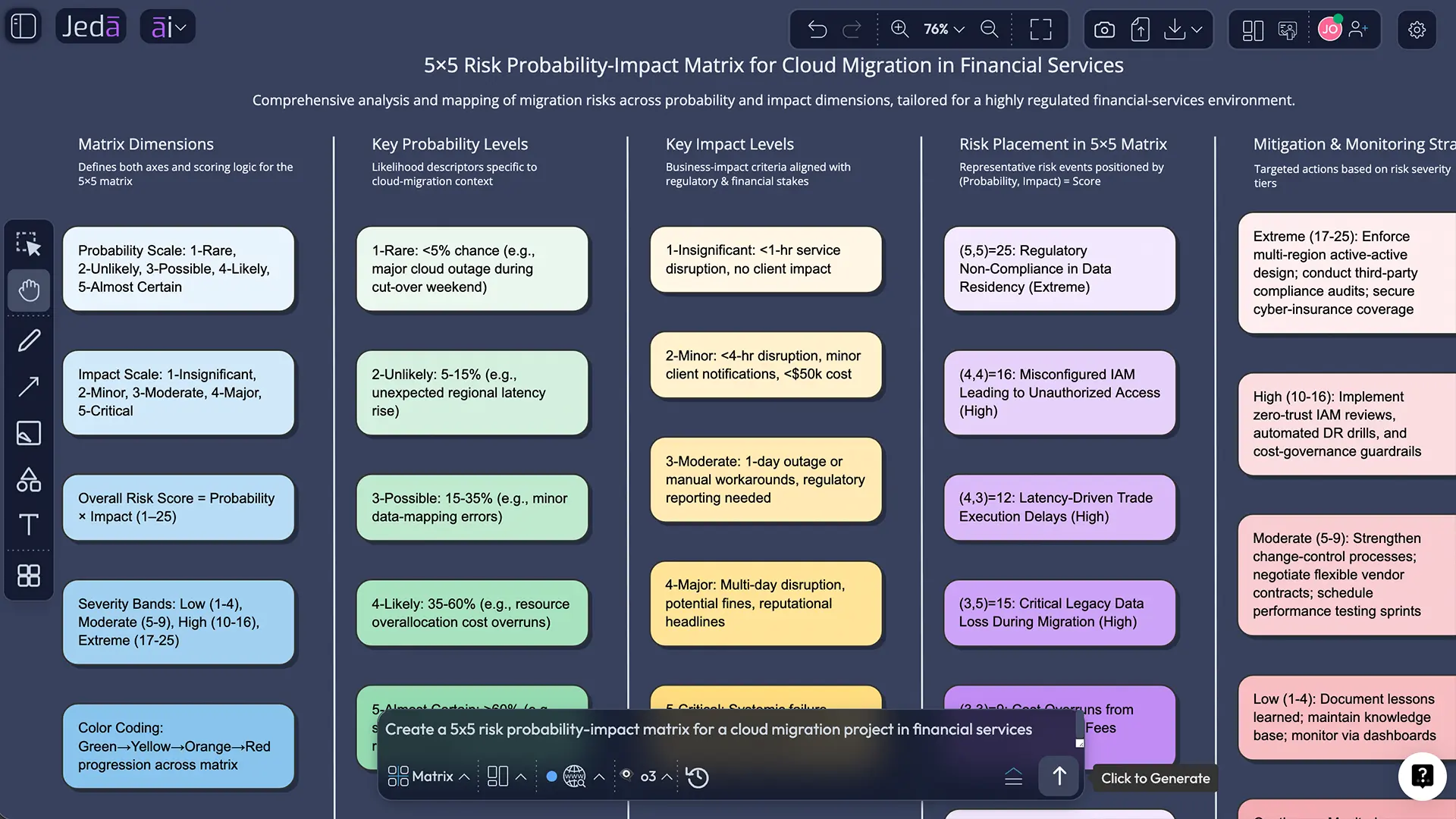
- Type a detailed prompt. For example: "Create a 5x5 risk probability-impact matrix for a cloud migration project in financial services, including data security, regulatory compliance, operational continuity, vendor dependency, and talent availability risks"
- Press Enter to generate
Method 3 — Data-Driven Risk Analysis:
- Select the Data Insight command from the Prompt Bar
- Upload a CSV or Excel file containing historical incident data, project risk logs, or operational metrics
- Choose your preferred output format like data summarizations
- The AI identifies risk patterns, generates a visual assessment, and highlights priority areas
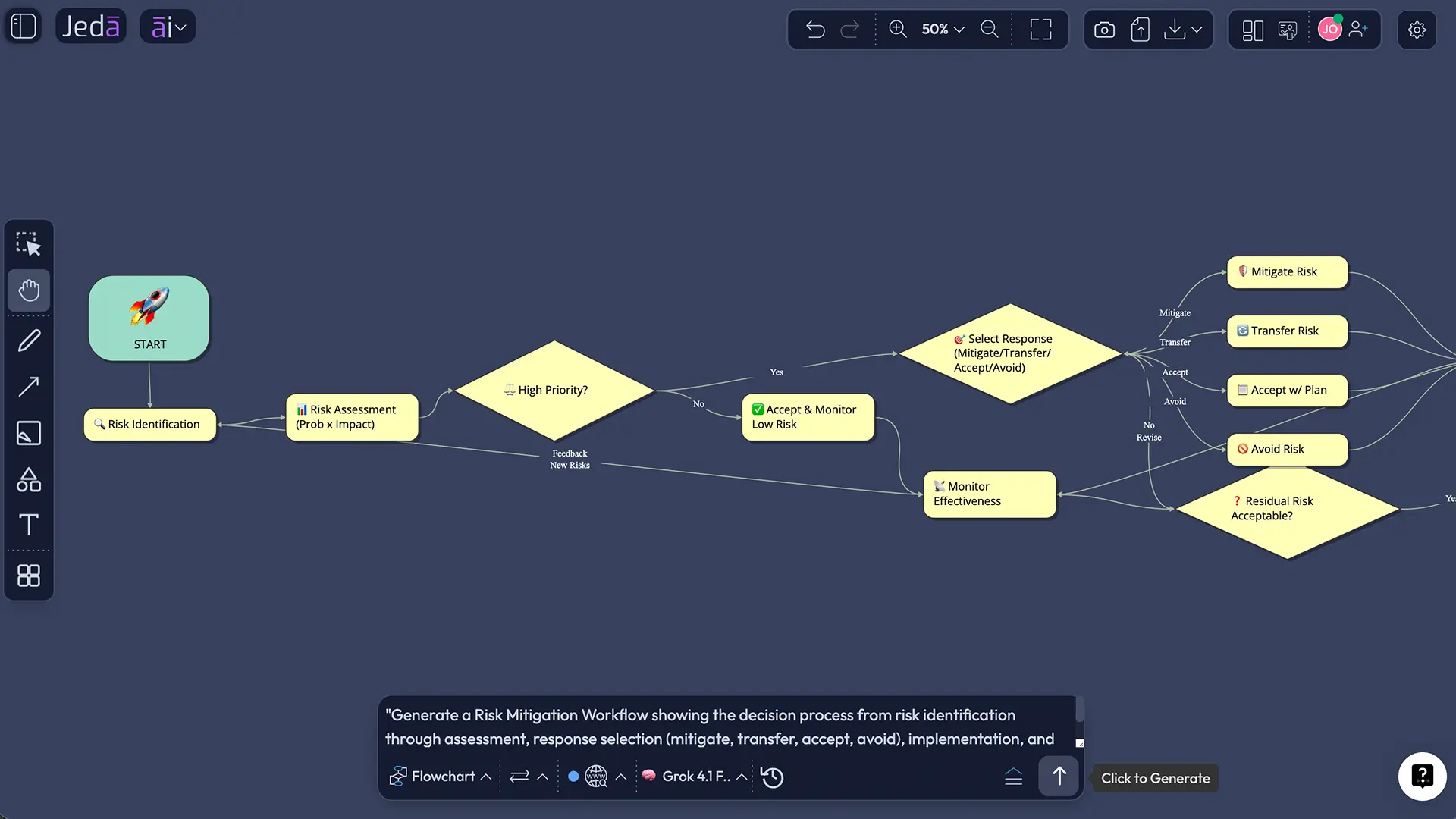
After generating your initial analysis, use AI+ to expand any risk category for deeper investigation. Use Vision Transform to convert your risk matrix into a mitigation flowchart or your risk register into a visual heat map.
- Define Scope and Objectives
Clarify what you're analyzing — a project, business unit, strategic initiative, or operational process. Define the risk categories relevant to your context.
- Generate the Risk Framework
Use the Prompt Bar with the Matrix or Diagram command to create your risk analysis structure. Include specific industry and organizational context for targeted results.
- Identify and Populate Risks
Review the AI-generated risk inventory. Add risks specific to your situation using AI+ to expand categories. Remove any that don't apply to your context.
- Assess Probability and Impact
Rate each risk on probability (1-5) and impact (1-5) scales. The AI provides initial estimates that your team calibrates based on organizational knowledge.
- Prioritize and Plan Responses
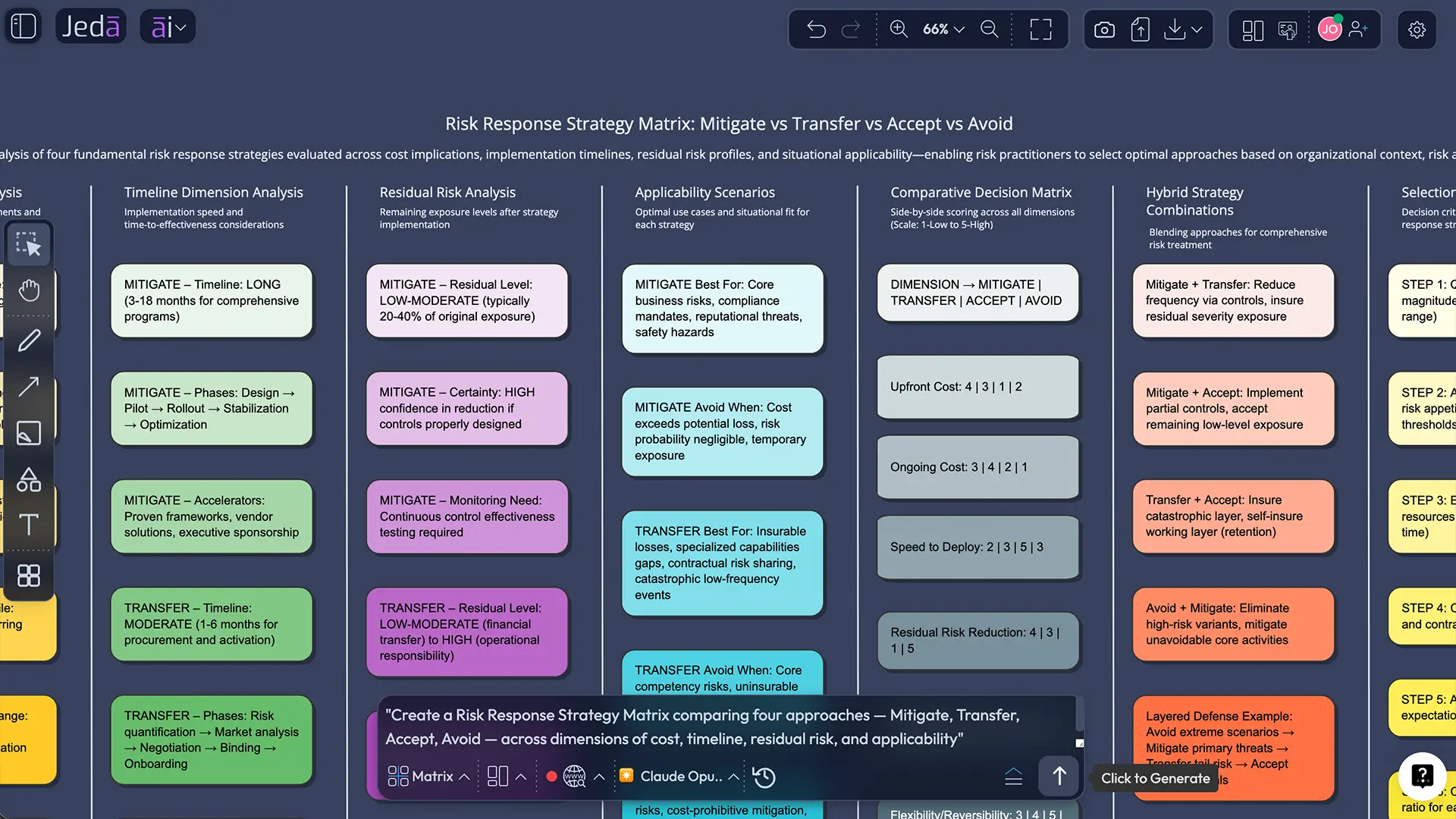
Focus on risks in the high-probability, high-impact quadrant. For each priority risk, define the response strategy: mitigate, transfer, accept, or avoid.
- Document and Monitor
Export your completed risk analysis as PNG, SVG, or PDF. Maintain the analysis on your Jeda.ai canvas for ongoing updates as conditions change.
Risk Analysis Templates & Examples
The following example demonstrates how AI-powered risk analysis works in a practical business context.
Scenario: A healthcare technology company is preparing to launch a patient data platform across three hospital systems. The CTO needs a comprehensive risk assessment for the executive steering committee.
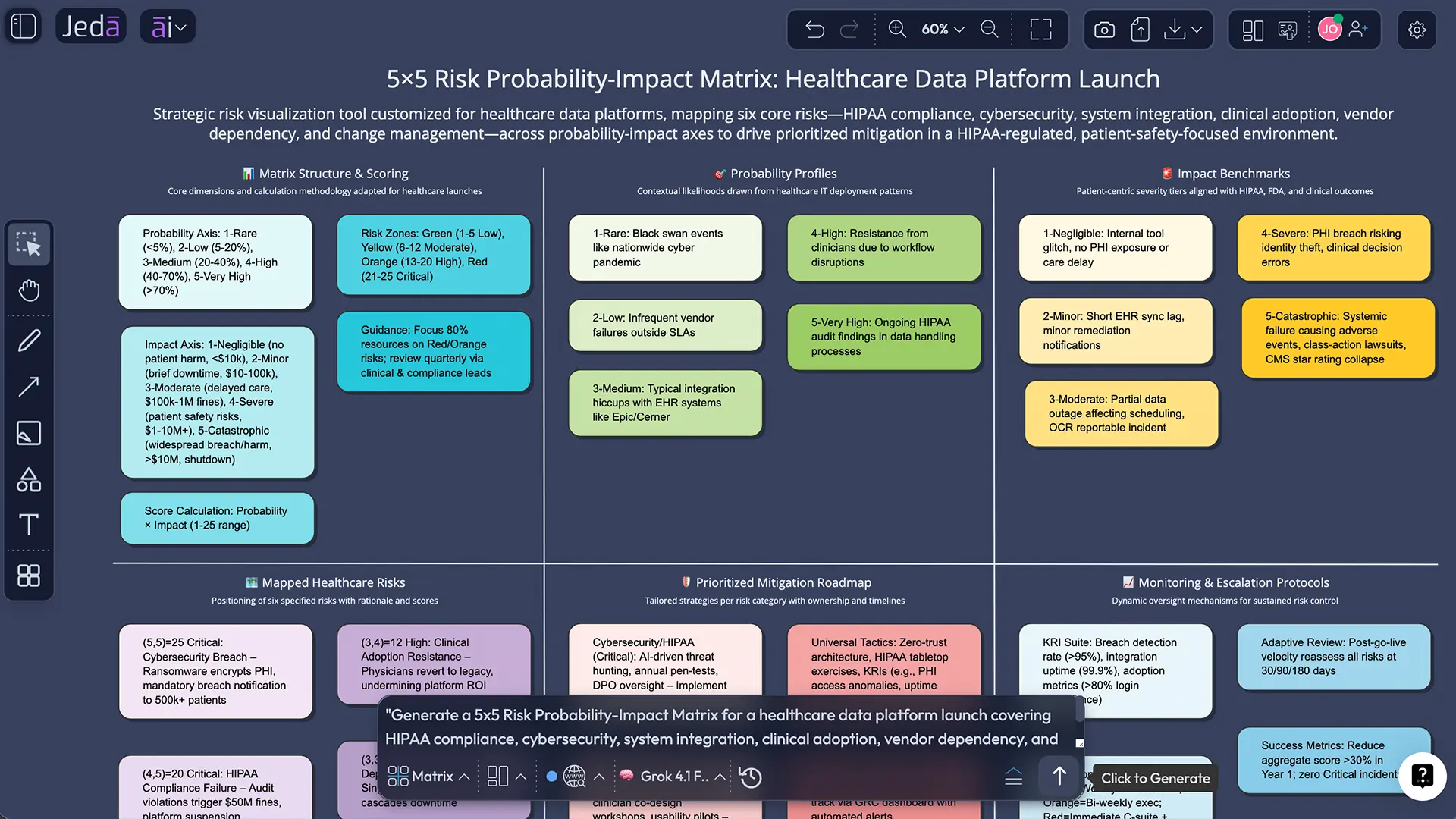
This example illustrates a critical advantage of AI-assisted risk analysis: coverage. When teams conduct manual risk identification, they tend to cluster around familiar risk categories and underrepresent risks outside their direct expertise. AI models trained on broad knowledge bases surface risk categories that specialized teams might overlook — regulatory, reputational, supply chain, and second-order effects that cascade across risk categories.
Best Practices & Tips
Effective AI-powered risk analysis follows several patterns observed across our user base of 150,000+ professionals on Jeda.ai:
Be specific in your prompts. A prompt like "create a risk analysis" produces generic output. A prompt like "create a 5x5 risk matrix for a Series B SaaS company expanding into the EU market, covering GDPR compliance, hiring challenges, competitive response, currency exposure, and technical scalability" produces an analysis you can actually use. Context drives quality.
Layer qualitative and quantitative approaches. Start with a qualitative risk matrix generated through the Matrix command to identify and prioritize your risk landscape. Then use Data Insight with historical data to quantify the highest-priority risks. This two-stage approach mirrors ISO 31000 best practices while leveraging AI to accelerate both stages.
Maintain risk analyses as living documents. The risk environment changes continuously. Rather than creating risk assessments as static deliverables, maintain them on your Jeda.ai AI Workspace canvas where your team can update probability ratings, add emerging risks, and track mitigation progress collaboratively. Quarterly reviews at minimum; monthly for high-stakes initiatives.
Use Vision Transform strategically. Different stakeholders need different views of the same risk data. Executives want heat maps and summary matrices. Project managers need detailed risk registers. Implementation teams need mitigation flowcharts. Vision Transform lets you create all three from a single risk analysis — select the output and convert it to the format your audience needs.
Common Mistakes to Avoid
Treating risk analysis as a compliance checkbox. When risk assessment becomes a box-ticking exercise, it loses its strategic value. The purpose is not to produce a document — it's to improve decision-making. Every risk analysis should lead to a specific response strategy or a deliberate decision to accept residual risk.
Underestimating low-probability, high-impact risks. Teams consistently overweight familiar, moderate risks and underweight rare but catastrophic ones. The 2008 financial crisis, the COVID-19 pandemic, and major supply chain disruptions all fell into this category. AI-generated risk analyses help by surfacing tail risks that manual brainstorming typically misses.
Confusing risk identification with risk analysis. Listing risks is not analyzing them. Analysis requires assessing probability, estimating impact, evaluating interactions between risks, and determining appropriate responses. Jeda.ai's Matrix command produces structured analyses that move beyond identification into assessment and prioritization.
Failing to assign risk ownership. Every significant risk needs an individual responsible for monitoring its status and implementing the response strategy. A risk matrix without owners is a risk matrix without accountability. Include ownership assignments in your Jeda.ai risk outputs.
Using a single risk analysis method for all decisions. A startup validating a product concept needs a different level of risk analysis than a pharmaceutical company launching a new drug. Scale your approach to the decision's significance. Jeda.ai supports this flexibility — from a quick 3x3 risk matrix for tactical decisions to comprehensive FMEA analysis for critical operations.
Frequently Asked Questions
- What is risk analysis in business?
- Risk analysis is the systematic process of identifying potential threats to business objectives, assessing their probability and impact, and developing response strategies. It applies to project management, strategic planning, financial decisions, and operational processes. AI tools like Jeda.ai accelerate this process by generating structured risk frameworks from natural language descriptions.
- How do I create a risk analysis matrix with AI?
- In Jeda.ai, open the Prompt Bar and select the Matrix command. Describe your project or business context, specify risk categories, and press Enter. The AI generates a probability-impact matrix with identified risks, scoring criteria, and priority ratings. Use AI+ to expand any risk for deeper analysis.
- What is the difference between qualitative and quantitative risk analysis?
- Qualitative risk analysis uses subjective ratings — typically low, medium, or high — to assess probability and impact. It's faster but less precise. Quantitative risk analysis applies mathematical models like Monte Carlo simulation or expected monetary value calculations for numerical risk estimates. Most organizations use both approaches in sequence.
- What is a 5x5 risk matrix?
- A 5x5 risk matrix plots risks on a grid with five probability levels (rare to almost certain) on one axis and five impact levels (negligible to catastrophic) on the other. Each risk receives a score from 1 to 25 based on its position. Jeda.ai generates 5x5 matrices with risk scoring and color-coded priority zones automatically.
- Can AI identify risks I haven't considered?
- Yes. AI models trained on broad knowledge bases surface risk categories that specialized teams often overlook, including regulatory changes, reputational impacts, second-order effects, and cross-functional dependencies. Multi-LLM intelligence in Jeda.ai provides diverse analytical perspectives that reduce blind spots.
- What risk analysis frameworks does Jeda.ai support?
- Jeda.ai provides access to 300+ strategic frameworks through its AI Menu, including risk probability-impact matrices, FMEA templates, bow-tie analysis diagrams, risk registers, decision trees, Monte Carlo input models, and ISO 31000-aligned risk assessment structures. Custom frameworks can also be created via the Prompt Bar.
- How does risk analysis differ from risk management?
- Risk analysis is the assessment phase — identifying, evaluating, and prioritizing risks. Risk management is the broader discipline that includes analysis plus risk treatment, monitoring, communication, and governance. Risk analysis informs risk management decisions but is one component of the overall process.
- How often should risk analysis be updated?
- For ongoing projects, review risk assessments monthly. For strategic or enterprise risks, quarterly reviews are standard practice. Major organizational changes, market shifts, or new regulatory requirements should trigger immediate reassessment. Jeda.ai's AI Workspace supports continuous updates through collaborative canvas editing.
- Can I upload project data for AI risk analysis?
- Yes. Jeda.ai's Data Insight command accepts CSV and Excel files containing historical incident data, project risk logs, financial metrics, or operational performance data. Document Insight processes PDF and Word reports. The AI identifies risk patterns and generates visual analysis outputs from your actual organizational data.
Sources & Further Reading
- [1]
International Organization for Standardization (2018) . “ISO 31000:2018 — Risk Management Guidelines” ISO.
View Source ↗ - [2]
Project Management Institute (2021) . “A Guide to the Project Management Body of Knowledge (PMBOK Guide), 7th Edition” PMI.
View Source ↗ - [3]
Slattery, Peter et al. (2024) . “The AI Risk Repository” MIT FutureTech.
View Source ↗
Build Your Risk Analysis with AI Today
Join over 150,000 professionals using Jeda.ai to generate structured risk assessments in seconds — not weeks.
Try Free Risk Analysis