Sailboat Retrospective with AI: Turn Sprint Drift into Clear Team Action
Sailboat Retrospective with AI gives teams a faster, more visual way to run honest sprint reflection inside one AI Workspace instead of scattering notes across calls, docs, and forgotten boards. In Scrum, the Sprint Retrospective exists to improve quality and effectiveness, not to perform a ceremonial “how did we feel?” lap around the harbor. The trouble is that many retros get vague, repetitive, or weirdly polite. Jeda.ai fixes that by turning the conversation into an editable AI Whiteboard where goals, momentum, blockers, and risks become visible in seconds.
A classic sailboat retro uses a simple metaphor: your team is the boat, the island is the goal, the wind pushes you forward, anchors slow you down, and rocks mark the risks ahead. Current Agile guides from Scrum.org, Atlassian, and Miro all describe the retrospective as a way to inspect what happened, identify what helped and hindered progress, and convert that reflection into actionable improvement. The format works because it is visual, easy to explain, and surprisingly good at surfacing issues teams usually dance around.
And that matters. A lot. Research on Agile teams keeps landing on the same uncomfortable truth: teams improve more when people feel safe enough to raise problems, admit mistakes, and speak plainly. That is why a visual, collaborative retrospective format still punches above its weight.
What is a sailboat retrospective?
A sailboat retrospective is a visual Agile reflection exercise that maps a team’s recent sprint or project onto a sailing metaphor. The island represents the destination or sprint goal. Wind shows the forces helping the team move. Anchors capture friction and blockers. Rocks represent risks or looming issues that could damage progress. Scrum itself does not prescribe the sailboat format specifically, but it does define the Sprint Retrospective as the event where teams inspect how the sprint went and identify the most helpful changes to improve effectiveness.
That combination is why the method works so well.
You get structure without stiffness. Teams can talk about delivery problems, process issues, dependencies, unclear decisions, missing context, stakeholder chaos, or morale dips without turning the meeting into a blame carnival.
Why use a Sailboat Retrospective with AI instead of a plain retro board?
Because most retros do not fail from lack of intent. They fail from sloppy synthesis.
People add notes. Someone clusters them. A few loud voices dominate. Half the board becomes wallpaper. Then everybody agrees to “improve communication,” which is corporate fog with a pulse.
Using Jeda.ai inside a shared AI Workspace changes the cadence. You can generate the initial retrospective structure instantly, collect and refine inputs on an AI Whiteboard, extend weak areas with the AI+ button, and convert findings into another format with Vision Transform when you need a cleaner action plan. You also stay inside one Visual AI environment instead of juggling chat tabs, sticky-note tools, and summary docs.
- Start faster
Generate the retrospective layout in seconds so the team spends time reflecting, not drawing islands and anchors by hand.
- Make discussion visible
Every insight lives on the same shared board, which keeps the conversation grounded and much harder to derail.
- Surface risks earlier
Rocks make hidden risks visible before they become next sprint’s avoidable disaster.
- Extend with AI+
Use the AI+ button to deepen a weak cluster, expand a blocker theme, or continue the board when the team uncovers more context.
- Turn reflection into action
Use Vision Transform to convert the retro into a flowchart, diagram, or action map after the discussion ends.
- Reuse the ritual
Save a repeatable retrospective structure inside Jeda.ai’s AI Workspace so every sprint starts from a better baseline.
Why the sailboat format still works for modern teams
The sailboat exercise has stuck around for a reason. Atlassian describes it as a visual way to map what propels a project forward and what anchors it down. Miro frames the same exercise around island, wind, anchors, and rocks, then adds grouping, discussion, and voting so the team turns reflection into next-step decisions. In other words, the metaphor is not fluff. It is scaffolding.
It also lowers the barrier for quieter contributors. People often find it easier to write “unclear stakeholder requests” under Anchors or “tech debt in checkout flow” under Rocks than to say those things cold on a call.
And when psychological safety matters—and it does—this format helps. Studies on Agile team retrospectives and software teams consistently connect better reflection with openness, no-blame behavior, collective decision-making, and the ability to raise problems safely.
The 5 parts of a strong sailboat retrospective board
A decent retro board has the shapes. A useful one has sharp prompts.
1) Island — the goal
The island is where the team is trying to go. This should not be vague. “Ship value” is not a goal. “Release self-serve billing without support intervention” is a goal.
2) Wind — what pushed us forward
Wind includes helpful conditions: strong collaboration, clear acceptance criteria, quick stakeholder decisions, stable tooling, focused scope, or supportive leadership.
3) Anchors — what slowed us down
Anchors are blockers, friction, or recurring drag. Think dependencies, approval lag, unclear ownership, brittle environments, meeting overload, or half-baked requirements.
4) Rocks — risks ahead
Rocks are not always current blockers. They are threats on the horizon: launch risk, resourcing gaps, hidden dependencies, unresolved quality issues, or stakeholder misalignment.
5) Actions — what changes next
This is the part teams skip or rush. Bad move. A retro without action is just group journaling with nautical props.
## How to create a Sailboat Retrospective with AI in Jeda.aiThis page follows the Jeda.ai workflow for recipe-driven framework content: when a Matrix recipe exists, use the guided AI Menu method first, then the Prompt Bar method for more control. Jeda.ai’s platform reference also requires command naming through the interface itself—so the content below uses the actual AI Menu and Prompt Bar flow, not slash-command shorthand. Jeda.ai supports editable matrix outputs, AI+, Vision Transform, and export in PNG, SVG, or PDF, which makes it a clean fit for retrospective work inside one board rather than across three tools and a prayer.
- Open a workspace in Jeda.ai
Create or open a board in Jeda.ai. This becomes your shared AI Workspace for the retrospective and follow-up actions.
- Method 1 (recommended): Use the Recipe Matrix
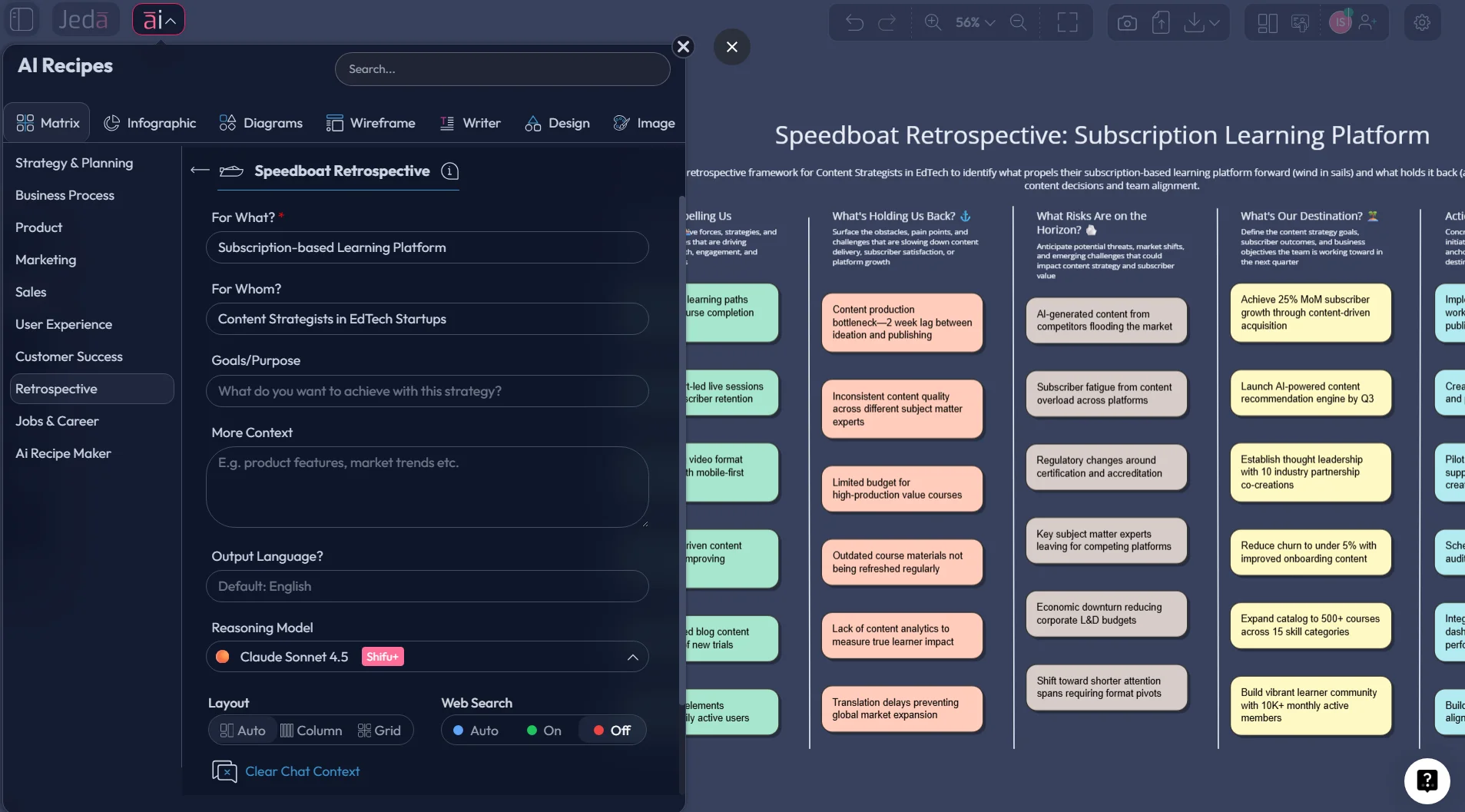
Open the AI Menu in the top-left, go to Matrix Recipes → Retrospective, choose Sailboat Retrospective, fill in the guided fields, and click Generate.
- Method 2: Use the Prompt Bar
Open the Prompt Bar at the bottom, select the Matrix command, write your Sailboat Retrospective prompt with the goal, sprint context, and sections you want, then generate the board.
- Add real context during the retro
As the team talks, edit sticky-note content, cluster repeated themes, and make the island, wind, anchors, and rocks more specific.
- Use AI+ to deepen a section
Select a cluster or note and tap the AI+ button to extend it with more detail, likely causes, or sharper action ideas. Keep the AI+ use broad and iterative rather than over-instructed.
- Convert the outcome into an action plan
Use Vision Transform to turn the final retrospective into a flowchart, diagram, or cleaner follow-up board for execution.
- Share, revisit, and export
Invite collaborators, present in Follow Me mode if needed, then export the board as PNG, SVG, or PDF for sprint records and stakeholder visibility.
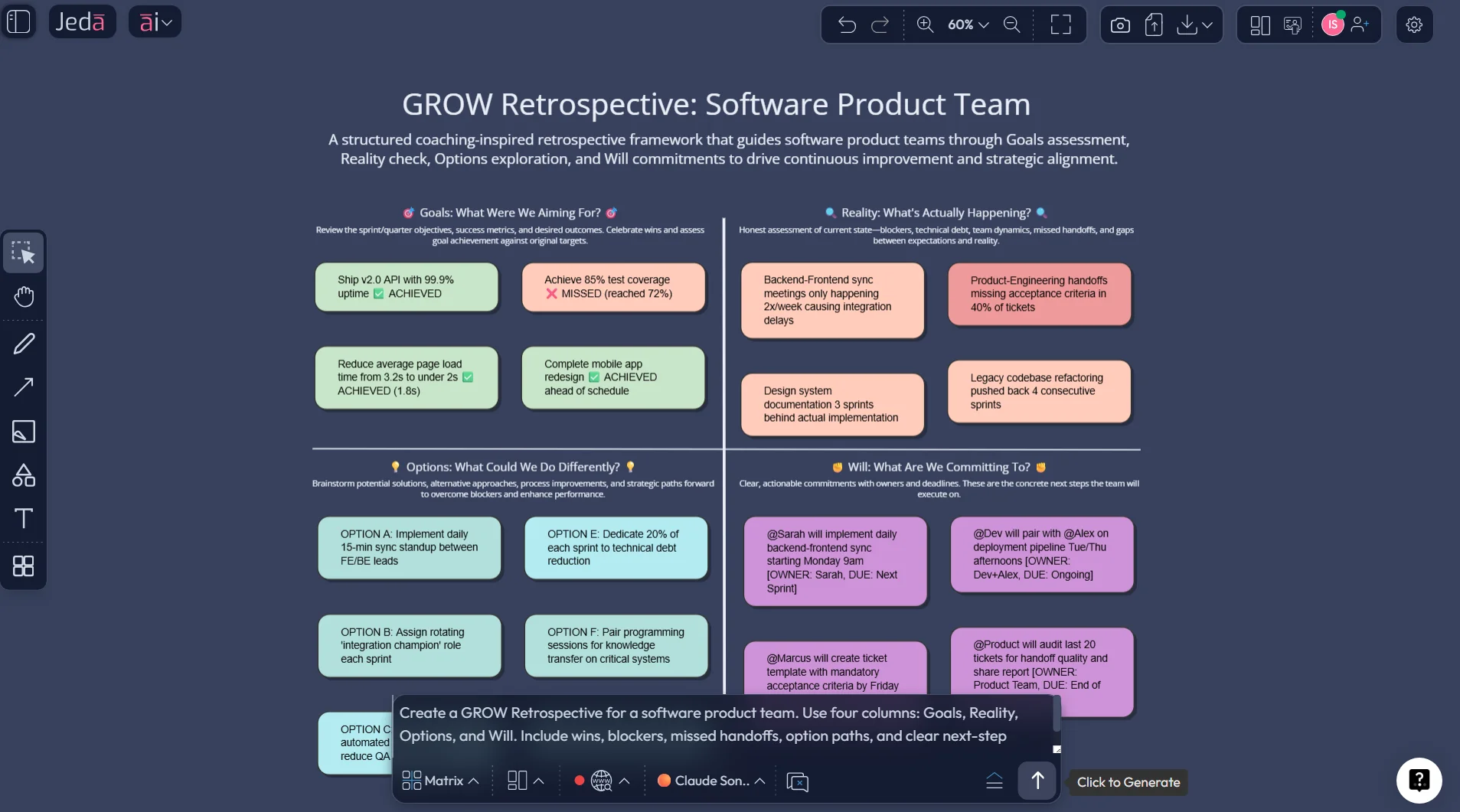
Copy-paste prompt for Method 2 (Prompt Bar → Matrix)
Prompt:
Create a Sailboat Retrospective with AI for [team / sprint / project].
Goal / Island: [target outcome].
Context: [what happened this sprint or milestone].
Generate a matrix-style retrospective with sections for Island/Goal, Wind, Anchors, Rocks, and Top Action Items.
Keep each note specific, practical, and discussion-ready. Group repeated themes where possible.
End with the 3 most important improvements the team should carry into the next sprint.
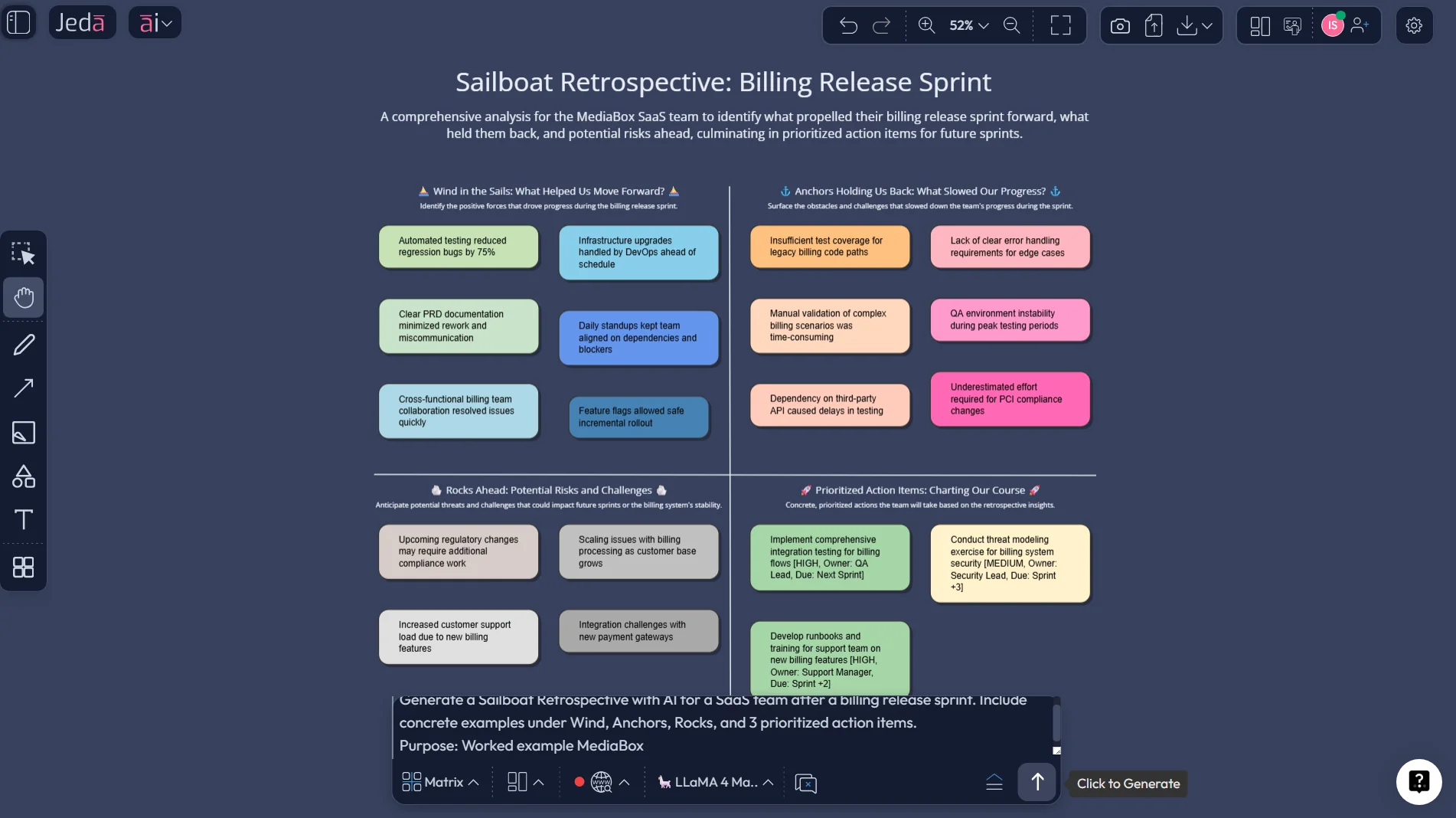
A worked example: SaaS product team after a rough release sprint
Let’s make this real.
Imagine a product team just finished a sprint tied to a billing release. The release shipped, but not cleanly. Support got hit. QA found late issues. Engineering pulled long hours. Stakeholders still called it a win because the feature went live. Classic.
A strong Sailboat Retrospective with AI might look like this:
- Island: Launch self-serve billing with fewer than 5 critical support escalations
- Wind: Fast cross-functional collaboration, a motivated team, and rapid bug triage
- Anchors: Late requirement changes, unclear ownership for rollback decisions, and overloaded QA
- Rocks: Technical debt in billing logic, weak release communication, and missing observability
- Top Action Items: freeze scope earlier, assign a release owner, add billing-specific monitoring before next launch
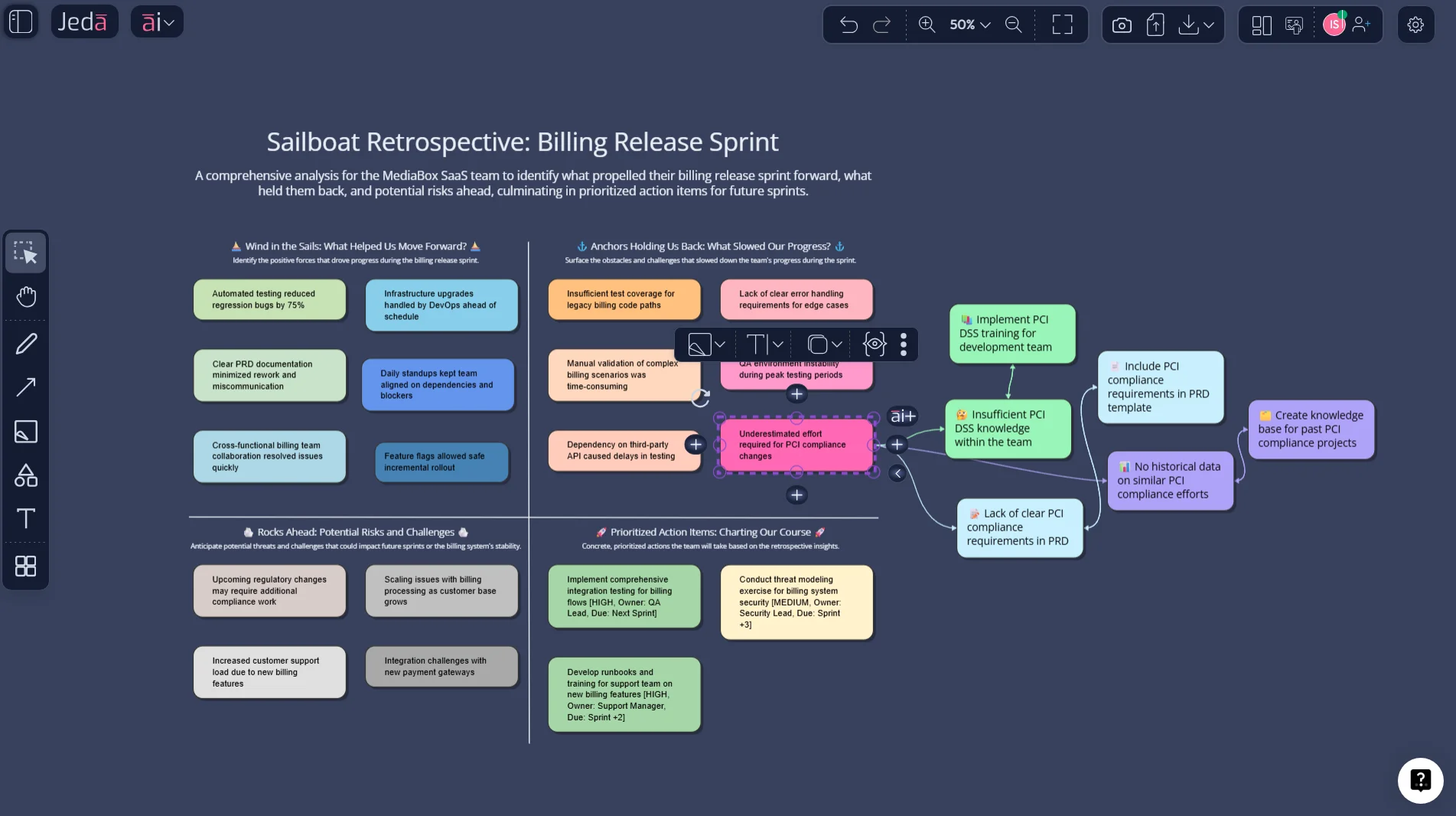
Now the useful part: after the discussion, select the biggest anchor cluster—say, “late requirement changes”—and use AI+ to extend it. Jeda.ai can help expand that into likely causes, follow-up questions, or a sharper process fix. Then use Vision Transform to convert the retro into a simple flowchart for the next release process.
That is the difference between “nice retro” and “we actually changed how we work.”
Best practices for running a better sailboat retro
The format is easy. The facilitation is where teams either get insight or just decorative stickies.
What actually helps
Common mistakes to avoid
1) Using a fuzzy island
If the goal is unclear, the whole board goes soft. People cannot judge what helped or hindered progress if the destination is mush.
2) Mixing anchors and rocks together
Current drag and future risk are not the same thing. When teams blur them, the retro turns into a general complaints dockyard.
3) Writing notes that are too abstract
“Communication issues.” Lovely. Between whom? About what? When? If a note could fit literally any sprint in human history, rewrite it.
4) Letting the retro become therapy with no output
Reflection matters. So does change. The Scrum Guide is pretty blunt here: the point is to plan ways to improve quality and effectiveness.
5) Treating the board like a dead artifact
A retro board should not vanish the second the call ends. In Jeda.ai, keep it in the AI Workspace, extend it with AI+, convert it if useful, and bring the actions forward.
Sailboat retrospective tools: board vs chat vs spreadsheet
| Visual structure | Live collaboration | Action clarity | Reusable template | Fast follow-up | |
|---|---|---|---|---|---|
| Jeda.ai | ✓ | ✓ | ✓ | 300+ strategic frameworks | ✓ |
| Chat-only AI tool | Limited | Basic | Depends on summary | Manual | ✓ |
| Spreadsheet or doc | ✗ | ✓ | Manual | ✓ | Slower |
Frequently Asked Questions
- What is a sailboat retrospective?
- A sailboat retrospective is a visual Agile reflection exercise that uses a sailboat metaphor to review a sprint or project. Teams map their goal, helpful forces, blockers, and risks so they can identify specific improvements for the next cycle.
- What do wind, anchors, rocks, and island mean in a sailboat retro?
- The island is the goal, wind represents forces helping the team move forward, anchors show what slowed progress, and rocks capture risks ahead. The point is to separate momentum, drag, and future threats clearly.
- Why use AI for a sailboat retrospective?
- AI helps teams generate the structure quickly, sharpen vague notes, cluster themes faster, and turn raw discussion into clearer action items. It saves setup time and improves synthesis, which is where many retrospectives normally fall apart.
- Can I create a Sailboat Retrospective with AI in Jeda.ai?
- Yes. Use the AI Menu if you want the guided recipe flow, or use the Prompt Bar with the Matrix command when you want more control. After generation, you can edit the board, extend sections with AI+, and convert it with Vision Transform.
- Is Sailboat Retrospective with AI only for Scrum teams?
- No. Product, marketing, design, operations, and cross-functional project teams can use it as long as they are reflecting on a recent cycle of work. The metaphor travels well, which is part of its charm.
- How long should a sailboat retrospective take?
- Most teams can run it in 45 to 90 minutes depending on group size and complexity. Scrum guidance caps the Sprint Retrospective at three hours for a one-month sprint, with shorter sprints usually requiring less time.
- What makes a sailboat retro effective?
- A clear goal, specific notes, silent idea collection before discussion, strong clustering, and a small set of owned action items make the biggest difference. Psychological safety matters too, because teams only improve when people can raise real problems honestly.
- Can I turn the retro into an action plan in Jeda.ai?
- Yes. Once the retrospective is complete, use AI+ to deepen the most important themes and Vision Transform to convert the board into a flowchart, diagram, or cleaner execution view for the next sprint.
- Can Jeda.ai export the final retrospective board?
- Yes. Jeda.ai supports export in PNG, SVG, and PDF formats, which works well for sprint records, stakeholder updates, and internal documentation.
- Is Jeda.ai suitable for remote retrospective workshops?
- Yes. Jeda.ai supports shared editing, collaboration controls, and presentation workflows inside one visual board. That makes it a practical fit for distributed teams who need a common view of the conversation.
Sources & Further Reading
- [1]
Ken Schwaber and Jeff Sutherland (2020) . “The Scrum Guide” Scrum Guides.
View Source ↗ - [2]
Atlassian (2026) . “Sailboat Retro Template” Atlassian Confluence.
View Source ↗ - [3]
Miro (2026) . “How to run a sailboat retrospective” Miro.
View Source ↗ - [4]
D. Khanna et al. (2022) . “Are Your Online Agile Retrospectives Psychologically Safe? the Usage of Online Tools” Springer.
View Source ↗ - [5]
A. Alami et al. (2023) . “Antecedents of psychological safety in agile software development teams” Journal of Systems and Software.
View Source ↗
Run Your Next Sailboat Retrospective with AI in Jeda.ai
Join over 150,000+ users using Jeda.ai’s AI Workspace and AI Whiteboard to turn messy reflection into visible, actionable improvement.
Try Free Template