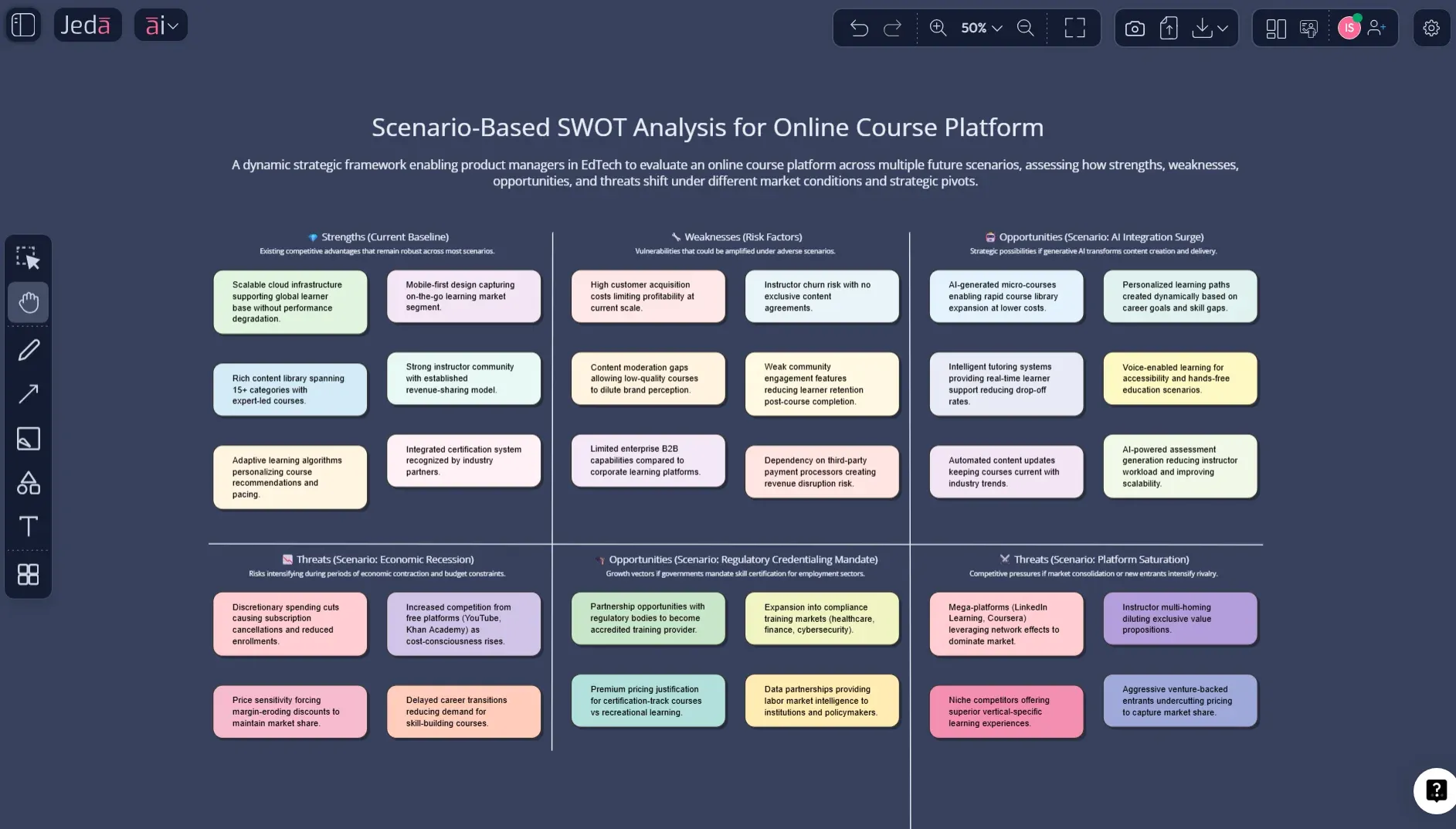
Scenario Based SWOT Analysis with AI gives you a smarter way to plan when the future refuses to sit still. Instead of making one neat four-box matrix and pretending the market will behave, you use Jeda.ai’s AI Workspace and AI Whiteboard to examine several plausible futures side by side, then decide what holds up across all of them. That matters when your team is dealing with regulatory shifts, AI disruption, new entrants, pricing pressure, or customer behavior that changes faster than your slide deck.
In practice, this means you stop asking, “What is our SWOT?” and start asking, “What does our SWOT look like if the market turns left instead of right?” That’s a much better question.
Jeda.ai turns that into a visual workflow. You can generate a structured matrix in seconds, refine it collaboratively, extend weak areas with the AI+ button, and transform your analysis into another format when you need a different lens. More on that in a minute. And yes, this all happens inside one AI Workspace, not across five tabs and one slowly dying spreadsheet.
What is Scenario Based SWOT Analysis with AI?
Scenario Based SWOT Analysis with AI is a scenario-planning version of the classic SWOT framework. Instead of producing one static matrix, you evaluate how strengths, weaknesses, opportunities, and threats change across multiple plausible futures. The goal is not prediction. It is preparedness.
That makes it different from standard SWOT. A normal SWOT tells you where you stand now. A scenario-based SWOT asks how that position changes if a competitor cuts prices, regulation tightens, distribution shifts, or demand spikes unexpectedly. In other words, it forces strategy to leave the comfort zone.
This is where scenario planning becomes useful. Pierre Wack’s work helped make scenario thinking a serious management tool, while later research has continued to show that scenario planning helps decision-makers work through uncertainty instead of freezing in it. Heinz Weihrich’s TOWS work is also relevant here because it pushed strategy beyond listing factors and toward matching internal realities with external conditions.
AI speeds this up dramatically. Instead of building one matrix manually, then rebuilding it for two or three alternative futures, you can ask Jeda.ai to generate a first draft, compare scenarios, surface weak assumptions, and give you something your team can actually debate on a canvas.
Why use Scenario Based SWOT Analysis with AI instead of standard SWOT?
Because most strategy problems are not static. They are conditional.
If your market is stable, a standard SWOT might be enough. But if you operate in tech, healthcare, energy, consulting, finance, education, or any category where the next 12 to 24 months can flip on regulation, funding, AI adoption, or pricing wars, one tidy matrix can become stale before the meeting ends.
Scenario-based work gives you three big advantages:
- Compare multiple futures
Model different scenarios side by side instead of betting everything on one assumed future.
- Spot fragile strategy early
See which strengths disappear, which weaknesses worsen, and which threats become existential under pressure.
- Find no-regret moves
Identify actions that make sense across most scenarios, not just the optimistic one.
- Build faster with AI
Generate first-draft matrices in minutes, then refine the reasoning instead of formatting boxes.
- Debate visually with your team
Use one AI Whiteboard for discussion, edits, alignment, and executive-ready outputs.
- Turn analysis into next steps
Extend weak areas with AI+ or convert the matrix into another visual when you need a decision path.
Most ranking pages for SWOT still focus on the generic four-box explanation, editable templates, or one-shot AI generators. Useful, sure. But they rarely show how to run SWOT under uncertainty, how to compare multiple futures, or how to convert those insights into a visual planning workflow. That gap is exactly where Scenario Based SWOT Analysis with AI earns its keep.
Scenario Based SWOT Analysis with AI in Jeda.ai
Jeda.ai fits this use case unusually well because the workflow is already framework-native. The AI Workspace supports structured Matrix generation, guided AI Recipes, Web Search as a platform feature, Vision Transform, and the AI+ button for extending a visual after generation. The result is not just text. It is an editable output on an AI Whiteboard.
That matters because scenario-based SWOT gets messy fast. You are often comparing several versions of the same business under different future conditions. If your tool only gives you a static response, you still have to reorganize, label, compare, and present it somewhere else. Jeda.ai skips that nonsense.
And there is another practical advantage. Jeda.ai already supports SWOT in the Matrix recipe library, and public Jeda resources also show Scenario-Based SWOT examples and use cases. So you are not trying to force a random prompt into the wrong format. You are working with a structure that already fits the job.
How to create Scenario Based SWOT Analysis with AI in Jeda.ai
There are two solid ways to do this in Jeda.ai. Use the AI Menu when you want a more guided setup. Use the Prompt Bar when you already know the structure you want.
Method 1: Recipe Matrix
This is the cleaner starting point for most teams.
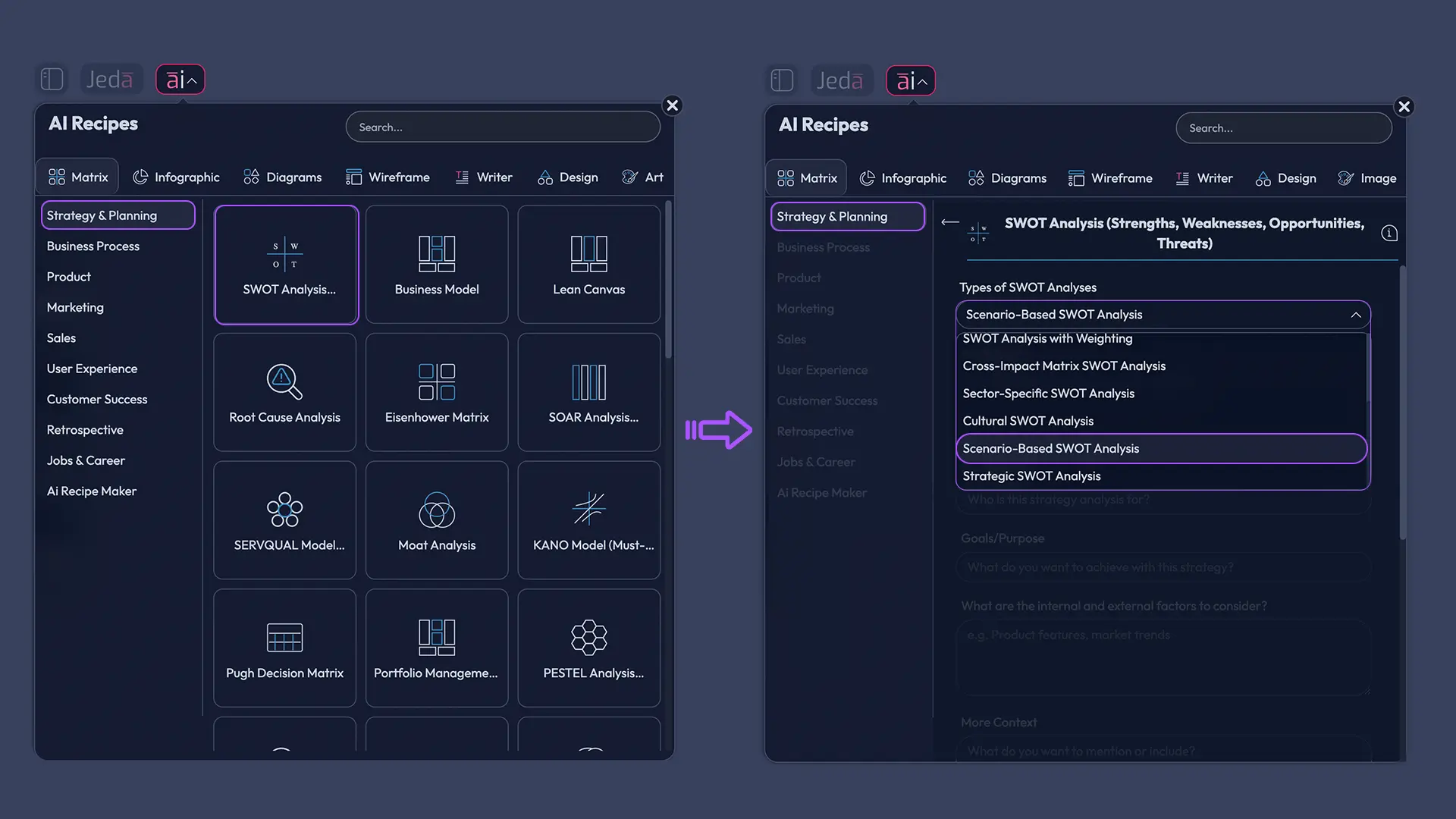
- Open the AI Menu from the top-left corner.
- Choose Matrix.
- Go to Strategy & Planning and start from the SWOT Analysis recipe.
- In the recipe form, define the business context and the future scenarios you want to test.
- Generate the matrix and review whether the output separates the scenarios clearly.
- Edit labels, duplicate sections if needed, and compare what changes across futures.
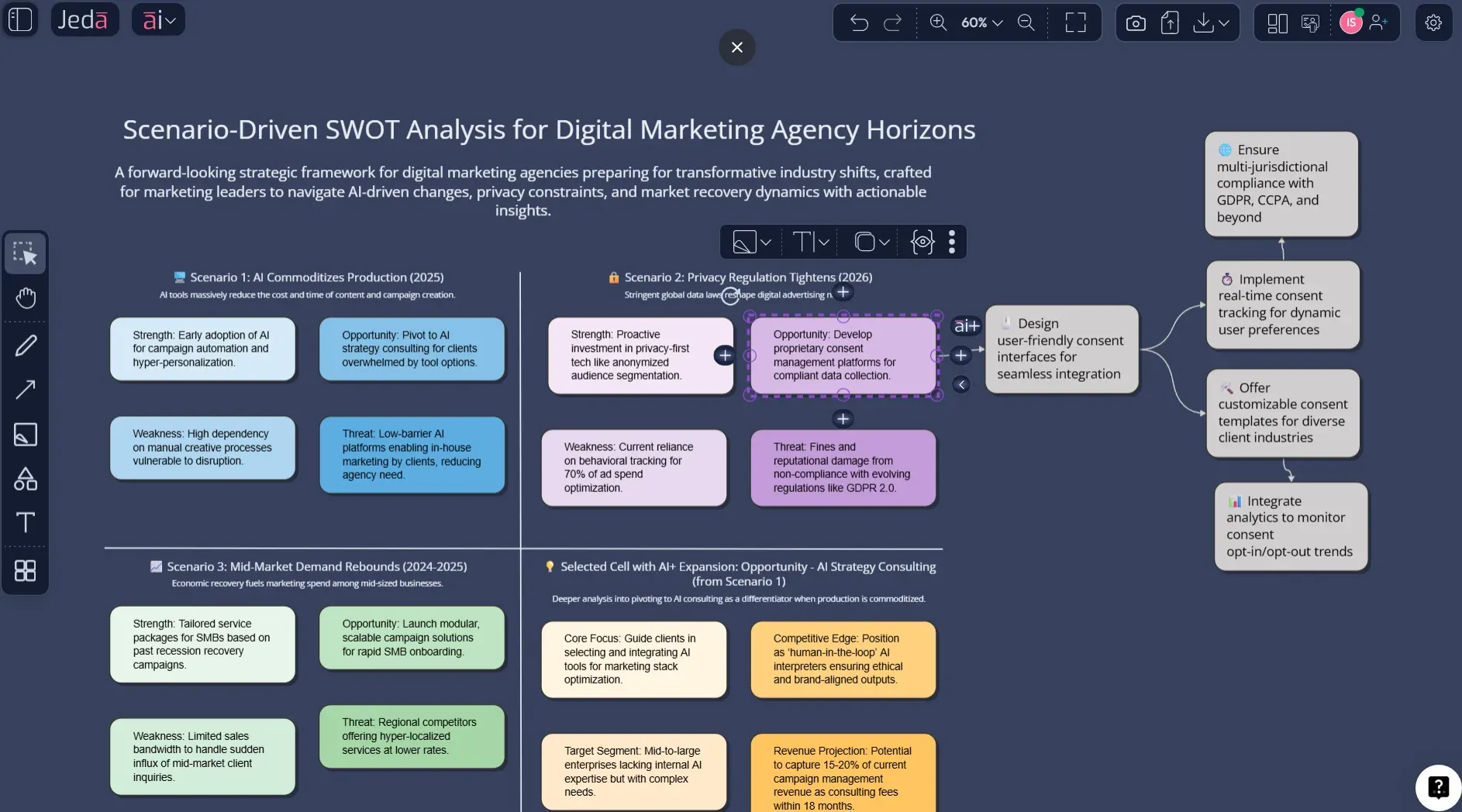
- Use the AI+ button on a selected cell or branch to deepen the analysis further.
- Use Vision Transform if you want to reframe the same thinking as a flowchart, mind map, or diagram.
Method 2: Prompt Bar
This is better when you want tighter control over the prompt.
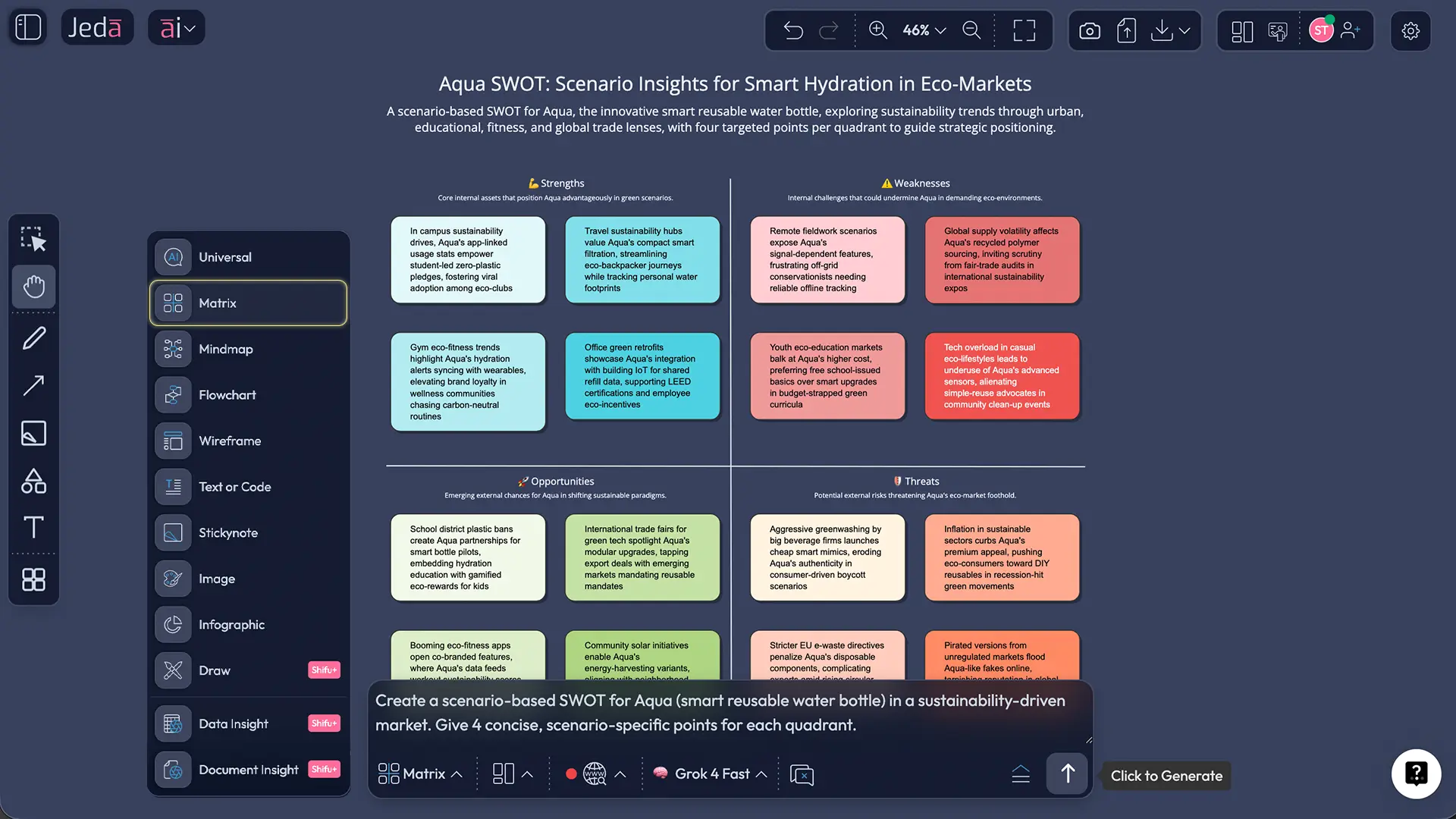
- Open the Prompt Bar at the bottom of the canvas.
- Select the Matrix command.
- Enter a prompt that specifies the business, time horizon, and distinct scenarios.
- Generate the first version.
- Refine the structure, extend weak sections with AI+, and compare scenario patterns on the same AI Whiteboard.
Prompt formula that works
Use this structure:
Business + time frame + number of scenarios + scenario labels + required output + decision objective
Example:
Build a Scenario Based SWOT Analysis with AI for a B2B cybersecurity SaaS company over the next 18 months. Use three scenarios:
- a well-funded enterprise competitor enters the market,
- compliance demand surges after a regulatory shift,
- budget cuts slow mid-market buying.
Show strengths, weaknesses, opportunities, and threats for each scenario. Then identify no-regret strategic moves and the risks we should monitor now.
What to include in the input
How AI+ should be used here
The AI+ button is your deep-dive move after the first matrix exists. Select one quadrant, branch, or cluster and use AI+ to extend it with AI. This is ideal when one scenario looks underdeveloped or one threat clearly deserves another layer of reasoning.
Do not over-script it. The point is extension, not micromanagement. Let AI+ continue the logic from the selected visual instead of trying to force a tiny, hyper-specific instruction onto it.
- Method 1 — Open the AI Menu
Click the AI Menu, choose Matrix, and go to the Strategy & Planning section.
- Method 1 — Start from SWOT Analysis
Use the SWOT Analysis recipe as the base structure for your scenario-based version.
- Method 1 — Add scenario context
Define the business, audience, time horizon, and the 2-4 future scenarios you want to stress-test.
- Method 1 — Generate the matrix
Create the first draft, review whether each scenario is separated clearly, and refine labels if needed.
- Method 2 — Open the Prompt Bar
Select the Matrix command at the bottom of the canvas when you want direct prompt control.
- Method 2 — Write a scenario-based prompt
Specify the company, future scenarios, required SWOT breakdown, and the decision you need to support.
- Extend with AI+
Select any quadrant, cell, or branch and use the AI+ button to deepen the thinking without rebuilding the whole matrix.
- Convert or present
Use Vision Transform to reframe the same analysis into another visual, then export as PNG, SVG, or PDF when ready.
Scenario Based SWOT Analysis with AI example
Let’s make this concrete.
Imagine a digital marketing agency that depends heavily on three enterprise clients. The leadership team wants to know whether to double down on performance marketing, expand into AI content services, or diversify into strategy retainers. A normal SWOT would produce one snapshot. That is not enough.
A scenario-based version could compare these three futures:
| Scenario | What changes |
|---|---|
| AI commoditizes ad production | Creative execution becomes cheaper, faster, and harder to differentiate |
| Privacy regulation tightens further | Attribution weakens, paid performance gets noisier, analytics complexity grows |
| Mid-market demand rebounds | Smaller accounts become more viable and less risky than concentration in a few giant clients |
Now the SWOT gets interesting.
Under the first scenario, the agency’s process discipline and client strategy depth might remain strengths, while pure content production becomes a weakness. Under the privacy scenario, first-party data capability becomes a major opportunity. Under the rebound scenario, the biggest threat may no longer be platform volatility. It may be operational strain from servicing too many accounts without the right delivery model.
That is the real benefit of Scenario Based SWOT Analysis with AI. You can see which advantages are durable, which weaknesses become dangerous only under pressure, and which opportunities appear only when the market changes shape.
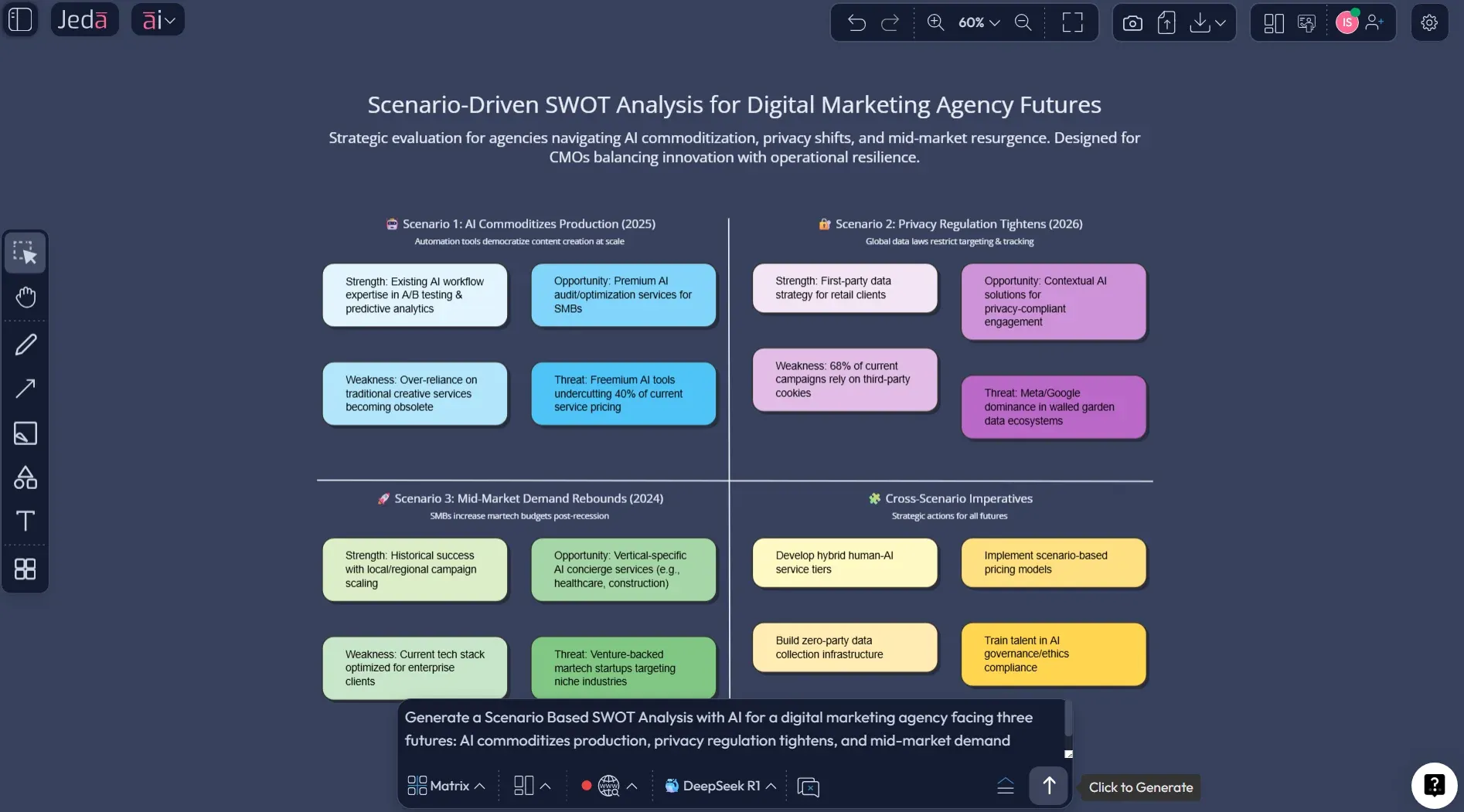
A good final board usually ends with three kinds of actions:
- No-regret moves — sensible in almost every scenario
- Scenario-triggered bets — worth pursuing only if a specific future starts materializing
- Watch signals — metrics or events that tell you which scenario is becoming more likely
That last part is often skipped. Bad idea. Strategy without signals is just optimism in business casual.
Best practices for Scenario Based SWOT Analysis with AI
A few more things matter.
First, separate what is internal from what is external. Teams love to stuff every problem into “threats.” That muddies the logic. Second, be specific about the scenario trigger. “Market gets worse” is useless. “EU regulation lengthens sales cycles by 90 days” is helpful. Third, keep it collaborative. Scenario-based work benefits from disagreement. You are not trying to create a perfectly polite matrix. You are trying to stress-test assumptions before reality does it for free.
Common mistakes to avoid
The most common mistake is building three scenarios that are basically the same story with different adjectives. If each future leads to the same SWOT, you are not doing scenario planning. You are decorating certainty.
Another mistake is treating every scenario as equally likely. They do not need equal probability to be useful. Some scenarios deserve attention because they would hurt badly, not because they are the most likely.
Teams also overfill the matrix. More bullets do not mean more intelligence. Prioritize the factors that actually change strategy.
And one more. Big one. Do not stop at the matrix. Use the analysis to decide what you should do now, what you should delay, and what signals you should watch. Otherwise you just built a nicer brainstorming artifact.
Frequently Asked Questions
- What is Scenario Based SWOT Analysis with AI?
- Scenario Based SWOT Analysis with AI is a method for comparing strengths, weaknesses, opportunities, and threats across multiple plausible futures instead of one fixed present. AI helps generate, organize, and expand those scenario-specific matrices faster so teams can compare risks, resilience, and strategic options in one visual workflow.
- How is scenario-based SWOT different from standard SWOT?
- Standard SWOT gives you one snapshot of the current situation. Scenario-based SWOT changes the future conditions and asks how your strengths, weaknesses, opportunities, and threats shift under each one. It is better for uncertainty, market shocks, and strategy decisions that depend on more than one possible outcome.
- When should I use Scenario Based SWOT Analysis with AI?
- Use it when the decision depends on uncertain external conditions such as regulation, pricing pressure, competitor entry, AI disruption, or demand changes. It is especially useful for market entry, product strategy, portfolio decisions, hiring plans, and any planning cycle where one static matrix feels suspiciously tidy.
- How many scenarios should I model?
- Two to four scenarios is usually the sweet spot. Fewer than two rarely exposes real uncertainty. More than four can turn the exercise into a maze. Choose distinct futures with real strategic consequences, then compare what remains strong, what weakens, and what actions hold up across them.
- What command should I use in Jeda.ai?
- Start with the Matrix command. If you prefer a guided setup, open the AI Menu, choose Matrix, and begin from the SWOT Analysis recipe in Strategy & Planning. That gives you the right structure first, then you can adapt the output into a scenario-based version for your specific decision.
- Can I create Scenario Based SWOT Analysis with AI from documents or data?
- Yes. In Jeda.ai, Document Insight and Data Insight can ground the analysis in uploaded materials, then you can generate the output as a matrix. That is useful when your scenario work needs to reflect actual reports, financial data, market notes, or internal strategy documents rather than pure brainstorming.
- How does the AI+ button help with this workflow?
- The AI+ button helps after the first matrix exists. Select a quadrant, cell, or branch and use AI+ to extend it with more detail. This is useful when one scenario is thin, one threat needs unpacking, or one opportunity needs a deeper layer of strategic reasoning without rebuilding the whole board.
- Can I convert the matrix into another visual?
- Yes. Jeda.ai supports Vision Transform, which lets you use the existing visual as context and reframe it into another structure. That is handy when your team wants to turn a scenario-based SWOT into a flowchart, mind map, or another visual for communication and decision support.
- Who should use Scenario Based SWOT Analysis with AI?
- It is useful for strategy consultants, business leaders, product managers, business analysts, and innovation teams. Really, anyone making decisions under uncertainty can use it. The framework is not limited to enterprise planning either. Startups, agencies, and operating teams can get serious value from it.
- Why use Jeda.ai for this instead of a static template?
- A static template helps you document one view. Jeda.ai helps you generate, compare, extend, and transform multiple future views inside one AI Workspace. That means less manual rebuilding, better collaboration on an AI Whiteboard, and a faster path from strategic thinking to something presentation-ready.
Sources & Further Reading
- [1]
Weihrich, Heinz (1982) . “The TOWS Matrix—A Tool for Situational Analysis” Long Range Planning.
View Source ↗ - [2]
Wack, Pierre (1985) . “Scenarios: Uncharted Waters Ahead” Harvard Business Review.
View Source ↗ - [3]
Cordova-Pozo, Kathya; Rouwette, Etiënne A.J.A. (2023) . “Types of scenario planning and their effectiveness: A review of reviews” Futures.
View Source ↗ - [4]
Abu Bakir, Sahar Moh’d (2023) . “Impact of Strategic Analysis (SWOT) on the Performance of Jordanian Public Shareholding Industrial Companies: The Mediating Role of Scenario Planning” International Journal of Sustainable Development and Planning.
View Source ↗ - [5]
University of Kansas Center for Community Health and Development (2026) . “SWOT Analysis: Strengths, Weaknesses, Opportunities, and Threats” Community Tool Box.
View Source ↗
Start Your Scenario Based SWOT Analysis with AI Today
Join over 150,000+ users who use Jeda.ai’s AI Workspace to turn uncertainty into clearer strategic choices.
Try Free Template