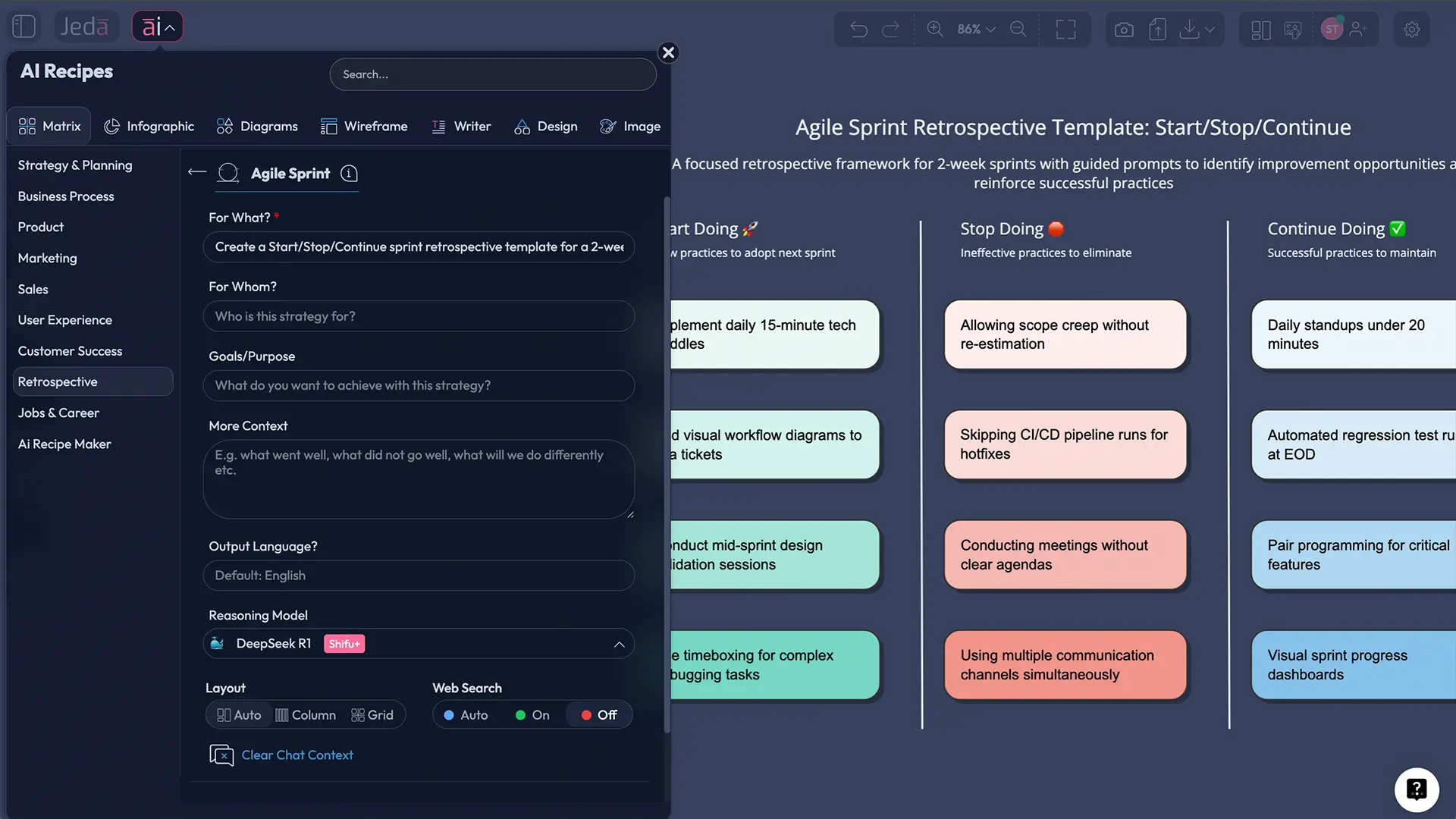
A sprint retrospective template should make your team faster next sprint — not just fill 45 minutes with polite opinions. In a Visual AI AI Workspace, you can capture inputs, spot patterns, and turn “we should…” into clear action items your team can track. That’s what this guide shows, using Jeda.ai (an AI Whiteboard used by 150,000+ users) to run a retrospective as a matrix you can keep improving.
What is an Agile Sprint Retrospective?
A Sprint Retrospective is the Scrum event held at the end of a sprint where the team inspects how the sprint went and agrees on concrete improvements for the next sprint. The Scrum Guide frames it as planning ways to increase quality and effectiveness, covering people, process, tools, and the Definition of Done. Retrospectives didn’t start with Scrum. “Project retrospectives” as a structured practice were formalized earlier in software and project management circles, notably by Norman Kerth’s work on team reviews and learning loops.
So what’s the real point?
- Learn fast (without waiting for a post‑mortem).
- Keep improvements small enough to ship.
- Build trust by making issues discussable — and fixable.
Why use AI for sprint retrospectives?
A retrospective has two jobs: collect the truth, then turn it into change. AI helps with both, especially when the team is distributed or time‑boxed.
- Faster synthesis
AI clusters similar notes, flags themes, and drafts a tight summary so you spend time deciding—not sorting.
- Sharper action items
Turn vague feedback into specific next steps with owners, due dates, and success signals.
- More equal participation
Async inputs + anonymous sticky notes reduce “loudest voice wins” and bring quieter signals into the room.
- Less déjà vu
Compare this sprint to last sprint: repeated blockers, recurring handoffs, chronic tool pain. Patterns become obvious.
- Safer facilitation
AI can rephrase blame-y notes into process-focused language and keep the discussion about systems, not people.
- Instant format changes
Start with a matrix, then convert the same content into a flowchart for a new working agreement or checklist.
And yes, you can still run a retro without AI. But if your “actions” keep dying in a shared doc nobody opens, you’re already paying the cost.
The retrospective matrix formats that work (and when to use each)
Different retro formats pull different truths out of a team. If you always use the same board, you’ll always get the same kind of feedback. Atlassian and Miro both publish practical format lists (Start/Stop/Continue, 4Ls, Sailboat, 5 Whys, and more).
Here’s a practical picker:
| Format (Matrix) | Best for | Use when |
|---|---|---|
| Start / Stop / Continue | Action-focused improvement | You need quick, clear changes for next sprint |
| 4Ls (Liked, Learned, Lacked, Longed for) | Balanced learning | You want insight and morale signals |
| Mad / Sad / Glad | Emotional temperature | Tension is high or engagement is low |
| Sailboat | Risks + anchors | You’re trying to identify blockers and accelerators |
| Starfish (Start, Stop, More, Less, Keep) | Nuanced behavior change | You want “more/less” vs binary start/stop |
| 5 Whys (as an add-on) | Root cause | A recurring problem needs digging, not debating |
If you want one format that’s hard to mess up, Start/Stop/Continue is the default for a reason.
How to run an Agile Sprint Retrospective with AI in Jeda.ai
You’ll use Jeda.ai as an AI Workspace that behaves like an AI Whiteboard—meaning the board is editable, shareable, and built for real-time collaboration. (And if your team wants evidence, you can bring in documents, screenshots, or CSV/Excel via Document Insight or Data Insight.)
Method 1: Recipe Matrix (recommended for repeatable retros)
This method uses the AI Menu’s Matrix recipes to generate a structured retrospective board in seconds. If you don’t see a “Retrospective” recipe, pick a close matrix template (e.g., Start/Stop/Continue) and rename the columns—same outcome, zero drama.
- Open an AI Whiteboard in Jeda.ai
Create a new board in your AI Workspace and invite the sprint team (real-time collaboration is built in).
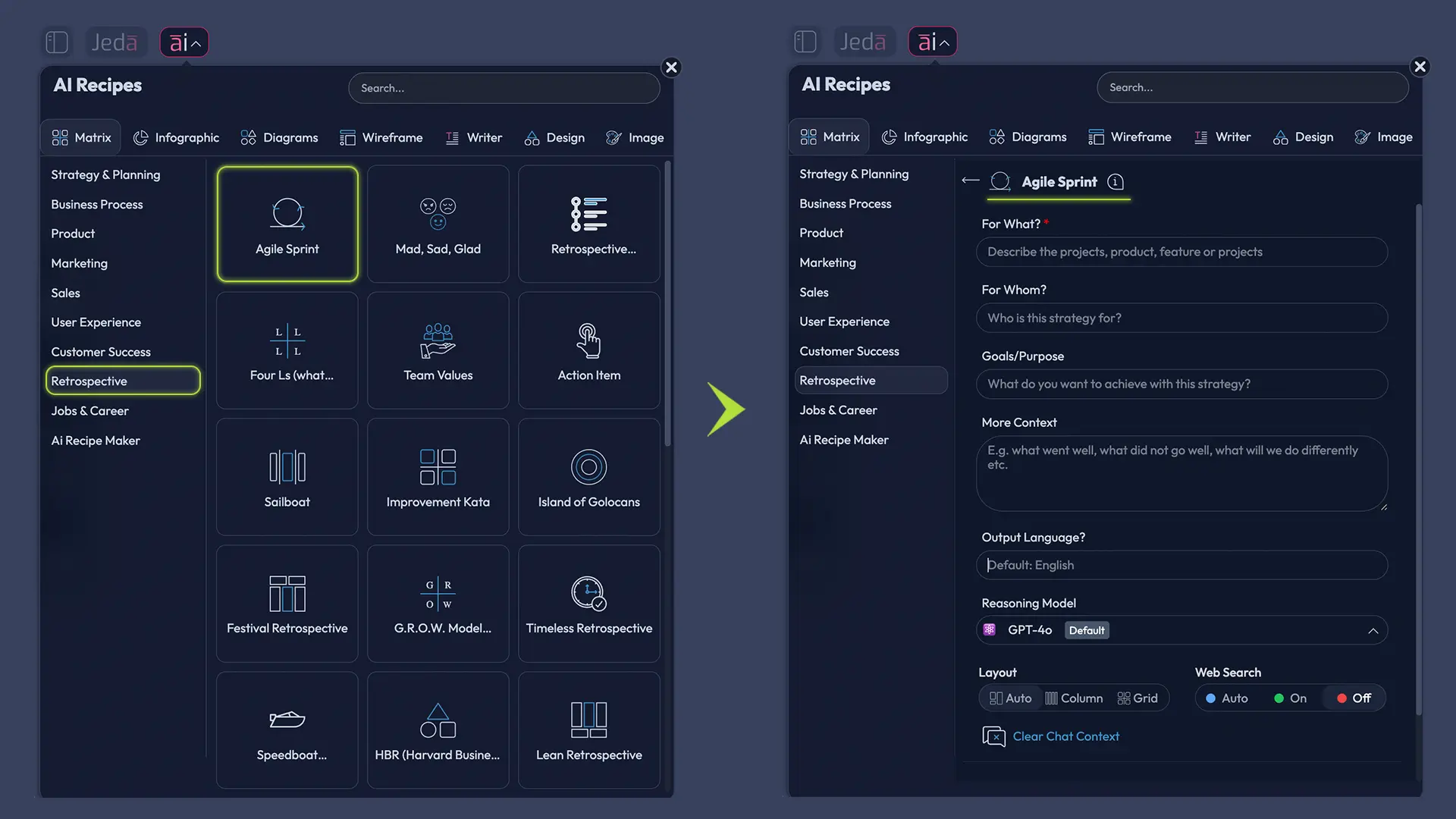
- Go to AI Menu → Matrix Recipes
From the AI Menu (top-left), choose Agile Sprint Retrospective Matrix recipe.
- Add sprint context (lightweight)
Paste the sprint goal, key shipped items, and 3–5 notable events (incidents, scope changes, blockers).
- Generate the retrospective matrix
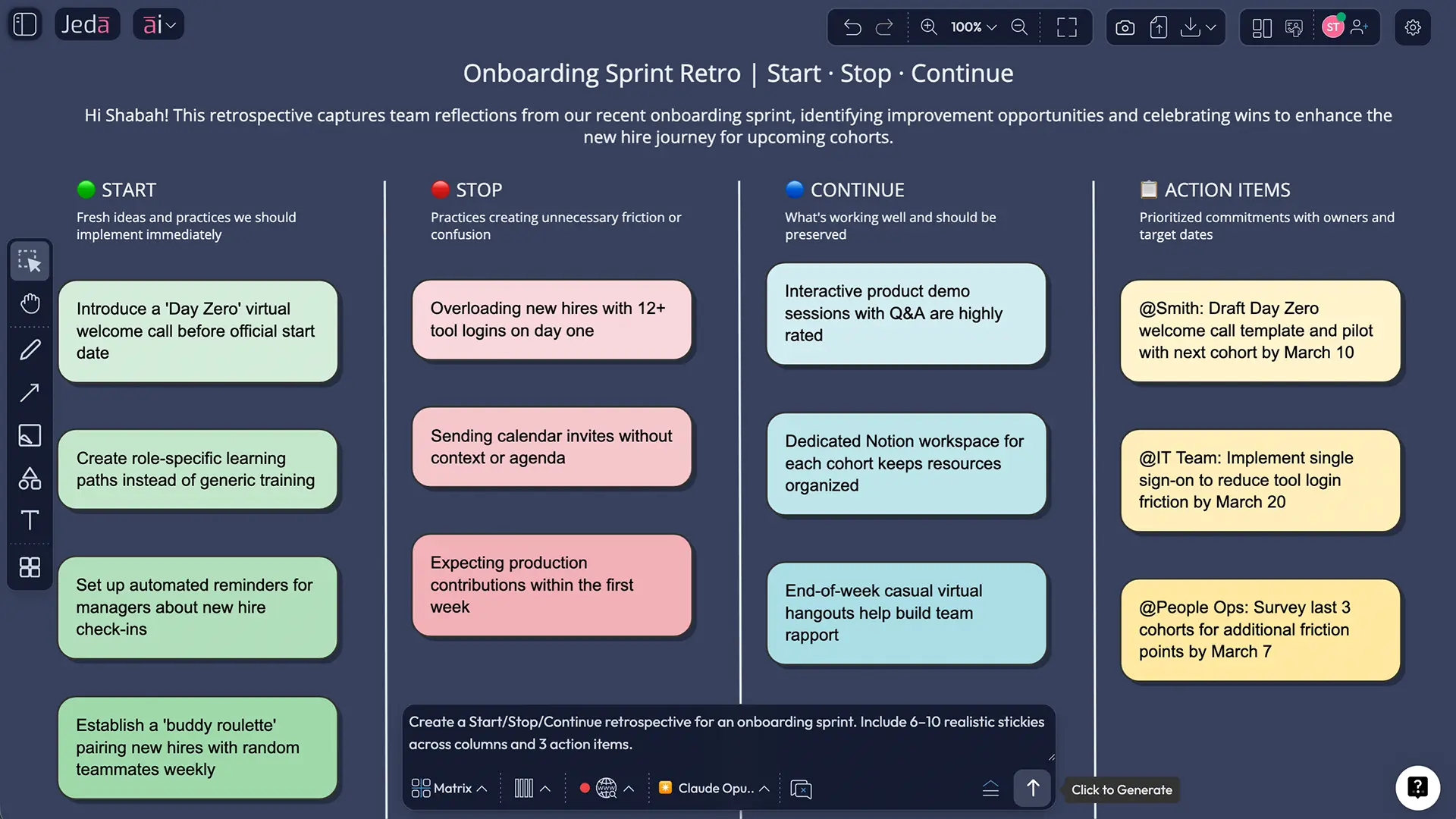
Click Generate. You’ll get a structured board with columns ready for sticky-note inputs.
- Collect notes + vote
Give 5–7 minutes for silent input, then vote to surface the highest-impact topics.
- Convert insights into action items
Create 1–3 actions with clear owners and a check-in date. Keep it small enough to finish next sprint.
Method 2: Prompt Bar (fast when you know what you want)
The Prompt Bar is perfect when you already know the format you want and just need the board generated quickly.
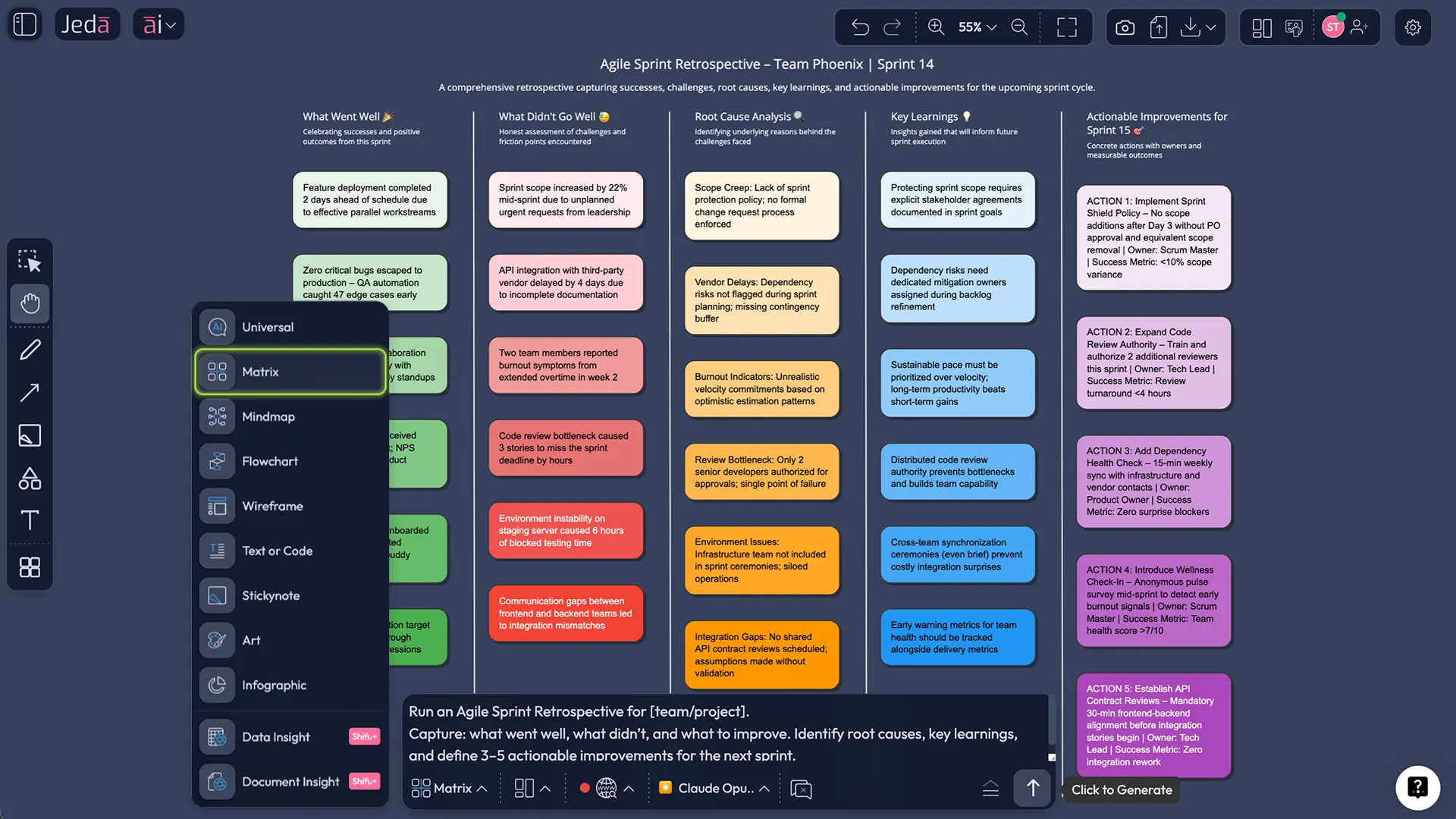
- Open the Prompt Bar at the bottom of the canvas.
- Select the Matrix command.
- Paste a prompt like this (copy/paste and tweak):
Prompt (Matrix):
“Create a sprint retrospective template as a matrix for a 2‑week sprint. Use Start/Stop/Continue columns. Add a fourth column: ‘Questions we need answered’. Include prompts under each column to guide contributions. Keep it concise and editable.”
- Press Enter to generate.
- Adjust the columns or prompts to match your team.
After you generate: use AI+ for a deeper dive (without turning it into therapy)
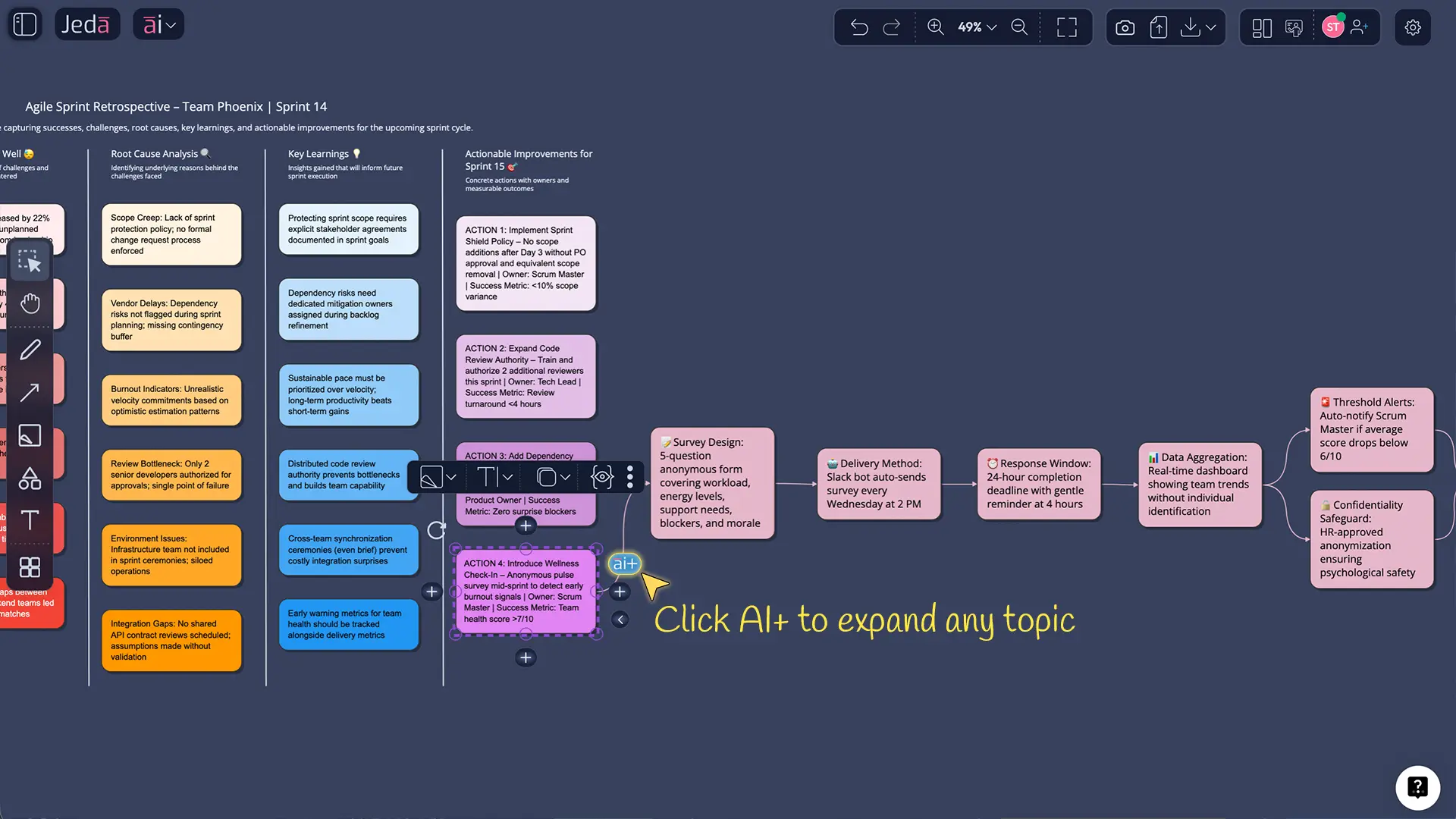
Once the board exists, you’ll usually want more detail in one area (not all of them). That’s where the AI+ button helps.
- Select a sticky note cluster or a single column.
- Tap AI+ to extend it with AI.
Keep the instruction generic: “Extend this section with more ideas,” or “Expand with alternative solutions.” Don’t try to micromanage AI+ into answering a 12-part exam question.
Optional: Vision Transform (turn retro outcomes into an execution artifact)
A matrix is great for collecting and prioritizing. A flowchart or checklist is often better for execution.
- Select the retrospective section you want to operationalize.
- Use Vision Transform to convert it into a Flowchart (new working agreement) or Diagram (handoff map).
Example: a real sprint retro (worked-through)
Let’s say your team just finished a two-week sprint shipping onboarding improvements. You shipped, but there were late surprises and support tickets spiked.
Start
- Add a 10‑minute mid‑sprint risk check (same day every sprint).
- Add a lightweight “definition of ready” for tickets touching onboarding screens.
Stop
- Stop merging onboarding UI changes without a screenshot in the PR description.
- Stop pushing “small” tracking changes without verifying analytics events.
Continue
- Continue pairing on tricky UI states (it reduced rework).
- Continue using feature flags for staged rollout.
Questions we need answered
- Which onboarding step created most tickets this sprint?
- Were tickets coming from new users or returning users?
Now you’ve got something that can survive Monday.
If you want external backing for why this matters: research and practitioner literature consistently frame retrospectives as mechanisms for team learning and continuous improvement, particularly valuable for distributed teams.
Best practices (what experienced facilitators do)
Common mistakes to avoid
Mistake 1: Turning it into a status meeting.
A retro is about the way you worked, not replaying every ticket.
Mistake 2: Writing actions that are unshippable.
If the “fix” requires a multi-quarter platform rewrite, it won’t happen. Break it down.
Mistake 3: No owner, no date, no follow-up.
If you can’t name the person who owns it, it’s a wish, not an action.
Mistake 4: Using the same format forever.
Teams habituate. Switch formats when the signal you want stops appearing.
Frequently Asked Questions
- What is the purpose of a Sprint Retrospective?
- A Sprint Retrospective exists to inspect how the sprint went and agree on improvements that raise quality and effectiveness in the next sprint. It’s not a performance review; it’s a system-improvement meeting.
- How long should a sprint retrospective take?
- Most teams land between 45 and 60 minutes for a two-week sprint. Scrum guidance timeboxes it to a maximum of three hours for a one-month sprint, and shorter sprints usually take less time.
- What’s the best sprint retrospective template for beginners?
- Start/Stop/Continue is usually best because it’s simple, action-oriented, and easy to facilitate. If emotions are running hot, Mad/Sad/Glad can surface the real blockers first.
- How do you keep retrospectives from becoming blame sessions?
- Frame notes around processes, constraints, and signals rather than personalities. Encourage ‘we’ language, cluster issues before discussing, and focus on changes the team can actually control in the next sprint.
- How many action items should we leave a retro with?
- Aim for 1–3 action items. More than that tends to dilute ownership and follow-through. If there are many issues, park them and schedule a separate deep-dive for the highest-impact one.
- Can AI replace the Scrum Master or facilitator in a retro?
- No. AI can help summarize, cluster themes, and draft actions, but facilitation still needs human judgment—especially for conflict, safety, and prioritization.
- How do we run an agile retrospective for remote teams?
- Use an AI Whiteboard where everyone can add notes asynchronously, then meet briefly to vote and decide actions. A shared board reduces context loss and makes follow-up visible.
- What’s a good way to handle recurring problems that show up every sprint?
- Treat recurring problems as root-cause candidates. Add a short 5 Whys segment or a Fishbone analysis on the top recurring theme, then commit to one targeted experiment next sprint.
- What should we do with retrospective notes after the meeting?
- Convert the winning themes into a small set of actions with owners, then keep the board as your running improvement log. At the next retro, start by reviewing what happened to last sprint’s actions.
- What can we export from Jeda.ai after the retrospective?
- You can export your board as PNG, SVG, or PDF. That’s usually enough for sharing in docs, wikis, or sprint review notes.
Sources & further reading
- [1]
Ken Schwaber and Jeff Sutherland (2020) . “The Scrum Guide (2020): Sprint Retrospective” scrumguides.org.
View Source ↗ - [2]
Esther Derby and Diana Larsen (2006) . “Agile Retrospectives: Making Good Teams Great” Pragmatic Bookshelf.
View Source ↗ - [3]
Norman L. Kerth (2001) . “Project Retrospectives: A Handbook for Team Reviews” Dorset House.
View Source ↗ - [4]
Atlassian Team Playbook (n.d.) . “Retrospective Play” Atlassian.
View Source ↗ - [5]
Tore Dingsøyr et al. (2018) . “An Exploratory Study of Retrospectives in Large-Scale Agile Development” Springer (Agile Processes in Software Engineering and Extreme Programming).
View Source ↗ - [6]
K. Duehr and colleagues (2021) . “The positive impact of agile retrospectives on the collaboration of distributed development teams (Bosch Engineering example)” Proceedings of the Design Society (Cambridge Core).
View Source ↗
Run your next sprint retrospective in an AI Workspace
Join over 150,000+ users who use Jeda.ai’s AI Whiteboard to turn team feedback into decision-ready visuals.
Try Free Template