A lot of “strategy” is just indecision wearing a blazer.
The STP model exists for one reason: to force you to stop being vague. You can’t say “our customer is everyone” with a straight face once you build a real STP model template. Segmentation creates options. Targeting makes a choice. Positioning makes that choice legible to the market.
And yes, the model is old. That’s not the insult people think it is. Gravity is old too.
What is the STP Model?
STP stands for Segmentation, Targeting, Positioning.
- Segmentation: break a broad market into distinct groups with meaningful differences. The classic marketing literature treats segmentation as an alternative strategic lens to pure product differentiation. Smith (1956) is a foundational reference in this lineage.
- Targeting: decide which segment(s) you will serve and, more importantly, which ones you will not.
- Positioning: decide the distinctive place you will occupy in the customer’s mind. Positioning as a marketing concept has a long academic trail, including work like Maggard (1976). And in the practical world, Ries and Trout popularized positioning as a discipline of clarity and constraint.
Here’s a modern reality check: STP still dominates how marketing is taught, and it still shapes how teams talk about competition. It also gets criticized when teams use it lazily or treat it as “messaging homework.” Sharp (2024) is a good example of that debate. The criticism doesn’t kill the framework. It tells you to use it like an adult.
Why Use the STP Model with AI?
Because STP is half analysis and half writing.
You need analysis to define segments and score them. And you need sharp language to express positioning without sounding like every other brand in the category.
AI helps you:
- generate segment hypotheses you might miss,
- structure qualitative research into clear segment profiles,
- draft positioning options quickly,
- and pressure-test your assumptions with multiple perspectives.
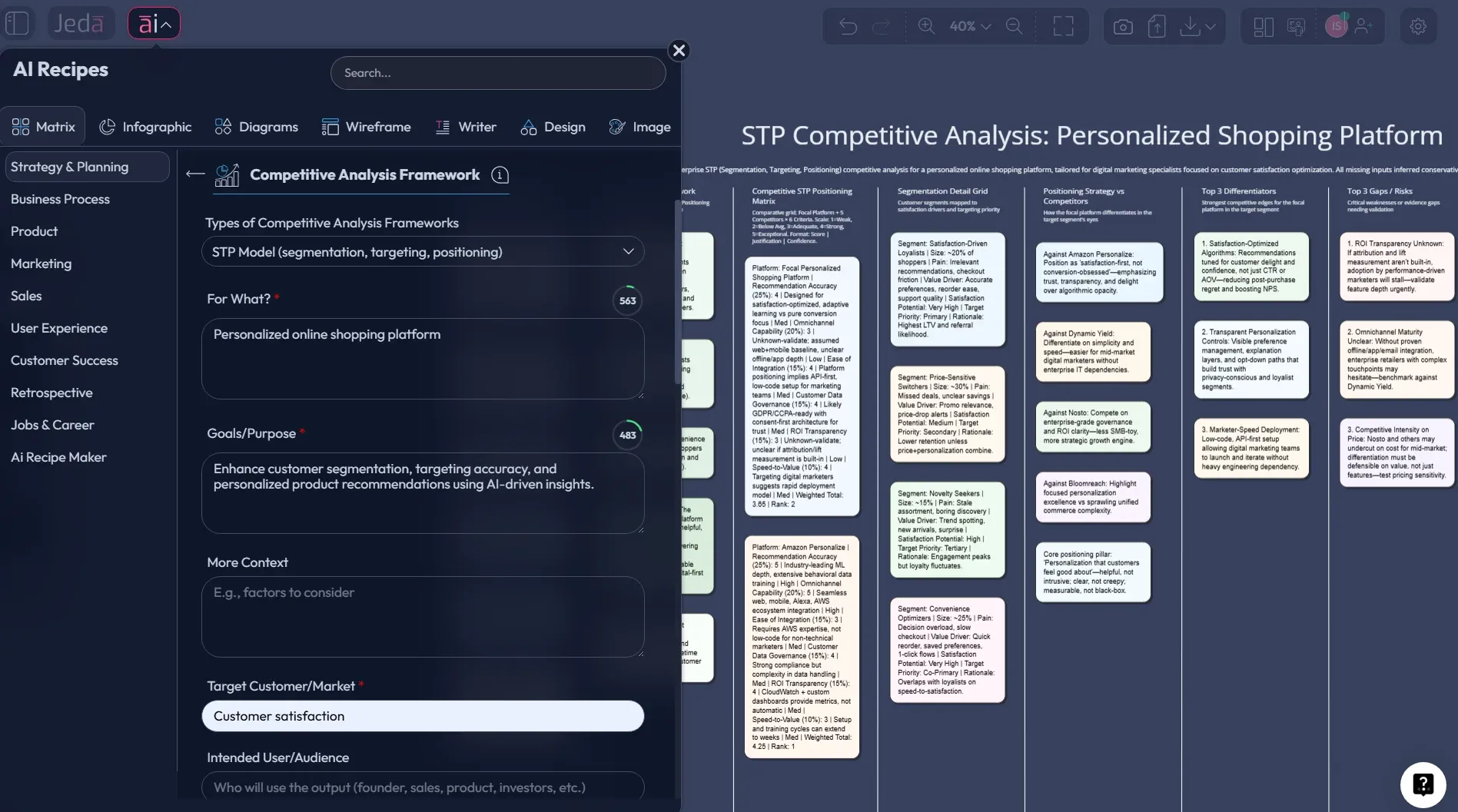
- STP as a single working canvas
Generate a segmentation-targeting-positioning matrix so the logic stays visible and you don't lose decisions in slide notes.
- Challenge your targeting assumptions
Run the same STP prompt across 1–3 models to surface blind spots: overlooked segments, weak proof, unclear trade-offs.
- Convert messy research into segment profiles
Paste interview notes, survey summaries, or sales call snippets and have AI structure them into segment cards.
- Iterate your positioning with AI+
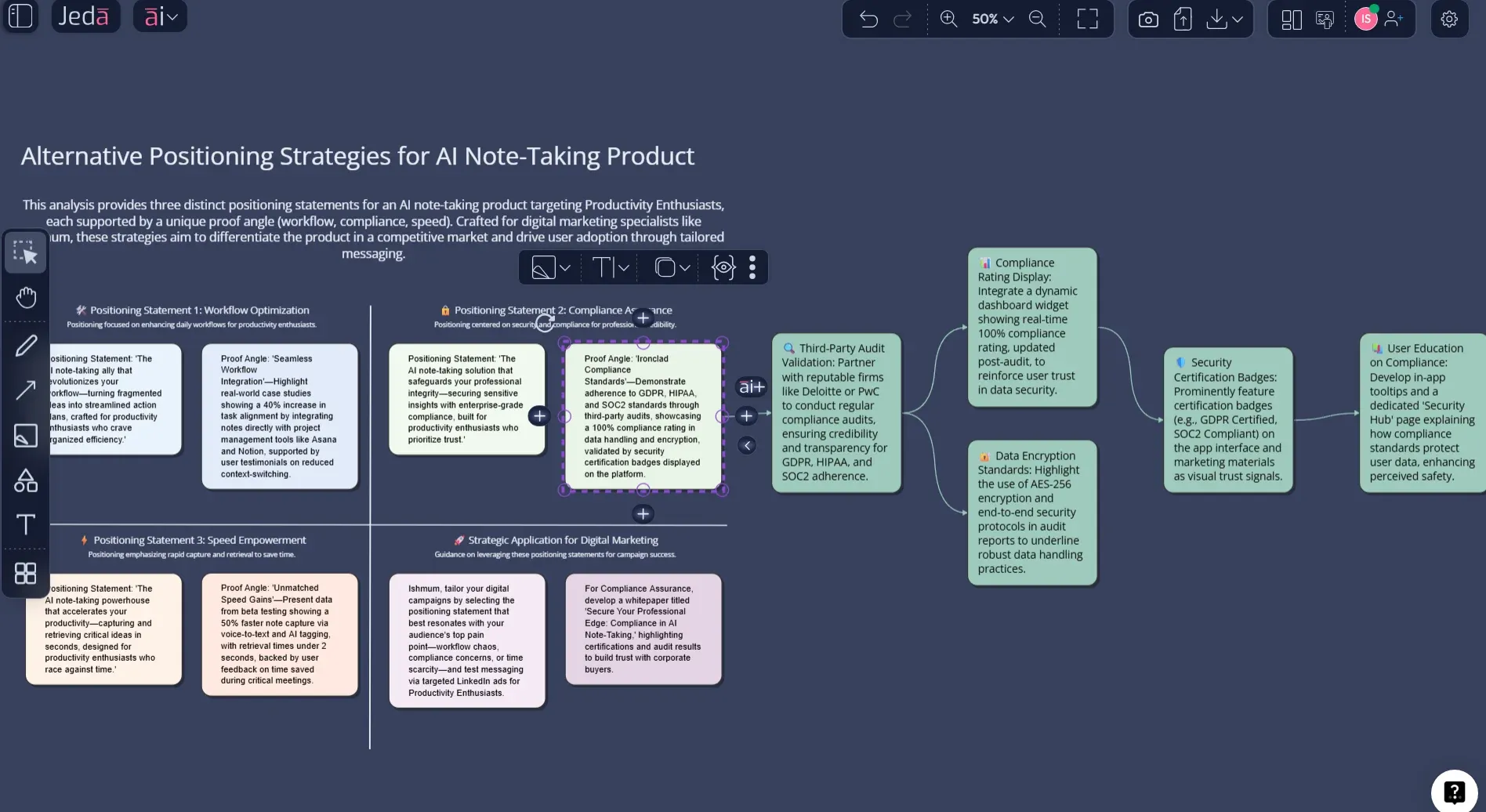
Select the STP matrix and tap AI+ to generate alternative positioning statements and proof angles for your chosen target.
- Turn STP into a launch plan
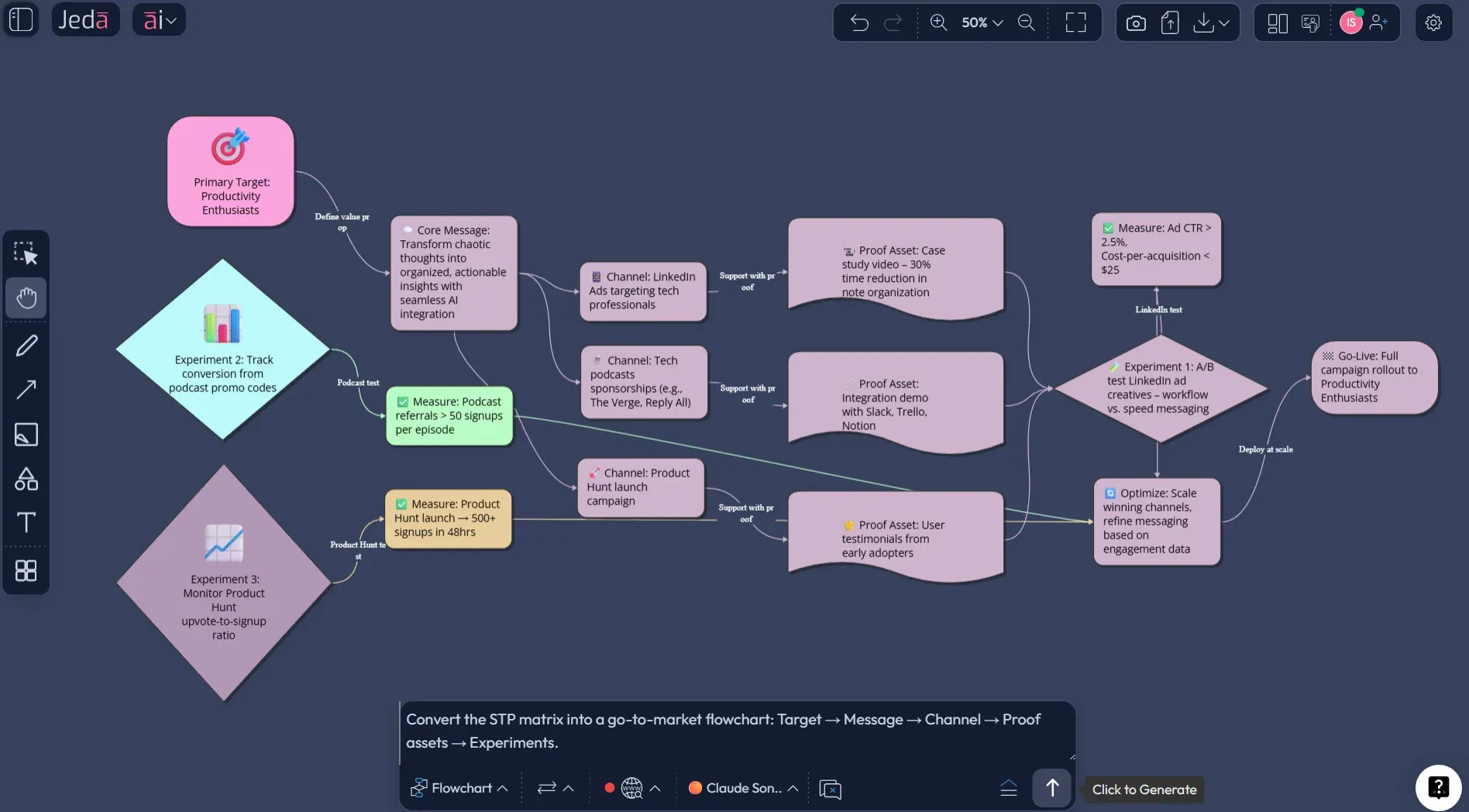
Vision Transform can convert the matrix into a flowchart: messaging → channels → assets → experiments.
How to's
Here are the two ways to build an STP Model with AI in Jeda.ai — using Matrix recipe templates (AI Menu) or the Prompt Bar (Matrix command). The STP page is explicitly designed as a Matrix use case where one canvas holds segments, scoring, target decision, and the final positioning statement.
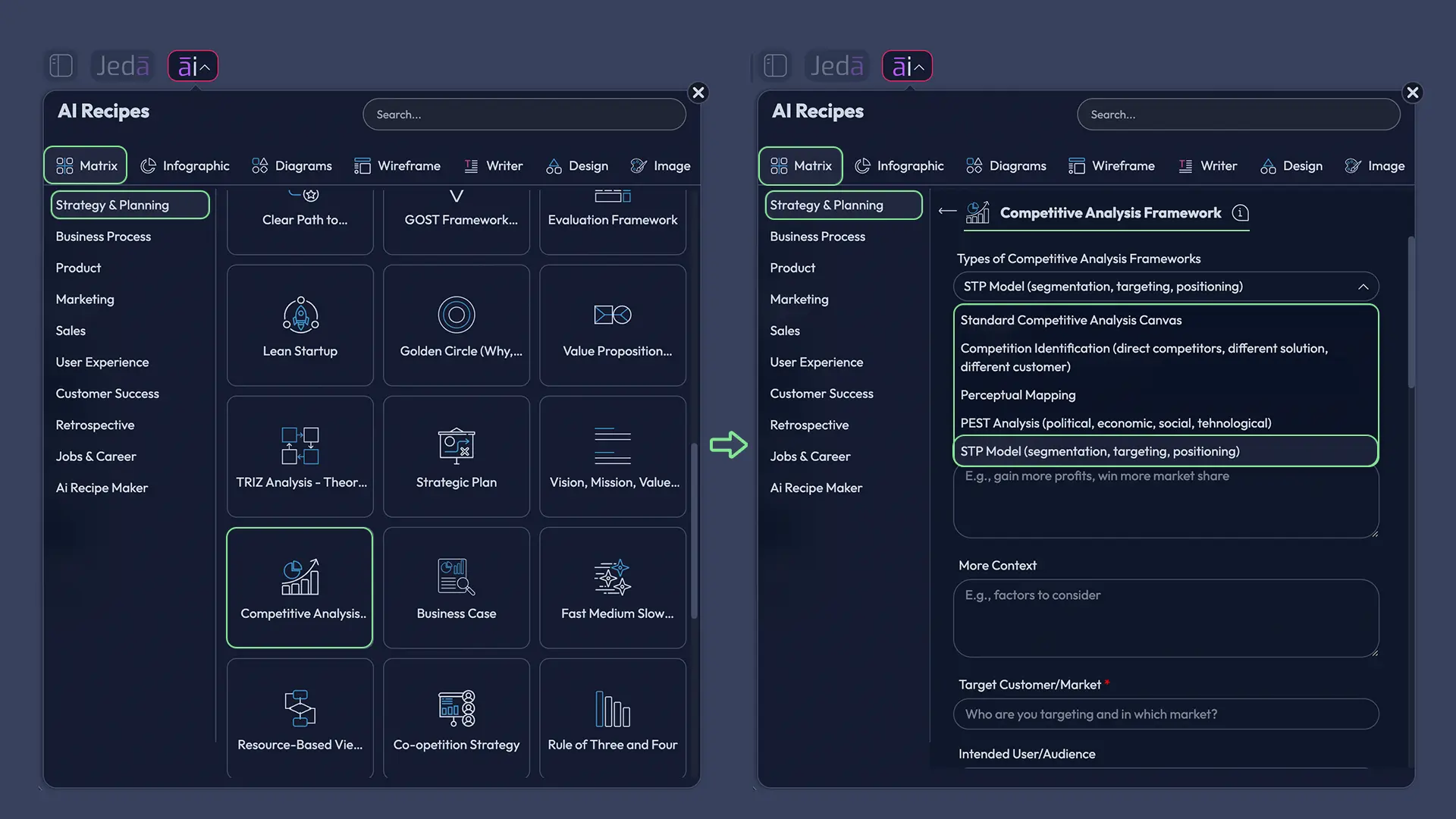
Method A — Use the Matrix Recipe Template (AI Menu)
Open the AI Menu → Matrix Recipes and search “STP” / “Segmentation Targeting Positioning”.
Select the STP Matrix recipe and set your market context (industry, geography, product category).
List 4–8 candidate segments using real variables (industry, size, workflow maturity, compliance, urgency, willingness to pay).
For each segment, add job-to-be-done + trigger + constraints + channels.
Score segments on attractiveness + win-ability (demand, budget, urgency, reachable channels, fit, credibility, switching costs).
Make the targeting decision (your matrix should include clear “No” segments, otherwise it’s not targeting).
Write a positioning statement you can prove (and attach proof).
Use AI+ to dive deep.
Use Vision Transform to turn the STP matrix into a GTM flow (message → channels → assets → experiments).
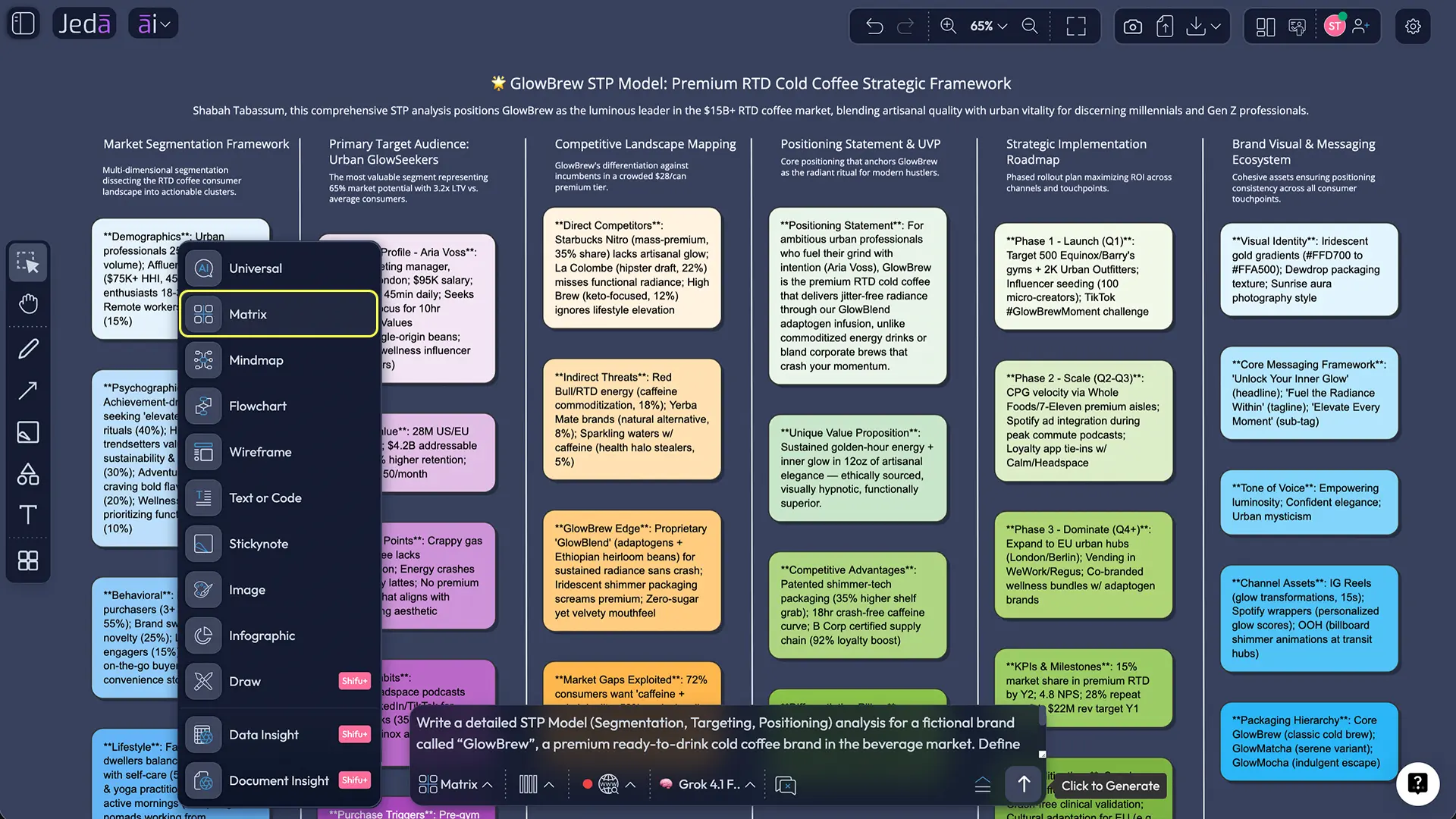
Method B — Use the Prompt Bar (Matrix command)
Open a new board.
Open the Prompt Bar, select Matrix, and paste an STP prompt (sample below).
Provide: market, product, 4–8 segments, and the columns you want in the canvas.
Generate the matrix.
Edit cells to replace fuzzy AI guesses with your real evidence.
Tap AI+ on the target segment to dive deep.
(Optional) Use Vision Transform to convert into a flowchart launch plan.
Export when needed (PNG/SVG/PDF).
Prompt Bar STP (copy/paste): Create an STP Model matrix for: [product + market]. Rows = 6 candidate segments. Columns: Segment definition, Core job, Buying trigger, Must-have constraints, Willingness to pay (Low/Med/High), Reachable channels, Target decision (Yes/No), Draft positioning statement. Keep each cell under 35 words. Mark assumptions with (verify).
- Pick your build path: Recipe or Prompt Bar
If your workspace has the STP Matrix Recipe, use AI Menu → Matrix Recipes. Otherwise, open the Prompt Bar and select the Matrix command.
- Define segmentation variables (no fluff)
Choose variables tied to buying behavior: industry, company size, workflow maturity, compliance needs, tech stack, urgency, willingness to pay.
- Draft 4–8 candidate segments
Write each segment as a short story: who they are, what they’re trying to get done, what triggers purchase, what causes churn.
- Score segments for attractiveness + win-ability
Use a simple rubric: demand, budget, urgency, reachable channels, product fit, credibility, and switching costs. Keep scoring consistent across segments.
- Make targeting decisions (Yes/No)
Pick one primary target to start. Include clear 'No' decisions for non-target segments to avoid vague positioning.
- Write a positioning statement you can prove
For [target], who [need], our product is [category] that [unique benefit], because [reasons to believe]. Attach proof: demo moments, metrics, case stories.
- Iterate with AI+ (fast, not fictional)
Select the target row/cells and tap AI+ to generate alternative positioning statements and proof angles. Replace assumptions with verified evidence.
- Convert to execution plan with Vision Transform
Use Vision Transform to turn the matrix into a flowchart: Target → Message → Channel → Proof assets → Experiments.
- Export and share
Export the finished STP canvas as PNG, SVG, or PDF for stakeholders and enablement.
STP Template & Worked Example
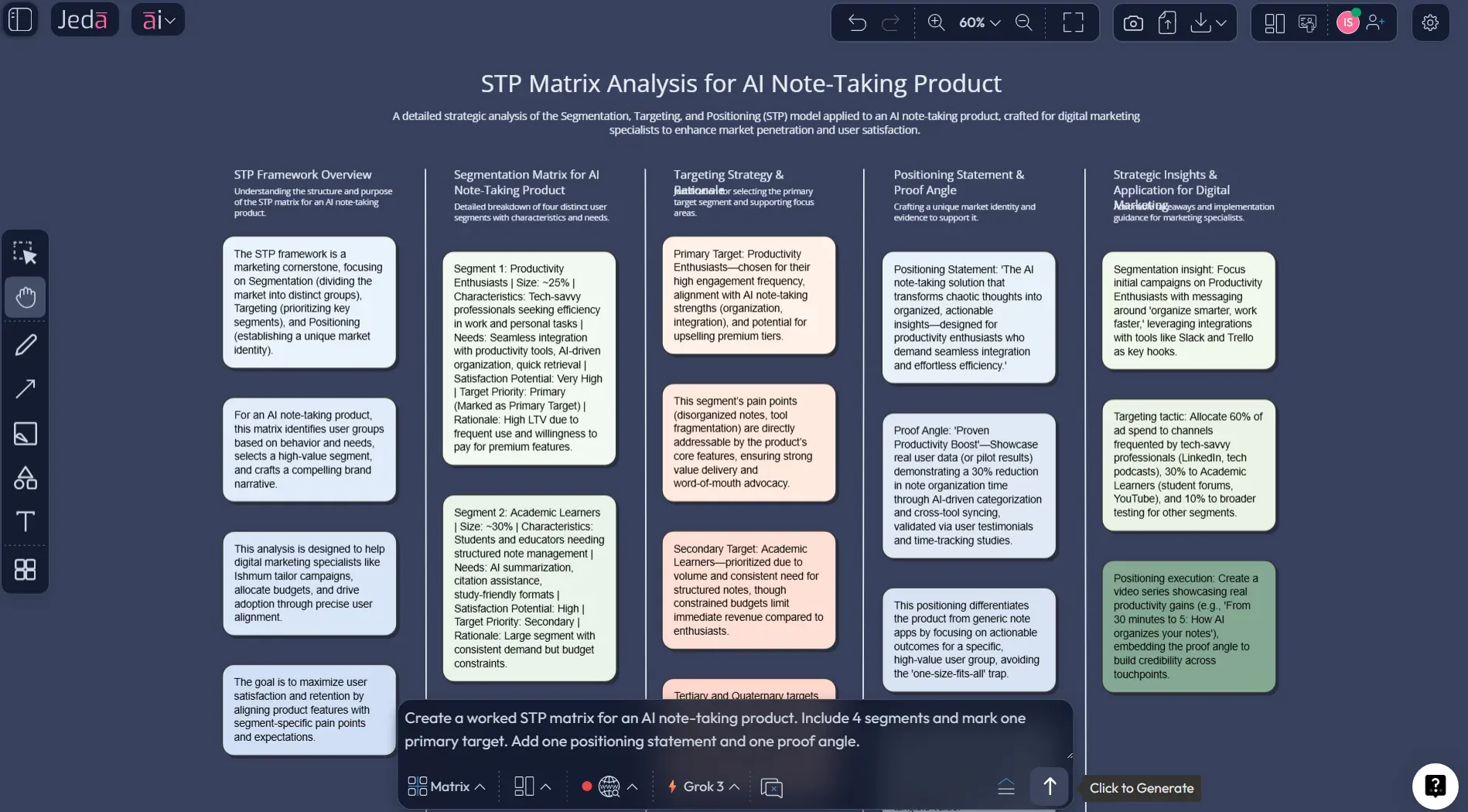
Let’s take a product category that tempts teams into being broad: an AI note-taking tool.
You can segment it a dozen ways. But here’s a practical set:
- Compliance-heavy teams (regulated workflows, audit trails)
- Sales teams (speed, CRM linkage, call summaries)
- Researchers (deep recall, citations, long-form synthesis)
- Students (price sensitivity, study workflows)
Now you score. Not with vibes. With criteria.
- Demand intensity
- Budget / willingness to pay
- Urgency triggers
- Reachable channels
- Proof you can show
- Switching costs
Then you choose. One primary target.
Best Practices & Tips
Common Mistakes to Avoid
- Over-segmenting. If you can’t name the segment in one sentence, it’s not usable.
- Skipping targeting. No decision, no strategy.
- Writing “positioning” that is just adjectives. “Modern, intuitive, powerful” is filler.
- Choosing a position you can’t prove. If you can’t show it in 30 seconds, it won’t land.
- Not changing execution. If STP doesn’t change packaging, roadmap priorities, or channel focus, it’s theatre.
Frequently Asked Questions
- What does STP stand for?
- Segmentation, Targeting, Positioning. You divide the market into meaningful groups, choose which group(s) to serve, then decide the distinctive position you'll own in their minds.
- Is STP only for big consumer brands?
- No. It's arguably more valuable in B2B and early-stage products because focus is survival. If you try to sell to everyone, your message becomes wallpaper.
- How many segments should we create?
- Enough to be useful, not enough to be fancy. Start with 3–7 segments you can describe and reach. If you create 20 segments, you're probably avoiding a hard targeting decision.
- What makes a segment 'actionable'?
- You can reach it (channels), it's big enough (or valuable enough), you can win (capabilities), and it's stable long enough to matter.
- How do I choose a target segment without bias?
- Use a scoring model. Score segments on attractiveness (demand, willingness to pay) and win-ability (distribution, product fit, credibility). Then sanity-check with real pipeline or research.
- What's the difference between positioning and branding?
- Positioning is the strategic decision about what you want to be known for in a category. Branding is the system of signals that reinforces that position.
- Can AI write our positioning statement?
- Yes, but you still have to choose the trade-off. AI can draft options. You decide which one you're willing to defend and build around.
- What's a common STP mistake?
- Skipping the targeting step. Teams brainstorm segments and write positioning copy, but never make a real 'we're not for everyone' decision.
Sources & Further Reading
- [1]
Smith, Wendell R. (1956) . “Product Differentiation and Market Segmentation as Alternative Marketing Strategies” Journal of Marketing (SAGE DOI).
View Source ↗ - [2]
Kotler, Philip; Keller, Kevin Lane; et al. (2019) . “Marketing Management” Pearson (Google Books listing).
View Source ↗ - [3]
Dibb, Sally (1998) . “Market segmentation: strategies for success” Marketing Intelligence & Planning (Emerald).
View Source ↗ - [4]
Maggard, John P. (1976) . “Positioning Revisited” Journal of Marketing (SAGE DOI).
View Source ↗ - [5]
Ries, Al; Trout, Jack (2001) . “Positioning: The Battle for Your Mind” McGraw-Hill (Google Books listing).
View Source ↗
Build your STP matrix and make the hard choice
Join over 150,000 professionals who use Jeda.ai to make targeting decisions and build go-to-market clarity.
Try Jeda.ai