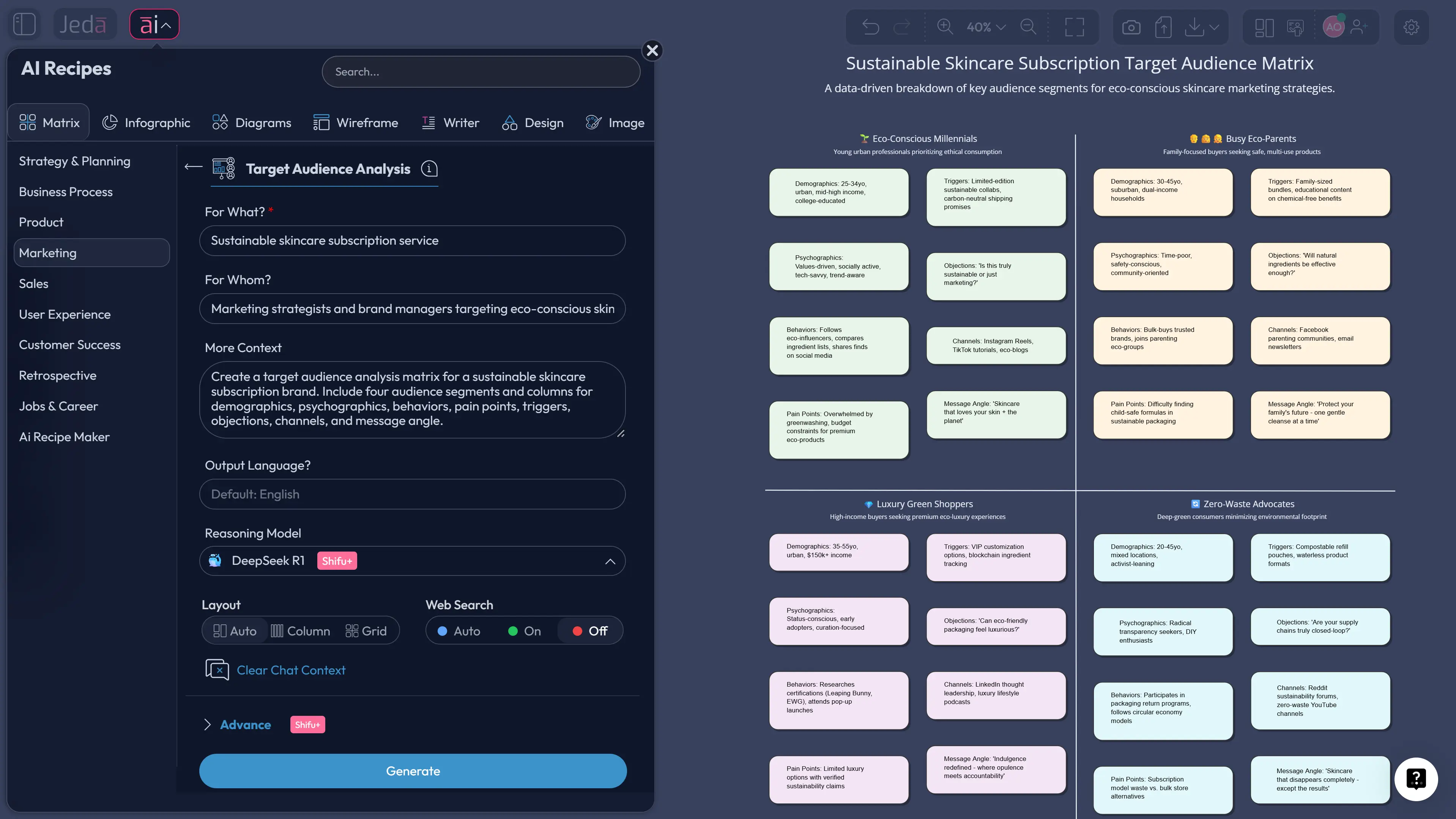
Target audience analysis with AI gets a lot more useful when you stop treating it like a vague brainstorm and start treating it like a working decision system. That is where a matrix helps. Instead of scattering notes across docs, tabs, and half-forgotten spreadsheets, you can map segments, motivations, buying triggers, objections, channels, and message angles in one editable visual inside Jeda.ai. For teams that need speed without losing clarity, that matters. A lot.
Jeda.ai is an AI Workspace and AI Whiteboard built for exactly this kind of thinking. You can generate a structured audience matrix in minutes, refine it with Visual AI assistance, and keep the whole board editable for product, marketing, strategy, and research teams. No blank-canvas panic. No “which version is final?” nonsense. And yes, this works whether you are shaping a startup launch, a campaign brief, or a repositioning exercise for an existing offer.
What is target audience analysis?
Target audience analysis is the process of identifying and understanding the people most likely to care about your offer, then turning that understanding into usable decisions. Most practical frameworks pull from the same core buckets: demographic, geographic, psychographic, and behavioral signals, then connect those signals to needs, motivations, barriers, and communication channels. Figma’s template guidance, Miro’s segmentation framing, QuestionPro’s step-by-step process, and The Compass for SBC all point toward the same basic truth: a useful audience model is not just who people are, but why they act, what blocks them, and how to reach them effectively.
That last part is where teams often wobble. They collect traits, then stop. A solid target audience analysis should help you answer questions like: Which segment is most promising? What pain point matters most? Which message angle is likely to land? Which channel earns attention instead of just burning budget?
Historically, the thinking behind audience work overlaps with market segmentation. Wendell R. Smith’s 1956 work on market segmentation pushed marketers to move beyond one-size-fits-all messaging. Later work from Daniel Yankelovich and David Meer argued that lazy segmentation fails when it becomes shallow profiling instead of a tool for understanding unmet needs. So the point is not to make prettier personas. The point is better decisions.
Why use target audience analysis with AI?
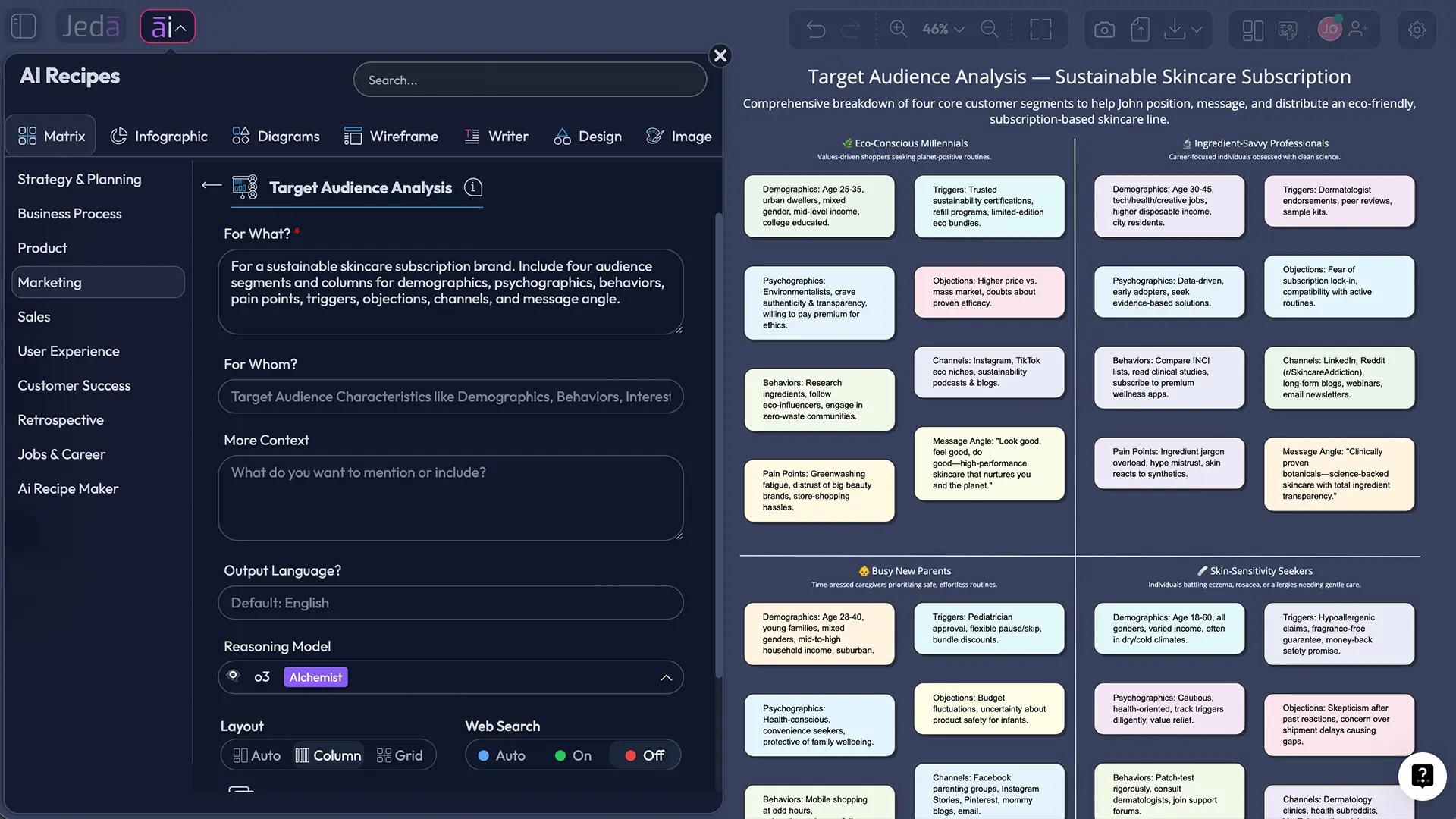
Because audience work is messy by default. You have survey notes, CRM scraps, sales calls, competitor clues, social comments, market reports, and a bunch of opinions delivered with suspicious confidence. AI helps you synthesize that mess faster. A matrix makes the result visible.
Jeda.ai works well here because the output is not a static answer. It is an editable audience board inside an AI Workspace. You can adjust assumptions, move segments, rewrite messages, add research evidence, and collaborate live with the team on the same AI Whiteboard.
- See segments side by side
Compare audience groups across demographics, psychographics, behaviors, barriers, and channels in one visual instead of across five scattered tools.
- Turn messy inputs into insight
Use AI to synthesize interviews, campaign notes, research, or customer feedback into usable segment patterns and messaging angles.
- Write sharper messaging
Connect segment pain points to offers, objections, proof points, and channel choices so your team stops writing generic copy for imaginary average customers.
- Extend the analysis visually
After generation, use AI+ to deepen segments, surface hidden needs, or continue the board into personas, journey maps, or campaign plans.
- Keep it editable
Unlike static docs, your matrix stays editable inside Jeda.ai, so product, strategy, and marketing teams can refine it together.
- Use the best model mix
On Shifu, you can run multiple models and let the aggregator help pick the strongest output for nuanced audience thinking.
Look, target audience analysis is not hard because the framework is hard. It is hard because real audiences are contradictory. They say one thing, do another, compare three competitors, and buy on Tuesday for reasons that feel mildly illegal to your neat framework. AI does not magically fix that. But it does speed up pattern-finding, summarization, and first-pass structuring.
And Jeda.ai gives you a better place to work through those patterns. You get an AI Whiteboard for collaborative thinking, an AI Workspace for structured strategy work, and access to 300+ strategic frameworks when you want to connect audience insight to positioning, planning, or execution.
Target audience analysis matrix structure
A good target audience matrix should be simple enough to scan and rich enough to act on. The sweet spot usually looks like this:
That structure works because it combines classic segmentation variables with decision-oriented fields. Miro emphasizes demographics, geography, needs, interests, psychographics, and behavior. Qualtrics pushes teams to go beyond demographics into experience, sentiment, and intent. The best matrix borrows both ideas. It profiles the audience and tells you what to do next.
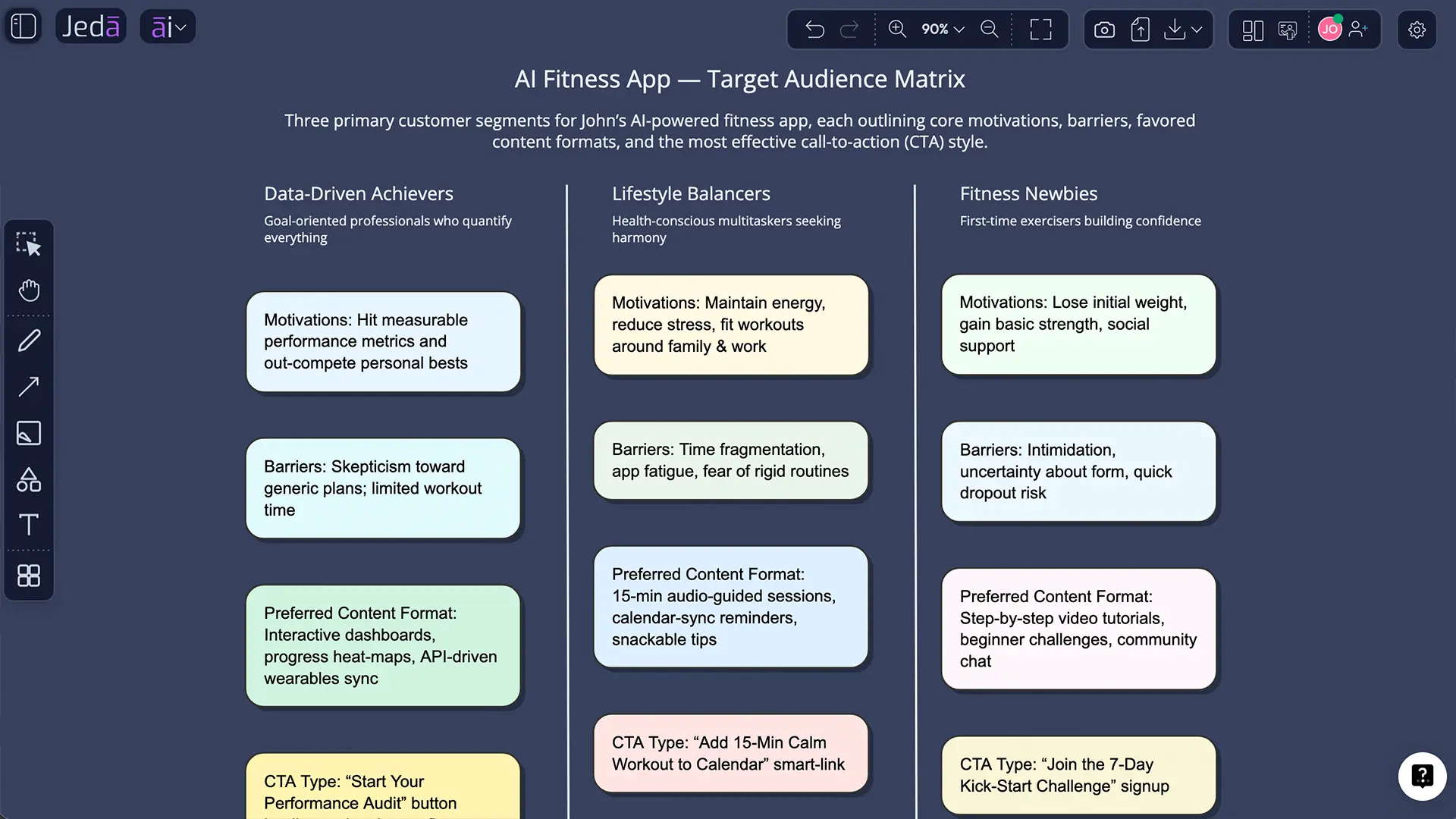
Here is a simple example for an AI fitness app:
Segment 1: Busy professionals, age 28 to 40, urban, time-poor, habit-driven
Pain point: Inconsistent routine
Trigger: Wants fast guided plans
Objection: “I never stick to apps”
Best channel: Instagram, YouTube, email
Message angle: “Ten-minute coaching that adapts to your schedule”
Segment 2: New gym returners, age 35 to 50, health-motivated, confidence-sensitive
Pain point: Feels overwhelmed restarting
Trigger: Wants low-friction structure
Objection: “This looks too intense”
Best channel: Facebook, search, referral
Message angle: “Start gently, stay consistent, see progress without burnout”
That is already more useful than a fluffy persona paragraph. You can brief creative, paid media, product onboarding, and sales from it. One board, several decisions.
How to create target audience analysis with AI in Jeda.ai
Jeda.ai supports two clean ways to build this: Method 1 uses a Recipe Matrix flow for structured generation. Method 2 uses the Prompt Bar for a faster custom build. After that, you can use AI+ to deepen the work and Vision Transform to convert the board into another visual.
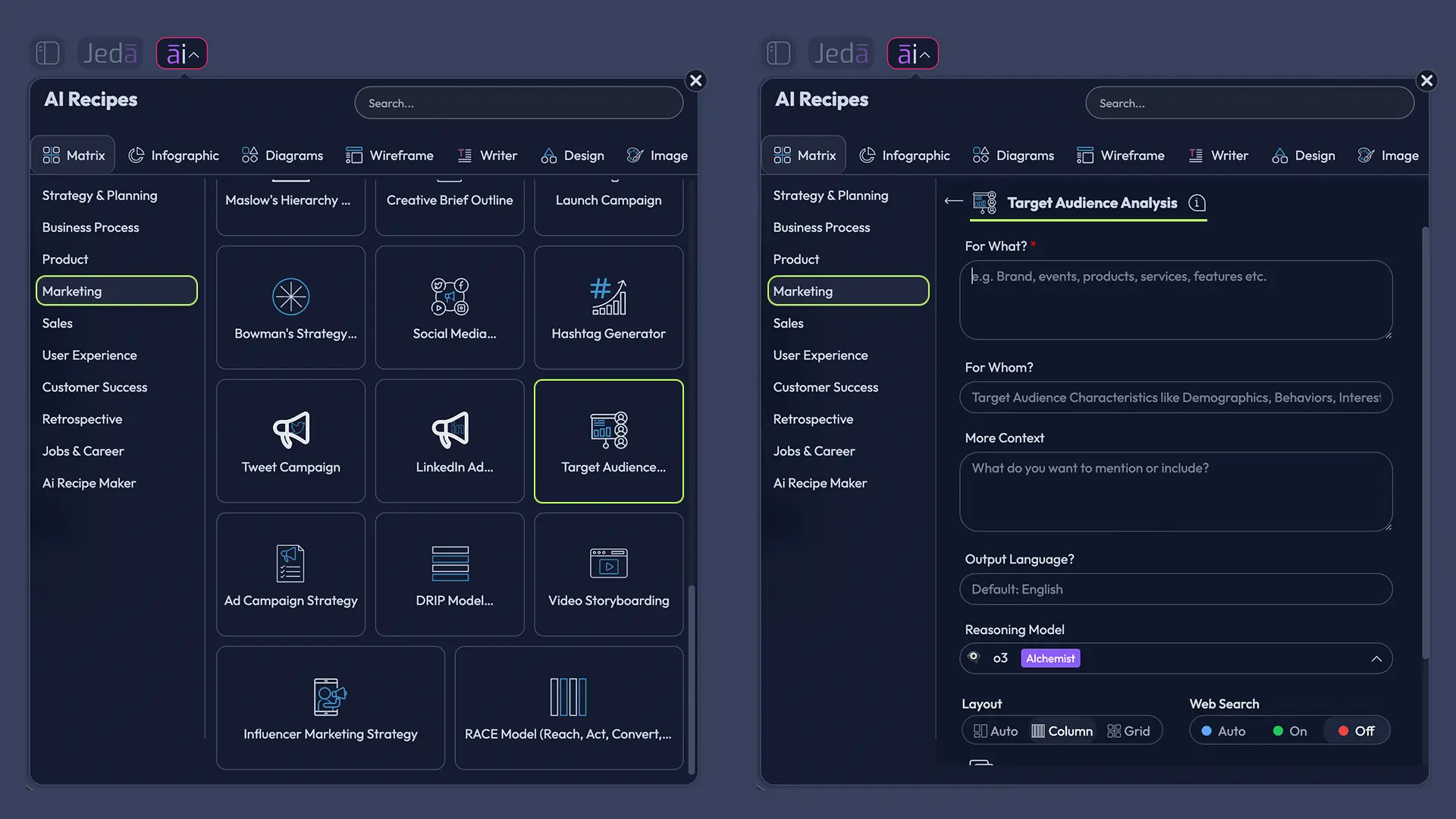
Method 1: Recipe Matrix
This is the better route when you want a structured starting point and cleaner first output. In Jeda.ai, the AI Menu gives you access to 300+ strategic frameworks, including Matrix-oriented workflows. The Matrix command is designed for structured grids with editable sticky notes, which makes it a natural fit for target audience analysis.
- Open AI Menu
On the canvas, open the AI Menu from the top-left area of the workspace.
- Choose Matrix Recipes
Select the Matrix recipe for Target Audience Analysis.
- Add your business context
Describe your product, market, offer, region, and goal. Include whether you want B2B, B2C, startup, enterprise, local, or global segments.
- Specify matrix columns
Ask for columns such as demographics, psychographics, behaviors, pain points, triggers, objections, channels, and message angle.
- Generate the matrix
Click Generate and review the first draft on the canvas.
- Edit and prioritize
Refine the segments, delete weak assumptions, and highlight the highest-value audience rows.
- Use AI+ to extend
Tap the AI+ button on the generated matrix to expand the analysis, deepen insights, or continue the work into more detail.
Method 2: Prompt Bar
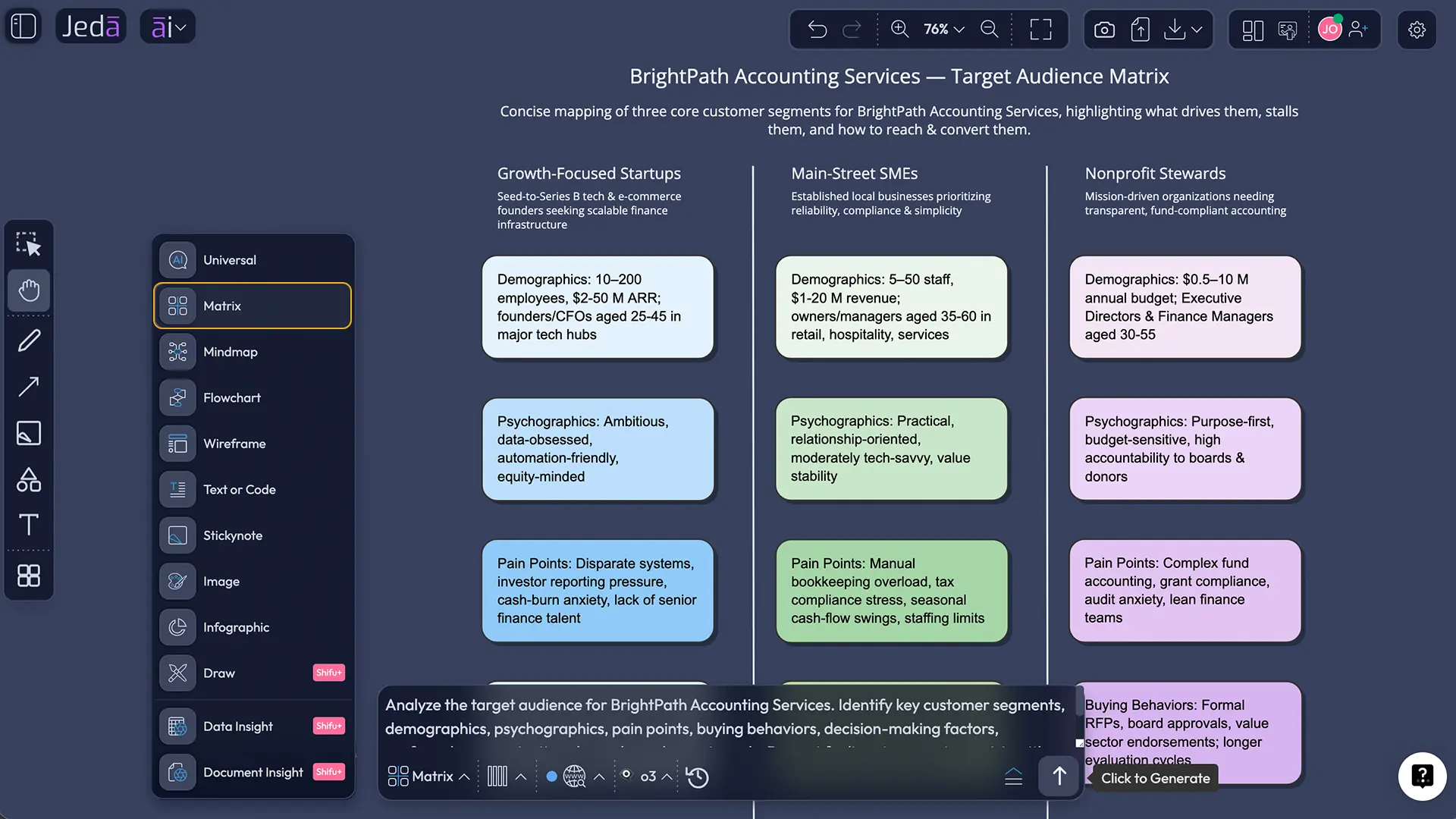
The Prompt Bar is faster when you already know what you want. Open the Prompt Bar at the bottom of the canvas, select the Matrix command, then give Jeda.ai a direct instruction.
Try a prompt like this:
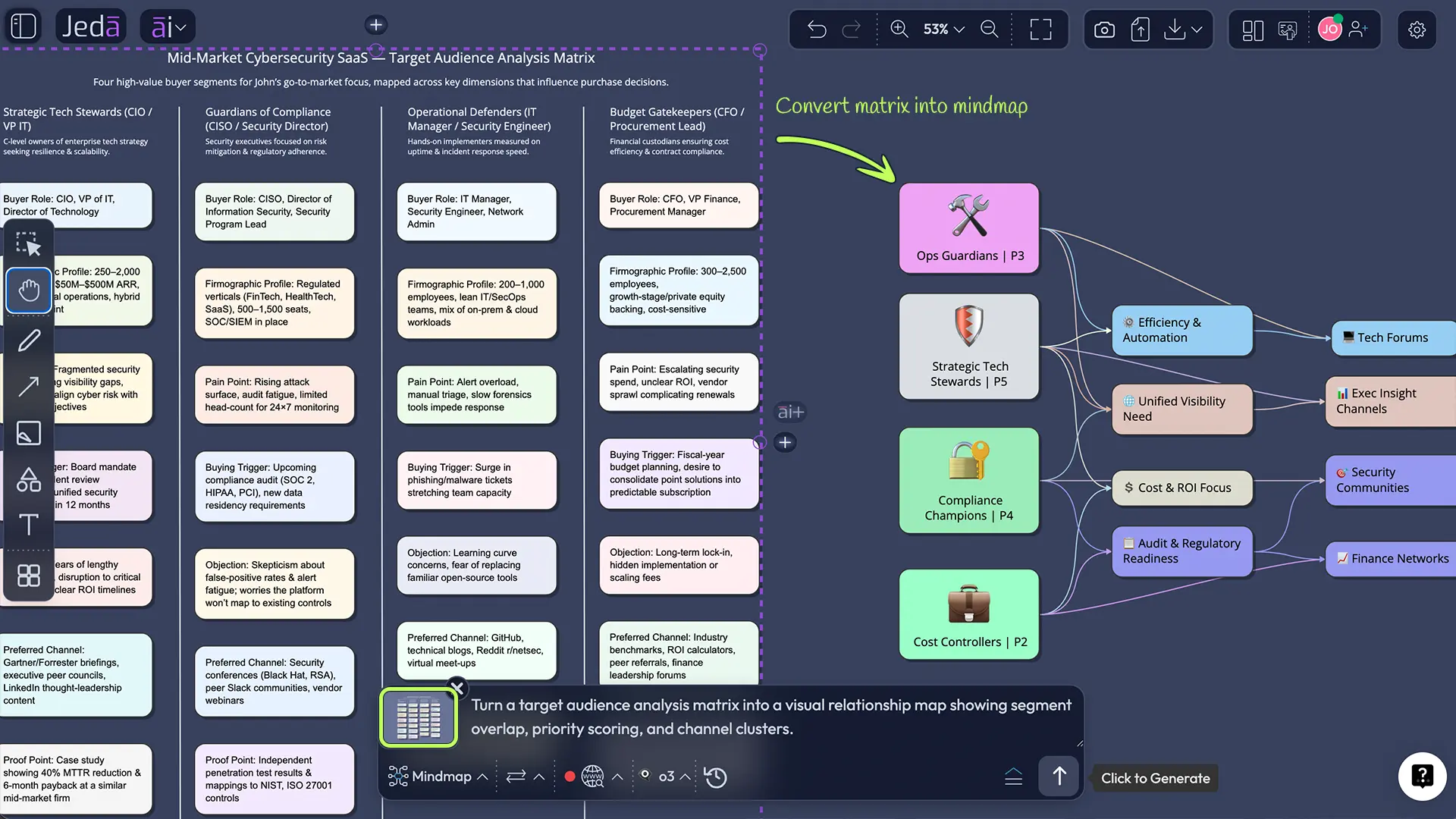
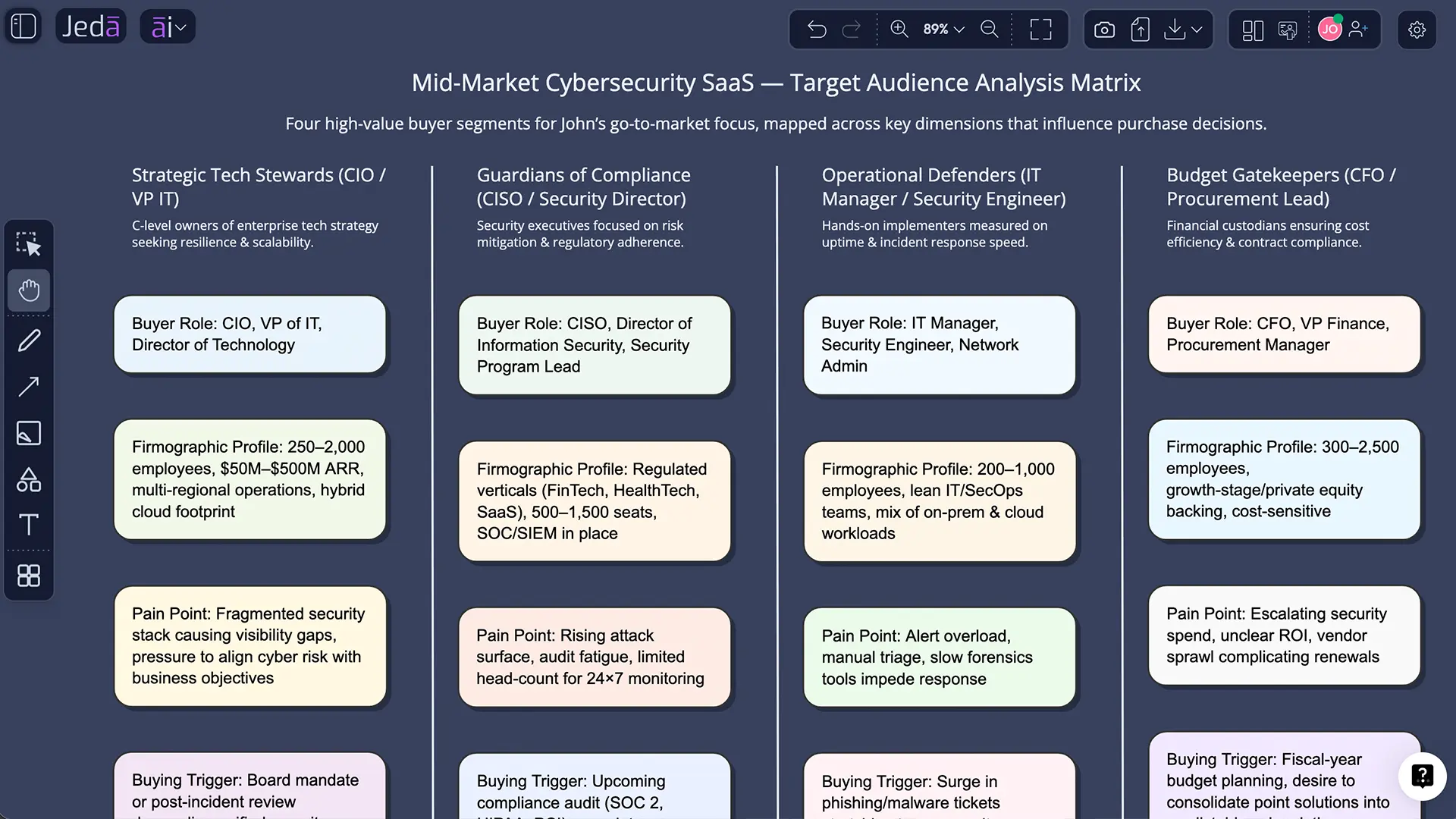
Create a target audience analysis matrix for a B2B cybersecurity SaaS product aimed at mid-market companies. Include 4 segments and columns for demographic profile, firmographic clues, psychographic drivers, buying behavior, pain points, purchase trigger, common objection, preferred channel, and message angle.
Then refine it. Add geography. Ask for channels. Ask for buyer-role differences. Ask for an anti-audience if needed. A matrix gets stronger when the prompt is specific about the business model and use case.
- Open the Prompt Bar
Use the Prompt Bar at the bottom of the canvas.
- Select the Matrix command
Choose Matrix so Jeda.ai generates a structured, editable grid.
- Describe the audience problem clearly
Include your product type, industry, target market, and the exact columns you want in the matrix.
- Generate and inspect
Review the output for weak assumptions, generic labels, or duplicated segments.
- Refine the prompt
Regenerate with tighter instructions if you need clearer segments, stronger objections, or better channel mapping.
- Use AI+ for deeper layers
After the board appears, use AI+ to continue, deepen, or expand the existing matrix. AI+ is best for extension, not highly scripted one-off micro-instructions.
AI+ button for deep dive
AI+ is where this gets fun. After your audience matrix is on the board, select it and use AI+ to continue the work. Ask it to:
- expand each segment into a mini persona
- surface likely unmet needs
- add messaging tests by channel
- map objections to proof points
- turn the strongest segment into a go-to-market brief
What AI+ should not be treated as is a magic remote control for ultra-specific production choreography. It is built to extend, expand, and continue the existing visual. Think “go deeper” rather than “perform ten unrelated stunts and juggle the data.”
And when you want a different format, use Vision Transform to convert the audience matrix into a mind map, flowchart, or diagram for a workshop.
Target audience analysis example
Let’s say you are launching a sustainable skincare subscription.
You could ask Jeda.ai to create four segments: eco-conscious Gen Z buyers, ingredient-focused millennial professionals, sensitive-skin problem solvers, and gift buyers shopping seasonally. Your matrix would not stop at age and location. It would include what each group worries about, what earns trust, what they compare before buying, and which channels actually influence decisions.
For example, the eco-conscious Gen Z segment might value low-waste packaging and ingredient transparency, discover products through creators and short-form video, and respond to messaging around values alignment and visible proof. The sensitive-skin segment might care less about brand story and more about ingredient safety, clinical reassurance, and before-and-after credibility. Same product. Different buying logic.
That is the whole game.
Once the matrix is done, you can keep going inside the same AI Workspace. Turn it into a campaign planning board. Connect it to a positioning matrix. Compare it against competitor assumptions. Or link it to a Porter’s Five Forces resource, a PESTEL analysis page, or a Fishbone diagram guide when you want the audience insight tied to broader strategy.
Best practices for smarter audience analysis
Common mistakes to avoid
The biggest mistake is confusing a target audience analysis with a vanity description. “Women aged 25 to 34 who like wellness” is not analysis. That is barely a label.
Another mistake is overfitting the audience around channels. People do not become a segment because they use TikTok. A channel is a clue, not an identity.
And then there is the classic spreadsheet sin: building a huge audience document that nobody uses. If the analysis does not affect messaging, product decisions, content direction, or campaign targeting, it is decoration. Expensive decoration.
One more. Teams often stop at existing customers and ignore adjacent buyers, switchers, skeptical evaluators, or influencers around the purchase. The Compass for SBC is useful here because it pushes you to think not only about the priority audience, but influencing audiences too. That can save you from building a very polished matrix for the wrong people.
Frequently asked questions
- What is target audience analysis with AI?
- Target audience analysis with AI is the process of using AI to identify, structure, and interpret audience segments based on traits, needs, behaviors, motivations, and likely buying patterns. It speeds up synthesis, but the strongest results still depend on good inputs and sharp review.
- Why use a matrix for target audience analysis?
- A matrix makes audience thinking visible. Instead of burying insight in notes or persona documents, you can compare segments side by side across traits, pain points, channels, triggers, and message angles. That makes it easier to act on the analysis across teams.
- What should a target audience analysis matrix include?
- A useful matrix usually includes segment name, demographic and geographic clues, psychographic signals, behavior patterns, pain point, buying trigger, objection, preferred channel, and message angle. You can add offer fit, urgency, or customer value when you need a sharper commercial view.
- Can Jeda.ai create target audience analysis visually?
- Yes. Jeda.ai can generate target audience analysis as an editable matrix inside the canvas. You can create it through Matrix Recipes or the Prompt Bar, then keep refining it with AI+, collaboration tools, and other visual commands inside the same AI Workspace.
- What is the difference between target audience analysis and buyer personas?
- Target audience analysis maps the wider segment logic. Buyer personas zoom in on a representative character within a segment. In practice, teams often start with audience analysis to identify patterns, then turn the strongest rows into personas, journeys, or messaging briefs.
- How many segments should a target audience analysis have?
- Most teams should start with three to five segments. That is enough to capture meaningful variation without turning the matrix into chaos. If every segment gets a different message, offer, or channel strategy, the split is probably useful. If not, consolidate.
- Can I use AI+ to make the matrix more detailed?
- Yes. AI+ is ideal for extending the matrix after generation. You can use it to deepen segment insights, add objections, expand messaging, or continue the board into personas or campaign plans. It works best as an extension tool, not a hyper-specific instruction engine.
- Who should use target audience analysis with AI?
- Marketing teams, founders, consultants, product managers, strategists, and business analysts all benefit from it. Anyone trying to decide who to target, what message to lead with, or how to prioritize segments can use a target audience analysis matrix inside Jeda.ai.
Sources & further reading
- [1]
Smith, Wendell R. (1956) . “Product Differentiation and Market Segmentation as Alternative Marketing Strategies” Journal of Marketing.
View Source ↗ - [2]
Yankelovich, Daniel and Meer, David (2006) . “Rediscovering Market Segmentation” Harvard Business Review.
View Source ↗ - [3]
QuestionPro (2023) . “Target Audience Analysis: What is it, Steps to follow” QuestionPro Blog.
View Source ↗ - [4]
The Compass for SBC (n.d.) . “How to Do an Audience Analysis” The Compass for Social and Behavior Change.
View Source ↗ - [5]
Qualtrics (2020) . “Customer Segmentation Analysis: Definition & Methods” Qualtrics XM Institute.
View Source ↗ - [6]
Qualtrics (2020) . “Market Segmentation: Definition, Types, Benefits, & Best Practices” Qualtrics XM Institute.
View Source ↗ - [7]
HubSpot (2024) . “AI Target Audience: What I Learned [+ Tools to Try]” HubSpot Blog.
View Source ↗ - [8]
Ospina-Agudelo, Juan Camilo et al. (2025) . “Tailoring the Ideal Customer: A Methodological Framework for Buyer Persona Design in the Tailoring Industry” Administrative Sciences.
View Source ↗
Start Your Target Audience Analysis Today
Join over 150,000+ users who use Jeda.ai to turn messy research into editable strategy boards inside one AI Workspace.
Try Free Template