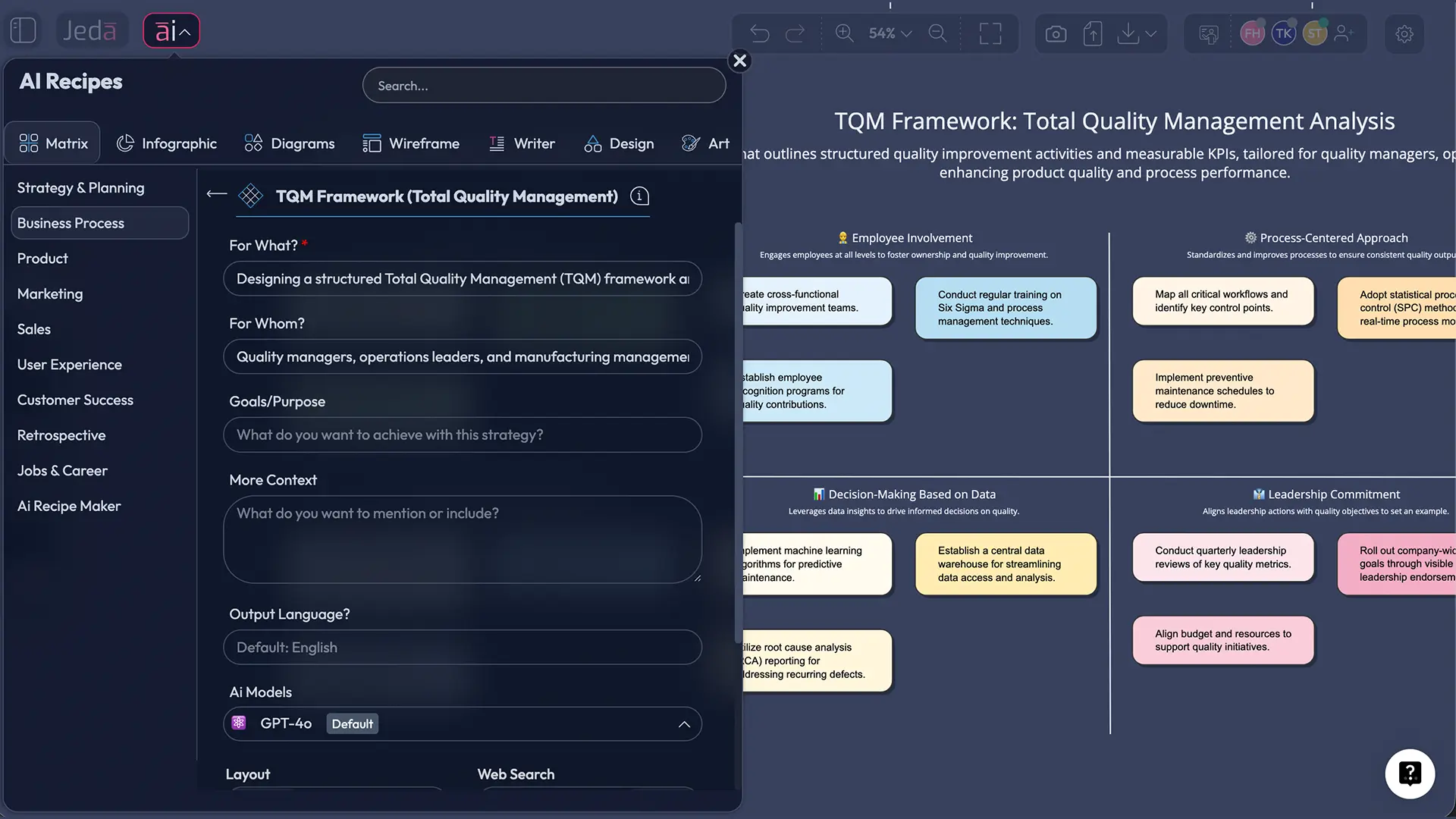
Quality management isn't a department. It's a culture — and it's one that's notoriously hard to visualize, communicate, and act on at speed. That's exactly where the TQM framework with AI changes everything. In Jeda.ai's AI Workspace, teams can generate a complete Total Quality Management matrix in under 60 seconds, map all 8 pillars of TQM across departments, and extend any section with deeper AI analysis using the AI+ button. Over 150,000+ professionals use it to turn quality theory into working visual frameworks — fast.
What is the TQM Framework?
Total Quality Management is a management philosophy built on a deceptively simple idea: quality is everyone's responsibility, not just the inspection team's. The American Society for Quality defines it as "a management approach to long-term success through customer satisfaction" — where every member of an organization participates in improving processes, products, services, and the culture in which they work.
The framework has its roots in post-World War II Japan. W. Edwards Deming, invited to lecture Japanese industry leaders starting in 1950, introduced statistical quality control and the iterative improvement cycle now known as PDCA (Plan-Do-Check-Act) — originally called the Shewhart Cycle, which Deming promoted and refined into his PDSA model. Joseph Juran followed in 1954, contributing the Juran Trilogy: quality planning, quality control, and quality improvement. Together with Armand Feigenbaum, who coined "Total Quality Control" in 1951, they built the intellectual foundation that the U.S. Navy formally branded as "Total Quality Management" in 1985.
TQM has since evolved well past its manufacturing origins. Today, healthcare systems, software companies, and global supply chains all apply its principles — and AI makes it faster to implement than ever.
The 8 Pillars of Total Quality Management
Every TQM framework rests on eight interconnected principles defined by ASQ. Miss even one, and the framework loses structural integrity.
- Customer Focus
Quality starts and ends with the customer. TQM aligns every process to understanding and exceeding customer expectations — not just meeting minimum specs.
- Employee Involvement
All employees — from the CEO to the frontline — are active participants in quality improvement. TQM fails when quality is delegated to a single team.
- Process-Centered Approach
Deming's principle: fix the process, not the people. TQM maps and optimizes every process rather than chasing individual errors.
- Integrated System
TQM connects every department and function. Quality isn't siloed — accounting, engineering, sales, and operations all share responsibility for outcomes.
- Strategic & Systematic Approach
TQM is embedded into organizational strategy, not treated as a one-off project. Quality goals are aligned with business objectives at every planning cycle.
- Continual Improvement
The PDCA cycle runs in perpetuity. TQM organizations don't 'complete' quality improvement — they iterate it as conditions, customers, and markets evolve.
- Fact-Based Decision Making
Data drives every decision. TQM requires accurate, timely measurements — defect rates, cycle times, customer satisfaction scores — before any change is made.
- Communications
Quality improvements live or die on communication. Clear, cross-functional channels ensure everyone understands quality goals, progress, and their role in outcomes.
Why Use the TQM Framework with AI?
Here's the problem with traditional TQM: it takes weeks to map, months to align stakeholders around, and years to embed culturally. And that's before you've processed a single data point from your actual operations.
AI compresses all of it.
When you build a TQM framework in Jeda.ai's Visual AI workspace, you're not just creating a pretty matrix. You're generating a structured quality map — complete with all 8 pillars, cross-functional ownership, and improvement priorities — in a format your entire team can immediately engage with, edit, and act on. The AI does the structural heavy lifting. Your team focuses on the strategic decisions that actually matter.
According to the 2024 ASQ Global Quality Report, 89% of organizations practicing TQM experienced improved customer satisfaction within the first two years. And 76% reported measurable profitability gains in the same period. Those numbers hold for companies that implement TQM effectively — which means with speed, alignment, and iteration. AI makes all three more achievable.
- Speed of Generation
Build a complete TQM matrix from scratch in under 60 seconds. Jeda.ai's AI Workspace generates all 8 pillars with contextual detail based on your industry and goals.
- Visual Clarity
TQM frameworks are complex. Visual AI turns abstract principles into structured, shareable matrices your whole team can navigate — no quality management background required.
- Reduce COPQ
AI-powered quality analysis identifies process gaps faster, directly attacking the Cost of Poor Quality (COPQ) — the hidden drain on margins from defects, rework, and inefficiency.
- Real-Time Data Integration
Connect quality data from operations, customer feedback, and production lines directly to your TQM framework. AI surfaces patterns that manual review misses.
- Collaborative by Default
Jeda.ai's AI Whiteboard supports real-time collaboration with live cursors, Follow Me mode, and role-based editing. Quality management becomes a team sport, not a solo exercise.
- Continuous PDCA Support
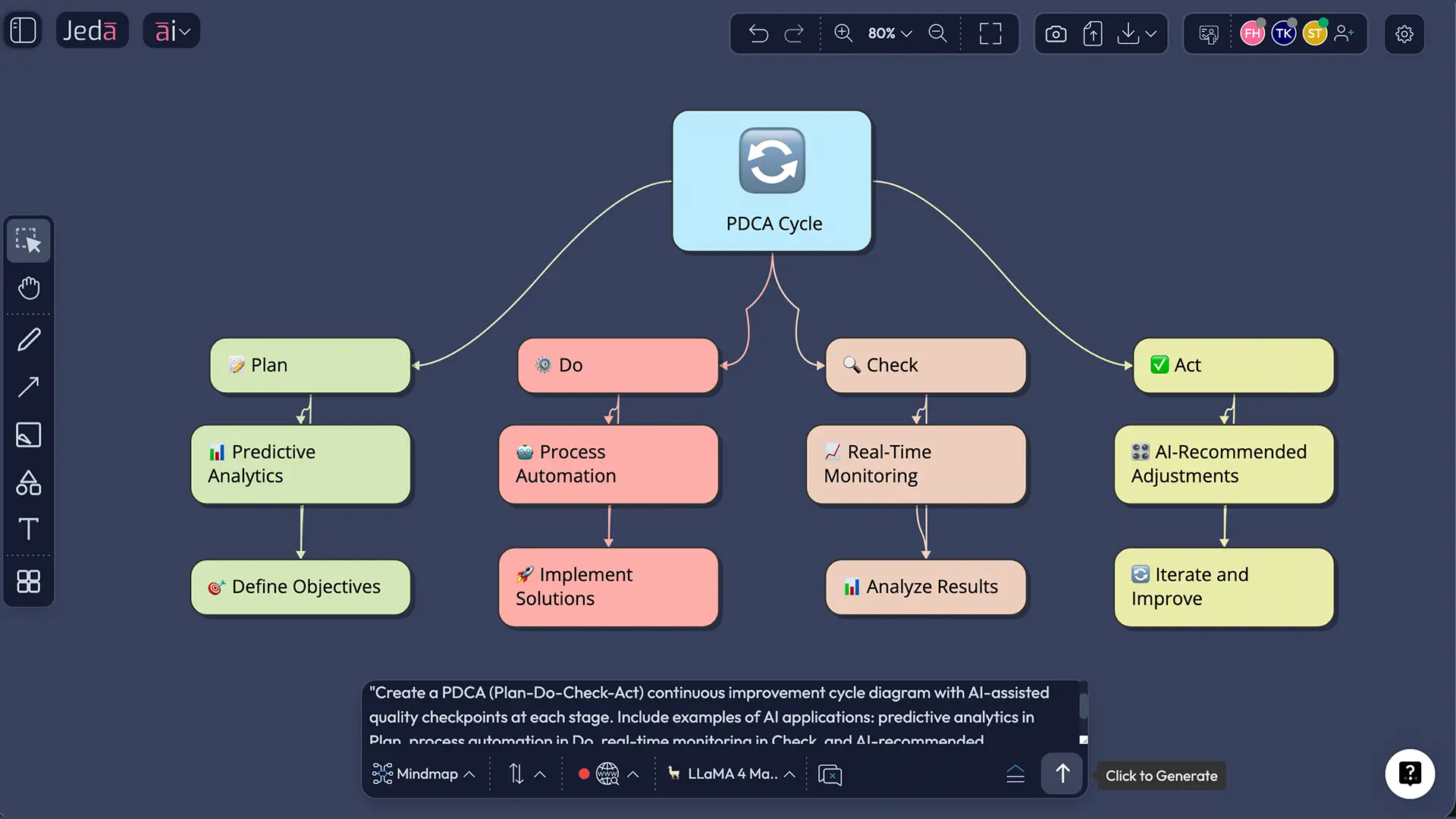
Every AI-generated TQM framework is fully editable. Run PDCA cycles directly on the canvas — update, extend with AI+, and re-generate as your quality context evolves.
How to Create a TQM Framework in Jeda.ai
Two paths. Both get you to a complete TQM framework — the AI Menu route is faster for structured outputs, the Prompt Bar gives you more custom control.
Method 1: AI Menu — Recipe Matrix (Recommended)
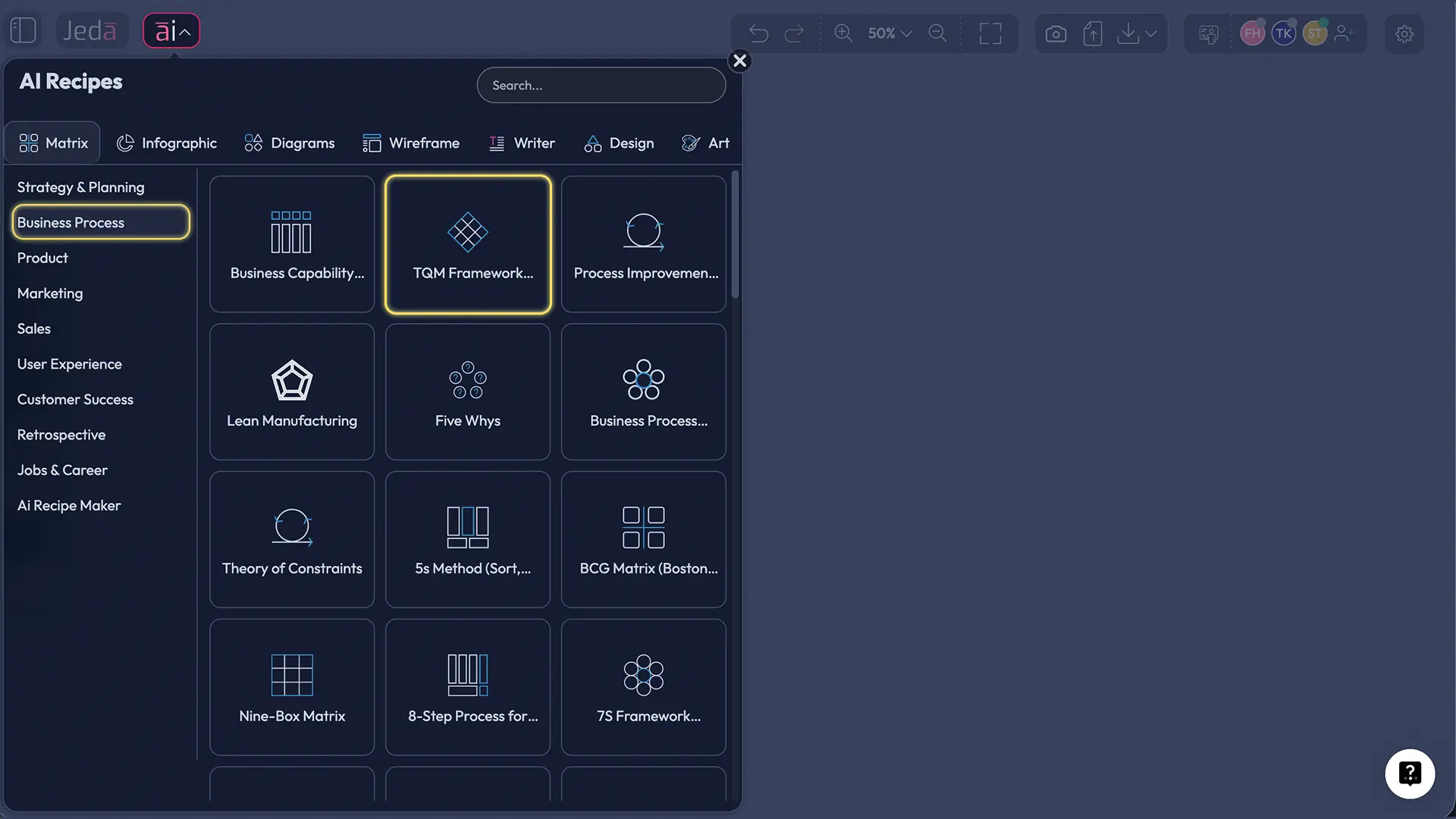
The AI Menu has 300+ pre-built framework templates. For TQM, the Matrix Recipes category includes a dedicated TQM template that structures all 8 pillars automatically.
- Open Jeda.ai and access your canvas
Log into your Jeda.ai AI Workspace. Open a new canvas or navigate to an existing project where you want to add the TQM framework.
- Click the AI Menu button
Find the AI Menu button in the top-left corner of the canvas. Click it to open the full library of 300+ AI Recipes, organized by output type.
- Select Matrix Recipes
In the AI Menu, choose Matrix Recipes from the recipe categories. This section contains structured framework templates including TQM, SWOT, BMC, and more.
- Choose the TQM Framework template
Browse the Matrix Recipes and select the TQM Framework template. This pre-built recipe is structured around the 8 TQM pillars with fields for your organization's context.
- Enter your context details
Fill in your organization name, industry sector, primary quality focus areas, and any specific challenges (e.g., high defect rate in production, low NPS scores). The more specific you are, the more targeted the output.
- Click Generate
Hit Generate. Within seconds, Jeda.ai's AI produces a fully structured TQM matrix mapped to your 8 pillars, complete with quality metrics, process ownership suggestions, and improvement priorities.
- Extend with AI+ and refine
Select any pillar on the canvas and tap the AI+ button to extend that section with deeper analysis — specific KPIs, action steps, or cross-departmental dependencies. Edit text, colors, and layout directly on the canvas.
Method 2: Prompt Bar
Prefer to start from a custom prompt? The Prompt Bar gives you direct control.
- Open the Prompt Bar
Find the Prompt Bar at the bottom of the Jeda.ai canvas. This is your primary input for generating any visual output directly.
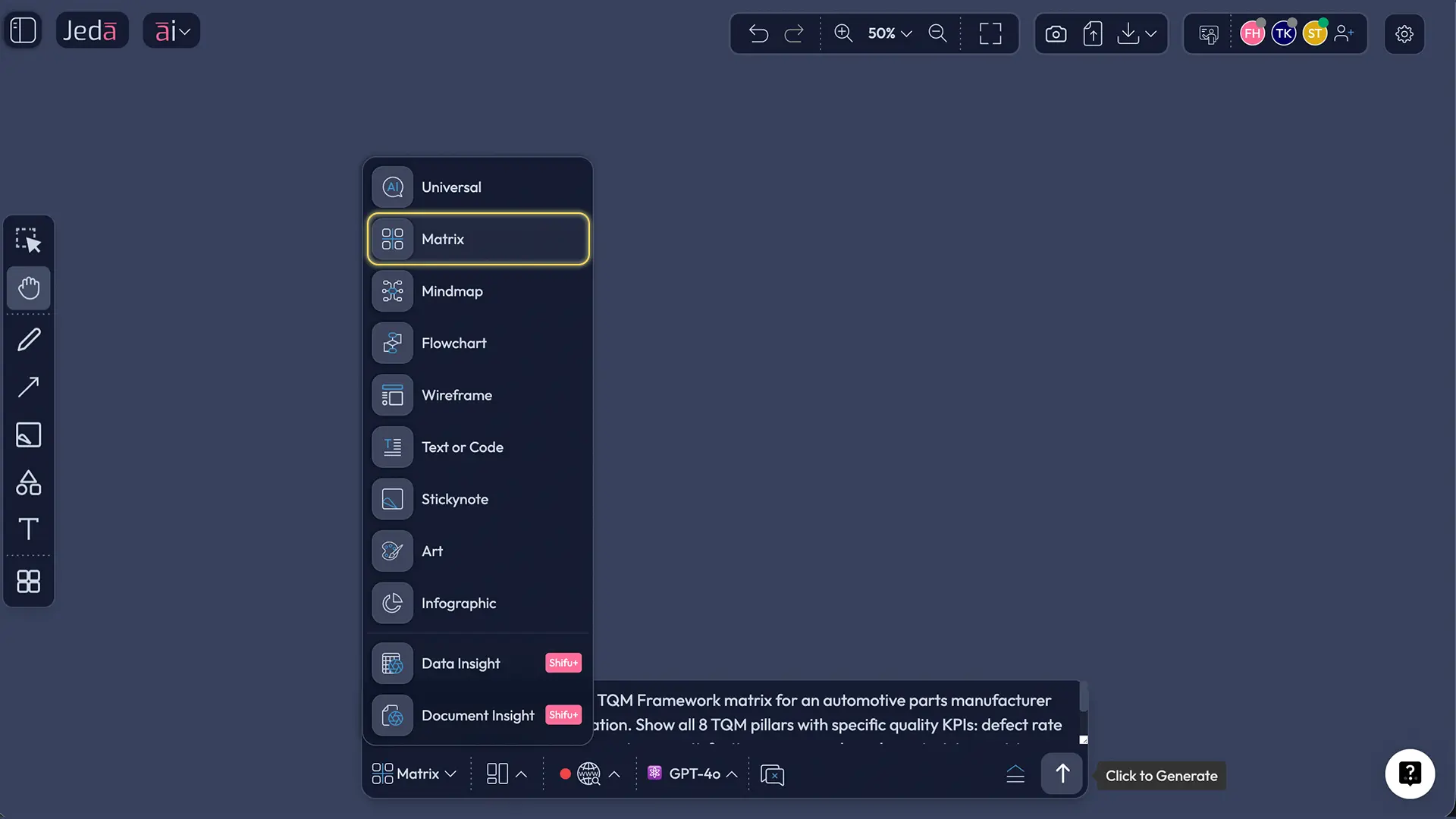
- Select the Matrix command
In the Prompt Bar, click the command selector and choose Matrix. This tells the AI to structure its output as a framework grid — ideal for TQM's multi-pillar structure.
- Type your TQM prompt
Write a specific prompt describing your TQM context. For example: 'TQM framework matrix for a mid-size healthcare organization focusing on patient safety, process compliance, and staff engagement across 8 quality pillars.' The more context you provide, the more actionable the output.
- Press Enter to generate
Press Enter. Jeda.ai generates your TQM matrix in real time on the canvas. You'll see all 8 pillars populated with quality dimensions, process steps, and ownership areas relevant to your context.
- Use AI+ to deep-dive any section
Select any pillar or section on the canvas and tap the AI+ button to generate deeper analysis for that specific area — for instance, expanding the 'Continual Improvement' pillar with a nested PDCA breakdown. Nothing specific needs to be asked for or instructed: AI+ handles the deep dive automatically.
- Convert or export
Use Vision Transform to convert your TQM matrix into a Flowchart (great for process mapping) or a Diagram (for org-level views). Export your finished framework as PNG, SVG, or PDF.
TQM Matrix Template & Real-World Examples
Theory lands differently when you see it applied. Here are two scenarios where Jeda.ai's AI Workspace generated TQM frameworks that drove real planning decisions.
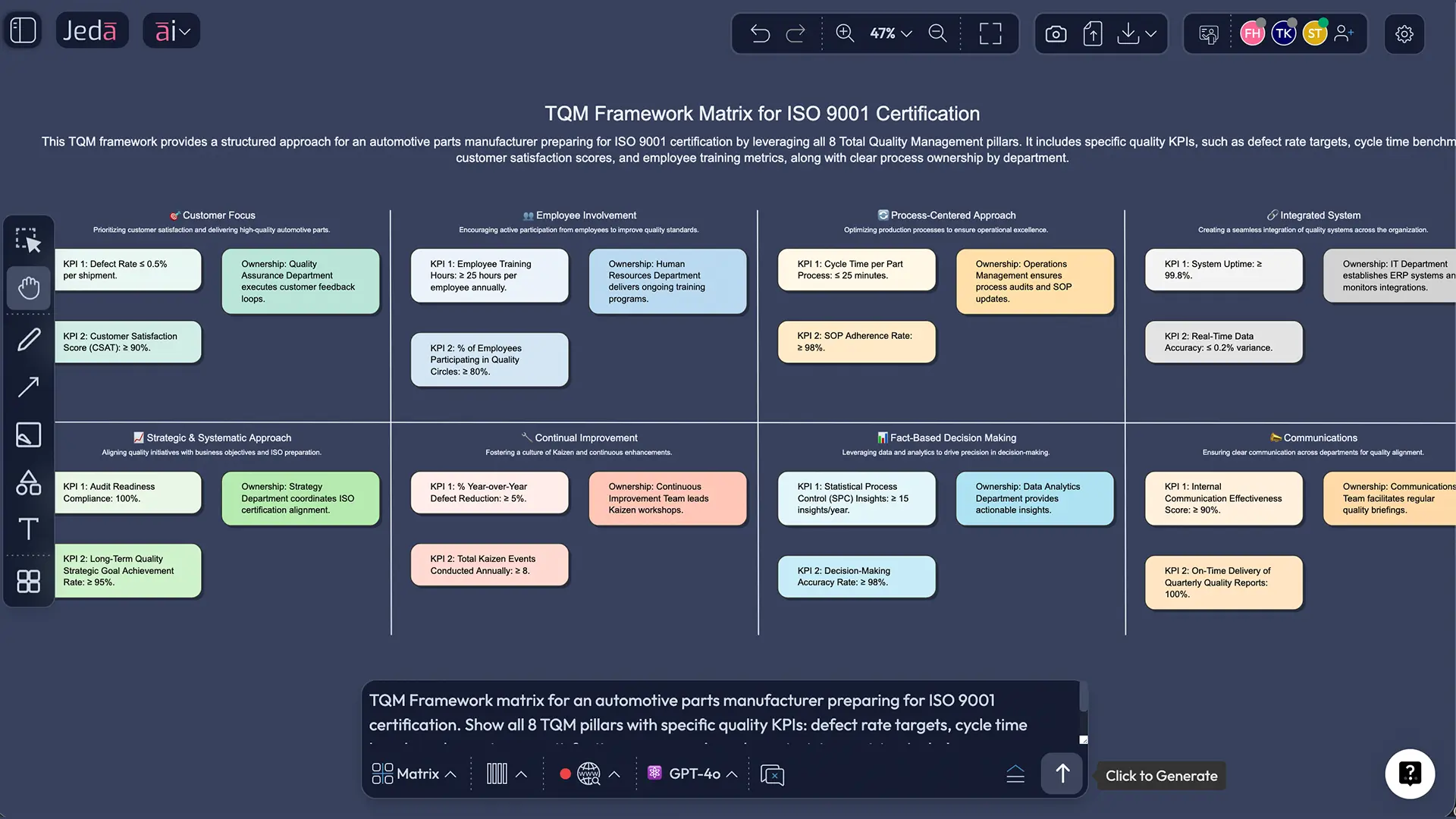
Scenario 1 — Automotive Manufacturing A mid-size tier-2 auto parts manufacturer used Jeda.ai to build a TQM matrix ahead of an ISO 9001 audit. They prompted the Matrix command with their production context. Within seconds, the AI generated a framework mapping all 8 pillars to specific production-line processes — flagging that their "Fact-Based Decision Making" pillar had the weakest KPI structure. The quality team extended that section with AI+ and discovered three measurement gaps their annual manual review had missed. Audit prep time dropped from three weeks to four days.
Scenario 2 — Healthcare Operations A regional hospital network built a TQM framework using the AI Menu's Matrix Recipes to restructure its patient-safety quality system after a Joint Commission review. The AI-generated matrix mapped employee involvement protocols across nursing, admin, and clinical departments — something that had previously existed only in siloed documents. The visual format made cross-departmental alignment possible in a single 90-minute working session.
Best Practices for AI-Powered TQM
Getting the most out of Jeda.ai's AI Workspace for TQM isn't complicated. But there are a few practices that separate one-time visual outputs from living quality management systems.
Common TQM Mistakes to Avoid
TQM fails more often from implementation errors than from flawed theory. Here's where teams consistently go wrong — and how AI-assisted frameworks help.
1. Treating TQM as a project, not a system. TQM is organizational culture. Teams that run a TQM workshop, generate a framework, and file it away see zero long-term benefit. The framework needs to live on your AI Whiteboard — updated in real time as quality data changes.
2. Skipping the "employee involvement" pillar. This is the most underweighted pillar in practice. ASQ's 2024 Insights on Excellence report found that 42% of organizations still cite subpar internal processes as their greatest unresolved quality challenge — which often traces back to employees not being genuinely involved in identifying and fixing those processes.
3. Generating a framework without data. AI can scaffold your TQM structure instantly. But if you don't connect it to real quality metrics — defect rates, NPS scores, cycle times — the framework becomes wallpaper. Build your matrix, then immediately map your actual KPIs onto each pillar.
4. Confusing TQM with Six Sigma or Lean. These are complementary, not interchangeable. TQM is the overarching philosophy; Lean eliminates waste within it; Six Sigma reduces variation. Use Jeda.ai to generate all three frameworks separately, then cross-reference them for a complete operational picture.
5. Building it once and never extending it. The PDCA cycle is iterative by design. Use the AI+ button in Jeda.ai after every quality review to extend, update, and deepen your TQM matrix without starting over.
Frequently Asked Questions
- What is the TQM framework with AI?
- The TQM framework with AI integrates Total Quality Management principles — customer focus, continuous improvement, and data-driven decision-making — with AI-powered tools that generate, visualize, and extend quality frameworks in real time. Jeda.ai's AI Workspace lets teams build complete TQM matrices in under 60 seconds using natural language prompts.
- How does AI improve Total Quality Management?
- AI accelerates TQM by analyzing quality data in real time, generating structured frameworks instantly, and identifying process gaps that manual review misses. AI reduces the Cost of Poor Quality (COPQ) by enabling predictive quality monitoring, automated compliance checks, and faster PDCA cycle iterations.
- What are the 8 pillars of TQM?
- The 8 pillars of TQM as defined by ASQ are: Customer Focus, Employee Involvement, Process-Centered Approach, Integrated System, Strategic & Systematic Approach, Continual Improvement, Fact-Based Decision Making, and Communications. Every effective TQM framework maps quality management activities across all 8 pillars.
- How do you create a TQM matrix with AI?
- In Jeda.ai, open the AI Menu, select Matrix Recipes, choose the TQM Framework template, and enter your organization's context. The AI generates a complete 8-pillar TQM matrix in seconds. Alternatively, use the Prompt Bar — select the Matrix command, type your TQM prompt, and press Enter.
- What is the PDCA cycle and how does AI enhance it?
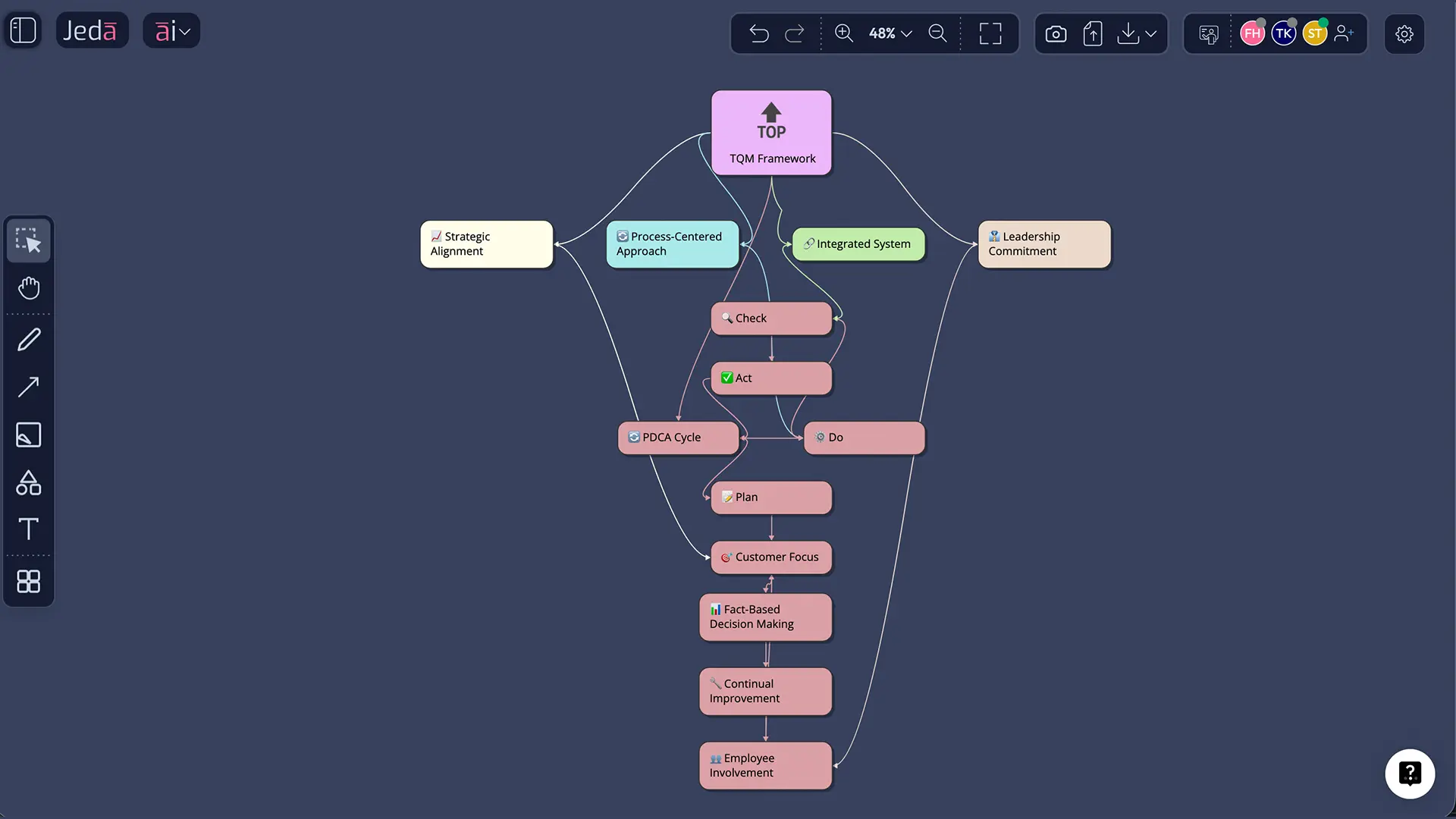
- The PDCA (Plan-Do-Check-Act) cycle, popularized by W. Edwards Deming based on Walter Shewhart's original work, is the iterative improvement engine of TQM. AI enhances it by automating the 'Check' phase with real-time data analysis, suggesting Plan updates based on pattern recognition, and generating visual cycle diagrams in Jeda.ai using the Diagram command.
- Is TQM different from Six Sigma and Lean?
- Yes. TQM is the overarching quality management philosophy covering customer focus, employee involvement, and organizational culture. Six Sigma focuses on reducing process variation using DMAIC methodology. Lean targets waste elimination. The three are complementary — many organizations use all three together, and Jeda.ai supports frameworks for each.
- What is the Cost of Poor Quality (COPQ) in TQM?
- COPQ is the total financial impact of not producing quality the first time — including defect rework, warranty claims, customer churn, and compliance failures. TQM frameworks aim to reduce COPQ by building quality into every process rather than inspecting for defects after the fact. AI tools help quantify and track COPQ in real time.
- Can I visualize a TQM framework without design skills?
- Yes. Jeda.ai's AI Workspace generates complete, professionally structured TQM matrices from a text prompt — no design or diagramming experience required. Every element is editable: text, colors, shapes, and layouts. The AI does the structure; you focus on the strategy.
- What industries use TQM with AI?
- TQM with AI is applied across manufacturing, healthcare, financial services, software development, retail, and logistics. Companies like Toyota (manufacturing), Mayo Clinic (healthcare), and IBM (technology) have used TQM principles for decades. AI extends TQM's reach to any organization with quality data and a need for continuous improvement.
- How does Jeda.ai's AI+ button work with TQM frameworks?
- After generating a TQM framework in Jeda.ai, select any pillar or section on the canvas and tap the AI+ button. The AI automatically extends that section with deeper analysis — specific KPIs, action steps, sub-processes, or cross-departmental dependencies. No specific instructions are needed; the AI+ button handles the deep dive contextually.
Sources & Further Reading
- [1]
Juran, Joseph M. (1951) . “Quality Control Handbook” McGraw-Hill.
View Source ↗ - [2]
American Society for Quality (ASQ) (2024) . “2024 ASQE Insights on Excellence Benchmarking Highlights Report” ASQ Excellence.
View Source ↗ - [3]
Feigenbaum, Armand V. (1951) . “Total Quality Control” McGraw-Hill.
View Source ↗ - [4]
Oschman, Jacobus Johannes (2017) . “The Role of Strategic Planning in Implementing a Total Quality Management Framework: An Empirical View” Quality Management Journal, ASQ.
View Source ↗
Build Your TQM Framework with AI Today
Join over 150,000+ professionals who use Jeda.ai to visualize quality management frameworks, PDCA cycles, and continuous improvement matrices — in seconds.
Try Free Template