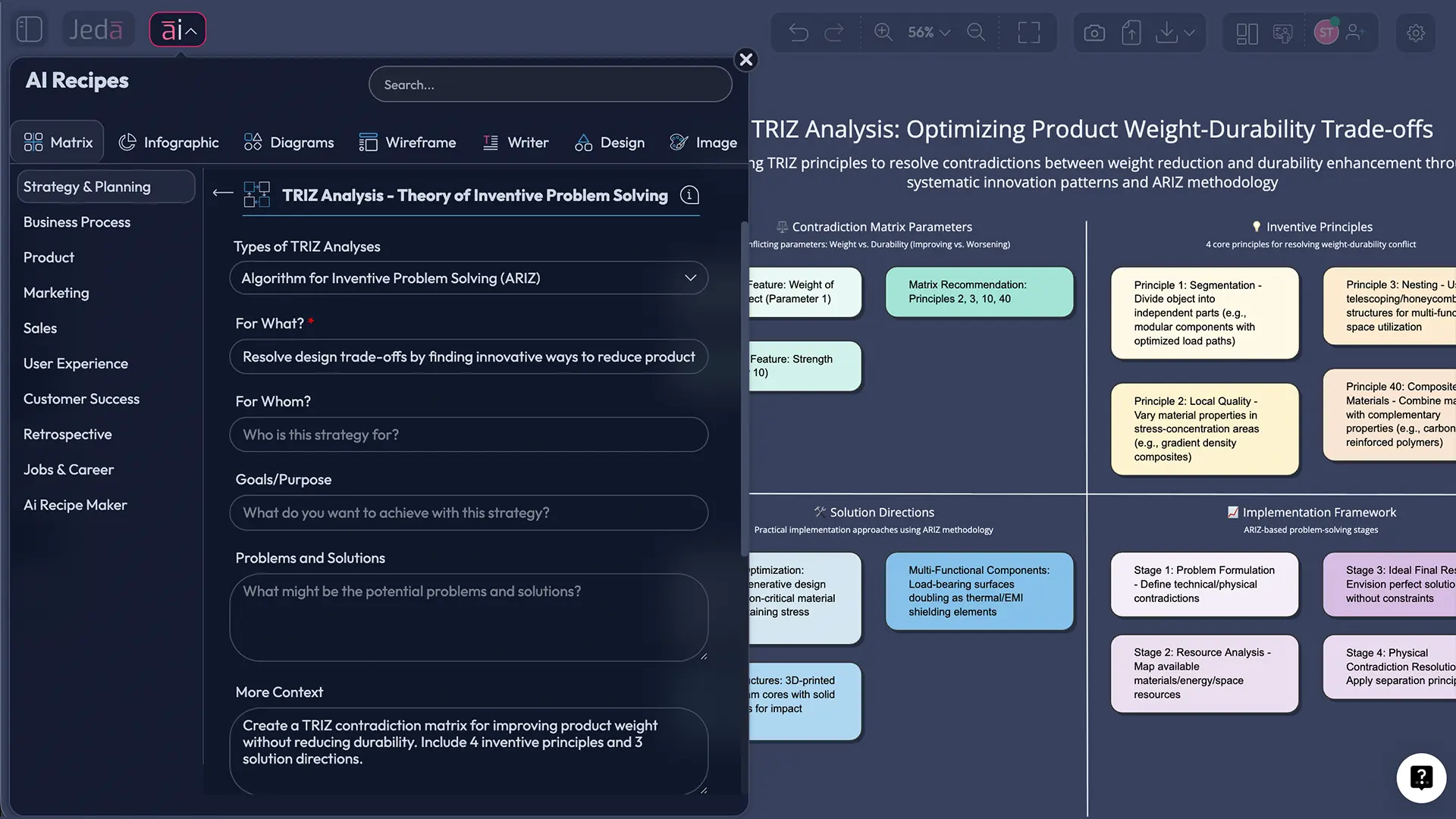
TRIZ analysis is one of those methods that feels almost unfair—once you learn it. You take a problem that’s been stuck for weeks, name the contradiction, and suddenly you’re looking at solution patterns that have worked across industries for decades. Now add an AI Workspace and you don’t just think faster… you also document faster. That’s the difference between “cool idea” and “approved, shipped, done.”
Jeda.ai is an AI Whiteboard and AI Workspace used by 150,000+ users, and it includes 300+ strategic frameworks, including TRIZ templates in the AI Menu. So yes—TRIZ can be structured, visual, and team-friendly without you babysitting spreadsheets.
What is TRIZ analysis?
TRIZ (short for “Theory of Inventive Problem Solving”) is a structured method for solving hard problems where improving one thing makes another thing worse. Think: making a drone lighter without making it fragile, or speeding up onboarding without increasing security risk.
TRIZ analysis works because it treats innovation as patterns, not magic. Instead of brainstorming in circles, you map the contradiction, consult proven inventive principles, and design solutions that remove the trade-off rather than “compromise” around it.
And yes, it started in engineering. But it’s been applied to business, operations, and product decisions too—because contradictions show up everywhere.
What a TRIZ analysis actually includes
If TRIZ feels overwhelming, it’s usually because people try to learn the whole toolbox at once. Don’t. A practical TRIZ analysis can be built from four pieces:
1) A clear contradiction statement
This is the heart of TRIZ. You’re not describing the problem. You’re naming the trade-off.
Example:
- “If we reduce weight, durability drops.”
- “If we increase speed, error rate rises.”
Short. Brutal. Accurate.
2) Contradiction Matrix (optional, but powerful)
Classic TRIZ uses a contradiction matrix to translate your trade-off into candidate solution patterns (the inventive principles). It’s basically a “what usually works” lookup table—so you don’t start from a blank page every time.
3) The 40 Inventive Principles
These principles are general solution patterns (like Segmentation, Taking out, Another dimension, Feedback). They don’t hand you a finished solution. They push your thinking in directions that tend to work.
4) Ideal Final Result (IFR)
IFR is the TRIZ move that sounds silly… until it isn’t.
It asks: What would the solution look like if the benefit happened “by itself”, with minimal new complexity?
That question forces simpler, cleaner, more “engineering-real” ideas.
Why use AI for TRIZ analysis?
Because TRIZ is structured—and structure is exactly what AI can accelerate.
Here’s the part nobody says out loud: most teams don’t fail at TRIZ because it’s “too complex.” They fail because it’s too manual. You lose momentum while searching, formatting, translating, and rewriting.
An AI Workspace flips that.
With Jeda.ai, you can:
- Generate a contradiction matrix template instantly (no setup tax)
- Turn messy notes into a clean Matrix or Diagram
- Run 1–3 LLMs at once (Multi‑LLM Agent) and let an Aggregator model pick the best output (Shifu plan)
- Pull in evidence from PDFs or spreadsheets using Document Insight and Data Insight
- Extend any section with the AI+ button when the team asks “what else?”
And because it’s an AI Whiteboard, the output is editable visuals, not a frozen answer. You can drag, rewrite, connect, and collaborate live.
- Faster contradiction modeling
Prompt the Matrix command with your trade-off and context. Jeda.ai generates a clean TRIZ structure you can refine with the team.
- Evidence‑in, not vibes‑in
Bring PDFs and docs into Document Insight to extract constraints, failure modes, or requirements that must stay true.
- Data‑backed TRIZ options
Use Data Insight on CSV/Excel to surface what’s really driving the contradiction (cost, defects, cycle time) before you pick principles.
- Collaborative decision trail
Run TRIZ in an AI Workspace where everyone can see the reasoning, edit the matrix, and agree on the final direction.
- Multi‑model alternatives
Generate multiple sets of inventive principles and solution sketches using 1–3 models, then compare without tool‑hopping.
- Extend + convert outputs
Use AI+ to expand any node. Use Vision Transform to convert a matrix into a flowchart, mind map, or diagram for stakeholders.
How to create TRIZ analysis in Jeda.ai
Jeda.ai supports TRIZ analysis in two ways: AI Menu templates (recommended) and the Prompt Bar (more flexible). Either way, you’re working inside an AI Whiteboard, so the output stays editable.
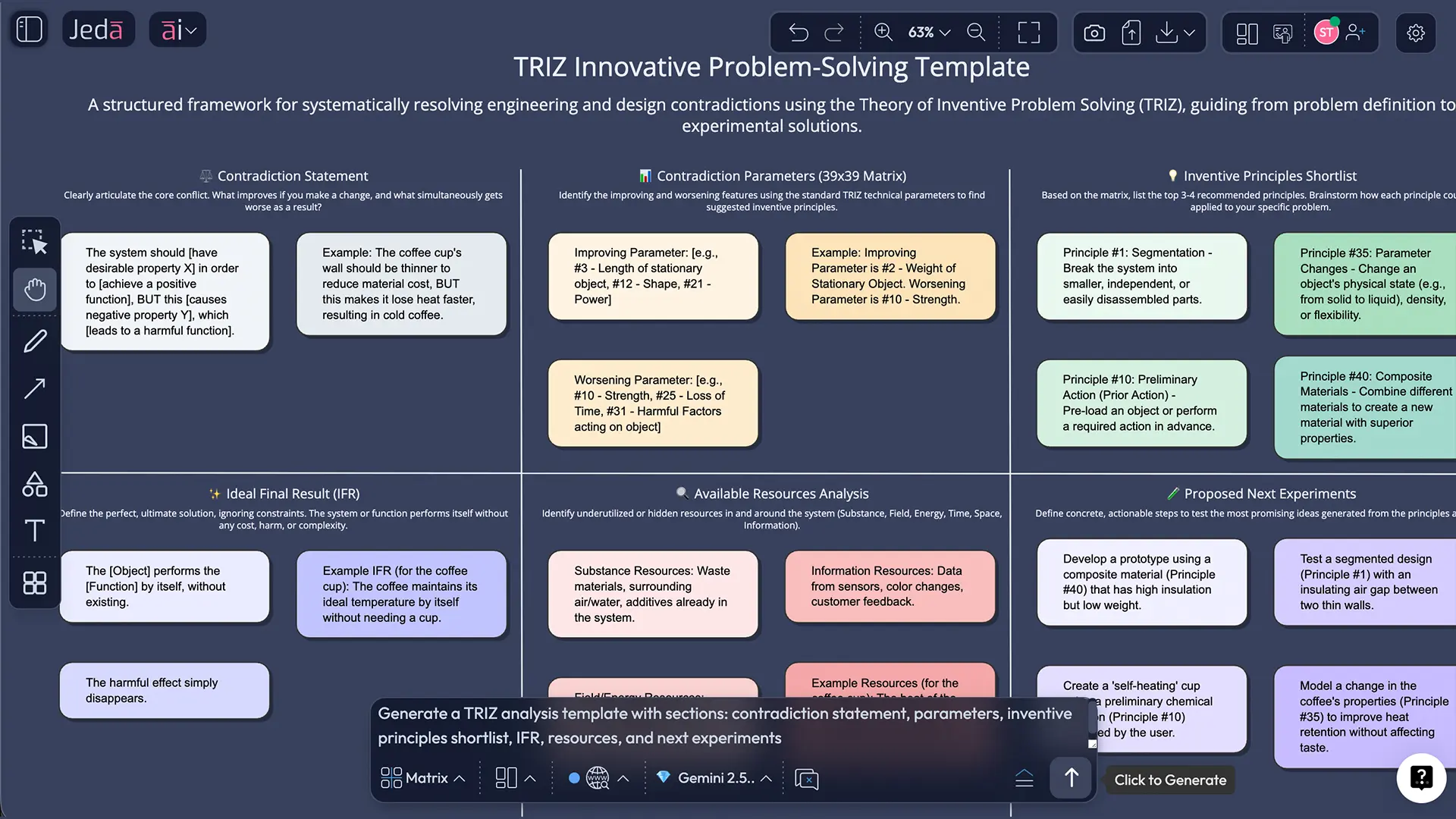
Method 1: AI Menu TRIZ template (recommended)
- Open the AI Menu (top-left of the canvas).
- Go to Matrix Recipes.
- Choose a TRIZ template.
- Add your context (system, constraint, what must improve, what gets worse).
- Click Generate.
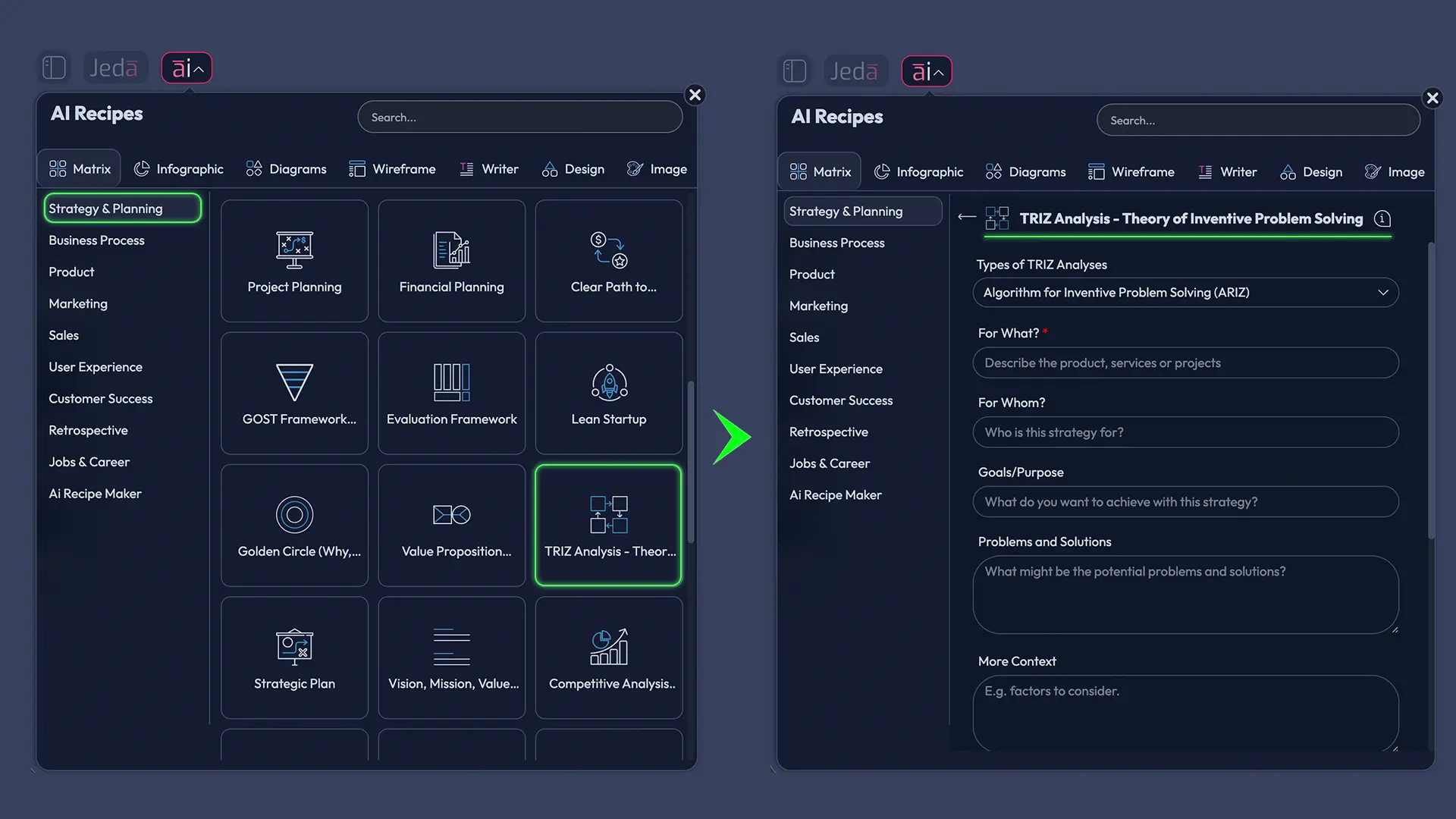
Method 2: Prompt Bar (fast + flexible)
- Open the Prompt Bar at the bottom.
- Select the Matrix command.
- Paste a TRIZ prompt (use the one below).
- (Optional) Run Multi‑LLM with an Aggregator model for a “best-of” output.
- Press Enter.
- Collect the real constraint
Write down what cannot change (budget cap, weight limit, compliance rule). Pull it from your doc or spec if possible.
- State the contradiction
Write: 'If we improve X, Y gets worse.' Keep it measurable.
- Generate a TRIZ board
Use the TRIZ template in AI Menu, or choose Matrix in the Prompt Bar and generate a contradiction matrix + inventive principles.
- Pick 2–4 principles to explore
Don’t explore all 40. Select a small set and sketch solution directions in a Diagram next to the matrix.
- Extend the promising branch
Tap the AI+ button on a node to expand mechanisms, risks, and implementation steps.
- Convert for stakeholders + export
Use Vision Transform to convert your matrix into a flowchart or mind map. Export as PNG, SVG, or PDF.
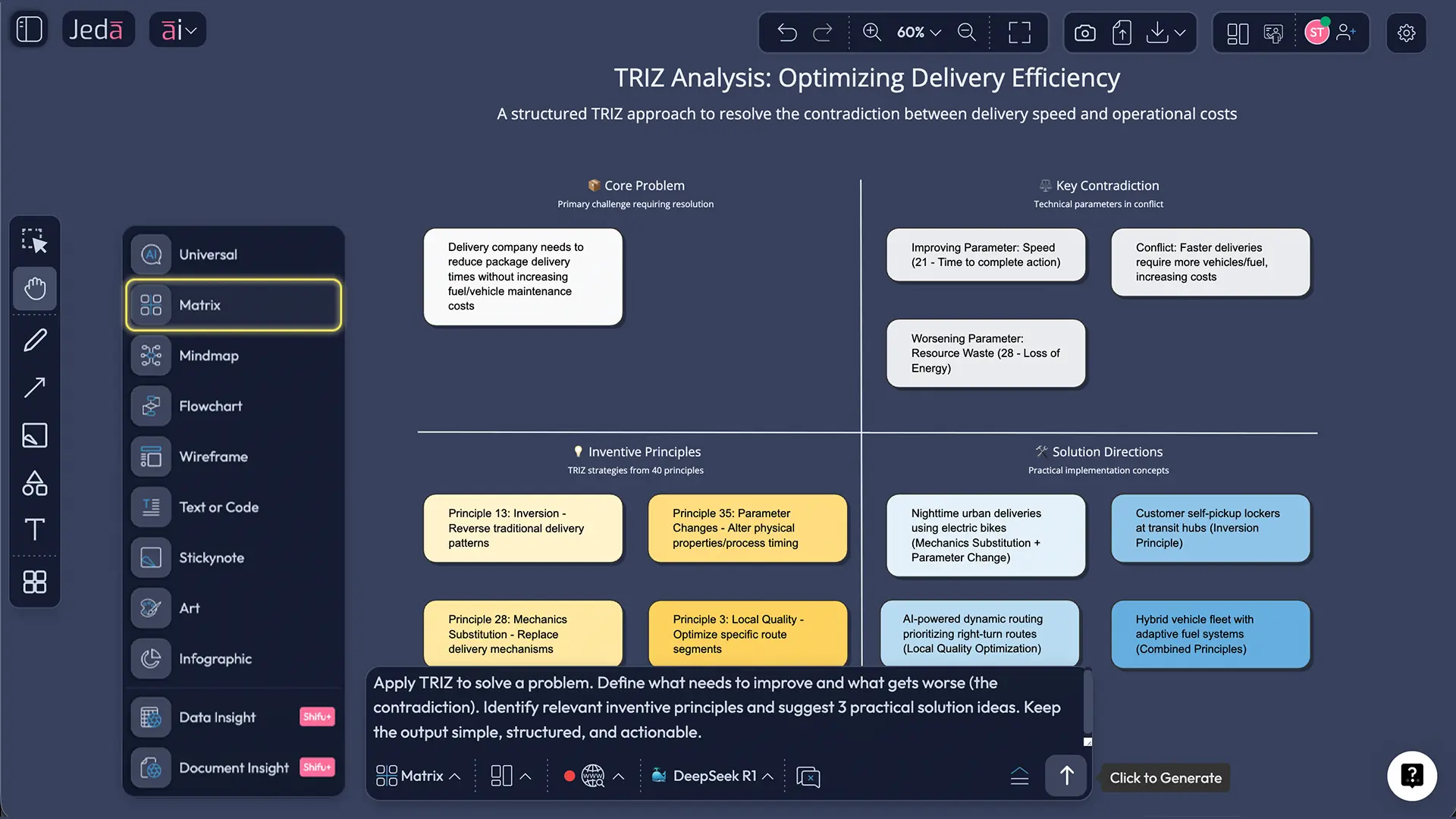
Copy‑paste TRIZ prompt template (Prompt Bar)
Use this when you want clean output on the first try:
- System: [what you’re improving]
- Context: [where/when it operates]
- Goal: [what should improve]
- Contradiction: If we improve [X], then [Y] gets worse.
- Constraints: [cost limit, materials, regulations, time]
- Deliverable: Create a TRIZ analysis as a matrix: contradiction statement, candidate inventive principles (with short explanations), 3 solution directions, and a suggested Ideal Final Result (IFR).
TRIZ analysis examples you can steal
Let’s do a fast, real-ish example. No sci‑fi required.
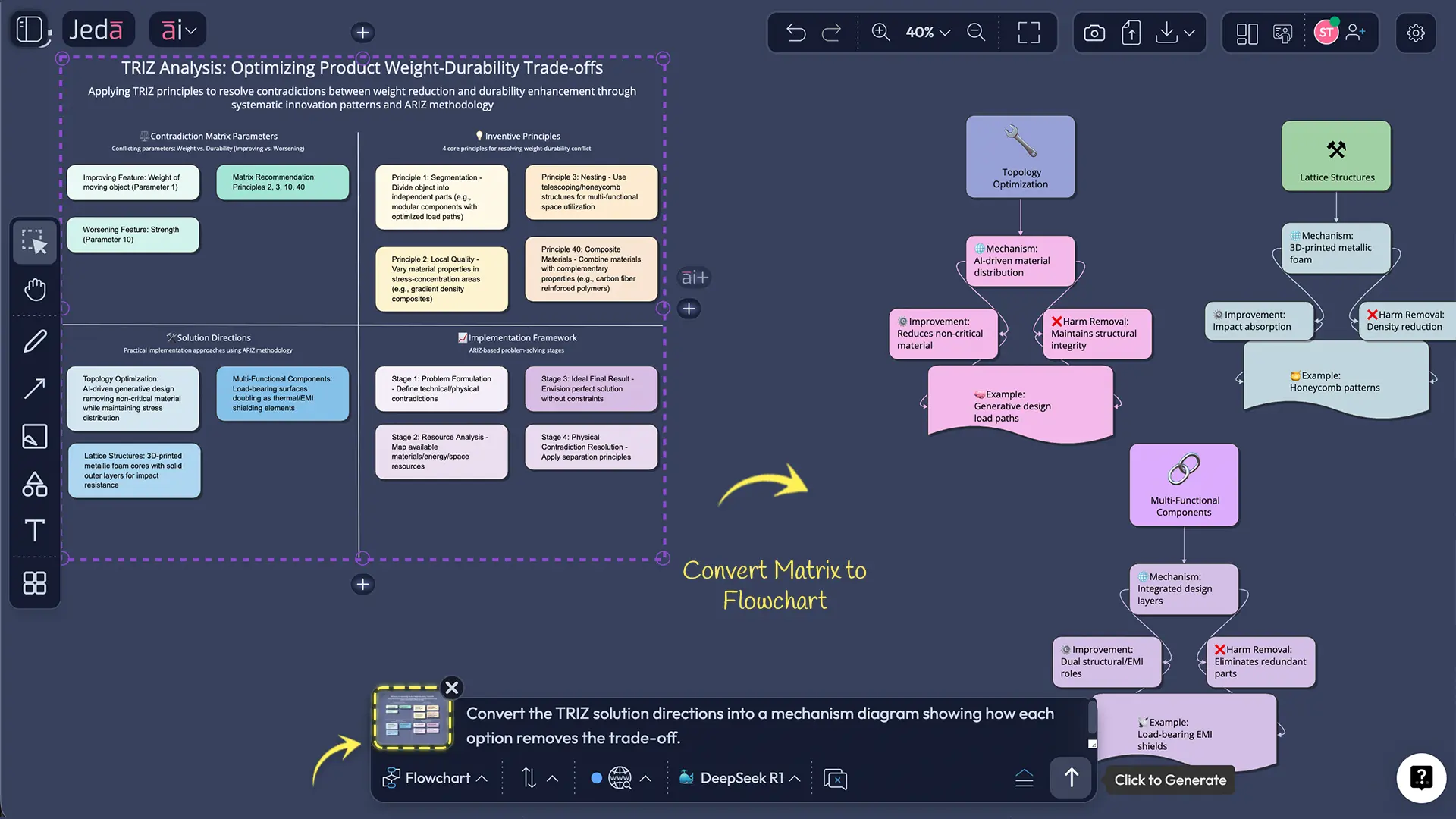
Example 1: Lightweight product, high durability (classic)
Scenario: A consumer electronics team wants to reduce device weight, but drop tests are failing.
Contradiction: Improve weight → worsens strength/durability.
A good TRIZ move here is to search for solutions that change structure, not just material thickness. That’s where principles like Segmentation, Composite materials, Another dimension, or Local quality often show up.
Example 2: Product onboarding vs security friction (yes, TRIZ fits)
TRIZ isn’t limited to mechanical parts. Product teams also hit contradictions:
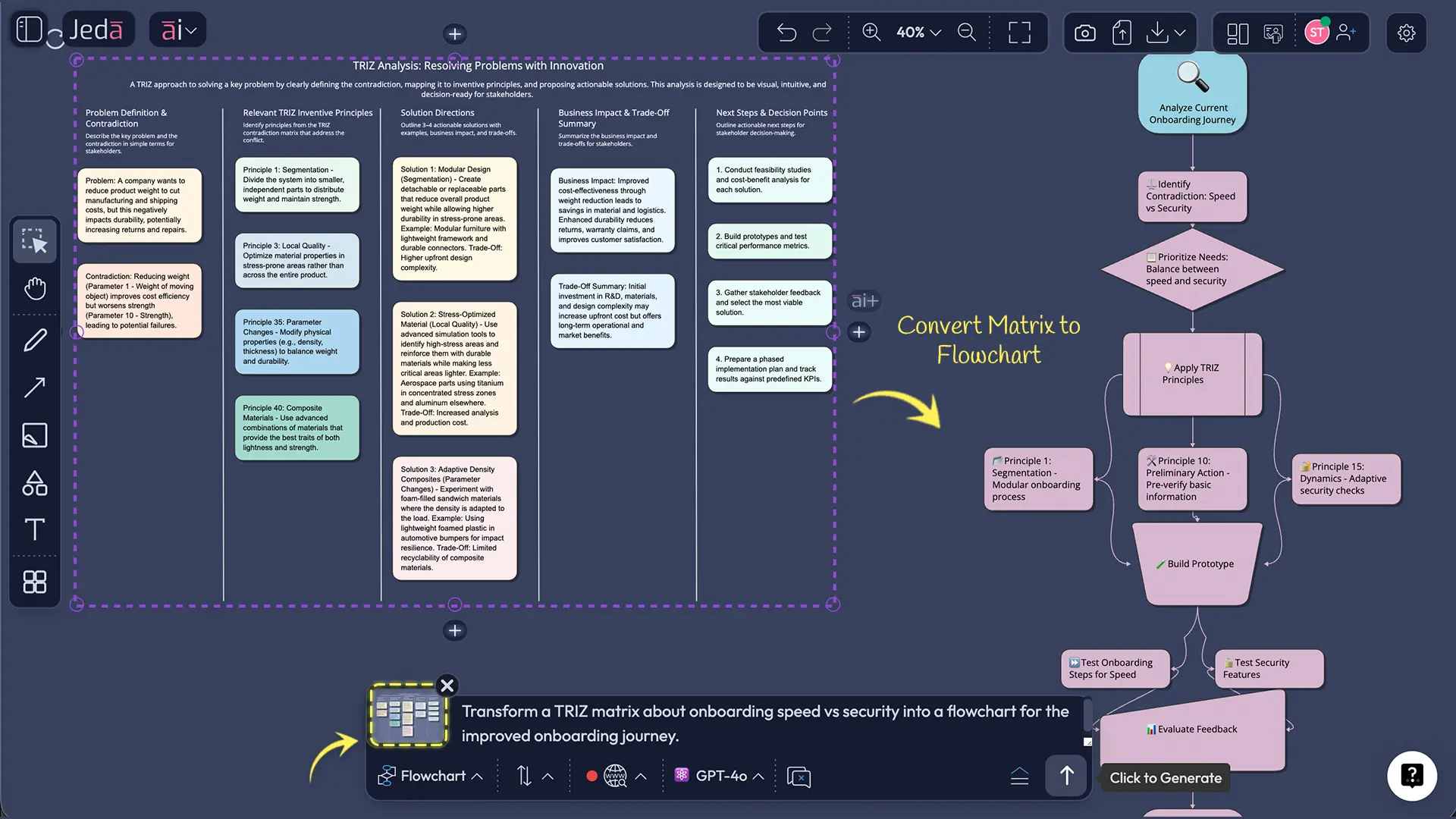
Contradiction: Improve onboarding speed → worsens security and verification confidence.
TRIZ helps because it forces you to ask: Can we remove the trade-off?
Sometimes that means shifting verification to moments of higher trust, splitting verification across steps, or using “self-service” patterns without weakening security.
This is where an AI Workspace shines. You can keep the TRIZ matrix for the thinking, then transform it into a flowchart for the onboarding journey in the same board.
Best practices for running TRIZ with AI
- Write contradictions with numbers. “Too slow” is vague. “Adds 12 seconds to checkout” is actionable.
- Separate the “system” from the “environment.” Many contradictions live in the interface.
- Use documents as evidence. Specs, QA notes, customer complaints—feed them into Document Insight instead of relying on memory.
- Keep a “principles tested” column. Your future self will thank you.
- Stop at 2–4 principles first. Depth beats breadth.
- Capture trade-offs openly. TRIZ is about contradictions. Pretending they don’t exist is… adorable. And expensive.
- Calling any trade-off a TRIZ contradiction. TRIZ contradictions are measurable and tied to system parameters.
- Picking principles because they “sound right.” Pick them because they map to the contradiction model you wrote.
- Skipping the IFR step. IFR is where you find simpler, cleaner moves.
- Not converting outputs for the audience. Engineers may love matrices. Execs want a story flow. Use Vision Transform.
- Leaving the board as a one-off artifact. Save it as a reusable template for the next similar contradiction.
Frequently Asked Questions
- What does TRIZ stand for?
- TRIZ stands for “Theory of Inventive Problem Solving.” TRIZ is a method for resolving tough problems by modeling contradictions and applying repeatable solution patterns instead of relying on open-ended brainstorming.
- Who invented TRIZ, and when?
- TRIZ is credited to Genrich Altshuller and colleagues, with development beginning in the mid‑1940s. Altshuller’s work grew from studying large numbers of invention patents to identify patterns behind breakthrough solutions.
- What is a TRIZ contradiction matrix?
- A TRIZ contradiction matrix is a structured table that links a defined engineering contradiction (improving one parameter while another worsens) to inventive principles that have historically resolved similar contradictions. It helps you shortlist solution directions faster.
- What are the 40 inventive principles used for?
- The 40 inventive principles are generalized patterns of inventive solutions. You use them to generate mechanism-level solution directions when you’re stuck in a trade-off, such as improving strength without increasing weight, or increasing speed without increasing errors.
- What is the Ideal Final Result (IFR) in TRIZ?
- The Ideal Final Result (IFR) is a statement of the best possible outcome where the problem is eliminated with minimal added complexity. IFR pushes you to think beyond patches and toward solutions that remove the root trade-off.
- Is TRIZ only for engineers?
- TRIZ started in engineering, but teams use TRIZ for product, operations, and business problems whenever contradictions exist. If your work includes trade-offs like speed vs accuracy or cost vs quality, TRIZ can help you structure better options.
- Can AI do TRIZ analysis reliably?
- AI can speed up TRIZ analysis by generating templates, drafting contradiction statements, suggesting relevant principles, and summarizing evidence from docs. You still need human judgment to validate the contradiction model and choose which solution direction is feasible.
- How long does a TRIZ analysis take?
- A lightweight TRIZ analysis can take 30–60 minutes if the contradiction is clear and the team has the right context. Complex systems can take longer, especially when multiple contradictions interact and you need deeper exploration of solution mechanisms.
- What is ARIZ in TRIZ?
- ARIZ is a more advanced TRIZ problem-solving algorithm used for difficult, multi-layer contradictions. It guides you through deeper modeling steps like IFR, resources, and contradiction refinement when the matrix approach isn’t enough.
- How do I create a TRIZ contradiction matrix template in Jeda.ai?
- To create a TRIZ contradiction matrix template in Jeda.ai, open the AI Menu and select a TRIZ template under Matrix Recipes, or choose the Matrix command in the Prompt Bar and generate a reusable TRIZ board from your prompt.
- What can I export from Jeda.ai after a TRIZ session?
- You can export your TRIZ board from Jeda.ai as PNG, SVG, or PDF. Because the output is editable on the AI Whiteboard, you can also convert the format (matrix to diagram or flowchart) before exporting.
Sources & further reading
- [1]
G. S. Altshuller (1984) . “Creativity as an Exact Science: The Theory of the Solution of Inventive Problems” Taylor & Francis (original publication 1984).
View Source ↗ - [2]
TRIZ Journal (n.d.) . “40 Inventive Principles (with examples)” The TRIZ Journal.
View Source ↗ - [3]
TRIZ Journal (n.d.) . “Find the Ideal Final Result (IFR)” The TRIZ Journal.
View Source ↗ - [4]
C. Pokhrel et al. (2015) . “Adaptation of TRIZ contradiction matrix for solving contradictions in process engineering” Chemical Engineering Research and Design.
View Source ↗ - [5]
Emerald Insight (2013) . “Exploring the effectiveness of inventive principles of TRIZ on manufacturing technology management” Journal of Manufacturing Technology Management.
View Source ↗ - [6]
T. Pheunghua (2024) . “TRIZ and Generative AI – Example of Prompt” triz-consulting.de (PDF).
View Source ↗
Start Your TRIZ Analysis Today
Join over 150,000+ users who trust Jeda.ai’s AI Workspace to turn contradictions into decision-ready visuals.
Try Free Template