User Research with AI: Turn Raw Feedback Into Product Decisions Faster
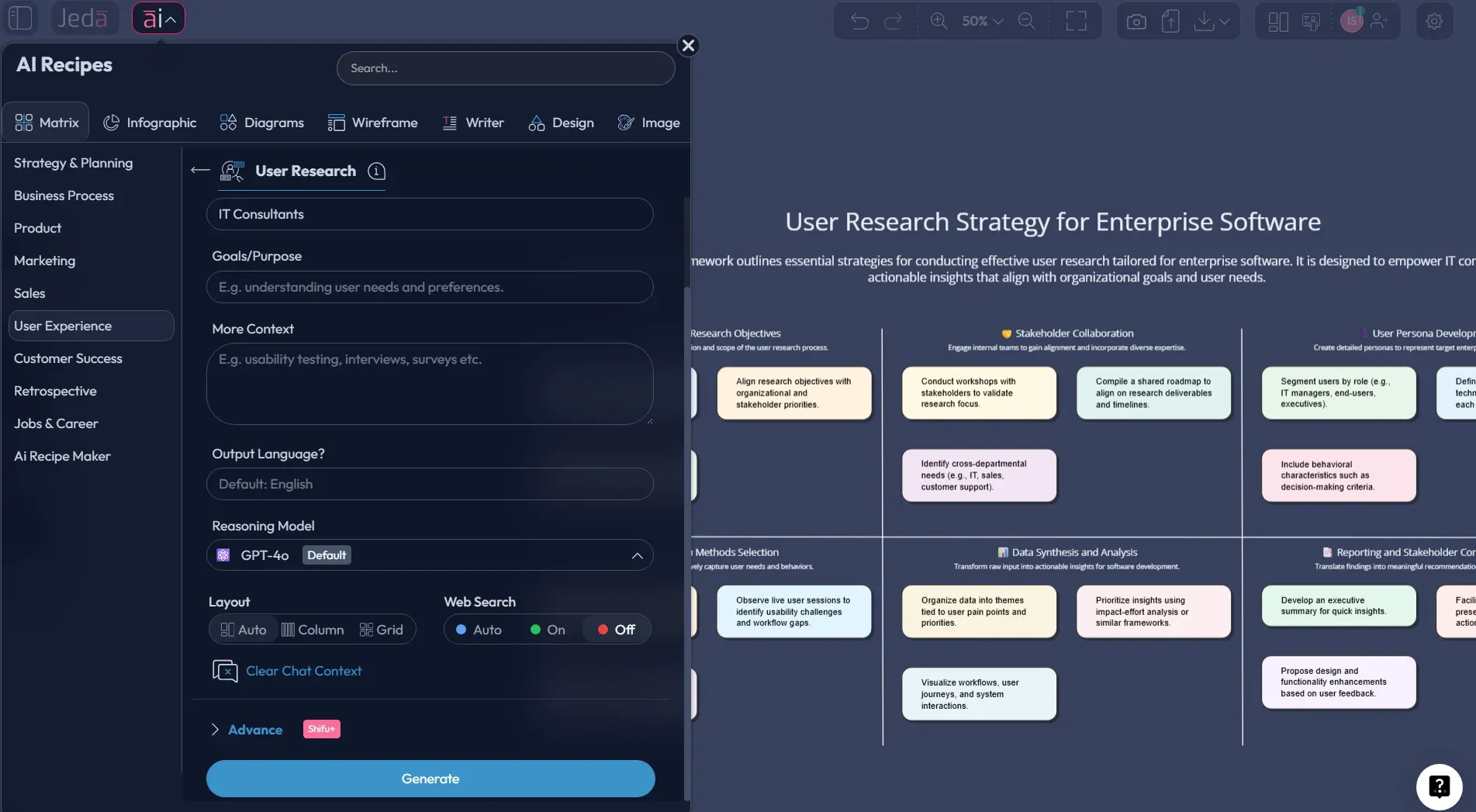
User Research with AI sounds like a shortcut. Sometimes it is. But the useful version is not “replace researchers and hope for the best.” It is this: use AI to speed up planning, clustering, synthesis, and sharing, while your team keeps the judgment, the probing, and the calls that actually matter. That’s where Jeda.ai earns its keep. Inside one AI Workspace and one collaborative AI Whiteboard, teams can turn interviews, notes, screenshots, documents, and data into editable research boards instead of letting insight die in transcripts, decks, and scattered tabs.
And that matters more than most teams admit. User research usually fails for boring reasons: too much raw input, weak synthesis, poor stakeholder visibility, and a constant race between “learn fast” and “stay rigorous.” With Jeda.ai, you can structure that work visually, extend weak sections with the AI+ button, and move from evidence to action without switching between five tools. It’s one reason more than 150,000+ users rely on Jeda.ai when the goal is clarity, not just content generation.
What is user research, really?
At its core, user research is the systematic study of users, their needs, behaviors, contexts, and frustrations so teams can make design and product decisions based on evidence rather than opinion. Nielsen Norman Group defines user research as a way to improve design based on evidence, while the UK Government Service Manual frames it as the work of understanding user needs, preparing sessions, analyzing findings, and sharing what matters. That’s the right lens.
Not vibes. Not stakeholder guesses. Not “our CEO said customers probably want this.”
Good research helps you answer questions like:
- What are users trying to get done?
- Where do they struggle today?
- What language do they use to describe the problem?
- Which pain points are expensive, emotional, or recurring?
- What should we change first?
AI doesn’t magically solve those questions. But it can remove a lot of the slog around them. That’s the sweet spot.
Why use User Research with AI instead of doing everything manually?
Because manual research workflows break at the exact moment the team most needs clarity.
Interview notes pile up. Survey exports sit untouched. Product managers want a summary yesterday. Designers need a defensible direction. Researchers end up doing hours of tagging and reformatting before anyone even starts the real discussion.
Current UX guidance is pretty consistent here: AI is most useful in research planning and analysis, not as a replacement for real users or careful interpretation. That’s the practical middle ground, and it fits Jeda.ai well. You can collect the evidence elsewhere, then use Jeda.ai’s AI Workspace to synthesize it visually, collaboratively, and fast.
- Faster synthesis
Turn transcripts, notes, screenshots, and feedback into structured themes without spending half the week cleaning raw input.
- One visual source of truth
Use one shared AI Whiteboard so research findings, evidence, priorities, and follow-up actions stay connected.
- Evidence-in workflow
Upload docs and files, then use Document Insight or Data Insight to extract patterns into editable boards.
- Stakeholder alignment
Research gets clearer when product, UX, and leadership react to the same board instead of separate summaries.
- AI+ deep dives
Select a weak area and use the AI+ button to extend it with added causes, segments, objections, or opportunity ideas.
- Convert formats easily
Start with a matrix, then use Vision Transform to turn the same research into a mind map, flowchart, or diagram.
Where AI actually helps in user research
This is where teams either get practical or get weird.
The practical use cases are strong:
1. Research planning
AI can help draft a research brief, propose interview themes, turn a broad objective into sharper research questions, and suggest likely blind spots. You still decide what matters. But the blank-page problem? Gone.
2. Interview and survey synthesis
Once you have raw notes, transcripts, and open-text responses, AI can cluster similar signals, summarize repeated pain points, and draft initial patterns. This is usually the biggest time saver.
3. Insight structuring
Research often dies between “interesting finding” and “clear recommendation.” Jeda.ai helps bridge that gap by turning evidence into a matrix your team can challenge, edit, extend, and act on.
4. Sharing and collaboration
A good research board is easier to discuss than a 34-page slide deck. In Jeda.ai, the findings stay editable on the AI Whiteboard, and collaborators can review, refine, and present from the same canvas.
5. Multi-angle reasoning
For higher-stakes work, Multi-LLM Agent can generate alternative syntheses or competing interpretations, while the Aggregator model helps choose the strongest output. In plain English: less tunnel vision.
How to create User Research with AI in Jeda.ai
This topic fits naturally inside Jeda.ai’s Matrix Recipes flow for structured synthesis. Use the recipe when you want speed and guided inputs. Use the Prompt Bar when you want more control over the structure.
- Open a workspace in Jeda.ai
Create or open a board in Jeda.ai. This becomes your shared AI Workspace for planning, synthesis, and stakeholder review.
- Method 1 (recommended): Use the Recipe Matrix
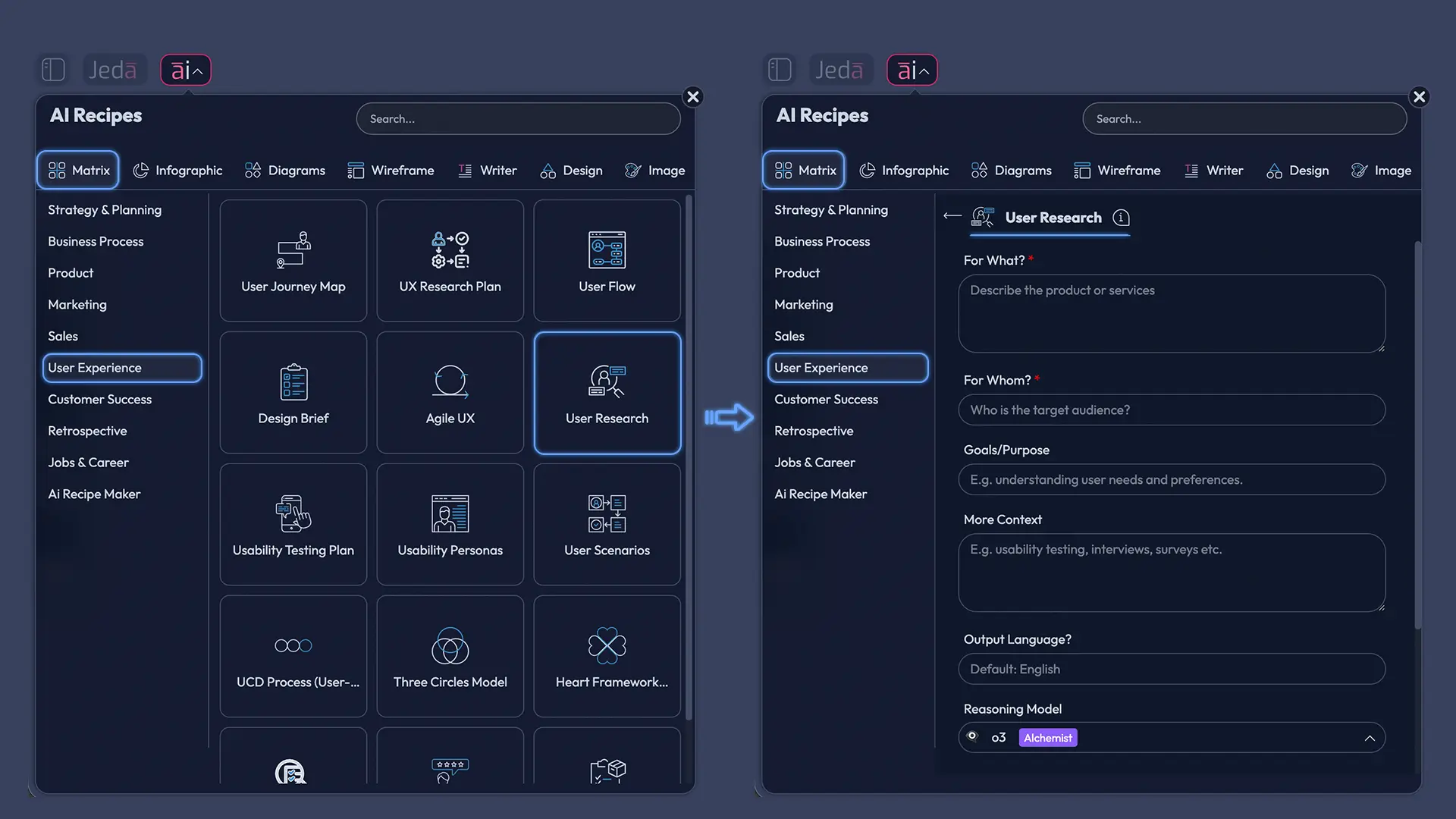
Open the AI Menu at the top-left, go to Matrix Recipes → User Experience → User Research, fill in the guided fields, and click Generate.
- Method 2: Use the Prompt Bar
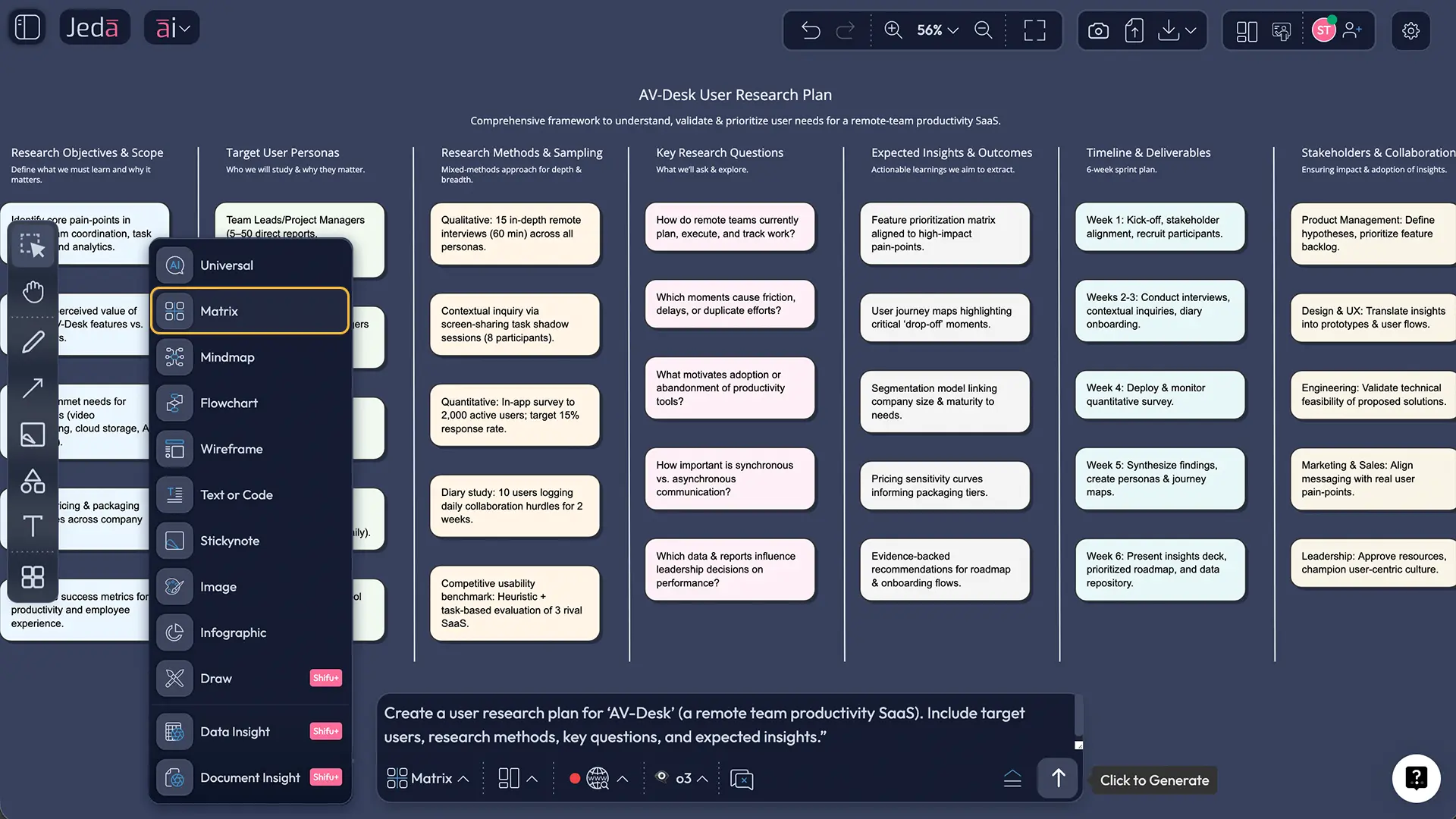
Open the Prompt Bar at the bottom, choose the Matrix command, describe your user segment, research inputs, and desired output structure, then press Enter.
- Add evidence and context
Upload interview notes, research briefs, screenshots, support tickets, survey results, or exported docs. Use Document Insight or Data Insight when your inputs are file-based.
- Deepen weak sections with AI+
Select any finding, segment, or pain-point cell and use the AI+ button to expand it with follow-up questions, contradictions, root causes, or opportunity ideas.
- Convert and share
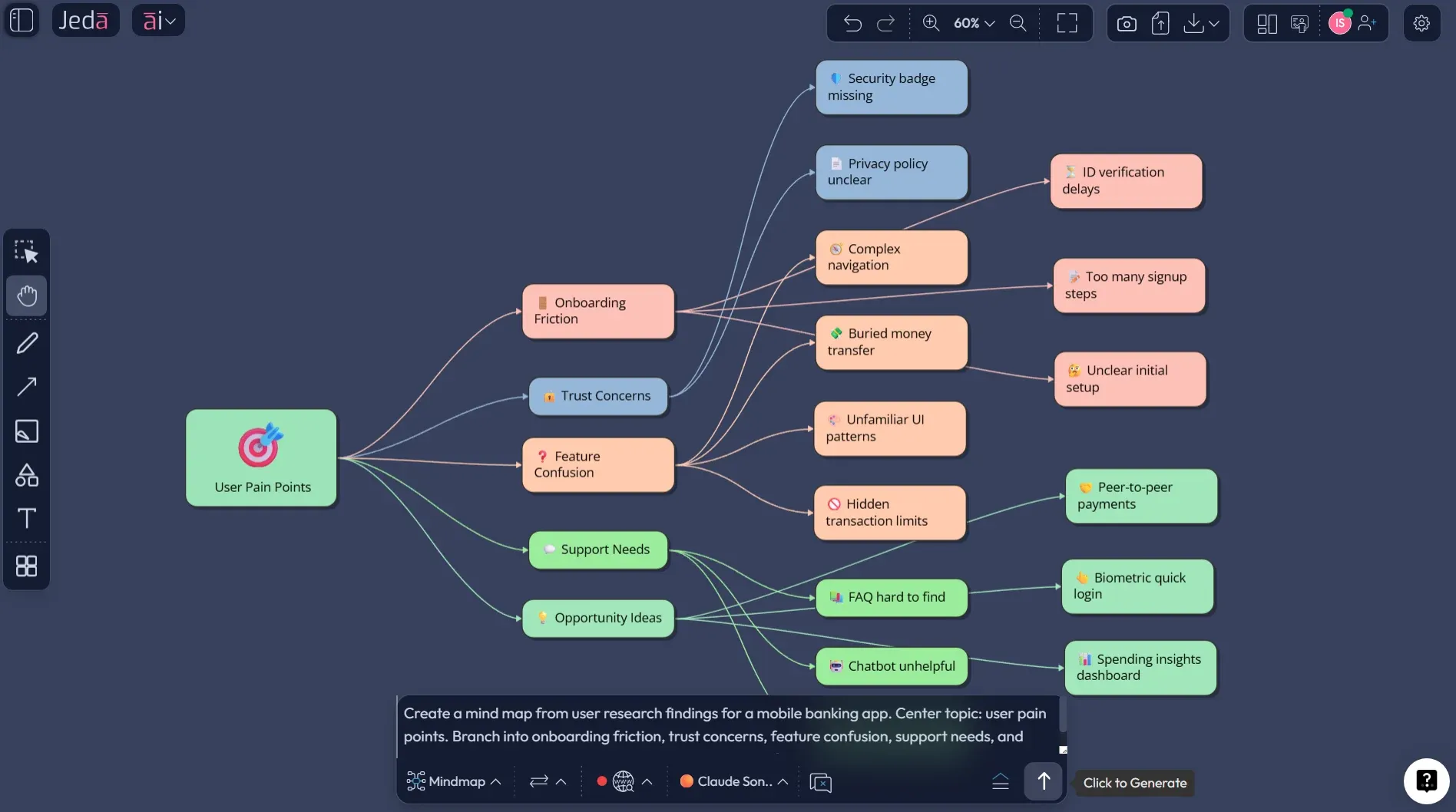
Use Vision Transform to convert the research board into a mind map, flowchart, or diagram if the team needs a different visual view, then export as PNG, SVG, or PDF.
Copy-paste prompt for the Prompt Bar
Prompt:
Create a User Research synthesis matrix for [product / feature / service].
Primary user segment: [who the users are].
Research inputs: [interview notes, survey feedback, support tickets, usability findings, analytics observations].
Build a matrix with these columns: Research Goal, User Segment, Evidence / Signals, Pain Points, Needs / Desired Outcomes, Opportunities, Confidence Level, Recommended Next Step.
Keep insights specific, plain-language, and decision-ready.
End with Top 5 design or product actions and 3 open research questions.
A practical workflow that works
Here’s the workflow we’ve found most useful for real teams.
Start with a clear research goal. Something like: “Understand why first-time users abandon onboarding after signup.” Then gather your raw evidence: interviews, survey comments, help-desk complaints, session observations, whatever you’ve got.
From there, generate a matrix in Jeda.ai that groups evidence into themes. Don’t stop at summary. Push for structure:
Then use the AI+ button on the fuzzy sections. Ask it to surface contradictions. Ask it to separate beginner issues from power-user issues. Ask it to turn one messy cluster into three cleaner patterns. That’s where the board gets sharp.
After that, use Vision Transform if the team needs a different view. A matrix is great for synthesis. A mind map is better for exploration. A flowchart works better when you want to show journey breakdown or decision points.
What a strong User Research matrix should include
A weak research board says, “Users are confused.” Thanks, detective.
A strong one is more precise. It should include:
Research goal
What question are you trying to answer?
User segment
Not just “users.” Be specific: first-time admins, procurement leads, returning shoppers, mobile-only students.
Evidence
Quotes, observations, patterns, screenshots, usage signals, drop-off moments.
Pain points
The repeated frictions, not one-off complaints.
Desired outcomes
What users are trying to achieve, in their own world, not just in your UI.
Opportunity areas
The product, design, message, or workflow changes suggested by the evidence.
Confidence
Because not every insight deserves the same weight.
Next step
A design change, experiment, follow-up study, or prioritization call.
Common mistakes to avoid
Treating AI summaries as final truth
They are drafts. Useful drafts. Still drafts.
Using synthetic users as a full substitute for real participants
Synthetic users can help pilot prompts or pressure-test assumptions. They should not replace direct research when accuracy matters.
Mixing all segments together
If new users, expert users, buyers, and admins are all in the same pile, the insight quality drops fast.
Skipping confidence levels
Not every pattern is equally reliable. Mark what is strong, weak, inferred, or still unvalidated.
Turning research into generic recommendations
“Improve the UX” is not a recommendation. It’s a shrug.
Hiding the evidence
If the board can’t show where the insight came from, stakeholders will rightly challenge it.
Why Jeda.ai is a strong fit for this work
Because research is rarely just one format.
Sometimes your input is interview notes. Sometimes it’s a PDF research brief. Sometimes it’s survey exports, screenshots, or a chaotic set of workshop notes. Jeda.ai handles that mess well because the platform is built as a Visual AI environment rather than a one-shot text generator.
You can start from Matrix Recipes, use the Prompt Bar for custom structure, bring in documents with Document Insight, bring in files with Data Insight, collaborate on the same AI Workspace, and present everything from the same AI Whiteboard. That combination matters.
It’s also worth saying this plainly: Jeda.ai is not just a blank canvas. It gives teams 300+ strategic frameworks, guided AI creation paths, editable outputs, and visual conversion options. For research teams that need clarity without tool sprawl, that’s a very real edge.
Frequently asked questions
- What is User Research with AI?
- User Research with AI means using AI to speed up parts of the research workflow—such as planning, synthesis, clustering, summarization, and sharing—while humans still handle participant understanding, ethical decisions, and final interpretation.
- Can AI replace user researchers?
- Not in any responsible sense. AI can reduce manual effort and help surface patterns, but direct observation, probing, judgment, and context-setting still depend on human researchers and product teams.
- What is the best Jeda.ai method for this topic?
- For most teams, the best path is Method 1: the AI Menu recipe under Matrix Recipes in the User Experience category. It gives you a faster guided setup. The Prompt Bar works better when you want a custom matrix structure.
- Which Jeda.ai command should I use for user research?
- Start with the Matrix command for structured synthesis. Then use Vision Transform if you want to convert the findings into a mind map, flowchart, or diagram for different stakeholder needs.
- Can I upload interview notes or research documents into Jeda.ai?
- Yes. You can upload documents and use Document Insight to extract structured findings. If your research includes tabular data or survey exports, Data Insight can help turn that input into visual analysis.
- How should I use the AI+ button for research work?
- Use the AI+ button to deepen a selected finding or section. It works well for expanding weak themes, surfacing root causes, generating follow-up questions, and separating broad insight clusters into cleaner patterns.
- Can Jeda.ai export user research boards?
- Yes. Jeda.ai supports export as PNG, SVG, and PDF. Those formats are useful for design reviews, stakeholder alignment, and archiving completed research outputs.
- Is web search in Jeda.ai an AI model feature?
- No. In Jeda.ai, web search is a platform feature, not a model-specific trick. That distinction matters because the platform can add current context regardless of which supported model you select.
- What teams benefit most from User Research with AI in Jeda.ai?
- Product managers, product design engineers, business analysts, innovation teams, startup founders, and UX-focused cross-functional teams all benefit when they need faster synthesis, clearer visual communication, and more collaborative decision-making.
- Can beginners use this workflow or is it only for advanced researchers?
- Beginners can absolutely use it. The guided recipe path makes setup easier, while more advanced teams can switch to the Prompt Bar, Multi-LLM Agent, and Vision Transform for a more customized workflow.
Sources and further reading
- [1]
Caleb Sponheim (2024) . “What Is User Research?” Nielsen Norman Group.
View Source ↗ - [2]
Kate Moran and Maria Rosala (2024) . “Accelerating Research with AI” Nielsen Norman Group.
View Source ↗ - [3]
Kate Moran (2024) . “Synthetic Users: If, When, and How to Use AI-Generated 'Participants' in Research” Nielsen Norman Group.
View Source ↗ - [4]
GOV.UK Service Manual (2026) . “User research” UK Government.
View Source ↗ - [5]
GOV.UK Service Manual (2016) . “User research for government services: an introduction” UK Government.
View Source ↗ - [6]
Interaction Design Foundation (2026) . “What is User Research?” IxDF.
View Source ↗ - [7]
National Institute of Standards and Technology (2023) . “AI Risk Management Framework (AI RMF 1.0)” NIST.
View Source ↗ - [8]
National Institute of Standards and Technology (2024) . “Artificial Intelligence Risk Management Framework: Generative AI Profile” NIST.
View Source ↗ - [9]
P. Bujorbarua et al. (2025) . “UX Research Meets AI: Level Up Your Skills” ACM.
View Source ↗ - [10]
L. Casoria et al. (2025) . “Evaluating LLMs for Synthetic Personas Generation” ACM.
View Source ↗ - [11]
LATA Study Authors (2025) . “LATA: A Pilot Study on LLM-Assisted Thematic Analysis” ACM.
View Source ↗
Start Your User Research with AI Workflow Today
Join over 150,000+ users using Jeda.ai’s AI Workspace and AI Whiteboard to turn messy research into decision-ready visuals.
Try Free Template