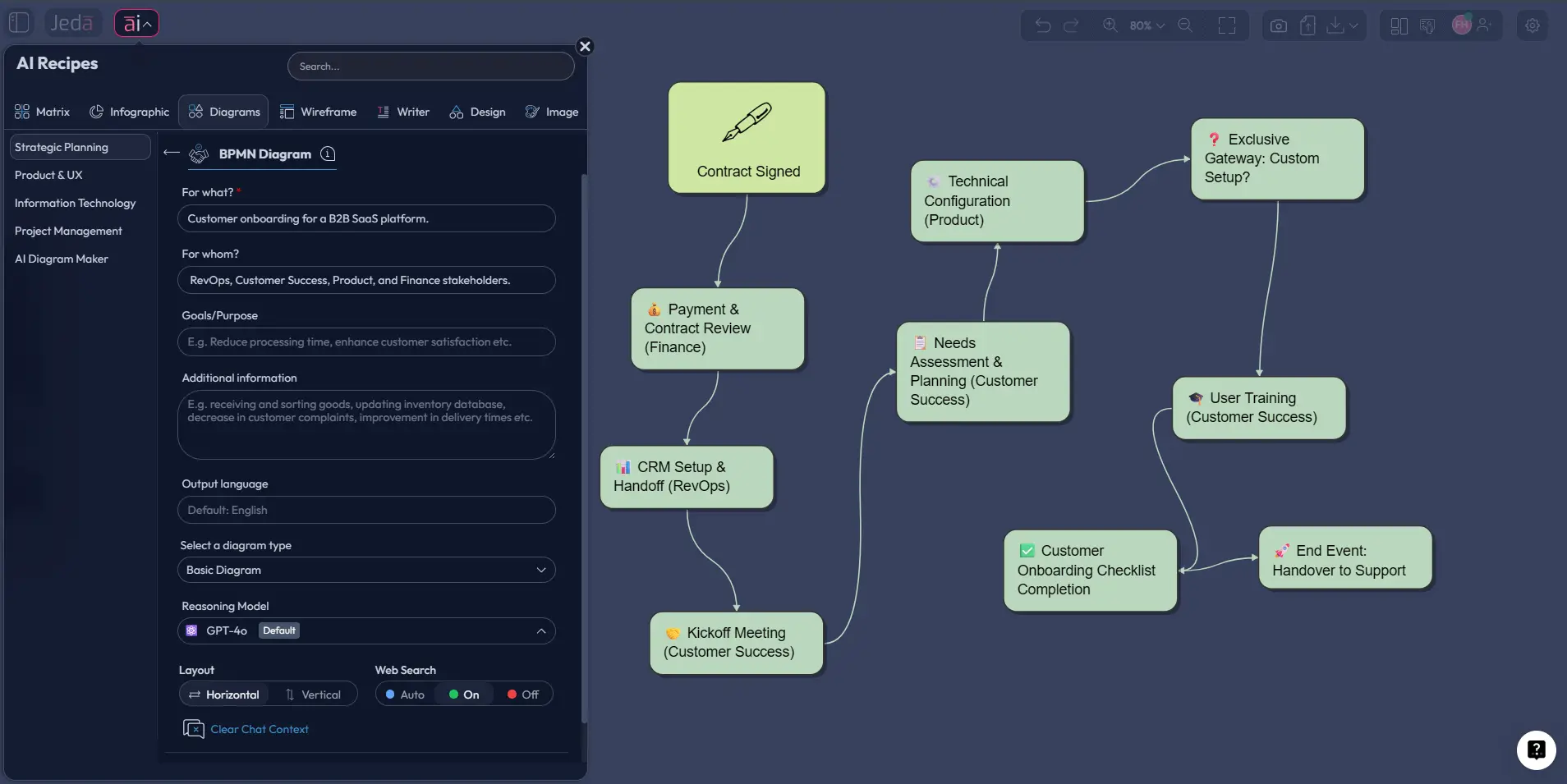
BPMN Diagram with AI turns a rough process description into a standards-based Business Process Model and Notation diagram — with pools, lanes, events, gateways, and exceptions — inside Jeda.ai's collaborative AI Workspace. You describe the workflow; Jeda.ai generates the first draft, then your team edits it together instead of redrawing it every time the process changes.
Jeda.ai earns its keep once workflows stop being a cute five-step flowchart and start involving real life: handoffs, delays, approvals, systems, exceptions, and the one department that always replies two days late. More than 150,000+ users already use Jeda.ai to think, map, and plan in one AI Whiteboard, alongside 300+ strategic frameworks.
What is a BPMN diagram?
A BPMN diagram is a Business Process Model and Notation diagram: a standardized visual language for showing how work moves across people, systems, decisions, and outcomes. The standard exists so business users, analysts, and technical teams can talk about the same process without translating every box and arrow into three different interpretations later.
That matters more than it sounds. A plain flowchart can explain sequence. BPMN can explain sequence and ownership, messages, exceptions, timers, subprocesses, and collaboration across lanes. In other words, it is better suited for operational reality. The OMG specification positions BPMN as a notation that is readable by business stakeholders while still being precise enough for implementation and execution-minded work. IBM makes the same point from a practitioner angle: BPMN helps remove ambiguity from textual process descriptions and gives teams a common language for improvement.
The core building blocks are simple enough to learn quickly:
- Events show what starts, interrupts, or ends a process.
- Activities show work that must happen.
- Gateways control branching, merging, and decisions.
- Pools and lanes show participants and responsibilities.
- Artifacts add context such as data objects or annotations.
So yes, BPMN looks more formal than a casual whiteboard sketch. Good. That formality is the point.
Why use a BPMN Diagram with AI instead of drawing from scratch?
Most BPMN work does not fail because the notation is impossible. It fails because the process owner dumps half-finished knowledge on the analyst, the analyst overthinks the first draft, and the team loses momentum before the model becomes useful. BPMN Diagram with AI compresses that ugly middle.
With Jeda.ai, you are not starting from a blank canvas. You are starting from process intent. Describe the workflow, the roles involved, the decisions, and the exception paths. Then let the platform structure the first pass visually inside a shared AI Workspace. From there, your team can correct, extend, and reshape the diagram instead of debating whether to begin at all.
- Faster first draft
Turn rough process descriptions into an editable BPMN-style visual in minutes, then spend review time improving logic instead of drawing boxes from zero.
- Cross-team clarity
Use a shared Visual AI workspace so analysts, operators, product teams, and technical stakeholders can see the same process and discuss the same flow.
- Better process depth
Capture roles, branches, handoffs, and failure paths early, then extend the diagram with AI+ when the process needs more operational detail.
There is another reason this matters. BPMN is often used right before automation, compliance work, vendor handoff, or process redesign. Bad diagrams do not just look messy. They cause bad decisions. Camunda’s BPMN guidance is blunt on this point: the notation works well because it creates shared understanding across business and IT teams before code or orchestration begins. That is why Jeda.ai is useful here. It gives you speed, but it also keeps the output editable, collaborative, and discussion-ready on an AI Whiteboard.
And unlike a static image workflow, you are still working with living visual objects. That is a big deal.
How to create a BPMN Diagram with AI in Jeda.ai
You can create a BPMN Diagram with AI in Jeda.ai in two practical ways. The recommended path is the AI Menu recipe because the BPMN Diagram recipe already lives in the Diagrams category and gives you structured fields that reduce prompt guesswork. The second path is the Prompt Bar, which is useful when you already know the process you want.
Method 1: Use the BPMN Diagram recipe in the AI Menu
The BPMN Diagram recipe is the strongest entry point because it guides you through the important context instead of forcing you to remember every modeling detail in one giant prompt. This is the method to use when the process crosses teams, includes decision logic, or needs stakeholder-ready structure from the first draft.
- Open AI Recipes
Click the ai menu in the top-left corner, choose the Diagrams category, and select the BPMN Diagram recipe under Strategic Planning.
- Fill in the process context
Complete the guided fields such as For What, For Whom, Goals or Purpose, and More Context. Describe the workflow, the participants, the trigger, the key decisions, and the expected end states.
- Choose the structure options
Set the layout direction, turn Web Search on if current regulations or domain details matter, choose the diagram type option that fits the job such as Basic Diagram, Mind Map, or Flowchart, and pick the reasoning model you want Jeda.ai to use.
- Generate the BPMN draft
Click Generate and let Jeda.ai create the first visual pass on the canvas. Review the pools, lanes, events, tasks, and gateways for missing logic or overly generic steps.
- Refine collaboratively
Edit labels, rearrange nodes, add manual connections, and review the structure with your team directly on the AI Whiteboard so the BPMN model becomes a shared source of truth.
A good recipe input looks like this:
That single input block gives Jeda.ai enough structure to produce something closer to a real BPMN discussion artifact, not just a generic process doodle pretending to have standards.
Method 2: Use the Prompt Bar for a faster direct build
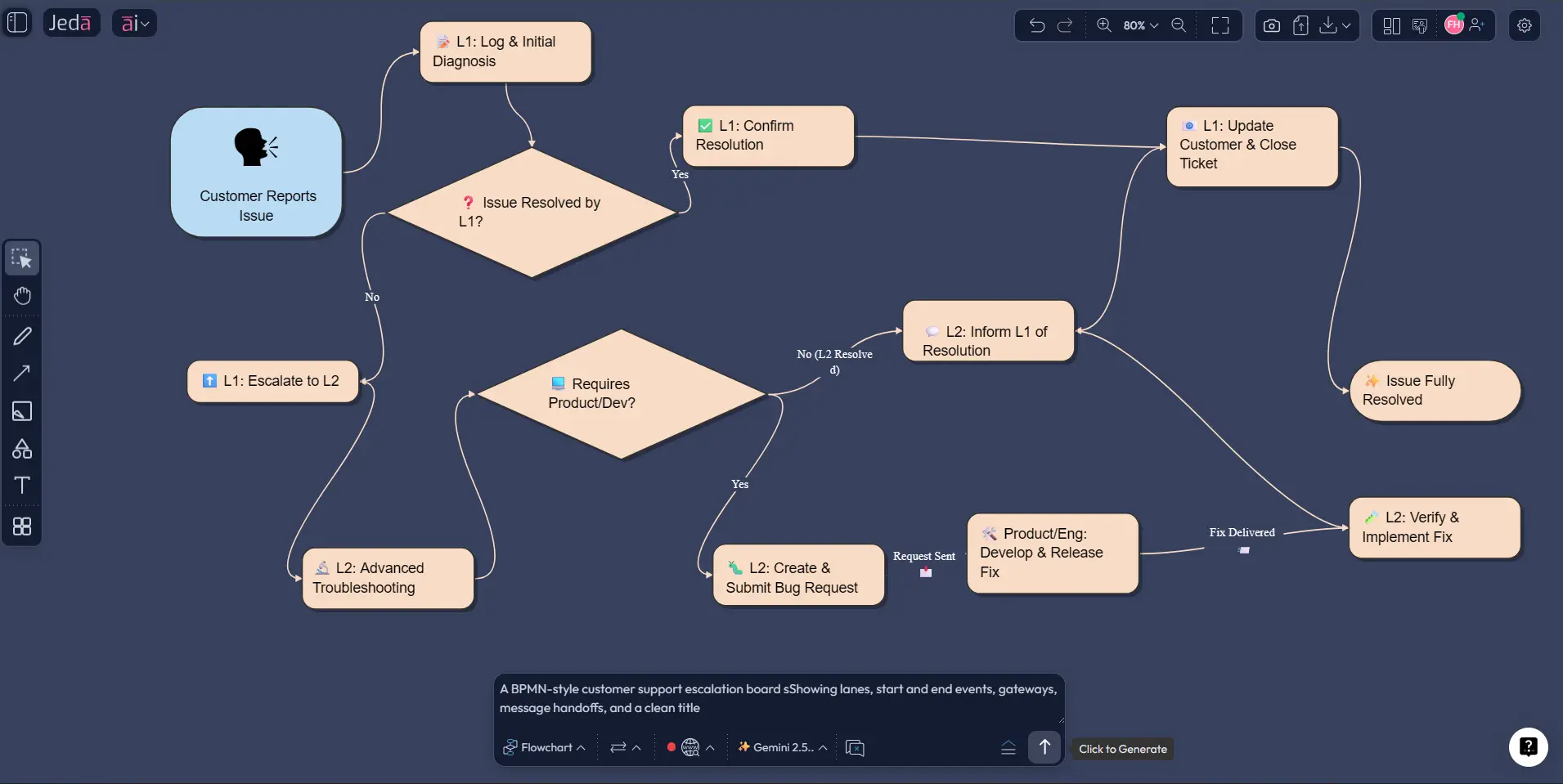
The Prompt Bar method is the fast lane. Open the Prompt Bar at the bottom of the canvas, select the command that best suits the structure you want, and describe the process clearly. For BPMN-like process work, teams usually do best when they select the Mind Map or Flowchart command for sequential workflows or use the recipe-first route when they want stricter BPMN framing. If you want a lighter entry point before formal BPMN work, start with AI flowcharts and diagrams. The key is prompt quality, not mystical prompt poetry.
- Open the Prompt Bar
Click the Prompt Bar at the bottom center of the canvas and choose the most suitable process command for the workflow you want to model.
- Describe the workflow precisely
Write a prompt that names the trigger, participants, main tasks, decision gateways, exception paths, and end states. Mention lanes or ownership if they matter.
- Set layout and grounding options
Choose a horizontal or vertical layout depending on readability needs, and turn Web Search on if the process depends on current rules, domain requirements, or external operating context.
- Generate and inspect
Run the prompt and review whether the process logic, branching, and ownership are correctly represented. Tighten vague labels immediately.
- Polish the board
Reposition elements, edit the wording, add missing handoffs, and prepare the diagram for stakeholder review inside the collaborative AI Workspace.
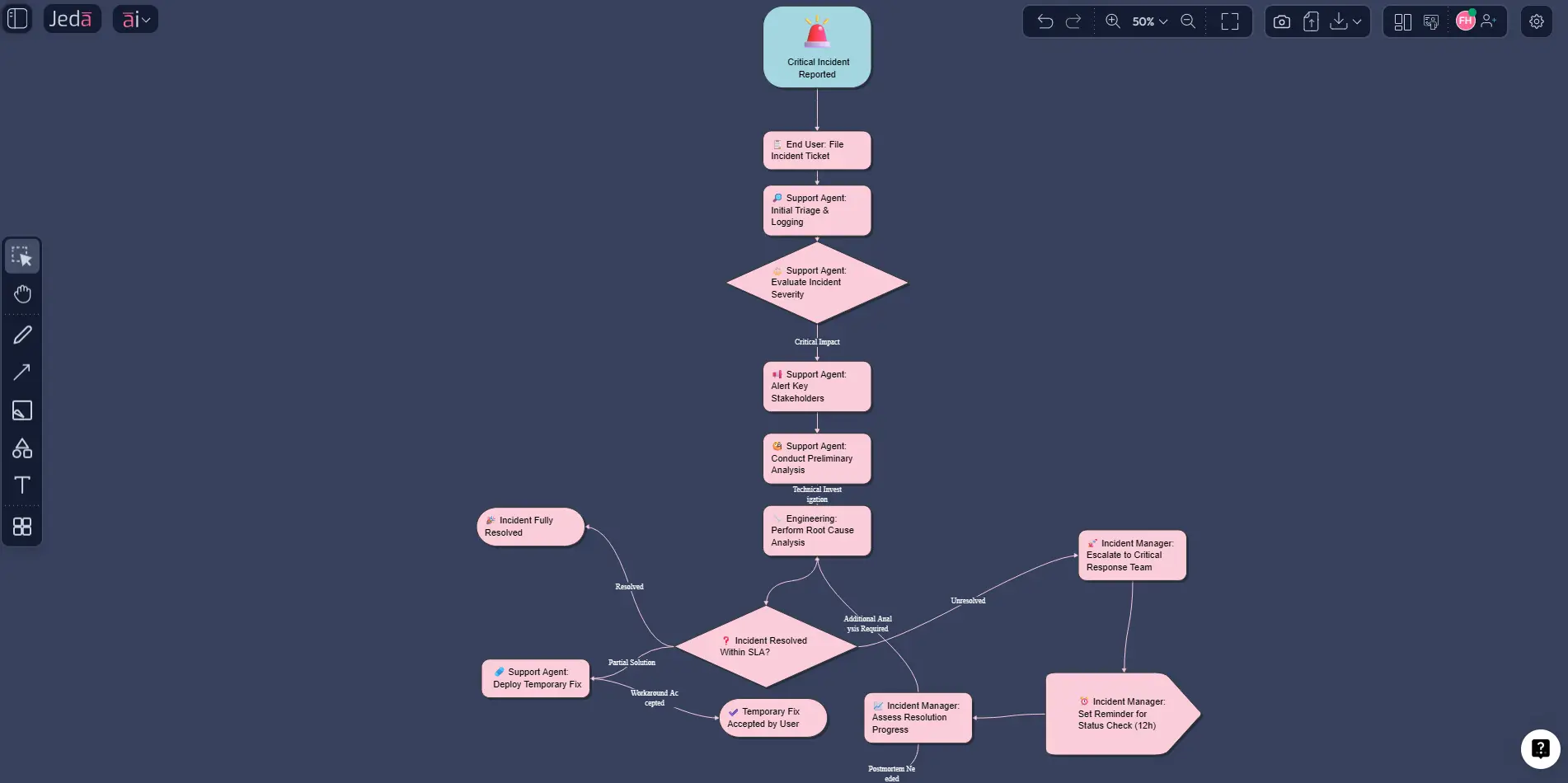
Use a prompt like this:
Prompt example:
Create a BPMN diagram for enterprise software incident escalation. Include lanes for End User, Support Agent, Engineering, and Incident Manager. Start when a critical issue is reported. Show triage, severity assessment, parallel investigation and stakeholder notification, an escalation gateway for unresolved incidents, a timer-based follow-up, and end states for resolved, workaround provided, or postmortem required.
That works because it names actors, triggers, branches, and outcomes. Vague prompts create vague diagrams. Shocking, I know.
After either method, use AI+ to extend the selected BPMN area with more depth. Think of AI+ as a way to deepen the model around the part you already have on the canvas, not as a fresh detailed instruction workflow. Then use Vision Transform if you want to convert the board into another visual format for a different audience. A BPMN model can be turned into a simpler presentation flow for exec review without rebuilding the whole thing.
BPMN Diagram with AI example: customer support escalation
Let’s make this concrete. Suppose you need to map a customer support escalation process. A loose flowchart might show intake, triage, escalation, and resolution. Fine. But a proper BPMN-style view gives you the operational detail leadership actually cares about: who owns each step, what happens when SLA thresholds are missed, where message handoffs occur, which tasks can run in parallel, and where the process can terminate in different ways.
In Jeda.ai, that example becomes much easier to workshop because the first draft lands on a visual canvas where everyone can react in real time. The support lead can tighten the intake rule. Engineering can add a diagnostic subprocess. Ops can flag a missing notification step. Compliance can point out the audit trail requirement. You are not passing screenshots around. You are refining the living diagram in one AI Workspace.
A strong BPMN example usually includes these pieces:
That is where BPMN Diagram with AI becomes more than convenience. It becomes a process thinking tool.
Best practices for building BPMN diagrams that people can actually use
Start simpler than your ego wants. Most broken BPMN diagrams are not broken because they lack sophistication. They are broken because someone tried to model the entire universe in version one. Create the happy path first. Then add real-world complexity in layers.
Use naming discipline. Events should sound like triggers or outcomes. Tasks should read like actions. Gateways should represent an actual business question. If a lane exists, it should matter.
Keep the model at one useful level of abstraction. If one task is written as “Validate application” and the next is written as a twelve-step engineering epic, your diagram is already drifting into nonsense. Stay consistent.
And use the collaboration features for what they are meant to do. BPMN is strongest when multiple stakeholders can refine the same visual. That is why Jeda.ai works well as an AI Whiteboard here. You get the speed of AI-assisted drafting plus the discipline of shared review.
Common mistakes to avoid
The first mistake is using BPMN when a quick sketch would do. If the process is tiny and nobody needs formal notation, do not force ceremony where clarity alone is enough.
The second is the opposite mistake: using a plain flowchart when the process includes multiple participants, message exchanges, exception states, or automation intent. That is usually where BPMN earns its keep.
Another common mess is overusing gateways. Teams love adding diamonds as if they are getting paid by the branch. Every gateway should represent a real decision or control point. If it does not, cut it.
One more: treating the first AI-generated output as final. Do not do that. Review the logic, tighten the labels, and sanity-check ownership. AI gets you moving. You still own correctness.
Jeda.ai vs. Eraser for BPMN work
| Feature | Jeda.ai | Eraser | |
|---|---|---|---|
| AI-generated first draft from a prompt | — | ✓ | ✓ |
| Guided recipe with structured context fields (audience, goal, constraints) | — | ✓ | Prompt-only |
| Real-time team collaboration | — | ✓ | ✓ |
| Convert the diagram into another visual format | — | ✓ | Diagram-as-code, edited via prompt |
| One workspace for diagrams plus 300+ strategy frameworks (SWOT, PESTEL, and more) | — | ✓ | ✗ |
| Free plan available | — | ✓ | ✓ |
Frequently asked questions
- What is a BPMN diagram in simple terms?
- A BPMN diagram is a standardized visual map of how a business process works. It shows events, tasks, decisions, and responsibilities so business and technical teams can understand the same workflow without relying on ambiguous written descriptions.
- What does BPMN stand for?
- BPMN stands for Business Process Model and Notation. It is the widely used standard for representing business processes in a structured visual format that supports both stakeholder communication and implementation-oriented process design.
- Is BPMN the same as a flowchart?
- No. A flowchart shows sequence well, but BPMN adds standardized process semantics such as lanes, message flows, events, gateways, and subprocess logic. BPMN is usually the better choice when multiple teams, systems, or exception paths are involved.
- Can Jeda.ai create a BPMN Diagram with AI?
- Yes. Jeda.ai can help you generate a BPMN Diagram with AI using the BPMN Diagram recipe in the AI Menu or by building a process model from the Prompt Bar. The result can then be edited, extended, and reviewed collaboratively on the canvas.
- Which Jeda.ai method is best for BPMN work?
- The AI Menu recipe is usually best because it gives you structured inputs such as process purpose, audience, and context before generation. The Prompt Bar is faster when you already know the workflow and want a direct first draft.
- Can I edit the BPMN output after Jeda.ai generates it?
- Yes. Diagram and process visuals in Jeda.ai are editable on the canvas, so you can rename tasks, move nodes, adjust structure, and refine the logic with collaborators. This is one reason it works well as a Visual AI workspace.
- What should I include in a prompt for a better BPMN diagram?
- Include the trigger, participants, major tasks, decision points, parallel work, exceptions, and end states. Specific prompts produce stronger BPMN drafts because the AI has enough context to model ownership and branching clearly.
- Can AI+ improve a BPMN diagram?
- Yes. AI+ is useful for extending a selected part of the BPMN model with more detail. Use it after the initial diagram exists on the canvas, then review the added logic carefully so the expanded section still reflects the real process.
- When should teams use BPMN instead of a simpler process map?
- Use BPMN when the workflow crosses departments, includes system handoffs, has formal approval logic, or may later support automation. Use a simpler process map when you only need a quick, informal sequence and not a formal operational model.
- Can I turn a BPMN model into another visual in Jeda.ai?
- Yes. Vision Transform lets you convert an existing visual into another format for a different audience or discussion purpose. That is useful when a detailed BPMN model needs to become a lighter summary for planning or presentation.
Sources & Further Reading
- [1]
Object Management Group (2014) . “BPMN: Business Process Model and Notation 2.0.2” OMG.
View Source ↗ - [2]
Cole Stryker and Ivan Belcic (n.d.) . “What is Business Process Modeling and Notation (BPMN)?” IBM Think.
View Source ↗ - [3]
Camunda (n.d.) . “BPMN Tutorial: Learn Business Process Model and Notation” Camunda.
View Source ↗ - [4]
Mark von Rosing, Stephen White, Fred Cummins, and Henk de Man (2015) . “Business Process Model and Notation—BPMN” The Complete Business Process Handbook.
View Source ↗ - [5]
S. A. Kassim et al. (2022) . “Benefits and limitations of business process model notation in modelling patient healthcare trajectory: a scoping review” BMJ Open.
View Source ↗
Related frameworks
- Process Flow Diagram with AI
- Cross Functional Flowchart with AI
- Activity Diagram with AI
- Five Whys Analysis with AI
- Explore the full library: AI Templates
Build your next BPMN Diagram with AI in Jeda.ai
Join 150,000+ users who use Jeda.ai as an AI Workspace and AI Whiteboard for clearer process thinking.
Try Jeda.ai Free