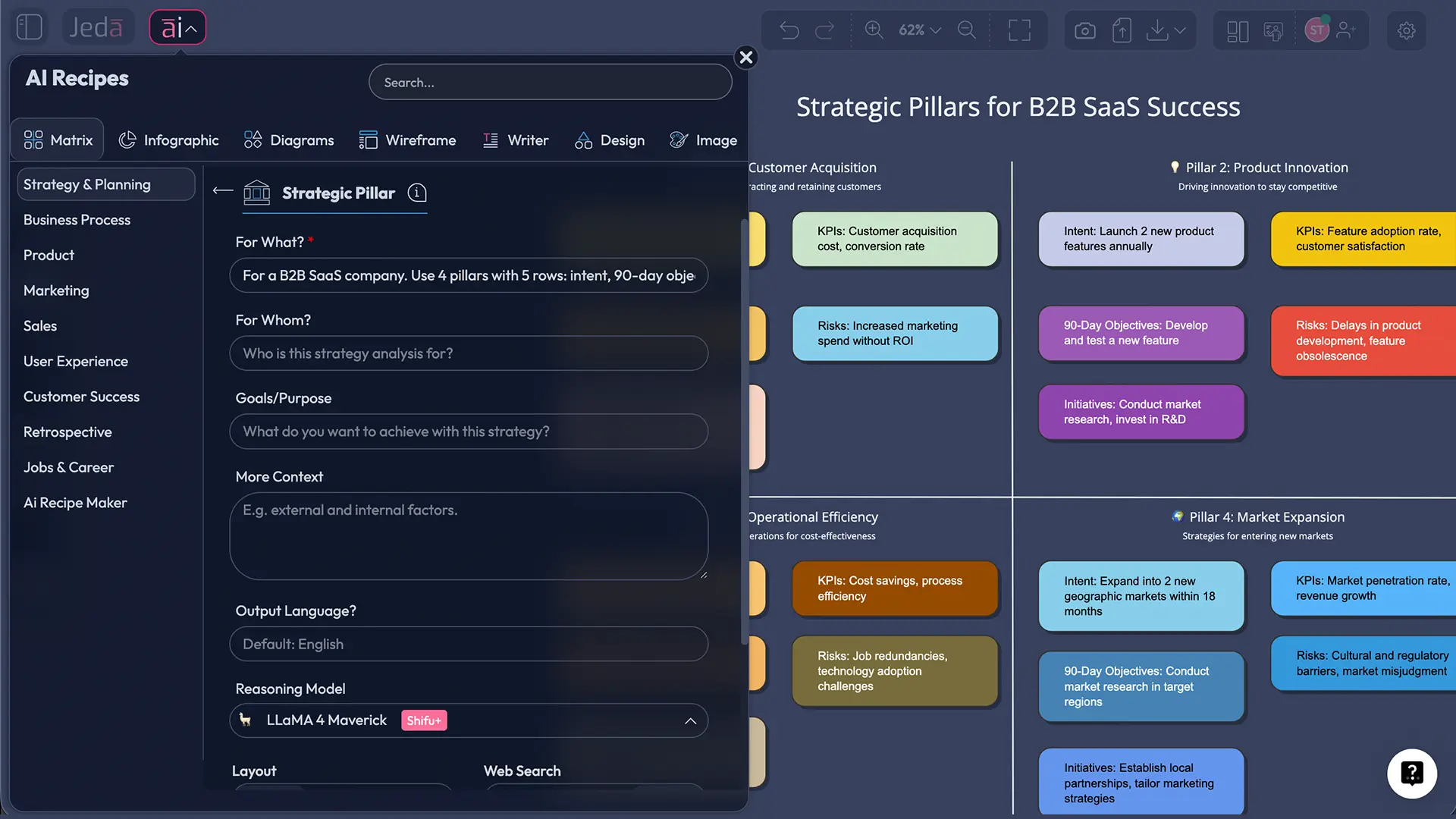
Strategic Pillars with AI: Build a Decision-Ready Strategy Matrix in Jeda.ai
A strategic pillars template with AI is the fastest way to turn “we should focus on growth” into something your team can actually execute. If your strategy still lives in a slide deck nobody opens, you don’t have a strategy. You have a bedtime story.
In this guide, you’ll build a Strategic Pillars matrix inside Jeda.ai, an AI Workspace and AI Whiteboard trusted by 150,000+ users for turning messy thinking into editable visuals. You’ll generate the matrix in minutes, stress-test it, then deepen it with the AI+ button so you can move from “pillars” to “plans.”
What is a strategic pillars template?
A strategic pillars template is a structured matrix that captures the 3–5 focus areas that must go right for your strategy to win. Think of pillars as “where we will invest attention and budget,” not as a list of projects.
Michael Porter’s core point still holds: strategy is about choosing what to do and what not to do. Pillars make that choice visible, so execution does not get hijacked by the loudest meeting attendee.
In practice, a Strategic Pillars matrix usually links:
- Pillars (the focus areas)
- Objectives (what must change)
- Initiatives (what you’ll do)
- KPIs (how you’ll measure outcomes)
- Owners + cadence (how you’ll run it)
That “linking” part matters. The Balanced Scorecard became popular because it forced leaders to connect strategic intent to measurable performance. A pillars matrix does the same thing, but with less bureaucracy and more speed.
Why use Strategic Pillars with AI (instead of in slides)?
Because slides are polite graveyards for strategy.
A Strategic Pillars matrix is a living artifact. AI helps you draft it quickly, challenge it, and restructure it without starting over. Inside an AI Workspace, you can keep the pillars, the evidence, and the decisions in one place, then iterate with your team like adults.
Here’s what AI changes:
- Speed to first draft: you can get to a coherent matrix in minutes, then edit the details like a normal strategy team.
- Consistency: AI forces similar depth across pillars so one pillar doesn’t become a novel and the others become fortune cookies.
- Better alignment: research on strategic alignment consistently links alignment to organizational performance. Your matrix becomes the alignment object, not your meeting notes.
- Clearer execution mapping: OKR-style thinking popularized the idea of measurable outcomes tied to objectives. Pillars can be your “north,” then OKRs can sit underneath.
- Fewer debates, more decisions
Pillars force trade-offs. If something doesn’t fit a pillar, it’s probably a distraction. That’s not harsh, it’s strategy.
- From themes to KPIs
A pillars matrix makes measurement part of the conversation. Balanced Scorecard style, but lighter and faster.
- Team-readable, not consultant-only
Because it lives on an AI Whiteboard, teams can edit, comment, and keep it current. No “final_v7_reallyfinal.pptx” nonsense.
Strategic pillars template with AI: the matrix structure that works
You can design your matrix a hundred ways. Most are either too abstract to execute or too detailed to maintain. This structure is a sweet spot.
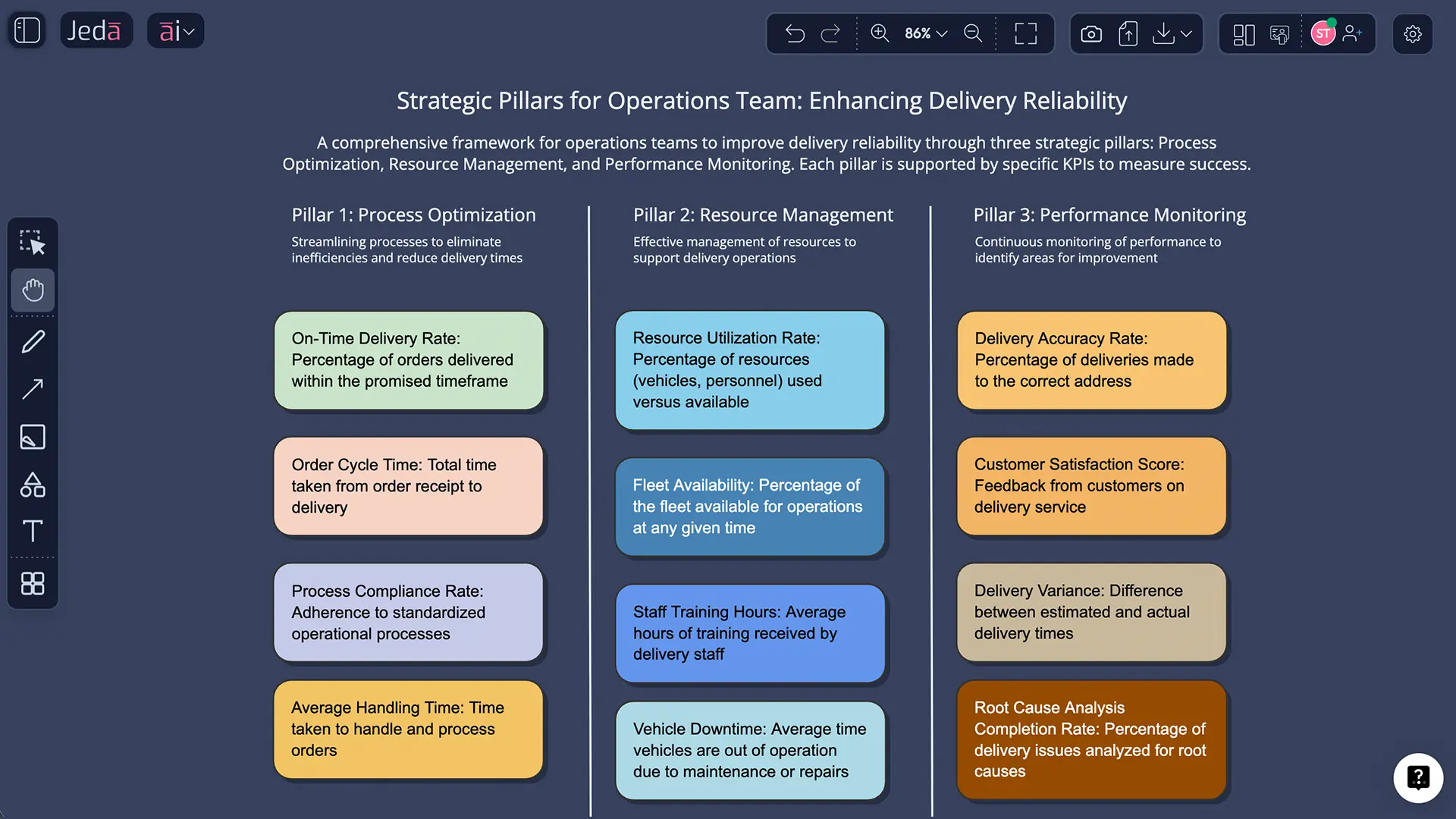
Columns (3–5): Pillars
Rows (5): Intent, 90-day objectives, Initiatives, KPIs, Risks/assumptions
If you want an even simpler start, drop “Risks/assumptions.” But don’t skip KPIs. That’s how strategies become vibes.
How to create a strategic pillars template with AI in Jeda.ai
Two ways, same outcome: an editable matrix you can run your strategy from.
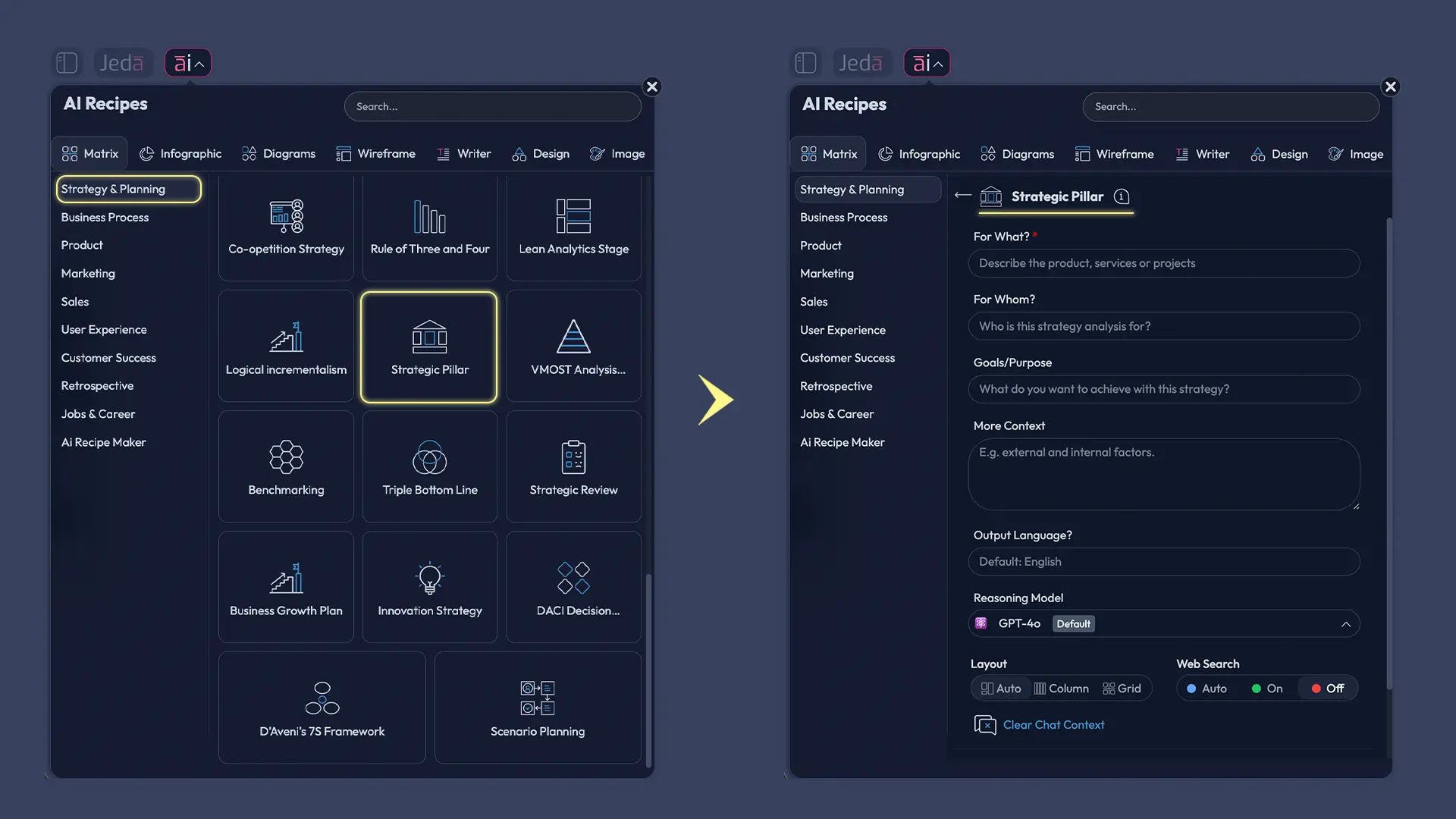
Method 1: Recipe Matrix (recommended)
This uses Jeda.ai’s AI Menu template flow for matrix-style frameworks. The UI gives you structure first, then you fill details.
- Open the AI Menu
On the canvas, open the AI Menu and go to the Matrix Recipes category.
- Choose a Strategic Pillars-style matrix template
Pick a matrix template called Strategic Pillars.
- Add your context
Provide your company or project context, time horizon, and any constraints you already know (budget, market, headcount, timeline).
- Generate the matrix
Click Generate to create an editable Strategic Pillars matrix on the canvas.
- Edit and align the matrix
Rewrite pillar names, tighten objectives, and adjust KPIs so they are measurable. Keep it simple and specific.
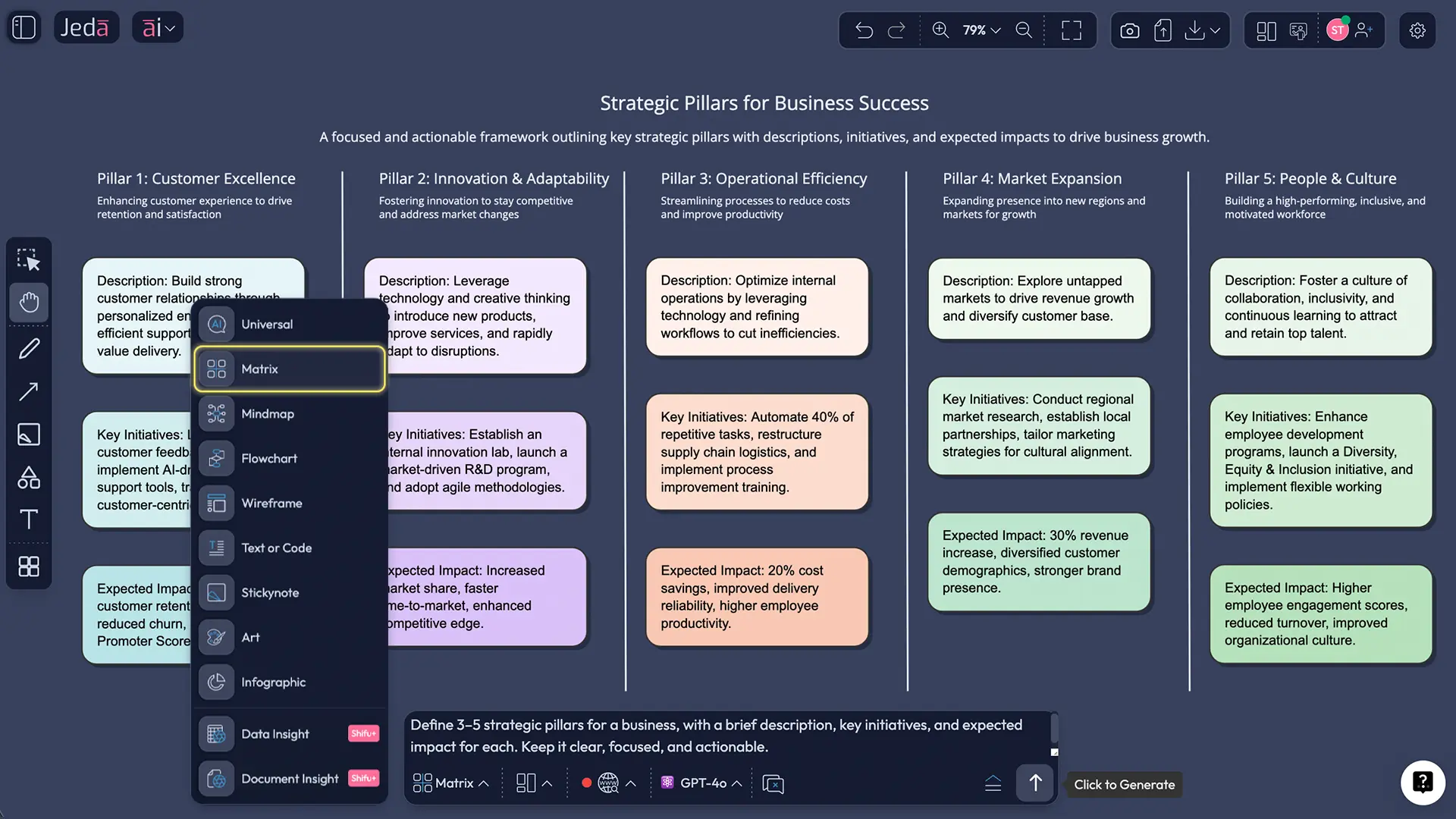
Method 2: Prompt Bar (fast and flexible)
If you already know your pillars, this is the quickest route.
- Open the Prompt Bar at the bottom of the canvas.
- Select the Matrix command.
- Describe the pillars and the rows you want.
- Press Enter to generate.
Deep-dive with the AI+ button (no extra setup)
Once your matrix exists, you can deepen it without rebuilding the whole thing. Select the part of the matrix you want to expand and tap the AI+ button to extend it with AI.
This is where the tool stops acting like a template generator and starts acting like a strategy partner. But it stays grounded, because it is extending your matrix, not inventing a new one.
What “deep-dive” looks like in practice:
- expanding a pillar into clearer objectives and cleaner KPIs
- surfacing missing risks and dependencies
- filling thin sections so each pillar has comparable depth
- proposing alternative initiatives so your team can choose
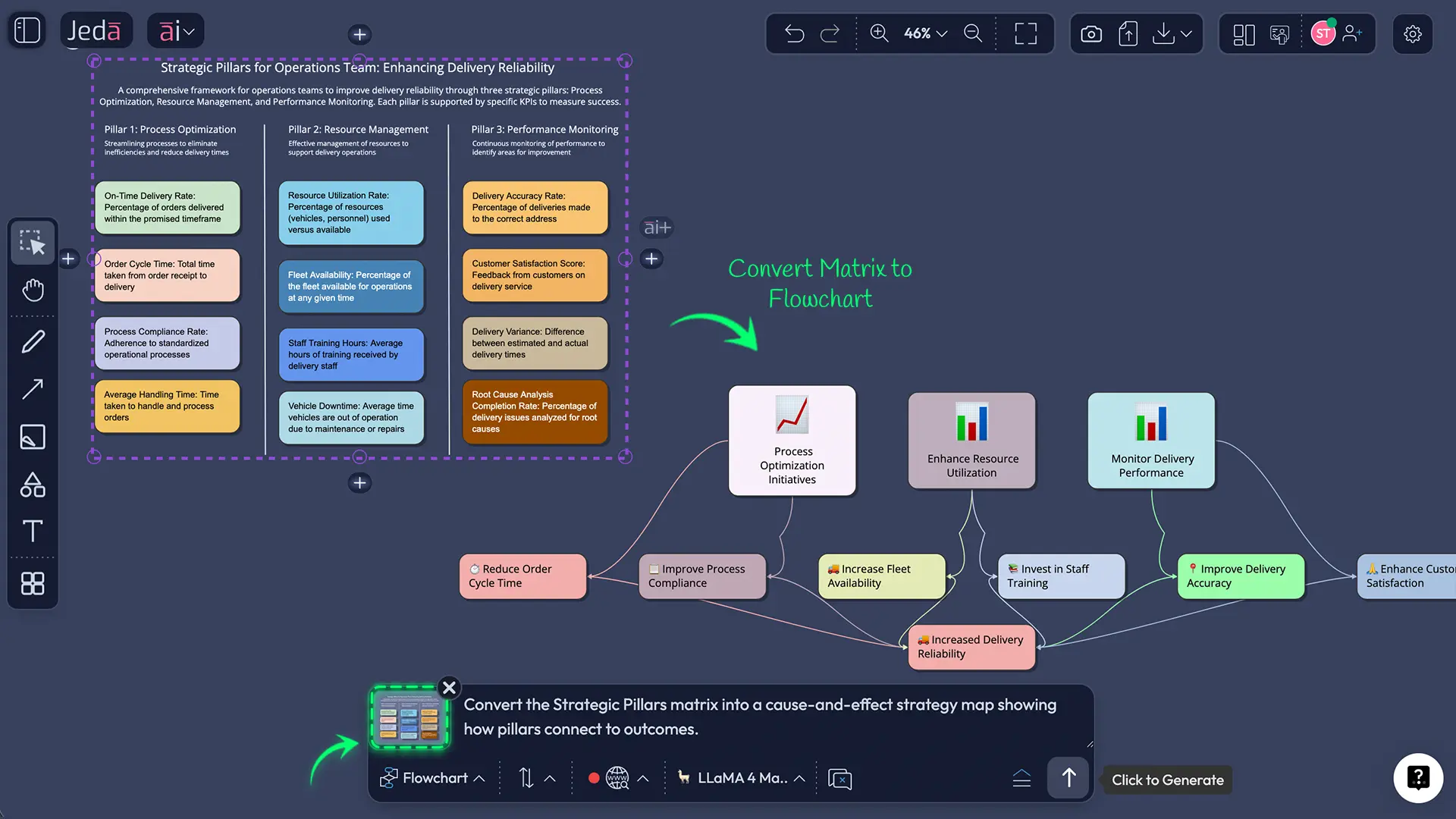
Optional: Convert your matrix into a different visual
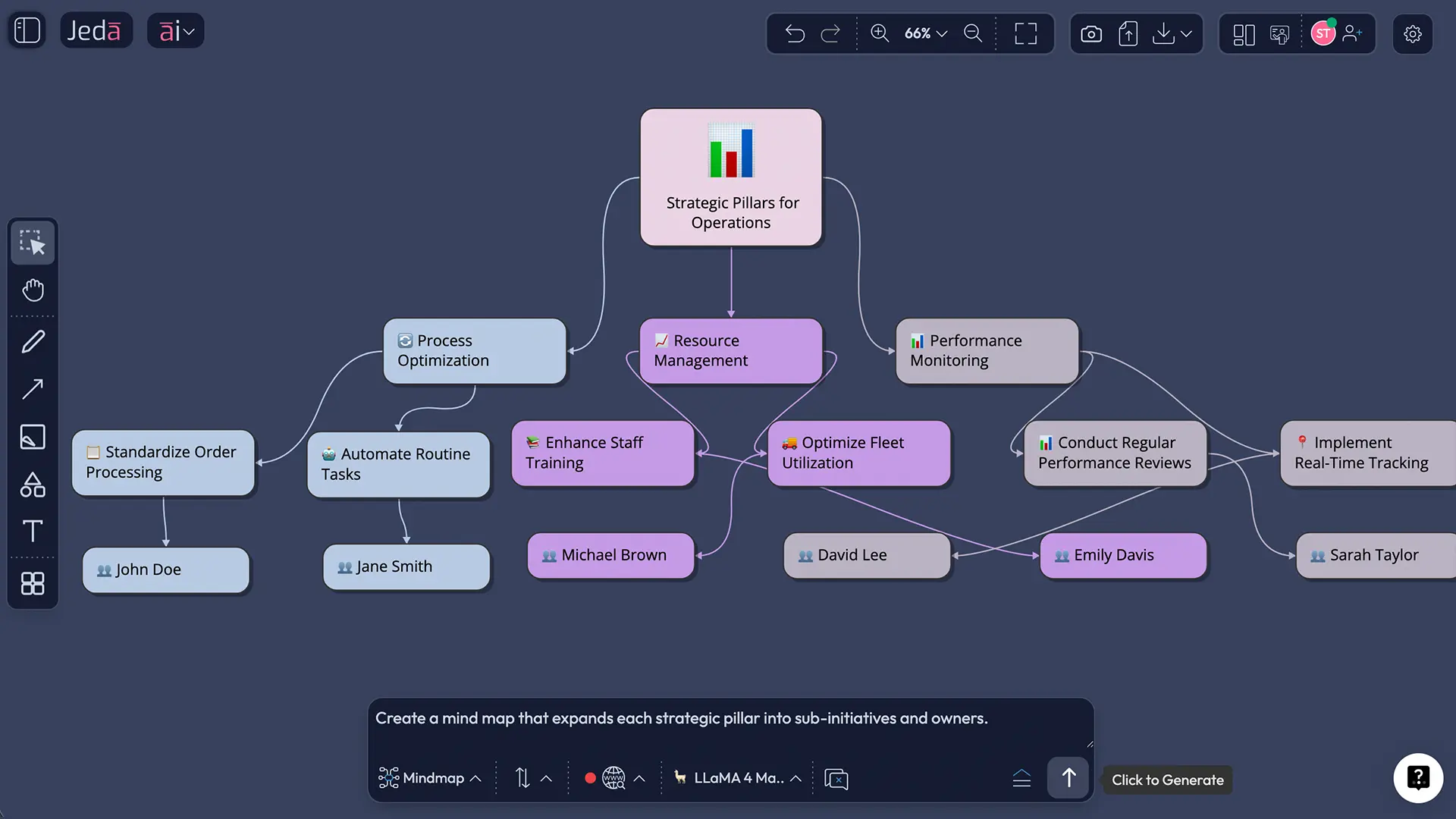
Sometimes the matrix is perfect for planning, but not for storytelling. Use Vision Transform to convert the matrix into a mind map or diagram for workshops and stakeholder updates.
Export your Strategic Pillars board
When you’re ready to share, export the board as PNG, SVG, or PDF.
Example: Strategic Pillars matrix for a B2B SaaS product
Below is a worked example you can copy and adapt. It’s intentionally realistic. Nothing magical. Just clear priorities, measurable outcomes, and enough constraints to feel like real life.
Pillar 1: Customer Trust
- Intent: Reduce churn by making the product feel reliable and safe.
- 90-day objectives: Improve onboarding completion, reduce critical bugs, tighten incident response.
- Initiatives: Onboarding redesign, reliability sprint, incident playbook.
- KPIs: churn %, time-to-resolution, onboarding completion %.
- Risks/assumptions: engineering capacity, support data quality.
Pillar 2: Revenue Efficiency
- Intent: Grow revenue without buying growth at any cost.
- 90-day objectives: Increase expansion revenue, reduce CAC payback.
- Initiatives: Pricing tests, onboarding nudges, lifecycle messaging.
- KPIs: net revenue retention, CAC payback months, conversion rate.
- Risks/assumptions: pricing sensitivity, sales enablement readiness.
Pillar 3: Product Differentiation
- Intent: Make the product harder to replace.
- 90-day objectives: Ship one signature capability, improve time-to-value.
- Initiatives: flagship feature sprint, templates library, in-app guidance.
- KPIs: activation time, feature adoption %, weekly active teams.
- Risks/assumptions: scope creep, competing roadmap demands.
Pillar 4: Operating Rhythm
- Intent: Make execution predictable.
- 90-day objectives: Improve planning cadence, reduce blocked work.
- Initiatives: weekly execution review, dependency mapping, role clarity.
- KPIs: cycle time, blocked-ticket %, goal completion rate.
- Risks/assumptions: leadership follow-through, cross-team coordination.
Best practices that make pillars work (and not become wall art)
- Keep pillars stable for a cycle. You can adjust initiatives weekly, but pillars should survive the mood swings.
- Make KPIs boring and numeric. “Improve trust” is not a KPI. “Reduce churn from 4.2% to 3.5%” is.
- Assign owners. Not committees. Owners.
- Tie pillars to execution systems. Many teams align pillars to OKRs because OKRs force measurable outcomes and cadence.
- Review with evidence. Bring customer notes, support themes, sales calls, usage metrics, and docs into the same AI Workspace so the matrix stays honest.
Mistake 1: Calling departments “pillars”
“Sales, Marketing, Product, Ops” are functions. Pillars are focus areas. A pillar can cut across departments, like “Customer Trust” or “Speed to Value.”
Mistake 2: Writing initiatives as outcomes
“Become a market leader” is not an initiative. It is wishful thinking. Initiatives are actions. Outcomes live in objectives and KPIs.
Mistake 3: Too many KPIs
If you need 15 KPIs per pillar, you’re building a reporting system, not a strategy. Keep it tight.
Mistake 4: No trade-offs
If everything is a pillar, nothing is. Strategy is choosing. Porter made that uncomfortably clear decades ago.
Frequently Asked Questions
- What is a strategic pillars template?
- A strategic pillars template is a structured matrix that captures 3–5 focus areas and ties each one to objectives, initiatives, KPIs, and owners. It makes strategy measurable and reviewable, so execution stays aligned instead of drifting into ad hoc priorities.
- How many strategic pillars should a company have?
- Most teams do best with 3–5 pillars. Fewer than 3 can miss critical focus areas, and more than 5 usually creates competing priorities. If you have 8, you probably have a list of interests, not a strategy.
- What is the difference between strategic pillars and OKRs?
- Strategic pillars define focus areas and trade-offs. OKRs translate focus into measurable objectives and key results for a time period. Many teams use pillars as the stable structure, then use OKRs underneath for quarterly execution and tracking.
- How do strategic pillars relate to the Balanced Scorecard?
- Strategic pillars and the Balanced Scorecard both connect strategy to measurement. The Balanced Scorecard formalizes measurement across perspectives, while pillars are a simpler way to name focus areas. You can map pillar KPIs to scorecard perspectives if you want a tighter measurement system.
- Can Jeda.ai generate a strategic pillars matrix automatically?
- Yes. In Jeda.ai, you can generate a pillars matrix using the Recipe Matrix approach or by selecting the Matrix command in the Prompt Bar. The result is an editable board you can refine with your team, then deepen using the AI+ button.
- How do we keep pillars from becoming a one-time exercise?
- Make the matrix part of your operating rhythm. Review it on a fixed cadence, update initiatives based on evidence, and keep KPIs visible. If the board is not reviewed, it will drift into “strategy theater” within a month.
- What inputs should we bring before creating strategic pillars?
- Bring the basics: customer feedback themes, revenue and retention metrics, product usage data, competitive notes, and key constraints like budget or headcount. If you have documents or spreadsheets, adding them to your AI Workspace makes your pillars more grounded.
- How long does it take to build a strategic pillars template with AI?
- A first draft can be generated in minutes, but a useful version usually takes 45–90 minutes with the right stakeholders. The time goes into choosing trade-offs and making KPIs measurable, not into formatting.
- Do strategic pillars work for small startups?
- Yes, and they can be even more valuable when resources are tight. Pillars give founders a way to say no, align the team quickly, and keep execution focused. Start with 3 pillars and revisit them quarterly.
- What can we export from Jeda.ai?
- You can export boards as PNG, SVG, or PDF. That covers presentations, docs, and shareable visuals, while keeping the editable version inside the AI Whiteboard for ongoing updates.
Sources & further reading
- [1]
Porter, Michael E. (1996) . “What Is Strategy?” Harvard Business Review.
View Source ↗ - [2]
Kaplan, Robert S.; Norton, David P. (1992) . “The Balanced Scorecard—Measures that Drive Performance” Harvard Business Review.
View Source ↗ - [3]
Kaplan, Robert S.; Norton, David P. (1992) . “The Balanced Scorecard: Measures that Drive Performance” Harvard Business School Faculty & Research.
View Source ↗ - [4]
Doerr, John (2018) . “When John Doerr Brought a ‘Gift’ to Google’s Founders” Wired (excerpt from Measure What Matters).
View Source ↗ - [5]
Gede, D. U. et al. (2023) . “The impact of strategic alignment on organizational performance” Cogent Business & Management (Taylor & Francis Online).
View Source ↗ - [6]
Kaplan, Robert S.; Norton, David P. (2004) . “Strategy Maps: Converting Intangible Assets into Tangible Outcomes” Harvard Business School Press (book listing).
View Source ↗
Build Your Strategic Pillars Matrix Today
Join over 150,000+ users who use Jeda.ai as an AI Workspace and AI Whiteboard for decision-ready strategy.
Try Free Template