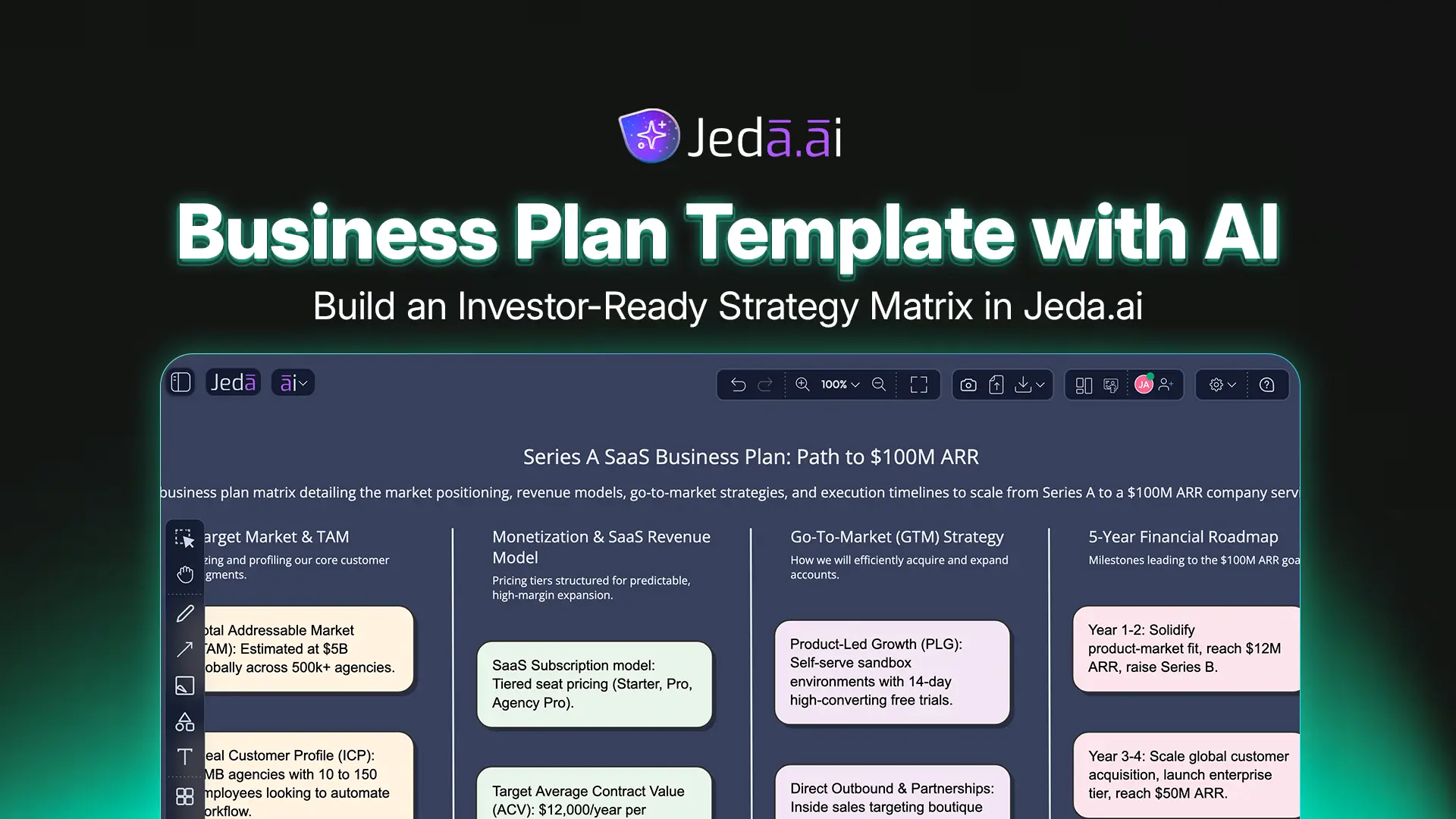
A Business Plan Template with AI gives founders, consultants, and business teams a faster way to turn scattered strategy notes into a structured plan. Instead of starting with a blank document, you can use Jeda.ai to create a visual business plan matrix that organizes company context, market opportunity, target customers, revenue model, risks, and execution priorities in one editable board.
Jeda.ai is an AI Workspace and AI Whiteboard built for visual strategy work. More than 150,000+ users use Jeda.ai to think, plan, analyze, and collaborate on editable Visual AI outputs. For business planning, the strongest path is the Business Plan matrix recipe under Strategy & Planning, because it gives you guided fields, Web Search, layout selection, and AI model selection before generation. You can also create a business plan from the Prompt Bar when you want a quicker, more flexible starting point.
A business plan should not behave like a pretty PDF that gets buried after the first investor meeting. It should act like a living strategy board. That is the core advantage of building a Business Plan Template with AI inside Jeda.ai: your plan remains visual, editable, expandable, and useful during real decisions.
What is a Business Plan Template with AI?
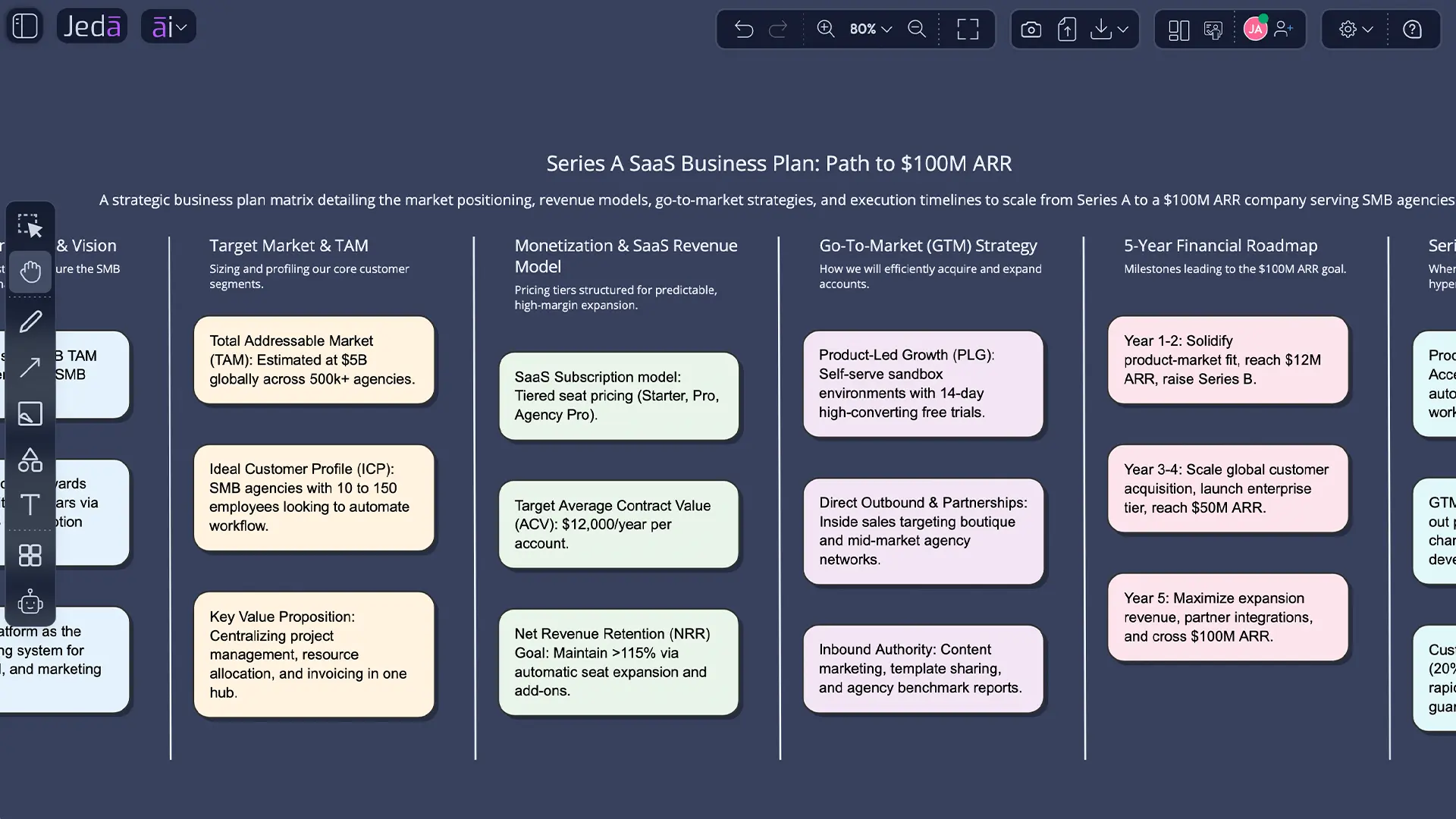
A Business Plan Template with AI is a guided structure that uses AI to draft, organize, and refine the main sections of a business plan. In Jeda.ai, the result is not just text. It becomes an editable matrix on an AI Whiteboard, so teams can review assumptions, improve weak sections, and convert strategy into next steps.
Traditional business plan templates usually ask you to fill in static sections: executive summary, company description, products and services, marketing plan, operations, management, financial plan, and appendices. SCORE’s startup business plan template follows this type of structure, and it remains a useful baseline for serious planning. The problem is not the structure. The problem is the empty-box workflow.
AI removes the slowest part: the first structured draft.
Jeda.ai goes further by turning that draft into a visual planning surface. You can compare options, reorganize sections, extend individual nodes with AI+, add notes, upload files for context, and collaborate with others on the same AI Workspace. That makes the Business Plan Template with AI more practical for founders, consultants, and internal strategy teams.
Why use an AI business plan template instead of a static document?
Use an AI business plan template when you need speed, structure, and strategic clarity at the same time. Static templates help you remember what to include. An AI business plan template helps you draft, compare, deepen, and revise the plan based on business context.
A static business plan often turns into a writing exercise. An AI-powered business plan becomes a strategy exercise.
Here is the practical difference:
| Planning Need | Static Business Plan Template | Business Plan Template with AI in Jeda.ai |
|---|---|---|
| First draft | Manual writing from scratch | AI-generated visual matrix |
| Market context | User must research separately | Web Search can ground the plan with current context |
| Structure | Fixed document sections | Editable matrix cells and visual sections |
| Collaboration | Comments in documents | Shared AI Whiteboard with visual editing |
| Refinement | Rewrite paragraphs manually | Use AI+ to extend and deepen generated sections |
| Inputs | Text fields only | Prompt, recipe fields, uploaded documents, data files, and canvas context |
| Output | Document-first | Visual, editable, decision-ready board |
A business plan should answer simple but difficult questions: What are we building? Who buys it? Why now? How do we make money? What could break? What must happen next? The Business Plan matrix recipe helps you answer these in a format your team can actually discuss.
When should you use the Business Plan matrix recipe in Jeda.ai?
Use the Business Plan matrix recipe when you want a structured, investor-friendly planning board from specific business inputs. It is best for founders, consultants, and business leaders who want a guided workflow instead of a generic AI prompt.
The recipe is located under the Strategy & Planning category and is designed for matrix output. That matters because business planning is naturally multi-section work. A matrix helps you see the whole strategy at once, instead of scrolling through pages of text like a raccoon looking for one buried snack.
The recipe is especially useful for:
- Startup planning before a pitch deck or fundraising conversation
- Internal strategy planning for a new business line
- Consultant-led planning workshops with clients
- Product-led growth planning for SaaS teams
- Market expansion and revenue model analysis
- Early validation of customer segments and positioning
- Turning uploaded research, strategy notes, or business documents into a clearer plan
Jeda.ai includes 300+ strategic frameworks and recipes across planning, analysis, diagrams, and visual strategy work. For this topic, the Business Plan matrix recipe is the recommended route because it gives the AI the right structure before it generates the plan.
How to create a Business Plan Template with AI using the matrix recipe
The matrix recipe is the recommended method because it gives Jeda.ai structured planning inputs before generation. You fill in the company, market size, target customers, revenue model, and extra information, then choose Web Search, layout type, and AI model before creating the board.
- Open AI Recipes
Go to the top-left AI Menu in Jeda.ai and open the AI Recipes panel.
- Choose Matrix recipes
Select the Matrix category, then open the Strategy & Planning subcategory.
- Select the Business Plan recipe
Choose the Business Plan recipe to open the guided form.
- Fill in the company field
Add the business context, such as Series A SaaS startup, local service business, enterprise software company, or new product venture.
- Enter the market size
Add the known or estimated market opportunity. Example: $5B TAM.
- Define target customers
Describe the buyer segment clearly. Example: SMB agencies, marketing teams, or B2B SaaS operations leaders.
- Add the revenue model
Specify how the company makes money. Example: SaaS subscription, usage-based pricing, marketplace commission, or services revenue.
- Add extra information
Include goals, constraints, assumptions, differentiators, or planning context. Example: 5-year goal is $100M ARR.
- Use Web Search when market context matters
Turn Web Search on when you want the plan grounded with current market signals, competitor context, or recent industry movement.
- Select layout type
Choose Auto for balanced output, Column for sequential review, or Grid for a board-style business plan matrix.
- Choose the AI model
Select the reasoning model that fits the work. Use stronger models for investor-facing strategy and detailed planning.
- Generate and review
Generate the matrix, review weak assumptions, edit text directly, and use AI+ to extend and deepen sections that need more detail.
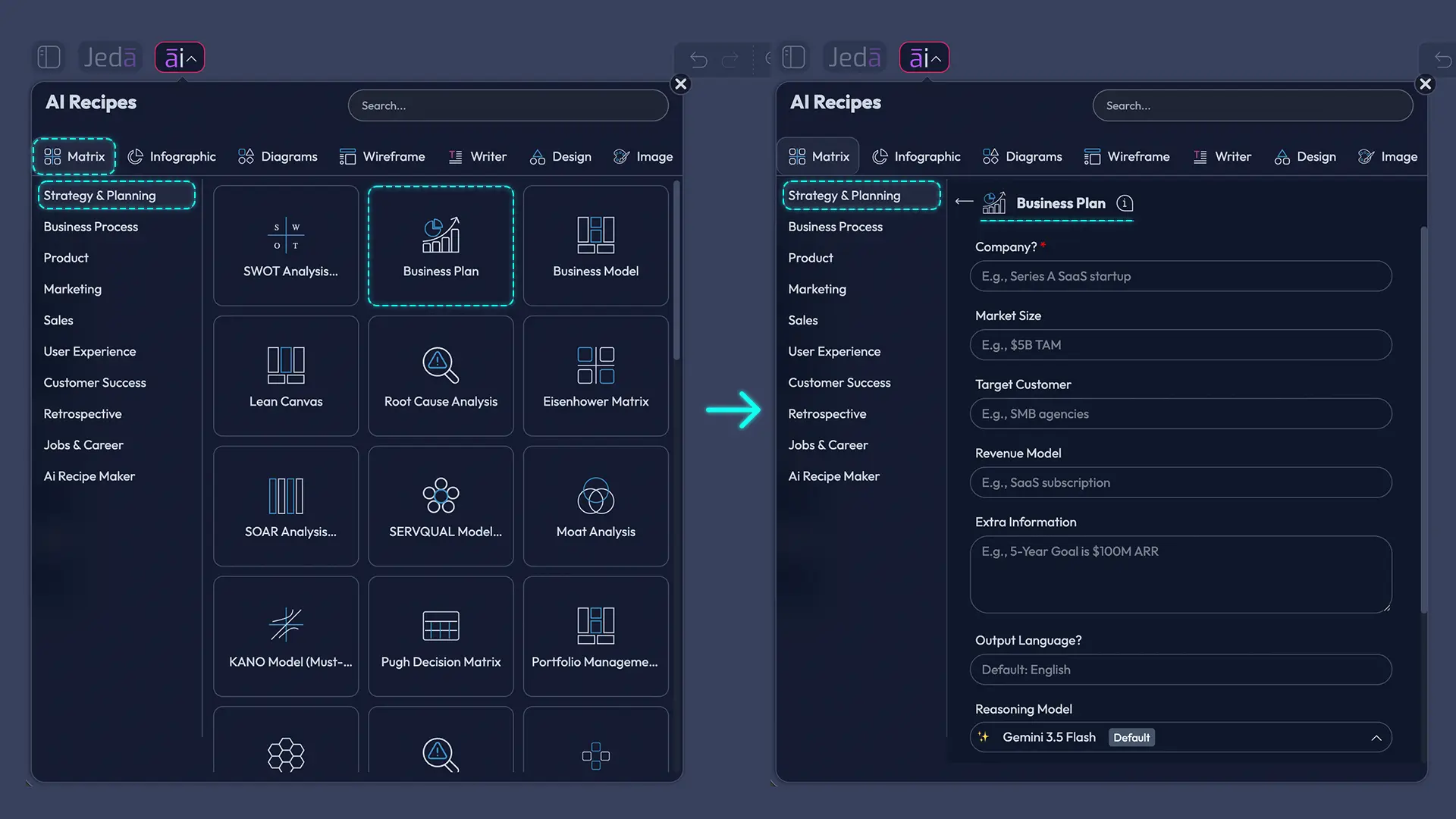
Visual guide for designer: Show the Business Plan recipe form inside the AI Recipes panel. Highlight the input fields: Company, Market Size, Target Customers, Revenue Model, and Extra Information. Also show Web Search, layout selection with Auto, Column, and Grid, plus AI model selection.
Valid content generation prompt for this mediabox: Create a polished product screenshot-style visual of a Jeda.ai Business Plan matrix recipe form. Include fields for Company, Market Size, Target Customers, Revenue Model, and Extra Information. Show controls for Web Search, layout options Auto, Column, Grid, and AI model selection. Keep the UI clean and professional.
Best recipe settings for better business plan output
The best settings depend on your planning stage.
Choose Auto layout when you want Jeda.ai to decide the best visual structure. This works well for first drafts because the AI can balance the sections naturally.
Choose Column layout when you want to present the plan step by step. This is useful for founder meetings, stakeholder reviews, and consultant walkthroughs.
Choose Grid layout when you want a business plan board. Grid works best when you need a quick visual comparison across sections such as market, customers, revenue, operations, risks, and milestones.
Turn Web Search on when the plan depends on recent facts. Market trends, competitor moves, pricing shifts, funding conditions, and category growth can change fast. Web Search helps Jeda.ai bring current context into the planning process.
Use AI model selection based on output stakes. A lightweight model is fine for a quick internal sketch. A stronger reasoning model is better for investor-facing narratives, complex revenue assumptions, or multi-market planning.
How to create a Business Plan Template with AI from the Prompt Bar
Use the Prompt Bar method when you want a fast business plan matrix without opening the recipe panel. This method is more flexible, but it depends on prompt quality. Be specific with company, market, customers, revenue model, goals, and constraints.
- Open the Prompt Bar
Use the bottom Prompt Bar in Jeda.ai as your primary AI input area.
- Select the Matrix command
Choose Matrix from the command selector so the output becomes a structured business plan board.
- Choose the layout
Pick Auto, Column, or Grid depending on how you want the business plan organized.
- Set Web Search
Turn Web Search on when the plan needs current market, competitor, or customer context.
- Select the AI model
Choose the reasoning model you want to use for business planning.
- Enter a detailed prompt
Include company type, market size, target customers, revenue model, traction, risks, and planning goal.
- Generate the matrix
Review the generated Business Plan Template with AI on the canvas.
- Edit and extend
Edit the Smart Shapes directly. Use AI+ to extend and deepen sections, but do not expect AI+ to accept a custom instruction at that step.
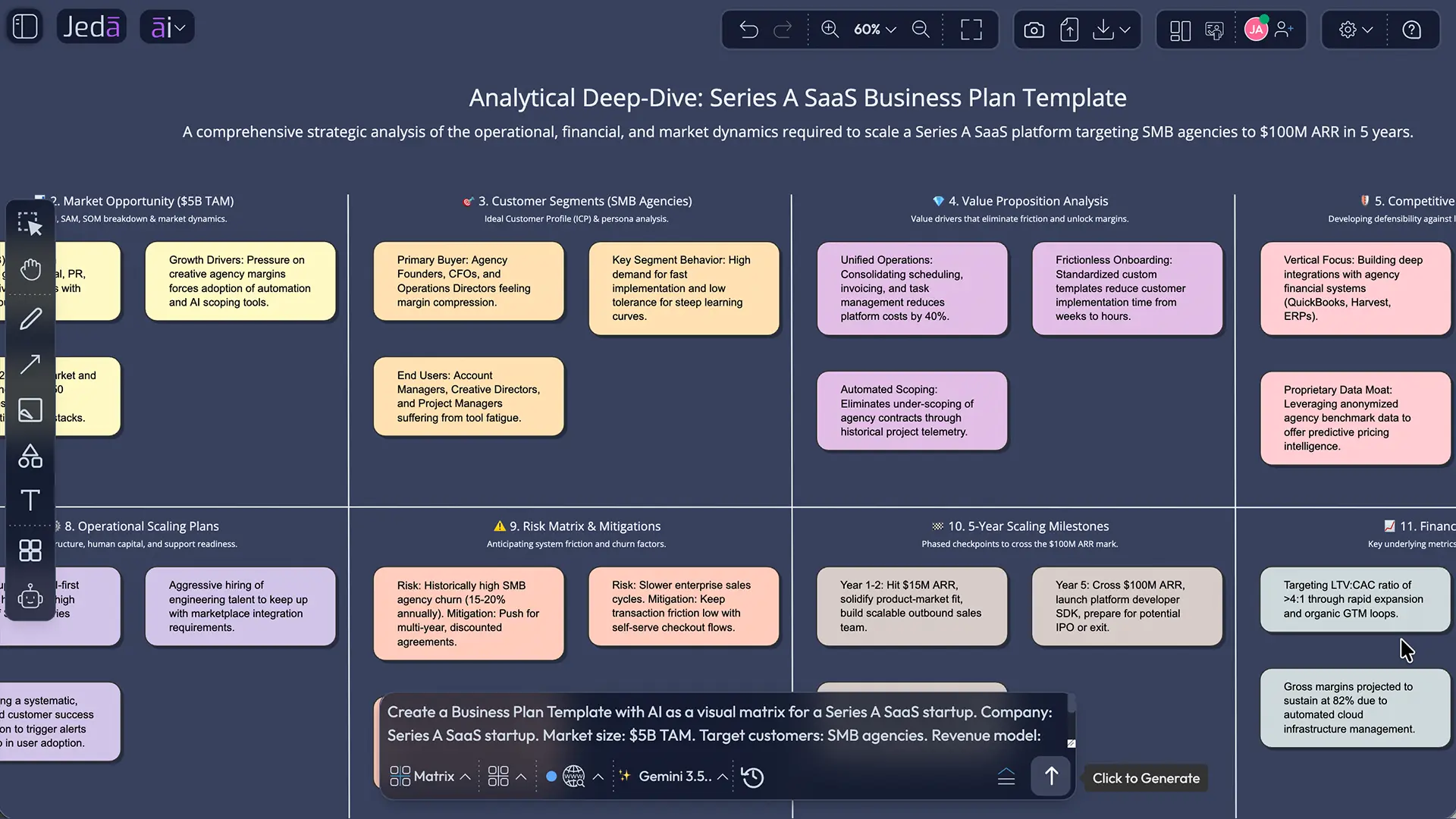
Prompt Bar example
Use this prompt when you want a strong first draft:
“Create a Business Plan Template with AI as a visual matrix for a Series A SaaS startup. Company: Series A SaaS startup. Market size: $5B TAM. Target customers: SMB agencies. Revenue model: SaaS subscription. Extra information: 5-year goal is $100M ARR. Include executive summary, market opportunity, customer segments, value proposition, competitive positioning, revenue model, go-to-market strategy, operations, risks, milestones, and financial assumptions.”
That prompt gives Jeda.ai enough context to produce a useful business plan matrix. It also keeps the output grounded in planning categories that founders and stakeholders expect.
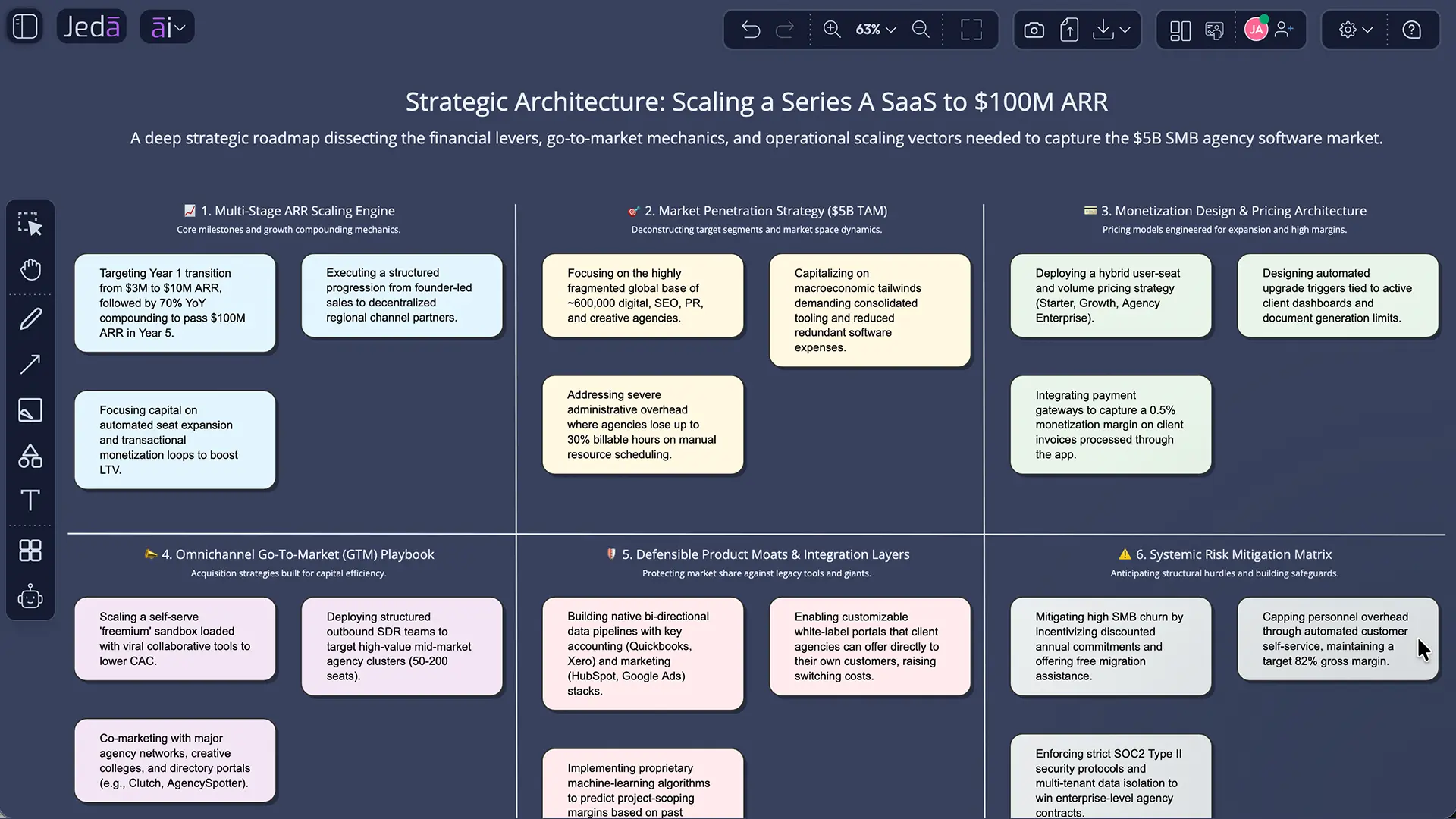
Example: Business Plan Template with AI for a Series A SaaS startup
Let’s apply the recipe to the example input:
| Recipe Field | Example Input |
|---|---|
| Company | Series A SaaS startup |
| Market Size | $5B TAM |
| Target Customers | SMB agencies |
| Revenue Model | SaaS subscription |
| Extra Information | 5-year goal is $100M ARR |
A strong generated matrix should not only restate those facts. It should interpret them. For example, the market section should identify what portion of the $5B TAM is realistically serviceable. The target customer section should separate buyer, user, decision-maker, and budget owner. The revenue model section should show pricing logic, expansion revenue, churn risk, and payback assumptions.
A practical output might include:
| Business Plan Section | What the AI should help clarify |
|---|---|
| Executive Summary | What the company does, who it serves, and why the timing matters |
| Market Opportunity | TAM, SAM, SOM, growth drivers, and category tailwinds |
| Target Customers | SMB agency personas, pains, buying triggers, and adoption barriers |
| Product Strategy | Core value proposition, differentiation, and roadmap priorities |
| Revenue Model | Subscription packaging, pricing assumptions, expansion paths, and churn risks |
| Go-To-Market | Acquisition channels, sales motion, onboarding, partnerships, and retention |
| Operations | Team needs, systems, delivery model, and internal process gaps |
| Risks | Market, product, financial, execution, and competitive risks |
| Milestones | 12-month, 24-month, and 5-year checkpoints toward $100M ARR |
Advanced usage: add files for deeper context
For advanced usage, upload data and document files before or during the planning workflow. This gives the business plan stronger context than a generic prompt can provide.
Use data files when you have:
- Sales pipeline exports
- Pricing tests
- Conversion data
- Customer segmentation tables
- Revenue forecasts
- Market sizing spreadsheets
- Churn or retention data
Use document files when you have:
- Existing business plans
- Pitch decks
- Market research PDFs
- Product strategy docs
- Customer interview notes
- Competitive analysis reports
- Founder memos
- Board updates
In Jeda.ai, uploaded data can support Data Insight workflows, and uploaded documents can support Document Insight workflows. When used inside AI Recipes through advanced file analysis, those inputs can help the Business Plan recipe generate a more grounded strategy matrix. This is where the AI Workspace becomes more useful than a normal AI business plan generator. You are not asking AI to invent the business from thin air. You are giving it evidence.
Important: AI+ can extend and deepen an existing generated section, but nothing specific can be asked for or instructed by using AI+. Select a generated Smart Shape and use AI+ when you want Jeda.ai to add relevant connected detail from that selected point.
What should a good AI business plan include?
A good AI business plan should include the same core planning logic investors, founders, and operators expect: company overview, market opportunity, customers, product, revenue model, operations, financial assumptions, risks, and milestones. The AI should make those sections clearer, not replace judgment.
SCORE’s startup template includes executive summary, company description, products and services, marketing plan, operational plan, management and organization, startup expenses, financial plan, and appendices. That structure is still useful. Jeda.ai adapts it into a visual matrix so each section becomes easier to discuss.
For investor-facing work, pay special attention to:
- Market size assumptions
- Customer urgency
- Differentiation
- Pricing logic
- Gross margin assumptions
- Acquisition channels
- Sales cycle
- Retention and expansion
- Competitive risk
- Milestone credibility
The first AI output should be treated as a strategy draft, not final truth. Edit it. Challenge it. Ask whether every claim has evidence. That is how you avoid the classic AI planning failure: a polished plan with soft assumptions. Beautiful nonsense is still nonsense, just wearing a blazer.
Business Plan matrix vs Business Model Canvas
A Business Plan matrix and a Business Model Canvas are related, but they solve different planning problems. Use the Business Model Canvas when you need a one-page model of how the company creates, delivers, and captures value. Use the Business Plan matrix when you need a fuller strategy plan with market, customer, revenue, risk, operations, and milestone detail.
| Use Case | Better Fit |
|---|---|
| Quick idea validation | Business Model Canvas |
| Investor-ready strategy planning | Business Plan matrix |
| Internal startup workshop | Business Plan matrix |
| Early business model sketch | Business Model Canvas |
| Market expansion planning | Business Plan matrix |
| Revenue model comparison | Both |
| Founder alignment session | Business Plan matrix |
Jeda.ai supports both types of structured thinking because business planning rarely stays inside one framework. You may start with a Business Plan Template with AI, then use AI+ to extend weak sections, or use Vision Transform to convert selected parts into another visual format.
Common mistakes to avoid
The most common mistake is asking for a complete business plan with too little context. “Make me a business plan” is technically a prompt. It is also how you get oatmeal. Add concrete context.
Avoid these mistakes:
- Leaving the target customer vague
- Using a TAM number without explaining reachable market
- Treating revenue model as pricing only
- Ignoring distribution and sales motion
- Overstating AI-generated market claims
- Forgetting operational constraints
- Not separating assumptions from evidence
- Treating the generated plan as final
- Using AI+ as if it accepts custom follow-up instructions
- Building a document when your team needs a shared planning board
The Business Plan matrix recipe prevents many of these issues because it asks for specific inputs first. Still, the quality of the plan depends on the quality of your context.
Why Jeda.ai is different from AI business plan generators
Most AI business plan generators produce a document. Some generate pitch decks or financial forecasts. Jeda.ai is different because it creates the plan inside a visual AI Workspace where teams can edit, extend, reorganize, and discuss the strategy.
That distinction matters after the first draft.
A founder may need to turn the revenue model into a pricing experiment. A consultant may need to review risks with a client. A product manager may need to convert the customer section into a roadmap discussion. A marketing team may need to turn target segments into campaign planning. A static document makes those transitions harder. An AI Whiteboard keeps them connected.
Jeda.ai combines the Business Plan recipe, Matrix command, Web Search, model selection, file context, collaboration, and editable Smart Shapes. The result is not a frozen plan. It is a visual strategy workspace.
FAQ
- What is a Business Plan Template with AI?
- A Business Plan Template with AI is a structured planning format that uses AI to draft and organize key business plan sections. In Jeda.ai, it becomes an editable visual matrix, so teams can refine market, customer, revenue, risk, and execution details on an AI Whiteboard.
- What is the best way to create a business plan in Jeda.ai?
- The best way is to use the Business Plan matrix recipe under Strategy & Planning. It provides guided fields for company, market size, target customers, revenue model, and extra information, plus Web Search, layout selection, and AI model selection.
- Can I create a business plan from the Prompt Bar?
- Yes. Select the Matrix command from the Prompt Bar, choose a layout, set Web Search, select an AI model, and enter a detailed business plan prompt. The recipe method is better for guided structure, while the Prompt Bar is better for fast flexible drafting.
- Which layout should I use for a business plan matrix?
- Use Auto layout for a balanced first draft, Column layout for step-by-step review, and Grid layout for a board-style planning view. Grid is usually best when several stakeholders need to compare business plan sections quickly.
- Should I turn Web Search on for a business plan?
- Turn Web Search on when your plan depends on current market trends, competitor movement, pricing shifts, or recent industry data. Keep it off when you only want to use internal assumptions, uploaded documents, or private planning context.
- Can I upload data or documents for a better business plan?
- Yes. Advanced users can upload data and document files to provide more context. Sales data, market research, financial projections, pitch decks, and customer notes can help Jeda.ai produce a more grounded business plan matrix.
- Can AI+ rewrite a specific business plan section with my instruction?
- No. AI+ can extend and deepen selected generated content, but you cannot give AI+ a specific custom instruction at that step. Select the relevant Smart Shape and use AI+ when you want Jeda.ai to add related detail.
- Is an AI-generated business plan investor-ready?
- An AI-generated business plan can become investor-ready after human review, evidence checks, financial validation, and strategic editing. Treat the first output as a strong draft, then refine assumptions, risks, market sizing, and revenue logic before sharing it externally.
- What information should I provide for the best AI business plan?
- Provide the company type, market size, target customers, revenue model, business goal, constraints, traction, competitors, and any available data. More specific input usually creates a clearer, more useful Business Plan Template with AI.
- Who should use a Business Plan Template with AI?
- Startup founders, business leaders, strategy consultants, product managers, and marketing teams can use it. It is especially useful when a team needs a shared visual plan rather than a long static document.
Final takeaway
A Business Plan Template with AI works best when it helps you think better, not just write faster. Jeda.ai gives you two practical methods: the Business Plan matrix recipe for guided strategy work, and the Prompt Bar for flexible matrix generation. The recipe should be your default because it supports structured fields, Web Search, Auto/Column/Grid layouts, AI model selection, and advanced file context.
Use the first output as a draft. Then edit, challenge, extend, and collaborate on it inside the AI Workspace. That is how a business plan becomes more than a document. It becomes a working strategy board on an AI Whiteboard, trusted by 150,000+ users building with Jeda.ai.
Create your Business Plan Template with AI in Jeda.ai
Join 150,000+ users building strategy boards, business models, and planning frameworks in Jeda.ai.
Get StartedCitations
- [1]
SCORE (2026) . “Business Plan Template for a Startup Business” SCORE.
View Source ↗ - [2]
SCORE (2011) . “Business Plan Outline” SCORE.
View Source ↗ - [3]
Investopedia (2026) . “Comprehensive Guide to Crafting a Winning Business Plan” Investopedia.
View Source ↗ - [4]
Grammarly (2026) . “Free AI Business Plan Generator” Grammarly.
View Source ↗ - [5]
Venturekit (2026) . “AI Generated Business Plans” Venturekit.
View Source ↗ - [6]
PrometAI (2026) . “AI Business Plan Generator” PrometAI.
View Source ↗ - [7]
monday.com (2026) . “10 Best AI Business Plan Generators Tested and Compared” monday.com.
View Source ↗