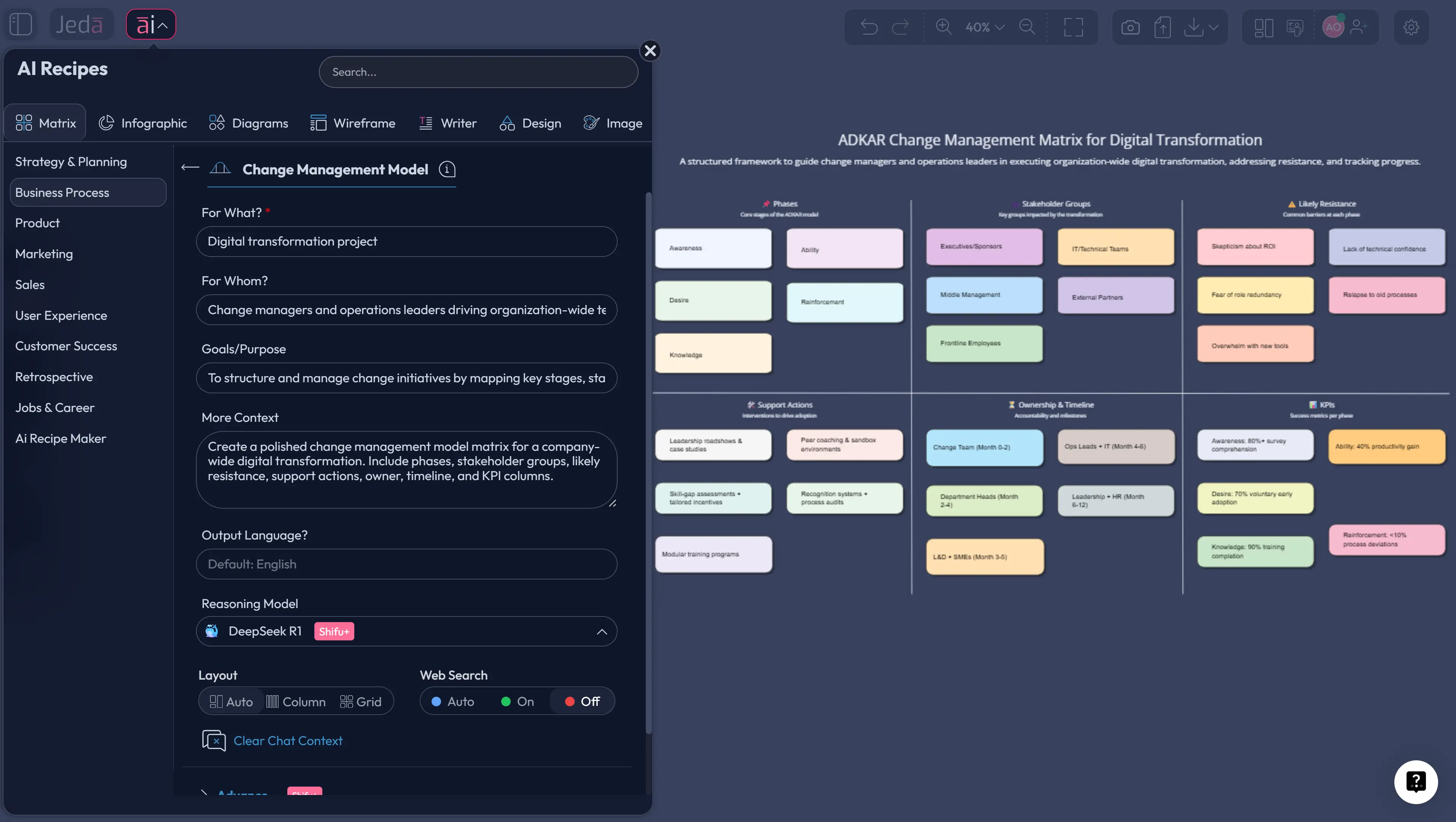
Change programs rarely fail because leaders forget to make a slide. They fail because the logic of the change is fuzzy, ownership is blurry, and the people side gets treated like a footnote. Change Management Model with AI gives you a faster way to fix that. Instead of juggling docs, sticky notes, and half-finished spreadsheets, you can use Jeda.ai to build an editable matrix that shows the change goal, stakeholder impact, resistance points, adoption actions, and success signals in one place. In other words: less chaos, more visible alignment inside an AI Workspace and AI Whiteboard trusted by 150,000+ users.
What is a change management model?
A change management model is a structured framework that helps organizations move people, processes, and systems from a current state to a desired future state. Recent Prosci guidance defines it as a framework for helping people adopt and use change in their work, while Lewin’s classic 1947 work established the logic of preparing for change, moving through change, and stabilizing new behavior. Kotter later expanded the leadership side by showing why large transformation efforts often stall when urgency, coalition-building, and communication are weak.
That history matters. It tells you a model is not just a checklist. It is a way to make change visible, repeatable, and governable.
For a modern team, the most useful version is often not a long policy memo. It is a visual matrix that maps:
- the change objective,
- who is affected,
- what must change,
- what resistance is likely,
- what support is required,
- and how success will be measured.
Why use a change management model with AI?
The old way is familiar. Also slow. Teams collect notes in one place, timelines in another, training plans somewhere else, and then wonder why nobody shares the same picture.
Using Jeda.ai changes the operating rhythm. You can generate a first-pass matrix in seconds, edit it collaboratively, and keep both the strategic model and the execution details inside one AI Workspace. Because Jeda.ai is framework-native rather than blank-canvas-first, you start from structure instead of staring into a white void like it owes you clarity. The platform’s Visual AI approach also helps teams move from abstract change language to concrete, editable planning artifacts.
- Faster structure
Generate a usable change matrix quickly instead of building rows, columns, and categories by hand.
- Shared visibility
Keep leaders, project teams, and stakeholders aligned inside one editable AI Whiteboard.
- Model flexibility
Start with Lewin, Kotter, or ADKAR logic, then adapt the matrix to your own organization.
- AI-assisted depth
Use AI+ to expand weak sections such as resistance management, communications, or training plans.
- Easy iteration
Revise the model as adoption data, stakeholder feedback, or project realities change.
- Visual conversion
Turn the matrix into a diagram or flowchart when you need a different view for leadership or delivery teams.
Which change model should you start with?
Not every change needs the same structure. That is where teams overcomplicate things.
If your initiative is broad and cultural, Kotter is useful because it emphasizes urgency, coalition, communication, and anchoring change. If your challenge is mostly about helping individuals move through adoption barriers, ADKAR gives you a cleaner lens: awareness, desire, knowledge, ability, and reinforcement. If you need a simple executive narrative, Lewin’s three-stage logic still works well: unfreeze, change, refreeze.
A matrix-based change management model works especially well when you need to combine those perspectives into one working board. Here is a practical rule:
How to create a change management model in Jeda.ai
Jeda.ai gives you two practical ways to build this. Since this topic is best handled as a matrix, the Matrix command should be your starting point. And yes, keep it visual. That is the whole point.
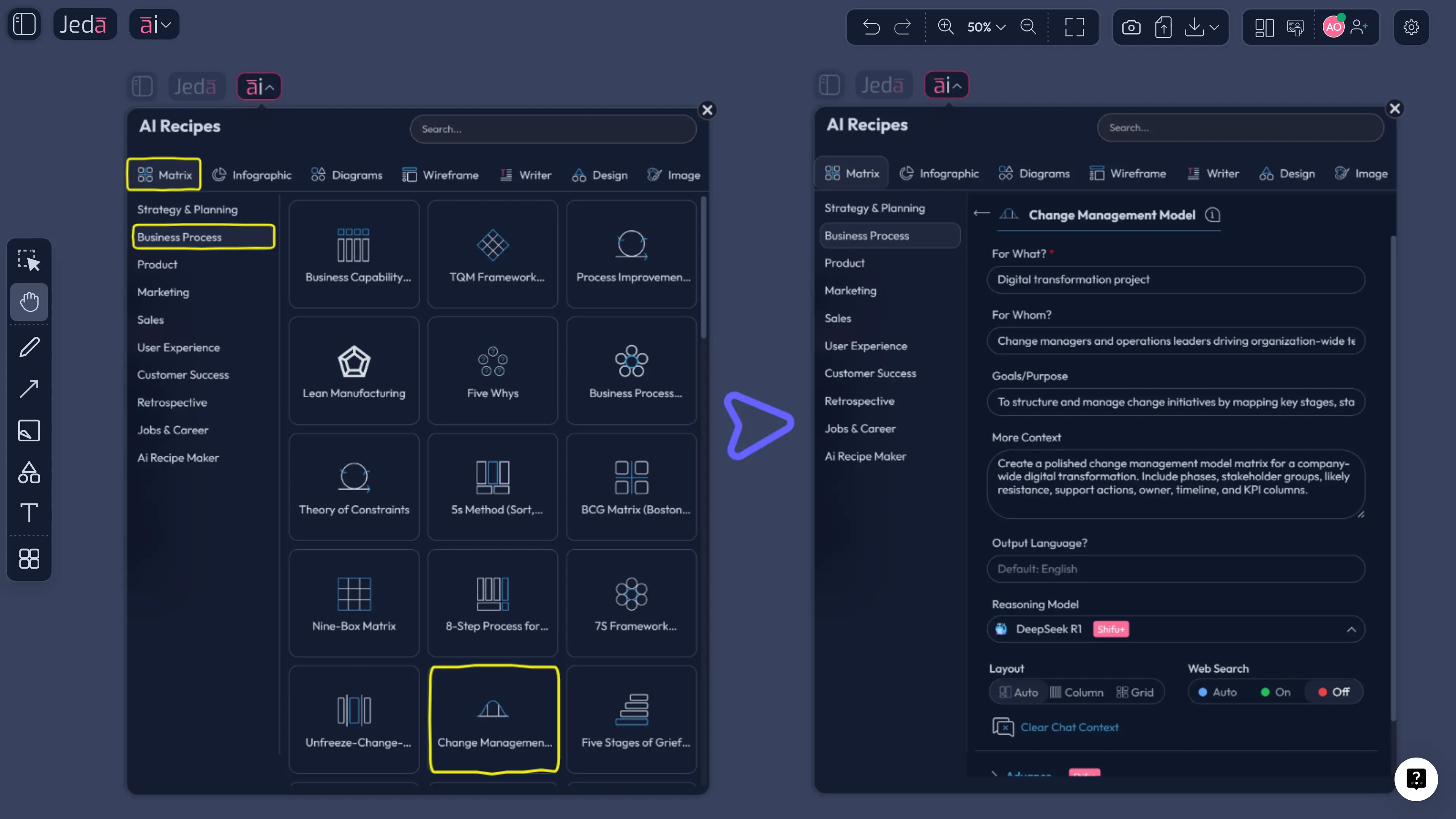
Method 1: Recipe Matrix
This is the recommended path when you want a faster structured starting point inside the AI Menu.
- Open AI Menu from the top-left of the canvas.
- Go to Matrix Recipes.
- Choose the Change Management Model recipe for a change initiative in your workspace.
- Add the context: the change initiative, stakeholder groups, timeline, risks, and intended outcomes.
- Generate the matrix.
- Edit the cells, color-code priorities, and assign owners.
- Use the AI+ button to extend thin sections such as communications, training, or resistance mitigation.
- If you need a more presentation-friendly view, use Vision Transform to convert the matrix into a diagram or flowchart.
Method 2: Prompt Bar
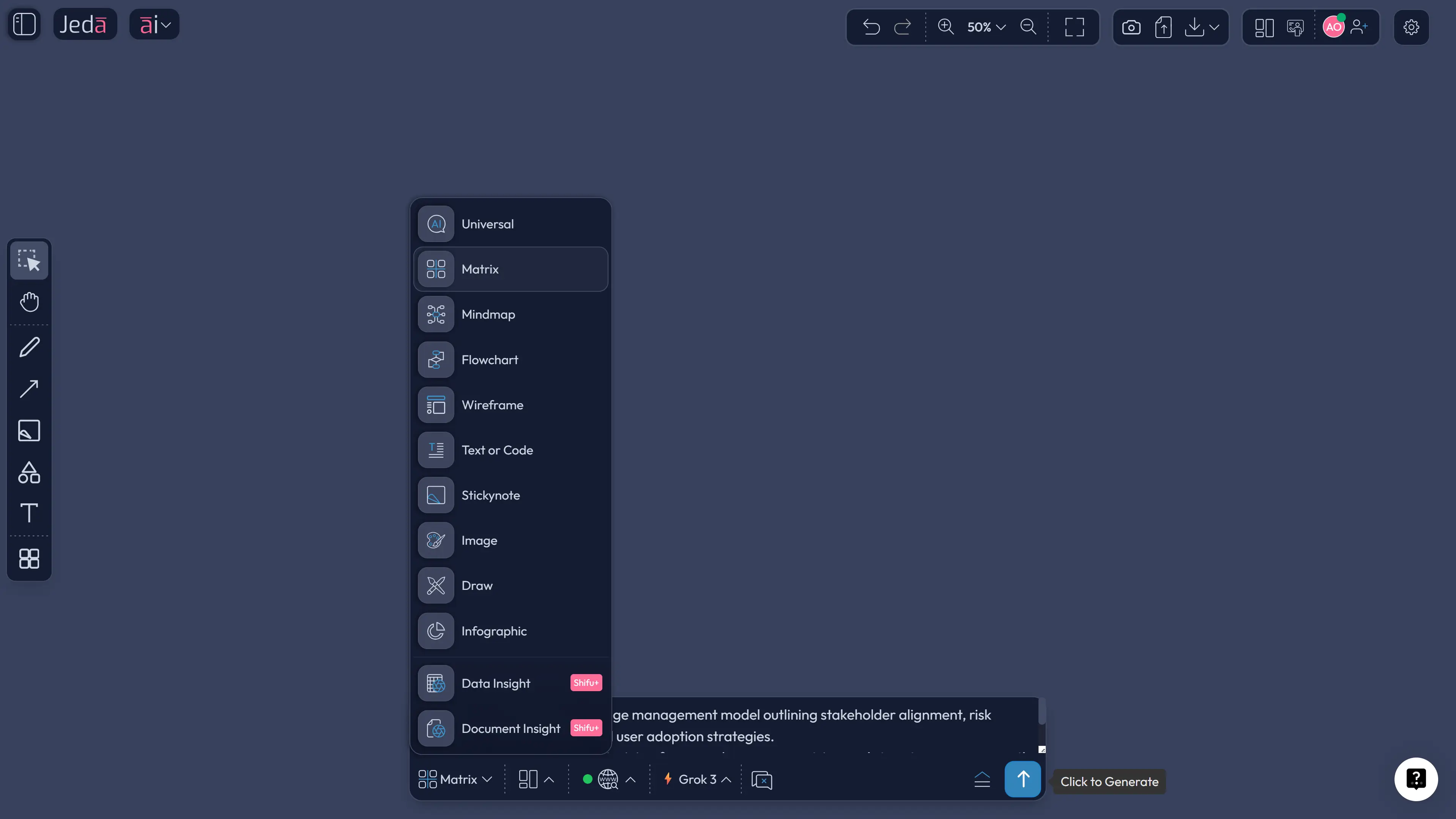
This is the better route when your change context is specific and you want the AI to shape the matrix around your exact scenario.
- Open the Prompt Bar at the bottom of the canvas.
- Select the Matrix command.
- Use a direct prompt such as:
Build a change management model matrix for a company-wide CRM migration. Include stages, stakeholder groups, expected resistance, communication plan, training actions, change owners, risks, and KPIs.
- Press Enter to generate.
- Review the matrix and simplify anything that feels bloated.
- Use AI+ to deepen one section at a time. Good targets: stakeholder readiness, manager enablement, and post-launch reinforcement.
- Use Vision Transform if you want to create a flowchart of the rollout path from the same content.
- Define the change
State the initiative, business reason, scope, timeline, and the teams affected.
- Choose the model logic
Decide whether Lewin, Kotter, ADKAR, or a hybrid structure will guide the matrix.
- Generate the first matrix
Use Matrix Recipes or the Prompt Bar to create the initial change management model in Jeda.ai.
- Refine stakeholders and actions
Edit the matrix to clarify resistance points, communications, training, owners, and metrics.
- Extend weak sections with AI+
Tap the AI+ button to expand underdeveloped parts such as manager coaching, adoption barriers, or reinforcement steps.
- Transform for delivery
Use Vision Transform to turn the matrix into a diagram or flowchart for executive reviews or team execution.
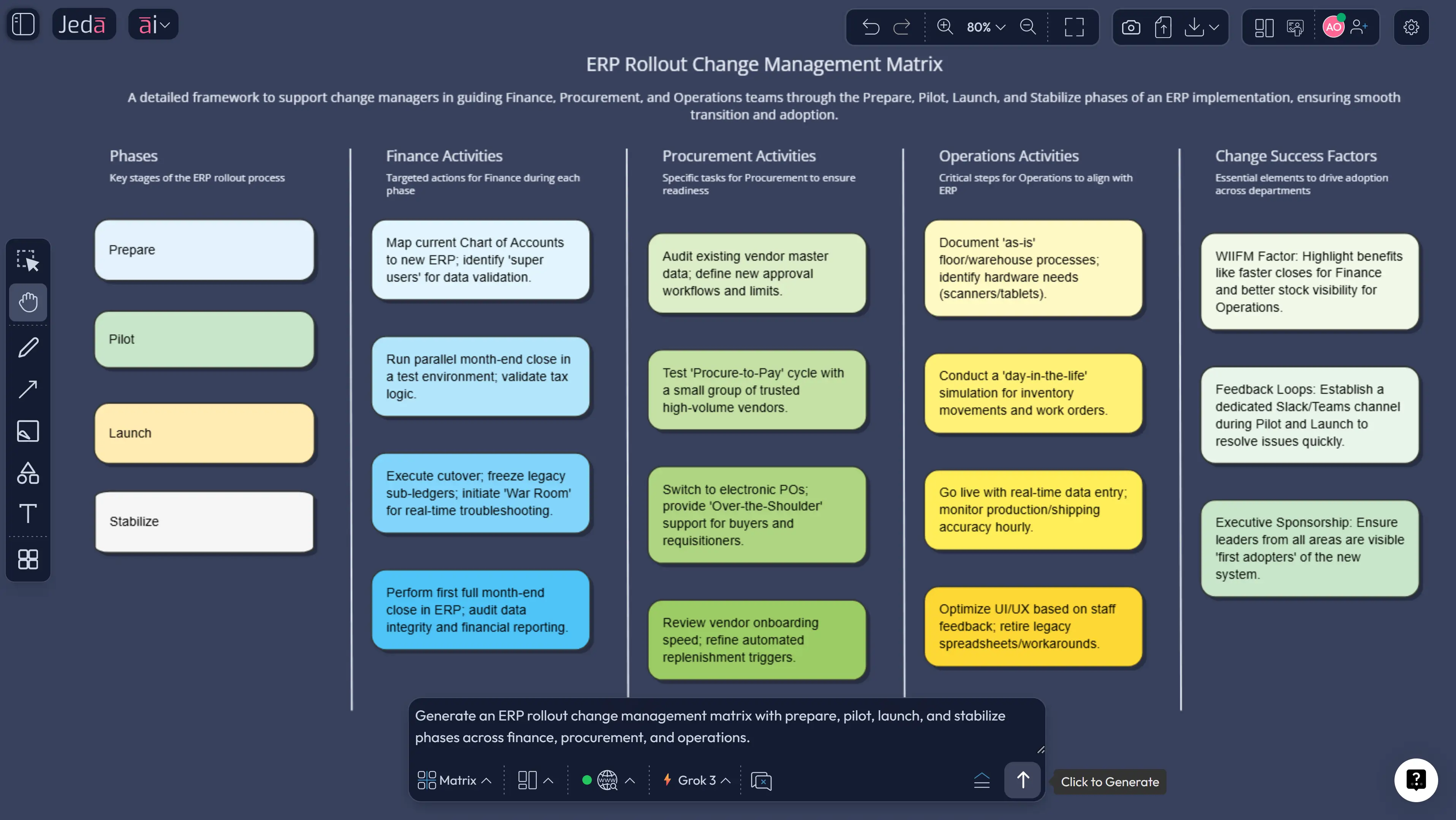
Change management model template and example
Here is a practical example. Imagine a company rolling out a new ERP platform across finance, procurement, and operations.
The matrix could include:
- Stage: prepare, pilot, launch, stabilize
- Stakeholder group: finance managers, plant leads, procurement analysts
- Likely resistance: fear of slower workflows, reporting confusion, role ambiguity
- Actions: executive briefings, role-based training, office hours, job aids
- Owner: transformation lead, function head, local change champion
- Metric: training completion, login adoption, error rate, time-to-task completion
You can also create a second layer for leaders only. Keep the same logic, but simplify the view to show initiative status, risk level, adoption trend, and decision points. That gives executives a cleaner dashboard while the working team keeps the detailed matrix on the same AI Whiteboard.
Best practices for leading change with AI
The technology is helpful. The governance is what keeps it useful.
Recent McKinsey reporting notes that the average employee now experiences ten planned change programs a year, up sharply from a decade ago. That makes clarity and prioritization more important than ever, because change fatigue is not theoretical anymore.
Common mistakes to avoid
The first mistake is picking a famous model and assuming the job is done. It is not. A model is a frame, not an outcome.
The second is building one giant matrix with every possible detail. That usually creates a board nobody wants to maintain.
The third is ignoring reinforcement. Prosci’s current ADKAR guidance still matters here: people need more than awareness and training. They need support that helps new behaviors stick. And one more. Teams often over-focus on launch day. In practice, post-launch adoption is where the real fight happens.
Frequently asked questions
- What is a change management model?
- A change management model is a structured framework for planning, guiding, and reinforcing organizational change. It helps teams clarify what is changing, who is affected, what support is needed, and how success will be measured.
- What is the difference between a change management model and a change plan?
- A model gives you the logic. A plan gives you the execution details. The model explains how change should be approached; the plan turns that into actions, timelines, owners, communications, and metrics.
- Which change management model is best?
- There is no universal winner. Lewin works well for simple narratives, Kotter suits large transformations, and ADKAR is strong for individual adoption. A matrix-based approach is useful when you need all of that translated into one working visual system.
- Can AI really help with change management?
- Yes, especially in structuring the work faster. AI can help draft stakeholder maps, communication actions, resistance categories, and success metrics. But human review is still essential because organizational context matters more than generic output.
- How do I create a change management model in Jeda.ai?
- Use the Matrix route. You can start from Matrix Recipes through the AI Menu or open the Prompt Bar, choose Matrix, and describe your initiative. Then refine the result, use AI+ to extend weak sections, and transform it visually if needed.
- Why build a change management model as a matrix?
- A matrix makes the work visible. It lets you connect stages, stakeholders, actions, risks, owners, and KPIs in one editable view. That is much easier to update and discuss than a long narrative document.
- What should a change management matrix include?
- At minimum include the change stage, stakeholder group, expected resistance, support action, owner, and success metric. Many teams also add communication channels, training needs, risk level, and review cadence.
- How does AI+ help after the first draft?
- AI+ helps you deepen selected areas without rebuilding the full board. For example, you can extend the communication plan for managers, generate reinforcement ideas, or expand a training section for a specific stakeholder group.
- Can I turn the matrix into another visual?
- Yes. In Jeda.ai you can use Vision Transform to convert the matrix into a diagram or flowchart. That is useful when executives want a simplified rollout narrative instead of a working planning table.
- Who should own the change management model?
- Usually a transformation lead or project leader owns the board, but function heads and local change champions should contribute. Shared visibility matters, but final accountability should still sit with a named owner.
Sources & Further Reading
- [1]
Kurt Lewin (1947) . “Frontiers in Group Dynamics” Human Relations.
View Source ↗ - [2]
John P. Kotter (1995) . “Leading Change: Why Transformation Efforts Fail” Harvard Business Review.
View Source ↗ - [3]
Prosci (2024) . “9 Change Management Models to Compare” Prosci Blog.
View Source ↗ - [4]
Prosci (2024) . “The Prosci ADKAR Model” Prosci Methodology.
View Source ↗ - [5]
McKinsey (2025) . “Change Is Changing: How to Meet the Challenge of Radical Reinvention” McKinsey & Company.
View Source ↗ - [6]
M. Carreño (2024) . “An Analytical Review of John Kotter's Change Leadership Framework” ResearchGate / Essay.
View Source ↗ - [7]
AI and Organizational Change: Dynamics and Management Strategies (2024) . “AI And Organizational Change: Dynamics And Management Strategies” ResearchGate.
View Source ↗
Start Your Change Management Model with AI
Join over 150,000 professionals who use Jeda.ai as an AI Workspace and AI Whiteboard for structured planning, clearer alignment, and faster execution.
Try Free Template