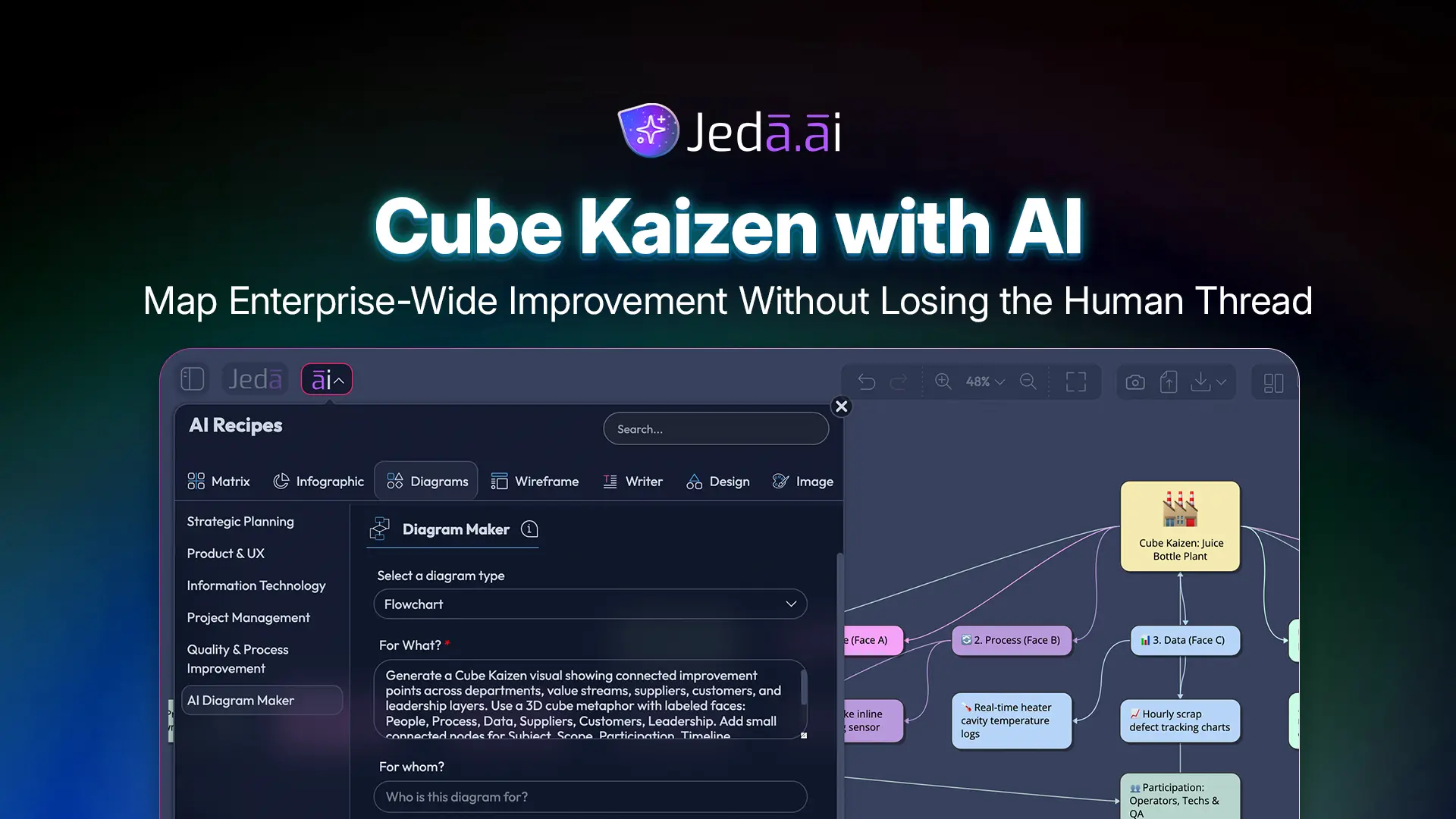
Cube Kaizen with AI is for the moment when “let’s improve this process” stops being a tidy little department project and becomes a whole-organization question. One team fixes a handoff. Another changes a supplier routine. A third rewrites the customer escalation path. Great. But unless those improvements connect, you don’t get enterprise Kaizen. You get improvement confetti.
Jeda.ai gives teams a better way to see the whole thing. Inside its AI Workspace and AI Whiteboard, the Cube Kaizen Diagram Recipe helps you map improvements across points, lines, planes, suppliers, customers, timelines, and ownership. More than 150,000+ users use Jeda.ai to turn methods like this into editable Visual AI outputs instead of buried notes, static slides, or “we’ll circle back” meeting fog.
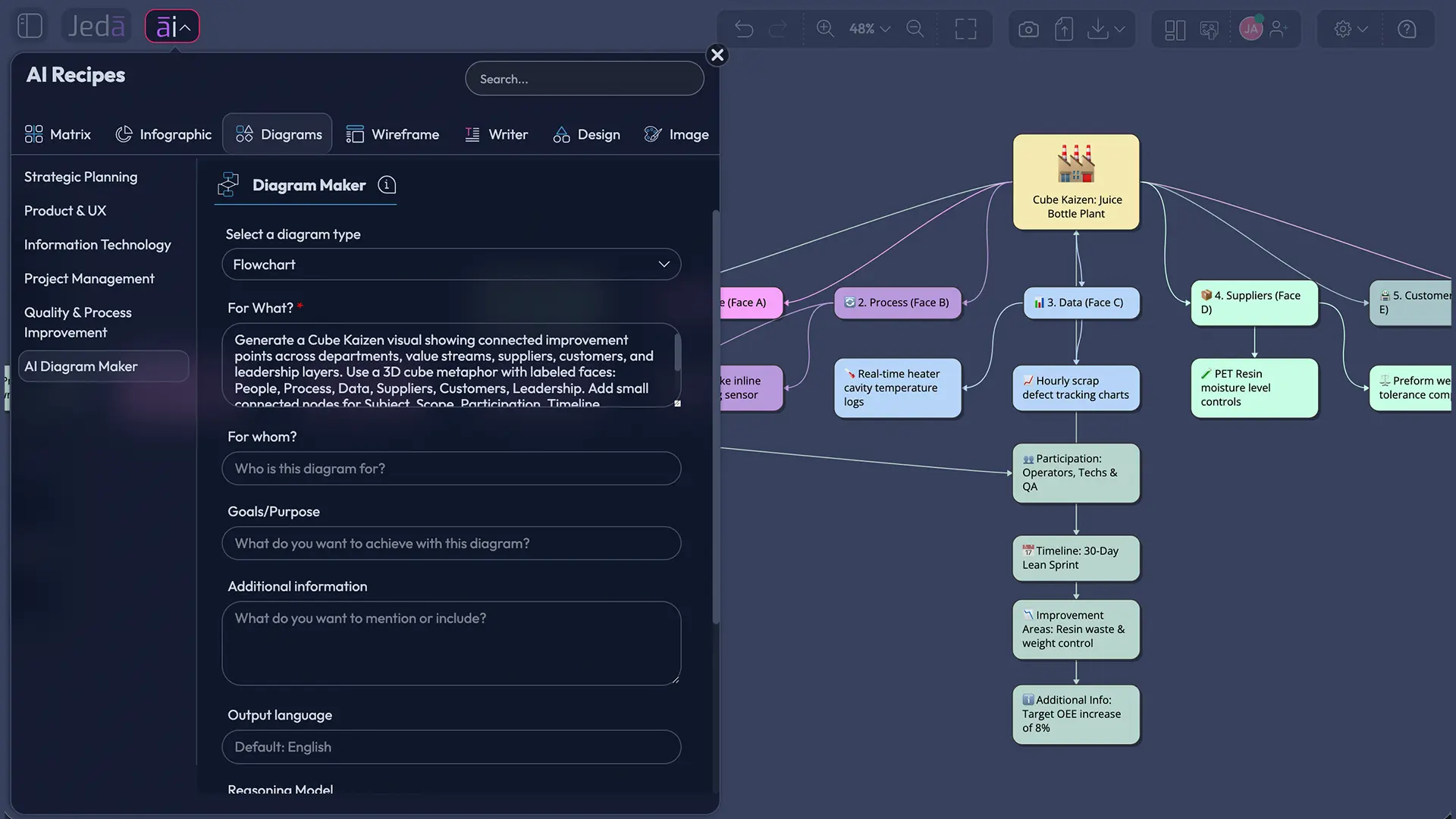
What Is Cube Kaizen?
Cube Kaizen is a maturity view of Kaizen where improvement is no longer isolated to one point, one process line, or one value stream plane. It describes a connected state where improvements can move upstream, downstream, across departments, through suppliers, and toward customers without leaving disconnected pockets behind.
Think of it like this. Point Kaizen fixes a local issue. Line Kaizen links upstream and downstream process improvements. Plane Kaizen connects several lines into a value stream. Cube Kaizen connects those planes into an enterprise-wide improvement system.
That sounds grand, but it’s practical. A logistics delay may begin as a warehouse issue, then touch procurement, vendor reliability, inventory policy, sales promises, customer support, and finance. Cube Kaizen asks the annoying but necessary question: “What breaks somewhere else if we improve only here?”
Toyota’s own description of the Toyota Production System emphasizes waste elimination, shorter lead times, quality, and daily incremental kaizen across the organization. Cube Kaizen takes that spirit and asks teams to visualize the full network instead of pretending the factory wall, department chart, or spreadsheet tab is the boundary.
Why Cube Kaizen with AI Matters Now
Cube Kaizen with AI matters because modern operations are too connected for single-process improvement theater. Sorry, but a pretty workshop board that improves one team while quietly dumping work on another team is not progress. It’s operational debt with better stationery.
AI helps when the problem has too many relationships for one person to hold in their head. Jeda.ai can structure the first pass, surface adjacent risks, and convert messy improvement inputs into a diagram, mind map, or flowchart. You still need human judgment. Actually, you need more of it. The difference is that your team starts with a connected visual map instead of a blank canvas and eight competing opinions.
- See the enterprise system
Map improvement effects across departments, value streams, suppliers, customers, and leadership layers.
- Connect local fixes
Turn isolated Kaizen ideas into linked upstream, downstream, and cross-functional improvement paths.
- Ground the work
Use the recipe web search option when current market, supplier, or operational context matters.
- Choose the best structure
Generate the same improvement logic as a Basic Diagram, Mind Map, or Flowchart.
- Align contributors
Clarify participation across frontline teams, managers, process owners, suppliers, and customer-facing teams.
- Extend after generation
Use AI+ to extend and deepen generated sections without treating it like a separate custom prompt box.
Cube Kaizen with AI: When Should You Use It?
Use Cube Kaizen with AI when the improvement problem crosses more than one team, process, or external stakeholder. If the fix touches only a workstation, Point Kaizen may be enough. If it touches one upstream and one downstream process, Line Kaizen may fit. If it affects a full value stream, Plane Kaizen gets closer.
Cube Kaizen is the heavier tool. Don’t swing it at a thumbtack.
Use it when you need to map:
- supplier quality issues that affect production, delivery, support, and customer trust
- handoffs across sales, onboarding, implementation, customer success, and billing
- enterprise waste patterns that repeat across multiple business units
- compliance fixes that affect process design, documentation, approvals, and customer communication
- digital transformation projects where local automation may create downstream complexity
- quality improvement programs that need leadership visibility and frontline ownership
How to Create a Cube Kaizen Diagram in Jeda.ai Using the Diagram Recipe
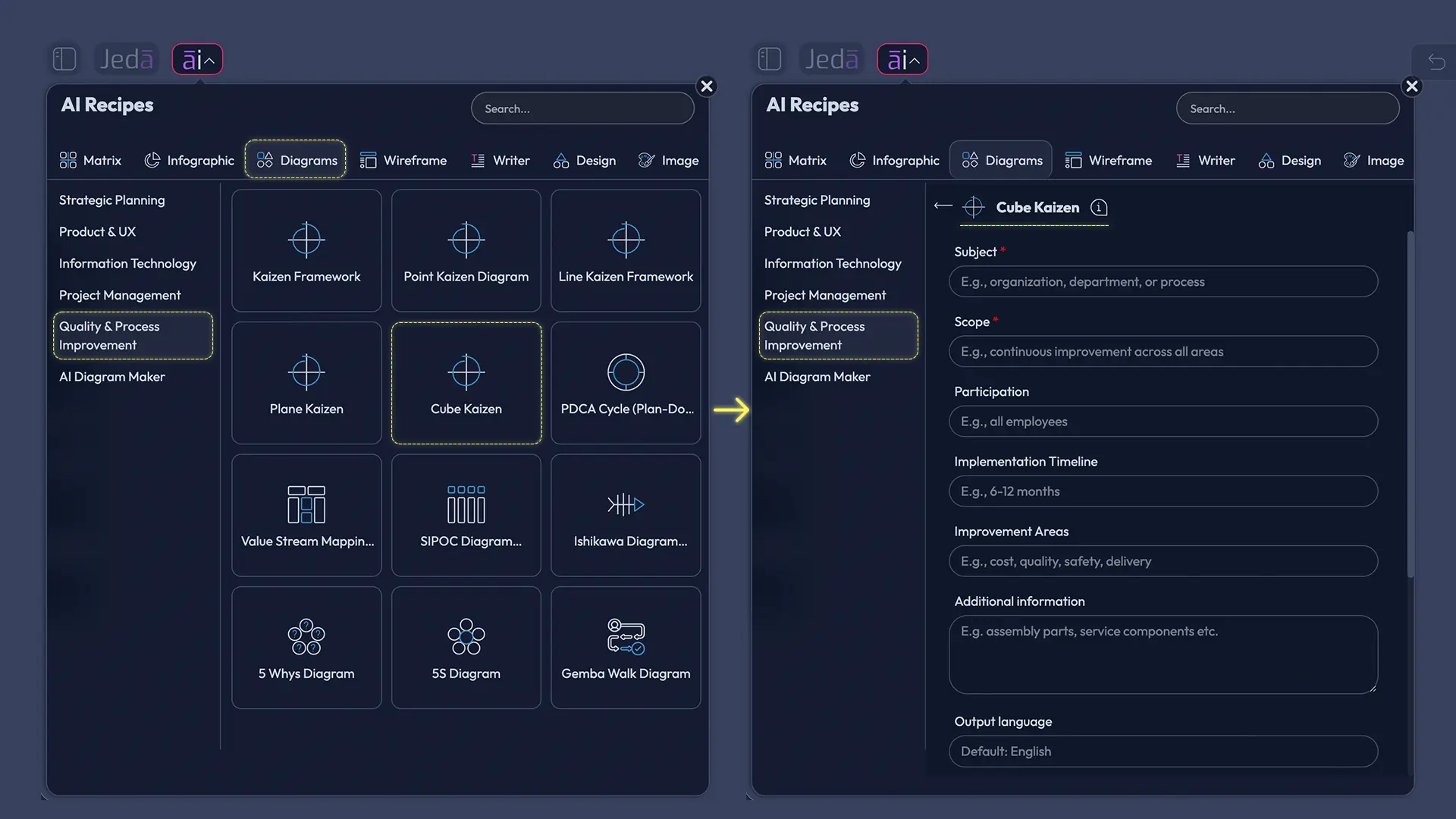
The recommended method is the Cube Kaizen Diagram Recipe under the Quality & Process Improvement category. This is the cleanest path because the recipe guides the structure before generation. You don’t have to invent the framework each time. Nice little sanity saver.
The Cube Kaizen recipe uses common Diagram Recipe fields: Subject, Scope, Participation, Implementation Timeline, Improvement Areas, and Additional Information. It also lets you choose horizontal or vertical layout, turn web search on or off, select the diagram type, and choose the AI model. For diagram type, use Basic Diagram when you want a connected system view, Mind Map when you want exploration, and Flowchart when you want implementation sequence.
Method 1: Use the Cube Kaizen Diagram Recipe
Start here when you want the most structured output. The recipe helps Jeda.ai understand the enterprise improvement context before it generates the visual.
- Open AI Menu
From the Jeda.ai canvas, click the AI Menu at the top-left of the workspace.
- Go to Diagrams
Choose the Diagrams category, then open Quality & Process Improvement.
- Select Cube Kaizen
Choose the Cube Kaizen recipe so the output follows the correct improvement-map structure.
- Fill in the Subject
Describe the enterprise improvement topic, such as supplier delay reduction, onboarding bottlenecks, defect prevention, or customer escalation improvement.
- Define the Scope
State which teams, departments, workflows, value streams, suppliers, customers, or regions are included.
- Add Participation
List the roles involved, including frontline workers, managers, analysts, process owners, suppliers, customer-facing teams, or leadership sponsors.
- Set the Implementation Timeline
Add the timeline for analysis, pilot, rollout, review, and standardization.
- List Improvement Areas
Name the areas to improve, such as waste, waiting time, rework, handoff quality, visibility, compliance, throughput, or customer response.
- Add Additional Information
Provide constraints, baseline metrics, known risks, customer feedback, supplier notes, or internal process observations.
- Choose layout and diagram type
Select horizontal or vertical layout. Then choose Basic Diagram, Mind Map, or Flowchart based on whether you want a system map, exploration map, or execution sequence.
- Set web search and model
Turn web search on when current external context matters. Choose the AI model or Multi-LLM Agent based on the depth of analysis you need.
- Generate and refine
Click Generate. After the diagram appears, edit text, move nodes, adjust connectors, and use AI+ to extend generated sections when you need more depth.
How to Create Cube Kaizen with AI from the Prompt Bar
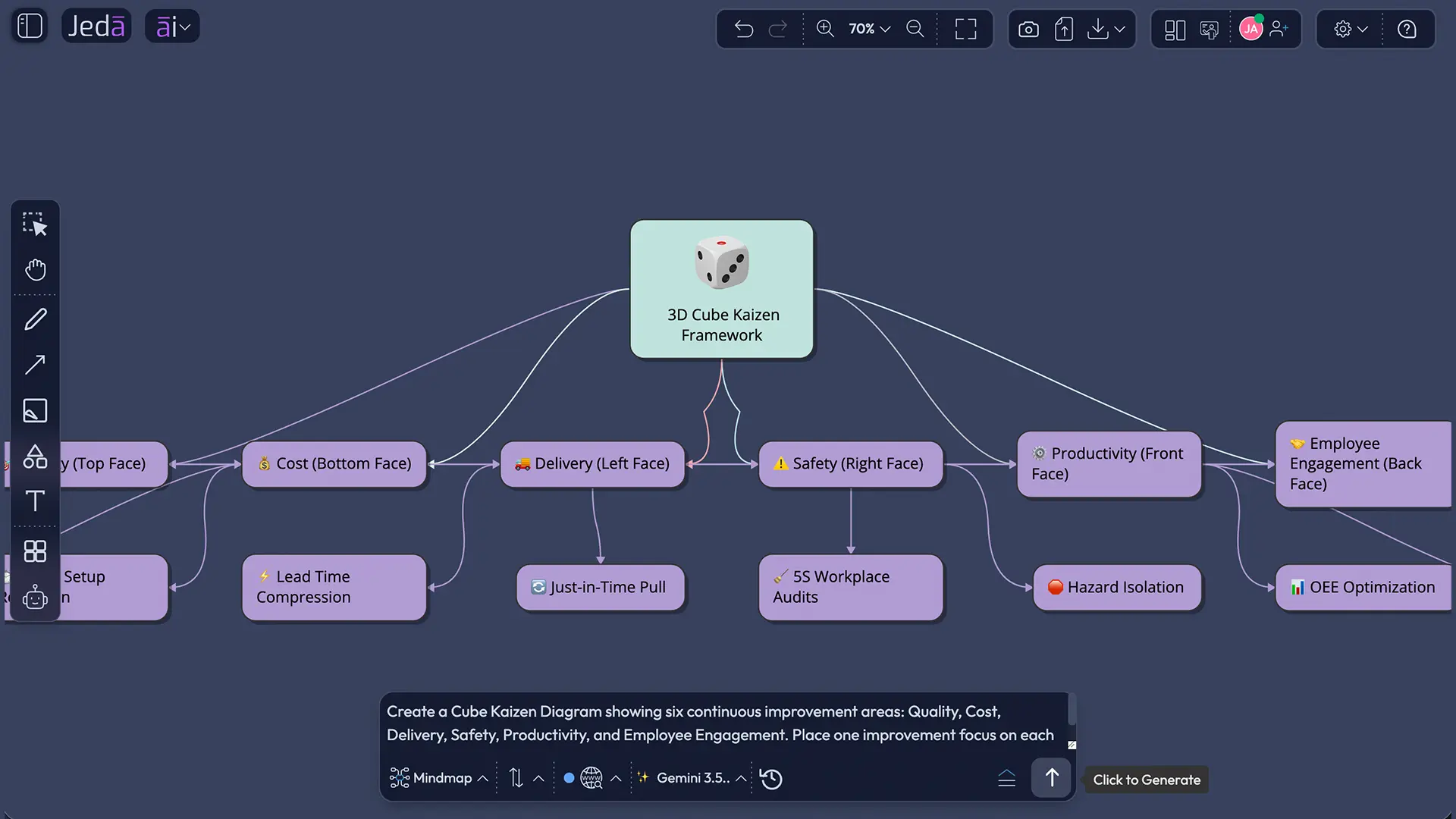
The Prompt Bar method is faster when you already know what you want. It is less guided than the recipe, so your prompt needs more structure. Keep it specific. Vague input creates vague diagrams. Shocking, I know.
Use the Prompt Bar when you want to generate a Cube Kaizen map from a written brief, meeting summary, operational issue, customer complaint pattern, or improvement theme. Select the visual output style first, then write the prompt.
Method 2: Use the Prompt Bar
Use this method when the team wants speed, flexibility, or a prompt-driven draft before formalizing the improvement map.
- Open the Prompt Bar
Use the bottom-center Prompt Bar inside the Jeda.ai workspace.
- Select the output type
Choose Mind Map for exploration or Flowchart for execution steps.
- Choose layout
For Mind Map or Flowchart outputs, select horizontal or vertical layout depending on how the team wants to review the improvement path.
- Turn web search on if needed
Use web search when the diagram should include current industry, supplier, market, or regulatory context.
- Choose the AI model
Select the reasoning model. For deeper comparison, use Multi-LLM Agent and an aggregation model when available.
- Write a complete Cube Kaizen prompt
Include subject, scope, participants, timeline, improvement areas, constraints, and the desired output format.
- Generate the visual
Click Generate and review the diagram for missing links, duplicated nodes, weak assumptions, or disconnected improvement paths.
- Edit and extend
Edit the generated Smart Shapes directly on the canvas. Use AI+ to extend and deepen selected generated nodes, but do not treat AI+ as a place for specific prompt instructions.
Prompt Example for Cube Kaizen with AI
Here’s a prompt you can use in Jeda.ai. Adjust the details to match your operation.
This prompt works because it does not ask the AI to “make a Kaizen thing.” It gives the system boundaries. It names the participants. It defines what improvement means. That’s the difference between a useful enterprise map and a decorative blob with arrows.
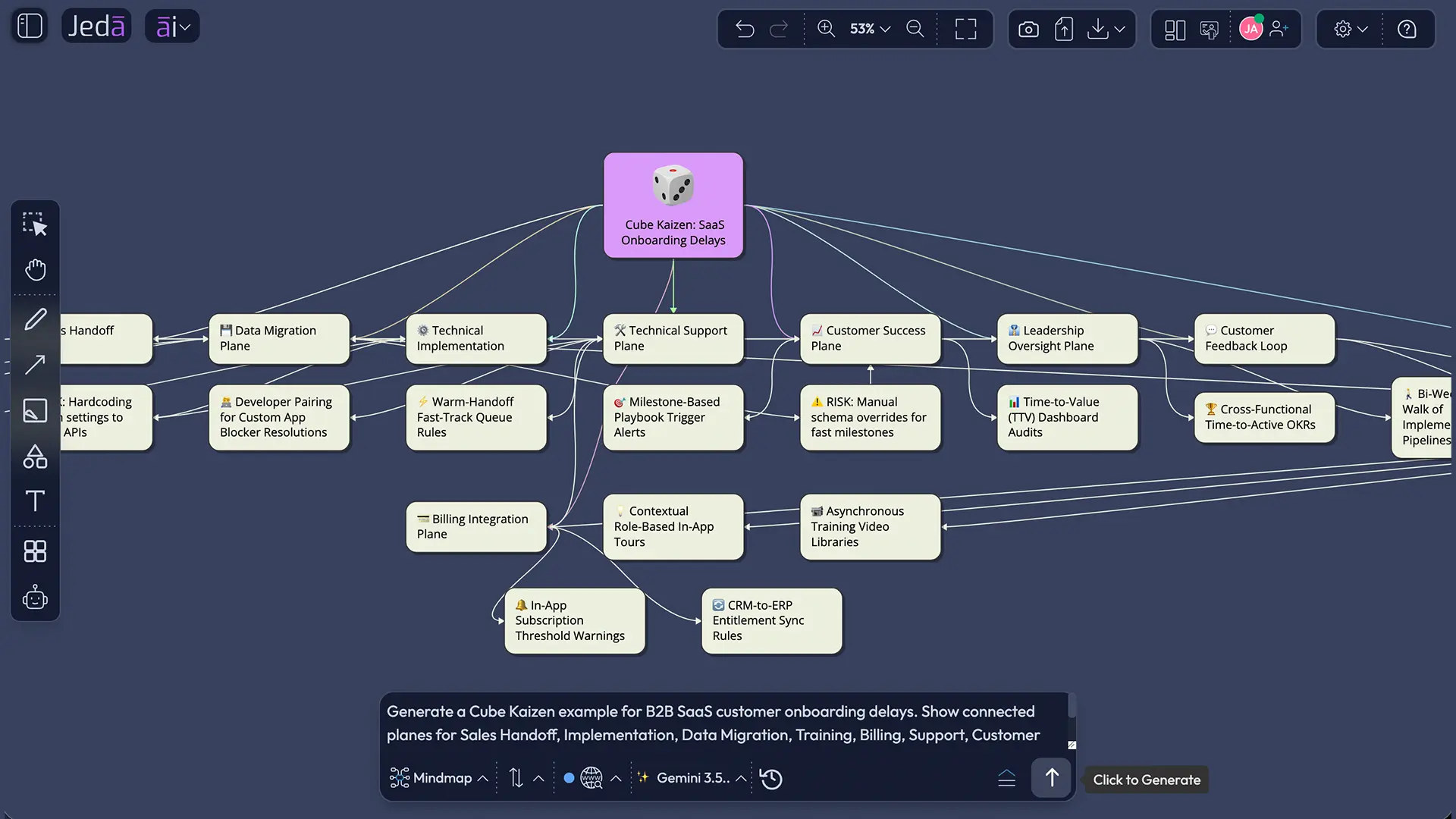
Example Use Case: Customer Onboarding Delay Reduction
Let’s make this real.
A B2B SaaS company keeps missing onboarding timelines. Sales promises one implementation path. Customer success inherits vague notes. Data migration depends on customer-side IT. Finance activates billing before the customer is trained. Support receives tickets for features the customer never learned to use. Everyone is “doing their job.” The customer still feels the mess.
Point Kaizen may fix one sales handoff checklist. Line Kaizen may connect sales operations and implementation. Plane Kaizen may map the onboarding value stream. Cube Kaizen asks the harder question: how do all planes connect across internal teams, customer behavior, vendor tools, leadership governance, and measurable outcomes?
In Jeda.ai, the Cube Kaizen diagram can show:
- upstream causes, such as poor qualification or unclear onboarding expectations
- downstream effects, such as support load, delayed activation, churn risk, and billing disputes
- cross-functional owners across sales, implementation, finance, product, support, and success
- customer-side dependencies, such as data readiness or decision-maker availability
- standardization points, such as kickoff templates, migration readiness checks, and handoff rules
- review cycles, such as 30-day diagnosis, pilot, rollout, and monthly control checks
The payoff is not the diagram itself. The payoff is shared visibility. Suddenly, the improvement conversation moves from “who caused this?” to “where does the system create this result?”
Cube Kaizen Framework with AI: What Should the Diagram Include?
A strong Cube Kaizen Framework with AI should include the improvement subject, the scope boundary, all participating roles, the implementation timeline, improvement areas, dependencies, risks, and measurable outcomes. Without those pieces, you may generate a nice visual that misses the operational truth.
For most teams, the useful structure looks like this:
Don’t overload the first version. Generate the map, then edit it. Jeda.ai outputs editable Smart Shapes, so your team can move nodes, rename sections, adjust connectors, and reshape the logic as the discussion sharpens.
Best Practices for Using Kaizen with AI
Kaizen with AI should make people better at improvement work, not remove people from it. That distinction matters. Kaizen is built around participation, observation, and daily learning. AI can organize patterns, propose relationships, and speed up first drafts. It cannot walk the floor, feel the tension in a broken handoff, or notice the workaround everyone stopped questioning.
Use these practices to keep the work grounded:
- Start from real observations. Use customer feedback, process notes, waste examples, queue times, defect logs, or team comments.
- Name the boundary. “Enterprise-wide” does not mean “everything everywhere forever.” Define the cube.
- Include frontline voices. Cube Kaizen fails when leadership maps a process they do not experience.
- Add customers and suppliers when relevant. Cube Kaizen often reaches outside the company wall.
- Check unintended consequences. Every “improvement” should be tested against upstream and downstream effects.
- Standardize after learning. Don’t freeze a weak process too early. Let the pilot teach you.
- Use AI+ carefully. Tap AI+ to extend and deepen an existing generated section, not to issue a specific custom instruction.
Common Mistakes to Avoid
The biggest mistake is using Cube Kaizen too early. If the team has not understood the basic point or line problem, a cube-level map can become abstract strategy wallpaper. Looks sophisticated. Solves nothing.
Another mistake is treating AI output as final. A generated diagram is a starting structure. Your team must validate it with real work conditions, real people, and real measurements.
Avoid these traps:
- mapping every department but forgetting the customer
- improving one metric while harming another
- confusing a value stream map with a full Cube Kaizen system
- adding suppliers as labels instead of dependencies
- skipping ownership because the diagram “looks clear”
- using web search as a substitute for internal process evidence
- extending the diagram endlessly instead of deciding what to pilot
Frequently Asked Questions
- What is Cube Kaizen with AI?
- Cube Kaizen with AI is the use of AI to map enterprise-wide continuous improvement across connected teams, value streams, suppliers, customers, and leadership layers. It helps teams see how local improvements affect the larger operating system.
- How is Cube Kaizen different from Point Kaizen?
- Point Kaizen focuses on a local improvement, usually at one workstation, team, or process point. Cube Kaizen connects all improvement planes so teams can understand upstream, downstream, cross-functional, supplier, and customer effects.
- When should I use a Cube Kaizen diagram?
- Use a Cube Kaizen diagram when an improvement crosses several teams, departments, value streams, suppliers, or customer-facing processes. If the problem is isolated, a Point, Line, or Plane Kaizen map may be enough.
- Can Jeda.ai generate Cube Kaizen as a flowchart?
- Yes. In Jeda.ai, the Cube Kaizen recipe can be generated as a Basic Diagram, Mind Map, or Flowchart. Use Flowchart when you want to show the sequence of implementation steps and decision points.
- What fields should I fill in for the Cube Kaizen recipe?
- The common Diagram Recipe fields are Subject, Scope, Participation, Implementation Timeline, Improvement Areas, and Additional Information. Strong inputs create stronger diagrams because they define boundaries, ownership, goals, and constraints.
- Should I turn on web search for Cube Kaizen?
- Turn on web search when external context matters, such as current supplier risks, market expectations, logistics trends, regulatory issues, or industry benchmarks. Keep it off when the work depends mainly on internal process evidence.
- What is the best output type for Cube Kaizen?
- Basic Diagram is usually best for Cube Kaizen because it shows connected systems clearly. Mind Map works well for exploration. Flowchart works best when the team needs an implementation path after the system map is understood.
- Can AI+ create specific new instructions for Cube Kaizen?
- No. Use AI+ to extend and deepen generated sections on the canvas. Do not treat AI+ as a place to ask for specific custom instructions. Use the Prompt Bar or recipe form for specific prompt details.
- Who should participate in a Cube Kaizen session?
- Include process owners, frontline workers, managers, analysts, supplier-facing roles, customer-facing roles, and leadership sponsors when relevant. Cube Kaizen depends on seeing the full system, not only the department that first noticed the issue.
- Is Cube Kaizen only for manufacturing?
- No. Cube Kaizen comes from Lean and continuous improvement traditions, but the logic applies to SaaS onboarding, healthcare operations, logistics, education administration, support workflows, and any system where improvements ripple across multiple groups.
Sources and Further Reading
- [1]
Toyota Motor Corporation (2026) . “Toyota Production System” Toyota Global.
View Source ↗ - [2]
Toyota UK Magazine (2013) . “What is Kaizen and how does Toyota use it?” Toyota UK Magazine.
View Source ↗ - [3]
Masaaki Imai / Kaizen Institute (2022) . “Interview with Masaaki Imai and his Focus on KAIZEN Continuous Improvement” Kaizen Institute.
View Source ↗ - [4]
SixSigma.com (2012) . “Types of Kaizen and Training Required” SixSigma.com.
View Source ↗ - [5]
PTC (2024) . “How Kaizen and Lean Manufacturing Work Together” PTC Blog.
View Source ↗ - [6]
Carnerud, D., Jaca, C., and Bäckström, I. (2018) . “Kaizen and continuous improvement: trends and patterns over 30 years” The TQM Journal.
View Source ↗ - [7]
Reliable Plant (2017) . “Kaizen: What It Is and How to Use It” Reliable Plant.
View Source ↗
Build Your Cube Kaizen Diagram in Jeda.ai
Join 150,000+ users using Jeda.ai to turn continuous improvement work into editable Visual AI diagrams, maps, and decision-ready workflows.
Try the Cube Kaizen Recipe