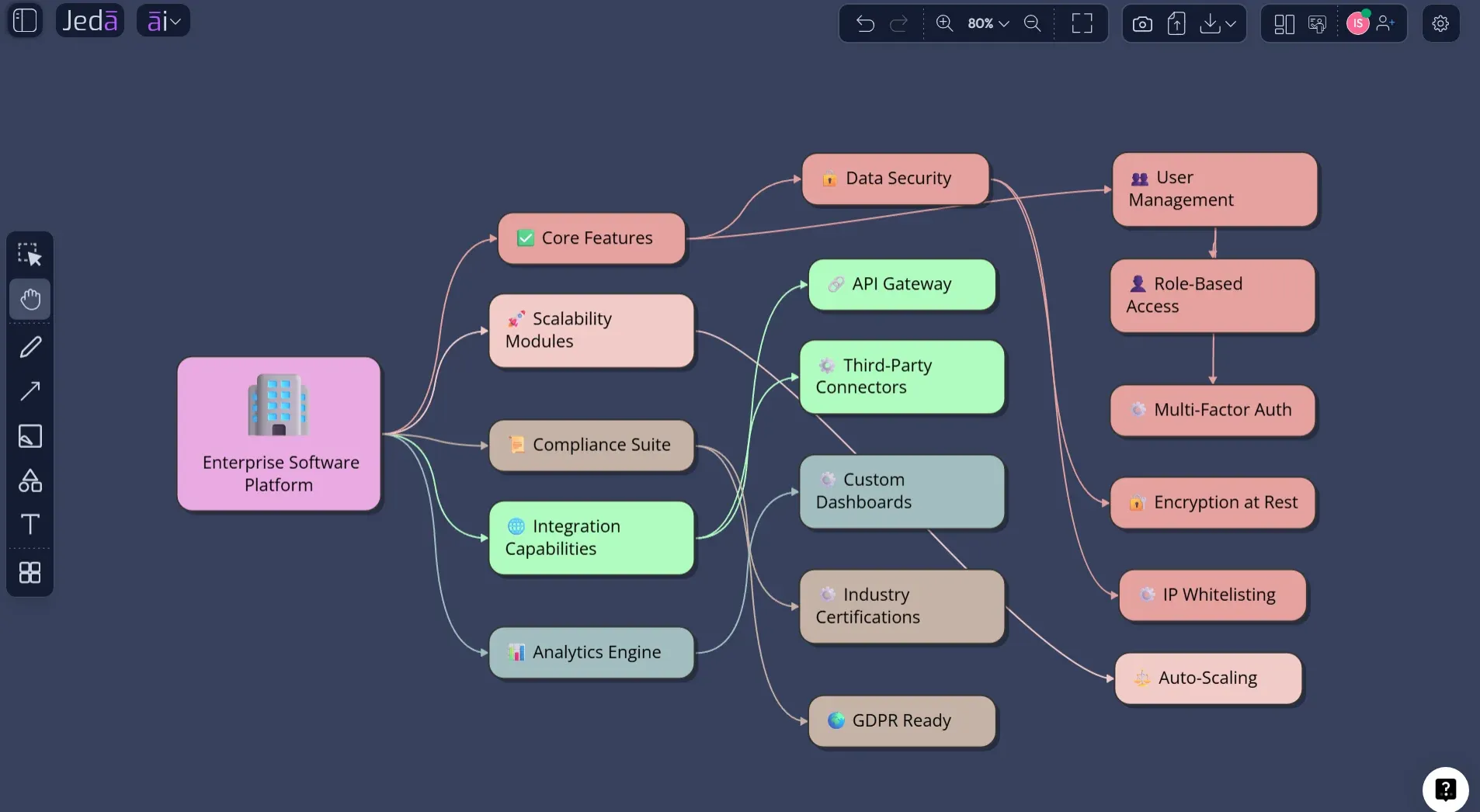
Feature Model Diagram with AI is not just a faster way to draw a product tree. It is a sharper way to ask a dangerous question: which features actually define your product, and which ones are just backlog noise wearing a nice jacket? In Jeda.ai, teams can use the Feature Model Diagram recipe under Product & UX or build the same structure from the Prompt Bar, then refine it on an editable AI Whiteboard where product decisions stay visible instead of getting buried in tickets.
A feature model diagram is built for products with variation: free vs paid plans, admin vs end-user capabilities, regional compliance modules, mobile vs web experiences, optional integrations, mandatory core services, and mutually exclusive feature choices. That makes it unusually valuable for product teams that have outgrown simple feature lists. Lists flatten decisions. Diagrams expose them.
What Is a Feature Model Diagram?
A feature model diagram is a visual representation of a product's features, their hierarchy, and the rules that determine which combinations can exist together. In software product line engineering, feature models are used to capture commonality and variability across related products or product variants.
The idea became prominent through Feature-Oriented Domain Analysis, the 1990 Software Engineering Institute report by Kang, Cohen, Hess, Novak, and Peterson. That work focused on domain analysis: finding reusable commonality across related software systems rather than redesigning each system as if it were born alone on a tiny island. Later feature-oriented software development research described feature modeling as a way to represent commonalities, variabilities, relationships, and dependencies in a domain.
In practice, a feature model diagram usually starts with one root concept. Under it, child features are marked as mandatory, optional, alternative, or grouped. The useful part is not the tree. Trees are cheap. The useful part is the constraint logic hiding inside the tree.
Why Feature Model Diagram with AI Changes the Product Conversation
Traditional feature planning often happens in tools that reward volume. More tickets. More requests. More roadmap cards. Lovely. Also dangerous.
A Feature Model Diagram with AI pushes the conversation upstream. Instead of asking, "What should we build next?" the team asks, "What product system are we actually designing?" That shift matters because complex products rarely fail because one feature is badly named. They fail because options, dependencies, and constraints are scattered across docs, spreadsheets, sprint boards, and human memory.
Jeda.ai gives this work a Visual AI layer. You can describe the product, audience, goals, and constraints, then generate a feature structure as editable Smart Shapes on an AI Workspace. Product managers can review it with engineers. Designers can challenge the user-facing grouping. Analysts can spot dependency risks. Consultants can turn product ambiguity into a client-ready map.
- Expose product logic
Turn scattered feature ideas into a visible hierarchy of core, optional, alternative, and dependent capabilities.
- Map variants clearly
Compare product plans, user roles, platform modules, regions, or deployment types without flattening everything into one backlog.
- Reason before drawing
Use AI to structure the feature space first, then edit the diagram manually as the team validates real product constraints.
- Align technical and business teams
Give product, design, engineering, and stakeholder teams one shared map instead of competing interpretations.
- Ground with Web Search
Use the platform Web Search option when market context, competitor patterns, or current product category examples matter.
- Extend with AI+
Use AI+ to extend and deepen existing branches after generation. Treat it as an expansion control, not a place for specific instructions.
When Should You Use a Feature Model Diagram?
Use a feature model diagram when your product has choices that must be understood together. A simple landing page probably does not need one. A multi-plan SaaS product, API platform, developer tool, marketplace, healthcare app, or enterprise workflow system probably does.
The diagram becomes especially useful when teams keep arguing about what belongs in the core product versus what belongs in a plan, module, add-on, integration, or regional variant. It also helps when optional features quietly create mandatory engineering costs. Sneaky little monsters.
You can use it for:
The hard truth: if your roadmap cannot be explained as a coherent feature system, it may not be a roadmap yet. It may be a group chat with deadlines.
How to Create a Feature Model Diagram with AI in Jeda.ai
Jeda.ai gives you two practical paths. The Diagram Recipe is the recommended method because it gives structure before generation. The Prompt Bar method is faster when you already know the product context and want a direct output. Both methods keep the final diagram editable on the AI Whiteboard.
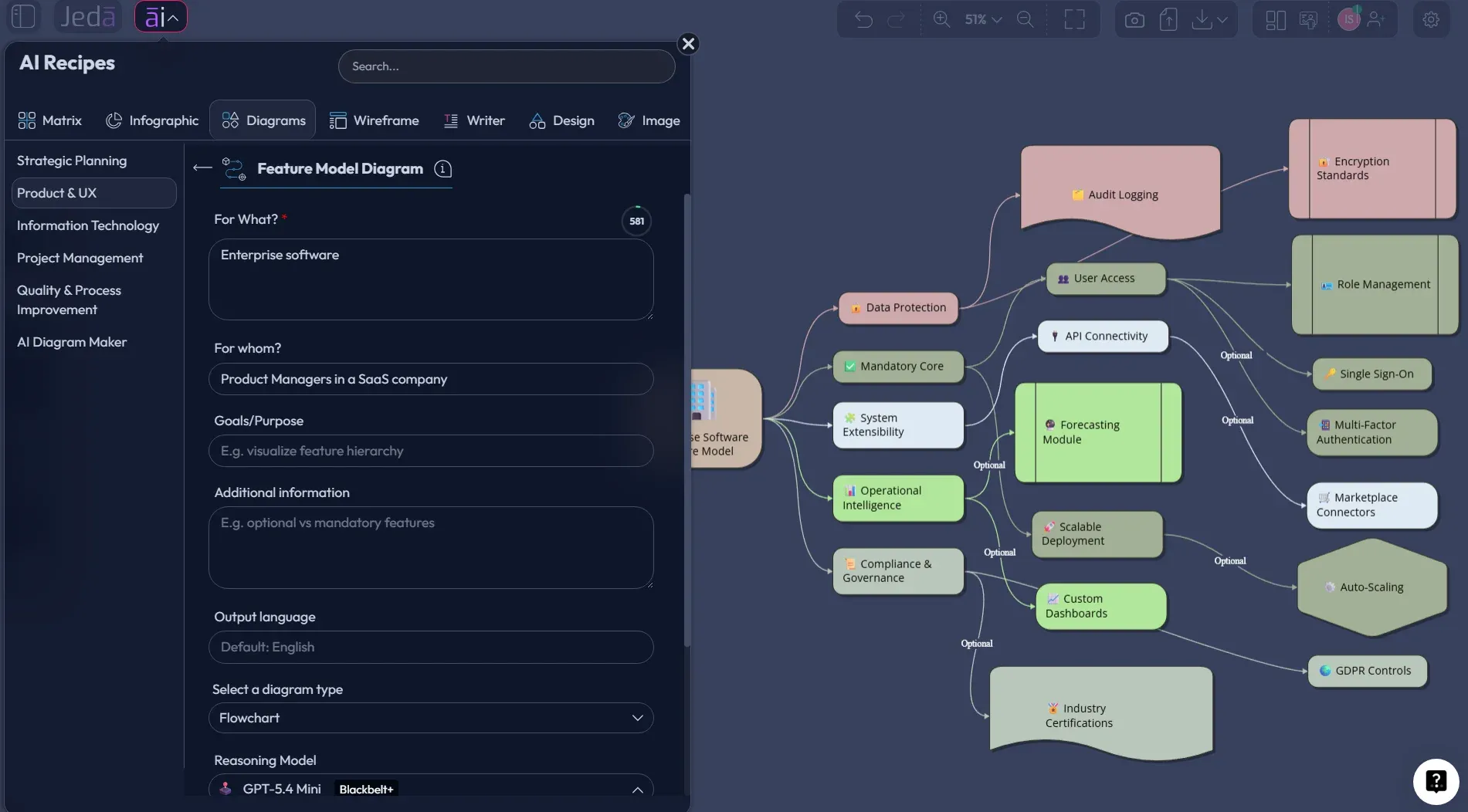
Method 1: Use the Feature Model Diagram Recipe in Product & UX
The recipe method is best when you want guided inputs and fewer messy assumptions. Open the AI Menu, go to Diagram Recipes, select Product & UX, and choose Feature Model Diagram. The form is designed for exactly this kind of product-variant thinking: what the diagram is for, who it is for, the goal, extra context, output language, diagram type, layout, Web Search, and model selection.
- Open the Diagram Recipe
From the Jeda.ai canvas, open the AI Menu, go to Diagrams, choose the Product & UX category, and select Feature Model Diagram.
- Fill the product context fields
Enter the product or system in the For what field, the target team or stakeholder group in For whom, and the reason for building the model in Goals/Purpose.
- Add feature rules and constraints
Use Additional information to describe mandatory features, optional modules, alternative choices, dependencies, exclusions, product tiers, user roles, or platform variants.
- Choose the output style
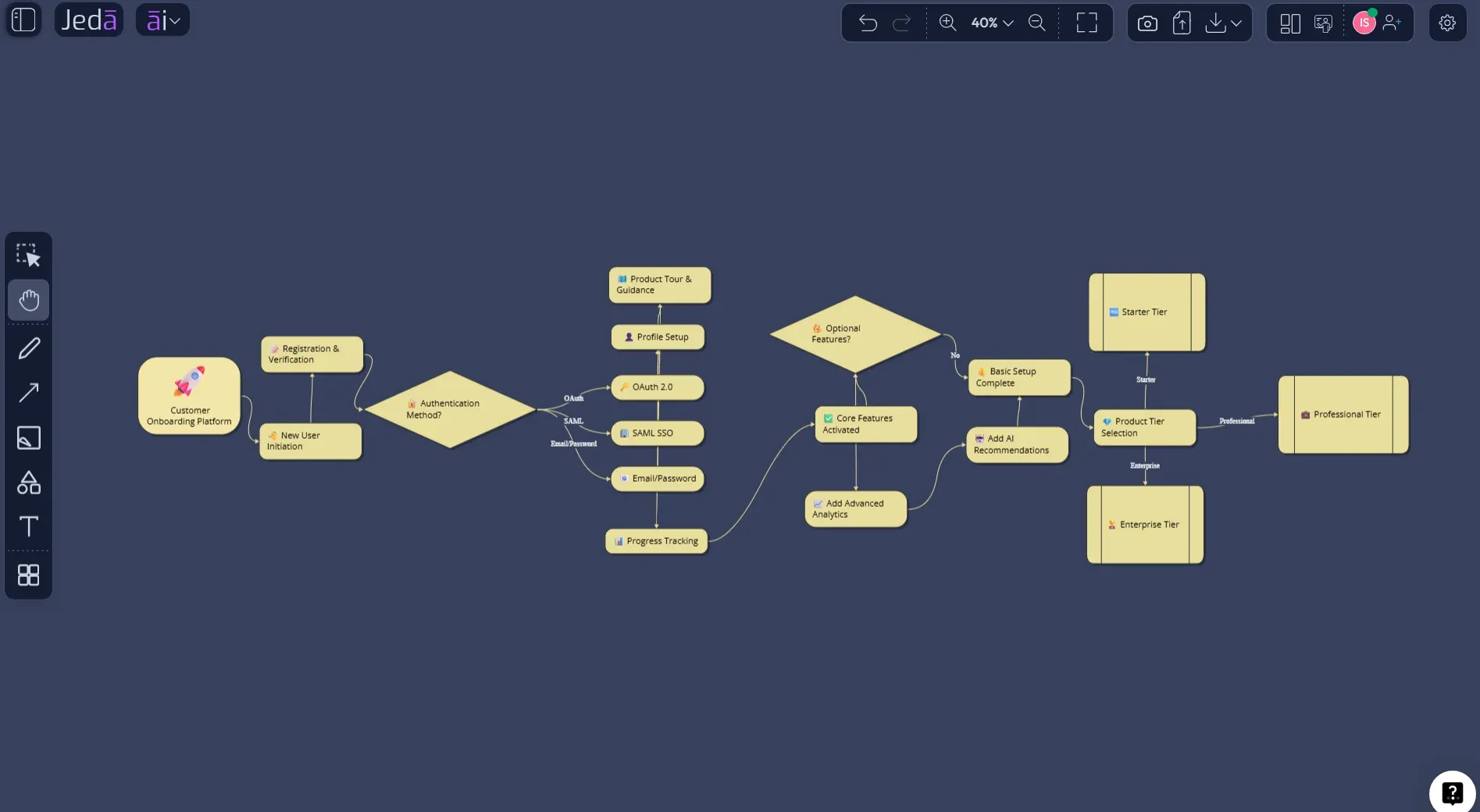
Select Basic Diagram for a classic relationship map, Mind Map for exploratory hierarchy, or Flowchart when feature choices need decision-flow logic.
- Set layout and grounding
Choose horizontal or vertical layout, then set Web Search to Auto, On, or Off depending on whether current market or category context should inform the output.
- Select the AI model
Choose the reasoning model or use Multi-LLM Agent when you want multiple model perspectives before the final feature structure is generated.
- Generate and review on the canvas
Click Generate, inspect the feature hierarchy, edit labels and connectors, and use AI+ only to extend or deepen selected parts of the diagram.
Method 2: Generate It from the Prompt Bar
Use the Prompt Bar when speed matters more than guided setup. This is useful during a product strategy meeting, a sprint planning conversation, or a client workshop where the team already has enough context and needs a first structure quickly.
The Prompt Bar method still needs a good prompt. Vague input creates vague diagrams. Say what the product is, who uses it, what feature categories matter, what options are mandatory or optional, and whether you want a Basic Diagram, Mind Map, or Flowchart-style output.
- Open the Prompt Bar
Go to the bottom-center Prompt Bar in the Jeda.ai AI Workspace and choose the diagram-oriented output mode for the visual you want to create.
- Choose the diagram format
Use Mind Map for quick exploration, or Flowchart when the feature model depends on decision paths.
- Select horizontal or vertical layout
Use horizontal layout for wide product hierarchies and vertical layout when you want a top-down map that reads like a product architecture tree.
- Set Web Search and model options
Turn Web Search on or leave it on Auto when current product-category context matters, then choose the AI model or Multi-LLM Agent for generation.
- Write the prompt
Describe the product, audience, core capabilities, optional modules, alternatives, dependencies, exclusions, and the level of detail you want in the feature model.
- Generate, edit, and deepen
Generate the diagram, edit the Smart Shapes and connectors directly, then use AI+ to extend or deepen branches when the team needs more coverage.
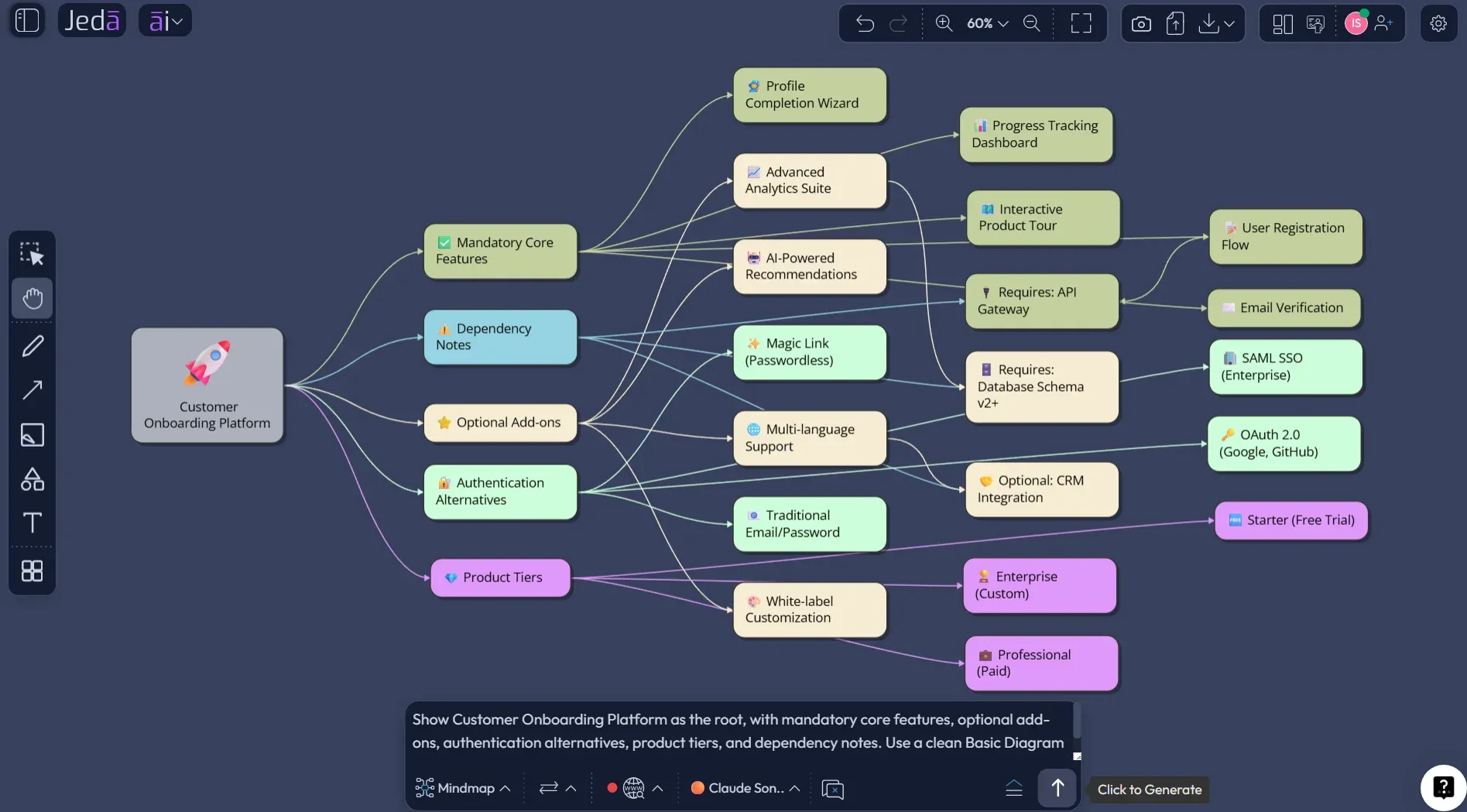
Example Prompt: Feature Model Diagram with AI for a SaaS Product
Here is a prompt you can adapt inside Jeda.ai:
This example forces the diagram to do real work. It includes the root system, mandatory capabilities, optional modules, alternative choices, tiers, and dependencies. That is the difference between a decorative diagram and a useful product artifact.
What Makes a Good AI Feature Model Diagram?
A good feature model is not the biggest tree. It is the clearest map of choice. That is where many teams get it wrong. They treat every feature as equal because a backlog tool lets every row look equally official.
A better model separates feature categories by role in the product system:
| Question | What to capture | Why it matters | |
|---|---|---|---|
| Mandatory features | What must exist for the product to work? | Core capabilities, baseline workflows, required infrastructure | Prevents teams from confusing add-ons with product foundations |
| Optional features | What can be included or excluded? | Add-ons, integrations, advanced workflows, plan-based modules | Clarifies packaging, pricing, implementation, and roadmap flexibility |
| Alternative features | Which options compete with each other? | Authentication choices, deployment models, payment methods, UX variants | Prevents invalid combinations and bloated product logic |
| Dependencies | What requires or excludes something else? | Requires, excludes, plan locks, permission rules, technical dependencies | Turns hidden implementation risk into visible product reasoning |
Feature modeling is especially powerful because it sits between product strategy and technical implementation. It is not purely UX. It is not purely architecture. It is a bridge. And bridges are where messy organizations either move faster or fall into the river.
Where Jeda.ai Fits in the Feature Modeling Workflow
Jeda.ai is useful because it does not stop at generation. A static diagram is better than nothing, but real product thinking needs revision. Jeda.ai gives teams an editable AI Workspace where the first version can be challenged, reshaped, extended, and reused.
You can generate the initial diagram with a recipe. You can bring in current market context with Web Search. You can use Multi-LLM Agent when the product space is ambiguous and multiple perspectives matter. You can edit every Smart Shape and connector on the AI Whiteboard. And when a branch feels too thin, AI+ can extend or deepen it without requiring a specific instruction.
For teams already using documents, spreadsheets, or product briefs, Jeda.ai also supports file-driven work through Document Insight and Data Insight. That matters because product knowledge rarely arrives as a perfect prompt. It usually arrives as a messy pile of roadmap notes, customer feedback, sales objections, compliance constraints, and that one spreadsheet everyone quietly fears.
Best Practices for Feature Modeling with AI
Start with the product boundary. If the root node is too broad, the model becomes a universe. If it is too narrow, the diagram becomes a checklist. Pick the product, module, platform, or product line you actually need to reason about.
Then define what a feature means for your team. Is it user-visible capability? Technical capability? Commercial packaging element? Architecture component? There is no shame in choosing one definition. There is shame in mixing four definitions and pretending the diagram is objective.
After generation, review the diagram with at least two lenses: product value and technical dependency. Product managers usually catch weak grouping. Engineers usually catch impossible combinations. Designers catch feature names that make sense internally but confuse actual humans. All three matter.
Common Mistakes to Avoid
The first mistake is using a feature model diagram as a prettier backlog. That misses the point. A backlog tracks work. A feature model explains product variability.
The second mistake is ignoring dependencies. If Enterprise SSO requires organization-level permissions, custom domains, and identity-provider setup, it should not float as a lonely optional feature. It has gravity.
The third mistake is treating AI output as final. Jeda.ai can give you a strong first structure, but your team still owns the product truth. Edit the labels. Move branches. Delete weak assumptions. Add missing constraints. The canvas is there for thinking, not decoration.
And the fourth mistake? Making the diagram too polite. If two features exclude each other, say so. If a feature belongs only in Enterprise, mark it. If an optional module secretly adds a major engineering burden, show the dependency. Product clarity has teeth.
Frequently Asked Questions
- What is a Feature Model Diagram with AI?
- A Feature Model Diagram with AI is an AI-generated visual map of product features, variants, and constraints. It helps teams identify mandatory, optional, alternative, grouped, and dependent features faster than manually building the model from scratch.
- What is the difference between a feature model diagram and a feature roadmap?
- A feature roadmap shows timing and delivery priorities. A feature model diagram shows product structure, variability, and valid feature combinations. The roadmap answers when to build. The feature model answers what combinations make sense.
- Can Jeda.ai create a Feature Model Diagram from a recipe?
- Yes. Jeda.ai includes a Feature Model Diagram recipe under the Product & UX diagram category. The recipe guides users through product context, audience, goals, extra information, output language, diagram type, layout, Web Search, and AI model selection.
- Can I create a Feature Model Diagram from the Prompt Bar?
- Yes. You can use the Prompt Bar to describe the product, feature groups, variants, dependencies, and output style. This method is faster when you already know the product context and want a quick editable flowchart.
- Which diagram type should I choose for feature modeling?
- Choose Basic Diagram for a classic feature structure, Mind Map for exploratory feature hierarchy, and Flowchart when feature choices depend on decision paths or configuration logic. The best option depends on how your team needs to review the model.
- How does AI+ work with feature model diagrams?
- AI+ can extend and deepen an existing branch or section of a generated diagram. For this workflow, treat AI+ as a continuation control, not a place to give specific instructions or detailed custom prompts.
- Who should use feature model diagrams?
- Product managers, software engineers, business analysts, product design engineers, and consultants benefit most. The diagram is especially useful when products have tiers, variants, optional modules, technical dependencies, or mutually exclusive feature choices.
- Can feature model diagrams support software product line planning?
- Yes. Feature modeling has deep roots in software product line engineering, where teams need to understand commonality and variability across related products. A feature model diagram helps make those shared and variable capabilities visible.
- Can I edit the generated diagram in Jeda.ai?
- Yes. Jeda.ai outputs diagram content as editable visual objects on the AI Whiteboard. You can rename nodes, change layout, adjust connectors, style shapes, add notes, collaborate with teammates, and export the final visual.
- Does Jeda.ai support Web Search for this workflow?
- Yes. Web Search is a Jeda.ai platform option that can be used with AI Recipes and visual commands when current context is useful. It helps ground the diagram in fresh product, market, or category information when needed.
Sources and Further Reading
- [1]
Kang, Kyo C.; Cohen, Sholom G.; Hess, James A.; Novak, William E.; Peterson, A. Spencer (1990) . “Feature-Oriented Domain Analysis (FODA) Feasibility Study” Software Engineering Institute, Carnegie Mellon University.
View Source ↗ - [2]
Apel, Sven; Kästner, Christian; Lengauer, Christian (2009) . “An Overview of Feature-Oriented Software Development” Journal of Object Technology.
View Source ↗ - [3]
Batory, Don (2005) . “Feature Models, Grammars, and Propositional Formulas” Software Product Line Conference.
View Source ↗ - [4]
FeatureIDE Project (2026) . “FeatureIDE: An Extensible Framework for Feature-Oriented Software Development” FeatureIDE.
View Source ↗ - [5]
Eclipse Foundation (2014) . “EMF Feature Model” Eclipse Projects.
View Source ↗ - [6]
Software Ideas Modeler (2024) . “Feature Model Diagram” Software Ideas Modeler Help.
View Source ↗
Create Your Feature Model Diagram with AI
Join 150,000+ users using Jeda.ai to turn product complexity into editable diagrams, sharper decisions, and reusable visual strategy inside one AI Workspace.
Try Jeda.ai Free