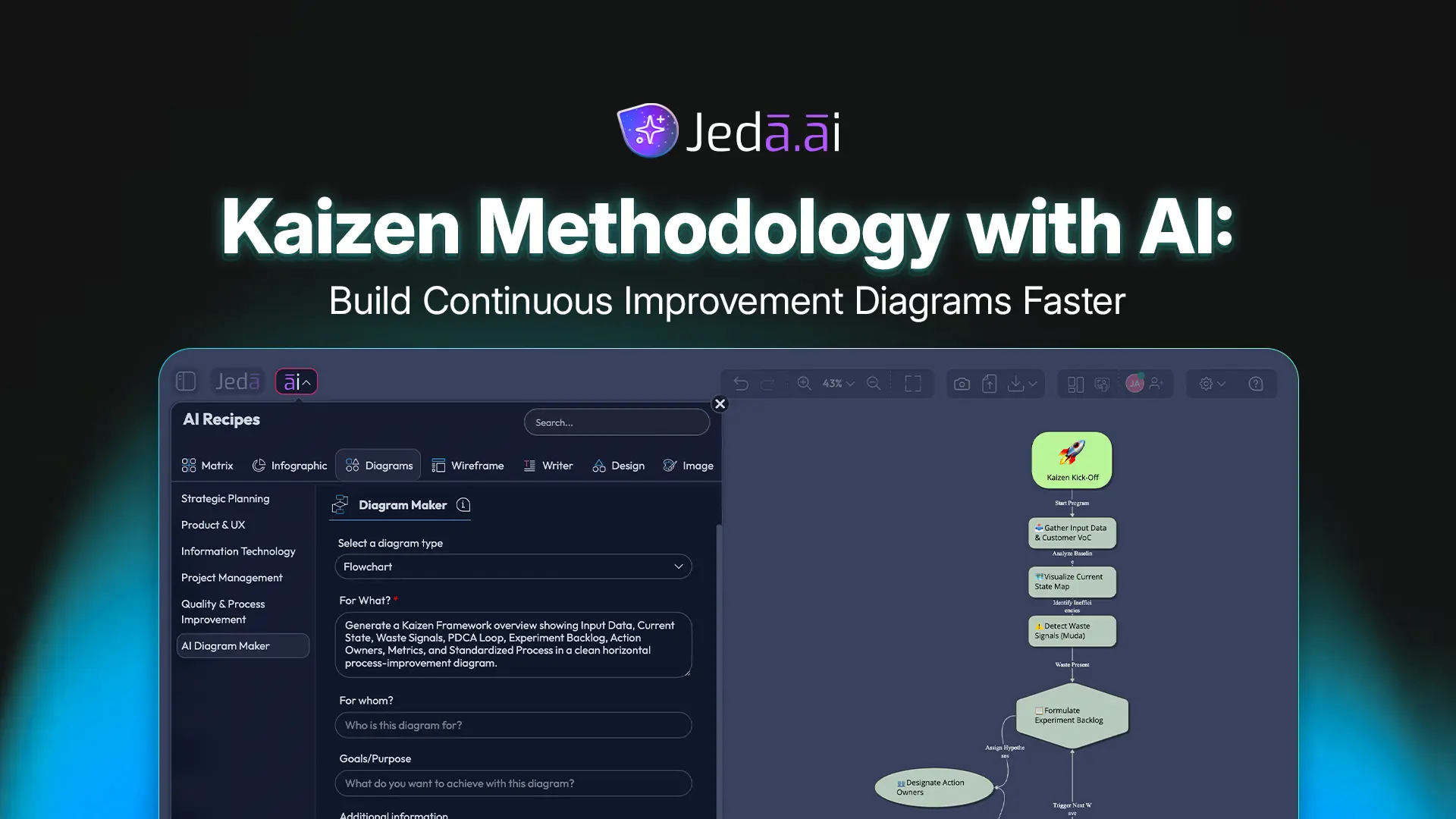
Kaizen Methodology with AI is useful when a team already knows that a process is inefficient but cannot see the improvement path clearly. Traditional Kaizen emphasizes small, continuous improvements, employee participation, waste reduction, and disciplined learning cycles. AI adds a second layer: it can organize messy observations, surface patterns from process notes, and turn improvement ideas into editable diagrams on a shared AI Whiteboard. In Jeda.ai, the Kaizen Framework diagram recipe gives teams a guided way to move from scattered improvement signals to a visual plan that can be reviewed, adjusted, and repeated.
What is Kaizen Methodology with AI?
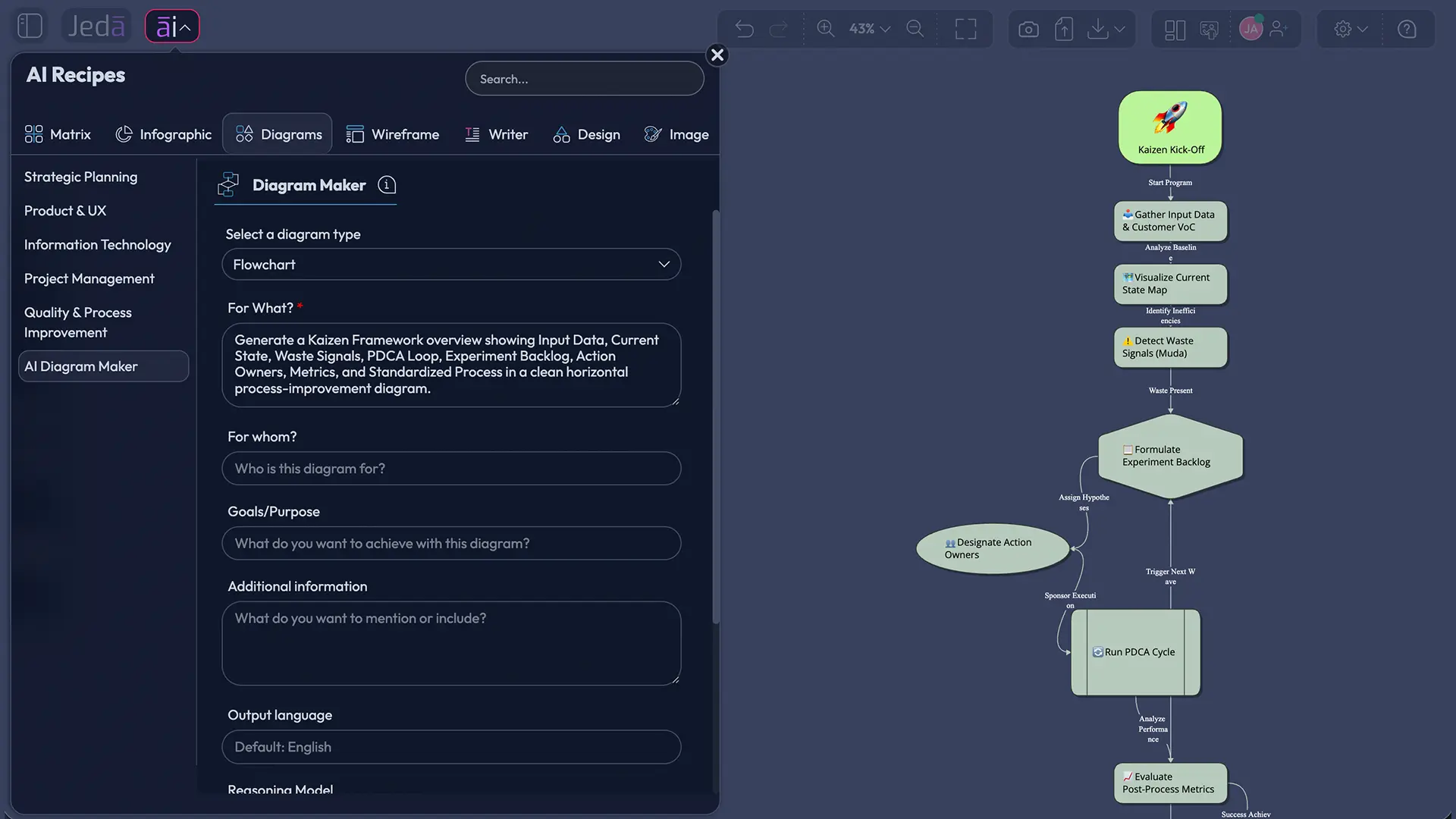
Kaizen Methodology with AI is the use of artificial intelligence to support continuous improvement without replacing the human judgment that makes Kaizen work. Kaizen is commonly translated as “change for the better,” and Masaaki Imai popularized it globally through his 1986 book, Kaizen: The Key to Japan’s Competitive Success. In management practice, Kaizen is not a single workshop trick. It is a way to examine work, improve standards, test changes, and keep learning.
AI changes the operating rhythm. A process owner can enter observations from the floor, support tickets, service delays, defect notes, customer complaints, or meeting transcripts. The AI can then help classify waste, group improvement areas, and propose a visual structure for team discussion. That matters because Kaizen often fails when improvement knowledge stays informal. Someone notices a bottleneck. Someone else remembers a workaround. A third person owns the metric. Then the evidence disappears into chat threads. Not ideal.
Jeda.ai treats the Kaizen Framework with AI as a visual reasoning problem. The platform can generate diagrams, mind maps, and flowcharts inside an AI Workspace, then keep those outputs editable for further refinement. The result is not just an answer. It is a shared improvement board.
Why use a Kaizen Framework with AI?
A Kaizen Framework with AI helps teams reduce ambiguity before they act. The method gives structure to improvement work, while AI helps teams synthesize inputs faster and explore alternatives with less manual formatting. Used well, AI supports the early thinking stages: identifying waste, grouping symptoms, clarifying current-state problems, and building a practical improvement map.
This distinction matters. Kaizen is grounded in participation and observation. AI should not invent operational truth. It should help people ask better questions, compare evidence, and create diagrams that make the improvement conversation easier to audit. In that sense, AI is best treated as a visual analyst and organizer, not as the final authority.
- Find improvement signals
Organize delays, defects, rework, handoff issues, and recurring friction into clear improvement areas.
- Map cause and action
Convert process observations into connected diagrams that show causes, experiments, owners, and expected outcomes.
- Support team learning
Keep the Kaizen board editable, collaborative, and visible so teams can discuss evidence instead of debating memory.
How does Kaizen Methodology with AI work in Jeda.ai?
Kaizen Methodology with AI works best when the team defines a narrow process scope, identifies participating roles, selects a time horizon, and names the improvement areas before asking AI to generate the visual. Jeda.ai supports this through a dedicated Kaizen Framework diagram recipe under the Quality & Process Improvement category. That recipe is the recommended path because it asks for the right inputs before generating the diagram.
The workflow below shows two methods. Use the diagram recipe when you want structure and consistency. Use the Prompt Bar when you want a faster, open-ended generation path.
Method 1: Use the Kaizen Framework diagram recipe
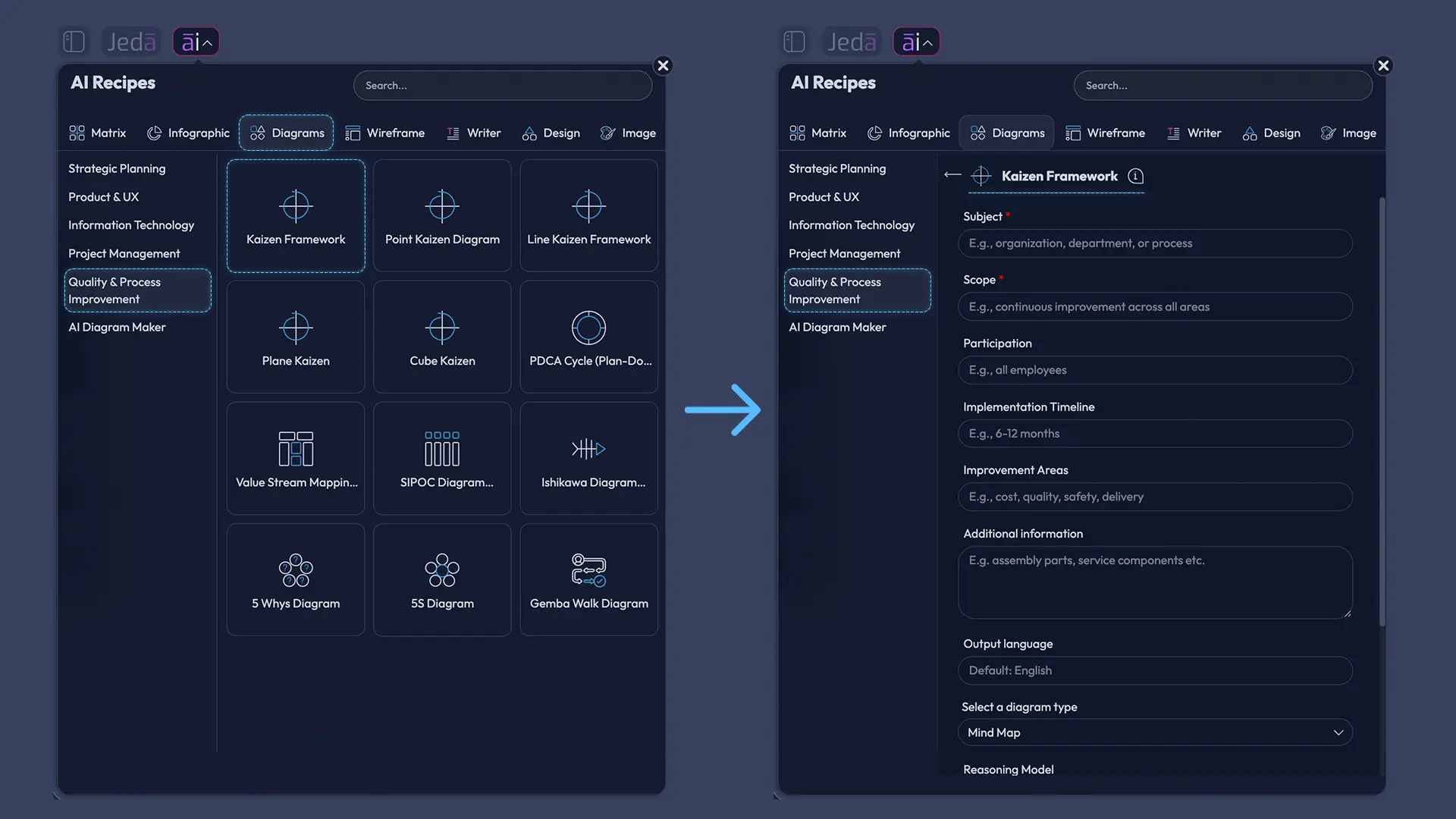
The Kaizen Framework diagram recipe is the stronger method for serious process improvement work. It uses guided fields that keep the output focused: Subject, Scope, Participation, Implementation Timeline, Improvement Areas, and Additional Information. Those fields prevent the most common Kaizen mistake: trying to improve everything at once.
- Open the AI Menu
From the top-left AI Menu, open AI Recipes and choose the Diagram recipes area. Go to the Quality & Process Improvement category and select the Kaizen Framework recipe.
- Complete the Kaizen recipe fields
Enter the Subject, Scope, Participation, Implementation Timeline, Improvement Areas, and Additional Information. Keep the scope specific, such as order fulfillment delays or onboarding handoff errors.
- Choose diagram settings
Select a horizontal or vertical layout. Choose the diagram type: Basic Diagram, Mind Map, or Flowchart. Use Basic Diagram for framework overview, Mind Map for idea exploration, and Flowchart for process sequence.
- Set research and model options
Turn Web Search on or off depending on whether external context is needed. Select the AI model that fits the task, or use available multi-model options if your plan supports them.
- Generate and review the visual
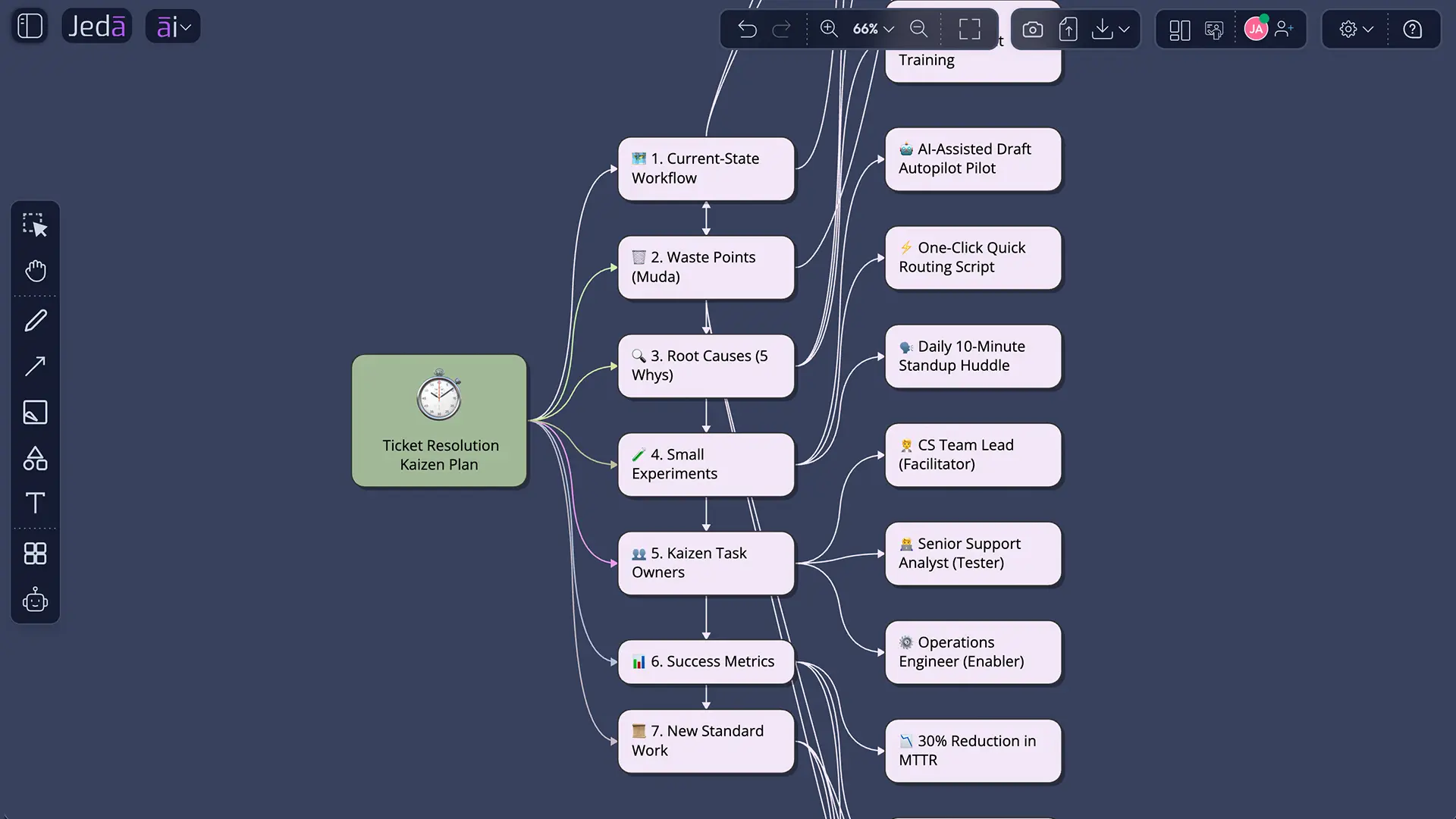
Click Generate, review the Kaizen diagram, and check whether the current state, waste areas, improvement experiments, ownership, metrics, and standardization steps are clear.
- Extend and refine on the canvas
Use AI+ to extend and deepen generated sections. AI+ adds related detail to selected content, but it does not accept a separate typed instruction. Use Vision Transform when you need to convert the output into another visual format.
Method 2: Generate Kaizen with AI from the Prompt Bar
The Prompt Bar method is faster. It is useful when the team wants a first draft, a workshop visual, or a quick comparison between possible improvement paths. The tradeoff is simple: fewer guided constraints. So the prompt must carry the structure that the recipe normally provides.
- Open the Prompt Bar
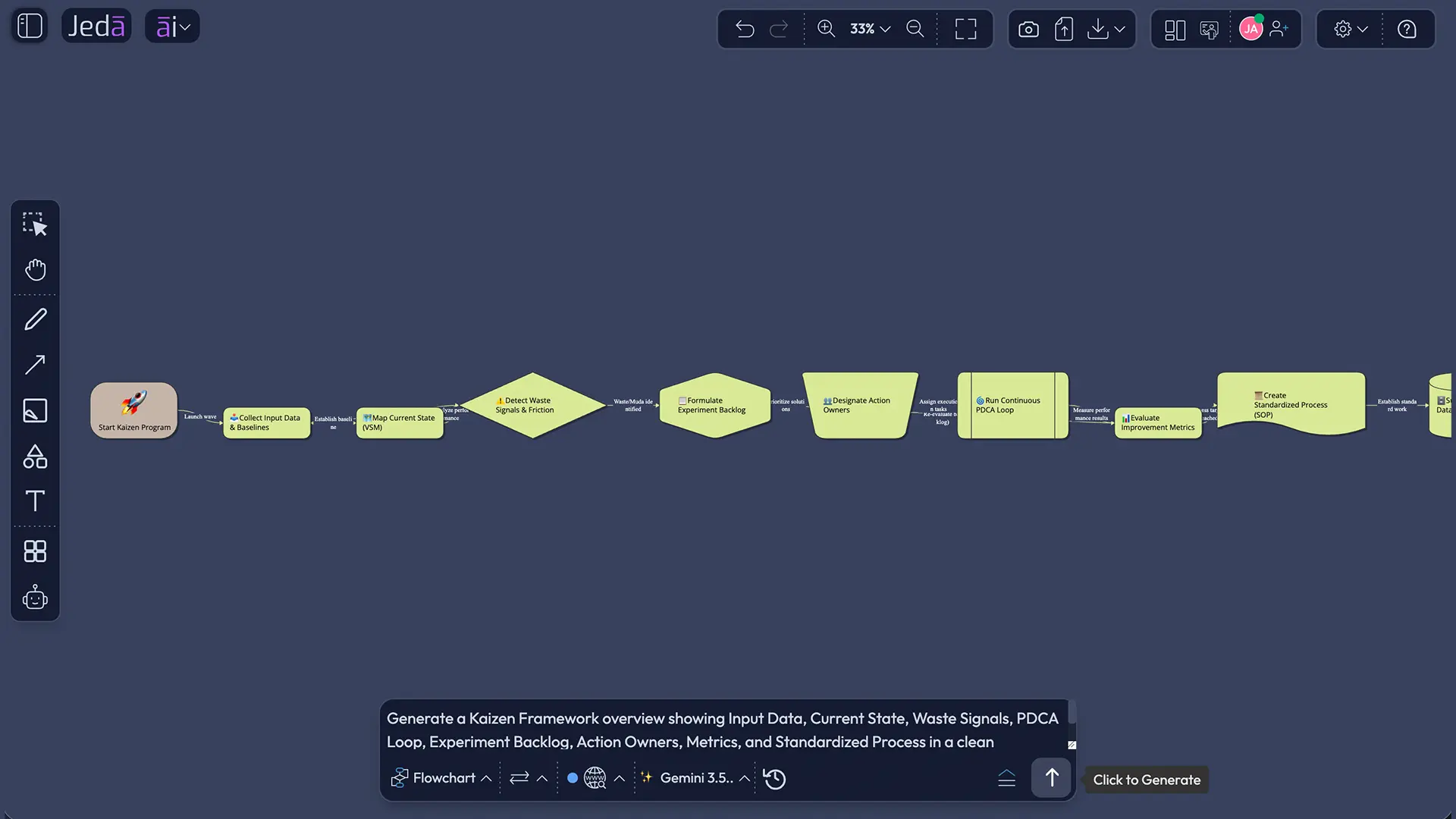
Use the bottom Prompt Bar in the Jeda.ai workspace. Select the visual command that fits your intent, such as Mind Map, or Flowchart, depending on your available command options.
- Select layout and model settings
Choose a horizontal or vertical layout where available. Set Web Search on, off, or auto based on whether the process needs current external context. Select the AI model for the generation.
- Enter a structured Kaizen prompt
Write a prompt that includes the process subject, scope, participants, timeline, improvement areas, and any constraints. This prevents the output from becoming generic.
- Generate the first visual
Generate the Kaizen diagram and inspect the logic. Check whether the visual separates current-state issues, causes, improvement ideas, experiments, owners, metrics, and standardization steps.
- Edit directly on the AI Whiteboard
Move nodes, change labels, adjust connectors, edit text, and add team comments. Use AI+ to extend generated parts and Vision Transform to convert the board into another visual structure when needed.
What should you include in a Kaizen diagram?
A useful Kaizen diagram should connect the current condition to the improvement experiment. If it only lists nice ideas, it is not a Kaizen system yet. The visual should show what is happening now, where waste appears, who participates, what change will be tested, how success will be measured, and how the new standard will be maintained.
| Kaizen diagram element | What it should capture | Why it matters |
|---|---|---|
| Subject | The process, product, service, or workflow under review | Keeps the improvement effort bounded |
| Scope | Start and end points of the process | Prevents scope creep |
| Participation | Operators, managers, analysts, customers, or cross-functional owners | Maintains the participatory nature of Kaizen |
| Timeline | Daily improvement, event-based improvement, or phased implementation | Makes action realistic |
| Improvement Areas | Waste, delay, rework, defects, handoff gaps, safety risks, or customer friction | Turns observations into categories |
| Metrics | Lead time, error rate, rework volume, satisfaction, throughput, cost, or quality | Separates improvement from opinion |
| Standardization | The updated standard work or control method after the experiment | Keeps gains from fading |
The academic lesson is familiar: improvement is not only about the idea. It is about the learning loop. Lean organizations often connect Kaizen with PDCA, where teams plan a change, try it, check the result, and act on the learning. Jeda.ai makes that loop easier to visualize because the PDCA structure can sit directly inside the Kaizen diagram.
Example: Kaizen Methodology with AI for a service operations team
Consider a customer support team with rising ticket resolution time. The team suspects the problem comes from unclear escalation rules, duplicate troubleshooting, and slow handoffs between support and engineering. A manager could run a Kaizen event, but the first workshop would likely lose time just organizing the evidence. This is where Kaizen with AI becomes practical.
A strong prompt might look like this:
The generated output should not merely say “improve communication.” That phrase is the oatmeal of process improvement: warm, bland, and impossible to measure. A better Kaizen diagram would show an escalation decision point, a queue triage rule, a knowledge-base feedback loop, and a metric such as median time to engineering response. It would also identify a short experiment, for example, adding a severity checklist at intake for two weeks.
Best practices for Kaizen with AI
The best Kaizen with AI workflow is evidence-led. Start with process data or field observations. Then use AI to make the structure visible. Finally, let the team challenge the output. That last step is non-negotiable because Kaizen is not an abstract modeling exercise. It is about improving real work.
Common mistakes to avoid
The first mistake is making the subject too broad. “Improve operations” is not a Kaizen scope. “Reduce packaging rework in the final inspection stage” is much better.
The second mistake is treating AI output as a finished improvement plan. A Kaizen Framework with AI should be reviewed by the people who understand the work. If frontline teams cannot recognize the process, the diagram is decorative, not operational.
The third mistake is ignoring metrics. Kaizen needs a before-and-after comparison. A visual without metrics may still look impressive, but it will not show whether the change worked.
The fourth mistake is skipping standardization. Improvements decay when the new practice is not documented, trained, and checked. In Jeda.ai, add a final branch or lane for standard work, follow-up review, and ownership.
How does Jeda.ai compare with a blank whiteboard for Kaizen?
A blank whiteboard is flexible, but it asks the team to build the method from scratch. Jeda.ai gives the team an AI Workspace where the Kaizen structure, diagram generation, visual editing, and collaboration happen in one place. That is the practical difference.
| Guidance | AI support | Editable visual output | Best use | |
|---|---|---|---|---|
| Jeda.ai | Kaizen Framework recipe and Prompt Bar workflow | Structured generation, model selection, Web Search, AI+ extension | Yes, on an AI Whiteboard | Continuous improvement diagrams and team review |
| Blank whiteboard | Manual | None unless another tool is used | Yes, but built manually | Freeform discussion |
| Text-only AI chat | Prompt-dependent | Text reasoning | No native collaborative diagram | Drafting explanations or summaries |
Frequently Asked Questions
- What is Kaizen Methodology with AI?
- Kaizen Methodology with AI uses artificial intelligence to organize continuous improvement inputs, identify waste patterns, and generate editable diagrams. The human team still validates the process, selects experiments, assigns owners, and measures results.
- What is the difference between Kaizen with AI and traditional Kaizen?
- Traditional Kaizen relies on human observation, team participation, and PDCA learning cycles. Kaizen with AI keeps those principles but adds faster synthesis, visual mapping, structured prompts, and editable improvement diagrams for review.
- Does Jeda.ai have a Kaizen Framework recipe?
- Yes. Jeda.ai has a Kaizen Framework diagram recipe under the Quality & Process Improvement category. It uses guided fields such as Subject, Scope, Participation, Implementation Timeline, Improvement Areas, and Additional Information.
- Which diagram type should I choose for a Kaizen Framework with AI?
- Use Basic Diagram for an overview, Mind Map for idea exploration, and Flowchart for a process sequence. Horizontal layout works well for process flow. Vertical layout works well for layered analysis and review.
- Can AI replace the Kaizen team?
- No. AI can organize data, suggest structure, and generate visuals, but Kaizen depends on human participation, process knowledge, and local validation. Teams should treat AI output as a starting hypothesis.
- When should I use Web Search in a Kaizen workflow?
- Use Web Search when external benchmarks, recent industry context, standards, or regulatory information could improve the analysis. Keep it off when the Kaizen work depends only on internal observations or private process data.
- What metrics should a Kaizen diagram include?
- Useful Kaizen metrics include cycle time, lead time, defect rate, rework volume, wait time, throughput, cost per unit, customer satisfaction, and safety incidents. Select metrics that match the improvement scope.
- How does AI+ work after generating a Kaizen diagram?
- AI+ extends and deepens selected generated content by adding related branches or details. It does not take a separate typed instruction, so use it to expand existing visual areas rather than to run a new prompt.
- Can I use documents or data with Kaizen Methodology with AI?
- Yes, when supported by your plan and workflow. You can use uploaded documents or data to ground analysis, then generate visual outputs such as diagrams, flowcharts, mind maps, or matrices from that context.
- Who should use Kaizen Methodology with AI?
- Operations leaders, business analysts, process improvement teams, strategy consultants, product managers, and industrial design engineers can use it to structure improvement work, map causes, and create shared visual plans.
Sources and further reading
- [1]
Masaaki Imai (1986) . “Kaizen: The Key to Japan's Competitive Success” McGraw-Hill Education.
View Source ↗ - [2]
Lean Enterprise Institute (n.d.) . “Kaizen: A Resource Guide” Lean.org.
View Source ↗ - [3]
Lean Enterprise Institute (n.d.) . “Plan, Do, Check, Act (PDCA)” Lean.org.
View Source ↗ - [4]
American Society for Quality (n.d.) . “Continuous Improvement Model” ASQ.
View Source ↗ - [5]
Yasser Abuzied et al. (2022) . “A Practical Guide to the Kaizen Approach as a Quality Improvement Tool” Global Journal on Quality and Safety in Healthcare / PubMed Central.
View Source ↗ - [6]
National Institute of Standards and Technology (2023) . “Artificial Intelligence Risk Management Framework (AI RMF 1.0)” NIST.
View Source ↗ - [7]
McKinsey & Company (2023) . “The Economic Potential of Generative AI: The Next Productivity Frontier” McKinsey Digital.
View Source ↗ - [8]
C. Adadi (2025) . “Artificial Intelligence Integration in Kaizen-Oriented Continuous Improvement for Smart Manufacturing” Journal of Theoretical and Applied Information Technology.
View Source ↗
Create Your Kaizen Framework with AI
Join 150,000+ users using Jeda.ai to turn process observations, documents, and improvement ideas into editable Visual AI diagrams on an AI Workspace.
Try Jeda.ai Free