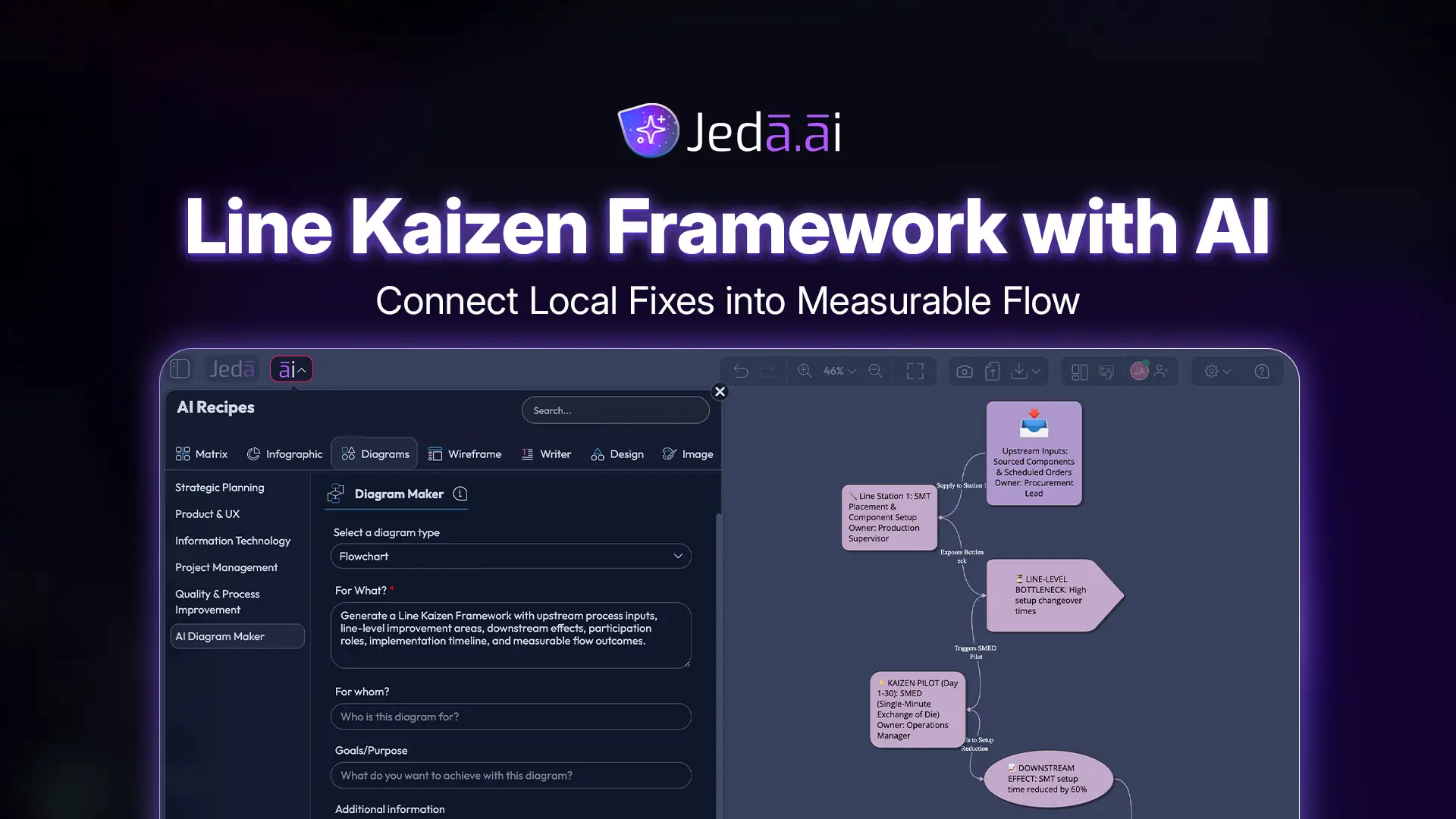
Line Kaizen Framework with AI is where continuous improvement stops behaving like a suggestion box and starts behaving like a system. A point fix can clean up one workstation. A line improvement asks the harder question: what happens before and after that workstation, and who feels the consequence when one step changes? In Jeda.ai, this becomes an editable AI Whiteboard diagram, not another static process note hiding in someone’s folder. Used well, Line Kaizen with AI helps teams see the invisible handshake between upstream causes, line-level flow, downstream delays, and measurable improvement.
What is Line Kaizen Framework with AI?
Line Kaizen Framework with AI is a structured way to improve a connected process line rather than fixing one isolated point. In Lean language, point kaizen targets a local issue. Line kaizen connects improvements across upstream and downstream steps so a change in one area does not accidentally create waste somewhere else.
That distinction matters. A team can reduce setup time at one machine and still increase waiting time at the next station. It can reorganize a tool cabinet and still miss the real flow problem. Line Kaizen pushes the team to ask: where does the problem enter, where does it travel, and where does it finally become visible?
Kaizen itself was popularized globally by Masaaki Imai in Kaizen: The Key to Japan's Competitive Success in 1986. Modern Lean sources connect kaizen to continuous improvement, waste reduction, employee participation, and repeated learning cycles. Toyota describes its production system as a way to eliminate waste, shorten lead times, and implement daily incremental kaizen across the organization. That is the spirit this framework brings into Jeda.ai: make the line visible, make the trade-offs discussable, and make the next experiment clear.
Why Line Kaizen deserves more attention than another isolated fix
Most organizations love quick wins. Fair enough. Quick wins feel good. They also look fantastic in weekly updates, which is convenient because leadership decks do not usually show the downstream chaos that appeared two days later.
Line Kaizen is less theatrical. It asks teams to connect cause and consequence. That makes it more useful for production lines, service operations, procurement workflows, healthcare intake, software handoffs, support escalation paths, and any process where one team’s “optimization” can become another team’s bottleneck.
The provocative part is this: many improvement programs fail not because people lack ideas, but because the ideas are drawn at the wrong scale. Too small, and you get local optimization. Too large, and the team freezes under enterprise-transformation theater. Line Kaizen sits in the useful middle. It is bigger than one workstation. It is smaller than a full value-stream redesign. Excellent place to start.
- Connect the process line
Map upstream triggers, line activities, and downstream effects so teams understand how one improvement changes the whole flow.
- Bring operators into the logic
Capture participation from managers, workers, analysts, and process owners instead of designing improvements from a conference room cloud.
- Tie work to time
Use an implementation timeline to separate immediate fixes, short experiments, standardization, and follow-up measurement.
- Ground decisions with context
Use Jeda.ai Web Search when current industry examples, external benchmarks, or fresh operational context matter.
- Choose the right visual form
Generate the framework as a Basic Diagram, Mind Map, or Flowchart depending on whether you need relationships, exploration, or sequence.
- Extend without rebuilding
After generation, use the AI+ button to extend and deepen selected areas while keeping the existing visual structure intact.
When should you use Line Kaizen with AI?
Use Line Kaizen with AI when the problem crosses at least two connected process steps. If the issue lives entirely inside one small workspace, a Point Kaizen diagram may be enough. But when the improvement touches handoffs, queues, layout, information flow, approval timing, material movement, staffing, quality checks, or downstream rework, Line Kaizen is the better lens.
It works especially well when teams disagree about where the real problem starts. Operations says procurement is late. Procurement says planning changes priorities too often. Planning says sales forecasts are noisy. Sales says the customer changed the order. Congratulations. You have a line problem wearing four different name tags.
A Line Kaizen diagram gives the team a shared visual place to stop arguing from memory and start working from structure. In Jeda.ai, that structure can sit inside an AI Workspace with notes, diagrams, files, data, and follow-up visuals. For teams already using an AI Whiteboard for process improvement, this is where the canvas earns its keep.
How to create Line Kaizen Framework with AI in Jeda.ai using the diagram recipe
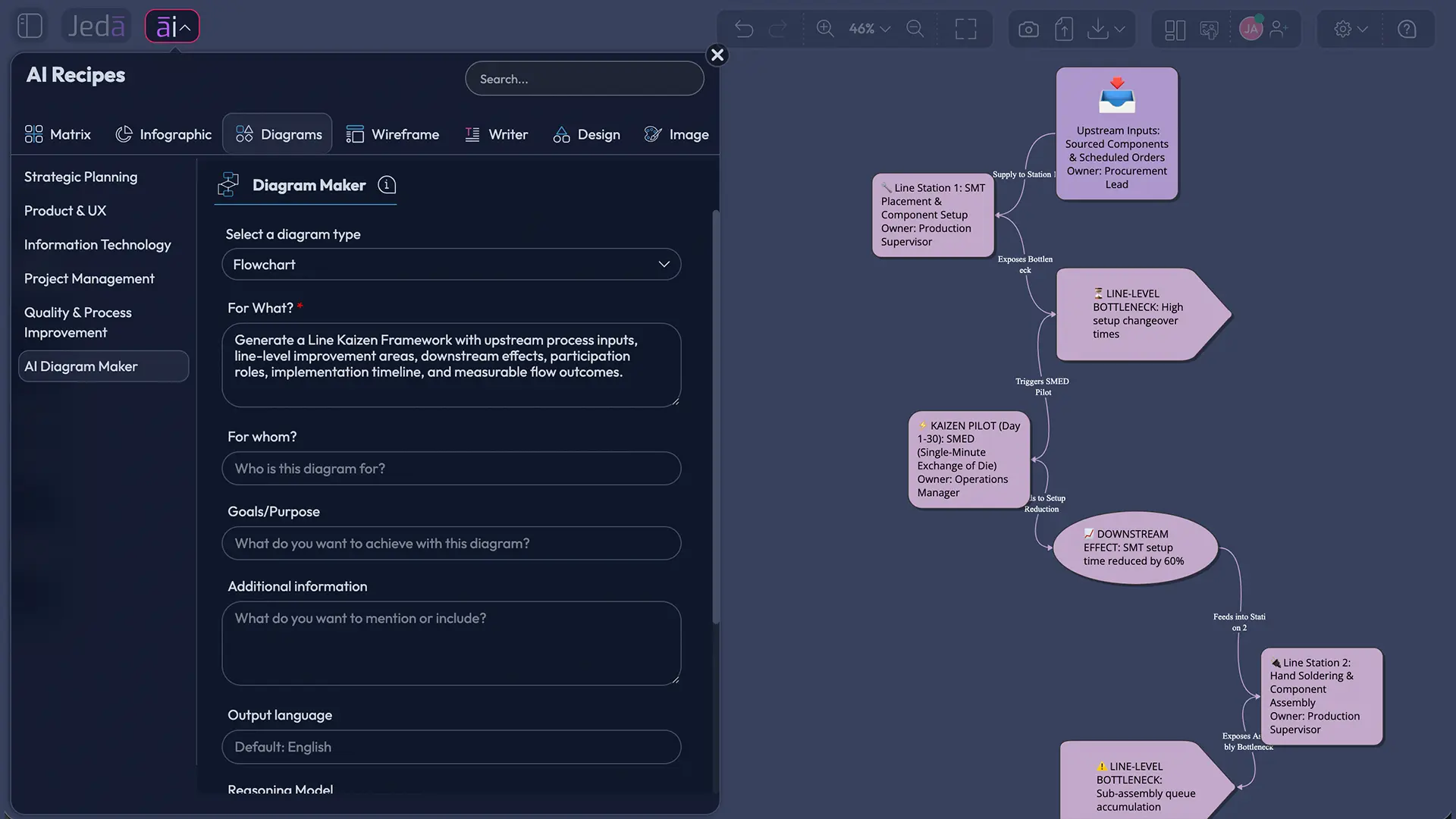
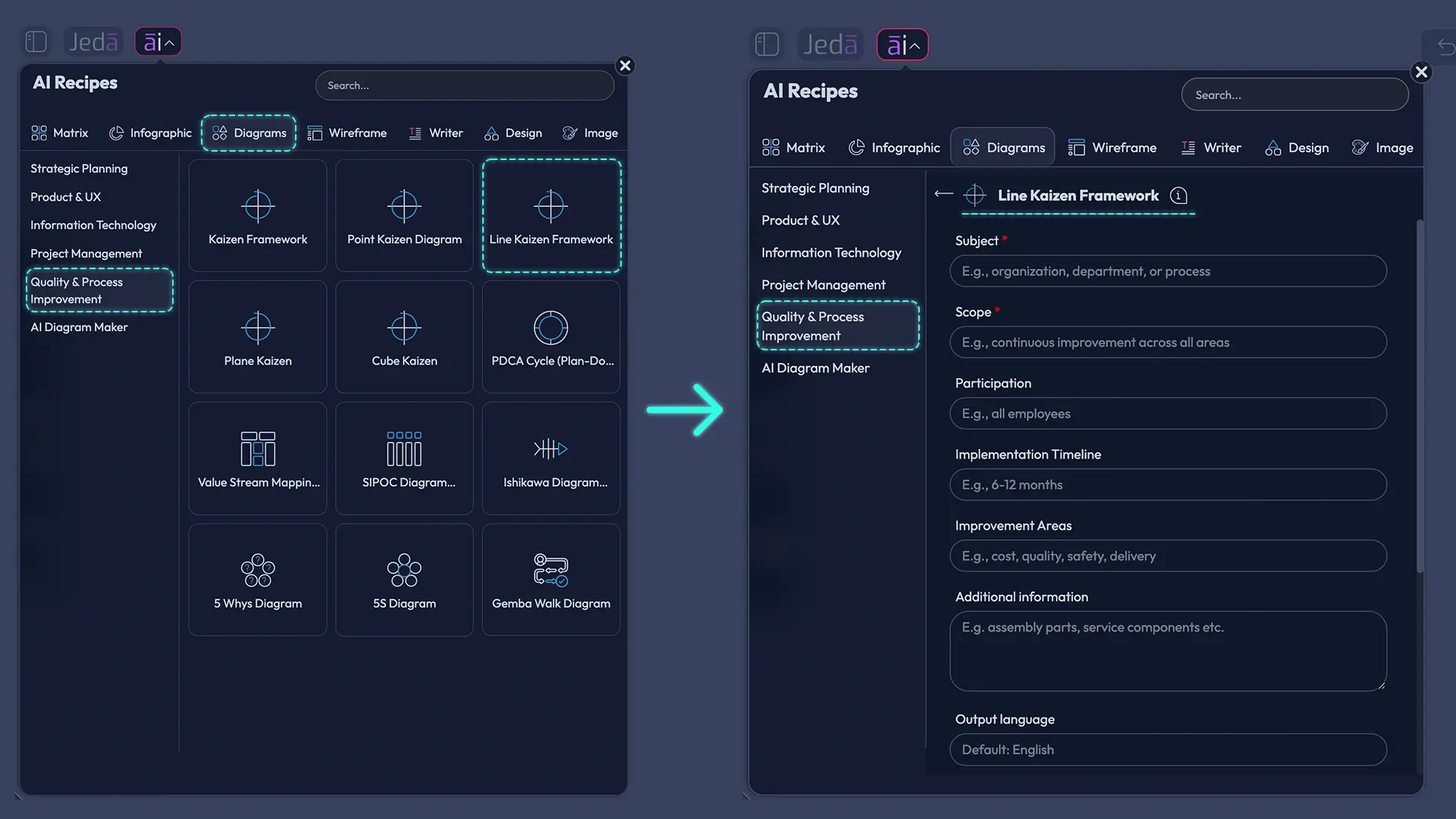
The recommended method is the Line Kaizen Framework diagram recipe in the Quality & Process Improvement category. Use this when you want guided inputs, consistent structure, and a cleaner first output. The recipe is the main event here. The Prompt Bar method is useful too, but the recipe reduces ambiguity by asking for the fields that matter.
The Line Kaizen Framework recipe includes common diagram fields: Subject, Scope, Participation, Implementation Timeline, Improvement Areas, and Additional Information. It also gives you the practical generation controls: horizontal or vertical layout selection, web search option, diagram type selection for Basic Diagram, Mind Map, or Flowchart, and AI model selection.
- Open the AI Menu
Start on the Jeda.ai canvas and open the AI Menu from the top-left area of the workspace.
- Go to Quality & Process Improvement
Choose the diagram recipe category, then find the Line Kaizen Framework recipe under Quality & Process Improvement.
- Enter the Subject
Define the process line you want to improve, such as packaging changeover, order fulfillment, patient intake, sprint handoff, or supplier onboarding.
- Set the Scope
Describe the upstream step, the line activity, and the downstream step. Keep the scope connected but not enormous. A line is not the whole planet. Tiny mercy.
- Add Participation
List who should be represented in the improvement work, including operators, supervisors, planners, analysts, quality leads, or customer-facing teams.
- Define the Implementation Timeline
State whether the improvement should run as a same-week experiment, a short kaizen event, a 30-day rollout, or a staged standardization plan.
- List Improvement Areas
Add the specific areas to investigate, such as waiting time, motion, defects, rework, tool placement, information handoff, approval delay, or changeover loss.
- Add Additional Information
Include constraints, known symptoms, metrics, customer impact, team concerns, or context from current operations.
- Choose diagram type and layout
Select Basic Diagram for connected relationships, Mind Map for exploration, or Flowchart for sequence. Then choose horizontal or vertical layout based on how your team reviews process flow.
- Set Web Search and model options
Turn Web Search on, off, or auto based on whether you need current external context. Then select the AI model or Multi-LLM setup available in your plan.
- Generate and review the framework
Generate the visual, inspect the upstream-to-downstream logic, and edit the Smart Shape nodes directly on the canvas.
- Use AI+ only to extend and deepen
Select a generated section and use the AI+ button to extend and deepen the visual. Do not treat AI+ as a custom instruction box. It expands from the selected visual context.
How to create Line Kaizen with AI from the Prompt Bar
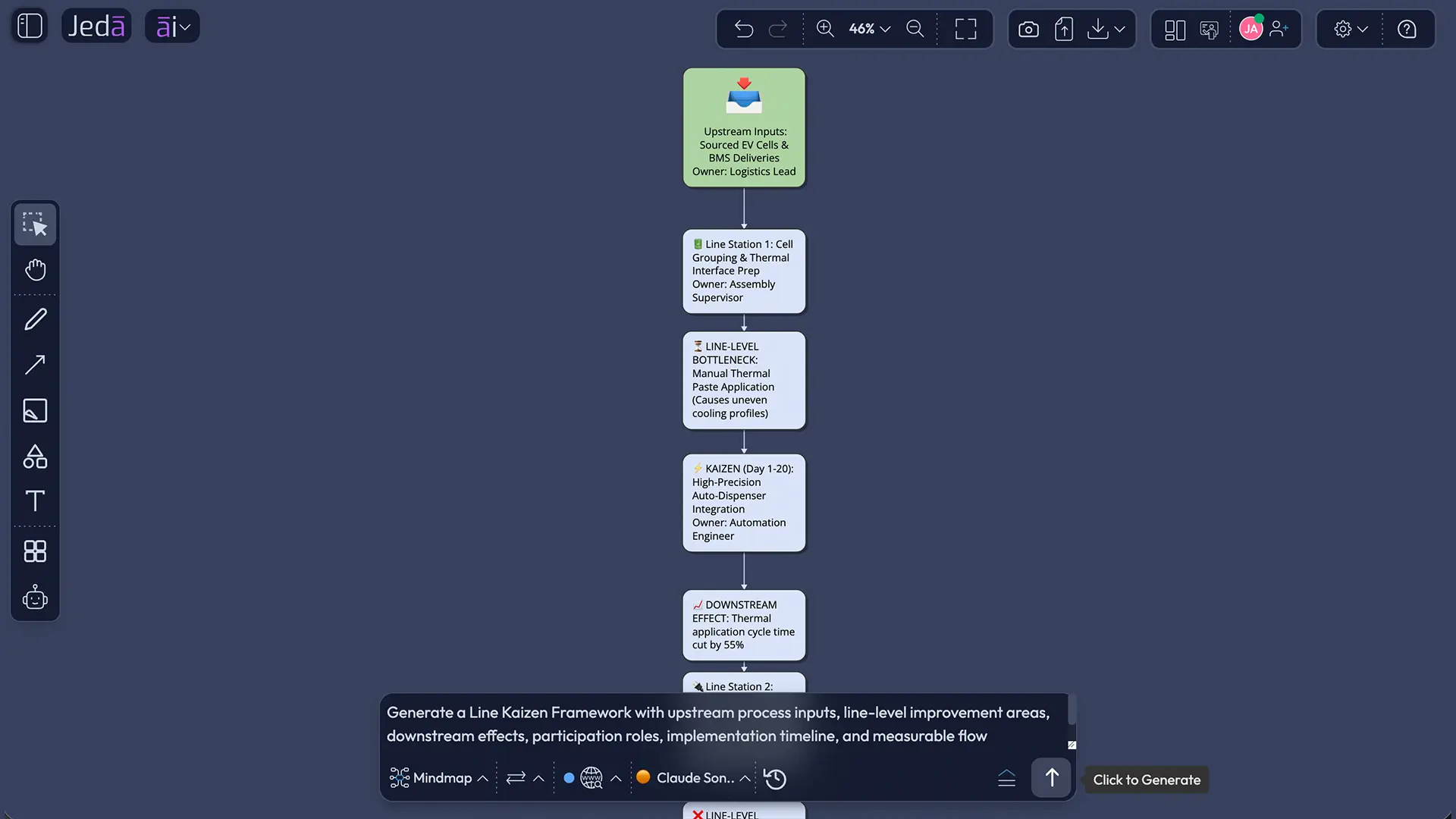
The Prompt Bar method is best when you already know the process and want a faster generation path. It is also useful when you want to test different visual structures before committing to a more polished recipe-driven output.
Here is the catch: the Prompt Bar gives you freedom, which means it also gives you enough rope to build a beautiful nonsense diagram. Be specific. Name the process, the line boundary, the roles, the improvement areas, and the timeline. Then choose the visual type before you generate.
- Open the Prompt Bar
Use the Prompt Bar at the bottom of the Jeda.ai AI Whiteboard as your main input area.
- Select the visual command
Choose Mind Map for branching exploration, or Flowchart for a step-by-step process sequence.
- Choose horizontal or vertical layout
Use horizontal layout when the process moves left to right across a line. Use vertical layout when the team needs a top-to-bottom implementation path.
- Set the Web Search option
Use Web Search when you want current examples, industry references, or external context. Keep it off when the framework should only use your internal process description.
- Select the AI model
Pick the reasoning model available in your plan. For broader alternatives, use Multi-LLM Agent where available and keep the output focused on the framework.
- Write the prompt with recipe-style fields
Include Subject, Scope, Participation, Implementation Timeline, Improvement Areas, and Additional Information in the prompt so the output mirrors the guided recipe structure.
- Generate the visual
Generate the framework and place it on the canvas as editable Smart Shapes, connectors, and text.
- Refine on the canvas
Edit node text, connector direction, shape color, and layout directly. Use Vision Transform if you want to convert the result into another visual format.
- Extend with AI+
Use the AI+ button to extend and deepen selected parts of the generated framework. Keep AI+ as an extension action, not a place for specific custom prompts.
Prompt example for a production line use case
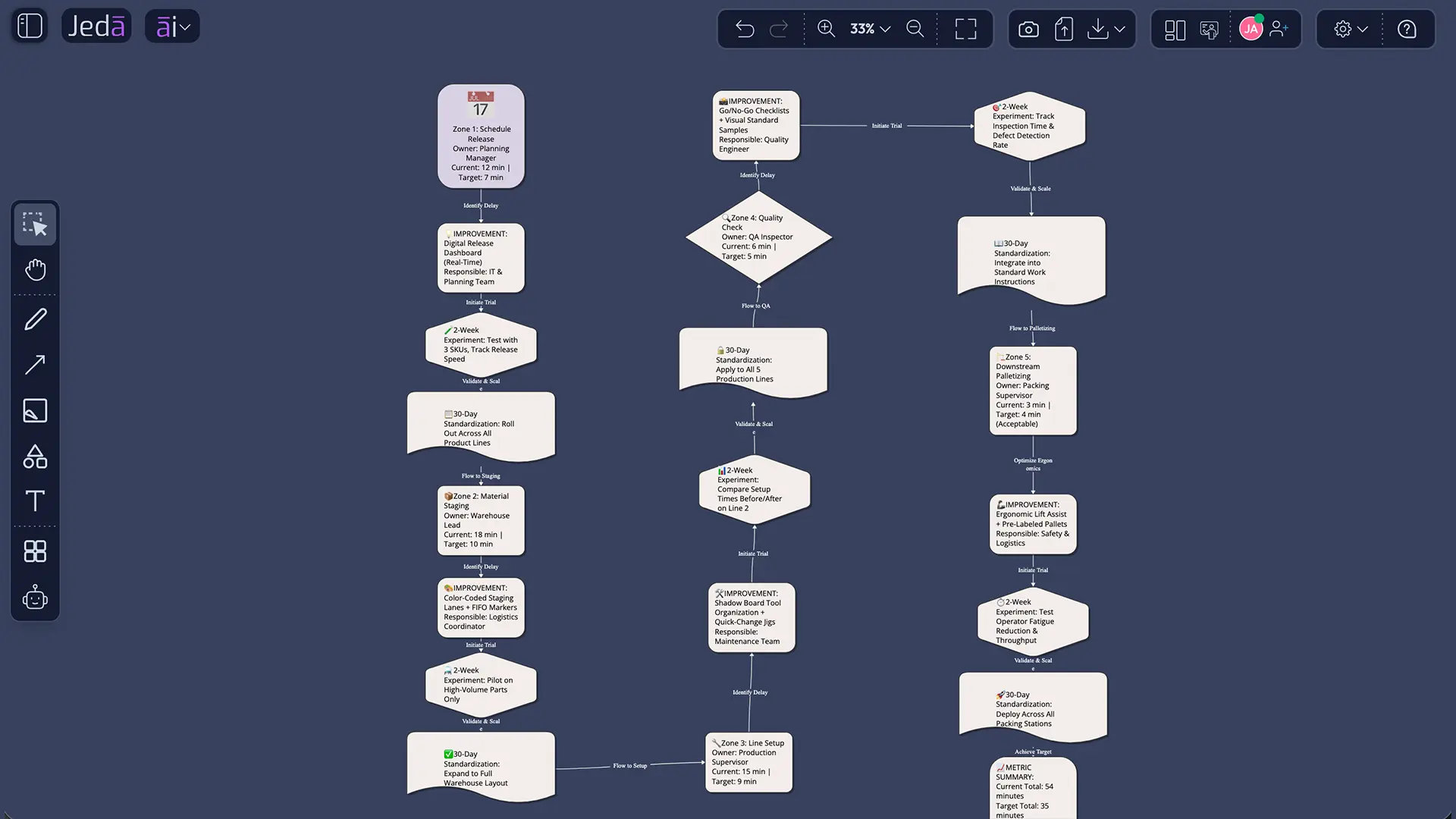
Use this example when a team wants to reduce changeover delays across a packaging line. It is intentionally specific because vague prompts create vague improvement theatre. Nobody needs that. We have enough theatre already.
The output should show the improvement line as a connected logic chain. Upstream planning affects material staging. Material staging affects setup. Setup affects quality release. Quality release affects downstream palletizing. That is the point. A Line Kaizen diagram should make dependency visible enough that the team cannot casually optimize one step while quietly punishing another.
What should a strong Line Kaizen diagram include?
A strong Line Kaizen diagram should include the process boundary, upstream triggers, downstream consequences, participating roles, improvement areas, implementation timeline, and metrics. It should also show where a fix may create risk. That last part is often missing, and it is the part that separates thoughtful improvement from process cosplay.
In Jeda.ai, these elements become editable. That matters because real process work changes once people see it. A supervisor may correct the sequence. An operator may point out that the “simple” staging change creates a safety issue. A planner may explain why the schedule release cannot move earlier without better demand signals. Good. That is not friction. That is the work finally becoming honest.
Basic Diagram, Mind Map, or Flowchart: which output should you choose?
Choose Basic Diagram when you want the clearest relationship map. This is usually the best first choice for the Line Kaizen Framework recipe because it can show upstream, line, and downstream links without forcing everything into a strict sequence.
Choose Mind Map when the team is still discovering the improvement areas. Mind maps are useful for workshops where participants need to branch from the main process into issues, causes, participants, and possible countermeasures.
Choose Flowchart when the sequence matters most. If the team needs to understand exact process order, decision points, rework loops, approvals, or quality gates, a Flowchart will make the hidden delays more obvious.
| Best Use | Output Shape | When to Choose | |
|---|---|---|---|
| Basic Diagram | Connected improvement relationships | Flexible nodes and connectors | Use first when mapping upstream and downstream dependencies. |
| Mind Map | Exploration and workshop discovery | Branching ideas from a central process | Use when teams need to gather causes and improvement areas. |
| Flowchart | Sequence and decision logic | Step-by-step process flow | Use when timing, approval, rework, or handoff order matters. |
Best practices for Line Kaizen with AI
The best Line Kaizen work starts at the real workplace, then uses AI to structure what people already know but rarely document cleanly. Do not outsource judgment to the model. Use Jeda.ai to organize the discussion, reveal missing links, and turn workshop input into an editable visual.
A useful pattern is to run the recipe once as a Basic Diagram, review it with the people who do the work, then use Vision Transform if the team needs a Flowchart version for standard work or a Mind Map version for deeper cause exploration. This is where an AI Workspace beats a static template. The same thinking can become multiple visual forms without making the team start from zero.
Common mistakes to avoid
The first mistake is treating Line Kaizen as a prettier process map. It is not. A process map shows how work currently moves. A Line Kaizen Framework should show where improvement energy must travel.
The second mistake is over-scoping. If your line includes procurement, production, quality, shipping, customer service, finance, and lunar logistics, pause. That is not a line. That is a documentary series.
The third mistake is excluding front-line participation. EPA guidance on kaizen stresses that workers close to the process often have suggestions and insights that can reduce waste. If the diagram is built only by people far away from the work, expect elegant guesses.
The fourth mistake is skipping measurement. ASQ describes PDCA as a repeated change model where teams test, review results, and act based on learning. A Line Kaizen diagram should therefore include current state, target state, and follow-up measurement.
The fifth mistake is using AI+ as if it were a second prompt bar. In Jeda.ai, AI+ extends and deepens selected visual content. Use it that way. Select the area that needs more depth, tap AI+, then review what it adds.
Frequently Asked Questions
- What is Line Kaizen Framework with AI?
- Line Kaizen Framework with AI is a visual process-improvement method that connects upstream and downstream steps around a shared improvement goal. In Jeda.ai, teams can generate it as a diagram, mind map, or flowchart and then edit the output on the AI Whiteboard.
- What is the difference between Point Kaizen and Line Kaizen?
- Point Kaizen improves a local issue, such as one workstation or one task. Line Kaizen connects improvements across two or more related process points, so the team can see how a change affects upstream causes and downstream consequences.
- When should I use Line Kaizen with AI instead of a regular process map?
- Use Line Kaizen with AI when the goal is not only to document a process but to improve connected flow. A regular process map shows steps. A Line Kaizen diagram shows improvement areas, participants, timing, dependencies, and likely downstream impact.
- Can Jeda.ai generate the Line Kaizen Framework from a recipe?
- Yes. Jeda.ai includes a Line Kaizen Framework diagram recipe under the Quality & Process Improvement category. The recipe uses guided fields such as Subject, Scope, Participation, Implementation Timeline, Improvement Areas, and Additional Information.
- Which diagram type works best for Line Kaizen Framework with AI?
- Basic Diagram is the best starting point for most Line Kaizen work because it shows relationships clearly. Mind Map works better for discovery sessions, while Flowchart works better when sequence, approvals, rework loops, or decision points need attention.
- Should I use Web Search for a Line Kaizen diagram?
- Use Web Search when you need current examples, outside benchmarks, or industry context. Keep it off when the diagram should reflect only internal process knowledge, private operating constraints, or workshop input from your team.
- Can AI+ change the Line Kaizen diagram based on my instructions?
- AI+ should be used to extend and deepen selected visual content. It is not the place to ask for a specific custom instruction. For specific changes, edit the Smart Shape text directly or regenerate from the recipe or Prompt Bar.
- Who should participate in a Line Kaizen workshop?
- Include people who touch the line directly and people who influence it indirectly. Operators, supervisors, maintenance, quality, planning, warehouse, analysts, and process owners often see different parts of the same flow problem.
- How does Line Kaizen help avoid local optimization?
- Line Kaizen makes dependencies visible. When the team maps upstream and downstream effects, it can see whether a local fix improves the whole line or simply moves waste into another step.
- Can Line Kaizen with AI be used outside manufacturing?
- Yes. Line Kaizen can apply to service operations, healthcare intake, software delivery, procurement, support escalation, onboarding, and any process where connected handoffs affect quality, time, cost, or customer experience.
Sources and further reading
- [1]
Masaaki Imai (1986) . “Kaizen: The Key to Japan's Competitive Success” McGraw-Hill Education.
View Source ↗ - [2]
Toyota Motor Corporation (2026) . “Toyota Production System” Toyota Global.
View Source ↗ - [3]
U.S. Environmental Protection Agency (2025) . “Lean Thinking and Methods: Kaizen” EPA.
View Source ↗ - [4]
American Society for Quality (2026) . “PDCA Cycle: What is the Plan-Do-Check-Act Cycle?” ASQ.
View Source ↗ - [5]
Lean Enterprise Institute (2026) . “Continuous Improvement aka Kaizen” Lean.org.
View Source ↗ - [6]
Jon Miller (2017) . “When is Point Kaizen OK?” Gemba Academy.
View Source ↗ - [7]
SixSigma.com (2012) . “Types of Kaizen and Training Required” SixSigma.com.
View Source ↗ - [8]
PTC (2024) . “How Kaizen and Lean Manufacturing Work Together” PTC.
View Source ↗
Line Kaizen Framework with AI gives teams a better question than “what can we fix here?” It asks, “what should improve across the line so the whole system flows better?” That question is harder. Good. Harder questions usually produce fewer vanity wins and better work.
Create Your Line Kaizen Framework with AI
Join 150,000+ users using Jeda.ai to turn process thinking into editable AI Workspace visuals, diagrams, and collaborative improvement boards.
Try Jeda.ai Free