PDCA Cycle with AI is for teams that are tired of improvement work turning into a polite meeting, a messy spreadsheet, and three follow-up messages nobody wants to own. The classic Plan-Do-Check-Act loop still works because it gives change a rhythm: plan the experiment, do it at a controlled scale, check the result, then act on what you learned. In Jeda.ai, that loop becomes a visual, editable, collaborative diagram inside an AI Workspace instead of a static slide.
That matters more than it sounds. A PDCA cycle is not just a circle with four labels. It is a learning system. When you build it in Jeda.ai, your team can define the subject, set the scope, map participation, choose an implementation timeline, identify improvement areas, add context, select layouts, ground the output with Web Search, choose the diagram type, and compare AI model outputs before committing to an action path. Tiny detail? No. That is the difference between “nice framework” and “usable improvement workflow.”
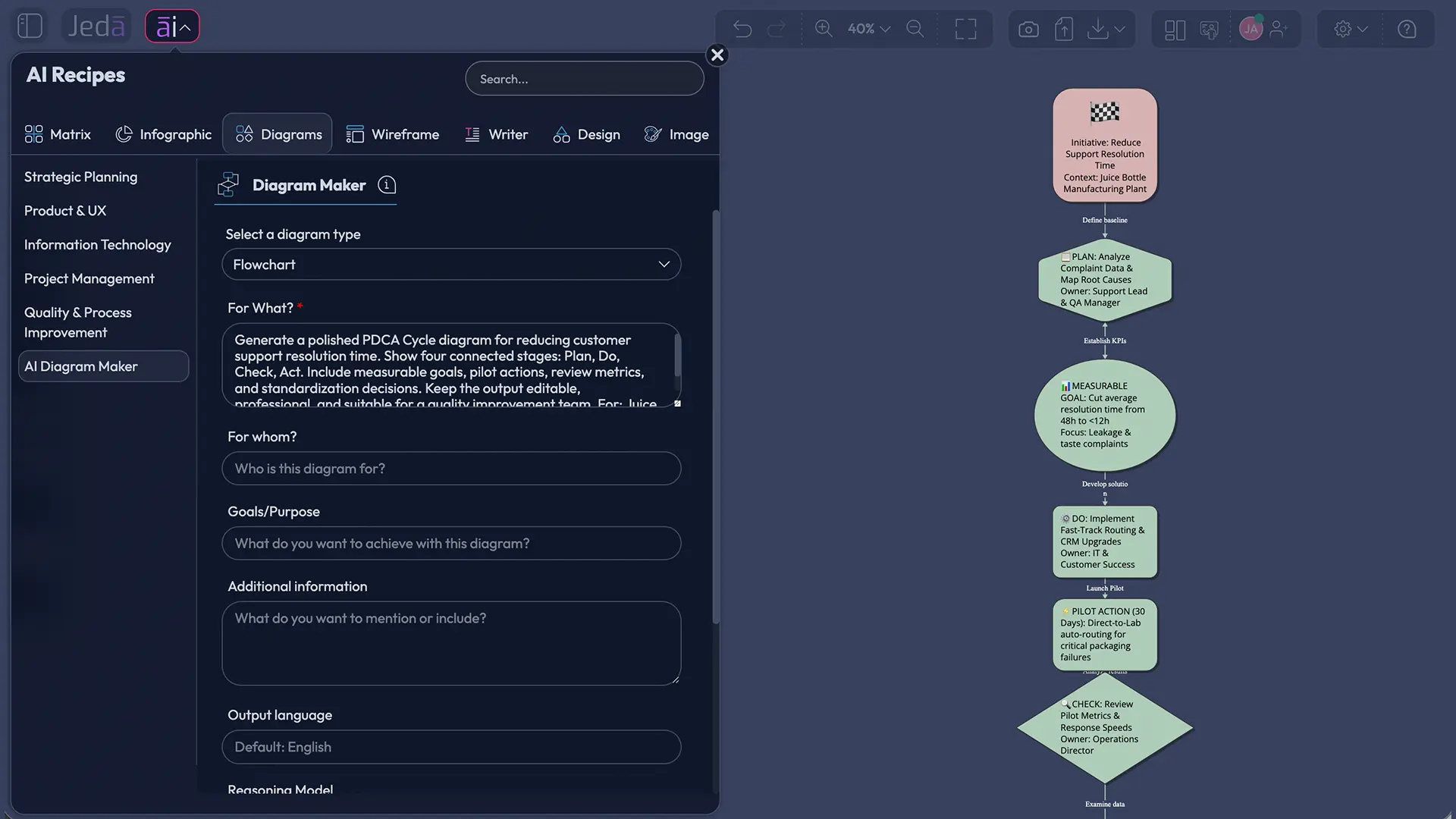
What is the PDCA Cycle?
The PDCA Cycle is a four-step improvement method: Plan, Do, Check, and Act. ASQ describes PDCA as a four-step model for carrying out change that should be repeated continuously, because improvement is not meant to be a one-time fix. The Lean Enterprise Institute explains the same logic as a scientific-method cycle: propose a change, implement it, measure the result, and take action based on what the result says.
The four stages are simple on purpose.
Plan asks, “What are we trying to improve, and what change do we believe will help?” Do means testing that change, preferably at a controlled scale. Check means comparing the result against the target, not against vibes. Act means standardizing the change if it worked, or learning from the result and beginning another cycle if it did not.
There is a bit of history here. Walter A. Shewhart developed an early repeating cycle for improvement. W. Edwards Deming helped popularize related improvement thinking in Japan, and the Japanese PDCA model became a widely recognized form of the cycle. Ronald Moen’s history of PDSA also points out a useful nuance: Deming later preferred PDSA, with “Study” instead of “Check,” because he wanted the cycle to emphasize learning. So yes, PDCA and PDSA are related cousins. They are not identical twins. Business content often smushes them together like leftover rice, but serious teams should know the distinction.
What is PDCA Cycle with AI?
PDCA Cycle with AI is the use of artificial intelligence to help teams build, expand, review, and visualize a Plan-Do-Check-Act improvement cycle. AI does not replace the human decision. It helps structure the messy input faster.
In practical terms, AI can help you identify improvement areas, clarify root causes, convert rough notes into structured stages, suggest measurable indicators, draft pilot actions, and turn the whole cycle into a diagram, mind map, or flowchart. Jeda.ai adds the visual layer. Instead of receiving a plain text answer and rebuilding the framework somewhere else, you generate an editable PDCA visual directly on the AI Whiteboard.
This is where Visual AI becomes useful. You can start with a guided diagram recipe when you want a structured path. You can start with the Prompt Bar when you already know what you want. After generation, you can use AI+ to extend and deepen selected sections. Small but important caveat: AI+ extends from the selected context. You do not use AI+ as a separate instruction box for detailed custom prompts. Think of it as “continue and deepen this selected part,” not “write a whole new brief from scratch.”
- Plan with clearer context
Use AI to turn vague improvement goals into a defined subject, scope, timeline, participants, and measurable success criteria.
- Test at the right scale
Map pilot actions before rollout so the Do stage stays controlled, reviewable, and grounded in what the team can actually execute.
- Check with evidence
Use metrics, observations, documents, or web context to compare expected outcomes with what happened during the pilot.
- Act without losing learning
Standardize successful changes or loop back with a sharper plan when the result says the first idea needs work.
- Collaborate visually
Keep the PDCA diagram inside a shared AI Workspace where teams can comment, edit, review, and align around the same source of truth.
- Extend with AI+
Select a weak or thin section after generation and use AI+ to deepen it while keeping the original visual structure intact.
Why use PDCA Cycle with AI?
Use PDCA Cycle with AI when you need faster structure, not more noise. Most improvement work does not fail because the team lacks motivation. It fails because the work lacks boundaries. The problem is too broad. The metric is unclear. The pilot is too ambitious. The review is fuzzy. The action step turns into “we’ll revisit this later,” which is corporate for “this is going into the swamp.”
AI helps by forcing the first draft into shape. Jeda.ai helps by making that shape visible.
In a standard chat tool, you may get a useful PDCA outline. Then you still need to copy it into a doc, diagram tool, whiteboard, or slide. That handoff is where context starts leaking. Jeda.ai avoids that extra grind because the output is already visual and editable on the canvas. Your PDCA diagram can sit next to supporting notes, process screenshots, stakeholder comments, uploaded files, and related diagrams.
For consultants, that means a client workshop can move from scattered discovery notes to a structured improvement loop faster. For business analysts, it means process changes can be tested and reviewed with clearer evidence. For product managers, it means feature experiments can be framed as a repeatable learning cycle instead of a one-off launch guess. For operations leaders, it means teams can align around the same Plan-Do-Check-Act logic without drawing boxes like it is 2009.
And yes, you can still edit everything. That is the point.
How to create a PDCA Cycle with AI in Jeda.ai
Jeda.ai gives you two clean ways to create a PDCA Cycle with AI. Use the diagram recipe when you want a guided path with the right fields already prepared. Use the Prompt Bar when you want direct generation from plain language.
Method 1: Use the PDCA Cycle diagram recipe
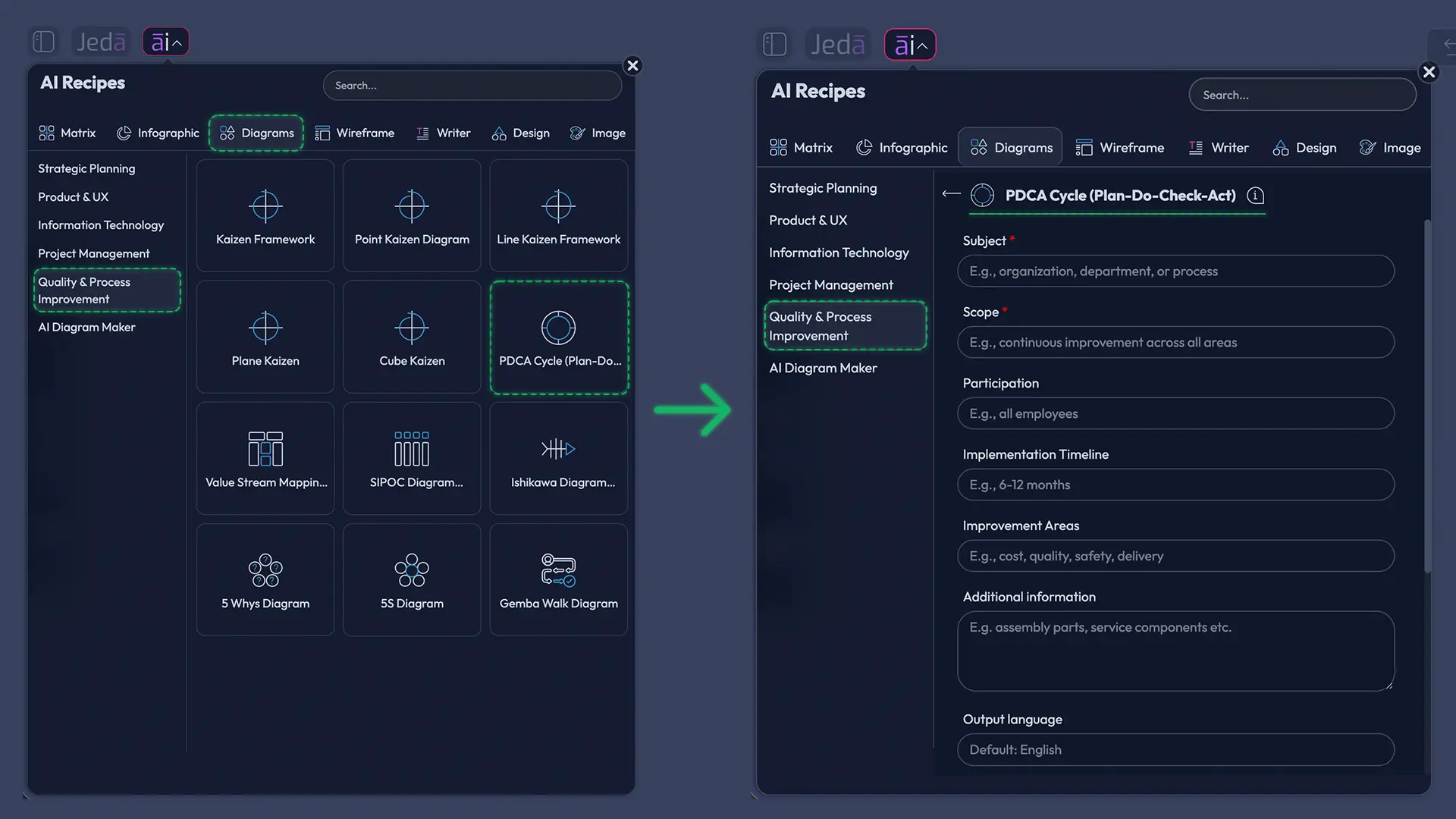
The recommended method is the PDCA Cycle (Plan-Do-Check-Act) diagram recipe under the Quality & Process Improvement category. This route gives you structure before generation, which is exactly what a process improvement diagram needs.
The recipe fields are designed to capture the real operating context:
Below those fields, the diagram recipe also supports layout and generation controls. Choose horizontal layout when you want a left-to-right improvement flow. Choose vertical layout when the diagram needs to read like a step-by-step operational plan. You can enable Web Search when current context matters, choose the diagram type as Basic Diagram, Mind Map, or Flowchart, and select the AI model that best fits the depth and style of analysis you want.
Basic Diagram works well for a clean PDCA loop. Mind Map works well when you want branches under each stage. Flowchart works well when decisions and handoffs matter.
- Open the AI Menu
From the Jeda.ai canvas, open the AI Menu and go to the Diagram Recipes area under the Quality & Process Improvement category.
- Choose PDCA Cycle (Plan-Do-Check-Act)
Select the PDCA Cycle recipe so Jeda.ai starts with the guided structure instead of a blank prompt.
- Fill in the common recipe fields
Add the Subject, Scope, Participation, Implementation Timeline, Improvement Areas, and Additional Information so the AI understands the real improvement context.
- Select the layout
Choose Horizontal layout for a left-to-right improvement flow or Vertical layout for a stacked operational view.
- Choose the diagram type
Pick Basic Diagram for a clean cycle, Mind Map for branching analysis, or Flowchart for decision-heavy improvement paths.
- Set Web Search and AI model options
Turn Web Search on when current context or market data matters, then choose the AI model or model setup you want to use.
- Generate and review the PDCA visual
Click Generate, then review the editable PDCA output on the canvas with your team before committing to the improvement plan.
- Extend or transform after generation
Use AI+ to extend selected sections for more depth, or use Vision Transform when the same PDCA thinking should become another visual format.
Method 2: Create a PDCA Cycle from the Prompt Bar
Use the Prompt Bar method when you already know the improvement challenge and want to move quickly. This path is more open-ended than the recipe. It is ideal for fast drafts, live workshops, and teams that already have a written improvement brief.
Open the Prompt Bar at the bottom of the AI Whiteboard, choose the Diagram command or another suitable visual command, and type a clear prompt. You can ask for a Mind Map, or Flowchart style output by selecting the relevant visual setting rather than relying on the prompt to do all the work. If your PDCA cycle needs current facts, enable Web Search. If you want stronger reasoning, choose the model setup that fits your plan.
A good Prompt Bar request includes the process, target outcome, stakeholder group, known constraint, and the metric you want to improve. Simple inputs produce simple outputs. Slightly better inputs produce diagrams that your team can actually use. Shocking, I know.
- Open the Prompt Bar
Use the Prompt Bar at the bottom center of the Jeda.ai canvas as the direct generation surface.
- Select the visual command
Choose Mind Map when you want branches, or Flowchart when you want steps and decision points.
- Choose layout and diagram type
Set Horizontal or Vertical layout, then choose Basic Diagram, Mind Map, or Flowchart based on how the PDCA cycle should be presented.
- Add your PDCA prompt
Describe the subject, scope, participants, implementation timeline, improvement areas, and extra context in plain language.
- Set Web Search and model options
Enable Web Search when outside information matters, then choose the AI model or model combination that fits the task.
- Generate the first version
Generate the PDCA Cycle with AI and let Jeda.ai place the editable output on the canvas.
- Review with your team
Check whether the Plan, Do, Check, and Act stages match the real operating constraints before using the diagram in execution.
- Use AI+ carefully
Select a section and use AI+ to extend or deepen it. AI+ continues from the selected context, so do not treat it as a separate detailed prompt form.
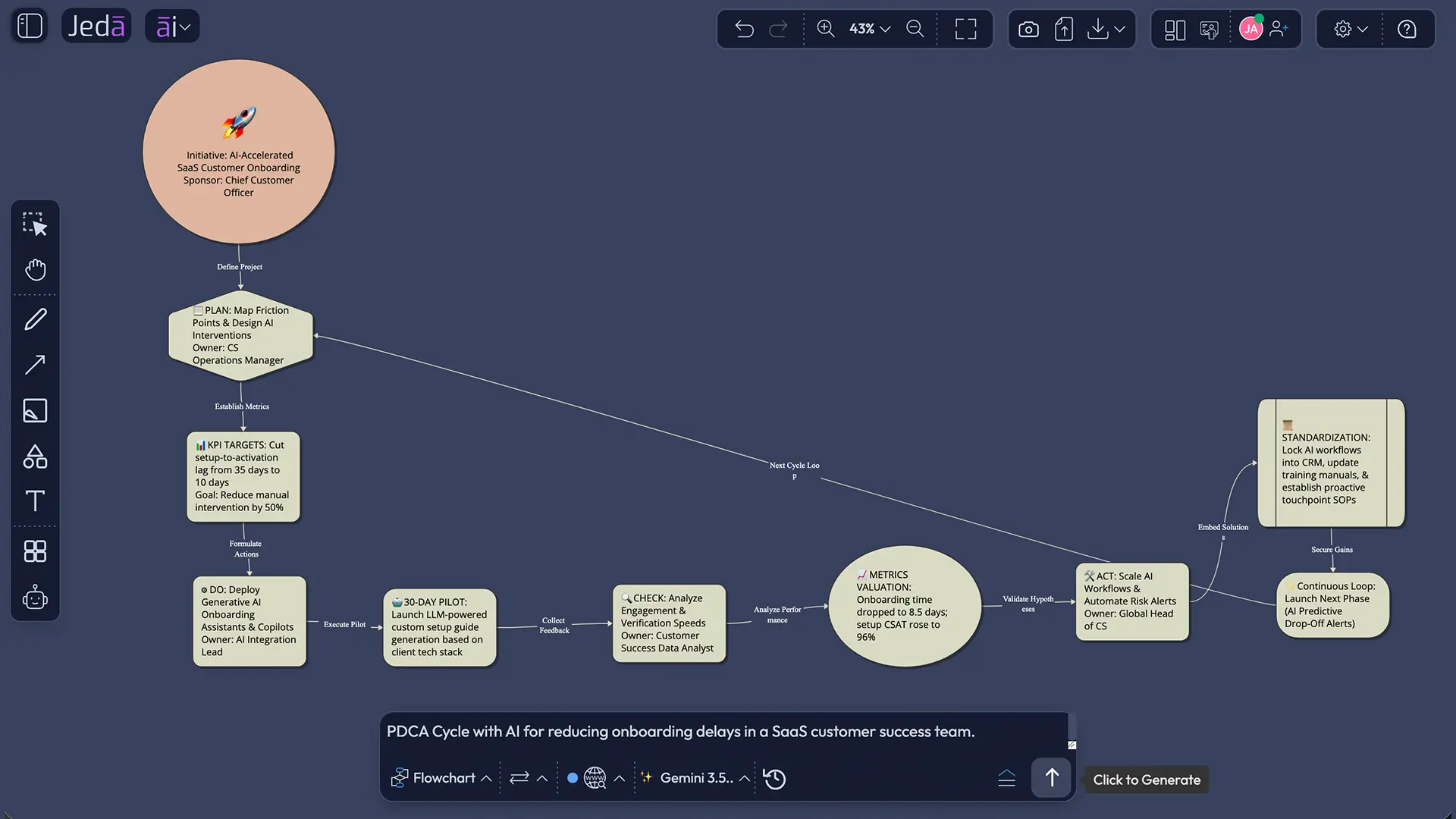
Example: PDCA Cycle with AI for reducing customer onboarding delays
Let’s make this practical. Imagine a SaaS company has a recurring problem: new customers take too long to reach their first successful outcome. Sales promised speed. Customer success is overloaded. Product has five different onboarding paths. Nobody is evil here. The system is just messy.
A strong PDCA cycle would not try to “fix onboarding” in one heroic sprint. That is how teams accidentally create a 43-tab spreadsheet and a haunted Trello board.
Instead, the team can use Jeda.ai to generate a focused PDCA diagram.
The resulting diagram should give the team a working improvement loop:
Plan
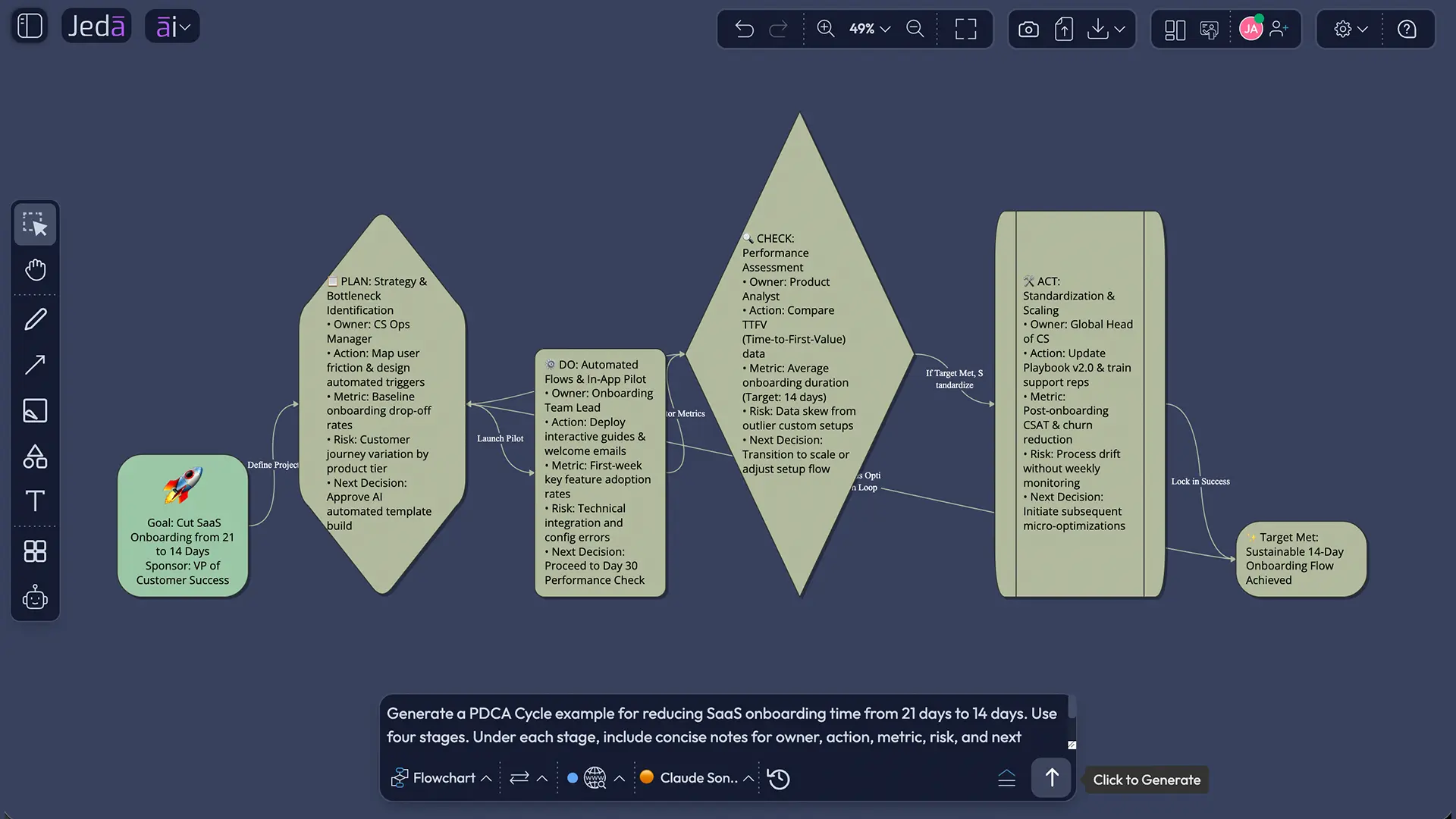
Define the target, current baseline, problem symptoms, suspected causes, pilot audience, owner roles, and measures. For this example, the target is a reduction from 21 days to 14 days. The measures could include time to first value, setup completion rate, training attendance, support ticket volume, and customer-reported confidence.
Do
Run a controlled pilot. For example, test a simplified onboarding checklist, a revised sales-to-success handoff, an automated reminder sequence, and a 30-minute kickoff format with one customer segment before rolling it out to everyone.
Check
Compare pilot results against the baseline. Did time to first value fall? Did support tickets rise or fall? Did customers understand the next step? Did the customer success team save time, or did the new process simply move work to another person?
Act
Standardize the parts that worked. Fix or discard what failed. Then start the next loop. Maybe the kickoff improved clarity but data import still blocked customers. Great. That becomes the next PDCA cycle.
When should you use PDCA Cycle with AI?
Use PDCA Cycle with AI when the work needs learning, not just planning. If the answer is already obvious and the change is low-risk, you probably do not need a full cycle. Just do the thing. Nobody needs a ceremonial diagram for replacing a broken login button.
But if the problem has uncertainty, multiple stakeholders, process risk, customer impact, operational complexity, or unclear metrics, PDCA earns its keep.
Good use cases include:
In Jeda.ai, the added benefit is that you can keep the improvement plan next to the supporting evidence. A PDCA diagram can sit beside a root cause analysis, process flow, customer journey map, support ticket summary, or KPI dashboard. The AI Workspace becomes the working memory for the cycle. That is more useful than a perfect-looking diagram that nobody updates after the meeting.
Best practices for better PDCA diagrams with AI
The first draft is not sacred. Treat it like a smart intern with a whiteboard marker: useful, fast, occasionally too confident.
Start with a narrow scope. “Improve operations” is too wide. “Reduce billing support escalations for mid-market customers during renewal month” is better.
Define a measurable target. PDCA needs a “check” stage, and checking only works when you know what good looks like. Use cycle time, defect rate, response time, adoption rate, satisfaction score, cost, error rate, completion rate, or another concrete indicator.
Name the participants. A PDCA cycle without ownership is performance art. Add the people who will plan, run, review, and standardize the change.
Keep the Do stage small. Pilot before rollout. PDCA is friendlier to experiments than big-bang transformations.
Use Web Search only when it adds value. If you are improving an internal process, your own context matters most. If you are comparing industry benchmarks or current regulatory expectations, turn Web Search on.
After generation, review the output like a grown-up. AI can organize the work, but your team still owns the decision.
Common mistakes to avoid
Making the scope too broad
If the PDCA cycle tries to solve everything, it will solve nothing. Keep the first loop small enough to test.
Treating Check as a meeting recap
Check is not “we talked about it.” Check means comparing observed results against expected results. ASQ’s PDCA procedure emphasizes reviewing the test, analyzing the results, and identifying what was learned.
Skipping standardization
If the pilot works and nobody updates the process, training, ownership, or documentation, the improvement is fragile. The Act stage should stabilize the gain or prepare the next cycle.
Asking AI to invent missing business context
AI is helpful, not psychic. Give it the real situation. Add the process, team, constraints, known failure points, and metrics.
Using AI+ like a full prompt box
Use AI+ to extend and deepen selected content after generation. Do not expect it to handle detailed, separate instructions the way the Prompt Bar or recipe form does.
PDCA Cycle with AI vs a static PDCA template
A static template gives you boxes. PDCA Cycle with AI gives you a working draft of the thinking inside those boxes.
| Setup | Context depth | Visual output | Iteration | Collaboration | |
|---|---|---|---|---|---|
| Static PDCA template | Manual | Depends on user writing | Fixed layout | Manual edits | Usually external |
| PDCA Cycle with AI in Jeda.ai | Guided recipe or Prompt Bar | Uses fields, prompt context, model choice, and optional Web Search | Editable Basic Diagram, Mind Map, or Flowchart | AI+ extension and Vision Transform | Shared AI Whiteboard inside the AI Workspace |
This is why Jeda.ai works well for teams that care about quality and execution. It does not stop at “generate me a framework.” It gives you a place to edit, challenge, share, and reuse the framework.
That is also why more than 150,000+ users use Jeda.ai for visual thinking, analysis, and planning. The value is not a prettier canvas. The value is that the thinking stays visible.
Frequently Asked Questions
- What is PDCA Cycle with AI?
- PDCA Cycle with AI is the use of AI to generate, structure, and refine a Plan-Do-Check-Act improvement cycle. In Jeda.ai, it becomes an editable visual diagram, mind map, or flowchart that teams can review and update on a shared AI Whiteboard.
- What are the four steps of the PDCA cycle?
- The four steps are Plan, Do, Check, and Act. Plan defines the improvement goal and change idea. Do tests the change. Check compares results against expectations. Act standardizes successful changes or starts another cycle with a revised plan.
- Does Jeda.ai have a PDCA Cycle recipe?
- Yes. Jeda.ai includes a PDCA Cycle (Plan-Do-Check-Act) diagram recipe under the Quality & Process Improvement category. The guided recipe supports fields such as Subject, Scope, Participation, Implementation Timeline, Improvement Areas, and Additional Information.
- Can I create a PDCA diagram from the Prompt Bar?
- Yes. You can open the Prompt Bar, select a visual command such as Mind Map, or Flowchart, add your PDCA prompt, choose layout and model options, and generate an editable PDCA visual directly on the canvas.
- Which layout should I choose for a PDCA Cycle diagram?
- Choose a horizontal layout when you want a left-to-right improvement flow. Choose a vertical layout when the cycle needs to read like an operational checklist or implementation plan. For a classic loop, Basic Diagram usually works best.
- Should I use Basic Diagram, Mind Map, or Flowchart for PDCA?
- Use Basic Diagram for a clean four-stage PDCA cycle, Mind Map for branching details under each stage, and Flowchart when the improvement process includes decision points, approvals, handoffs, or conditional actions.
- Can Web Search improve a PDCA Cycle with AI?
- Web Search can help when the PDCA cycle needs current external context, such as industry benchmarks, regulation, market conditions, or recent best practices. For internal process improvement, your own data, constraints, and team context usually matter more.
- What does AI+ do after the PDCA cycle is generated?
- AI+ can extend and deepen a selected section of the generated PDCA visual. It is useful when a stage feels thin or needs more detail. It does not work like a separate detailed instruction form, so use the Prompt Bar for custom prompts.
- Can I turn a PDCA cycle into another format?
- Yes. In Jeda.ai, you can use Vision Transform to convert existing visual content into another format, such as turning a PDCA mind map into a flowchart or converting a structured diagram into a presentation-ready visual summary.
- Who should use PDCA Cycle with AI?
- PDCA Cycle with AI is useful for quality teams, operations leaders, strategy consultants, project managers, product managers, business analysts, and anyone running controlled improvement cycles where planning, testing, reviewing, and standardizing must stay visible.
- Is PDCA the same as PDSA?
- PDCA and PDSA are closely related but not identical. PDCA is commonly used for implementation and continual improvement. PDSA places stronger emphasis on studying results as a learning cycle, a distinction discussed in Ronald Moen’s history of Deming’s PDSA cycle.
Sources and further reading
- [1]
American Society for Quality (n.d.) . “What is the Plan-Do-Check-Act (PDCA) Cycle?” ASQ Quality Resources.
View Source ↗ - [2]
Lean Enterprise Institute (n.d.) . “Plan, Do, Check, Act (PDCA)” Lean Lexicon.
View Source ↗ - [3]
Moen, Ronald (2010) . “Foundation and History of the PDSA Cycle” The W. Edwards Deming Institute.
View Source ↗ - [4]
International Organization for Standardization (2015) . “The Process Approach in ISO 9001:2015” ISO/TC 176/SC 2/N1289.
View Source ↗ - [5]
Judy, Ken (2025) . “A Plan-Do-Check-Act Framework for AI Code Generation” InfoQ.
View Source ↗
Create Your PDCA Cycle with AI in Jeda.ai
Join 150,000+ users using Jeda.ai to turn continuous improvement, strategy, and process work into editable Visual AI diagrams on a shared AI Workspace.
Start Free