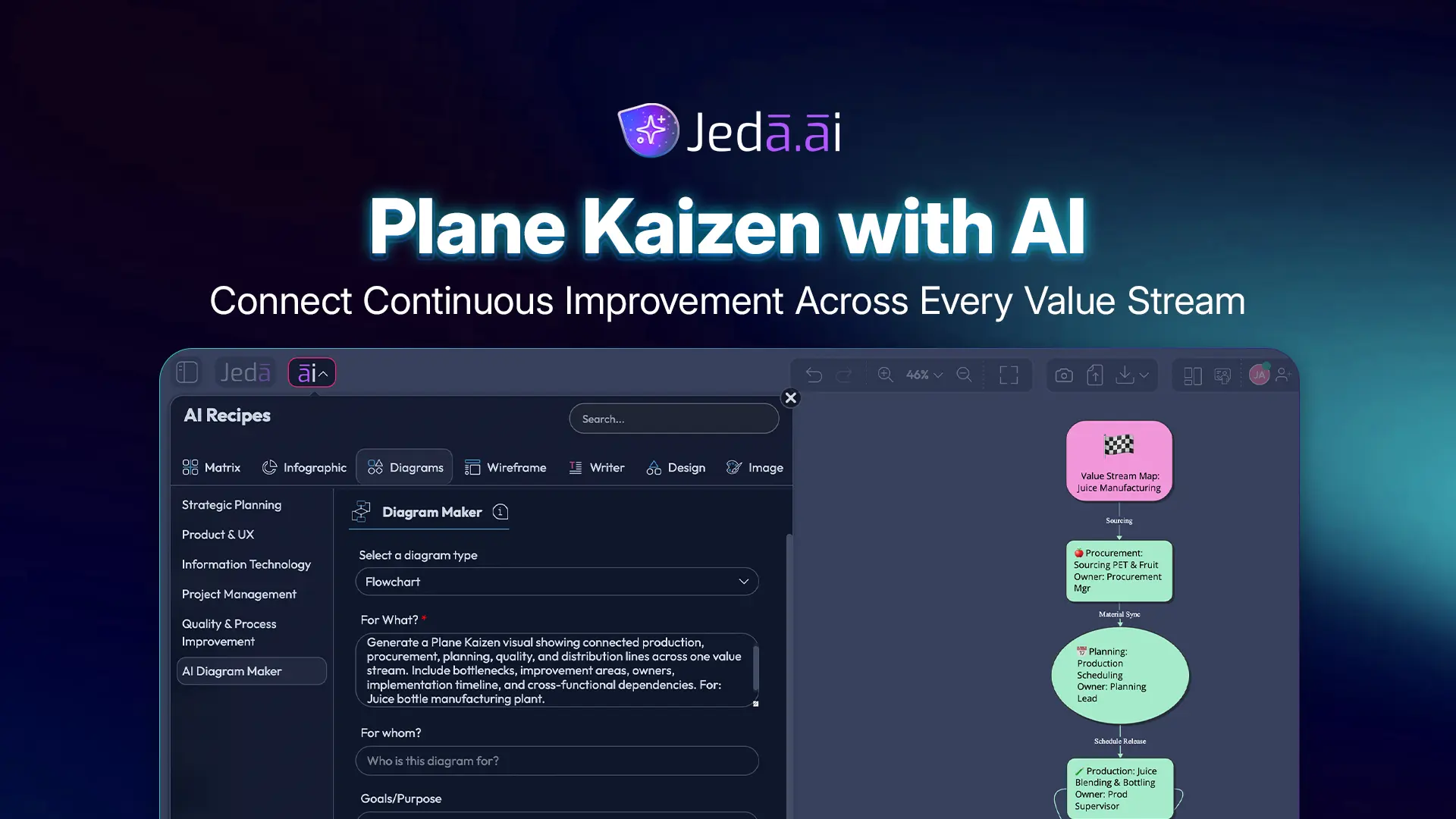
Plane Kaizen with AI is for the moment when a local improvement is no longer enough. One cell gets faster, but procurement still waits. Planning improves, but distribution still absorbs the mess. That is where Plane Kaizen earns its keep: it connects multiple lines, departments, and value-stream decisions into one visual improvement system inside an AI Workspace.
Jeda.ai gives this work a practical home. Instead of debating cross-functional process issues in scattered slides, spreadsheets, and meeting notes, you can generate a Plane Kaizen diagram on an AI Whiteboard, edit every node, compare improvement areas, and keep the whole team aligned. Jeda.ai is already used by 150,000+ users, and this kind of visual process thinking is exactly where static kaizen templates start to feel a little dusty.
What is Plane Kaizen?
Plane Kaizen is a cross-functional form of continuous improvement. It moves beyond improving one point or one line and focuses on how several connected lines, functions, or departments work together across a value stream.
Classic kaizen means continuous improvement. Toyota describes kaizen as a core part of the Toyota Production System, tied to quality, waste reduction, standard work, and practical worker-led improvement. Masaaki Imai helped bring kaizen to global management audiences in the 1980s, framing it as continuing improvement involving both managers and workers. That “everyone improves the system” idea matters here.
Point Kaizen fixes a local issue. Line Kaizen connects improvements along one line or adjacent processes. Plane Kaizen goes wider. It asks: what happens when production, procurement, planning, inventory, quality, logistics, customer support, and leadership all touch the same improvement target?
That is a tougher question. Also the useful one.
In modern language, Plane Kaizen often maps closely to value-stream improvement. Not identical in every school of lean thought, but close enough for practitioners: you are optimizing the horizontal flow of work across functions, not polishing one isolated workstation and pretending the whole system is healed.
Why Plane Kaizen with AI changes the improvement conversation
Plane Kaizen with AI changes the conversation because it exposes relationships that teams often discuss but rarely see. A cross-functional bottleneck is rarely polite enough to stay inside one department. It leaks. It hands off delays. It hides behind “waiting on another team.”
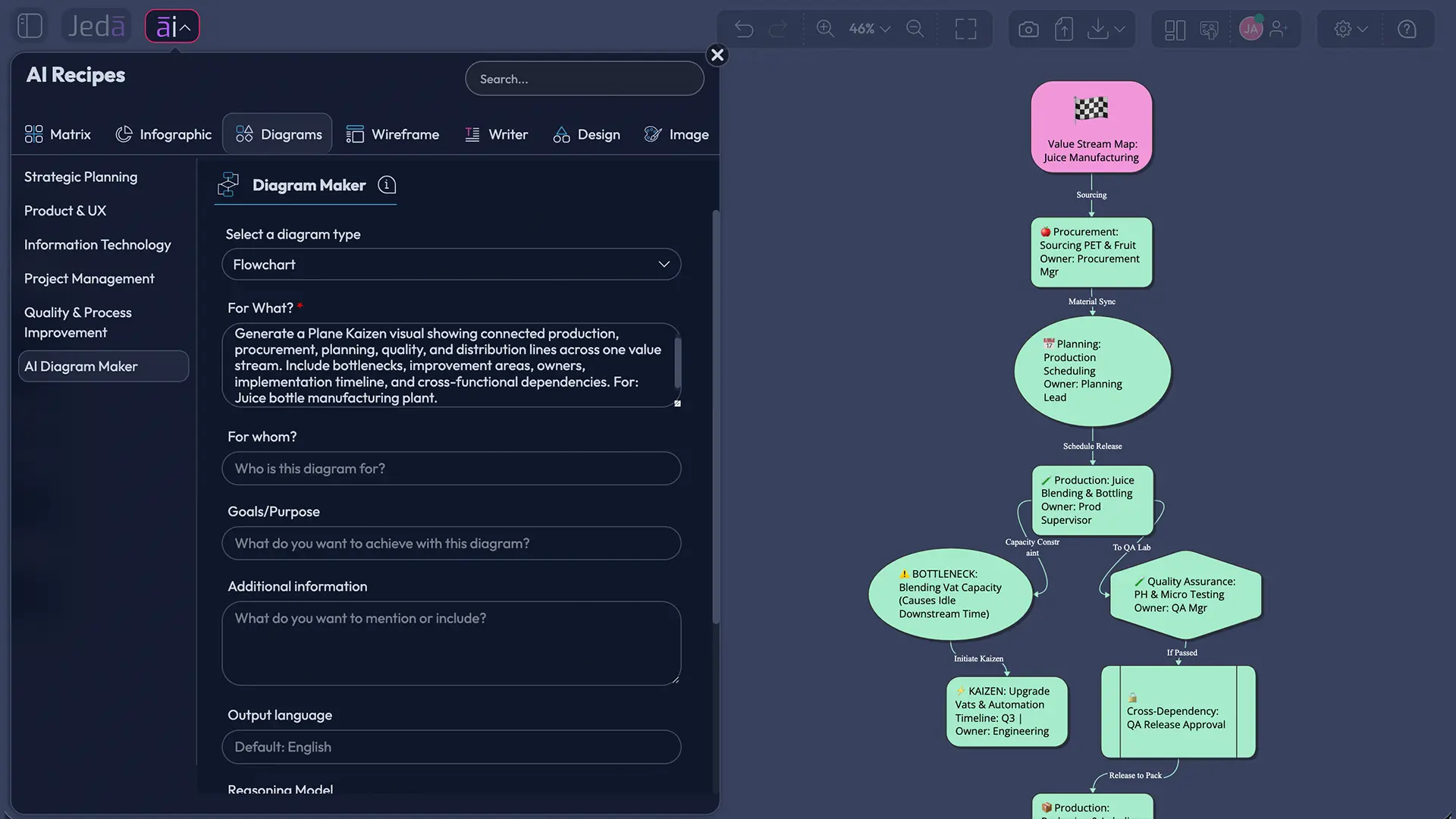
AI helps by turning fragmented improvement context into a structured visual model. In Jeda.ai, the Plane Kaizen recipe can turn the subject, scope, participants, timeline, improvement areas, and extra context into an editable diagram. Teams can then use the AI Whiteboard to refine the structure, add notes, move nodes, and extend selected areas with AI+.
- Map connected work
Show how several lines, teams, and departments influence one shared improvement target.
- Ground the analysis
Use Jeda.ai Web Search when current external context may affect improvement decisions.
- Choose the right output
Generate the framework as a Basic Diagram, Mind Map, or Flowchart depending on the workshop goal.
- Align participants
Clarify who contributes, who owns implementation, and who must approve changes.
- Sequence the timeline
Turn improvement ideas into staged actions instead of a vague list of good intentions.
- Extend without restarting
Use AI+ to deepen selected areas after generation without rebuilding the whole visual.
Here’s the bigger shift: Plane Kaizen with AI turns improvement from a workshop artifact into a living decision map. The old version of kaizen documentation often dies after the meeting. Someone exports a PDF. Someone forgets where the action list went. A manager asks for an update two weeks later, and everyone performs the ancient ritual of “checking the latest version.” Beautifully inefficient.
A visual AI Workspace gives the team one shared place to see the current state, proposed changes, dependencies, and owners. That is the point.
Plane Kaizen vs Point, Line, System, and Cube Kaizen
Plane Kaizen only makes sense when you place it inside the wider kaizen taxonomy.
| Kaizen type | Improvement scope | Best use case | Risk if misused |
|---|---|---|---|
| Point Kaizen | One issue, station, task, or local defect | Quick fixes and small local improvements | Creates local wins that do not improve the full flow |
| Line Kaizen | Connected steps along one line or process chain | Improving flow between adjacent activities | Can still miss upstream and downstream functions |
| Plane Kaizen | Multiple connected lines, departments, or functions | Cross-functional value-stream improvement | Can become too broad without clear scope |
| System Kaizen | Larger system-level constraints and operating model issues | Strategic process redesign | Needs strong governance or it becomes theory soup |
| Cube Kaizen | Organization-wide improvement across vertical, horizontal, and depth dimensions | Enterprise-wide lean transformation | Requires cultural maturity and leadership discipline |
Plane Kaizen sits in the uncomfortable middle. It is bigger than a line-level fix and smaller than full enterprise transformation. That makes it powerful. It also makes it easy to abuse. If the scope is too small, you are doing Line Kaizen and calling it fancy. If the scope is too big, you are trying to boil the ocean while holding a sticky note.
A good Plane Kaizen diagram makes the boundary visible. It says: these lines are connected, these departments matter, these improvement areas belong in scope, and these dependencies must be handled together.
How to create Plane Kaizen with AI in Jeda.ai using the Diagram Recipe
The recommended method is the Plane Kaizen Diagram Recipe in Jeda.ai. Use this when you want a guided, structured form rather than starting from a blank prompt. This is the main method for this page because the recipe already contains the correct improvement fields and output controls.
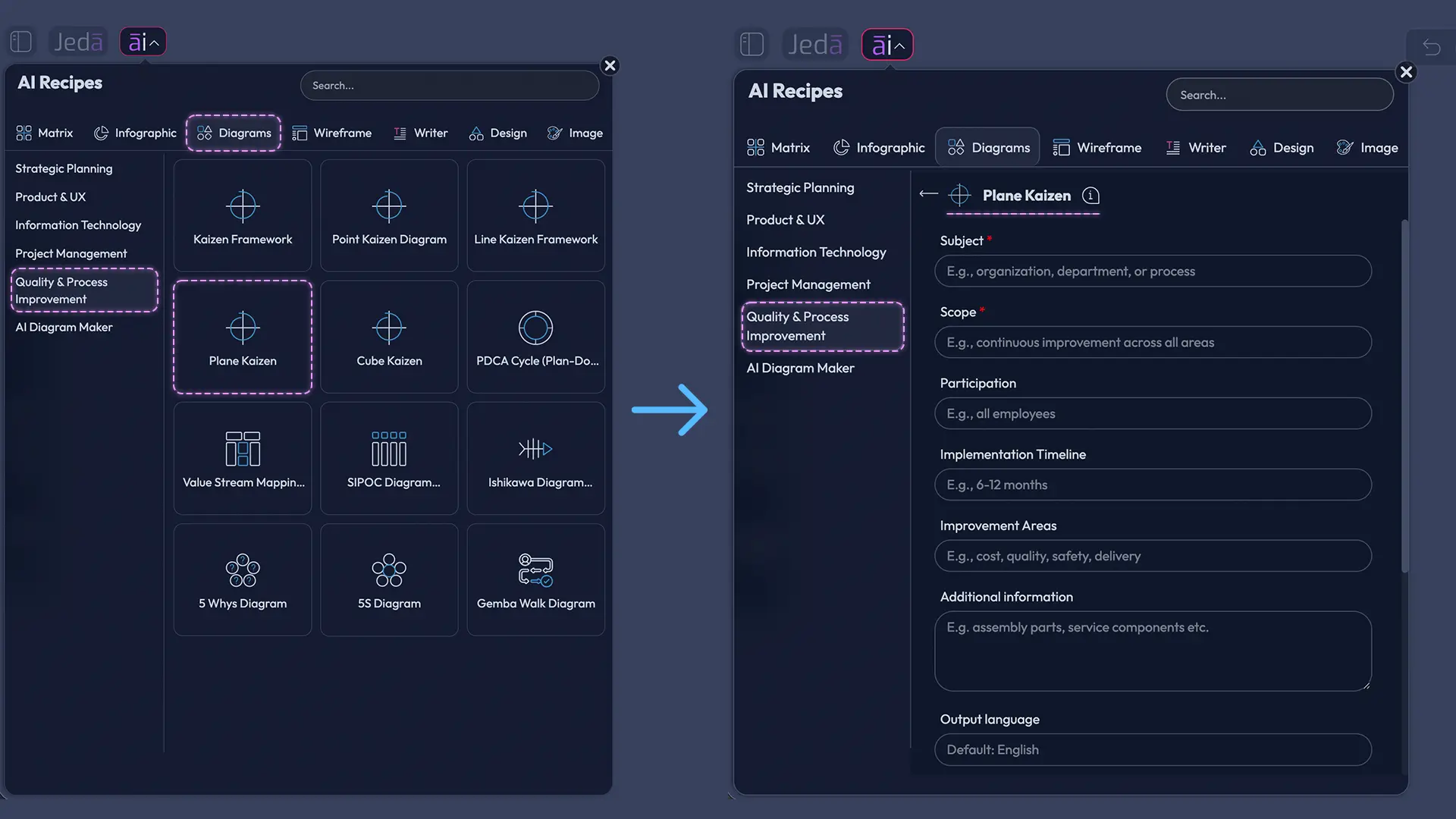
You will find the Plane Kaizen recipe under the Quality & Process Improvement category. The recipe asks for common diagram fields: Subject, Scope, Participation, Implementation Timeline, Improvement Areas, and Additional Information. It also supports layout selection, Web Search, diagram type selection, and AI model selection.
- Open the AI Menu
From the Jeda.ai canvas, click the AI Menu in the top-left area to browse AI Recipes.
- Choose Quality & Process Improvement
Go to the Diagram Recipes area and select the Plane Kaizen recipe from the Quality & Process Improvement category.
- Fill in the Subject field
Enter the improvement theme, such as reducing order-to-delivery lead time, improving production handoffs, or aligning procurement and distribution.
- Define the Scope
Specify the lines, departments, product families, or value-stream boundaries that the Plane Kaizen diagram should include.
- Add Participation details
List the functions and roles involved, such as production, procurement, planning, quality, warehouse, logistics, finance, and leadership.
- Set the Implementation Timeline
Describe the improvement horizon, such as a 30-day pilot, 90-day rollout, or quarterly improvement cycle.
- Describe Improvement Areas
Add the operational issues that need attention, such as handoff delays, rework loops, material shortages, queue time, approval lag, or quality escapes.
- Add Additional Information
Provide constraints, current metrics, known bottlenecks, customer impact, or notes from a gemba walk.
- Choose layout and output type
Select Horizontal or Vertical layout, then choose Basic Diagram, Mind Map, or Flowchart based on how you want to present the improvement logic.
- Set Web Search and AI model options
Turn Web Search on, off, or auto depending on whether current external context is useful, then select the AI model for generation.
- Generate and edit on the AI Whiteboard
Click Generate, review the diagram, then edit text, shapes, connectors, colors, and structure directly inside Jeda.ai.
Which diagram type should you choose?
Choose Basic Diagram when you need a flexible cross-functional map with non-linear relationships. This is the strongest default for Plane Kaizen because dependencies can move in several directions.
Choose Mind Map when you are still exploring improvement areas. It works well for early workshops where teams need to branch from the central Plane Kaizen subject into departments, causes, risks, and action themes.
Choose Flowchart when the improvement is mainly about sequence. Use it for order fulfillment, approval flow, production handoffs, incident escalation, or any process where timing and decision points matter.
How to create Plane Kaizen with AI from the Prompt Bar
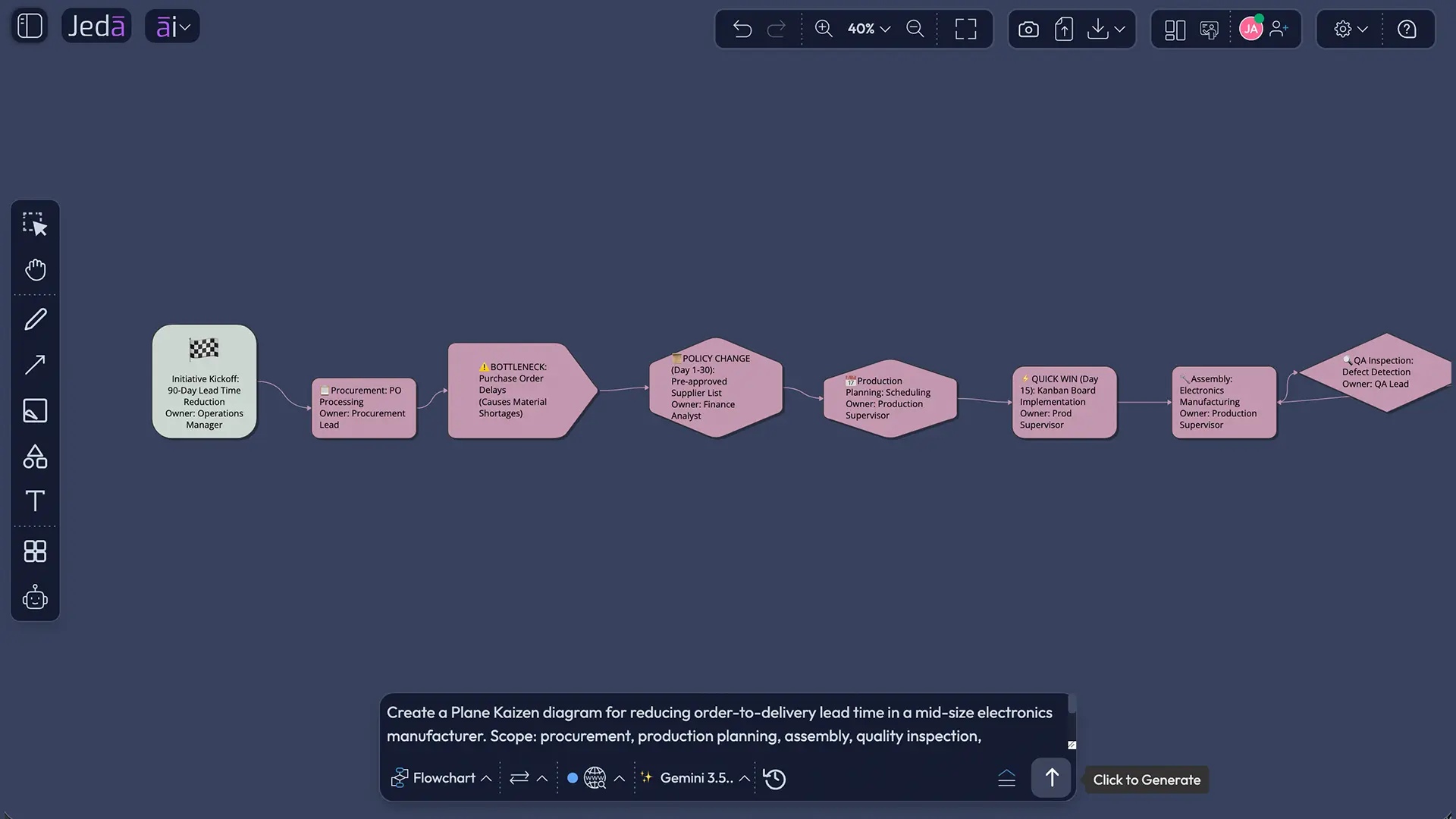
Use the Prompt Bar method when you already know the structure you want, or when you want to quickly generate an alternate version of the same Plane Kaizen diagram. This is faster, less guided, and better for experienced users.
The Prompt Bar sits at the bottom of the Jeda.ai workspace. Select the right command, enter your prompt, choose layout and model settings, then generate. No need to type slash commands here. The command selector handles that work.
- Open the Prompt Bar
Go to the bottom of the Jeda.ai canvas and click into the Prompt Bar.
- Select the Diagram command
You can also choose Mindmap for exploration or Flowchart for sequential process improvement.
- Write the Plane Kaizen prompt
Describe the subject, scope, participants, timeline, improvement areas, constraints, and expected outcome in one clear prompt.
- Choose Horizontal or Vertical layout
Use Horizontal for value-stream flow across departments. Use Vertical when you want leadership, teams, and execution layers stacked.
- Set Web Search
Use Web Search when current industry benchmarks, market conditions, or regulatory context could influence improvement decisions.
- Select the AI model
Pick the reasoning model that best fits the depth and style of analysis you need.
- Generate the visual
Click Generate and let Jeda.ai create the Plane Kaizen diagram directly on the AI Whiteboard.
- Edit, share, and extend
Adjust the generated nodes, add collaborators, and use AI+ to extend selected areas with related detail. AI+ extends existing content; it is not a custom instruction box.
Prompt Bar prompt example
Use this as a starting prompt, then rewrite it for your own operation:
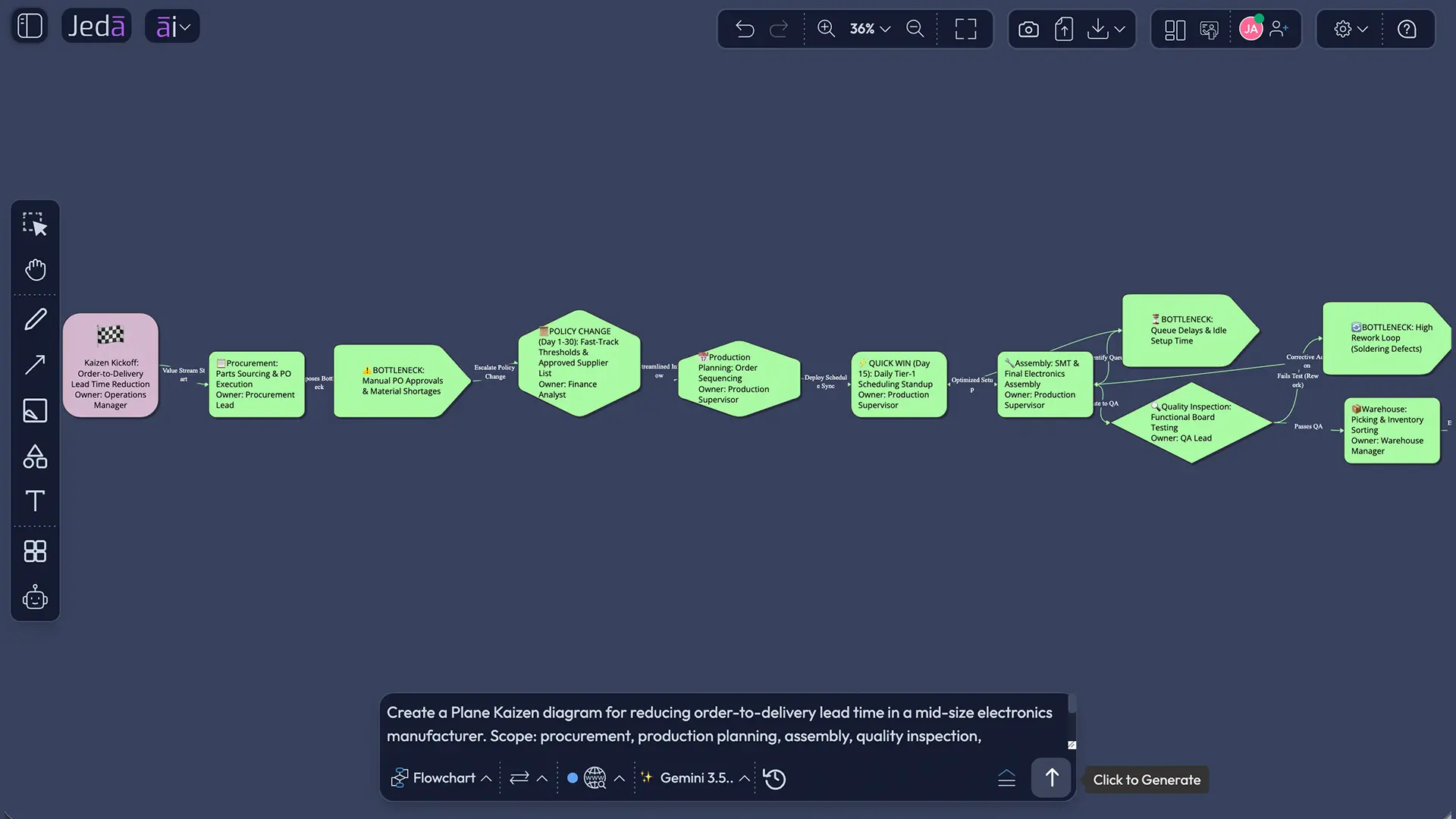
Plane Kaizen template for Jeda.ai
A strong Plane Kaizen template should not start with “improve everything.” That phrase is a trap wearing a motivational poster. Start with boundaries.
Use this structure inside the Plane Kaizen recipe or Prompt Bar:
| Template field | What to include | Example |
|---|---|---|
| Subject | The improvement theme | Reduce order-to-delivery lead time |
| Scope | Lines, functions, value stream, or product family | Procurement to outbound logistics for Product Family A |
| Participation | Functions and decision roles | Operations, procurement, QA, warehouse, finance |
| Implementation Timeline | Pilot and rollout horizon | 30-day pilot, 90-day rollout |
| Improvement Areas | Bottlenecks and waste patterns | Queue time, rework, approval lag, stockouts |
| Additional Information | Constraints and context | No new ERP project, low-cost changes preferred |
This structure forces clarity before generation. Good AI output depends on the shape of the input. If the input is vague, the diagram becomes motivational fog. If the input names the real lines, constraints, and actors, Jeda.ai can generate a much more useful starting point.
Example use case: reducing cross-functional delay in a manufacturing value stream
Imagine a manufacturer trying to reduce customer delivery delays. Production blames procurement. Procurement blames forecast changes. Warehouse blames late inspection release. Quality blames unclear defect thresholds. Finance blocks rush shipments because exception approvals are unclear.
Classic meeting. Everyone is correct. Nothing improves.
Plane Kaizen gives the team a wider map. In Jeda.ai, the team can create a Basic Diagram with six connected functions: demand planning, procurement, production, QA, warehouse, and outbound logistics. Then the team can mark each improvement area: forecast instability, supplier delay, changeover queue, rework loop, release delay, carrier cutoff miss, and approval bottleneck.
The useful part is not the picture. The useful part is what the picture makes impossible to ignore.
A local fix in production may reduce assembly time by 8 percent, but if QA release still waits 18 hours, the customer sees no improvement. A better Plane Kaizen diagram shows that the improvement target is not “make assembly faster.” It is “reduce total order-to-delivery lead time by removing cross-functional waiting.”
That is a different problem. Better problem, better odds.
Best practices for Plane Kaizen diagrams with AI
Common mistakes to avoid
The first mistake is scope inflation. Plane Kaizen should connect several lines or functions, but it still needs a boundary. “Improve operations” is too broad. “Reduce order-to-delivery lead time across procurement, assembly, QA, warehouse, and logistics for Product Family A” is usable.
The second mistake is confusing activity with improvement. A busy diagram is not a better diagram. Add fewer nodes if those nodes expose the real constraint.
The third mistake is hiding ownership. If the diagram does not show who participates and who owns follow-up, the team has created process art. Lovely. Useless by Friday.
The fourth mistake is skipping measurement. A Plane Kaizen diagram should connect improvement areas to metrics such as lead time, defect rate, queue time, rework frequency, changeover time, on-time delivery, inventory turns, or escalation delay.
The fifth mistake is treating AI output as final. Jeda.ai gives you an editable first version. The team still needs to inspect, challenge, adjust, and align. That human judgment is the point.
How Plane Kaizen fits inside an AI Workspace
Plane Kaizen becomes more valuable when it lives inside a shared AI Workspace instead of a static document. In Jeda.ai, the diagram can sit next to notes, screenshots, uploaded documents, related process maps, sticky notes, and follow-up visuals. Teams can turn one Plane Kaizen output into a Mind Map for causes, a Flowchart for the future-state process, or a Basic Diagram for dependency mapping.
The AI Whiteboard matters because cross-functional improvement is visual work. People need to see where work waits, who touches the flow, and what changes affect other teams. Text alone is too linear for that. Slides are too final. A live canvas gives the team room to think.
Jeda.ai also supports the broader content system: 300+ strategic frameworks, editable Visual AI outputs, AI Recipes, Web Search, model selection, and collaboration. For 150,000+ users, that means Plane Kaizen does not have to be a one-time workshop file. It can become part of an ongoing improvement workspace.
Frequently Asked Questions
- What is Plane Kaizen?
- Plane Kaizen is a cross-functional continuous improvement approach that connects several lines, departments, or processes across a value stream. It goes beyond local fixes and focuses on how improvements move horizontally through the organization.
- How is Plane Kaizen different from Line Kaizen?
- Line Kaizen improves connected steps within one line or process chain. Plane Kaizen expands the scope across multiple lines or departments, making it better for value-stream issues that involve procurement, production, quality, logistics, finance, or leadership.
- Can AI help create a Plane Kaizen diagram?
- Yes. AI can structure the subject, scope, participation, timeline, improvement areas, and constraints into a visual diagram. In Jeda.ai, the output stays editable, so teams can refine nodes, connectors, ownership, and timeline details after generation.
- What is the best Jeda.ai method for Plane Kaizen?
- The Plane Kaizen Diagram Recipe is the best starting method because it guides users through the right fields. The Prompt Bar method is better when users already know the structure and want a faster custom diagram.
- Should I choose Basic Diagram, Mind Map, or Flowchart?
- Choose Basic Diagram for flexible cross-functional relationships, Mind Map for early exploration, and Flowchart for sequential process improvement. Plane Kaizen usually works best as a Basic Diagram when dependencies move across several departments.
- What fields should a Plane Kaizen template include?
- A strong Plane Kaizen template should include Subject, Scope, Participation, Implementation Timeline, Improvement Areas, and Additional Information. These fields keep the improvement effort specific and prevent the diagram from becoming a vague operations wish list.
- Can Plane Kaizen be used outside manufacturing?
- Yes. Plane Kaizen can support logistics, software delivery, finance operations, customer support, education administration, and other workflows where several functions affect one shared outcome.
- How does Web Search help Plane Kaizen with AI?
- Web Search helps when current external context matters, such as supplier disruption, regulatory changes, industry benchmarks, or market conditions. In Jeda.ai, Web Search is a platform feature, not a specific AI model feature.
- What does AI+ do after a Plane Kaizen diagram is generated?
- AI+ extends selected parts of an existing visual with related detail. Use it to deepen a node, branch, or section after generation. Do not use AI+ as a place for custom instructions or new prompts.
- Is Plane Kaizen the same as value stream mapping?
- No, but they overlap. Plane Kaizen focuses on cross-functional improvement across connected lines or departments. Value stream mapping visualizes the flow of materials and information. A Plane Kaizen diagram can use value-stream thinking without replacing formal VSM.
Sources & Further Reading
- [1]
Toyota UK Magazine (2013, updated 2024) . “What is kaizen and how does Toyota use it?” Toyota UK Magazine.
View Source ↗ - [2]
Toyota Motor Corporation (2026) . “Toyota Production System” Toyota Global.
View Source ↗ - [3]
Kaizen Institute (2026) . “What is KAIZEN™?” Kaizen Institute.
View Source ↗ - [4]
Lean Enterprise Institute (2026) . “Kaizen: A Resource Guide” Lean Enterprise Institute.
View Source ↗ - [5]
U.S. Environmental Protection Agency (2025) . “Lean Thinking and Methods - Kaizen” EPA.
View Source ↗ - [6]
Mohd Ghazali Maarof and Fatimah Mahmud (2016) . “A Review of Contributing Factors and Challenges in Implementing Kaizen in Small and Medium Enterprises” Procedia Economics and Finance.
View Source ↗ - [7]
PTC (2024) . “How Kaizen and Lean Manufacturing Work Together” PTC Blog.
View Source ↗ - [8]
Six Sigma Development Solutions, Inc. (2021) . “What is Kaizen? Principles, Key Concepts and Implementation” SixSigmaDSI.
View Source ↗
Create Your Plane Kaizen Diagram in Jeda.ai
Join 150,000+ users using Jeda.ai to turn continuous improvement work into editable Visual AI diagrams, value-stream maps, and collaborative AI Workspace boards.
Try Jeda.ai Free