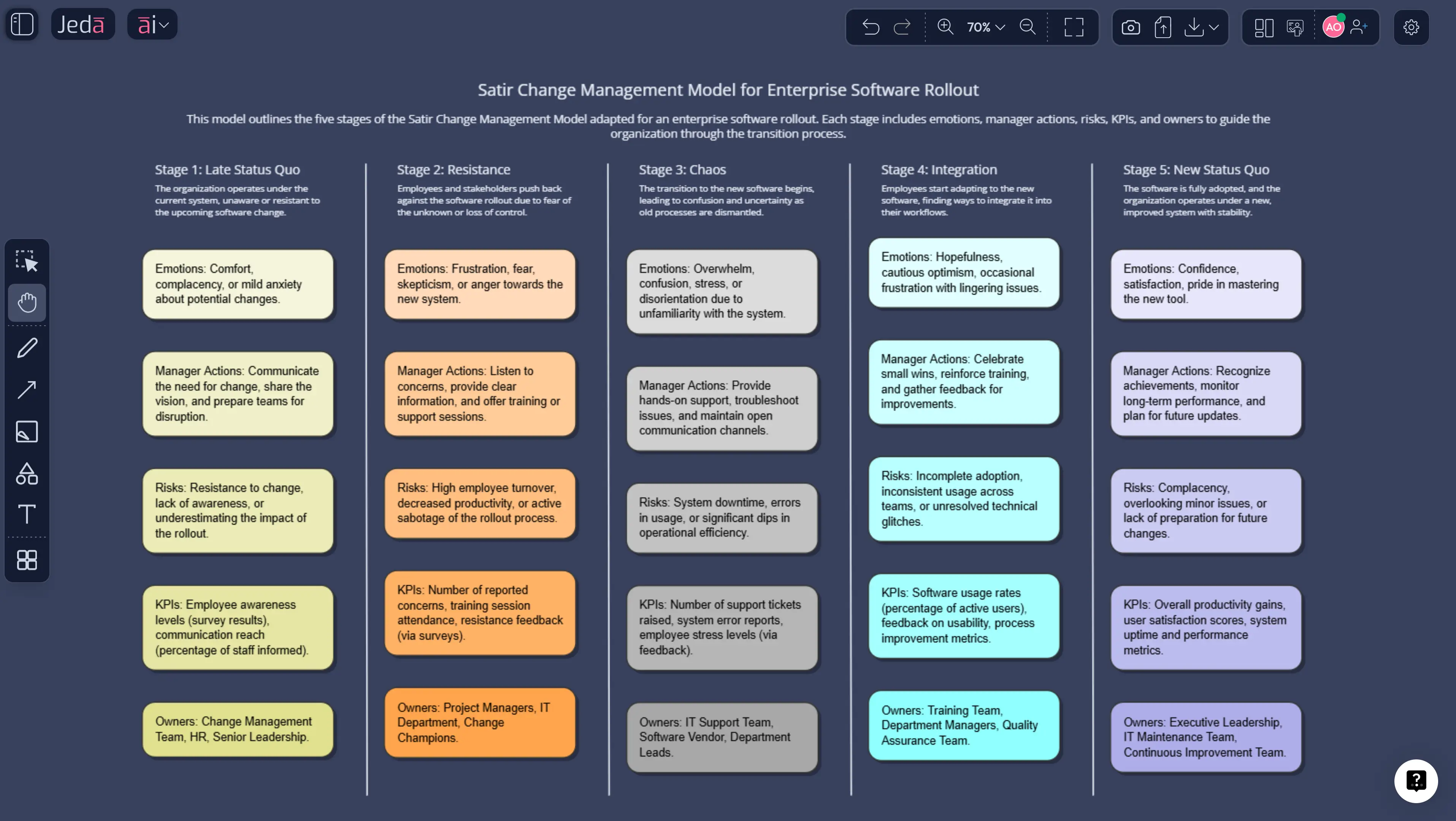
Satir Change Management Model with AI: lead people through resistance, chaos, and integration with more clarity
The Satir Change Management Model with AI is useful because change rarely fails on logic alone. It fails when leaders underestimate what disruption feels like from inside the team. Strategy decks look calm; humans do not. And that’s exactly why this model still earns its keep. It gives you a way to map emotional reality while building a practical plan inside an AI Workspace and AI Whiteboard your team can actually edit together.
If you’re trying to roll out a new process, platform, org design, or operating model, this framework helps you see where performance dips, why resistance shows up, and what people need before they can reach a durable new status quo.
What is the Satir Change Model?
The Satir Change Model is a change framework associated with Virginia Satir, a pioneer in family therapy, later adapted widely for organizational change. In business use, it usually appears as five stages: late status quo, resistance, chaos, integration, and new status quo.
Here’s why people still use it: it doesn’t pretend change is a clean line. Performance often drops before it improves. People don’t just “adopt.” They wobble, push back, get confused, test new behavior, and only then stabilize. The model captures that arc with more honesty than most change-management posters ever do.
Some Satir literature also highlights the foreign element that disrupts the old state and the need for practice on the way to stabilization. In practical team settings, those ideas are usually folded into the five-stage version because it’s easier to teach and easier to run on a board.
Why use the Satir Change Management Model with AI?
Because static change frameworks die in static documents.
When you use the Satir Change Model inside Jeda.ai, you move from explanation to execution. You can map each stage, attach stakeholder signals, generate risk-reduction ideas, and keep the output editable. That’s where an AI Workspace beats a dead PDF and where an AI Whiteboard beats a one-off presentation.
- Stage-by-stage clarity
Build one editable matrix that shows the emotional stage, operational symptoms, intervention, owner, and success signal.
- Faster intervention design
Use AI to generate talking points, manager prompts, coaching notes, and risk mitigations for each phase of the curve.
- Shared change visibility
Keep leaders, PMs, and team members aligned in one AI Whiteboard instead of scattering decisions across chat, docs, and slides.
Jeda.ai’s workflow docs position the product around framework-native, visual-first, editable collaboration rather than a blank canvas approach, which fits this framework unusually well. And the platform rules matter here too: you can generate the board through the AI Menu or by selecting the Matrix command from the Prompt Bar, then use the AI+ button to deepen the analysis after the first pass.
The five stages, without the corporate wallpaper
1) Late Status Quo
This is the familiar normal. Routines are stable. People know the shortcuts. Performance feels predictable, even if the system is already showing cracks. The trap? Leaders often confuse familiarity with health.
2) Resistance
A new element enters. People push back. Sometimes that looks loud. Sometimes it looks polite and passive, which is sneakier. Resistance is not always irrational. Quite often it’s a signal that the team lacks context, trust, capability, or proof.
3) Chaos
This is the dip. Old methods no longer work, the new way still feels awkward, and performance can fall before it recovers.If you’re leading a systems migration, process redesign, or new management model, this is the stage that scares executives most.
And honestly? It should. Because unmanaged chaos creates rollback behavior.
4) Integration
People start making sense of the new pattern. Skills improve. The change stops feeling like an alien object and starts feeling usable.
5) New Status Quo
The new behavior becomes routine. The organization has stabilized at a new baseline. Ideally, it performs better than before. If it doesn’t, congratulations—you didn’t finish the change. You just survived the disruption.
How to create Satir Change Management Model with AI in Jeda.ai
Jeda.ai’s uploaded workflow file requires the “how-to” section to use two methods when an AI recipe exists: AI Menu first and Prompt Bar second. For this topic, that recipe exists. Jeda.ai’s gallery explicitly shows a Satir Change Management Model option under the AI Menu’s Business Process category.
Method 1: Recipe Matrix
Use the Satir Change Management Model recipe when you want a pre-structured matrix fast. Open AI Menu from the top-left corner of the canvas, go to the Matrix Recipes category, and choose the Satir-related change model recipe if it is available in your workspace. Then enter your situation in plain language. For example, you might describe a merger, a new operating model, a leadership transition, or a digital rollout that is causing instability across teams.
Once you click Generate, Jeda.ai builds the matrix around the Satir model’s change stages so you can map where a team, department, or business unit currently sits. That matters because most change plans fail when leaders treat all resistance as the same thing. It isn’t. A team in Late Status Quo needs a different response than one in Chaos or Integration.
After the matrix appears, refine it directly on the canvas. Add your own notes, rewrite labels, expand sticky notes, and clarify what each stage means in your context. Then use the AI+ button to deepen the board. AI+ works best here when you want broader expansion rather than a narrow instruction. Think: extend the board, add more detail, surface risks, or continue the analysis. Not: “write three bullets for the finance team.” AI+ is for expansion, not micromanagement.
This method is the fastest route when you want structure first and customization second. It is especially useful for workshop facilitators, change leaders, consultants, and strategy teams who need to move from abstract change talk to a visible, shared model on an AI Workspace without building the matrix from scratch.
- Open the AI Menu and choose the recipe
In Jeda.ai, open the AI Menu, go to the Business Process category, and select the Satir Change Management Model recipe.
- Describe the change clearly
Add the real change event: new software rollout, reorg, policy shift, operating-model redesign, or transformation initiative. Be specific about who is affected.
- Generate the Recipe Matrix
Let Jeda.ai create the initial matrix with stages, expected reactions, and early change patterns. Review the structure before editing.
- Use the Prompt Bar for a custom version
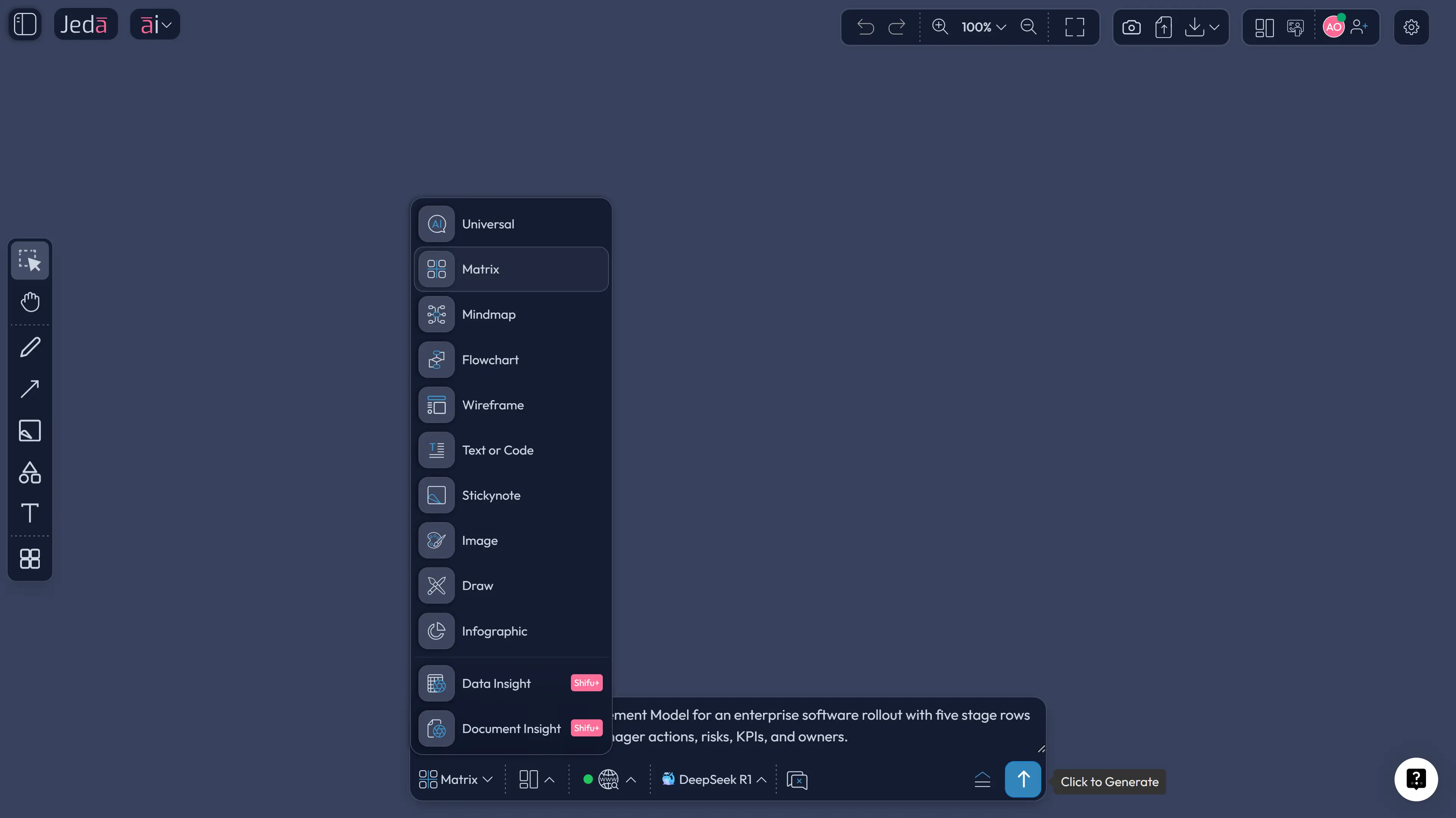
Open the Prompt Bar, select the Matrix command, and prompt Jeda.ai to build a Satir change board with columns such as stage, employee signals, leadership actions, risks, metrics, and owner.
- Deepen the analysis with AI+
Select the board and use the AI+ button to extend any stage. Ask for manager communication scripts, resistance-handling tactics, coaching prompts, or success indicators.
- Transform and share
Use Vision Transform if you want to turn the matrix into a Diagram or Flowchart for presentations, then export the result as PNG, SVG, or PDF for review.
Method 2: Prompt Bar
Use the Prompt Bar when you want to create the Satir Change Management Model from scratch with more flexibility. Open the Prompt Bar at the bottom of the canvas, select the Matrix command, and type a direct prompt describing the change scenario you want to map.
A solid prompt looks like this:
“Create a Satir Change Management Model matrix for an organization going through ERP implementation. Show the five stages: Late Status Quo, Resistance, Chaos, Integration, and New Status Quo. Include emotional patterns, leadership risks, team behaviors, and recommended actions for each stage.”
Press Enter, and Jeda.ai will generate the matrix on the canvas. From there, you can edit every section, adjust wording, add examples, or tailor the model to a specific team, initiative, or business context. This is the better route when you need tighter control over the framing, especially if the change is complex or politically sensitive.
After the matrix is generated, use the AI+ button to expand the board into a deeper visual analysis. AI+ is useful when you want the model to continue into adjacent thinking—such as risks, communication gaps, stakeholder reactions, or transition actions—without manually rebuilding the structure yourself. It helps you turn a simple change map into a more complete working board inside Jeda.ai’s AI Whiteboard.
This method works well for consultants, business leaders, HR teams, and transformation managers who want a more customized output inside a Visual AI workflow, while still getting the speed benefits of Jeda.ai.
Example Prompt Bar prompt
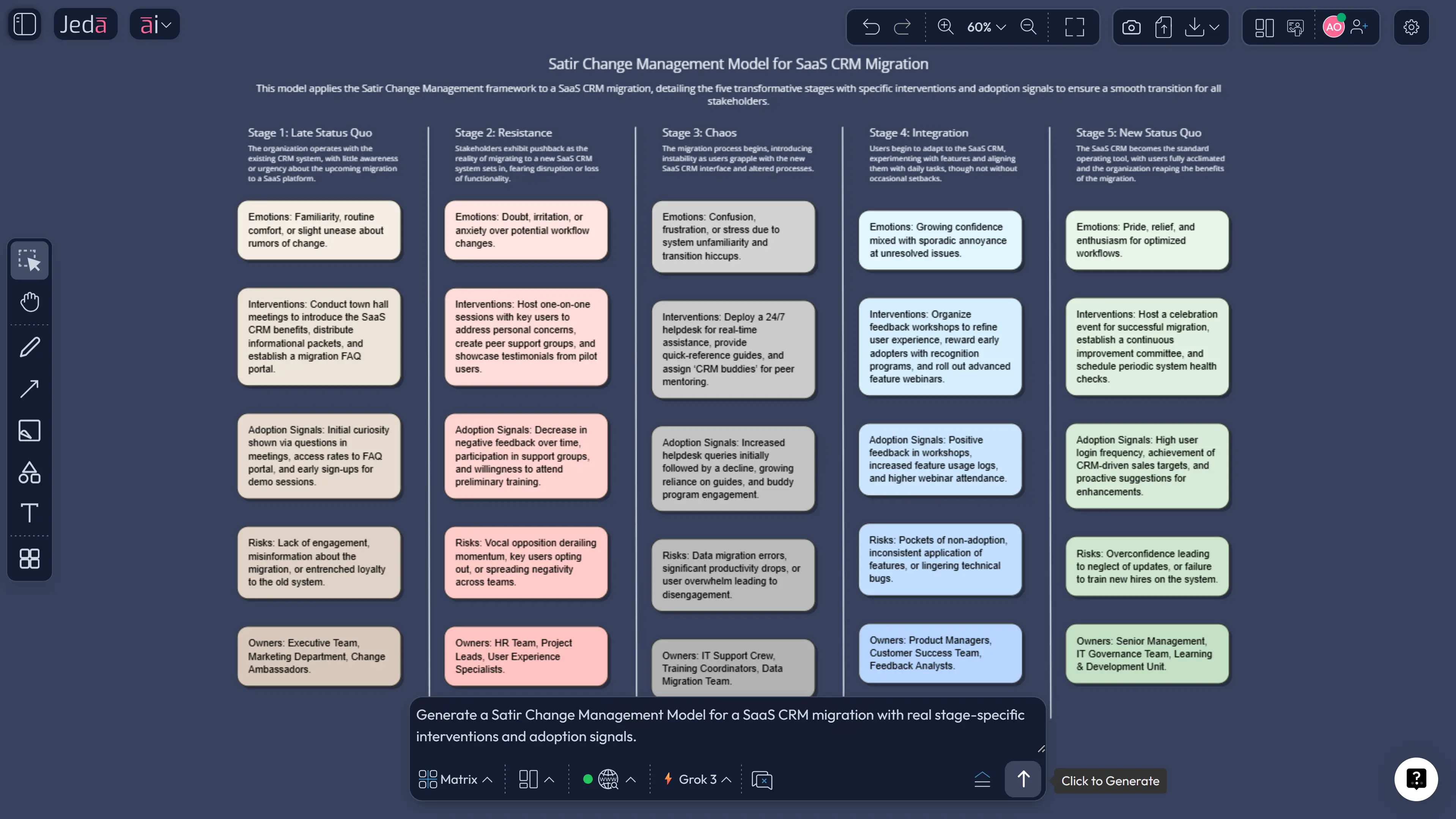
“Create a Satir Change Management Model for a company-wide CRM migration. Build rows for late status quo, resistance, chaos, integration, and new status quo. Add columns for team emotions, visible behaviors, manager interventions, communication priorities, KPIs, and risks.”
That prompt does real work. No fluff. No ceremonial buzzwords.
Satir Change Management Model template and example
Let’s say a mid-sized SaaS company is replacing its homegrown project tracker with a standardized work platform.
- In late status quo, teams rely on workarounds and tribal knowledge.
- In resistance, power users complain that the old system was “faster.”
- In chaos, dashboards break, reporting gets messy, and people question the decision.
- In integration, teams learn the new workflows and stop improvising around them.
- In new status quo, reporting improves, onboarding gets easier, and leaders finally get cleaner visibility.
Inside Jeda.ai, that board becomes more than a diagram. You can attach real intervention design to each phase:
- messaging for team leads,
- training by function,
- risk flags by department,
- success signals by week,
- and a comparison of actual vs expected adoption.
That’s the difference between admiring the framework and using it.
Best practices and tips
Common mistakes to avoid
First, treating resistance as a personnel problem. Sometimes it is. Often it’s a design problem.
Second, skipping the performance dip in your forecast. Teams usually do not glide from old to new with cinematic grace.
Third, assuming integration happens because training happened once. Practice is not a calendar invite; it’s repetition plus reinforcement.
Fourth, using the same communication style for every stage. Resistance needs clarity. Chaos needs containment. Integration needs reinforcement.
Fifth, forgetting to convert the board into other views. A matrix is great for working sessions, but leadership may absorb the story faster as a Diagram or Flowchart. Jeda.ai’s Vision Transform is made for that kind of shift.
Frequently asked questions
- What are the five stages of the Satir Change Model?
- The five stages are late status quo, resistance, chaos, integration, and new status quo. Together they describe how people and teams emotionally and behaviorally move through change before performance stabilizes again.
- Who created the Satir Change Model?
- The model is associated with Virginia Satir, a pioneer in family therapy whose change concepts were later adapted widely for organizational and transformational change work.
- Is the Satir Change Model only for personal change?
- No. It began in therapeutic and human systems thinking, but it is now widely used in organizations to understand how teams react to process, technology, structural, and cultural change.
- Why is the chaos stage so important?
- Chaos is where old patterns stop working but new ones are not yet reliable. If leaders ignore this stage, performance drops can trigger panic, blame, or rollback behavior.
- How do you use AI with the Satir Change Model?
- Use AI to draft the stage map, identify likely emotional signals, generate communication plans, propose interventions, and create role-specific coaching prompts. Then review and edit the output with leadership judgment.
- Does Jeda.ai have a Satir Change Management Model recipe?
- Yes. Jeda.ai’s gallery shows a Satir Change Management Model available through the AI Menu under the Business Process category, which supports the Recipe Matrix method for this topic.
- What Jeda.ai command should I use for this framework?
- Start with the Matrix command for the clearest structured view. Then convert it into a Diagram or Flowchart if you want a more presentation-ready format for stakeholder communication.
- Can I extend the generated board after it is created?
- Yes. After generating the board, select it and use the AI+ button to deepen stage analysis, add interventions, expand risk handling, or create manager communication prompts.
- What is the best use case for the Satir model at work?
- It works best for changes that disrupt habits and identity, such as software rollouts, reorganizations, operating-model shifts, mergers, or policy changes that alter how people work day to day.
- How is the Satir model different from process-heavy change frameworks?
- The Satir model focuses on the human response curve, especially emotion, performance, and adaptation. Process-heavy models often explain what leaders should do; Satir helps explain what people are likely to feel while it happens.
Sources & further reading
- [1]
Virginia Satir Global Network (2017) . “Satir Model” Virginia Satir Global Network.
View Source ↗ - [2]
John Banmen (2002) . “The Satir Model: Yesterday and Today” Contemporary Family Therapy.
View Source ↗ - [3]
Carl Sayles (2002) . “Transformational Change—Based on the Model of Virginia Satir” Contemporary Family Therapy.
View Source ↗ - [4]
Stanley J. Gross (1994) . “The Process of Change: Variations on a Theme by Virginia Satir” Journal of Humanistic Psychology.
View Source ↗ - [5]
Lucid Software (2026) . “What Is the Satir Change Model?” Lucid.
View Source ↗
Start Your Satir Change Management Analysis with AI Today
Join over 150,000+ users who use Jeda.ai’s AI Workspace and AI Whiteboard to turn external signals into decision-ready strategy.
Try Free Template