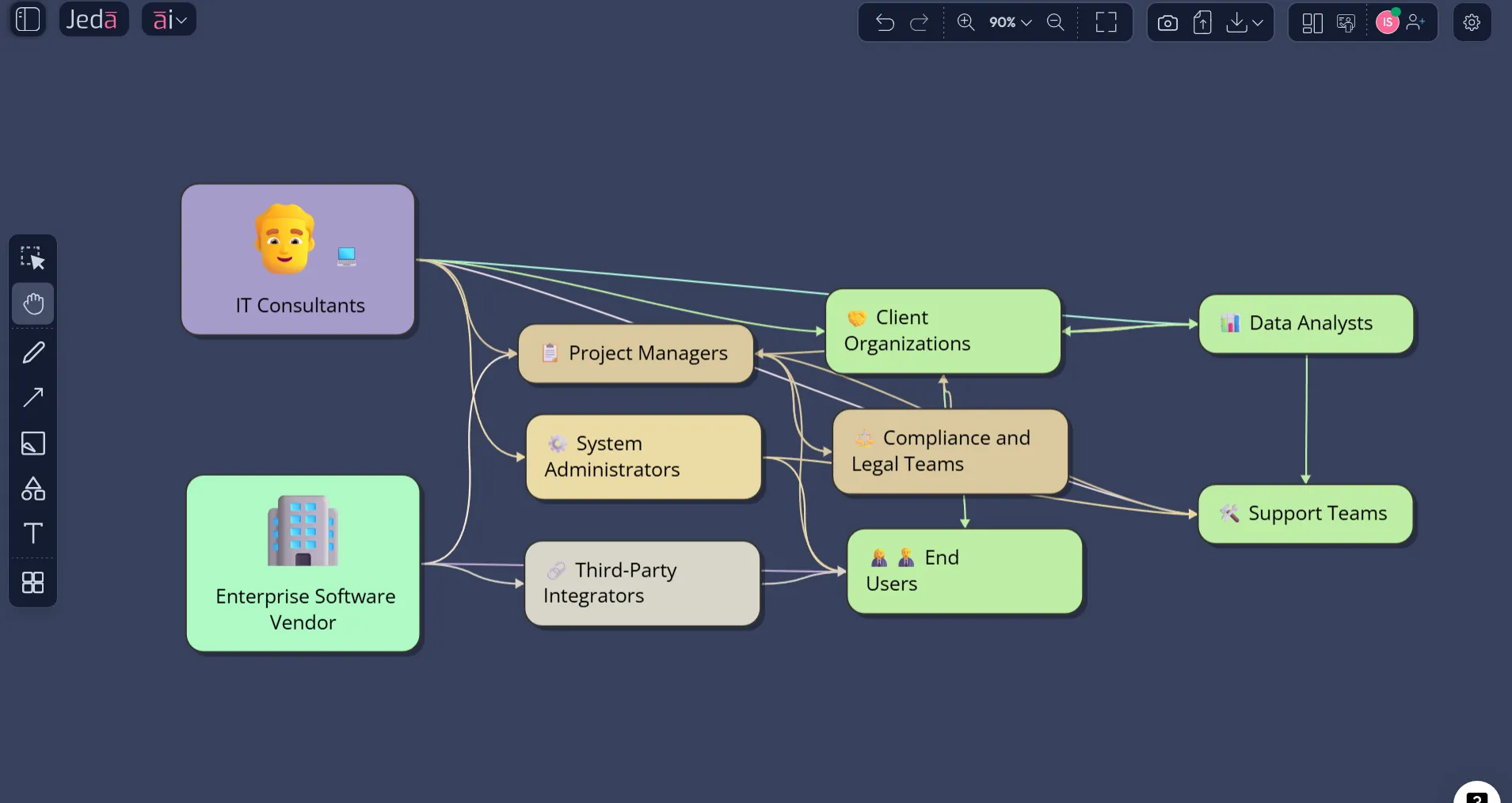
Stakeholder Map with AI sounds simple on paper. In real projects, it rarely is. The moment a launch, transformation, migration, or policy change gets real, the human layer gets messy fast: sponsors want updates, users want clarity, legal wants control, operations wants predictability, and nobody agrees on who matters most. That is exactly why a good stakeholder map earns its keep. Inside Jeda.ai, you can build one inside a single AI Workspace instead of bouncing between notes, slides, and static templates. And that matters when more than 150,000+ users are already leaning on visual workflows to cut through planning noise inside an AI Whiteboard built for structured thinking.
What is a stakeholder map, really?
A stakeholder map is a visual way to identify the people or groups who can affect your initiative, be affected by it, or both. In practice, teams usually turn that into a simple decision view: who has high influence, who has high interest, who needs close management, who needs steady updates, and who should not be ignored just because they are quiet.
That sounds obvious. It still gets skipped all the time.
Freeman’s stakeholder approach pushed strategy beyond a narrow shareholder lens and toward the broader network of groups that can affect or are affected by organizational action. Bryson later translated that into practical stakeholder identification and analysis techniques that help managers build coalitions, frame issues, and move strategy forward. PMI takes the same point into project delivery: miss one powerful stakeholder at the wrong moment and the project can wobble for reasons that have nothing to do with the technical plan.
So a stakeholder map is not a decorative quadrant. It is a risk-reduction tool. A communication design tool. Sometimes, frankly, a political survival tool.
Inside Jeda.ai, the payoff is stronger because the map is not trapped as a screenshot. It stays editable in your Visual AI canvas. You can expand it, restyle it, reframe it, or convert it into another visual when the conversation changes.
Why use Stakeholder Map with AI instead of building it by hand?
Manual stakeholder mapping usually breaks in three places. First, teams forget people. Second, they overrate the loudest voices and underrate the quiet blockers. Third, the map becomes stale the second the project moves from kickoff to execution.
That is where Jeda.ai earns its spot as an AI Whiteboard and AI Workspace rather than just another blank board. You are not starting from a cold canvas and hoping your memory behaves.
- Faster stakeholder discovery
Use AI to surface internal and external stakeholder groups you might overlook, including downstream reviewers, enablers, gatekeepers, and impacted end users.
- Clearer influence logic
Map people by power, interest, support, resistance, or communication urgency so your team sees who matters now versus later.
- Better engagement planning
Turn the map into a practical communication view by adding message themes, update cadence, owner, and escalation risk.
- AI+ extension when the scope shifts
After the first map is generated, use AI+ to deepen branches and reveal adjacent stakeholders without rebuilding the whole thing.
- Vision Transform for new formats
Convert the same underlying thinking into a matrix, flowchart, or mind map when leadership wants a different visual story.
- Editable output, not dead output
Shapes, labels, connections, and formatting stay editable on the canvas, which is the difference between a living plan and a frozen deliverable.
That last point matters more than people admit. Static stakeholder templates are fine until someone says, “Can we split regulators into local and national?” or “Can we show the rollout owners separately from decision makers?” Then the template starts fighting back. A good AI Workspace should not do that.
When should you build a stakeholder map?
Build one early, then revisit it when the stakes change.
The obvious moment is project kickoff. But the better answer is: create one anytime a decision has cross-functional impact, political sensitivity, or asymmetric influence. Product launches. ERP rollouts. Mergers. Pricing changes. Security initiatives. Policy shifts. Executive reorgs. Public-facing programs. Anything with hidden veto power.
A stakeholder map is especially useful when:
- one executive sponsor is visible but real influence is distributed,
- the project touches compliance, finance, legal, or operations,
- users are affected even though they are not part of formal decision-making,
- communication breakdown would create delay, resistance, or rework,
- your team keeps saying “we need alignment” without defining who alignment actually depends on.
That is also why a stakeholder map pairs naturally with an AI Whiteboard. Alignment is a visual problem before it becomes a scheduling problem.
How to create Stakeholder Map with AI in Jeda.ai using the Diagram Recipe
This is the recommended route. And for this topic, it should be the main route.
Jeda.ai’s diagram recipe flow is the better fit when you want structure from the start: guided fields, visual settings, web-grounding options, and output control without the usual blank-canvas hesitation. Since your topic sits in the Project Planning lane, the recipe-first method gives you the cleanest way to capture “for what,” “for whom,” and the surrounding context before the map is generated.
Use the recipe when you want a stakeholder map that is ready for real review, not just rough ideation.
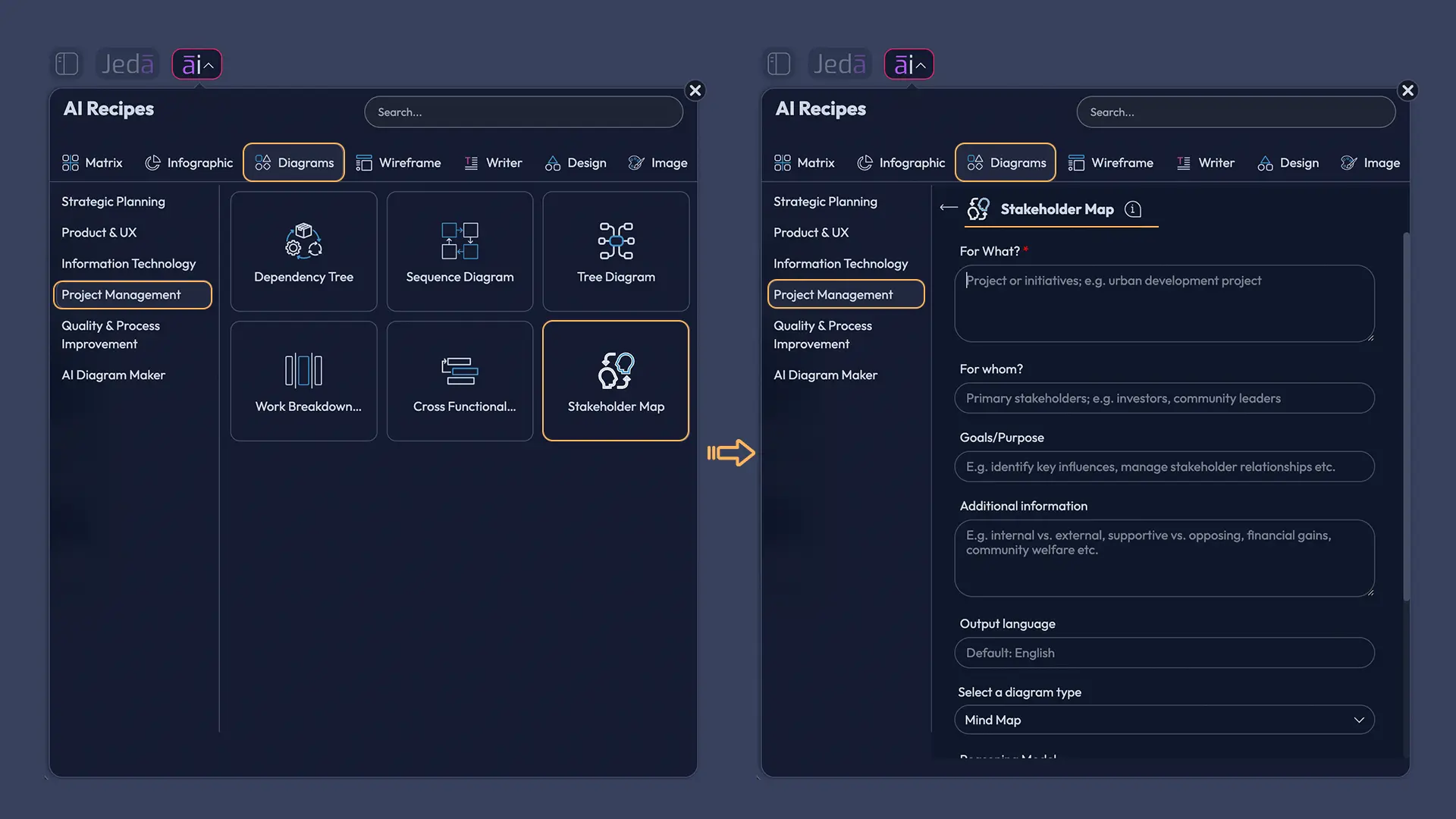
- Method 1 — Open the Diagram Recipe
In Jeda.ai, open the AI Menu from the top-left area, go to the Diagram recipes, and choose the Stakeholder Map recipe under the Project Planning category.
- Add the project context
Fill in the usual recipe fields such as For What, For Whom, Goals or Purpose, and More Context. Be specific about the initiative, decision scope, and what kind of stakeholder view you need.
- Choose the visual direction
Set the layout to Horizontal or Vertical based on how you want the conversation to flow on the canvas. Horizontal often feels better for broad executive reviews; Vertical can work well for stepwise project storytelling.
- Pick the diagram type
Choose whether the output should render as a Basic Diagram, Mind Map, or Flowchart. Basic Diagram is usually the cleanest option for stakeholder influence mapping, while Mind Map is useful for branching stakeholder families and Flowchart works when the story is tied to engagement or approval flow.
- Set Web Search and model options
Turn Web Search on or leave it on Auto if your stakeholder landscape depends on current context such as regulators, partners, market actors, or external organizations. Then choose the reasoning model you want to use.
- Generate the first map
Run the recipe and review the first version for missing groups, merged roles, or influence mistakes. Edit labels and move nodes directly on the canvas if needed.
- Use AI+ to deepen the map
Select a key node or area and use the AI+ button to extend the map with adjacent stakeholders, likely concerns, or deeper relationship detail. AI+ is best for extension after the map exists, not for ultra-precise instruction chains.
- Transform or refine for the audience
If the same thinking needs a different visual frame, use Vision Transform to convert the selected map into another structure such as a matrix or flow-based communication view.
How to create Stakeholder Map with AI from the Prompt Bar
The Prompt Bar method is faster when you already know the shape of the problem and just want to get moving.
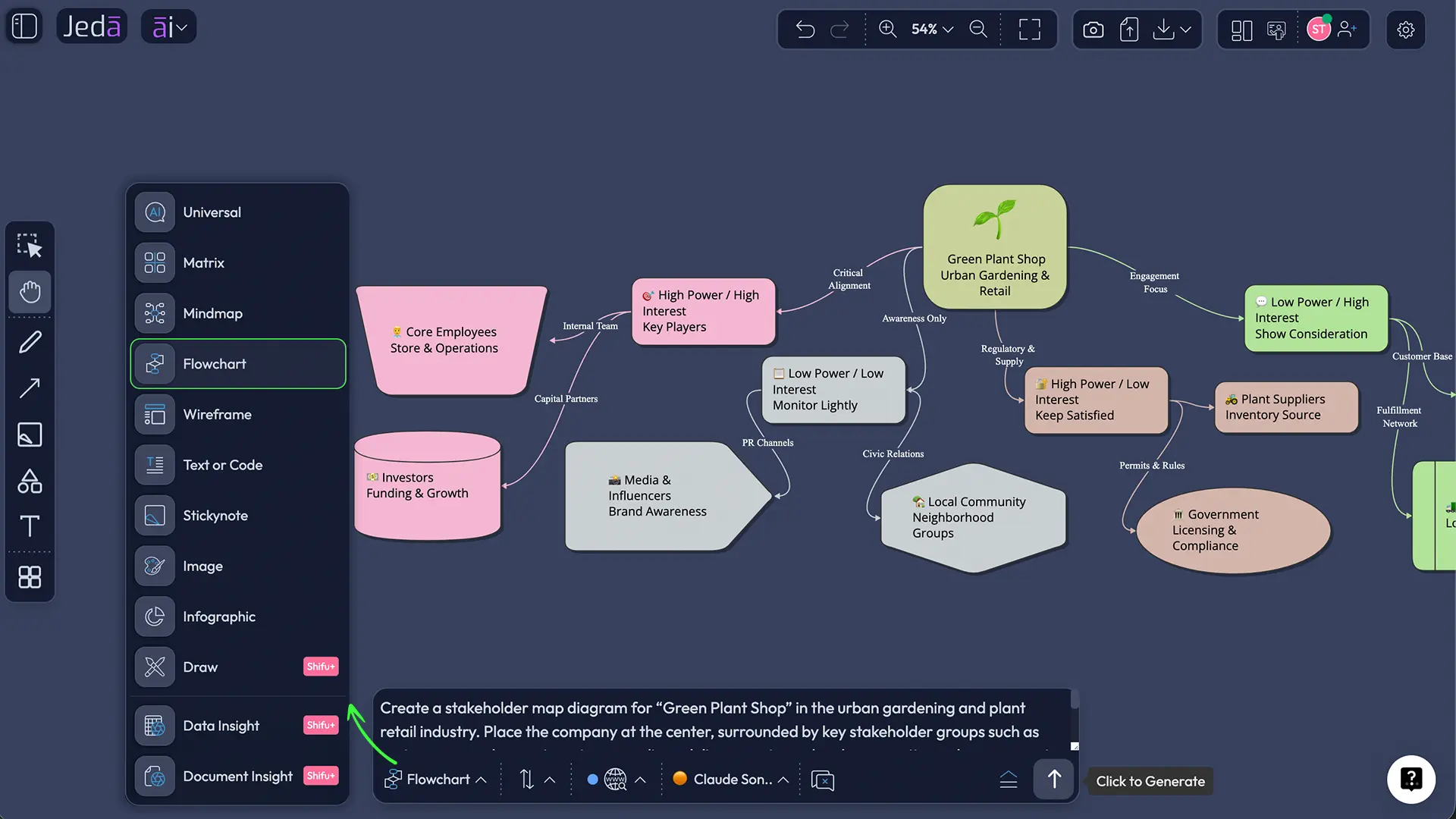
Open the Prompt Bar at the bottom of the canvas, select the most suitable command, and describe the stakeholder landscape in plain language. For most cases, start with Diagram. If you want a more hierarchical breakdown, use Mindmap. If your real need is not just “who matters” but “who signs off when,” Flowchart can be a better choice.
A solid Prompt Bar prompt usually includes five things:
- the initiative,
- the stakeholder groups,
- the scoring logic,
- the desired output style,
- and the communication objective.
Here is a clean example:
“Create a stakeholder map for a company-wide CRM migration. Plot stakeholders by influence and interest. Separate executive sponsors, sales leaders, operations, IT, legal, finance, customer success, training, and end users. Add likely concerns, engagement priority, and a suggested communication approach. Make the map presentation-ready.”
That prompt is already better than what most teams start with.
And once it renders, you are not done. That is the point. Use AI+ to deepen weak sections. Merge duplicate stakeholders. Split vague labels like “management” into actual decision groups. Then, if leadership wants a more formal view, convert the selection with Vision Transform inside the same AI Workspace.
Example use case: stakeholder mapping for a product launch
Let’s make this real.
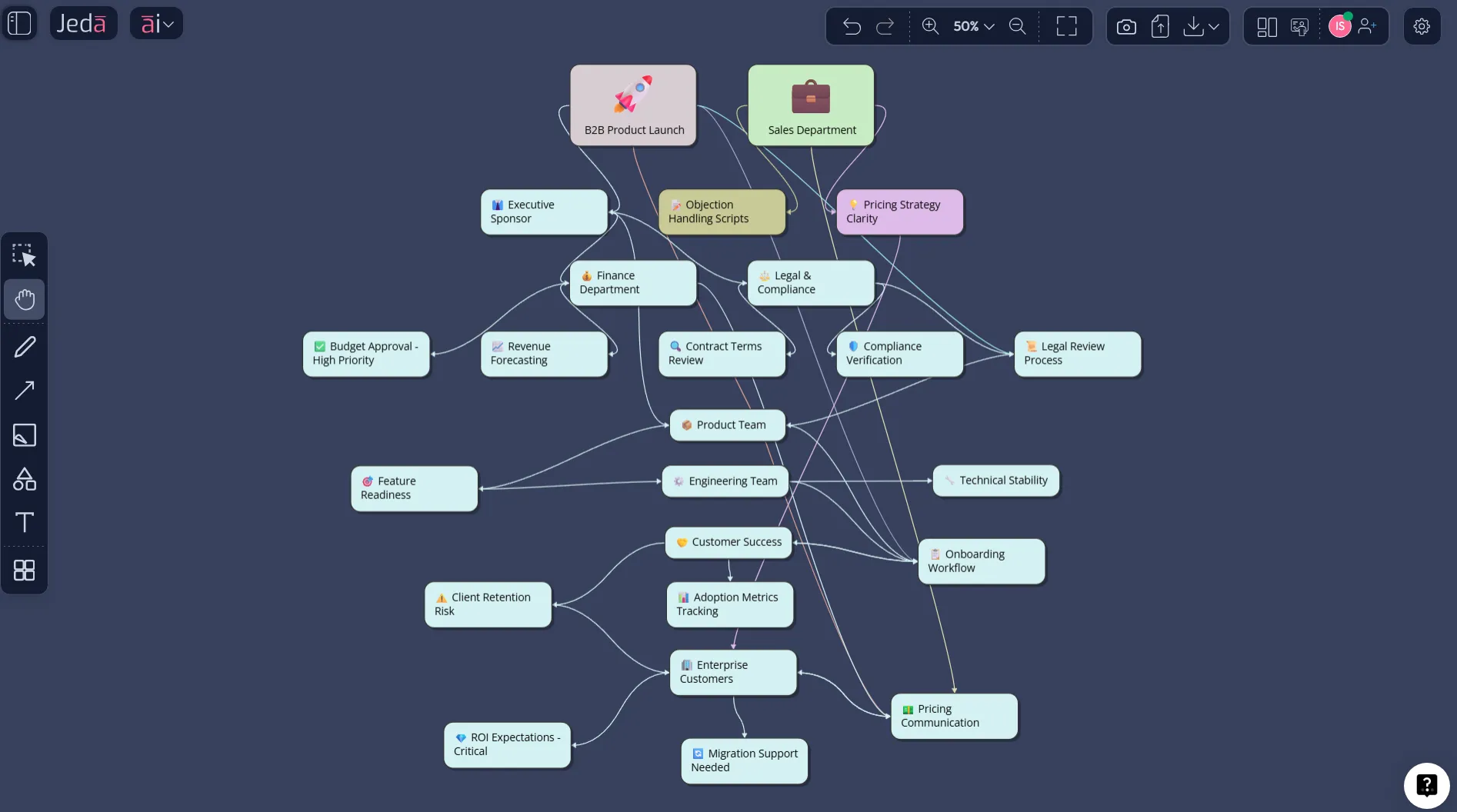
Imagine a product team preparing a major B2B feature launch that changes onboarding, pricing communication, support workflows, and legal review language. The team says they need alignment. What they actually need is a better stakeholder map.
The first pass might include product leadership, engineering, sales, customer success, marketing, legal, finance, support, and executive sponsors. Useful, but still too blunt.
A smarter stakeholder map would separate who approves from who influences, and who influences from who absorbs operational fallout. Legal may have moderate interest but high blocking power. Customer success may have lower formal power but high practical influence because they hear resistance first. Sales leadership may be highly interested but not equally affected across segments. Finance may care less about feature detail and more about revenue recognition or packaging implications.
That is where AI helps. Not because it replaces judgment, but because it helps surface patterns your team is likely to miss when building the map from memory.
Best practices for a stakeholder map that people will actually use
A strong stakeholder map is not the one with the prettiest quadrants. It is the one your team keeps returning to.
Common mistakes to avoid
The first mistake is treating the stakeholder map like a one-time workshop artifact. It is not. If the project changes, the stakeholder landscape changes.
The second is making the categories too generic. “Leadership,” “users,” and “operations” look tidy, but they often hide the exact groups that will either accelerate the work or gum it up.
The third is over-indexing on seniority. High title does not automatically mean high influence over your specific initiative.
And the fourth? Confusing stakeholder mapping with universal approval. A stakeholder map does not mean everyone gets equal say. It means your team knows who matters, why they matter, and how to engage them with intention.
That is a much better operating posture.
Stakeholder map, stakeholder analysis, and stakeholder engagement: what is the difference?
People blur these terms together because they are connected. Still, they are not interchangeable.
Stakeholder analysis is the broader process. It includes identifying stakeholders, understanding their interests, influence, incentives, likely behaviors, and risks. Stakeholder mapping is the visual expression of that analysis. Stakeholder engagement is what you do next: the communication, involvement, negotiation, and expectation management based on what the map reveals.
In other words:
- analysis tells you what is true,
- mapping helps everyone see it,
- engagement turns that insight into action.
That sequence matters. Skip the map and alignment stays fuzzy. Skip engagement and the map becomes wall art.
Frequently asked questions
- What is the main purpose of a stakeholder map?
- The main purpose of a stakeholder map is to show who can influence an initiative, who is affected by it, and how your team should engage each group. It helps reduce blind spots, prioritize communication, and avoid late-stage resistance from overlooked stakeholders.
- What is the difference between stakeholder mapping and stakeholder analysis?
- Stakeholder analysis is the broader process of identifying, assessing, and prioritizing stakeholders. Stakeholder mapping is the visual output of that work, often shown as a power-interest or influence-interest view that makes the relationships easier to discuss and act on.
- When should you create a stakeholder map?
- Create a stakeholder map at the start of a project, change initiative, product launch, transformation, or policy shift. Then revisit it whenever scope, sponsorship, risk, or operating impact changes, because the people who matter most can change as the work evolves.
- Which Jeda.ai method is better for stakeholder mapping: recipe or Prompt Bar?
- For this use case, the Diagram Recipe is usually better because it gives you structured inputs, layout controls, diagram-type options, Web Search, and model selection in one guided workflow. The Prompt Bar is faster when you already know exactly what you want.
- Which command should you use for a stakeholder map in Jeda.ai?
- Start with Diagram when you want a relationship-focused stakeholder view. Use Mindmap if you want stakeholder families and sub-groups to branch visually. Use Flowchart when the real need is tied to approvals, handoffs, or escalation paths rather than pure influence mapping.
- Can AI+ create a better stakeholder map after the first draft?
- Yes. AI+ is useful after the first version exists because it can deepen sections, add adjacent stakeholders, and expand weak areas without forcing you to rebuild the whole map. It works best as an extension tool rather than a hyper-specific instruction engine.
- Can you turn a stakeholder map into another format in Jeda.ai?
- Yes. With Vision Transform, you can select the existing stakeholder map on the canvas and convert it into another structure, such as a matrix or flow-based view. That is handy when the same analysis needs a different visual story for a different audience.
- What should be included in a good stakeholder map?
- A useful stakeholder map should include stakeholder groups, relative influence or power, level of interest, likely concerns, and an engagement implication. Many teams also add communication cadence, owner, risk if ignored, or support-versus-resistance signals to make the map more operational.
- Is a stakeholder map only for project managers?
- No. Project managers use it constantly, but product managers, consultants, business analysts, design leaders, founders, and transformation teams all benefit from it. Any initiative with competing interests, review layers, or cross-functional dependencies can use stakeholder mapping.
- Why use Jeda.ai instead of a static stakeholder map template?
- Jeda.ai gives you an editable AI Workspace instead of a frozen template. You can generate the first version faster, revise it visually on the AI Whiteboard, extend it with AI+, and transform it into another format when leadership, delivery, or execution needs a different view.
Sources & further reading
- [1]
Freeman, R. Edward (2010 reissue of 1984 work) . “Strategic Management: A Stakeholder Approach” Cambridge University Press.
View Source ↗ - [2]
Bryson, John M. (2004) . “Stakeholder Identification and Analysis Techniques” Public Management Review.
View Source ↗ - [3]
Project Management Institute (n.d.) . “Stakeholder Analysis” PMI Learning Library.
View Source ↗ - [4]
World Health Organization (2018) . “Stakeholder Mapping Guide” WHO Implementation Guide Toolkit.
View Source ↗ - [5]
Atlassian (2026) . “Stakeholder mapping: benefits & key steps” The Workstream.
View Source ↗ - [6]
ProjectManager (2024) . “Stakeholder Mapping 101: How to Make a Stakeholder Map” ProjectManager Blog.
View Source ↗
Start Your Stakeholder Map with AI
Join over 150,000 professionals using Jeda.ai to turn messy alignment problems into editable visual decisions inside one AI Whiteboard.
Try Free Template