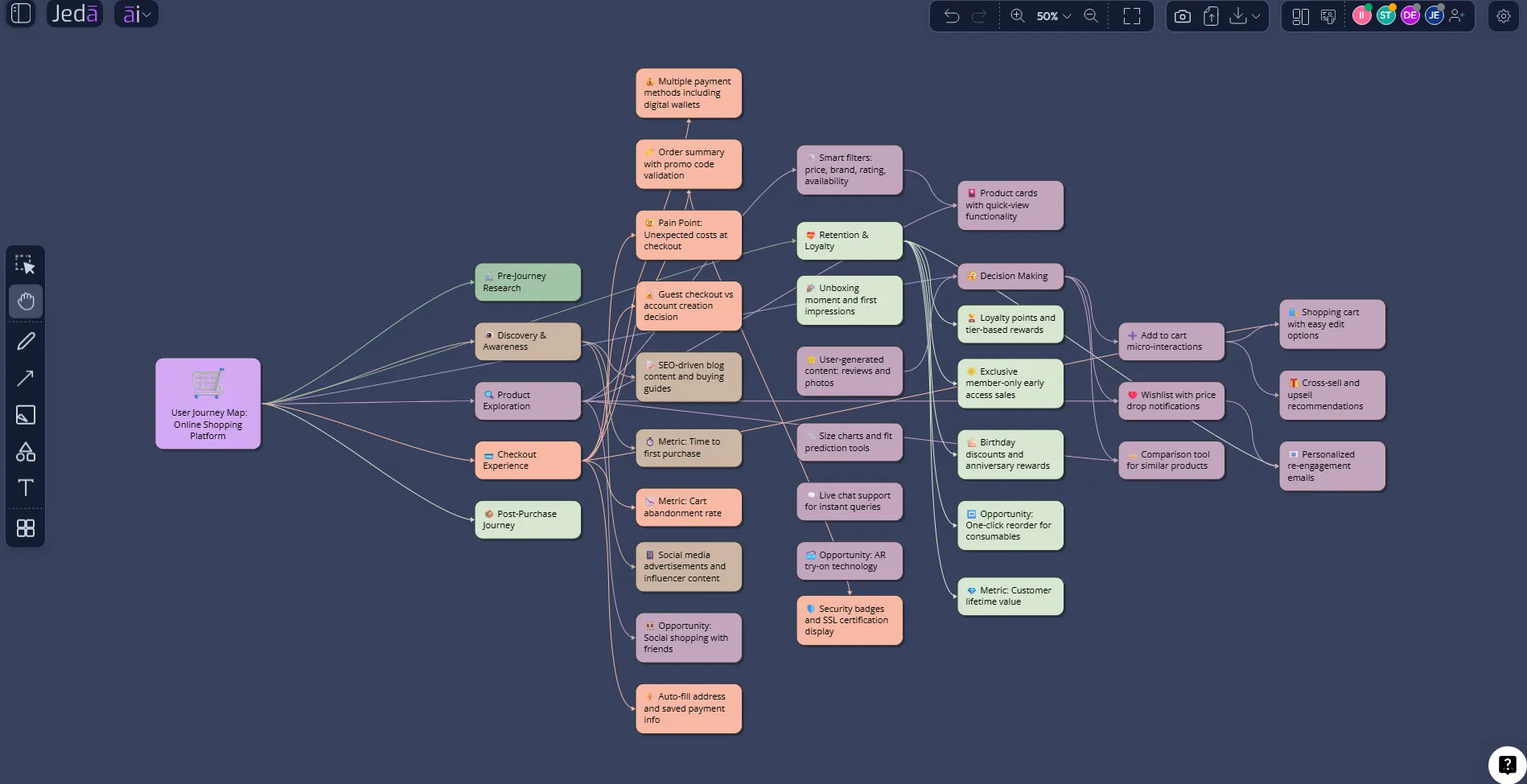
User Journey Map with AI changes the old journey-mapping ritual from a workshop artifact into a living decision system. Instead of spending half a day arranging sticky notes, product teams can use Jeda.ai to turn customer context, product goals, research notes, and touchpoint assumptions into an editable user journey map on an AI Whiteboard. That matters because journey maps are supposed to expose friction, emotion, intent, and opportunity. Too often, they become beautiful posters that quietly die after the meeting.
Jeda.ai solves a different problem. It gives teams an AI Workspace where research, strategy, and visual structure sit on the same canvas. More than 150,000+ users already use Jeda.ai to turn messy thinking into structured visuals, and the User Journey Map recipe gives product, UX, CX, marketing, and consulting teams a guided way to map the experience before, during, and after a key interaction.
What is a User Journey Map with AI?
A User Journey Map with AI is a visual representation of how a user moves through a product, service, or experience, enhanced by AI to structure stages, infer gaps, organize touchpoints, and surface opportunities faster. Nielsen Norman Group defines a journey map as a visualization of the process a person goes through to accomplish a goal, usually expanded with actions, thoughts, and emotions. AI does not replace research. It helps teams organize and reason over the research before the whiteboard becomes a landfill.
A strong journey map usually includes the persona or user segment, journey stages, user goals, actions, touchpoints, emotions, pain points, questions, blockers, and improvement opportunities. With Jeda.ai, those pieces become editable smart shapes, not a static screenshot. You can generate the first version through the User Journey Map recipe, refine it with teammates, use Web Search when external context matters, and keep improving the map as your product or market changes.
The shift is subtle but important. Traditional journey maps describe what happened. AI-powered journey maps help teams ask what should change next.
Why user journey mapping needs a better operating system
Journey mapping is not just a UX exercise. It is a strategic alignment tool. Lemon and Verhoef's customer experience research emphasizes that customer experience happens across multiple touchpoints, phases, and interactions, not inside a single screen or support ticket. That is why journey mapping is useful for product strategy, onboarding, retention, service design, sales enablement, and customer success.
The problem is the workflow. Most teams map journeys in fragments: interview notes in one doc, analytics in another, stakeholder assumptions in a call, and the final diagram in a whiteboard that nobody updates. The map looks complete, but the thinking underneath it is not inspectable.
Jeda.ai treats the journey map as a working surface. The AI Workspace lets you start with a structured recipe, choose a diagram format, generate the map, edit every node, invite collaborators, and keep the map connected to the discussion. That is a better fit for modern product teams because customer journeys are no longer linear. They are layered, multi-channel, and annoyingly human.
- Map the real experience
Turn stages, actions, emotions, touchpoints, and blockers into a visual journey your team can inspect instead of guessing from scattered notes.
- Use AI for structure
Let Jeda.ai organize the first version, propose missing sections, and create a clearer narrative from your product or customer context.
- Align the team faster
Collaborate on one editable AI Whiteboard so product, UX, marketing, and customer success teams debate the same journey instead of different documents.
- Ground assumptions
Use Web Search from the platform when market, competitor, or behavior context needs current support before the journey becomes a decision input.
- Compare journey paths
Generate current-state and future-state maps, then compare friction, handoffs, ownership, and opportunity areas in one Visual AI workspace.
- Extend without rebuilding
After generation, use AI+ to extend and deepen the map. It adds more connected detail without asking you to recreate the whole board.
How to create a User Journey Map with AI in Jeda.ai
Jeda.ai gives you two practical ways to create a user journey map. The guided recipe is the recommended method because it starts with the right structure. The Prompt Bar method is faster when you already know the exact journey, persona, and product moment you want to map.
Method 1: Use the User Journey Map diagram recipe
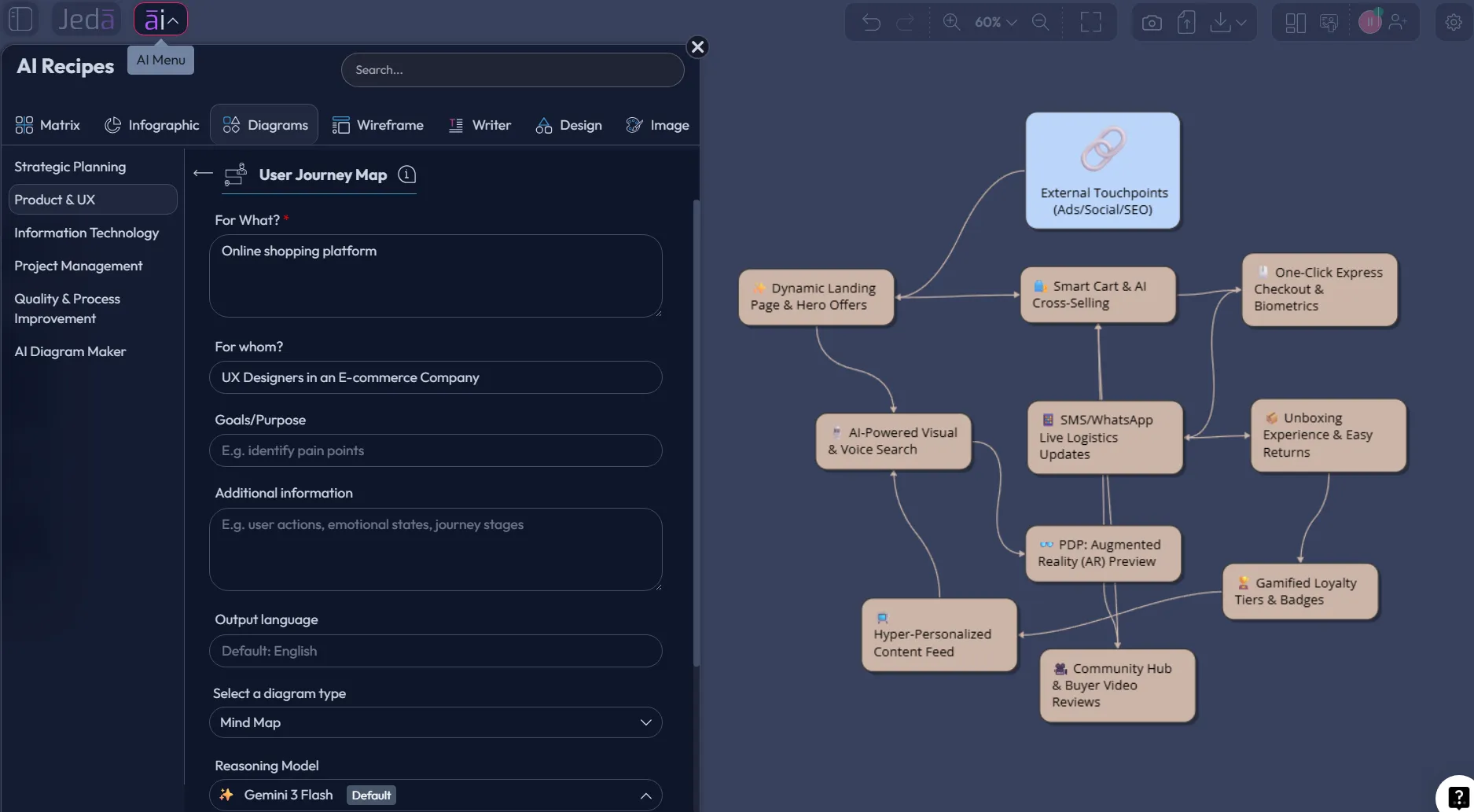
The recipe path is best when the map needs to be credible, shareable, and complete. Open the AI Menu, go to the Diagram recipes, select the Product & UX category, and choose the User Journey Map recipe. The form gives you structured fields so you do not start from an empty canvas with a heroic amount of optimism.
Typical fields include what the journey is for, whom it is for, the goal or purpose, the product or service context, key stages, pain points, constraints, and extra details. Then choose the layout, select Web Search if outside context matters, pick a diagram type such as Basic Diagram, Mind Map, or Flowchart, select the AI model, and generate. For a user journey map, Basic Diagram is usually the strongest first choice because journey maps need flexible relationships, stage lanes, and cross-functional context.
- Open AI Menu
Click the AI Menu from the top-left area of the Jeda.ai canvas to browse guided AI Recipes.
- Choose Product & UX
Go to the Diagram recipes and select the Product & UX category, then choose the User Journey Map recipe.
- Fill in the journey context
Add what the map is for, whom it is for, the journey goal, product or service context, key stages, pain points, and any known constraints.
- Select layout and diagram type
Choose Horizontal or Vertical layout, then pick Basic Diagram, Mind Map, or Flowchart. Use Basic Diagram when you need a flexible journey-map structure.
- Set Web Search and model options
Turn Web Search on when current market or competitor context matters, then choose the AI model or model workflow available on your plan.
- Generate the map
Click Generate and review the editable User Journey Map on the AI Whiteboard. Adjust stages, nodes, ownership, and labels directly on the canvas.
- Extend and refine
Use AI+ only to extend and deepen the generated map after it appears. Use manual edits and collaboration for precise changes.
Method 2: Generate from the Prompt Bar
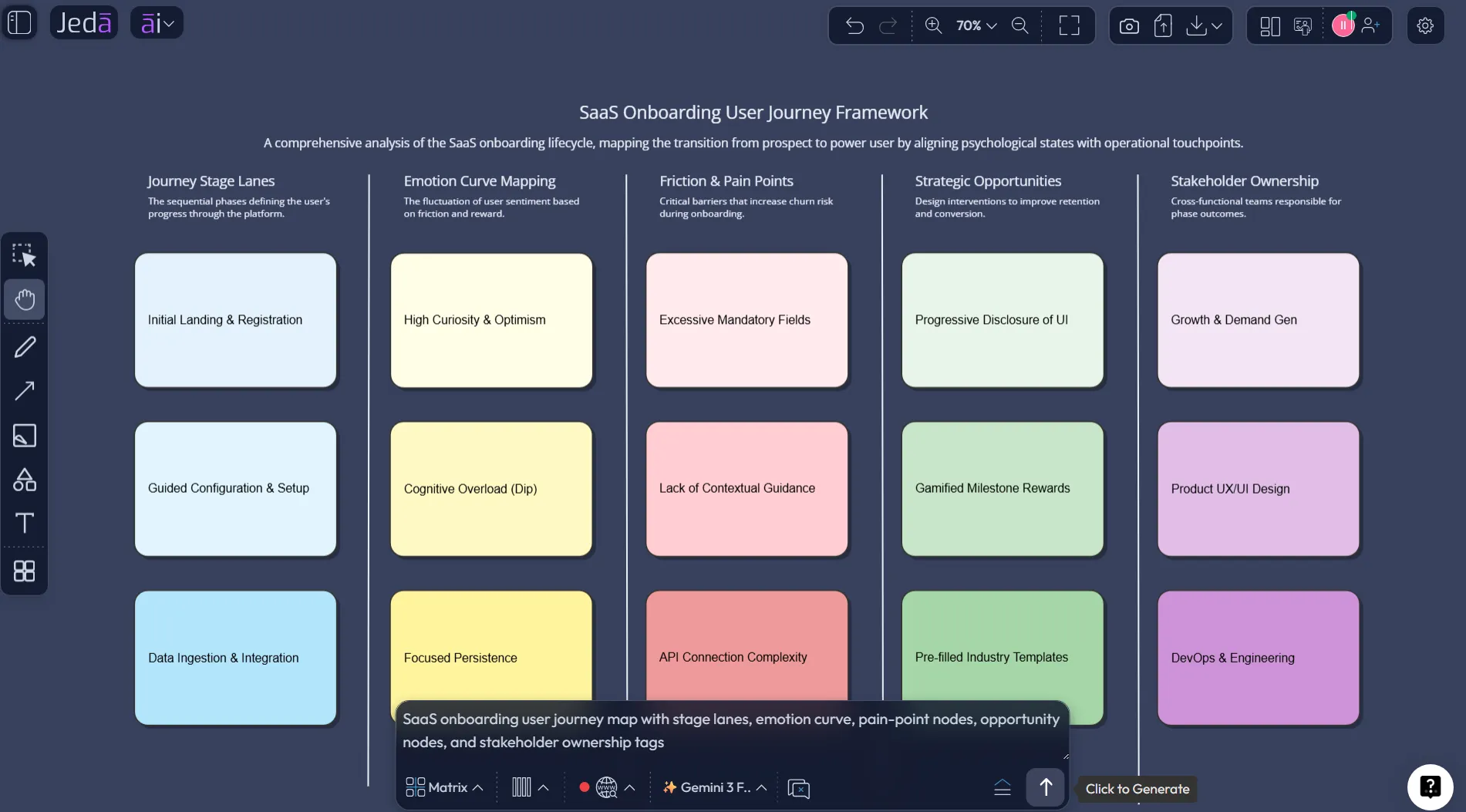
The Prompt Bar method is the speed route. Use it when you already have a clear journey scenario, such as “new user onboarding for a project management app” or “trial-to-paid conversion for a B2B analytics platform.” Open the Prompt Bar at the bottom of the canvas, choose the Diagram command or another suitable visual command, set Horizontal or Vertical layout where available, add your prompt, choose the model, and generate.
This method gives you direct control over the input. It also works well when you want to test several versions of the same journey. For example, a product manager might generate one map for a first-time user, another for an admin buyer, and a third for an enterprise evaluator. Same product. Different lived experience. That difference is the whole point.
- Open the Prompt Bar
Use the bottom-center Prompt Bar inside the Jeda.ai workspace as your direct AI input area.
- Choose the visual command
Select choose Mindmap or Flowchart if the journey needs a more hierarchical or step-by-step shape.
- Write a specific journey prompt
Name the user segment, product, goal, journey stages, known friction points, and the output structure you want to see.
- Choose layout and model
Select Horizontal or Vertical layout where available, then choose the AI model or model workflow that fits the quality level you need.
- Generate and inspect
Generate the first version, then inspect whether the stages, emotions, touchpoints, and opportunities match real user behavior.
- Collaborate on the canvas
Invite teammates to edit labels, move nodes, add notes, and use the AI Whiteboard as the shared source of truth.
What should you include in an AI-generated user journey map?
A useful user journey map should include the minimum structure needed to support decisions. Anything less becomes a decorative timeline. Anything more becomes a mural nobody wants to update. The trick is to include enough detail to reveal tension without turning the map into a UX tax return.
Start with the user segment. A founder trial user, enterprise admin, student, procurement lead, and returning customer do not experience the same product in the same way. Then define the job or goal. Next, map the stages, actions, touchpoints, emotions, pain points, questions, and opportunity areas. For product and UX teams, add internal owner and evidence source. For consultants, add strategic implication. For marketing teams, add message gap and conversion risk.
| What it captures | Why it matters | Jeda.ai output | |
|---|---|---|---|
| Journey stages | Awareness, evaluation, onboarding, use, support, retention | Shows where experience shifts happen | Editable stage lanes or connected diagram nodes |
| User actions | What the user does at each step | Exposes actual behavior instead of team assumptions | Action nodes grouped by stage |
| Emotions and pain points | Confidence, confusion, urgency, friction | Reveals why users hesitate or abandon | Emotion and friction labels attached to touchpoints |
| Opportunities | Product fixes, content gaps, automation, support changes | Turns mapping into roadmap input | Opportunity nodes connected to the exact problem area |
Example prompt for a User Journey Map with AI
Here is a strong Prompt Bar input you can adapt:
This prompt works because it gives Jeda.ai a role, scenario, user segment, journey boundary, output structure, and stakeholder lens. It does not ask for magic. It gives the AI enough context to produce a map that a real team can critique.
A second version could focus on a current-state map for churn. Another could map a future-state onboarding path after a redesign. Another could compare free-trial and enterprise-buyer journeys. The same framework can serve many decisions when the input is sharp.
Where AI improves the journey-map workflow
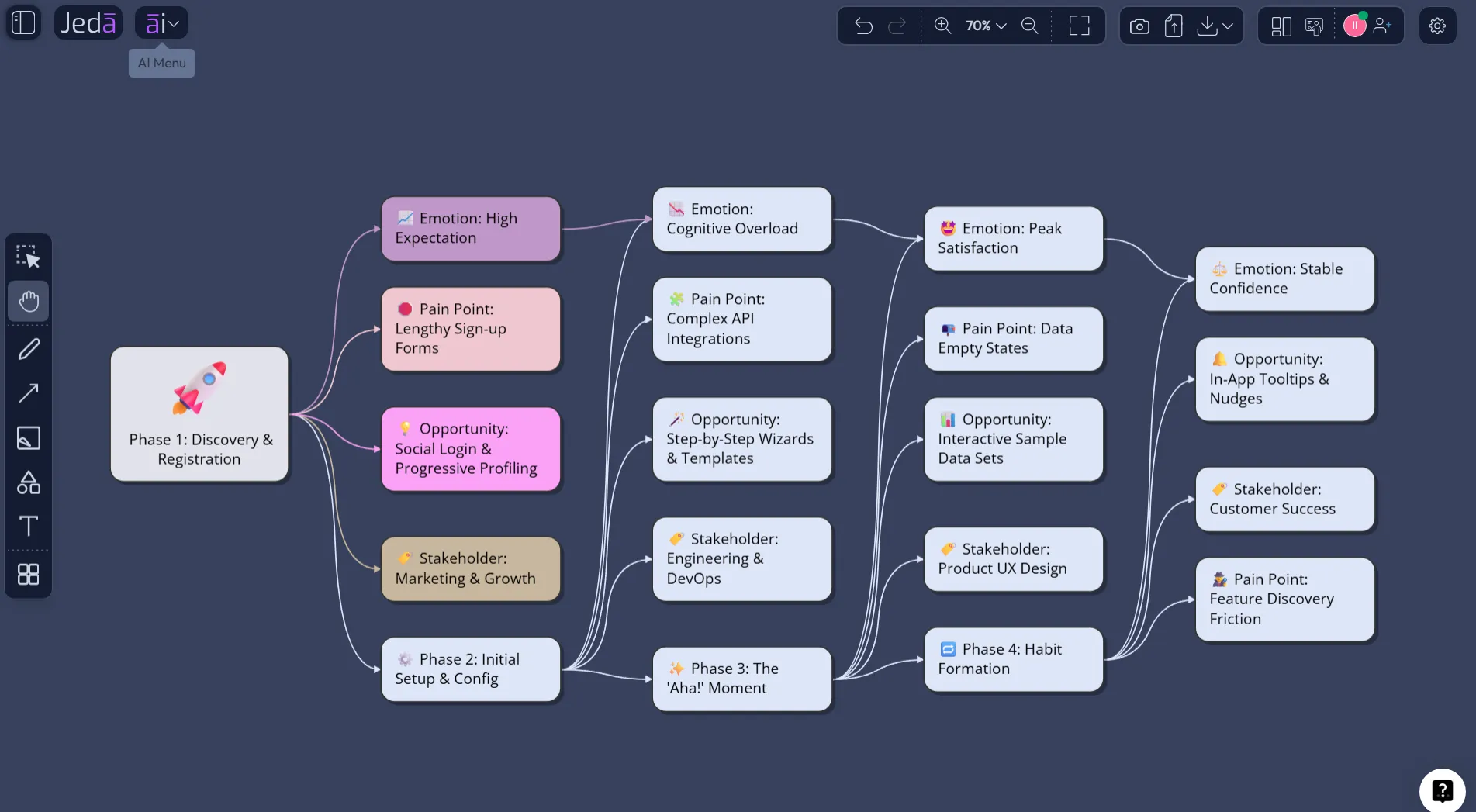
AI improves journey mapping when it reduces blank-canvas drag, exposes missing dimensions, and helps teams compare alternatives. That is the sane version. The reckless version is using AI to invent customer truth. Please do not do that. Your users are not fictional NPCs.
Use AI to create the first structure, then validate it with interviews, analytics, session recordings, support tickets, sales notes, and customer success feedback. Use Web Search if the journey depends on current market behavior or competitor context. Use the editable AI Whiteboard to challenge the map in the open. If the map cannot survive team review, it is not ready to guide product decisions.
Jeda.ai is useful here because the output stays editable. You can change text, move stages, add notes, adjust connectors, and build supporting visuals around the map. A static user journey map often becomes a file. A Jeda.ai journey map can become a working strategy board.
Common mistakes to avoid
The most common mistake is mapping the company’s process instead of the user’s experience. Users do not care about your funnel stage labels. They care about whether they understand the value, trust the product, get unstuck, and reach the outcome they came for.
Another mistake is skipping emotion. Journey maps without emotion are just process diagrams wearing nicer shoes. Include confidence, doubt, anxiety, excitement, or frustration where it matters. Emotion is often where the business problem hides.
Also avoid overbuilding. A journey map should help a team decide what to fix, test, or learn next. If every stage has 30 nodes, the map will become a museum exhibit. Pretty. Useless.
Why Jeda.ai is different from static journey-map templates
Static templates help you start. Dedicated journey-mapping tools help with specialized CX documentation. Blank whiteboards help teams brainstorm. Jeda.ai sits in a different lane: it combines guided AI Recipes, visual generation, real-time collaboration, editable outputs, and 300+ AI Recipes and strategic frameworks inside one AI Workspace.
That matters when the journey map is part of a bigger decision. Product teams may need a journey map, then a feature prioritization matrix, then a flowchart, then a stakeholder-ready summary. Consultants may need the map inside a client workshop. Marketing teams may need a message gap analysis from the same customer journey. Jeda.ai lets those outputs live together on one Visual AI canvas.
The platform is not just drawing boxes. It is turning reasoning into visual artifacts the team can debate, revise, and ship. That is the grown-up version of “let’s make a map.”
Frequently Asked Questions
- What is a User Journey Map with AI?
- A User Journey Map with AI is a visual map of how a user moves through a product or service, generated or structured with AI. It usually includes stages, actions, touchpoints, emotions, pain points, questions, and opportunities for improvement.
- How do I create a user journey map in Jeda.ai?
- Use the User Journey Map recipe from the Product & UX Diagram category, fill in the journey context, choose layout and diagram type, select Web Search if needed, pick an AI model, and generate the editable map on the canvas.
- Can I create a user journey map from the Prompt Bar?
- Yes. Open the Prompt Bar, choose Mindmap or Flowchart, write a specific journey prompt, choose the layout and model, then generate. This method is best when you already know the user segment and journey scenario.
- Should I use Basic Diagram, Mind Map, or Flowchart for a journey map?
- Use Basic Diagram for most user journey maps because it supports flexible connected structures. Use Mind Map for exploration and Flowchart when the journey needs strict step-by-step logic or decision paths.
- Does AI replace user research in journey mapping?
- No. AI helps structure, summarize, and visualize the map, but user research validates it. Treat AI-generated journey maps as structured hypotheses until you compare them with interviews, analytics, support tickets, or observed behavior.
- Can AI+ be used on a generated user journey map?
- Yes. After the journey map is generated, AI+ can extend and deepen the map. It is useful when a section needs more connected detail, but it should not be treated as a precise instruction-based editor.
- Who should use a User Journey Map with AI?
- Product managers, UX designers, customer success teams, lifecycle marketers, business analysts, startup founders, and strategy consultants can use it to understand friction, improve onboarding, plan service changes, or align stakeholders around customer experience.
- What should a user journey map include?
- A strong user journey map includes a persona or user segment, goal, stages, actions, touchpoints, emotions, pain points, questions, opportunities, and ownership. Add evidence sources when the map will guide product or business decisions.
- Can Jeda.ai export a user journey map?
- Jeda.ai supports export options such as PNG, SVG, PDF, and workspace text depending on plan and output type. Teams can also copy selected content for use in documents, presentations, or collaboration workflows.
- Why use Jeda.ai instead of a static journey-map template?
- A static template gives you a layout. Jeda.ai gives you AI generation, guided recipes, editable smart shapes, real-time collaboration, Web Search, and connected visual workflows in one AI Whiteboard, so the journey map can keep evolving.
Sources and further reading
- [1]
Nielsen Norman Group (2018) . “Journey Mapping 101” Nielsen Norman Group.
View Source ↗ - [2]
Nielsen Norman Group (2016) . “Customer Journey Maps: When and How to Create Them” Nielsen Norman Group.
View Source ↗ - [3]
Katherine N. Lemon and Peter C. Verhoef (2016) . “Understanding Customer Experience Throughout the Customer Journey” Journal of Marketing.
View Source ↗ - [4]
Adam Richardson (2010) . “Using Customer Journey Maps to Improve Customer Experience” Harvard Business Review.
View Source ↗ - [5]
Service Design Tools (2024) . “Journey Map” Service Design Tools.
View Source ↗ - [6]
Miro (2026) . “User Journey Map Template” Miro Templates.
View Source ↗ - [7]
Smaply (2026) . “The Basics of Customer Journey Mapping” Smaply Blog.
View Source ↗
Create a User Journey Map with AI in Jeda.ai
Join 150,000+ users using Jeda.ai to turn customer journeys, product decisions, and strategy work into editable visual intelligence on one AI Workspace.
Start Mapping Free