Value Stream Mapping with AI is what happens when a lean team stops arguing from memory and starts seeing the whole system. Not one station. Not one team’s complaint. The whole path from request to delivery, with material flow, information flow, waiting time, rework, handoffs, and the awkward little bottlenecks everyone knows about but nobody wants to own. In Jeda.ai, you can turn that messy reality into an editable AI Workspace where the current state, future state, and improvement actions live together instead of being buried in a slide deck.
What is Value Stream Mapping?
Value Stream Mapping is a lean method for visualizing how value moves from customer request to final delivery. It captures both value-creating and non-value-creating steps, plus the information flow that tells teams what to do next. The point is not to make a pretty chart. The point is to expose the flow.
Lean Enterprise Institute defines VSM as diagramming every step involved in the material and information flows needed to bring a product from order to delivery. It also notes that VSM usually starts with a current-state map and then moves into a future-state map. That distinction matters because a current-state map without a future-state direction can become process archaeology. Fascinating, maybe. Useful? Not enough.
Mike Rother and John Shook helped popularize the modern VSM method through Learning to See, a workbook built around Toyota’s material and information flow mapping practice. The lesson still holds: follow one product family or service family across the full value stream, draw what actually happens, then design what should happen next.
That is where AI changes the working rhythm. Instead of manually assembling every box, delay, queue, and countermeasure from scratch, teams can use Jeda.ai to generate a first structured draft, edit it on the AI Whiteboard, and refine the map with real process knowledge.
Why use Value Stream Mapping with AI?
Value Stream Mapping with AI helps teams build a faster first draft, compare improvement paths, and keep the conversation visual. A standard VSM workshop can get stuck in three places: collecting scattered context, turning context into a readable map, and translating insights into action. AI helps with all three, but only if the team still verifies the process facts.
That last part is non-negotiable. AI should not invent your cycle time. It should not pretend it knows your changeover time. It should not “vibe” its way into an implementation plan. Use AI to structure, challenge, summarize, and extend the map. Use your team to validate reality.
- See the whole flow
Map customer demand, process steps, wait states, inventory or queues, information signals, and improvement gaps in one editable Visual AI canvas.
- Reduce mapping drag
Start with a structured VSM draft instead of a blank canvas. Then refine cycle time, lead time, ownership, and waste categories with your team.
- Compare future states
Generate alternative improvement views as Basic Diagram, Mind Map, or Flowchart so stakeholders can compare options before committing.
- Align cross-functional teams
Bring operations, product, quality, support, and leadership into the same AI Whiteboard so decisions do not disappear into meeting notes.
- Ground context with web search
Turn on Jeda.ai Web Search when external context helps, such as industry benchmarks, lean terminology, or process improvement references.
- Deepen after generation
Use AI+ to extend parts of the generated map with more related detail. AI+ expands the existing visual, but it is not a separate custom prompt box.
Jeda.ai is especially useful when the map needs to become a working document. You can generate the first version, adjust shapes and labels, invite collaborators, add notes, and export the board when the team needs to share the improvement plan. That is a cleaner workflow than “whiteboard photo → spreadsheet → slide deck → nobody updates it again.” A tiny tragedy. Happens daily.
When should you create a Value Stream Map?
Create a Value Stream Map when your team needs to improve flow across a complete process, not just fix one local task. VSM is useful when lead time is too long, work gets stuck between teams, customer handoffs are unclear, rework is rising, or managers keep optimizing one department while hurting the whole system.
Good VSM candidates include:
- Manufacturing lines with queue time, changeover issues, or excess work-in-process.
- SaaS onboarding flows where customers wait between sales, success, implementation, and support.
- Healthcare intake processes where information delays affect patient experience.
- Product development workflows with repeated review loops.
- Procurement or finance approvals where work spends more time waiting than moving.
- Customer support escalation paths where tickets bounce between teams.
Bad candidate? A tiny single-person task with no real handoffs. For that, use a checklist or a simple process flow. VSM earns its keep when the system has multiple steps, multiple actors, and enough delay to make improvement meaningful.
What should you prepare before generating a VSM?
Prepare the process boundary, the product or service family, the core steps, and the known performance data before you use AI. A VSM becomes stronger when the prompt includes real context. Garbage in, fancy garbage out. Still garbage, just wearing a blazer.
Use these inputs before opening the recipe:
Do not worry if you do not have perfect numbers. Start with what you know, mark assumptions clearly, and update the map after the team reviews the process. The first map is a thinking tool. The final map should become an implementation guide.
How to create Value Stream Mapping with AI in Jeda.ai
Jeda.ai gives you two practical ways to create a Value Stream Mapping diagram. Use the Diagram Recipe when you want a guided workflow with structured fields. Use the Prompt Bar when you already know the shape of the output and want to move fast.
Method 1: Use the Value Stream Mapping diagram recipe
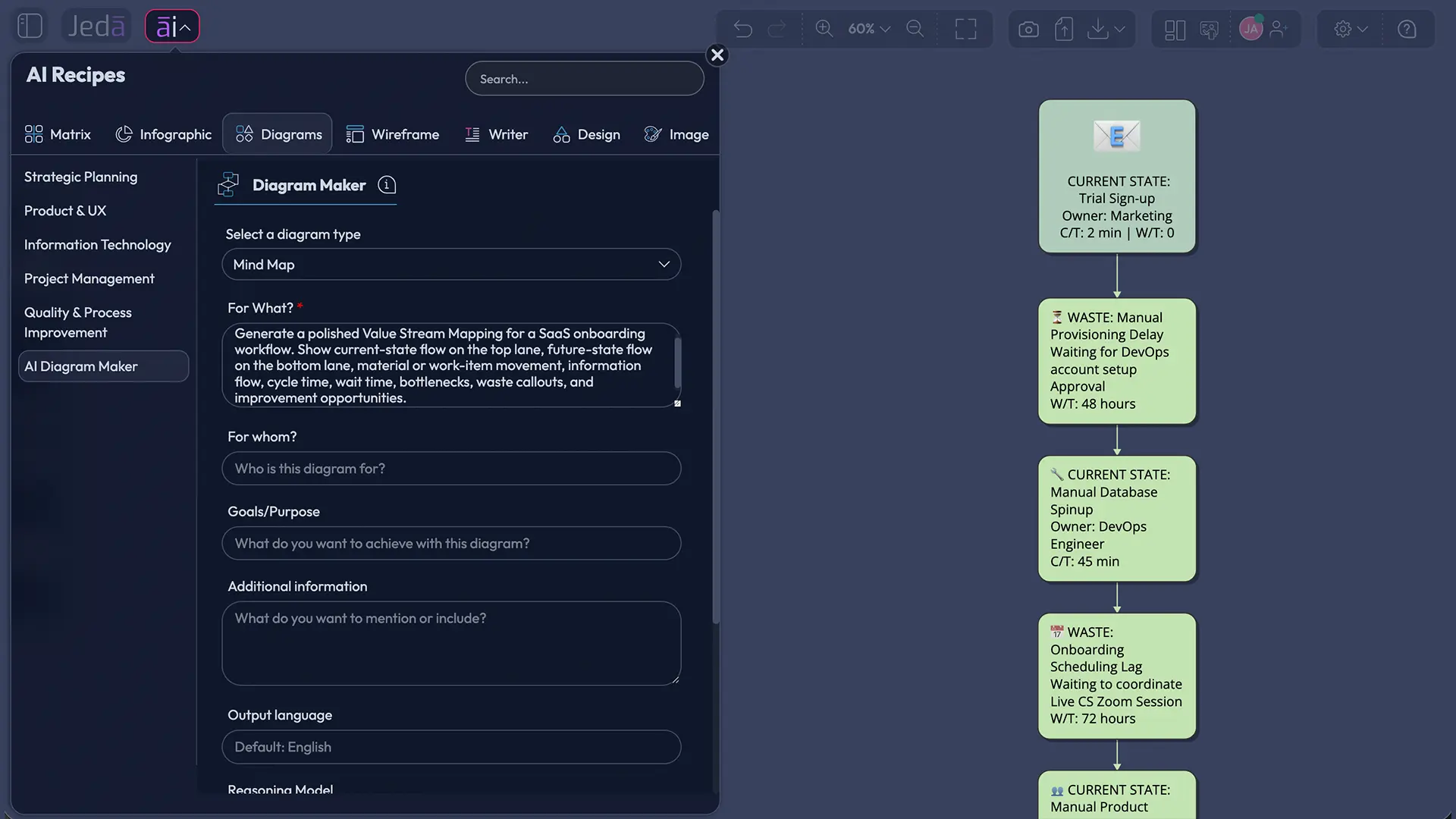
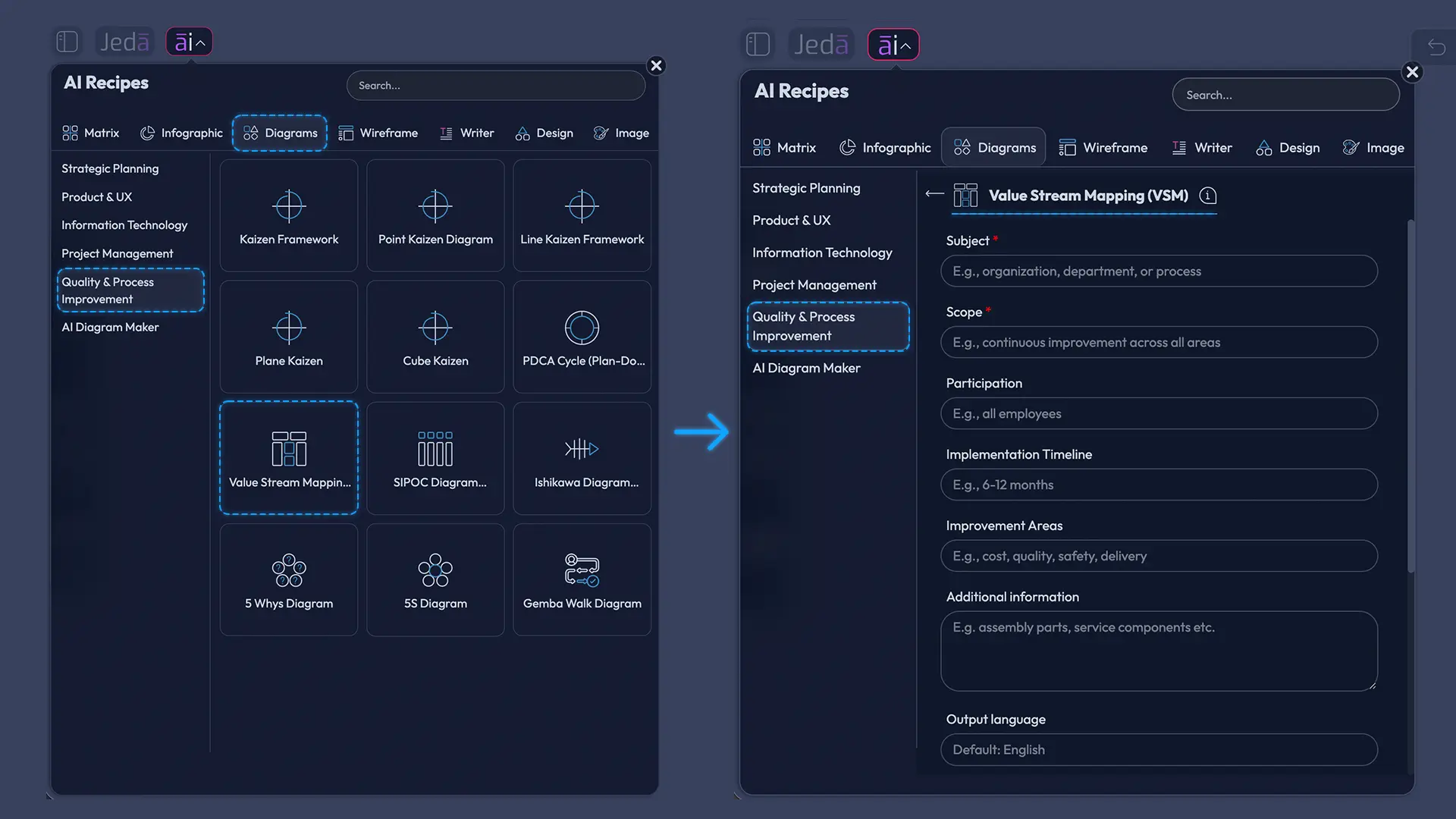
The Value Stream Mapping (VSM) recipe lives under the Quality & Process Improvement category. This is the recommended method because it gives the AI the right structure before generation. Instead of asking for a generic diagram, you feed the recipe the exact VSM context: Subject, Scope, Participation, Implementation Timeline, Improvement Areas, and Additional Information.
- Open the AI Menu
Start from the Jeda.ai canvas and open the AI Menu from the top-left area. Go to the Diagram Recipes section and choose the Quality & Process Improvement category.
- Select Value Stream Mapping (VSM)
Choose the Value Stream Mapping (VSM) recipe. This recipe is built for current-state and future-state process improvement diagrams rather than generic process mapping.
- Complete the recipe fields
Fill in Subject, Scope, Participation, Implementation Timeline, Improvement Areas, and Additional Information. Add known cycle times, wait times, handoffs, bottlenecks, rework, or customer pain points when available.
- Choose the diagram type
Select Basic Diagram for a classic VSM layout, Mind Map for discovery and issue clustering, or Flowchart for step-by-step process logic.
- Choose horizontal or vertical layout
Use a horizontal layout for end-to-end flow from supplier or request to customer delivery. Use a vertical layout when the process has many layers, teams, or review loops.
- Set web search and AI model options
Turn Web Search on when you want current lean terminology or external process references. Select the AI model that best fits your plan, or use available multi-model options when you want broader reasoning.
- Generate and review the map
Generate the VSM, then review every process box, timeline, data box, information signal, and improvement label with the team. Correct any assumptions before using the map for decisions.
- Extend carefully with AI+
Select a generated smart shape and use AI+ to extend related detail. AI+ can deepen the existing visual, but you should not treat it as a place to ask a separate custom instruction.
Method 2: Generate a VSM from the Prompt Bar
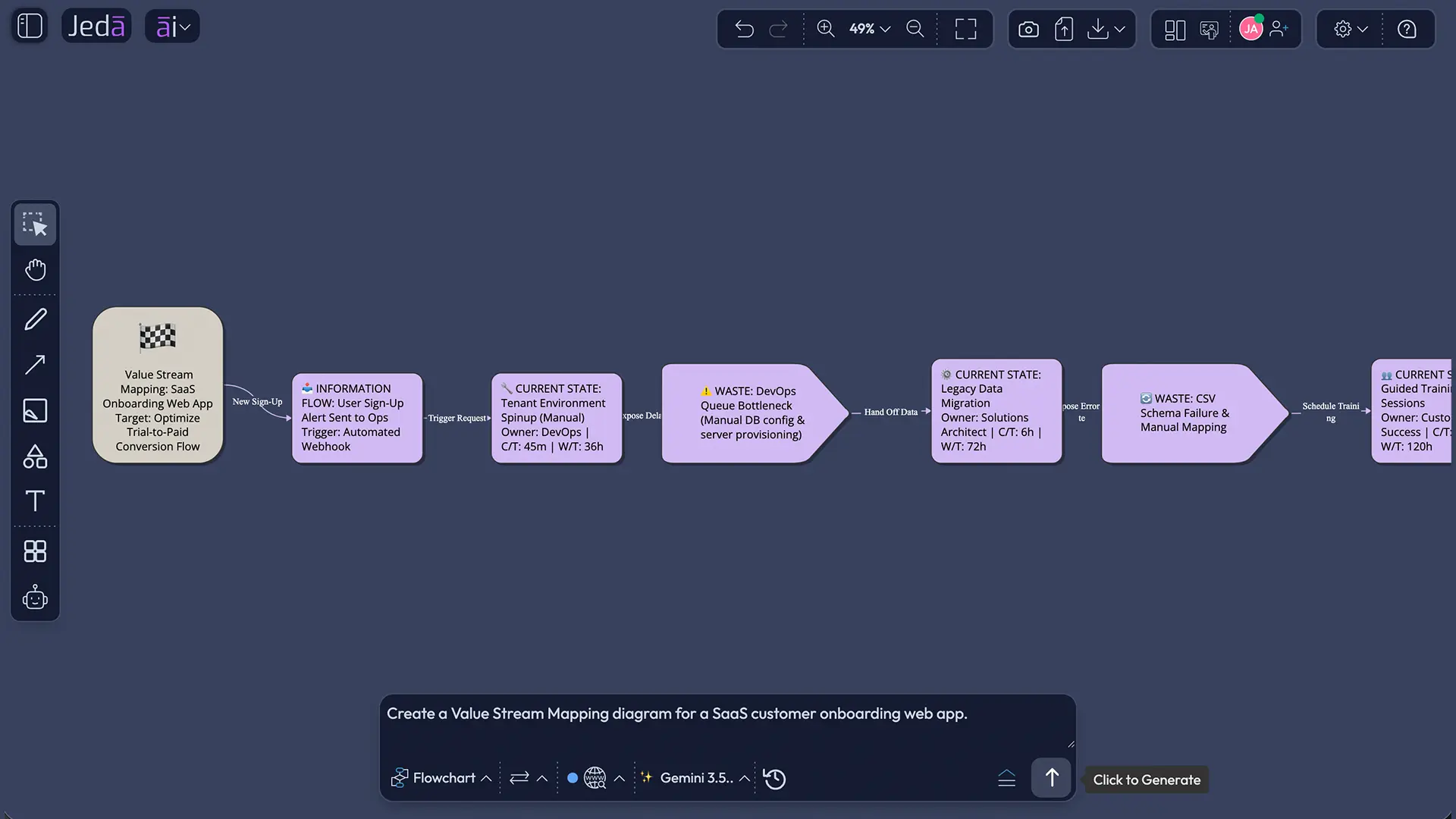
The Prompt Bar method is better when you want speed. You write one strong prompt, choose the most suitable visual command, set layout and model options, and generate. It is less guided than the recipe, so your prompt needs to carry more weight.
A good Prompt Bar instruction should name the workflow, define the boundary, list the teams involved, and ask for both current-state and future-state views. It should also request cycle time, wait time, bottlenecks, waste categories, and improvement actions. The AI does a better job when you tell it what “done” looks like.
- Open the Prompt Bar
Go to the bottom-center Prompt Bar in Jeda.ai. This is the fastest way to generate a process map from a direct instruction.
- Select the visual command
Choose Flowchart for a step-by-step VSM, and Mind Map for discovery.
- Pick the layout
Choose horizontal layout for a left-to-right value stream. Choose vertical layout when the process needs layered ownership, swimlane-style thinking, or many review paths.
- Set Web Search if needed
Use Web Search when you want the AI to ground lean terms, VSM structure, or external examples. Keep it off when the map must rely only on internal process knowledge.
- Choose the AI model
Select the model available in your plan. For complex process analysis, choose a stronger reasoning model or use multi-model generation when available.
- Enter a complete VSM prompt
Describe the subject, scope, participating teams, implementation timeline, improvement areas, and supporting facts. Ask for current-state and future-state outputs in one visual.
- Generate, validate, and edit
Generate the map, then edit the boxes, connectors, timing data, and improvement notes directly on the AI Whiteboard. Validate process data with the people who do the work.
Prompt example for Value Stream Mapping with AI
Use this prompt when you want a direct Prompt Bar generation. Replace the bracketed details with your process facts.
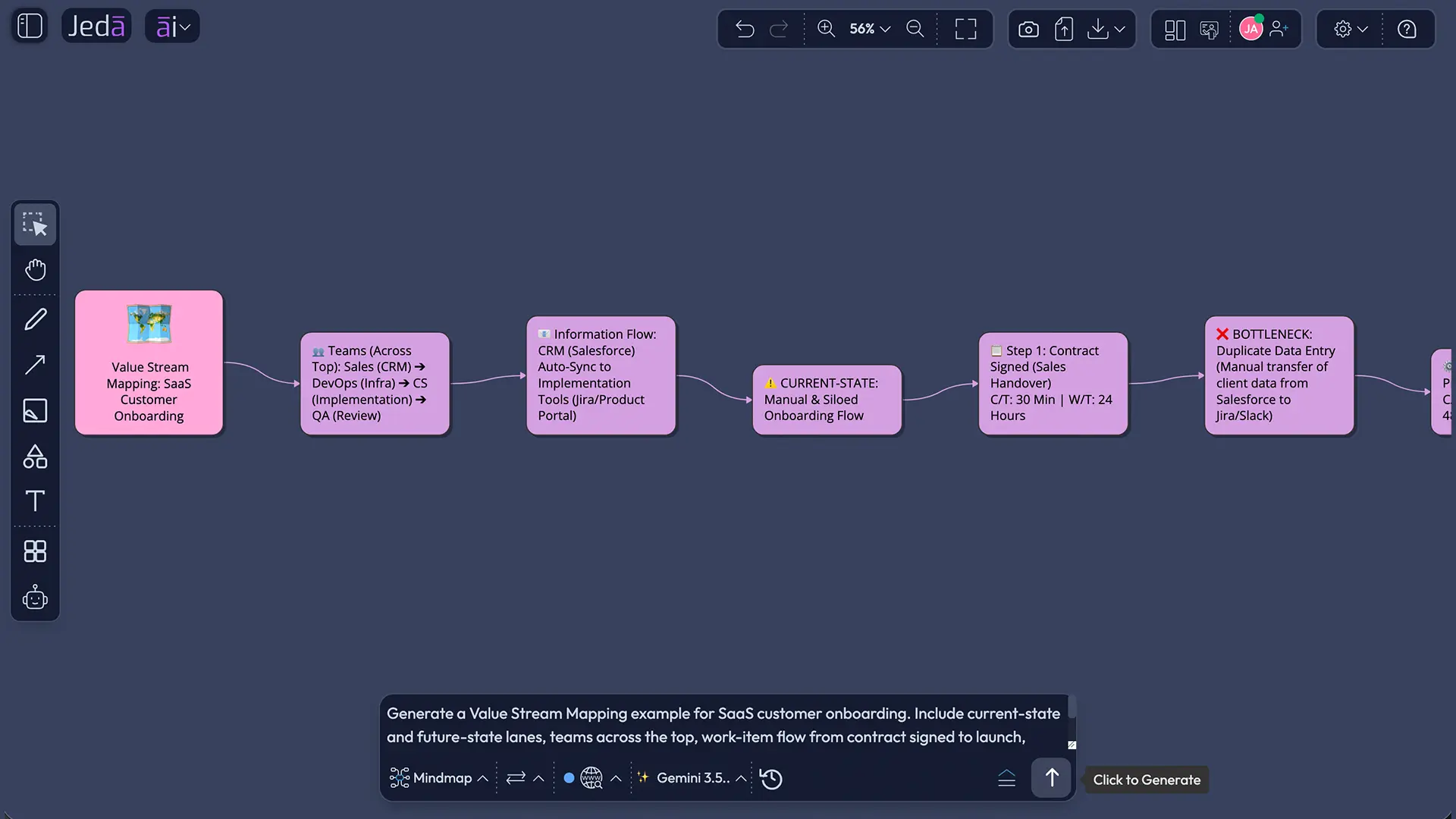
This prompt works because it does not ask for “a VSM about onboarding” and then hope for magic. It gives the AI the process boundary, actors, timeline, problems, and output format. That is the difference between a useful map and a decorative blob.
Example use case: reducing onboarding lead time
Imagine a B2B software company with a 21-day average onboarding lead time. The actual hands-on work takes about 5 days, but customers wait between sales handoff, setup call, configuration review, data import, QA, billing confirmation, and launch training. Everyone is busy. Nobody is technically “wrong.” Still, the customer waits.
A VSM exposes the trap. Sales closes the deal and sends notes. Customer success waits for complete requirements. Implementation starts setup, then pauses because billing has not confirmed the plan. Product support gets pulled in only after a configuration issue appears. QA finds missing data. Training gets rescheduled. The map makes the painful part visible: the work is not slow because one person is slow. The system is slow because information keeps arriving late.
In Jeda.ai, the team can generate a current-state map that shows those waits and handoffs. Then it can create a future-state map with a cleaner kickoff packet, automated billing confirmation, parallel data validation, and one visible owner for launch readiness. The improvement plan becomes part of the same AI Workspace. No scavenger hunt through notes.
Best practices for AI Value Stream Mapping
The best VSM work starts at the right altitude. Too high, and the map becomes a vague strategy poster. Too low, and the team drowns in micro-steps. Start at the facility, department, product family, or service-family level. Then zoom in only where the map reveals a real constraint.
A few practical rules help:
Also, resist local optimization. This is the classic VSM sin. One department improves its own numbers while the total lead time barely moves. The map should make the full system smarter, not help one team win process theater. Nobody needs more theater. We have enough dashboards for that.
Common mistakes to avoid
Mistake 1: Mapping every tiny task
A VSM should show flow across a value stream. If you document every click, every form field, and every micro-decision, the map becomes unreadable. Use process boxes for meaningful flow areas. Add detail only where it helps decisions.
Mistake 2: Ignoring information flow
Many teams draw physical or work-item movement and forget the signals that control the work. In VSM, information flow matters because delays often come from missing approvals, unclear priorities, batch scheduling, or late customer data.
Mistake 3: Treating AI output as verified data
AI can propose structure. It cannot know your exact queue time unless you provide it. Treat generated timing, bottleneck, and waste labels as draft hypotheses until your team validates them.
Mistake 4: Stopping at the current state
A current-state map is only half the job. The real value comes from designing a future state and creating an implementation plan. Otherwise, you have a very tidy picture of a messy system. Cute. Not transformative.
Mistake 5: Using AI+ as a custom prompt replacement
AI+ extends the selected visual section with related detail. It can deepen a branch, add connected context, or expand a diagram area. But do not write content that tells users to give AI+ a specific independent instruction. Keep that distinction clean.
How does Jeda.ai make VSM collaborative?
Jeda.ai makes VSM collaborative by placing the generated map on an editable AI Whiteboard where teams can adjust shapes, labels, connectors, notes, and supporting context together. The board becomes a shared source of truth for the current state, future state, and implementation actions.
That matters because value streams cross boundaries. Operations sees one issue. Support sees another. Finance sees a policy delay. Product sees technical rework. Leadership sees the missed customer promise. A static diagram rarely captures all of that. A shared Visual AI canvas has a fighting chance.
The strongest workflow is simple: generate the first map, invite the team, validate the flow, mark assumptions, revise the future state, and turn improvement areas into assigned actions. Keep the map alive during implementation. If the process changes, update the map. Lean is not a museum exhibit.
Frequently Asked Questions
- What is Value Stream Mapping with AI?
- Value Stream Mapping with AI uses artificial intelligence to help structure a current-state and future-state map for a process. The AI can organize steps, handoffs, information flow, bottlenecks, and improvement ideas, while the team validates actual process data.
- Can AI create a complete Value Stream Map?
- AI can create a strong first draft of a Value Stream Map, but it should not be treated as final. Teams still need to verify cycle time, lead time, queue time, demand, ownership, and constraints using real process knowledge.
- Which Jeda.ai method is best for VSM?
- The Value Stream Mapping diagram recipe is the best starting point because it provides guided fields for Subject, Scope, Participation, Implementation Timeline, Improvement Areas, and Additional Information. The Prompt Bar is better when you already have a complete prompt.
- Should I use Basic Diagram, Mind Map, or Flowchart for VSM?
- Use Basic Diagram for a classic value stream view, Flowchart for step-by-step process logic, and Mind Map for discovery or early problem exploration. Many teams start with Mind Map, then convert the refined structure into a diagram or flowchart.
- Does Value Stream Mapping only apply to manufacturing?
- No. VSM is common in lean manufacturing, but it also works for software delivery, healthcare, customer onboarding, finance approvals, procurement, support escalation, and other service workflows where work and information move through multiple steps.
- What information should I include in a VSM prompt?
- Include the process subject, start and end point, participating teams, known cycle times, wait times, bottlenecks, rework, customer pain points, improvement timeline, and desired output type. Better context creates a better map.
- Can I use Web Search while generating a VSM in Jeda.ai?
- Yes. Jeda.ai Web Search can be used when external context is helpful, such as lean terminology, industry examples, or process improvement references. For internal process facts, rely on your own data and team validation.
- How does AI+ work after generating a VSM?
- After the VSM is generated, select a smart shape and use AI+ to extend related content from that section. AI+ helps deepen the existing visual, but it is not meant for separate custom instructions.
- What is the difference between process mapping and Value Stream Mapping?
- Process mapping often documents steps inside a workflow. Value Stream Mapping looks at the broader value stream, including material or work-item flow, information flow, delays, value-added work, non-value-added work, and the future-state improvement plan.
- Can I export a Jeda.ai Value Stream Map?
- Yes. Jeda.ai supports export options such as PNG, SVG, PDF, text, and visible-area downloads depending on plan and workspace settings. Teams can also keep the map editable inside the AI Workspace for ongoing improvement.
Sources and further reading
- [1]
Lean Enterprise Institute (Accessed 2026) . “Value Stream Mapping” Lean Lexicon.
View Source ↗ - [2]
American Society for Quality (Accessed 2026) . “Value Stream Mapping Tutorial” ASQ Quality Resources.
View Source ↗ - [3]
Mike Rother and John Shook (2003 edition; original Toyota mapping methodology documented in 1998) . “Learning to See: Value Stream Mapping to Add Value and Eliminate Muda” Lean Enterprise Institute.
View Source ↗ - [4]
Lean Enterprise Institute (Accessed 2026) . “What is Value-Stream Mapping? Learning to See Part 1” Lean Enterprise Institute PDF.
View Source ↗ - [5]
P. M. Masuti and S. S. Dabade (2019) . “Lean manufacturing implementation using value stream mapping at excavator manufacturing company” Materials Today: Proceedings.
View Source ↗
Create Value Stream Mapping with AI in Jeda.ai
Join 150,000+ users creating process maps, diagrams, strategy frameworks, and improvement plans in one editable AI Workspace.
Start Mapping Free