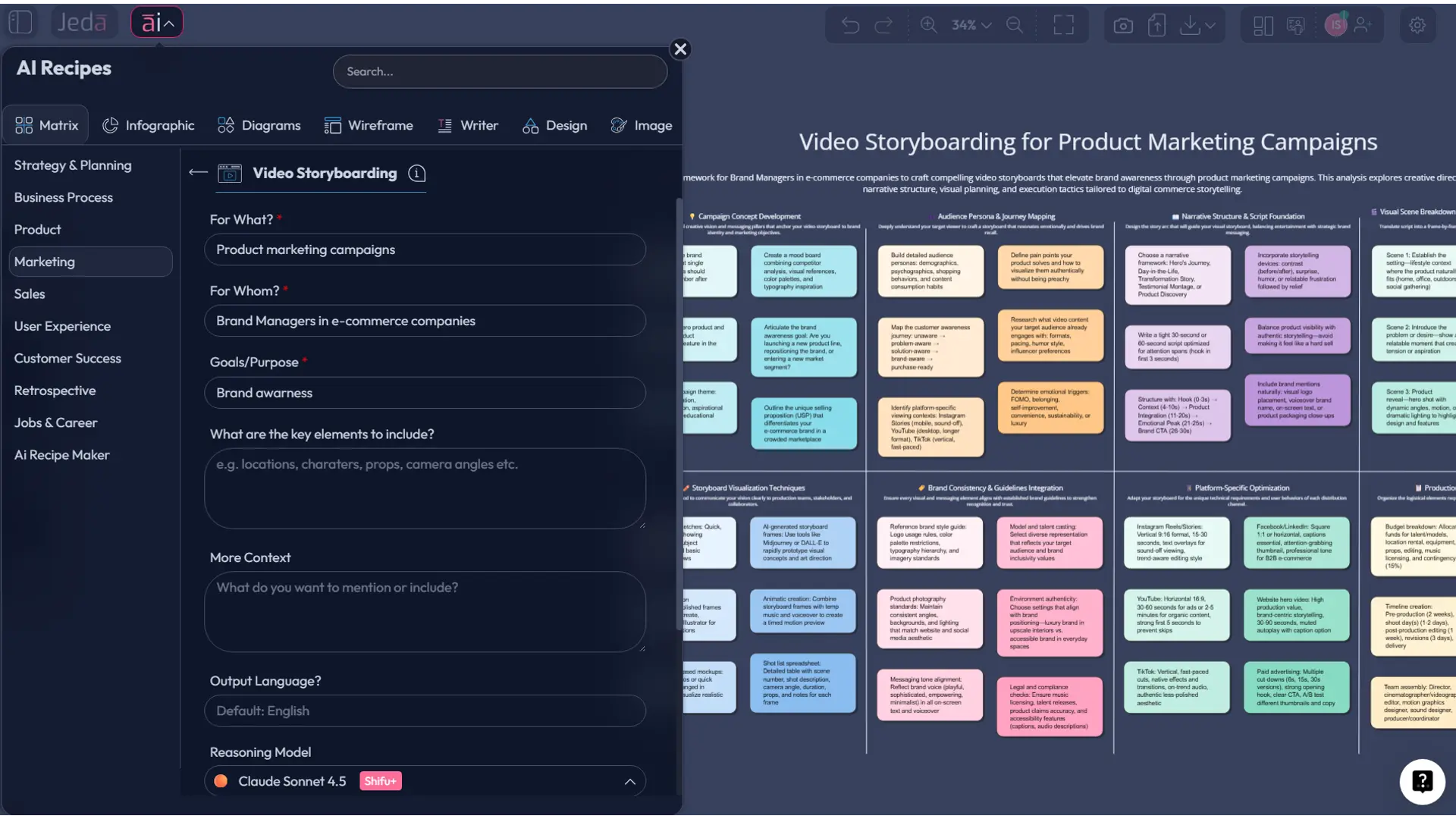
Video Storyboarding Template with AI is not just a prettier planning document. In practice, it is a pre-production decision system: one place to map scenes, message hierarchy, visual beats, camera intent, transitions, and production notes before anyone touches the final edit. That matters more now because video is no side channel anymore. Wyzowl’s 2026 survey reports that 91% of businesses use video as a marketing tool, and 93% of video marketers say video is an important part of their strategy. When the format is this central, winging the storyboard is expensive.
Jeda.ai gives teams a different way to handle that work. Instead of juggling a script in one tab, rough panels in another, and feedback in a chaotic comment thread, you can create the storyboard inside one AI Workspace, shape it visually on an AI Whiteboard, and keep every scene editable. The result feels less like “notes before the real work” and more like the actual command center for the video.
What is a video storyboard template?
A video storyboard template is a structured planning format that breaks a video into scene-by-scene panels, then assigns meaning to each frame: what the audience sees, what they hear, why the scene exists, and what must happen next. Adobe’s guidance reduces it to the essentials: write the script, divide it into scenes, then match each scene to an image and add visual notes, dialogue, and technical direction. Wyzowl describes a storyboard as a sequence of sketches or illustrations used to map planned scenes before production starts. Those definitions are simple. The implication is not.
A good storyboard does three jobs at once. First, it translates an idea into visible sequence. Second, it forces decisions early, when changes are still cheap. Third, it aligns stakeholders who rarely think in the same language—marketers, editors, founders, product teams, and clients. Steven D. Katz’s classic Film Directing Shot by Shot made the broader point years ago: shot design is not decorative; it is part of the logic of storytelling itself.
That is why “template” matters. A blank page sounds creative until five people interpret the same scene five different ways. A template gives you repeatable fields and shared judgment. Useful ones usually include:
- scene number or panel
- objective of the scene
- visual description
- dialogue or voiceover
- on-screen text
- transition or camera note
- CTA or desired audience response
- production constraints or asset notes
Why use a video storyboard template with AI?
Because the bottleneck is rarely drawing boxes. It is deciding what belongs in them.
Teams usually lose time in four places: compressing the message, sequencing the story, matching visuals to the script, and revising after stakeholder feedback. A capable AI system can cut the friction in each of those steps by turning a rough brief into a structured first draft. Recent HCI research points in that direction too. The 2025 CineVision study reports that an AI-driven pre-visualization system produced shorter task times and higher usability ratings than baseline methods in a 24-participant lab study. No, that does not mean AI replaces directors or marketers. It does mean AI can speed up draft quality and communication when used correctly.
Jeda.ai is especially useful here because the output does not get trapped in chat. The storyboard becomes an editable visual object inside the canvas. You can move frames, rewrite scenes, expand weak sections with the AI+ button, and convert the logic into other formats when needed.
- Structured from the first pass
Start with a matrix-based storyboard so every scene has a role, not just a sketch. That keeps pacing, messaging, and CTA logic visible.
- Draft faster without losing judgment
Use AI to generate a first storyboard from your campaign brief, audience, and message pillars, then edit it like a strategist, not a stenographer.
- Make feedback less chaotic
Keep marketers, scriptwriters, founders, and editors on one visual board so comments attach to actual scenes rather than floating in email purgatory.
- Extend with AI+ when a scene is weak
Select a frame or section and use AI+ to deepen it. That is ideal for adding clarity, alternate angles, or stronger message progression.
- Convert the plan when needed
Use Vision Transform to turn a storyboard into a flowchart for production workflow or a mind map for ideation, all inside the same AI Whiteboard.
- Keep the work reusable
Once the template is built, your team can reuse it for product launches, testimonials, explainers, social ads, webinar promos, and internal video ops.
Why this matters for marketing teams
Storyboard That’s marketing guide gets one point exactly right: storyboarding reduces miscommunication between the marketing team and the people building the final video. That sounds boring until you pay for a reshoot. Or discover in editing that your strongest product claim never actually made it into the shot list.
There is also a business reason. Video is now common enough that mediocre planning gets punished. When 91% of businesses are already using video, “we made a video” is not the differentiator anymore. Clear sequencing, message discipline, and visual coherence are. A storyboard is one of the cheapest ways to improve those before production money gets burned.
And here is the less glamorous truth: most teams do not need more creativity first. They need more clarity first.
How to create a Video Storyboarding Template in Jeda.ai
This recipe exists under the Marketing category as a Matrix recipe, so the guided route is the recommended one. Then use the Prompt Bar when you want more control or need to adapt the format for a specific campaign.
- Open a board in your AI Workspace
Create or open a canvas in Jeda.ai. This becomes the working board for your storyboard, comments, revisions, and production decisions.
- Method 1 (recommended): Use the Recipe Matrix
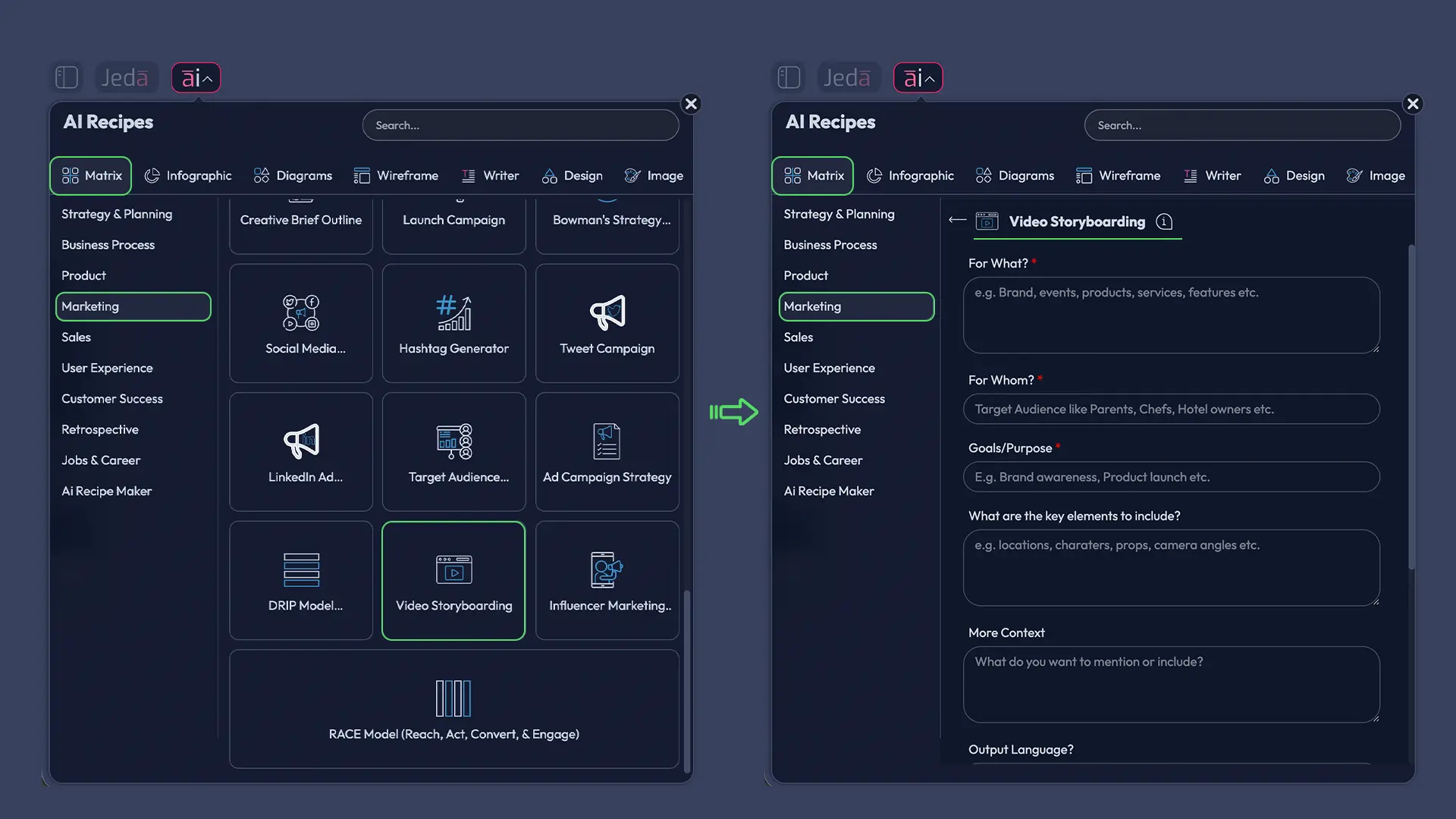
Open the AI Menu at the top-left, go to Matrix Recipes, then navigate to the Marketing category and select Video Storyboarding. Fill in your campaign context, audience, goal, and video angle, then click Generate.
- Method 2: Use the Prompt Bar with the Matrix command
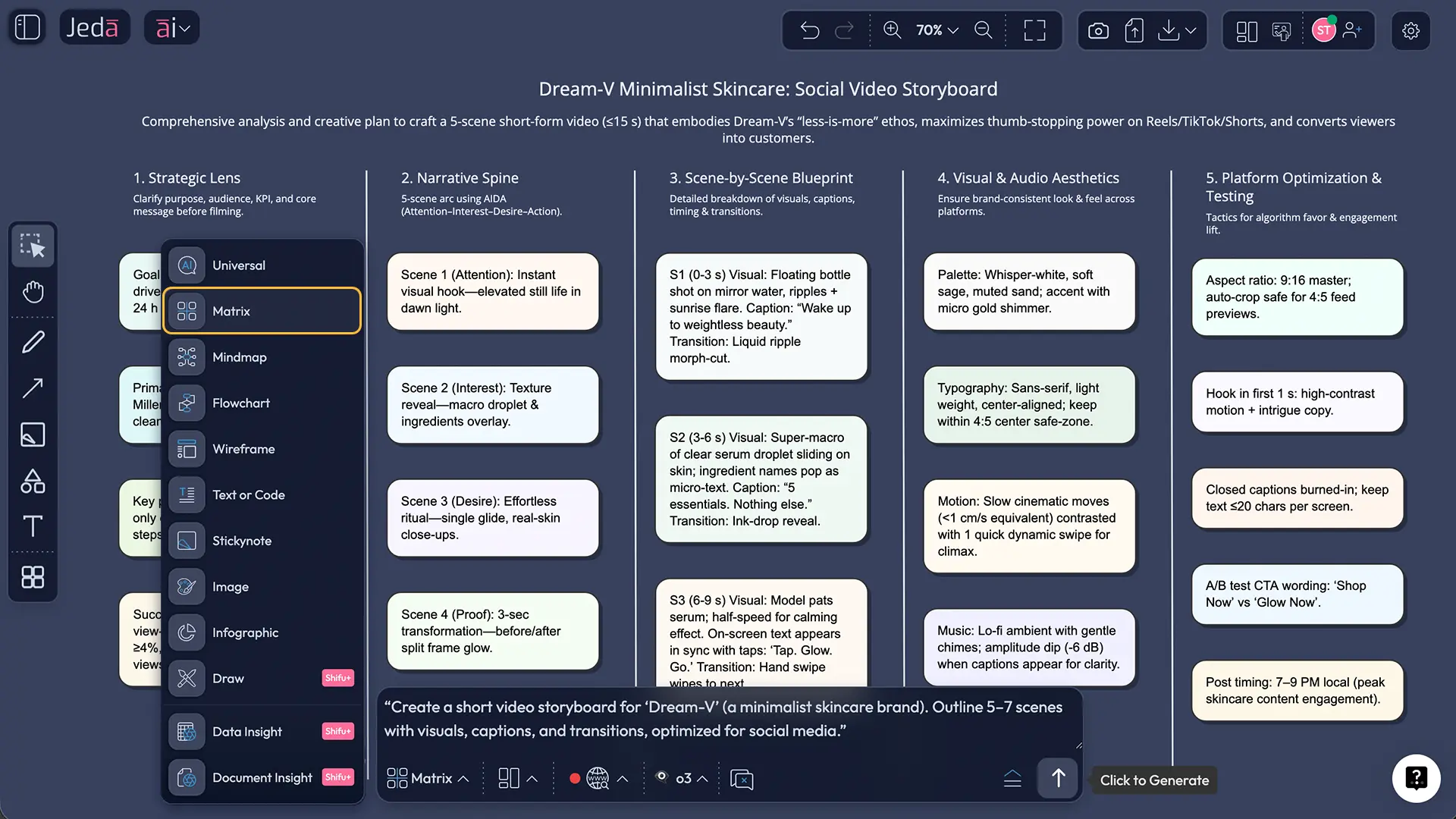
Open the Prompt Bar at the bottom of the canvas, select the Matrix command, and enter a scene-by-scene storyboard prompt. Press Enter to generate the first draft.
- Refine scenes and sequence manually
Edit the generated frames, tighten weak copy, adjust scene order, and add technical notes such as transitions, aspect ratio, or asset requirements.
- Use AI+ for a deeper second pass
Select a scene or section, then tap the AI+ button to extend it with more detail. Use this for richer explanation, better progression, or expanded production notes.
- Share, collaborate, and export
Review the storyboard with collaborators in real time, then export the board as PNG, SVG, or PDF for production handoff or stakeholder review.
Copy-paste prompt for Method 2
Prompt:
Create a Video Storyboarding Template for a [video type] about [product / topic / campaign].
Audience: [target audience]. Goal: [conversion goal or message goal].
Build a matrix with these columns: Scene, Scene Goal, Visual Direction, Voiceover / Dialogue, On-screen Text, Transition / Camera Note, CTA / Outcome, Production Notes.
Generate [number] scenes in logical sequence from hook to closing CTA.
Keep the storyboard concise, specific, and usable by both marketing and production teams.
Avoid vague filler. Make every scene earn its place.
A practical structure that works
Most marketing videos do not fail because the team forgot how to be creative. They fail because the scene logic is fuzzy. The storyboard template should fix that.
We recommend a seven-part flow for most commercial video work:
- Hook
- Problem
- Stakes
- Product or solution reveal
- Proof or mechanism
- Objection handling or trust layer
- CTA
That structure works for explainers, launch videos, testimonial edits, webinar promos, and short paid social. It is not the only structure, obviously. But it keeps the board honest.
Video Storyboarding Template examples
Example 1: B2B SaaS explainer
For a B2B SaaS explainer, the strongest storyboard usually leads with operational pain, then shifts fast into product clarity. The frames should show workflow friction, not just interface beauty shots. Otherwise the video turns into software wallpaper.
Typical scene logic:
- open with the operational bottleneck
- show the cost of delay or confusion
- introduce the platform
- demonstrate the key workflow
- add a proof layer
- close with a specific next step
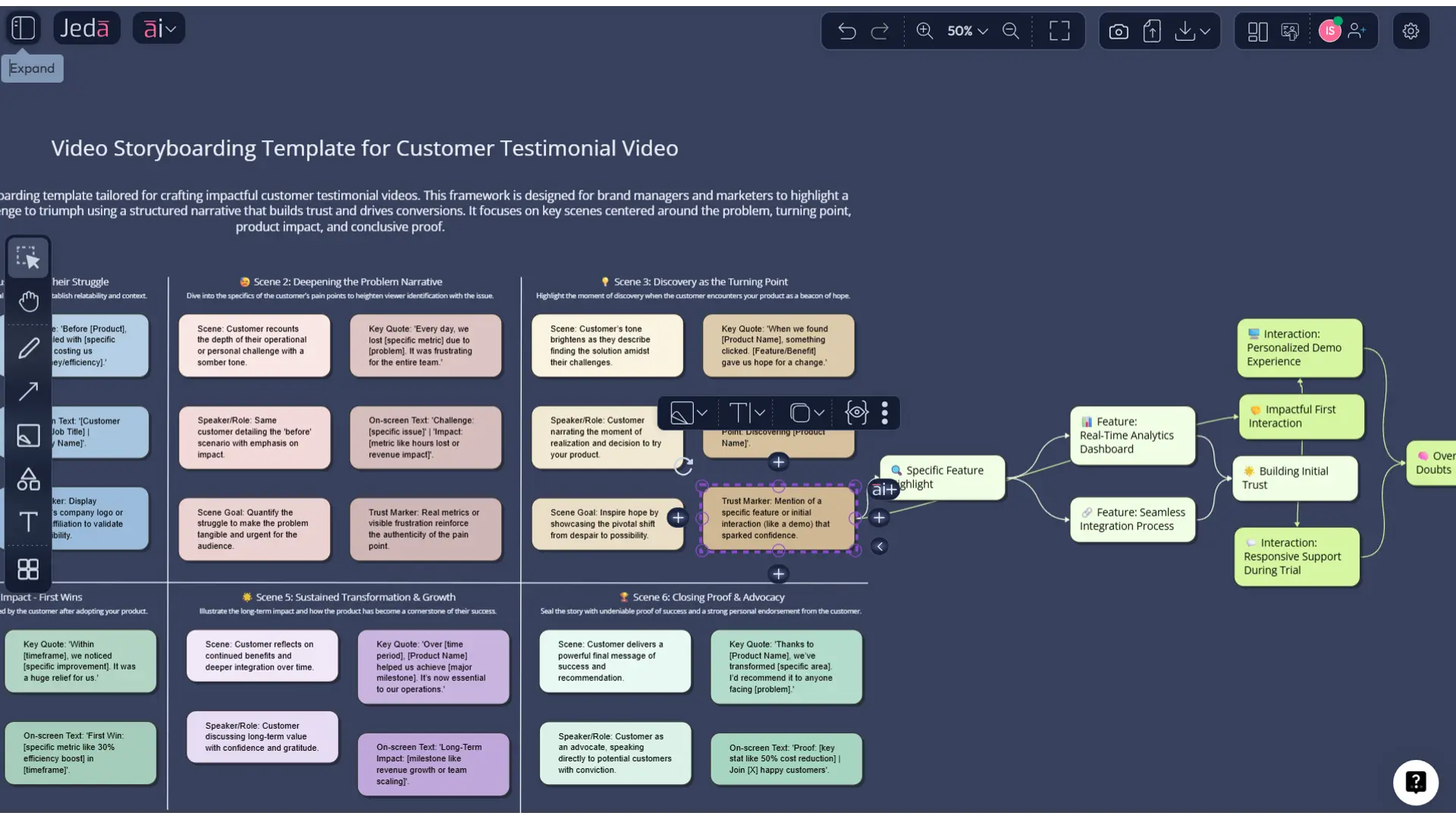
Example 2: Customer testimonial video
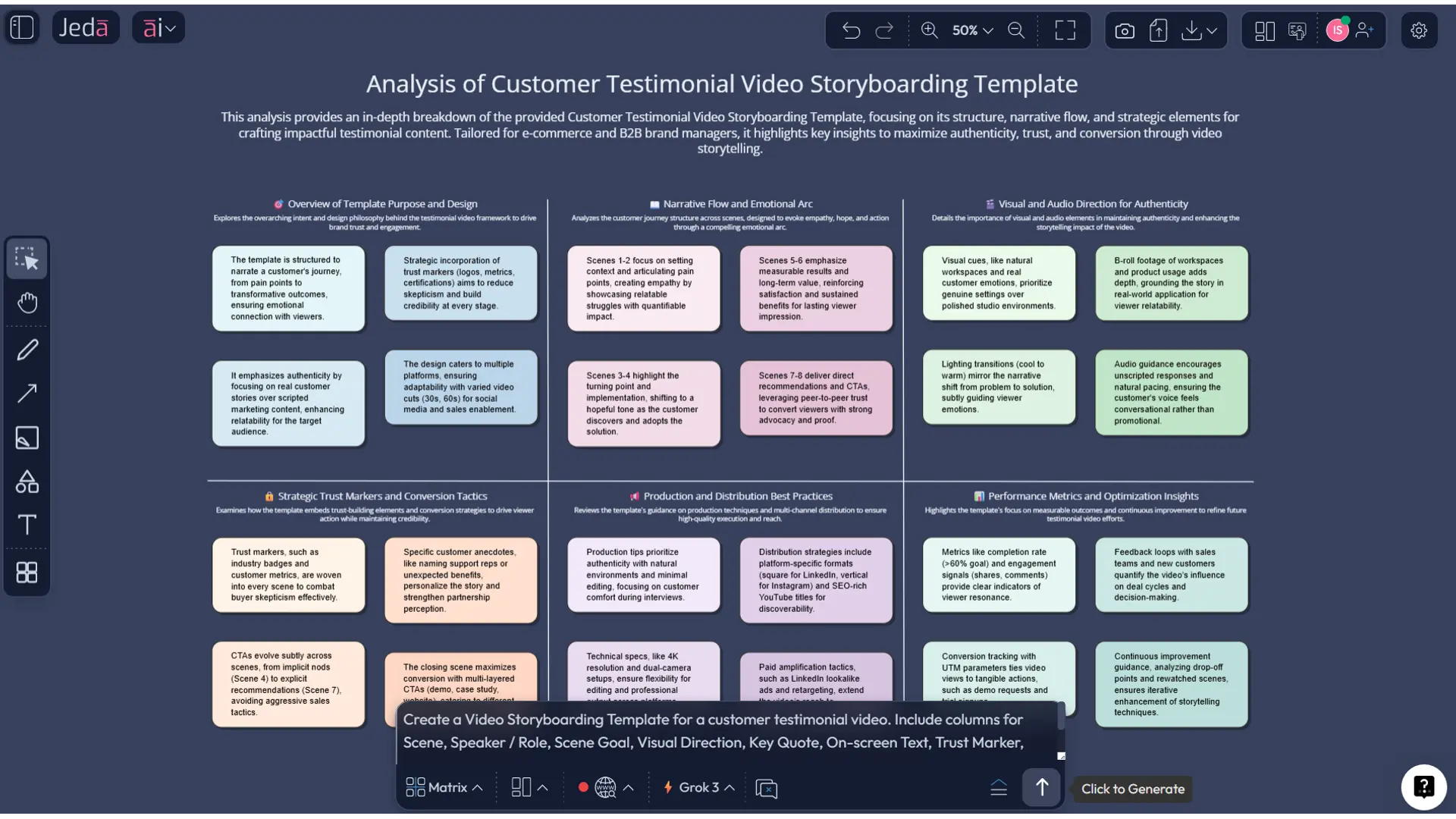
A testimonial storyboard should not read like a corporate love letter to itself. The customer’s problem comes first. Their turning point comes second. Your product appears as the mechanism, not the hero with suspiciously shiny hair.
Useful scene fields here include:
- speaker / customer role
- proof line or quote
- supporting visual
- emotional beat
- credibility marker
- CTA
Example 3: Short paid social ad
Short-form ads need a tighter frame logic. One idea per scene. Minimal text. Aggressive pacing. And yes, the first seconds do the heavy lifting. Google’s recent creative measurement write-up argues that early-cut or storyboard testing can help teams evaluate concepts before committing to full production. That is a fancy way of saying: test the idea before you spend real money making the wrong version.
Best practices for a stronger storyboard
1) Start from message, not aesthetics
Looks matter, but message order matters first. Identify the one thing the audience must understand after watching, then build the frame sequence backward from that outcome.
2) Give every scene one job
Do not ask one panel to explain the problem, show the feature, prove the claim, and close the sale. That is how scenes get bloated and forgettable.
3) Keep production notes attached to the frame
Adobe’s storyboard guidance highlights the value of pairing each scene with technical direction. Good. Keep camera movement, transitions, aspect ratio notes, and asset dependencies visible beneath the relevant panel.
4) Design for review, not just generation
The board should be easy for a founder, marketer, and editor to comment on without a guided tour. If the logic is invisible, the document is unfinished.
5) Use AI+ after the first draft, not before
The first pass should establish shape. Then use AI+ to deepen selected sections. That is where it adds value without turning the board into overstuffed soup.
Common mistakes to avoid
1) Confusing script outline with storyboard
A script tells you what is said. A storyboard must also tell you what is seen, when, and why.
2) Overloading frames with copy
If a panel needs a paragraph to explain itself, it probably contains too much. Break it apart.
3) Leaving the CTA for the last minute
The CTA should influence the whole sequence, not just appear in the closing scene like an afterthought with a button.
4) Making the board too abstract
Stick figures are fine. Vagueness is not. Rough visuals can still be precise.
5) Treating approval as a separate document
The storyboard should already contain enough clarity for stakeholders to approve direction, not just “react to concepts.”
Video storyboard tools: board vs blank doc vs chat-only workflow
| Editable visual board | Scene-by-scene structure | Collaboration | AI-assisted drafting | Reusable template logic | |
|---|---|---|---|---|---|
| Jeda.ai | ✓ | ✓ | ✓ | ✓ | 300+ strategic frameworks |
| Blank slide or doc | Partial | Manual | Basic | ✗ | Manual |
| Chat-only AI tool | ✗ | Text only | Limited | ✓ | Weak |
Frequently Asked Questions
- What is a video storyboard template?
- A video storyboard template is a structured frame-by-frame planning format for video production. It typically maps scenes, visual direction, dialogue or voiceover, on-screen text, transitions, and production notes so teams can align before filming or editing begins.
- Why should marketing teams use a storyboard before producing a video?
- Marketing teams use storyboards to reduce miscommunication, sequence the message clearly, and catch weak scenes before production costs rise. A storyboard also helps stakeholders review the logic of the video instead of reacting only after the first cut appears.
- Can AI create a storyboard from a campaign brief?
- Yes. AI can convert a campaign brief, audience profile, and message goal into a structured storyboard draft. It works best as a first-pass planning assistant, then a human team refines the sequence, visuals, and production detail.
- What should a strong storyboard template include?
- A strong template usually includes scene number, scene goal, visual description, dialogue or voiceover, on-screen text, transition or camera notes, CTA, and production notes. Those fields keep creative, strategic, and technical decisions tied to the same frame.
- What is the best Jeda.ai method for this use case?
- Use the Recipe Matrix first because it gives you a guided structure under the Marketing category. Use the Prompt Bar with the Matrix command when you want more control, custom columns, or a storyboard tailored to a specific video format.
- How does AI+ help with storyboards in Jeda.ai?
- AI+ helps after the first storyboard draft exists. Select a frame or section, then use the AI+ button to extend it with more detail, stronger transitions, or deeper production notes. It is best used to develop the board, not replace judgment.
- Can I turn a storyboard into another visual format in Jeda.ai?
- Yes. Use Vision Transform to convert selected storyboard logic into another visual structure such as a flowchart for production sequencing or a mind map for concept exploration. That keeps planning and adaptation inside one workspace.
- Is Jeda.ai suitable for collaborative video planning?
- Yes. Jeda.ai supports real-time collaboration on an AI Whiteboard, so marketers, founders, editors, and other stakeholders can review and refine the storyboard together. That makes approvals clearer and reduces fragmented feedback loops.
- What formats can I export from Jeda.ai?
- Jeda.ai exports boards as PNG, SVG, and PDF. Those formats are useful for production handoff, internal review, stakeholder presentation, or archiving your storyboard after approval.
- Does a storyboard still matter if the team already has a script?
- Absolutely. A script handles language, but a storyboard handles sequence, visual emphasis, pacing, and shot intent. Teams with a script but no storyboard often discover visual gaps only after production or during a painfully expensive edit.
Sources and further reading
- [1]
Wyzowl (2026) . “Video Marketing Statistics 2026” Wyzowl.
View Source ↗ - [2]
Wyzowl (2026) . “What Is a Storyboard and How Do You Make One?” Wyzowl.
View Source ↗ - [3]
Adobe (n.d.) . “How to Make a Storyboard – Free Templates” Adobe Acrobat Resources.
View Source ↗ - [4]
Adobe (n.d.) . “How to Get Started on Storyboarding” Adobe Creative Cloud.
View Source ↗ - [5]
Steve D. Katz (1991) . “Film Directing Shot by Shot: Visualizing from Concept to Screen” Michael Wiese Productions.
View Source ↗ - [6]
Yun Jang Jung et al. (2010) . “Storyboarding and Pre-visualization with X3D” Web3D '10 / ACM.
View Source ↗ - [7]
Scott Davidoff, Jeffrey Heer, and others (2013) . “Storyboarding for Visual Analytics” International Journal of Human-Computer Studies / Design Studies listing.
View Source ↗ - [8]
Zheng Wei et al. (2025) . “CineVision: An Interactive Pre-visualization Storyboard System for Director-Cinematographer Collaboration” UIST 2025 / arXiv.
View Source ↗
Start Your Video Storyboarding Template with AI Today
Join over 150,000+ users planning smarter campaigns in Jeda.ai’s AI Workspace and AI Whiteboard.
Try Free Template