Business Model Strategy Templates with AI is the fastest way to turn a messy idea into a clear, testable business model you can share, argue about, and improve. In Jeda.ai, you build these templates inside an AI Workspace (and yes, it still feels like an AI Whiteboard), so your team can edit the outputs instead of staring at a dead PDF. If you’ve ever spent a whole afternoon “aligning” on the business model and still walked away with contradictions, this is for you.
What are business model strategy templates?
Business model strategy templates are structured visuals that help you design, stress-test, and communicate how a business creates value and captures profit. Instead of long docs that nobody reads, you get boards that force the hard questions: Who pays? Why do they care? What has to be true for this to work? What breaks first?
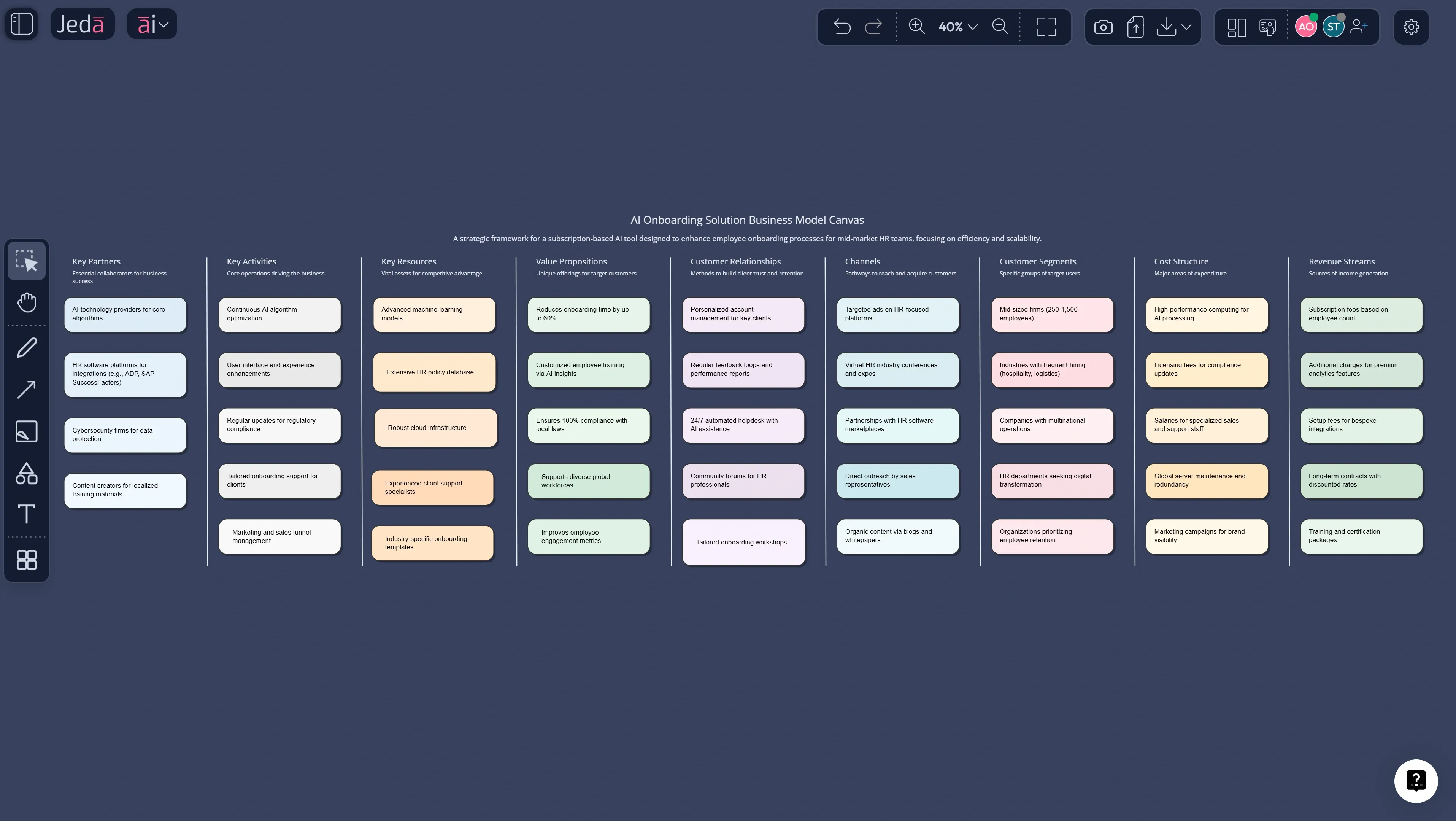
The most common templates come from the “canvas” family, popularized by Alexander Osterwalder and Yves Pigneur (2009/2010) with the Business Model Canvas. It’s a nine-block view of the core moving parts of a business model, built to make trade-offs visible. Newer variants like Lean Canvas (Ash Maurya) tune that same idea for early-stage validation and assumptions-first thinking. When you combine these templates with an AI Workspace, you don’t just fill boxes. You build a model you can iterate.
Why use business model strategy templates with AI?
You can fill a canvas manually. People have done it for years. The problem is speed and honesty.
When a team fills templates the “classic” way, two things happen:
- you argue about wording, and
- you silently skip the parts you don’t know.
AI doesn’t magically know your business. But it does help you:
- turn scattered notes into structured choices
- surface contradictions (and missing proof)
- generate alternative model options you can compare
- keep the whole thing editable on an AI Whiteboard, not trapped in chat
And here’s the underrated part. In Jeda.ai, the canvas output is a living object. You can rework it, style it, extend it with AI+ button expansions, and convert parts using Vision Transform. That’s what makes it feel like a proper Visual AI workflow, not “another template site.”
- Faster first draft
Start with a complete model draft in minutes. Then you refine what matters instead of spending an hour drawing boxes.
- Assumption spotlight
AI helps surface what you’re assuming versus what you’ve proven. That changes the conversation fast.
- Team-editable visuals
Templates stay editable like an AI Whiteboard. Your team can update, annotate, and align in one shared AI Workspace.
- Generate alternatives
Produce two or three different models (pricing, channel mix, partner structure). Compare them side by side.
- Evidence-in workflow
Bring pitch decks, research PDFs, or notes. Use Document Insight and Data Insight to turn inputs into structured blocks.
- Decision-ready output
End with a model that is clear enough to share with investors, stakeholders, or your own team without extra translation.
The 9 templates you should build first
If you want one “starter kit” that covers most strategy conversations, build these. (Yes, you can build more. Jeda.ai has 300+ strategic frameworks in the AI Menu. But start here.)
1) Business Model Canvas (BMC)
The classic nine-block model: customer segments, value propositions, channels, relationships, revenue streams, key resources, key activities, key partners, cost structure.
2) Lean Canvas
A startup-focused version tuned for risky assumptions: problem, customer segments, unique value proposition, solution, channels, revenue streams, cost structure, key metrics, unfair advantage.
3) Value Proposition Canvas
A focused template to match customer jobs, pains, and gains to your products, pain relievers, and gain creators.
4) Customer Segment and JTBD map
A clean segment definition plus “jobs-to-be-done” style needs. Great for clarifying who you’re actually building for.
5) Revenue model options grid
Subscription vs usage vs seats vs services. Show trade-offs, risks, and where each fits.
6) Pricing and packaging matrix
A simple grid that ties packaging tiers to value metrics (and prevents “random pricing” debates).
7) Channel and Go-to-Market map
How you reach people, convert them, and keep them. It’s often the hidden business model problem.
8) Unit economics summary (CAC, LTV, gross margin)
This is where fantasies go to die. In a good way.
9) Risk and assumption register
List what must be true, how you’ll test it, and what happens if it’s wrong.
How to create business model strategy templates in Jeda.ai
You’ve got two clean methods. Same destination, different driving style.
Method 1: Recipe Matrix (AI Menu) (recommended)
Use this when you want a guided form that nudges you to provide the right inputs, in the right order.
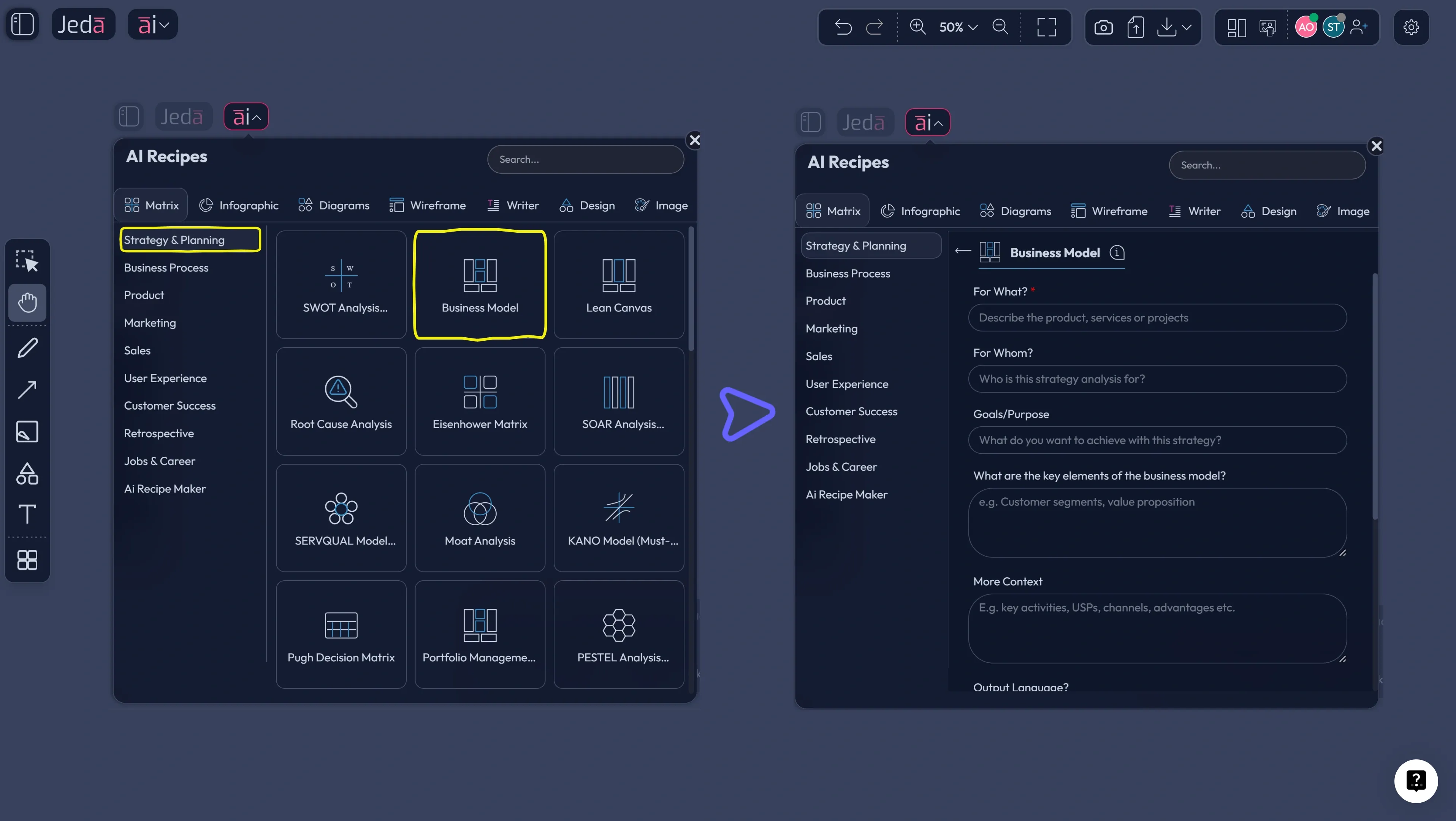
Where it lives: AI Menu (top-left) → Matrix Recipes
When it shines: Business Model Canvas, Lean Canvas, Value Proposition Canvas, and other structured frameworks.
- Open a new workspace
Create a fresh board so your business model stays clean and shareable. You’ll build this inside your AI Workspace so edits stay simple.
- Open the AI Menu and pick Matrix Recipes
Click the AI Menu (top-left), then choose Matrix Recipes. Search for 'Business Model Canvas' or 'Lean Canvas'.
- Choose a template and fill the guided inputs
Enter your product, target customers, and context. Add constraints like pricing, geography, or target margins if you have them.
- Generate the template on the canvas
Click Generate. Jeda.ai creates an editable matrix on your AI Whiteboard.
- Refine with edits and team feedback
Rewrite cells, add notes, color-code assumptions vs facts, and invite collaborators to comment or edit.
- Deepen sections using the AI+ button
Select any block (like Value Proposition or Channels) and use AI+ button to expand that section with additional depth.
- Convert parts with Vision Transform
Select a section and transform it into a mind map (for exploration) or a flowchart (for go-to-market steps) without rebuilding.
- Export the visual
Export as PNG, SVG, or PDF for sharing. Keep SVG if you want the cleanest scaling.
Method 2: Prompt Bar (faster when you already know what you want)
Use this when you want more control, or you’re generating multiple variants quickly.
Where it lives: Prompt Bar (bottom)
Best practice: Pick the Matrix command and be explicit about the company, audience, monetization, and constraints.
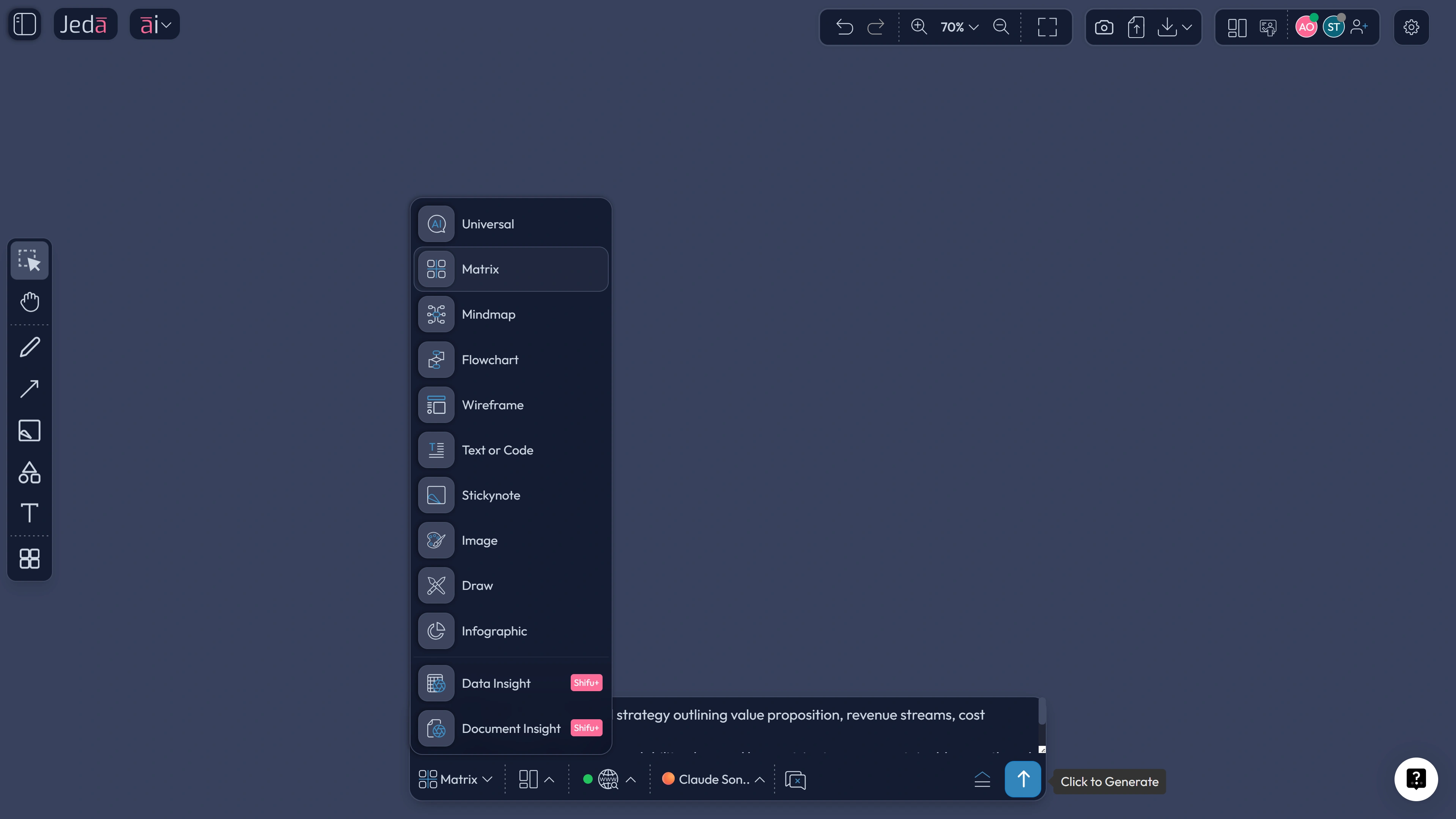
Here are prompts that work well:
- “Create a Business Model Canvas for [company]. Include 2 options for revenue streams and 2 channel strategies.”
- “Create a Value Proposition Canvas for [customer segment]. Include 5 customer pains and 5 gains, then map our offering.”
- “Create a pricing and packaging matrix for [product]. Use a value metric and propose 3 tiers.”
- “Create a go-to-market channel map. Show acquisition, activation, retention, and referral loops.”
AI+ button deep dive: how to turn one box into a real strategy
A canvas template is only useful if you can go deeper where it matters.
Here’s a practical way to use AI+ button without turning it into a random content generator:
- Start with your Business Model Canvas.
- Pick the block that will decide the business (often Value Propositions, Channels, or Revenue Streams).
- Use AI+ button to extend that block into sub-ideas, alternatives, and risks.
- Keep what is true. Delete what is fluff. Be ruthless.
That’s the “thinking tool” part. People feel it immediately when they use Jeda.ai like this.
Use Document Insight and Data Insight to ground the model
A business model is only as good as the evidence you feed it.
Document Insight (Shifu): turn decks and research into templates
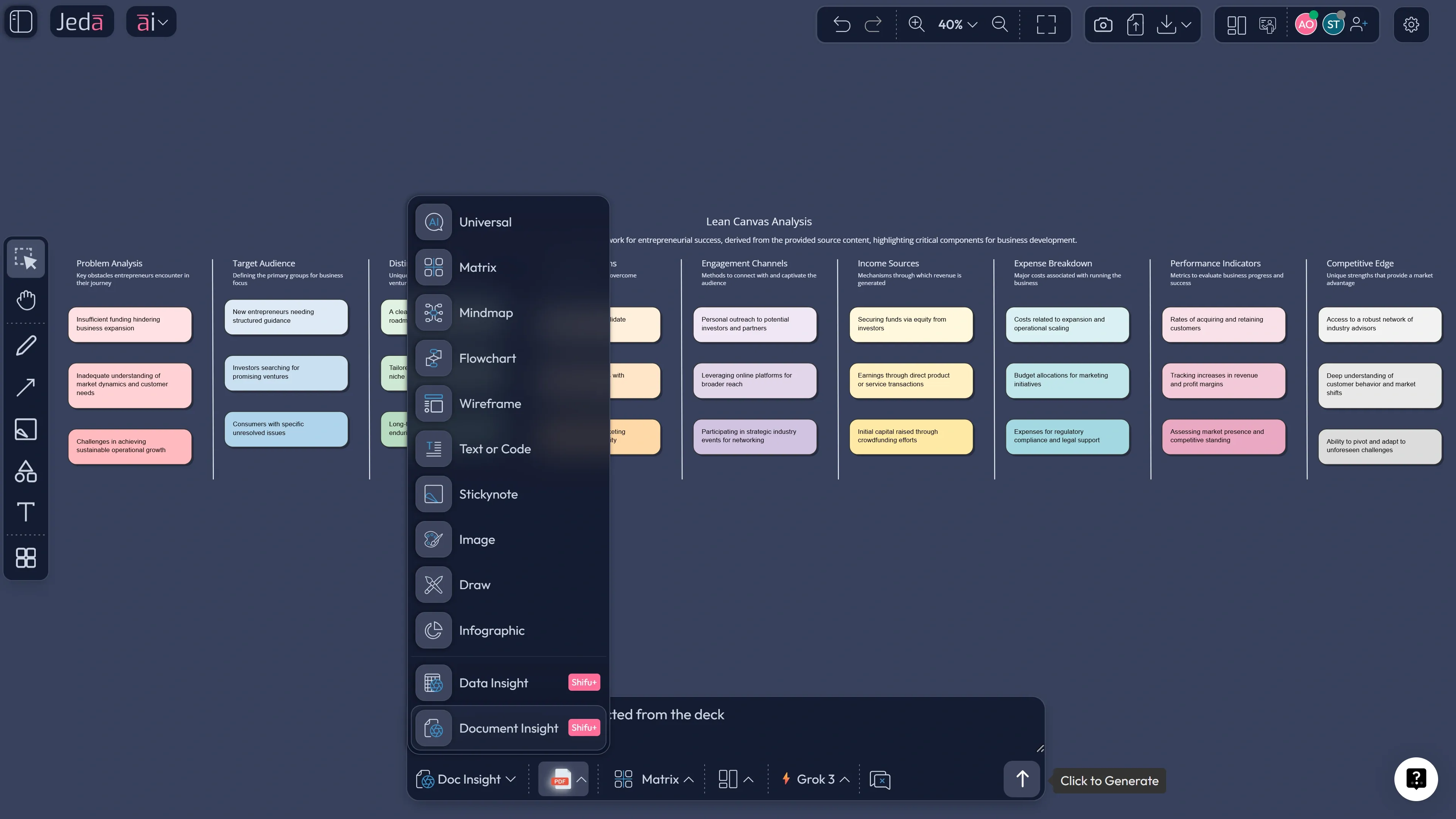
If you have a pitch deck, research PDF, or internal strategy doc, upload it and generate a structured output.
Typical workflow:
- Upload a doc (pitch deck, market research, competitor teardown).
- Choose Document Insight.
- Output as Matrix to generate a Business Model Canvas or Lean Canvas draft from the document.
Data Insight (Shifu): make pricing and unit economics less emotional
If you have any spreadsheet with numbers (even a rough one), Data Insight can produce quick visuals and summaries.
Useful inputs:
- CAC by channel
- trial-to-paid conversion
- churn
- ARPA by segment
- costs by product line
Jeda.ai vs typical template tools
Plenty of tools give you templates. That’s not rare.
The difference is whether the template is a living model you can evolve, with reasoning and alternatives, inside the same AI Workspace your team already uses.
Best practices that make templates actually useful
Common mistakes to avoid
- Treating the canvas like a final answer. It’s a working model. If it never changes, it’s stale.
- Stuffing everything into Value Proposition. Keep it crisp. The details can live in supporting notes.
- Skipping Channels because it feels “marketing-ish.” Channels are business model mechanics. Ignore them and you’ll learn the hard way.
- No unit economics. If you can’t explain CAC, LTV, and gross margin, you don’t have a model yet.
- Not assigning owners. A template without owners turns into a pretty screenshot. That’s not strategy.
Frequently asked questions
- What are business model strategy templates?
- Business model strategy templates are structured visuals that help you define how a business creates value and earns revenue. They usually cover customers, value propositions, channels, costs, and profit logic. Templates like the Business Model Canvas make trade-offs visible so teams can align and iterate faster.
- What is the Business Model Canvas?
- The Business Model Canvas is a nine-block template that maps the key parts of a business model, including customer segments, value propositions, channels, revenues, activities, resources, partners, and costs. Teams use it to design, describe, and revise a business model without writing long strategy documents.
- What is the difference between Lean Canvas and Business Model Canvas?
- Lean Canvas is a startup-focused variation that emphasizes risky assumptions such as the problem, solution, key metrics, and unfair advantage. Business Model Canvas is broader and works well for established businesses and new ventures. Lean Canvas is usually faster for early validation.
- How do I create business model strategy templates with AI?
- Business model strategy templates with AI are created by selecting a structured command like Matrix, then prompting for a Business Model Canvas, Lean Canvas, or pricing model. In Jeda.ai you can also use AI Menu recipes for guided inputs, then refine the output on the AI Whiteboard and extend sections using AI+ button.
- Can AI replace strategy thinking for a business model?
- AI cannot replace your market knowledge, customer insight, or decision accountability. What it can do is speed up structuring, generate alternative models, and highlight missing assumptions. You still choose what is true, what needs testing, and what the team will execute.
- What inputs should I provide to get a strong canvas?
- Provide your target customer segment, core problem, proposed solution, your current or planned pricing, and any constraints like region or cost limits. If you have a pitch deck, research PDF, or spreadsheet, use Document Insight or Data Insight so the canvas reflects evidence, not guesses.
- How do I validate a business model canvas quickly?
- Validate a business model canvas by picking the top assumptions and designing fast tests. Interview target customers, test acquisition channels with small budgets, and confirm willingness to pay. Update the canvas after each test so it stays connected to reality.
- How do I turn a canvas into an execution plan?
- Turn a canvas into execution by converting Channels and Customer Journey into a flowchart, then assigning owners and dates. In Jeda.ai you can use Vision Transform to convert sections into a flowchart or mind map and keep everything in the same AI Workspace.
- Can I collaborate with my team on these templates?
- Yes. Jeda.ai is built as a collaborative AI Workspace, so multiple people can edit the same business model strategy templates in real time. That collaboration is the point, because business models are rarely correct on the first draft.
- How can I export my business model strategy templates?
- You can export your templates as PNG, SVG, or PDF. PNG is best for quick sharing, SVG is best for crisp scaling, and PDF is best for formal documents. The underlying canvas remains editable inside Jeda.ai.
Sources and further reading
- [1]
Alexander Osterwalder, Yves Pigneur (2009) . “Business Model Generation (preview)” Self-published (MIT preview PDF).
View Source ↗ - [2]
Strategyzer (n.d.) . “The Business Model Canvas (official template)” Strategyzer Library.
View Source ↗ - [3]
Mark W. Johnson, Clayton M. Christensen, Henning Kagermann (2008) . “Reinventing Your Business Model” Harvard Business Review.
View Source ↗ - [4]
Ash Maurya (n.d.) . “Lean Canvas overview” LEANFoundry (tool overview).
View Source ↗ - [5]
Strategyzer (n.d.) . “Value Proposition Design (book page)” Strategyzer Library.
View Source ↗ - [6]
Miro (n.d.) . “Business Model Canvas Template” Miro Templates.
View Source ↗ - [7]
Lucid (n.d.) . “Business model canvas template” Lucid Templates.
View Source ↗ - [8]
Canva (n.d.) . “Business model canvas maker” Canva.
View Source ↗
Build your business model in one editable AI Workspace
Join over 150,000+ users who use Jeda.ai to draft, test, and refine business model strategy templates with AI.
Try Jeda.ai Free