If you searched Free AI Business Plan Generator, you probably want the same thing every founder wants: a plan that’s good enough to act on (and clean enough to show to someone with money).
Most “AI business plan generators” spit out a Word-style document and call it a day. That’s fine… until you realize a business plan isn’t just a document. It’s a decision system: assumptions, trade‑offs, numbers, and a story you can defend.
Jeda.ai is an AI Workspace and AI Whiteboard built for that. It turns your inputs into editable visuals—matrices, flowcharts, mind maps, and structured notes—so you can refine the plan with your team and export it when you’re ready. Jeda.ai is a Visual AI workspace: you generate visuals, then keep them editable as your assumptions evolve.
What a business plan is (and why it still matters)
A business plan is a roadmap for how you’ll structure, run, and grow the business—and it’s also what many lenders and investors use to decide whether your idea is worth funding. The U.S. Small Business Administration (SBA) frames business plans as both an operating guide and a funding tool.
And yes, planning is correlated with better outcomes in the research literature. Meta-analyses and reviews have found a positive relationship between business planning and firm performance—especially when planning is treated as an adaptive process rather than a one‑time homework assignment.
Traditional vs lean startup plans (pick the format that matches your goal)
SBA describes two common categories:
- Traditional plans: detailed, section-by-section, often requested by lenders and investors
- Lean startup plans: shorter, one-page style plans that summarize the essentials and can be created quickly
A smart approach is to start lean (fast) and expand only what you need for the next milestone (pilot, loan, seed round, partnerships).
What a “free AI business plan generator” should actually generate
A business plan isn’t one artifact. It’s a set of connected artifacts:
- A model (how you make money)
- A market view (who you serve and why they buy)
- A go‑to‑market path (how you acquire customers)
- A delivery system (operations, roles, milestones)
- A financial story (assumptions, costs, pricing, runway)
That’s why many teams prefer one-page tools like the Business Model Canvas (Osterwalder & Pigneur) to map the logic of the business quickly.
And why Lean-style canvases became popular for startups that need speed and iteration.
Jeda.ai’s edge is that it generates all of those as editable visuals inside one AI Workspace, so your plan stays coherent as you revise it.
What you can generate in Jeda.ai for a complete business plan
Here’s a practical “plan kit” you can build in one workspace, without jumping between five tools.
- Executive summary draft
Generate a crisp 1-page summary you can paste into a deck or funding portal. Then revise it as assumptions change.
- Lean Canvas or Business Model Canvas
Map the business logic in one page, then expand the blocks that need proof (channels, unit economics, partners).
- Market research + competitor map
Use Web Search (platform feature) to pull current context, then turn findings into a matrix or diagram you can annotate.
- Go-to-market flowchart
Generate acquisition → activation → retention flows, with clear milestones and handoffs between roles.
- Financial assumptions & runway
Build a structured assumptions table (pricing, CAC, churn, costs) and keep it editable as you learn.
- Team + ops plan
Create org structure, hiring timeline, and operating cadence so you’re not ‘winging it’ when things start moving.
How to create a business plan in Jeda.ai
You’ll use two paths:
- Method 1: Recipe Matrix (AI Menu templates) — fastest, most structured
- Method 2: Prompt Bar — flexible, great when you already know what you want
And after each generation, you’ll use AI+ to deepen sections without rewriting everything.
Method 1: Recipe Matrix (AI Menu) — the “structured sprint”
This is the best route when you want guardrails and consistent formatting.
- Open the AI Menu
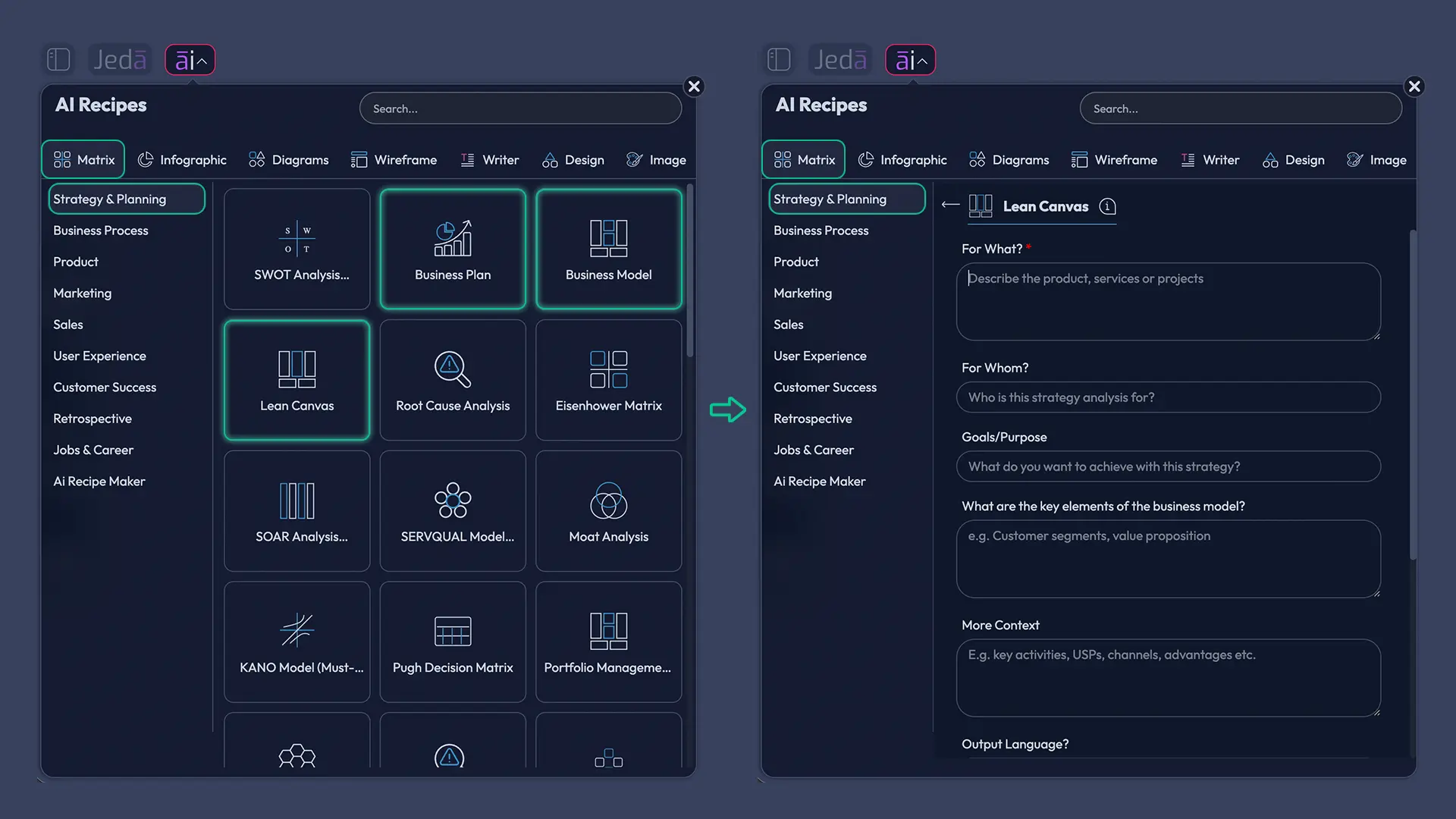
In the top-left of your AI Workspace, open the AI Menu and go to Matrix Recipes.
- Generate your Lean Canvas (or Business Model Canvas)
Pick Lean Canvas or Business Model, then enter your business: customer segment, value proposition, channels, revenue model, and key costs.
- Add a Market & Competitor snapshot
Use a strategy matrix (SWOT or competitive analysis style) to capture competitors, differentiation, and the risky assumptions you must validate first.
- Create a Financial Planning board
Select Financial Planning and enter pricing, target volume, key costs, and runway assumptions. Keep assumptions explicit so you can revise them later.
- Create your Project Plan milestones
Use a planning matrix to map milestones (MVP, pilot, launch), owners, timelines, and dependencies.
- Extend sections with AI+
Select any block (like Channels, Costs, or Milestones) and extend it with AI using the AI+ button to add details, risks, and alternatives.
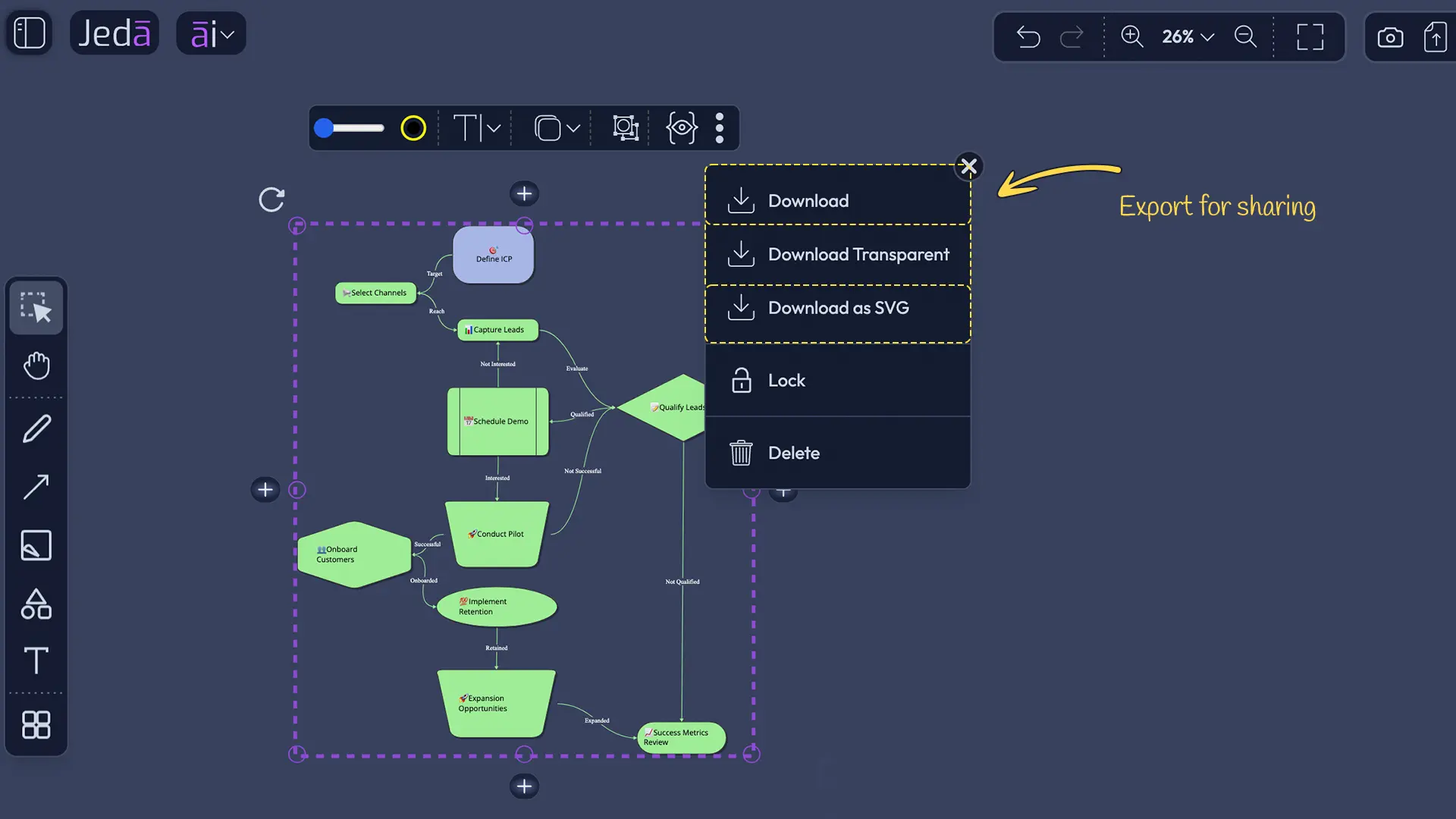
- Export for sharing
Export your board as PNG, SVG, or PDF and share it with co-founders, advisors, or lenders.
Method 2: Prompt Bar — the “custom build”
Use the Prompt Bar when you want a specific output (or you’re mixing formats).
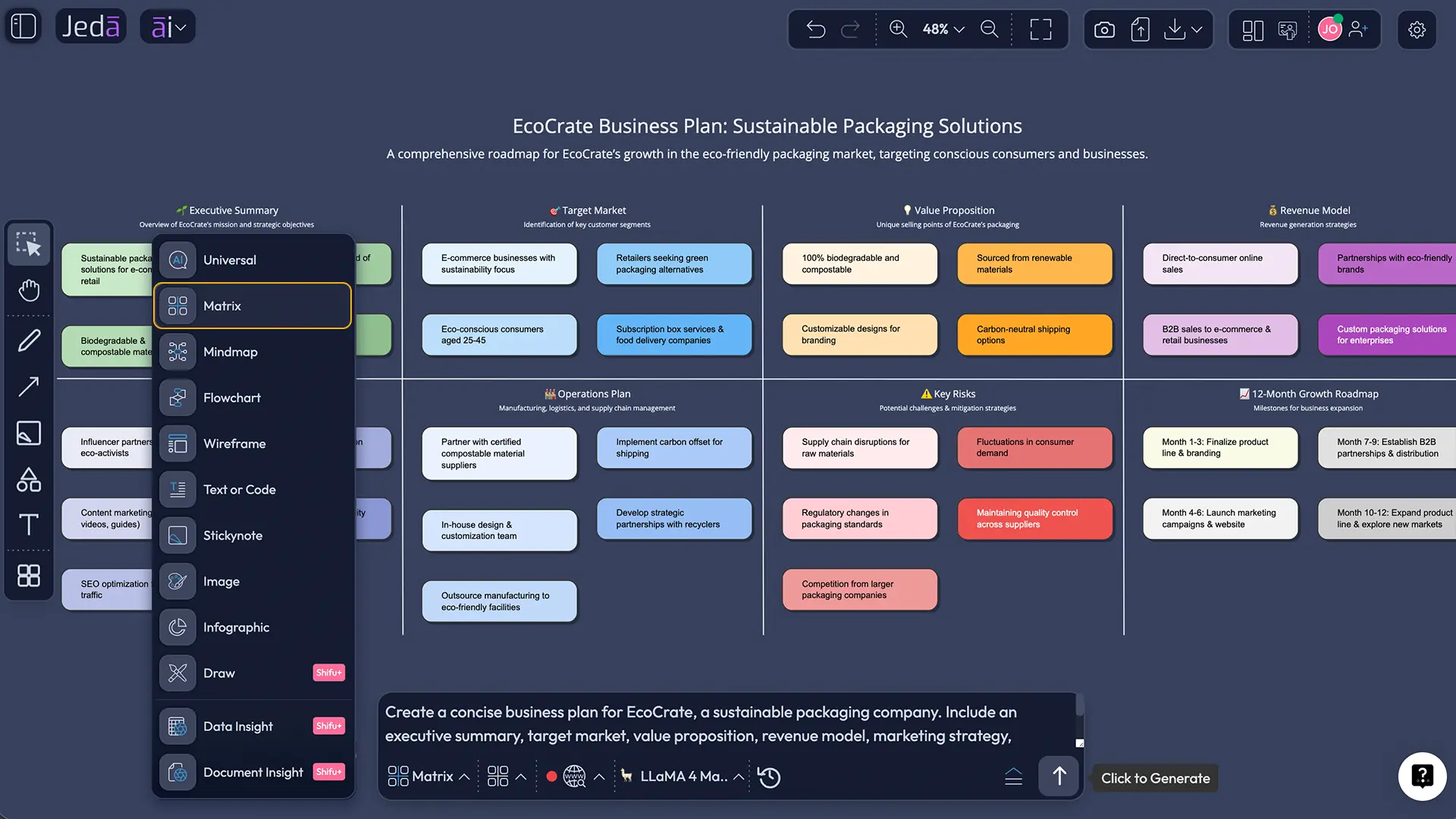
- Open the Prompt Bar at the bottom of the canvas
- Select a command (Matrix, Mindmap, Flowchart, or Text)
- Write your prompt with the details you already know
- Click Generate
- Use AI+ to deepen any section, and Vision Transform to convert formats (e.g., mind map → flowchart)
Example prompt (Text command)
Use this as a starter prompt in the Prompt Bar:
“Write a concise business plan narrative based on the canvas content: executive summary, problem, solution, target customer, differentiation, go-to-market plan, milestones, and key financial assumptions. Keep numbers labeled as assumptions.”
A realistic example: turn a messy idea into a coherent plan
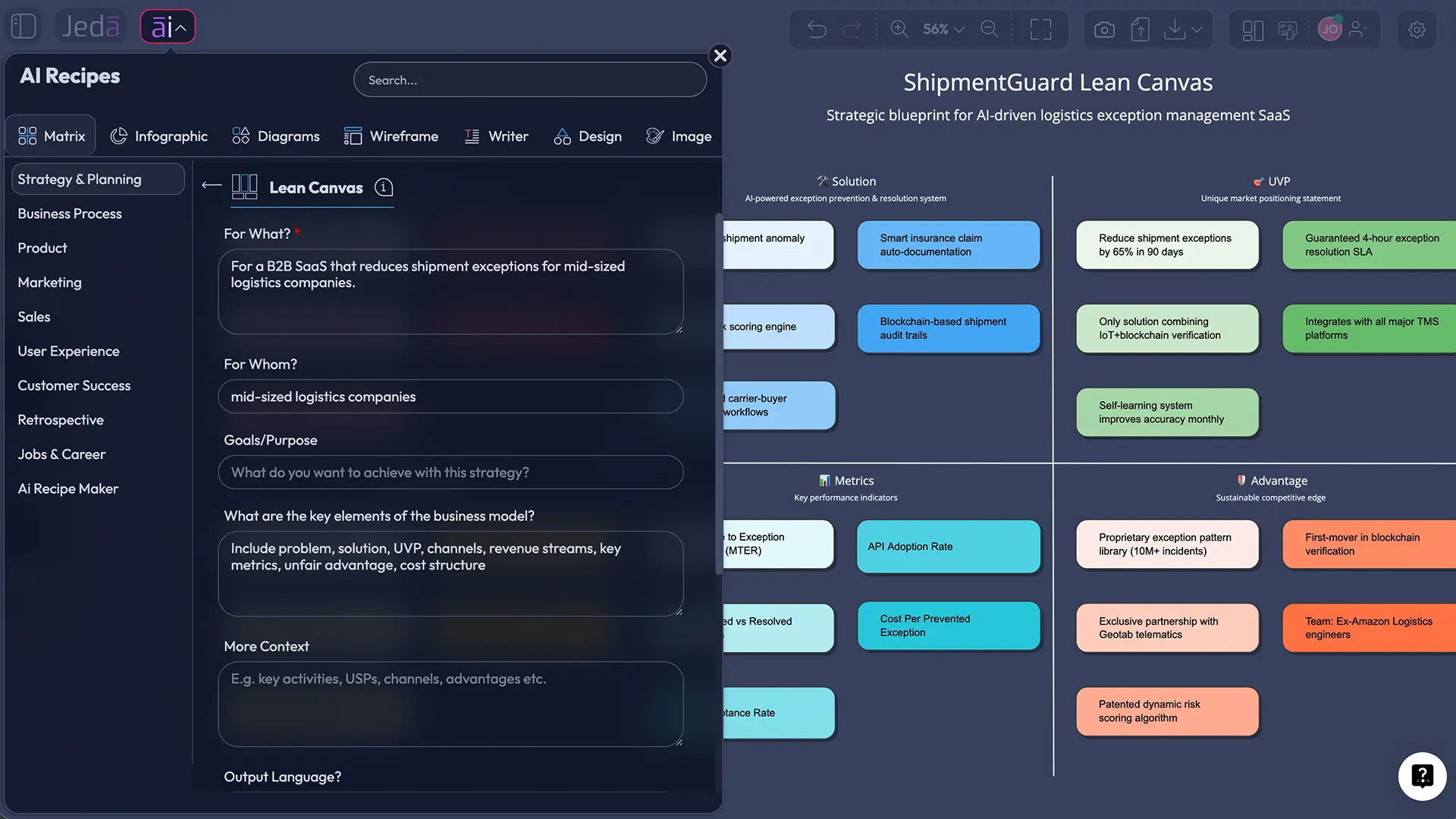
Let’s say you’re building a B2B SaaS that helps mid-sized logistics companies reduce shipment exceptions. You’ve got notes, a couple customer calls, and one spreadsheet of rough pricing.
In Jeda.ai, you can:
- Generate a Lean Canvas (model clarity)
- Add a SWOT (risk clarity)
- Build a Go-to-market flowchart (execution clarity)
- Add a Financial Planning matrix (numbers you can defend)
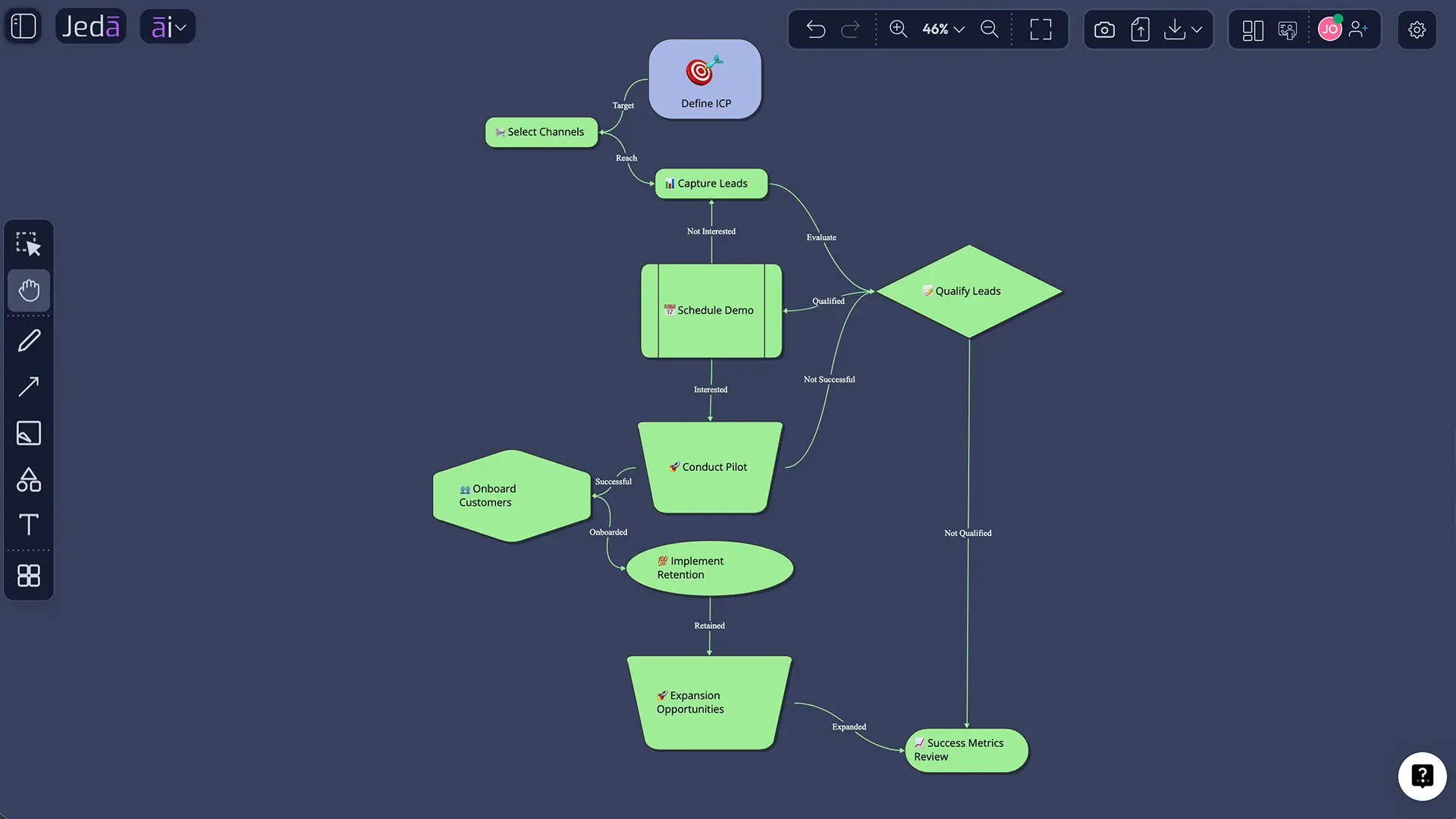
Here’s the key habit: keep your “facts” and “assumptions” visibly separate. When you get new data (a pilot customer, a new cost quote), you update the board—not just the PDF.
How to make AI-generated business plans less wrong
AI can draft structure fast. Accuracy is still on you.
Common mistakes to avoid
- Writing a plan before you have a model. Start with a canvas (Lean Canvas or Business Model Canvas), then expand.
- Mixing “research” with “guesses.” Keep sources separate from assumptions.
- Building a plan that no one can edit. A plan that can’t evolve gets ignored.
- Treating AI output as final. Use AI+ to iterate section-by-section, and revise with humans in the loop.
- Forgetting the plan’s job. The plan’s job is to help you make decisions and get funded—not to sound fancy.
Frequently Asked Questions
- Is a free AI business plan generator good enough for investors?
- A free AI business plan generator can produce a solid first draft, but investors care about the reasoning, assumptions, and proof behind the numbers. Use AI to structure the plan fast, then validate your market claims and make assumptions explicit so you can defend them.
- What sections should a traditional business plan include?
- Common traditional business plan sections include an executive summary, company description, market analysis, organization and management, products/services, marketing and sales, funding request, financial projections, and an appendix.
- What’s the difference between a traditional plan and a lean startup plan?
- Traditional business plans are detailed and comprehensive, often used for loans and formal funding. Lean startup plans summarize the essentials in a one-page format and are designed for speed and iteration. SBA describes both formats and recommends choosing the one that fits your needs.
- Do business plans actually improve business success rates?
- Research is mixed by context, but meta-analyses and reviews generally find a positive relationship between business planning and performance, especially when planning is adaptive and revisited over time.
- Can Jeda.ai generate a one-page business plan?
- Yes. Use a Lean Canvas or Business Model Canvas template in the AI Menu, then use the Text command to generate a one-page narrative summary based on what’s on the canvas.
- How do I add market research to my plan without spending days?
- Start with Web Search in your AI Workspace to collect current context, then translate findings into a competitive matrix or positioning notes you can edit. If you already have PDFs or reports, upload them and use Document Insight to extract the structure into visuals.
- Can I collaborate with co-founders on the same plan?
- Yes. Jeda.ai is an AI Whiteboard built for real-time collaboration. Use one shared workspace as the ‘source of truth’ for your canvases, flows, and plan narrative, and keep decisions visible for everyone.
- What formats can I export my business plan visuals to?
- You can export your workspace visuals as PNG, SVG, or PDF. Exporting makes it easy to share with advisors, lenders, or a board meeting, while keeping the editable version in your AI Workspace.
- How do I turn my plan into a pitch-friendly summary?
- Generate the core visuals (canvas + flow + financial assumptions), then use the Infographic command for a concise ‘plan at a glance’ summary. You can also use the Text command to draft a short executive summary you can paste into slides.
- Can I use AI+ to expand financial projections?
- AI+ can help you expand and clarify assumptions, scenarios, and risk notes connected to your financial plan. Keep the outputs labeled as assumptions, and validate key inputs (pricing, costs, volume) with real quotes or benchmarks before sharing externally.
Sources & further reading
- [1]
U.S. Small Business Administration (2025) . “Write your business plan” SBA.gov.
View Source ↗ - [2]
Jan Brinckmann, Dietmar Grichnik, Dominique Kapsa (2010) . “Should entrepreneurs plan or just storm the castle? A meta-analysis on contextual factors impacting the business planning–performance relationship in small firms” Journal of Business Venturing.
View Source ↗ - [3]
Hiroshi Nakajima (2025) . “Is Business Planning Useful for Entrepreneurs? A Review and Recommendations” Administrative Sciences (MDPI).
View Source ↗ - [4]
Alexander Osterwalder, Yves Pigneur (2010) . “Business Model Generation: A Handbook for Visionaries, Game Changers, and Challengers” Wiley.
View Source ↗ - [5]
Strategyzer (n.d.) . “The Business Model Canvas (Official template/library entry)” Strategyzer Library.
View Source ↗ - [6]
Ash Maurya (2012) . “Running Lean (Lean Canvas approach)” O’Reilly Media.
View Source ↗ - [7]
SCORE (n.d.) . “Business Plan Template for a Startup Business” SCORE.org.
View Source ↗
Start Your Business Plan in an AI Workspace
Join over 150,000+ users who use Jeda.ai to turn ideas, docs, and data into editable, decision-ready visuals.
Try Free Template