Multimodal AI agents are moving from shiny demo territory into real operating systems for work. Not because the market suddenly fell in love with buzzwords. Because modern work is messy. Teams don’t just deal with text. They deal with screenshots, PDFs, meeting notes, spreadsheets, product mockups, whiteboard sketches, dashboards, and half-finished ideas that live across five tabs and twelve tools.
McKinsey notes that multimodal AI can process text, images, audio, and video together, which makes it better suited to messy business work. Its 2025 research shows enterprise AI adoption accelerating: 78% of organizations reported using AI in 2024, up from 55% a year earlier, and 71% reported regular generative AI use in at least one business function. Microsoft found that 81% of leaders expect agents to be integrated into their AI strategy within 12–18 months, while PwC reports 79% of surveyed companies are already adopting AI agents. The market is not waiting politely. It has already kicked the door open.
That creates an opening for Jeda.ai. Not as another chatbot. And not as another blank canvas with AI duct-taped onto the side. Jeda.ai’s positioning is sharper than that: an AI Workspace that is framework-native, visual-first, collaborative, and built to turn documents, data, and ideas into editable, decision-ready outputs. That matters because both enterprises and startups want the same thing in different packaging: fewer handoffs, faster reasoning, clearer alignment, and outputs people can actually use.
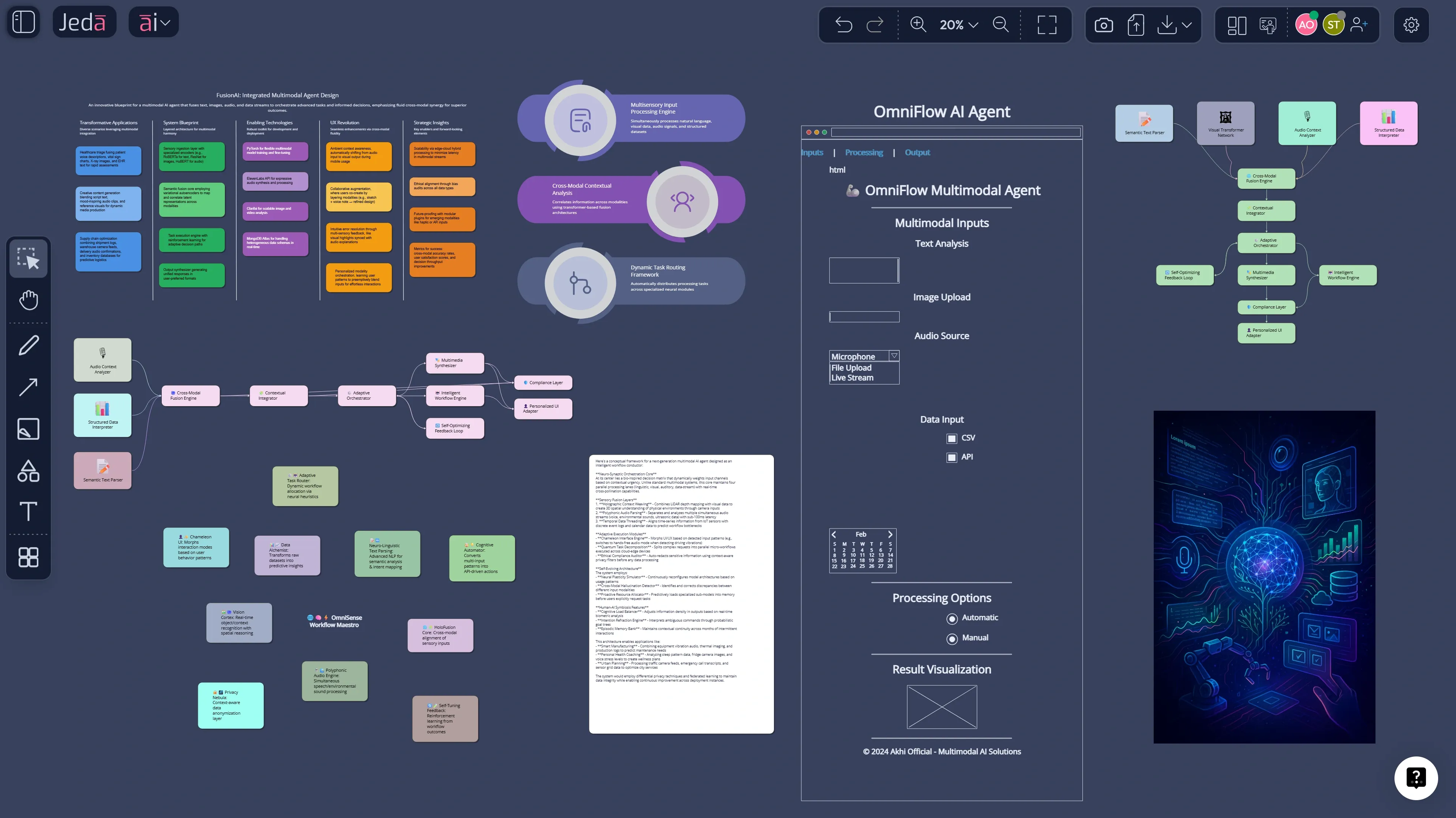
What are multimodal AI agents, really?
A multimodal AI agent takes in more than one input type, reasons across those inputs, and acts toward a goal. McKinsey defines multimodal AI as systems that process text, images, audio, and video together. Google Cloud describes the same idea from a product angle: multimodal models can accept one input type and generate another. Add agency to that stack and you get software that doesn’t merely answer questions. It can interpret, decide, and execute across steps.
A text-only model can summarize a meeting transcript. A multimodal AI agent can review the transcript, compare it against a screenshot, cross-check the roadmap spreadsheet, inspect a PDF brief, then generate a risk matrix and a meeting-ready board. Anthropic’s own multi-agent research system also outperformed a single-agent setup by 90.2% on internal breadth-first research evaluations, which is a strong signal that coordinated agent systems are already beating one-shot prompting on harder tasks.
Why enterprises will lean hard into multimodal AI agents
Enterprises are adopting multimodal agents because enterprise work is multimodal by default. Procurement involves contracts, spreadsheets, vendor emails, and approval logic. Product review involves dashboards, mockups, notes, and call transcripts. Compliance involves policy PDFs, evidence, and tickets. If your AI can handle only one slice cleanly, humans still do the glue work.
McKinsey estimates a $4.4 trillion long-term productivity opportunity from corporate AI use cases. Its 2025 workplace research says 92% of companies plan to increase AI investments over the next three years, but only 1% describe themselves as mature in deployment. Deloitte adds that 25% of companies already using gen AI were expected to launch agentic AI pilots or proofs of concept in 2025, rising to 50% by 2027. That gap between investment and maturity is exactly where multimodal agents win.
- They match real enterprise inputs
Enterprise work spans text, spreadsheets, screenshots, PDFs, and visual workflows. Multimodal agents can reason across the whole mess instead of forcing teams back into manual stitching.
- They handle multi-step work
Agents are useful when work needs planning, sequencing, and delegation. Research, analysis, review, drafting, and visual synthesis finally live in one loop.
- They support governed execution
Enterprises need workflows, checkpoints, and editable outputs. Mature adoption is less about a cool prompt and more about repeatable, reviewable systems.
- They improve decision visibility
A board, flowchart, or matrix is easier to challenge, align on, and refine than a pile of chat responses. That is where an AI Workspace becomes more valuable than a chatbot.
Why startups may move even faster
Startups have a different problem. Not complexity at scale. Compression.
A startup has fewer people, less time, and no patience for tool hopping. The founder wants market signals, competitor notes, wireframes, launch flows, and investor-facing clarity by yesterday. Multimodal agents fit that style because one small team can feed in research docs, screenshots, spreadsheets, call notes, and raw ideas, then get multiple outputs fast: mind maps, pitch frameworks, user flows, and positioning boards.
The funding picture backs up that urgency. Stanford’s 2025 AI Index says generative AI attracted $33.9 billion in private investment in 2024, up 18.7% from 2023, and notes that newly funded generative AI startups nearly tripled. Deloitte also reported that investors put more than $2 billion into agentic AI startups over the prior two years. Startups will love multimodal agents because they let tiny teams move like bigger ones.
Why text-only copilots will hit a ceiling
Text copilots are useful. But they flatten reality.
If the model cannot inspect the screenshot, parse the spreadsheet, understand the PDF, compare the note cluster, and turn the answer into an editable visual, your team is still doing the slow work outside the tool. This is where Jeda.ai’s AI Whiteboard and AI Workspace positioning gets interesting. The uploaded strategy docs define Jeda as an AI workspace for strategy, design, and innovation that is framework-native, visual-first, and built for real-time collaboration. The same docs emphasize an “evidence-in, editable visuals-out” logic: bring in docs, PDFs, CSV/Excel, images, screenshots, and optional web context, then generate boards, diagrams, flowcharts, mind maps, wireframes, and design alternatives that remain editable.
That is a better fit for both enterprise and startup use because the output is not dead text. It becomes a working artifact.
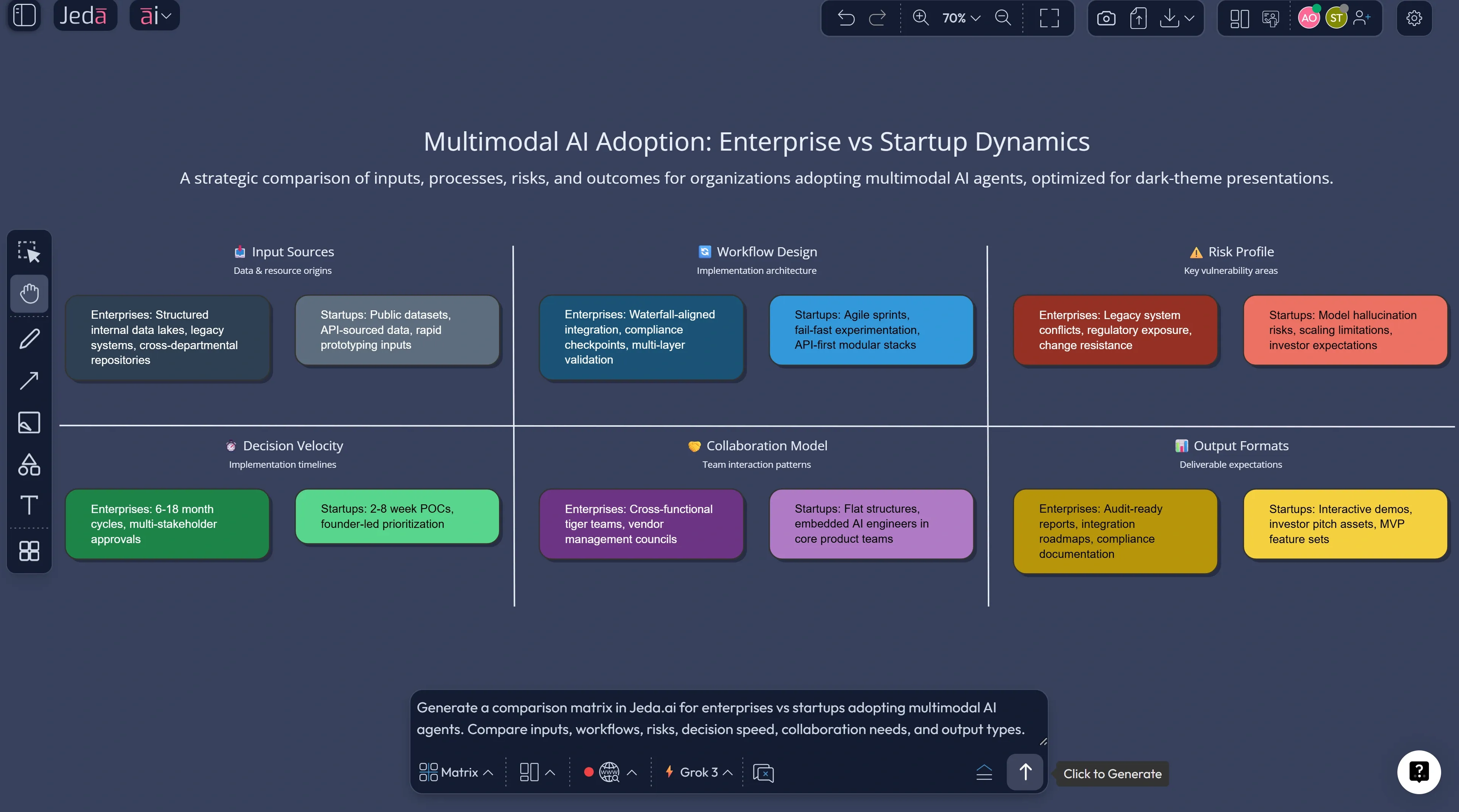
How Jeda.ai turns multimodal agent ideas into working boards
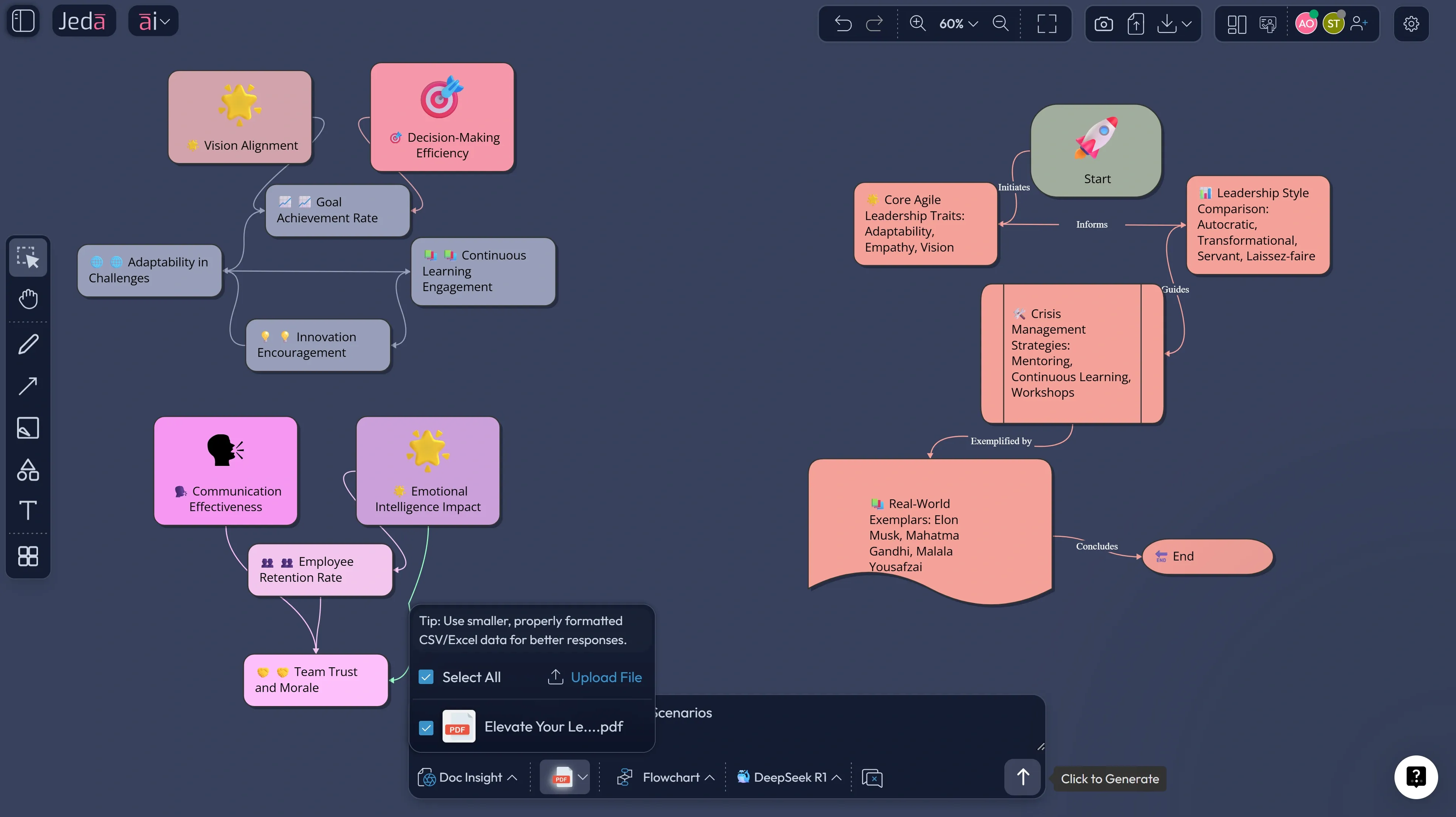
Jeda.ai’s workflow docs make the product logic pretty clear: the Prompt Bar is the main input surface, the AI Menu exposes 300+ AI Recipes, and the platform supports Matrix, Mindmap, Diagram, Flowchart, Stickynotes, Wireframe, Text, Infographic, Data Insight, and Document Insight. Its Web Search is a platform capability, not a model trick, and the AI+ button extends an existing visual instead of forcing you to restart from scratch. The user guide also notes that new accounts get a 7-day Shifu trial, and that Multi-LLM Agent is available at Shifu and above. That combination matters because multimodal agent work usually needs three things at once:
- Evidence intake — documents, data, screenshots, notes.
- Reasoning — ideally across more than one model for important work.
- Editable visual output — something a team can challenge, present, and improve.
That is basically the Jeda.ai playbook.
How to create a multimodal AI agent strategy board in Jeda.ai
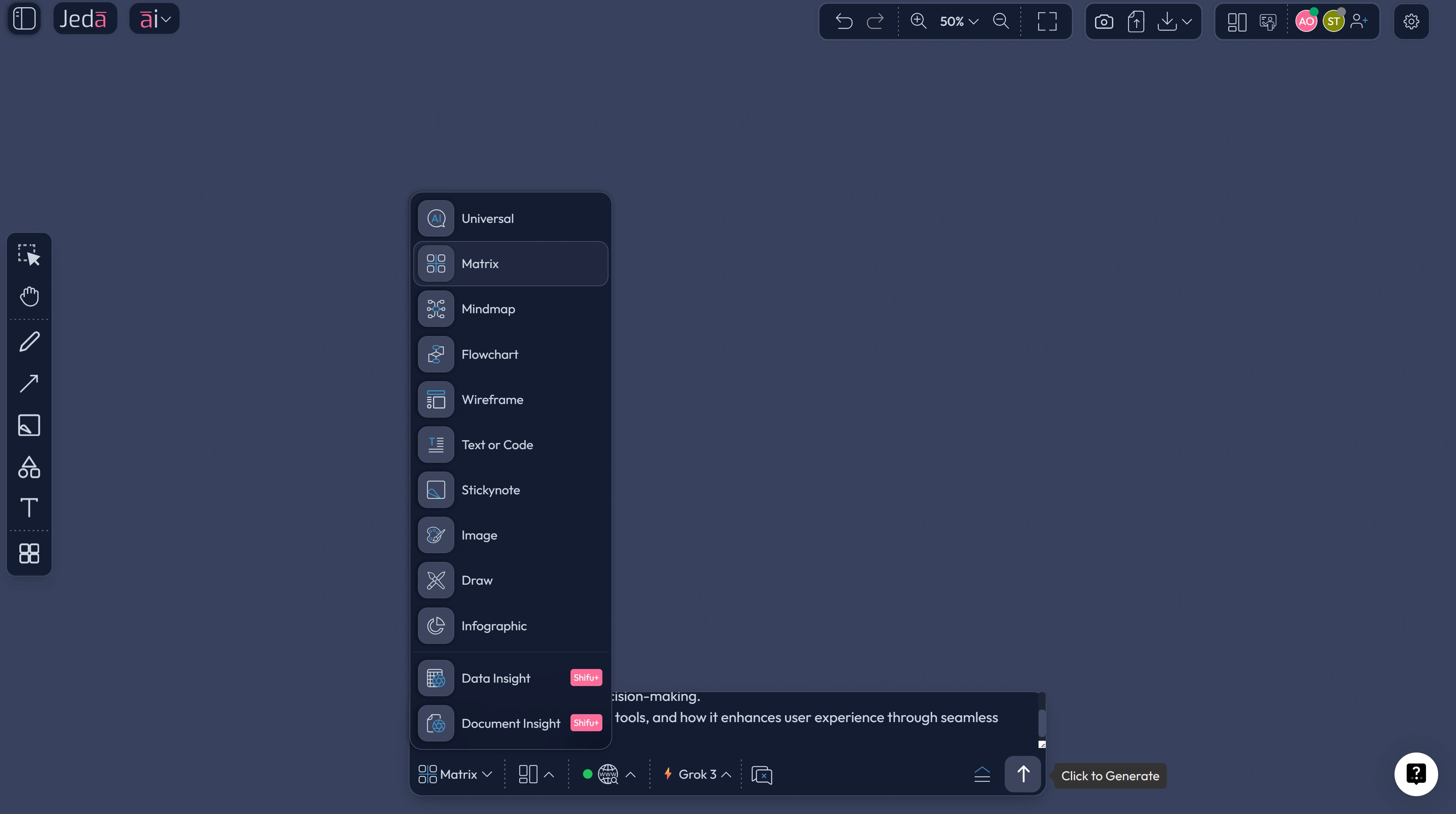
Method 1: Recipe Matrix
Use this method when you want a structured strategy artifact instead of a freeform brainstorm. It is the cleaner route for executive teams, founders, consultants, and product leads.
- Open the AI Menu
In the top-left of the workspace, open the AI Menu and go to Matrix Recipes.
- Choose a strategy recipe
Select a recipe such as SWOT Analysis, Business Model, PESTEL, Risk Analysis, or Portfolio Management depending on whether you are evaluating adoption, market timing, workflow risk, or growth opportunity.
- Set the multimodal AI context
Describe the company type, target market, business model, current workflows, and what kinds of inputs the agent must handle: documents, screenshots, spreadsheets, notes, or product visuals.
- Generate the first board
Let Jeda.ai build the matrix, then rewrite labels so each section reflects a real business question such as where agents save time, where human review stays mandatory, and which workflows are best for phase-one rollout.
- Bring in evidence
Upload a spreadsheet, PDF, screenshot, or product brief and use Data Insight, Document Insight, or Vision Transform to enrich the board with actual operating context.
- Use AI+ to deepen the analysis
Select any matrix cell and use the AI+ button to extend it with examples, risks, dependencies, counterarguments, or next-step actions.
- Turn the board into execution assets
Convert the strategy board into a flowchart, diagram, mind map, or infographic so the same thinking can move into rollout planning, design review, and stakeholder communication.
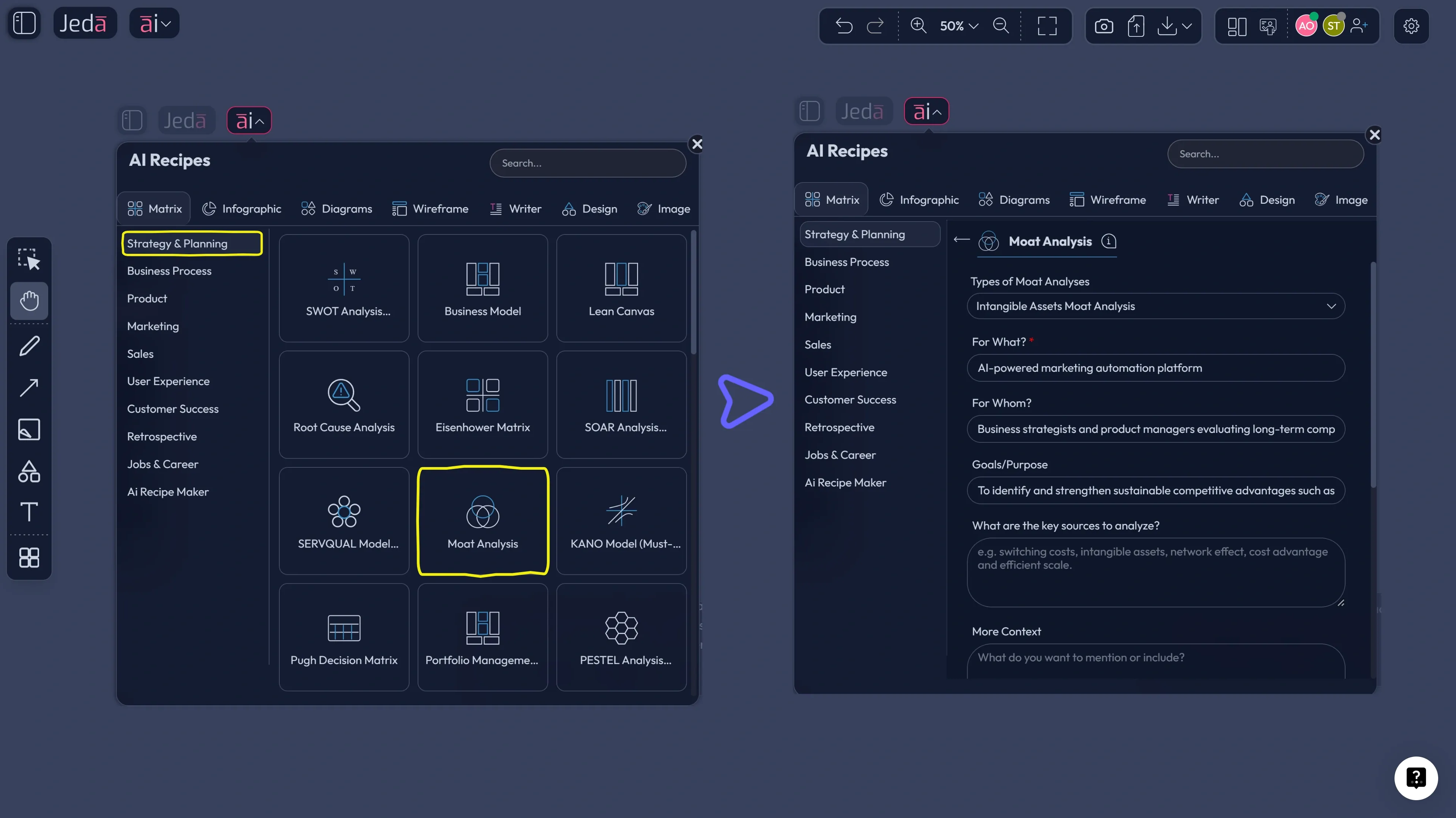
Method 2: Prompt Bar
Use this when you want speed, mixed outputs, or a less templated exploration.
Start in the Prompt Bar at the bottom of the canvas. Then choose the command that matches your outcome:
- Matrix for adoption strategy, risk analysis, or enterprise-vs-startup comparison
- Mindmap for opportunity exploration and product thinking
- Diagram for system design and orchestration logic
- Flowchart for rollout, approval, or support workflows
- Wireframe for startup MVP concepts
- Document Insight when you want a PDF or doc turned into a board
- Data Insight when you want a CSV or spreadsheet turned into strategic visuals
A few prompts that work well:
- Select the Matrix command and enter: “Build a decision matrix showing why multimodal AI agents outperform text-only copilots for enterprise operations across inputs, speed, governance, and collaboration.”
- Select the Mindmap command and enter: “Map startup opportunities created by multimodal AI agents across product, growth, support, and investor readiness.”
- Select the Diagram command and enter: “Create a system diagram for a multimodal AI agent workflow that takes documents, screenshots, spreadsheets, and meeting notes into one AI Workspace.”
- Select the Flowchart command and enter: “Design a 90-day enterprise rollout flow for multimodal AI agents with human approval gates, risk checks, and KPI review.”
Then use AI+ on the most important node or section to go deeper. That is where the second layer of value shows up.
Where Jeda.ai is unusually strong for this topic
The advantage is not just that Jeda.ai can generate content. Plenty of tools can do that now. The real advantage is that Jeda.ai can move from raw evidence to structured visual reasoning across multiple formats.
- Document Insight
Turn PDFs and docs into matrices, mind maps, or diagrams when your source material starts as research, reports, or policy files.
- Data Insight
Pull structured signals from CSV and Excel data, then convert those signals into strategic boards instead of leaving them trapped in charts alone.
- Multi-LLM Agent
Run one important prompt across multiple models, then use the aggregator to surface the strongest answer path for higher-stakes analysis.
- Vision Transform
Select a screenshot, sketch, or visual region and convert it into a different visual type with new reasoning attached.
- AI+ extension
Deepen one part of a board without regenerating the whole thing. Good for scenario planning, risks, and executive questions.
- Real-time collaboration
Because agent outputs need review. A good AI Workspace lets teams challenge and improve the output together instead of emailing screenshots around.
Common mistakes to avoid
The first mistake is treating multimodal AI agents like prettier chatbots. They are more useful when tied to a workflow, a board, or a business decision.
The second is skipping evidence. Bring the screenshot, spreadsheet, call notes, or PDF so the model reasons on something real.
Third: chasing autonomy before clarity. Start with agents that help teams see better and decide better. Full autonomy can wait.
Frequently asked questions
- What is a multimodal AI agent?
- A multimodal AI agent can take in multiple input types such as text, images, spreadsheets, audio, or documents, reason across them, and act toward a goal. It goes beyond a text chatbot by combining perception, planning, and task execution.
- Why are multimodal AI agents more useful than text-only AI?
- Because business work rarely lives in text alone. Multimodal agents can inspect screenshots, PDFs, spreadsheets, and notes together, which makes them better for real workflows like reviews, planning, compliance, and product decision-making.
- Why are enterprises investing in AI agents now?
- Enterprise adoption is accelerating because the value is becoming more operational. Recent research shows wider AI use, rising investment, and growing plans for agent integration, especially where workflows span many systems and require structured human review.
- Why are startups a strong fit for multimodal AI agents?
- Startups need leverage more than they need novelty. Multimodal agents help small teams compress research, planning, design, and communication into one workflow, which can reduce tool switching and speed up decision cycles.
- What can Jeda.ai do for multimodal AI agent workflows?
- Jeda.ai combines prompt-driven generation, 300+ AI Recipes, Document Insight, Data Insight, visual editing, and collaboration in one AI Workspace. That lets teams move from raw evidence to editable strategy boards, flows, diagrams, and wireframes.
- How do I go deeper after the first output?
- Use AI+ on a selected node, step, or matrix cell. That extends the existing visual with more examples, risks, actions, or scenario detail without forcing you to regenerate the entire board.
- Do multimodal AI agents replace employees?
- Usually no. The current pattern is augmentation, not blanket replacement. The biggest wins tend to come from speeding up analysis, reducing glue work, and making decisions more visible, while humans still approve important steps.
- What is the best first use case to test?
- Pick one workflow that already involves mixed inputs and too much manual stitching: design review, proposal analysis, market research synthesis, product planning, or support escalation. Those are the workflows where multimodal value shows up fastest.